Yoopta Editor
v4.9.3

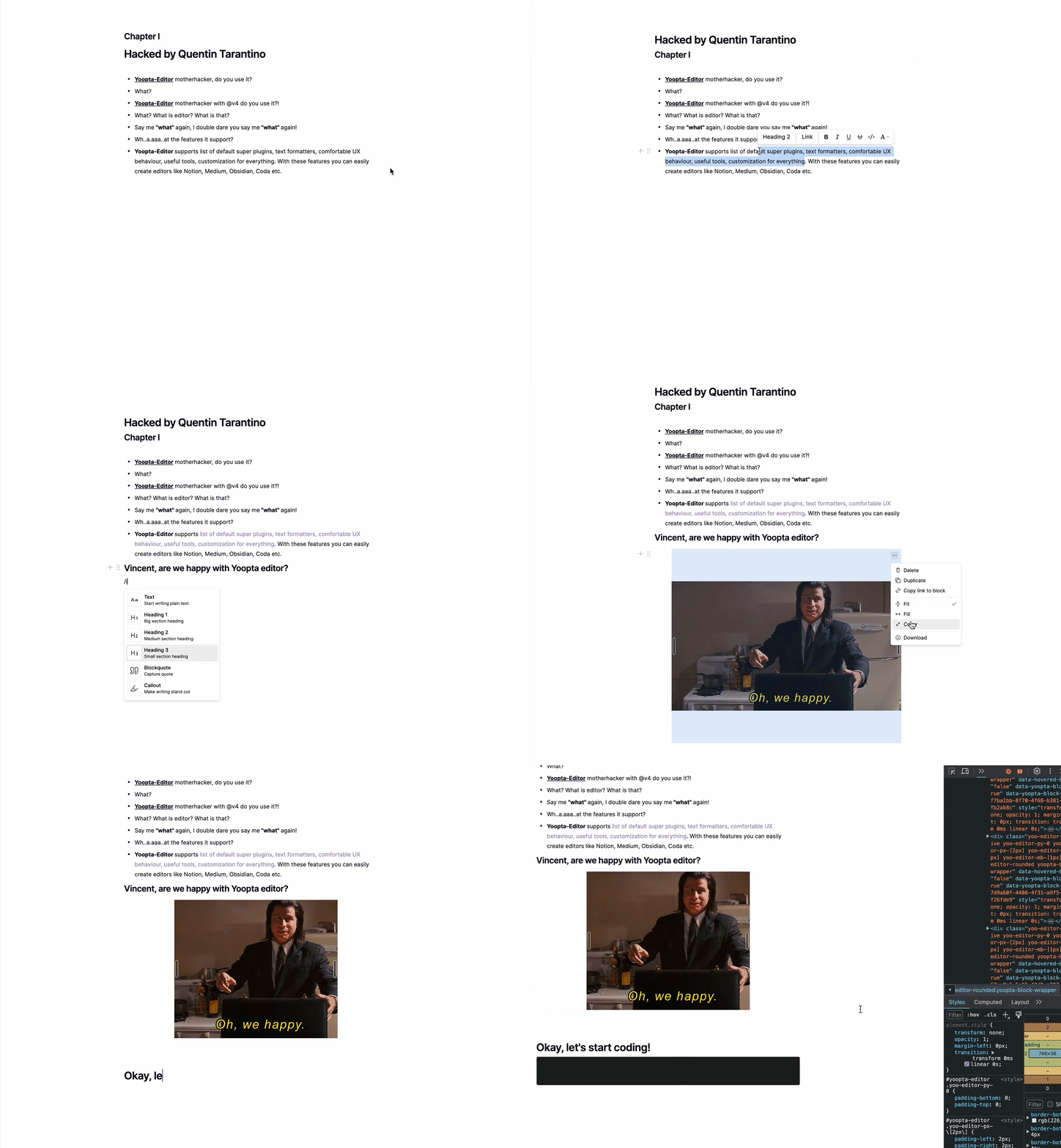
Yoopta-Enditor هو محرّر محرر مجاني ومفتوح المصدر تم تصميمه لتطبيقات React. إنها مليئة بالميزات التي تتيح لك إنشاء محرر قوي وسهل الاستخدام مثل فكرة ، حرفة ، CODA ، متوسط ، إلخ.
مع Yoopta-Editor ، يمكنك تخصيص كل شيء لتناسب بالضبط ما تحتاجه. هل تريد تعديل المظهر أو إضافة ميزات رائعة أو صياغة واجهة مستخدم مخصصة تمامًا؟ لا مشكلة. يمنحك Yoopta-Editor المرونة للقيام بذلك ، مما يجعل من السهل إنشاء الأداة المثالية لمشروعك. كل هذا قابل للتخصيص ، قابلاً للتوسعة ، وسهلة الإعداد!
جوهر
الإضافات
أدوات
علامات
أولاً ، قم بتثبيت تبعيات الأقران وحزمة Yoopta Core مع مكون إضافي على الأقل
 # # slate, slate-react, react, react-dom - peer dependencies
# # @yoopta/editor - core package
yarn add slate slate-react @yoopta/editor @yoopta/paragraph
# or
npm install slate slate-react @yoopta/editor @yoopta/paragraphاستيراد من Core Package @yoopta/ editor component والوظيفة لإنشاء مثيل المحرر
 import YooptaEditor , { createYooptaEditor } from '@yoopta/editor' ;

const plugins = [ ... ] ;

export default function Editor ( ) {
  const editor = useMemo ( ( ) => createYooptaEditor ( ) , [ ] ) ;
   const [ value , setValue ] = useState < YooptaContentValue > ( ) ;

  const onChange = ( value : YooptaContentValue , options : YooptaOnChangeOptions ) => {
    setValue ( value ) ;
  } ;

  return (
    < div >
      < YooptaEditor
        editor = { editor }
        plugins = { plugins }
        value = { value }
        onChange = { onChange }
      />
    </ div >
  ) ;
}
الدعائم المتاحة لمكونات yooptaeditor
 type YooptaEditor = {
  /* editor instance */
  editor : YooEditor ;
  /* list of plugins */
  plugins : YooptaPlugin [ ] ;
  /* list of marks */
  marks ?: YooptaMark < any > [ ] ;
  /* Value. [Default] - undefined */
  value ?: YooptaContentValue ;
  /* Change handler  */
  onChange ?: ( value : YooptaContentValue , options : YooptaOnChangeOptions ) => void ;
  /* autoFocus. [Default] - true */
  autoFocus ?: boolean ;
  /* className - class name */
  className ?: string ;
  /* These props define the area for the selection box.
  Good practice - passing parent element.
  [Default] - document */
  selectionBoxRoot ?: HTMLElement | React . MutableRefObject < HTMLElement | null > | false ;
  children ?: React . ReactNode ;
  /* Props for tools. You can get access to any passed tools using `useTools` hook from @yoopta/editor  */
  tools ?: Partial < Tools > ;
  placeholder ?: string ;
  readOnly ?: boolean ;
  /* Width. [Default] - 400px. Will be DEPRECATED, use style object  */
  width ?: number | string ;
  /* Style CSS Object. [Default] - { width: '400px', paddingBottom: '100px' } */
  style ?: number | string ;
  /* Id for your editor instance. Can be useful for multiple editors */
  id ?: number | string ;
} ;فيما يلي قائمة بالمكونات الإضافية المتاحة
 import YooptaEditor , { createYooptaEditor } from '@yoopta/editor' ;
import Paragraph from '@yoopta/paragraph' ;
import Blockquote from '@yoopta/blockquote' ;

const plugins = [ Paragraph , Blockquote ] ;

export default function Editor ( ) {
  const editor = useMemo ( ( ) => createYooptaEditor ( ) , [ ] ) ;
  const [ value , setValue ] = useState < YooptaContentValue > ( ) ;
  const onChange = ( value : YooptaContentValue , options : YooptaOnChangeOptions ) => {
    setValue ( value ) ;
  } ;

  return (
    < div >
      < YooptaEditor
        editor = { editor }
        placeholder = "Type text.."
        value = { value }
        onChange = { onChange }
        // here we go
        plugins = { plugins }
      />
    </ div >
  ) ;
}
تحقق من الرمز مع الإضافات
يوفر Yoopta-Editor أدوات مفيدة يمكن أن تساعدك عند العمل مع المحرر
فيما يلي قائمة بالأدوات المتاحة
تحقق من الرمز باستخدام الأدوات
 // IMPORT TOOLS
import LinkTool , { DefaultLinkToolRender } from '@yoopta/link-tool' ;
import ActionMenu , { DefaultActionMenuRender } from '@yoopta/action-menu-list' ;
import Toolbar , { DefaultToolbarRender } from '@yoopta/toolbar' ;

// Tools should be defined outside component
const TOOLS = {
  Toolbar : {
    tool : Toolbar ,
    render : DefaultToolbarRender ,
  } ,
  ActionMenu : {
    tool : ActionMenu ,
    render : DefaultActionMenuRender ,
  } ,
  LinkTool : {
    tool : LinkTool ,
    render : DefaultLinkToolRender ,
  } ,
} ;

export default function Editor ( ) {
  const editor = useMemo ( ( ) => createYooptaEditor ( ) , [ ] ) ;
  const [ value , setValue ] = useState < YooptaContentValue > ( ) ;
  const onChange = ( value : YooptaContentValue , options : YooptaOnChangeOptions ) => {
    setValue ( value ) ;
  } ;

  return (
    < div >
      < YooptaEditor
        editor = { editor }
        plugins = { plugins }
        placeholder = "Type text.."
        value = { value }
        onChange = { onChange }
        // here we go
        tools = { TOOLS }
      />
    </ div >
  ) ;
}العلامات هي تنسيقات نصية بسيطة
فيما يلي قائمة بالعلامات المتاحة من حزمة @Yoopta/Marks
 // IMPORT MARKS
import { Bold , Italic , CodeMark , Underline , Strike , Highlight } from '@yoopta/marks' ;

const MARKS = [ Bold , Italic , CodeMark , Underline , Strike , Highlight ] ;

export default function Editor ( ) {
  const editor = useMemo ( ( ) => createYooptaEditor ( ) , [ ] ) ;
   const [ value , setValue ] = useState < YooptaContentValue > ( ) ;

  const onChange = ( value : YooptaContentValue , options : YooptaOnChangeOptions ) => {
    setValue ( value ) ;
  } ;

  return (
    < div >
      < YooptaEditor
        editor = { editor }
        placeholder = "Type text.."
        plugins = { plugins }
        value = { value }
        onChange = { onChange }
        tools = { TOOLS }
        // here we go
        marks = { MARKS }
      />
    </ div >
  ) ;
}
تحقق من الرمز مع علامات
ابحث أدناه أمثلة مفيدة لاستخدام محرر Yoopta في مشاريعك. ستساعدك هذه الأمثلة على البدء بسرعة وتظهر لك مدى سهولة دمج المحرر وتخصيصه لاحتياجاتك.
حسنًا ، دعنا نذهب!
إذا وجدت Yoopta-Editor مفيدًا وقيمة لمشاريعك ، فأنا أرغب في إظهار دعمك من خلال إعطاء هذا النجم على Github. تقديرك يعني الكثير بالنسبة لي ويساعدني على النمو ومواصلة تحسين المحرر للمجتمع. ؟
مرحبًا يا من هناك! إذا وجدت هذا المشروع مفيدًا أو يساعدك في عملك ، ففكر في دعمه لضمان التحسينات والتطوير المستمر. تساعد تبرعاتك في الحفاظ على المشروع على قيد الحياة وتسمح لي باستثمار المزيد من الوقت والموارد في الحفاظ عليه وتعزيزه.
يمكنك دعم المشروع بواسطة:
أي مساهمة ، كبيرة أو صغيرة ، موضع تقدير كبير وتساعدني على الحفاظ على المشروع وإضافة ميزات جديدة مثيرة. شكرا لك على دعمك!
 packages/
├── core - core components of the editor
├── marks - text marks
├── plugins - editor plugin extensions
├── tools - tools packages
└── development - developer playground
إذا كنت مستعدًا لدعم Yoopta-Editor ، فإليك كيف يمكنك القيام بذلك:
يتم إصدار Yoopta-Editor بموجب ترخيص MIT. لا تتردد في استخدامه وتعديله لمشاريعك.






