Yoopta Editor
v4.9.3

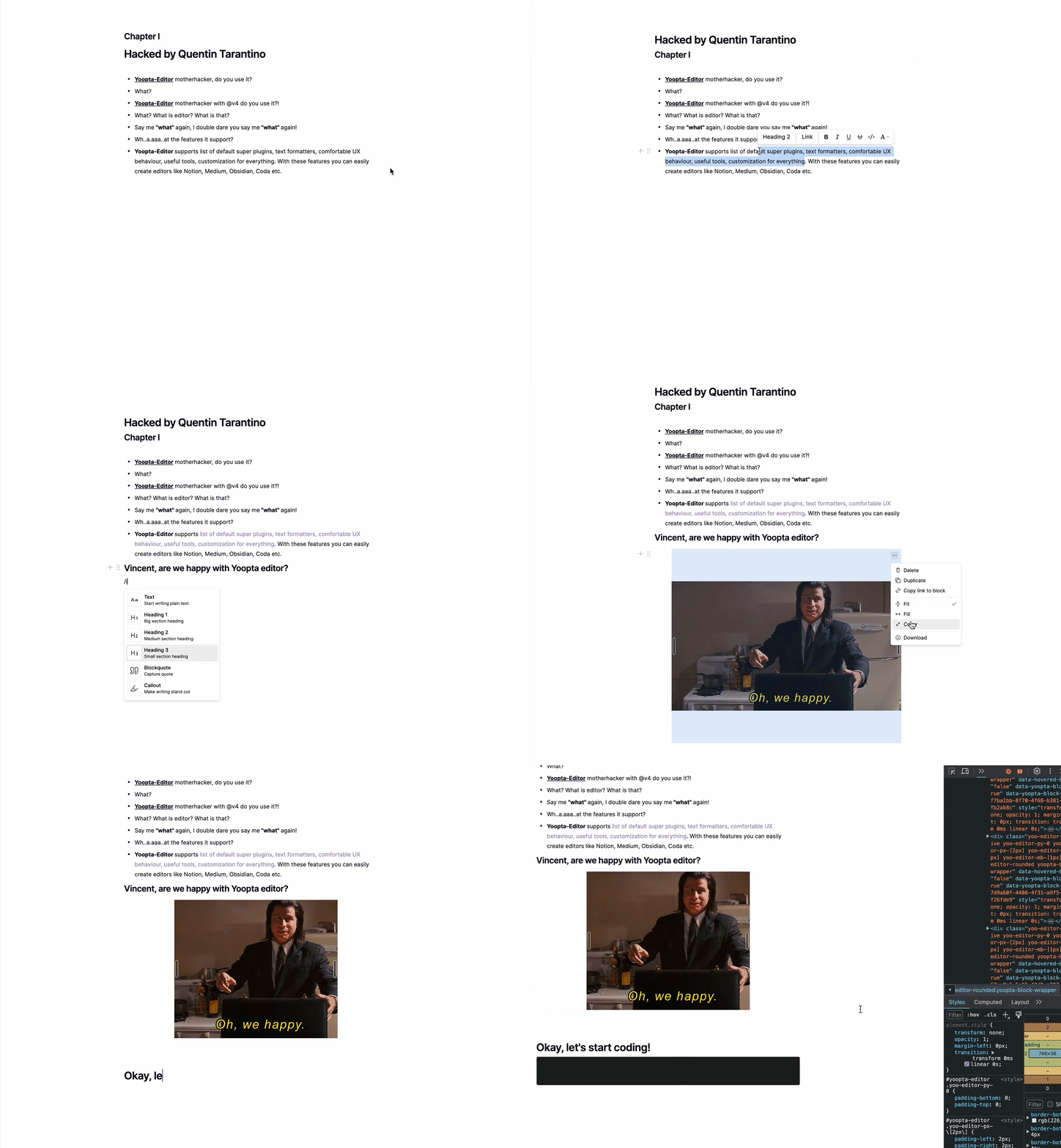
Yoopta-editor es un editor de texto rico de código abierto gratuito construido para aplicaciones React. Está lleno de características que le permiten construir un editor tan potente y fácil de usar como la noción, la artesanía, la coda, el medio, etc.
Con Yoopta-Editor, puede personalizar todo para que se ajuste exactamente a lo que necesita. ¿Desea ajustar el aspecto, agregar características geniales o crear una interfaz de usuario completamente personalizada? Ningún problema. Yoopta-editor le brinda la flexibilidad para hacerlo todo, lo que facilita la creación de la herramienta perfecta para su proyecto. ¡Todo esto es personalizable, extensible y fácil de configurar!
Centro
Complementos
Herramientas
Marcas
Primero, instale las dependencias de pares y el paquete de núcleo yoopta con al menos un complemento
 # # slate, slate-react, react, react-dom - peer dependencies
# # @yoopta/editor - core package
yarn add slate slate-react @yoopta/editor @yoopta/paragraph
# or
npm install slate slate-react @yoopta/editor @yoopta/paragraphImportar del paquete central @yoopta/ editor componente y función para crear una instancia de editor
 import YooptaEditor , { createYooptaEditor } from '@yoopta/editor' ;

const plugins = [ ... ] ;

export default function Editor ( ) {
  const editor = useMemo ( ( ) => createYooptaEditor ( ) , [ ] ) ;
   const [ value , setValue ] = useState < YooptaContentValue > ( ) ;

  const onChange = ( value : YooptaContentValue , options : YooptaOnChangeOptions ) => {
    setValue ( value ) ;
  } ;

  return (
    < div >
      < YooptaEditor
        editor = { editor }
        plugins = { plugins }
        value = { value }
        onChange = { onChange }
      />
    </ div >
  ) ;
}
Props disponibles para componentes de YooptaEditor
 type YooptaEditor = {
  /* editor instance */
  editor : YooEditor ;
  /* list of plugins */
  plugins : YooptaPlugin [ ] ;
  /* list of marks */
  marks ?: YooptaMark < any > [ ] ;
  /* Value. [Default] - undefined */
  value ?: YooptaContentValue ;
  /* Change handler  */
  onChange ?: ( value : YooptaContentValue , options : YooptaOnChangeOptions ) => void ;
  /* autoFocus. [Default] - true */
  autoFocus ?: boolean ;
  /* className - class name */
  className ?: string ;
  /* These props define the area for the selection box.
  Good practice - passing parent element.
  [Default] - document */
  selectionBoxRoot ?: HTMLElement | React . MutableRefObject < HTMLElement | null > | false ;
  children ?: React . ReactNode ;
  /* Props for tools. You can get access to any passed tools using `useTools` hook from @yoopta/editor  */
  tools ?: Partial < Tools > ;
  placeholder ?: string ;
  readOnly ?: boolean ;
  /* Width. [Default] - 400px. Will be DEPRECATED, use style object  */
  width ?: number | string ;
  /* Style CSS Object. [Default] - { width: '400px', paddingBottom: '100px' } */
  style ?: number | string ;
  /* Id for your editor instance. Can be useful for multiple editors */
  id ?: number | string ;
} ;Aquí hay una lista de complementos disponibles
 import YooptaEditor , { createYooptaEditor } from '@yoopta/editor' ;
import Paragraph from '@yoopta/paragraph' ;
import Blockquote from '@yoopta/blockquote' ;

const plugins = [ Paragraph , Blockquote ] ;

export default function Editor ( ) {
  const editor = useMemo ( ( ) => createYooptaEditor ( ) , [ ] ) ;
  const [ value , setValue ] = useState < YooptaContentValue > ( ) ;
  const onChange = ( value : YooptaContentValue , options : YooptaOnChangeOptions ) => {
    setValue ( value ) ;
  } ;

  return (
    < div >
      < YooptaEditor
        editor = { editor }
        placeholder = "Type text.."
        value = { value }
        onChange = { onChange }
        // here we go
        plugins = { plugins }
      />
    </ div >
  ) ;
}
Verifique el código con complementos
Yoopta-editor proporciona herramientas útiles que pueden ayudarlo cuando trabaja con el editor
Aquí hay una lista de herramientas disponibles
Verifique el código con herramientas
 // IMPORT TOOLS
import LinkTool , { DefaultLinkToolRender } from '@yoopta/link-tool' ;
import ActionMenu , { DefaultActionMenuRender } from '@yoopta/action-menu-list' ;
import Toolbar , { DefaultToolbarRender } from '@yoopta/toolbar' ;

// Tools should be defined outside component
const TOOLS = {
  Toolbar : {
    tool : Toolbar ,
    render : DefaultToolbarRender ,
  } ,
  ActionMenu : {
    tool : ActionMenu ,
    render : DefaultActionMenuRender ,
  } ,
  LinkTool : {
    tool : LinkTool ,
    render : DefaultLinkToolRender ,
  } ,
} ;

export default function Editor ( ) {
  const editor = useMemo ( ( ) => createYooptaEditor ( ) , [ ] ) ;
  const [ value , setValue ] = useState < YooptaContentValue > ( ) ;
  const onChange = ( value : YooptaContentValue , options : YooptaOnChangeOptions ) => {
    setValue ( value ) ;
  } ;

  return (
    < div >
      < YooptaEditor
        editor = { editor }
        plugins = { plugins }
        placeholder = "Type text.."
        value = { value }
        onChange = { onChange }
        // here we go
        tools = { TOOLS }
      />
    </ div >
  ) ;
}Las marcas son formatos de texto simples
Aquí hay una lista de marcas disponibles del paquete @yoopta/marks
 // IMPORT MARKS
import { Bold , Italic , CodeMark , Underline , Strike , Highlight } from '@yoopta/marks' ;

const MARKS = [ Bold , Italic , CodeMark , Underline , Strike , Highlight ] ;

export default function Editor ( ) {
  const editor = useMemo ( ( ) => createYooptaEditor ( ) , [ ] ) ;
   const [ value , setValue ] = useState < YooptaContentValue > ( ) ;

  const onChange = ( value : YooptaContentValue , options : YooptaOnChangeOptions ) => {
    setValue ( value ) ;
  } ;

  return (
    < div >
      < YooptaEditor
        editor = { editor }
        placeholder = "Type text.."
        plugins = { plugins }
        value = { value }
        onChange = { onChange }
        tools = { TOOLS }
        // here we go
        marks = { MARKS }
      />
    </ div >
  ) ;
}
Verifique el código con marcas
Encuentre a continuación ejemplos útiles de utilizar el editor yoopta-editor en sus proyectos. Estos ejemplos lo ayudarán a comenzar rápidamente y le mostrarán lo fácil que es integrar y personalizar el editor a sus necesidades.
¡Está bien, vamos!
Si encuentra que Yoopta-Editor es útil y valioso para sus proyectos, le pido que muestre su apoyo dando a este repositorio de estrella en Github. Su agradecimiento significa mucho para mí y me ayuda a crecer y continuar mejorando el editor de la comunidad. ?
¡Hola! Si encuentra útil este proyecto o lo ayuda en su trabajo, considere apoyarlo para garantizar mejoras y desarrollo continuos. Sus donaciones ayudan a mantener vivo el proyecto y me permiten invertir más tiempo y recursos para mantenerlo y mejorarlo.
Puede apoyar el proyecto por:
Cualquier contribución, grande o pequeña, es muy apreciada y me ayuda a mantener el proyecto y agregar nuevas características emocionantes. ¡Gracias por su apoyo!
 packages/
├── core - core components of the editor
├── marks - text marks
├── plugins - editor plugin extensions
├── tools - tools packages
└── development - developer playground
Si está listo para apoyar el editor de Yoopta-, así es como puede hacerlo:
Yoopta-editor se libera bajo la licencia MIT. Siéntase libre de usarlo y modificarlo para sus proyectos.






