RGFW
RG

그래픽 라이브러리 또는 간단한 그래픽 프로그램을 만들기위한 크로스 플랫폼 경량 단일 헤더 매우 간단한 사용하기 쉬운 창 추적 라이브러리. 순수한 C99로 작성되었습니다.
RGFW는 그래픽 라이브러리 또는 간단한 그래픽 프로그램을 작성하기위한 무료 멀티 플랫폼 단일 헤더로 매우 간단한 사용하기 쉬운 창 추적 프레임 워크입니다. GLFW의 매우 작고 유연한 대체 라이브러리로 사용됩니다.
Window 백엔드는 XLIB (UNIX), Cocoas (MACOS), Webasm (EMScripten) 및 Winapi (Windows XP , 10 및 11 및 Reactos에서 테스트)를 지원합니다.
Windows 95 & 98은 RGFW로 테스트되었지만 결과는 iffy입니다.
Wayland : Wayland Add (RGFW_Wayland = 1)를 컴파일합니다. Wayland 지원은 매우 실험적이고 깨졌습니다.
그래픽 백엔드는 OpenGL (EGL, 소프트웨어, OSMESA, GLES), Vulkan, DirectX, Metal 및 Software 렌더링 버퍼를 지원합니다.
RGFW는 RSGL의 백엔드로 설계되었지만 독립형 또는 선택적인 대안 백엔드로 사용하는 Raylib와 같은 다른 라이브러리에 사용할 수 있습니다.
RGFW는 다중 파라 디그입니다.
기본적으로 RGFW는 SDL과 유사한 유연한 이벤트 시스템을 사용하지만 해당 방법을 선호하는 경우 콜백을 사용할 수 있습니다.
이 도서관
이 라이브러리는 그렇지 않습니다
 #define RGFW_IMPLEMENTATION
#include "RGFW.h"

void keyfunc ( RGFW_window * win , u32 keycode , char keyName [ 16 ], u8 lockState , u8 pressed ) {
    if ( keycode == RGFW_Escape && pressed ) {
        RGFW_window_setShouldClose ( win );
    }
}

int main () {
    RGFW_window * win = RGFW_createWindow ( "a window" , RGFW_RECT ( 0 , 0 , 800 , 600 ), ( u16 )( RGFW_CENTER | RGFW_NO_RESIZE ));

    RGFW_setKeyCallback ( keyfunc ); // you can use callbacks like this if you want

    while ( RGFW_window_shouldClose ( win ) == RGFW_FALSE ) {
        while ( RGFW_window_checkEvent ( win )) {  // or RGFW_window_checkEvents(); if you only want callbacks
            // you can either check the current event yourself
            if ( win -> event . type == RGFW_mouseButtonPressed && win -> event . button == RGFW_mouseLeft ) {
                printf ( "You clicked at x: %d, y: %dn" , win -> event . point . x , win -> event . point . y );
            }

            // or use the existing functions
            if ( RGFW_isMousePressed ( win , RGFW_mouseRight )) {
                printf ( "The right mouse button was clicked at x: %d, y: %dn" , win -> event . point . x , win -> event . point . y );
            }
        }

        glClearColor ( 0.1f , 0.1f , 0.1f , 1.0f );
        glClear ( GL_COLOR_BUFFER_BIT );

        // You can use modern OpenGL techniques, but this method is more straightforward for drawing just one triangle.
        glBegin ( GL_TRIANGLES );
        glColor3f ( 1 , 0 , 0 ); glVertex2f ( -0.6 , -0.75 );
        glColor3f ( 0 , 1 , 0 ); glVertex2f ( 0.6 , -0.75 );
        glColor3f ( 0 , 0 , 1 ); glVertex2f ( 0 , 0.75 );
        glEnd ();

        RGFW_window_swapBuffers ( win );
    }

    RGFW_window_close ( win );
    return 0 ;
}
linux : gcc main.c -lX11 -lGL -lXrandr -lm
windows : gcc main.c -lopengl32 -lshell32 -lgdi32 -lwinmm -lm
macos : gcc main.c -framework Foundation -framework AppKit -framework OpenGL -framework CoreVideo -lm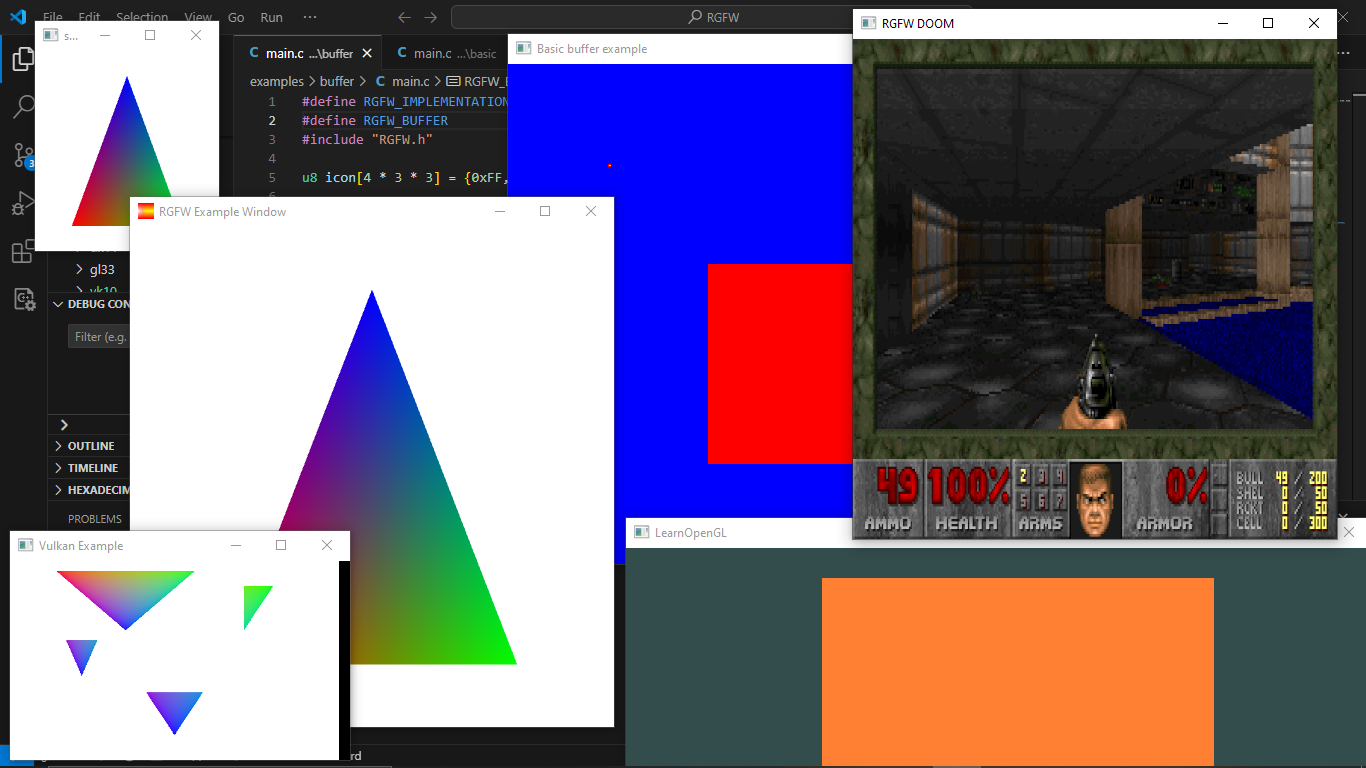
여기에서 더 많은 예제를 찾거나 emscripten을 사용하여 브라우저에서 실행할 수 있습니다.
RGFW와 함께 사용할 수있는 GUI 라이브러리 목록은 RGFW 위키에서 찾을 수 있습니다.
많은 사내 문서화가 있지만 https://colleagueriley.github.io/rgfw/docs/index.html에서 더 많은 문서를 찾을 수 있습니다. 문서를 직접 구축하려면 Doxygen 파일도 첨부되어 있습니다.
바인딩 목록은 여기 RGFW 위키에서 찾을 수 있습니다.
RGFW를 사용하는 프로젝트 목록은 RGFW 위키에서 찾을 수 있습니다.
RGFW의 개발을 지원하려면 여기에서 할 수있는 일에 대한 RGFW 위키 페이지가 있습니다.
RGFW와 GLFW의 비교는 위키에서 찾을 수 있습니다.
RGFW는 Zlib/libpng 라이센스를 사용합니다. 이는이 소프트웨어를 작성하지 않는 한 RGFW를 자유롭게 사용할 수 있고, 변경된 버전을 표시하고, 라이센스를 헤더에 포함시켜 보관할 수 있음을 의미합니다.
 Permission is granted to anyone to use this software for any purpose,
including commercial applications, and to alter it and redistribute it
freely, subject to the following restrictions:

1. The origin of this software must not be misrepresented; you must not
   claim that you wrote the original software. If you use this software
   in a product, an acknowledgment in the product documentation would be
   appreciated but is not required.
2. Altered source versions must be plainly marked as such, and must not be
   misrepresented as being the original software.
3. This notice may not be removed or altered from any source distribution.





