docsify this
v1.9.16: Merge pull request #161 from hibbitts-design

Aplikasi web open-source ini, dibangun dengan dokumentasi magis Generator Situs Docsify, memungkinkan Anda mempublikasikan file penurunan harga secara online sebagai halaman web tanpa menyiapkan situs web Anda sendiri.
Lihat apa yang dapat dilakukan DocSify-ini dengan melihat file readme ini sebagai halaman web dengan bilah samping opsional yang mencakup heading hingga 4 level!
Gambar 1. DOCSIFY-This.net Web Halaman Pembangun.
Sudahkah Anda mencoba Docsify-ini? Bagikan umpan balik Anda tentang DocSify-ini
DocSify-Ini menyediakan cara mudah untuk menampilkan dan berbagi konten penurunan harga dalam berbagai konteks, tanpa pengaturan situs web atau proses pembuatan yang diperlukan. Dengan hosting file penurunan harga Anda di GitHub atau Codeberg, Anda juga dapat memanfaatkan kontrol versi (kemampuan untuk melacak dan membalikkan perubahan) dan mengaktifkan kolaborasi.
Dengan Docsify-Ini Anda bisa:
Docsify-Ini adalah situs starter publishing terbuka Docsify Open Publishing yang dikonfigurasi untuk membuat file-file markdown jarak jauh melalui parameter URL dalam format berikut:
https://docsify-this.net?basePath=URLpath&homepage=filename.md
Parameter Basepath Docsify adalah jalur URL yang berisi file markdown sumber mentah yang akan diterjemahkan. Jika file dinamai readme.md default yang diharapkan maka tidak ada parameter lain yang diperlukan, jika tidak, parameter homepage docsify juga harus disertakan disetel ke nama file yang akan diterjemahkan. Contoh docsify-URL ini adalah: https://docsify-this.net/?basepath=https://raw.githubusercontent.com/hibbitts-design/docsify-this-one-page-article/main&homepage=home.md
DocSify-Ini dapat membuat file dari mana saja bahwa konten file markdown dapat dilihat dalam browser web, termasuk:
Untuk secara langsung membuat file yang disimpan dalam repositori GitHub publik saat tidak menggunakan pembuat halaman web di atas, Anda perlu menggunakan URL sumber mentah dari file itu (yaitu RAW.GithUBUSERCONTENT.com) dengan mengetuk tombol RAW saat melihat file. Dimungkinkan juga untuk membuat file yang disimpan dalam repositori GitHub pribadi dengan mengaktifkan halaman GitHub di dalam repositori itu dan kemudian menggunakan URL halaman GitHub dari file itu (yaitu username.github.io).
Penampilan file -file markdown yang diberikan dapat disesuaikan dengan parameter URL opsional dan sekumpulan kecil kelas CSS yang tersedia di dalam file markdown sumber. Selain mendukung diagram standar, embed.ly, h5p, lateks dan putri duyung disertakan. Secara opsional, anotasi halaman dengan hipote.is dapat diaktifkan.
Mencari pengantar keseluruhan untuk penerbitan dengan DocSify-ini? Lihat Markdown Publishing dengan DocSify-ini.
Saya terpesona hanya dengan fakta bahwa Anda meletakkan URL (file markdown) ke dalam DocSify-ini dan kemudian Anda mendapatkan URL kembali untuk halaman web ... selesai! Ambil URL dan pergi. Itu sangat mulus.
-J. Groom, Reclaim Today Episode 39 (Co-Founder, Reclaim Hosting)
Saya telah menggunakan DocSify-ini untuk kursus produksi penerbitan lulusan saya, sebagian untuk mengeksplorasi model baru dalam penerbitan Markdown, tetapi sebagian juga untuk menjinakkan kanvas, yang menurut saya canggung dan rumit. Menyimpan semua catatan kursus saya sebagai file teks biasa dan menyebarkannya melalui GitHub dan Docsify-ini mudah dan membuat pengembangan kursus saya menjadi mudah. Plus, saya menyimpan semua bahan saya secara lokal, dan dapat menggunakannya kembali tanpa bergantung pada kanvas.
- J. Maxwell (Direktur & Associate Professor dalam Program Penerbitan di Simon Fraser University)
Alat terbaik yang saya temukan selama bertahun -tahun - ini adalah salah satu kreasi yang dilakukan dengan benar, sampai ke inti.
- D. Malawey (Koordinator Lab Multidisiplin, Universitas A&M Texas)
Docsify-Ini telah secara signifikan meningkatkan tema WordPress saya dengan dapat menanamkan secara mulus ke antarmuka dokumentasi yang sama yang saya gunakan di repositori GitHub. Ini pada gilirannya telah membuat saya menulis dokumen yang lebih baik! Saya hampir tidak menggaruk permukaan apa yang dapat dilakukan oleh Docsify-ini sebagai alat penerbitan web yang mudah digunakan.
- A. Levine alias Cogdog (Teknologi Pendidikan Independen)
Docsify-ini telah diakui sebagai finalis dalam kategori infrastruktur terbuka untuk 2024 Open Education Awards for Excellence-terima kasih untuk semua Docsify.js.org mengelola dan kontributor, dan kepada sesama penerbit terbuka, pendidik, dan pencipta yang berbagi konten terbuka mereka dengan seluruh dunia melalui Docsify-This.
Penampilan visual dari file markdown online yang ditampilkan sebagai halaman web oleh DocSify-ini dapat diubah dalam dua cara:
Misalnya, untuk menampilkan file markdown yang terletak di https://raw.githubusercontent.com/hibbitts-design/docsify-this-one-page-article/main/home.md dengan sidebar docsify termasuk judul hingga 3 level, docsify- URL ini adalah:
https://docsify-this.net/?basePath=https://raw.githubusercontent.com/hibbitts-design/docsify-this-one-page-article/main&homepage=home.md&sidebar=true&maxLevel=3Dan begitulah docsify-ini.net menampilkan URL yang sama:
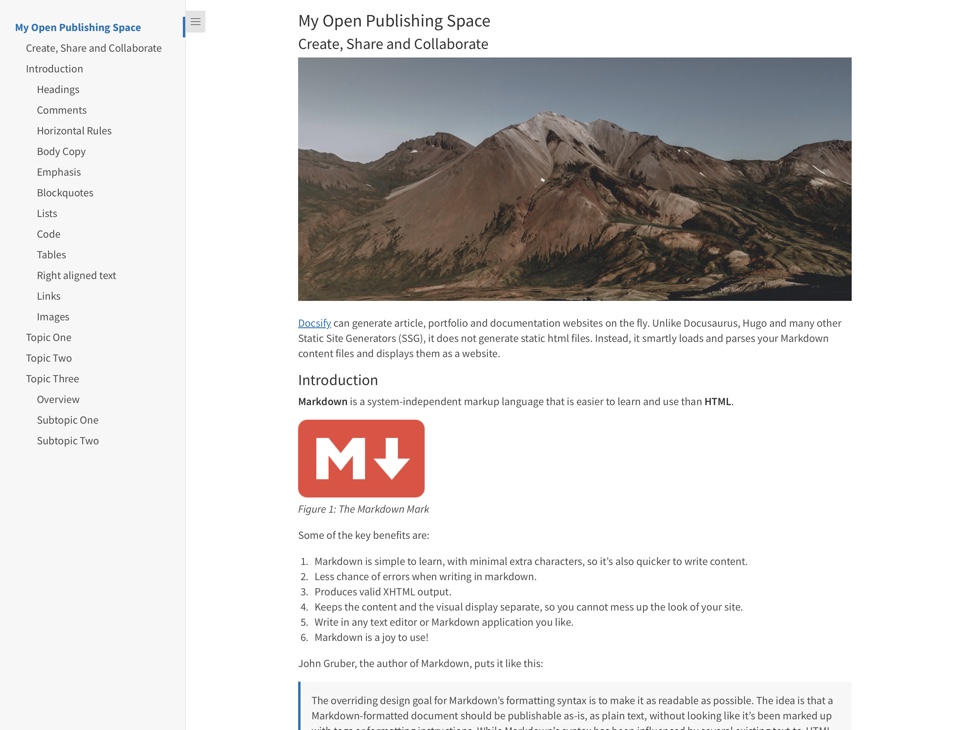 Halaman web yang ditampilkan oleh DocSify-ini.net, yang menunjukkan file markdown dengan bilah sisi yang mencakup heading hingga 3 level, sebagaimana ditentukan oleh URL Docsify-ini.
Pelajari lebih lanjut tentang masing-masing parameter URL DocSify-ini di bawah ini, dan temukan apa yang mungkin terjadi ketika menggabungkan parameter URL dan file penurunan harga online dengan satu set templat penurunan markdown yang siap digunakan-ini.
Parameter URL dasar (termasuk dalam pembangun halaman web standar)
Tetapkan judul khusus pada tab Browser untuk halaman web Anda dengan parameter browser-tab-browser opsional, misalnya:
https://docsify-this.net?basepath=https://raw.githubusercontent.com/paulhibbitts/demo-grav-open-matter-course-hub/master/pages/04.resources&merkage Jadi "halaman saya" akan menjadi "%20 halaman saya".
Tampilkan tautan "Edit halaman ini" (lokasi default adalah bagian bawah halaman) dengan parameter Edit-Link Opsional, misalnya:
https://docsify-this.net?basepath=https://raw.githubusercontent.com/hibbitts-design/docsify-open-course-starte r-kit/main & edit-link = https: //github.com/hibbitts-design/docsify-open-publishing-starter-kit/blob/main/readme.md
Ubah teks default untuk tautan "Edit Halaman ini" dengan parameter Edit-Link-Text Opsional, misalnya:
https://docsify-this.net?basepath=https://raw.githubusercontent.com/hibbitts-design/docsify-open-course-starter-kit/main&edit-li nk = https: //github.com/hibbitts-design/docsify-open-publishing-starter-kit/blob/main/readme.md&edit-link-text=View%20as%20markdown Harap dicatat untuk menggunakan teks dengan spasi yang harus dikodekan, jadi "Lihat sebagai Markdown" akan menjadi "Lihat%20As%20Markdown".
Ubah lokasi tautan "Edit Halaman ini" dari bagian bawah halaman menjadi bagian atas halaman dengan parameter edit-link-top opsional, misalnya:
https://docsify-this.net?basepath=https://raw.githubusercontent.com/hibbitts-design/docsify-open-course-starter-kit/main&toc = true & edit-link = https: //github.com/hibbitts-design/docsify-open-publishing-starter-kit/blob/main/readme.md&edit-link-top=true
Tetapkan font khusus untuk halaman web Anda dengan parameter font-family opsional, misalnya:
https://docsify-this.net?basepath=https://raw.githubusercontent.com/hibbitts-design/docsify-open-course-starter-kit/main/docs&homepage=resources.md&font-family=el=eling=heling=helvetsan.arial. Parameter ini bisa sangat berharga ketika mencoba lebih cocok dengan presentasi visual konten tertanam dengan platform tujuan Anda. Harap dicatat untuk menggunakan font dengan ruang atas nama mereka, mereka harus dikodekan, jadi "Courier New" akan menjadi "kurir%20NEW".
Tetapkan ukuran font khusus untuk halaman web Anda dengan parameter ukuran font opsional, misalnya:
https://docsify-this.net?basepath=https://raw.githubusercontent.com/hibbitts-design/docsify-open-course-starter-kit/main/docs&homepage=resources.md&font-size=1. Parameter ini bisa sangat berharga ketika mencoba lebih cocok dengan presentasi visual konten tertanam dengan platform tujuan Anda. Harap perhatikan ukuran font diatur dalam unit REM.
Tetapkan berat font header khusus (default adalah 400 - reguler) untuk halaman web Anda dengan parameter header -weight opsional, misalnya:
https://docsify-this.net?basepath=https://raw.githubusercontent.com/hibbitts-design/docsify-open-course-starter-kit/main/docs&homepage=resources.md&header-neight=600.
Sembunyikan Kredit yang biasanya ditampilkan di bagian bawah setiap halaman Docsify-ini dengan parameter hide-credit opsional, misalnya:
https://docsify-this.net?basepath=https://raw.githubusercontent.com/hibbitts-design/docsify-open-course-starter-kit/main/docs&homepage=resources.md&hide-credits=true.
Aktifkan anotasi halaman dengan hipote.is dengan parameter hipotesis opsional, misalnya:
https://docsify-this.net?basepath=https://raw.githubusercontent.com/hibbitts-design/docsify-open-course-starter-kit/main/docs&homepage=resources.md&hypothesis=true.
Tetapkan ketinggian baris khusus untuk halaman web Anda dengan parameter height garis opsional, misalnya:
https://docsify-this.net?basepath=https://raw.githubusercontent.com/hibbitts-design/docsify-open-course-starter-kit/main/docs&homepage=resources.md&line-height=1.5.5.
Tetapkan warna khusus untuk semua tautan, didefinisikan menggunakan format hexadecimal standar tanpa simbol '#' dengan parameter warna tautan opsional, misalnya:
https://docsify-this.net?basepath=https://raw.githubusercontent.com/hibbitts-design/docsify-open-course-starter-kit/main/docs&homepage=resources.md&link-color=cc0000.
Atur level header maksimum dari sidebar Docsify dengan parameter MaxLevel Docsify opsional, misalnya:
https://docsify-this.net?basePath=https://raw.githubusercontent.com/hibbitts-design/docsify-open-publishing-starter-kit/main/docs&homepage=introduction.mdside==true=Max&homepage=introduction.mdsideBar==true=Max&homepage=introduction.mdside==true=Max &
Tampilkan sidebar Docsify dengan parameter sidebar opsional, misalnya:
https://docsify-this.net?basepath=https://raw.githubusercontent.com/hibbitts-design/docsify-open-course-starter-kit/main&sideebar=true
Tampilkan Tabel Isi Halaman dengan parameter TOC opsional, misalnya:
https://docsify-this.net?basepath=https://raw.githubusercontent.com/hibbitts-design/docsify-open-publishing-starter-kit/main/docs&homepage=introduction.md&toc=true
Atur level heading halaman (yaitu H1, H2, dll.) Untuk dimasukkan dalam Daftar Isi Halaman dengan parameter opsional TOC-headings , misalnya:
https://docsify-this.net?basePath=https://raw.githubusercontent.com/hibbitts-design/docsify-open-publishing-starter-kit/main/docs&homepage=introduction.md&toc=truese.
Gunakan daftar konten halaman yang kurang lebar dengan parameter TOC-narrow opsional, misalnya:
https://docsify-this.net?basePath=https://raw.githubusercontent.com/hibbitts-design/docsify-open-publishing-starter-kit/main/docs&homepage=introduction.md&toc-narrue=true. Parameter ini bisa sangat berharga ketika menanamkan konten di mana area layar yang lebih kecil kemungkinan.
Aktifkan gambar zoom (mengetuk gambar halaman untuk memperbesar) dengan parameter zoom-images opsional Docsify, misalnya:
https://docsify-this.net?basepath=https://raw.githubusercontent.com/paulhibbitts/docsify-this-markdown-content-demo/main&zoom-images=true. Untuk mengecualikan gambar, gunakan  .
Parameter URL tambahan berikut tersedia untuk digunakan di URL DocSify-ini, dan termasuk dalam pembangun halaman web tingkat lanjut kecuali ditunjukkan sebaliknya.
Parameter URL Tambahan (termasuk dalam pembangun halaman web tingkat lanjut)
Tampilkan Docsify Custom Coverpage dengan parameter CoverPage opsional, misalnya:
https://docsify-this.net?basePath=https://raw.githubusercontent.com/hibbitts-design/docsify-open-publishing-starter-kit/main/docs&homepage=home.md&coverpage=_coverpage.md
Atur warna khusus untuk coverpage dengan parameter warna-warna opsional, misalnya:
https://docsify-this.net?basepath=https://raw.githubusercontent.com/hibbitts-design/docsify-open-publishing-starter-kit/main/docs&homepage=home.md&coverpage.main
Atur warna khusus untuk Mode CoverPage dalam gelap dengan parameter Mode CoverPage-warna-gelap opsional, misalnya:
https://docsify-this.net?basepath=https://raw.githubusercontent.com/hibbitts-design/docsify-open-publishing-starter-kit/main/docs&homepage=ome .MD & Dark-Mode = True & Link-Color = CC0000 & Link-Color-Dark-Mode = FF9E9E & CoverPage = _coverpage.md & Coverpage-Color = CC0000 & Coverpage-Color-Dark-Mode = 4d0000
Secara otomatis beralih tema terang/gelap berdasarkan preferensi tingkat OS sistem, misalnya:
https://docsify-this.net?basepath=https://raw.githubusercontent.com/hibbitts-design/docsify-open-publishing-starter-kit/main/docs&homepage=introduction.mdar &dark-mode=true
Ubah emoji default untuk tautan "Edit halaman ini" dengan parameter edit-link-emoji opsional (tidak termasuk dalam pembangun halaman web tingkat lanjut), misalnya:
https://docsify-this.net?basepath=https://raw.githubusercontent.com/hibbitts-design/docsify-open-course-starter-kit/main&edit-link=https://git hub.com/hibbitts-design/docsify-open-publishing-starter-kit/blob/main/readme.md&edit-link-text=View%20on%20github&edit-link-emoji=:file_folder:
Aktifkan pemuatan malas gambar oleh browser dengan parameter malas-muatan opsional (tidak termasuk dalam pembangun halaman web canggih), misalnya:
https://docsify-this.net?basePath=https://raw.githubusercontent.com/hibbitts-design/docsify-open-publishing-starter-kit-main/docs&homePage.kintroduction. Contoh oleh sidebar docsify dll.
Atur warna khusus untuk semua tautan dalam mode gelap, didefinisikan menggunakan format hexadecimal standar tanpa simbol '#' dengan parameter mode-warna-gelap opsional, misalnya:
https://docsify-this.net?basepath=https://raw.githubusercontent.com/hibbitts-design/docsify-open-course-starter-kit/main.docs&homepage=Resources.md&link-kit=cc00c00c00-ModePage=Resources.md&link-color=cc00c00c0000
Tetapkan warna kustom hover untuk semua tautan, didefinisikan menggunakan format hexadecimal standar tanpa simbol '#' dengan parameter link-hover-hover opsional, misalnya:
https://docsify-this.net?basepath=https://raw.githubusercontent.com/hibbitts-design/docsify-open-course-starter-kit/main/docs&homepage=resources.md&link-hover=cc0000.
Tetapkan warna hover khusus untuk semua tautan dalam mode gelap, didefinisikan menggunakan format hexadecimal standar tanpa simbol '#' dengan parameter link-hover-hover-color-dark-mode , misalnya:
https://docsify-this.net?basepath=https://raw.githubusercontent.com/hibbitts-design/docsify-open-course-sta RTER-KIT/Main/Docs & Homepage = Resources.md & Link-Color = CC0000 & Dark-Mode = True & Link-Hover-Color-Dark-Mode = FF9E9E.
Tetapkan dekorasi teks khusus untuk semua tautan, dengan parameter dekorasi tautan-teks opsional, misalnya:
https://docsify-this.net?basepath=https://raw.githubusercontent.com/hibbitts-design/docsify-open-course-starter-kit/main/docs&homepage=resources.md &-text-text=none=none
Tetapkan dekorasi teks kustom hover untuk semua tautan, dengan parameter link-text-decoration-hover opsional, misalnya:
https://docsify-this.net?basePath=https://raw.githubusercontent.com/hibbitts-design/docsify-open-course-starter-kit/main/docs&homepage=resources.md &-text-text-decoration=erline
Anda dapat mengatur favicon khusus dari file gambar yang diteruskan dari parameter LoadFavicon opsional, misalnya:
https://docsify-this.net?basepath=https://raw.githubusercontent.com/paulhibbitts/docsify-this-markdown-content-demo/main&loadfavicon=open-access.png
Muat footer DocSify dari file markdown di direktori saat ini dilewatkan dengan parameter Docsify LoadFooter opsional, misalnya: https://docsify-this.net?basepath=https://raw.githubusercontent.com/hibbitts-design/docsify-open-publishing-starter-kit/main/docs&homepage=introduction.md&loadfooter=_footer.footer.footer.footer.footer.footer.footer.footer.footer.footer.footer.footer.footer.footer.footer.footer.footer.footer.footer.footer.footer.footer.footer.footer.footer.footer.footer.footer.footer.footer.footer.footer.footer.footer.footer.footer.footer.footer.footer.footer.md
Muat Docsify Custom Navbar dari file Markdown yang dilewati dengan parameter Docsify LoadNavBar Opsional, misalnya:
https://docsify-this.net?basepath=https://raw.githubusercontent.com/hibbitts-design/docsify-open-publishing-starter-kit/main/docs&homepage=introduction.md&loadNavbar==.nav.nav.nav.nav.
Muat sidebar kustom DocSify dari file Markdown yang dilewati dengan parameter Docsify Opsional Loadside , misalnya:
https://docsify-this.net/?basepath=https://raw.githubusercontent.com/paulhibbitts/docsify-this-cmpt-363-222-site/main&homepage=home.md&sideBar==trueSideSideSide
Tampilkan gambar logo untuk situs web di sidebar kustom Docsify (IE file 'logo.png) dengan parameter logo opsional, misalnya: misalnya:
https://docsify-this.net/?basepath=https://raw.githubusercontent.com/hibbitts-design/docsify-this-multiple-page-course- Situs/Utama & Homepage = home.md & sidebar = true & loadsideBar = _sideBar.md & loadNavbar = _navbar.md & name = CPT-363 & logo =/gambar/logo.png Jalur folder penuh dan nama file harus disediakan. Nama situs web juga harus disediakan, dan akan digunakan sebagai teks alt untuk logo.
Gabungkan item Navbar ke bagian atas bilah samping pada layar yang lebih kecil dengan parameter Docsify Mergenavbar opsional, misalnya: https://docsify-this.net/?basepath=https://raw.githubusercontent.com/hibbitts-design/docsify-this-multiple-page-cours E-Site/Main & Homepage = home.md & sidebar = true & loadsideBar = _sideBar.md & loadnavbar = _navbar.md & mergenavbar = true & name = CPT-363
Tampilkan nama untuk situs web di sidebar custom DocSify (yaitu file '_sideBar.md) dengan parameter nama opsional Docsify, misalnya:
https://docsify-this.net/?basepath=https://raw.githubusercontent.com/hibbitts-design/docsify-this-multiple-page-co Urse-Site/Main & Homepage = home.md & sidebar = true & loadsideBar = _sideBar.md & loadnavbar = _navbar.md & Search = true & name = CPT-363 Ketika parameter ini disediakan, ia akan digunakan secara otomatis sebagai judul tab Browser juga.
Tetapkan judul halaman khusus di bagian atas halaman web Anda dengan parameter judul halaman opsional, misalnya:
https://docsify-this.net?basePath=https://raw.githubusercontent.com/paulhibbitts/demo-grav-open-matter-course-hub/master/pages/04.resources&nomepage mereka. Halaman "akan menjadi"%20 halaman "saya".
Tampilkan tombol pagination di area konten halaman (Docsify Custom Sidebar yang Diperlukan) dengan parameter pagination opsional, misalnya:
https://docsify-this.net?basepath=https://raw.githubusercontent.com/hibbitts-design/docsify-this-multiple-page-cour SE-Site/Main & Homepage = home.md & sidebar = true & loadsideBar = _sideBar.md & loadnavbar = _navbar.md & Search = true & pagination = true
Aktifkan plugin pencarian DocSify (yang saat ini mencakup kecocokan untuk teks dan markup) di beberapa situs halaman termasuk bilah samping khusus dengan parameter Docsify Opsional SearchBox , misalnya:
https://docsify-this.net?basepath=https://raw.githubusercontent.com/hibbitts-design/docsify-this-multiple-pag e-course-site/main & homepage = home.md & sidebar = true & loadsideBar = _sideBar.md & loadnavbar = _navbar.md & Searchbox = true
Atur level header Tabel Otomatis Maksimum di Sidebar Kustom Docsify (IE File '_SideBar.md) dengan parameter SubmaxLevel Docsify opsional, misalnya: misalnya:
https://docsify-this.net/?basePath=https://raw.githubusercontent.com/paulhibbitts/docsify-this-cmpt-363-222-site/main&homepage=home.md&sideBarebar=trueSsidsideSideSideSideSideSide
Gunakan versi SVG dari ikon mengagumkan font alih-alih font web dengan parameter SVG-Icons opsional (tidak termasuk dalam pembangun halaman web canggih), misalnya:
https://v2.preview.docsify-this.net/?basepath=https://raw.githubusercontent.com/hibbitts-design/docsify-this-lms-content-pages/main&homepage=schedule.md&svg-icons=trues=True
Embed konten di kanvas
Contoh kode iframe, termasuk parameter URL untuk mencocokkan DocSify-ini dengan konten ini dengan kanvas:
< p > < iframe style =" overflow: hidden; border: 0px #ffffff none; background: #ffffff; " src =" https://docsify-this.net?basePath=https://raw.githubusercontent.com/paulhibbitts/cmpt-363-222-pages/main&homepage=home.md&font-family=Lato%20Extended,Lato,Helvetica%20Neue,Helvetica,Arial,sans-serif&font-size=1&hide-credits=true " width =" 800px " height =" 1400px " allowfullscreen =" allowfullscreen " > </ iframe > </ p >Jika ada bilah gulir, Anda mungkin ingin mengedit kembali kode iframe Anda dan menyesuaikan nilai "tinggi".
Bagaimana cara menambahkan URL eksternal sebagai item modul?
Modul Contoh Tautan Eksternal, dengan Daftar Isi Halaman:
https://docsify-this.net?basePath=https://raw.githubusercontent.com/paulhibbitts/cmpt-363/main/docs/222&homepage=week-02.md&toc-narrow=true&font-family=Lato%20Extended,Lato,Helvetica%20Neue,Helvetica,Arial,sans-serif&font-size=1&hide-credits=true Membuat tautan khusus di navigasi kursus Anda menggunakan alat pengalihan
Redirect URL Field Contoh:
https://docsify-this.net/?basePath=https://raw.githubusercontent.com/paulhibbitts/cmpt-363-222-pages/main&homepage=resources.md&edit-link=https://github.com/paulhibbitts/cmpt-363-222-pages/blob/main/resources.md&font-family=Lato%20Extended,Lato,Helvetica%20Neue,Helvetica,Arial,sans-serif&font-size=1&hide-credits=trueiframe (untuk menanamkan konten dalam halaman)
Alat eksternal (untuk menambahkan tautan ke navigasi atau elemen kursus)
Meskipun semua yang Anda butuhkan untuk pergi dengan DocSify-ini adalah file penurunan harga dasar, di bawah ini adalah beberapa templat yang dapat Anda gunakan yang menunjukkan apa yang mungkin dengan penurunan harga, gambar, parameter URL, dan bahkan beberapa cuplikan HTML!
Untuk menggunakan templat ini, Anda biasanya akan melakukan hal -hal berikut (instruksi spesifik templat disertakan dengan setiap templat):
Masuk ke GitHub, atau buat akun jika Anda belum memilikinya.
Ketuk Gunakan template ini dalam repositori template yang dipilih (tombol hijau kanan-kanan) dan kemudian pilih Buat repositori baru
Pilih nama untuk repositori baru Anda untuk berisi file dan kemudian ketuk Buat repositori untuk menyalin file template ke akun github Anda sendiri
Lihat file markdown yang disertakan, misalnya home.md , dan salin URL -nya.
Pergi ke https://docsify-this.net dan tempel URL yang disalin ke bidang URL file penurunan harga
Pilih opsi halaman yang Anda inginkan (misalnya Docsify Sidebar) dan ketuk Publish sebagai tombol halaman web untuk melihat file penurunan harga Anda sebagai halaman web untuk berbagi atau menanamkan
Untuk mengedit file di GitHub, ketuk ikon pensil (edit file) di kanan atas saat melihat file, buat perubahan Anda, lalu ketuk tombol commit perubahan ... untuk menyimpan perubahan tersebut.
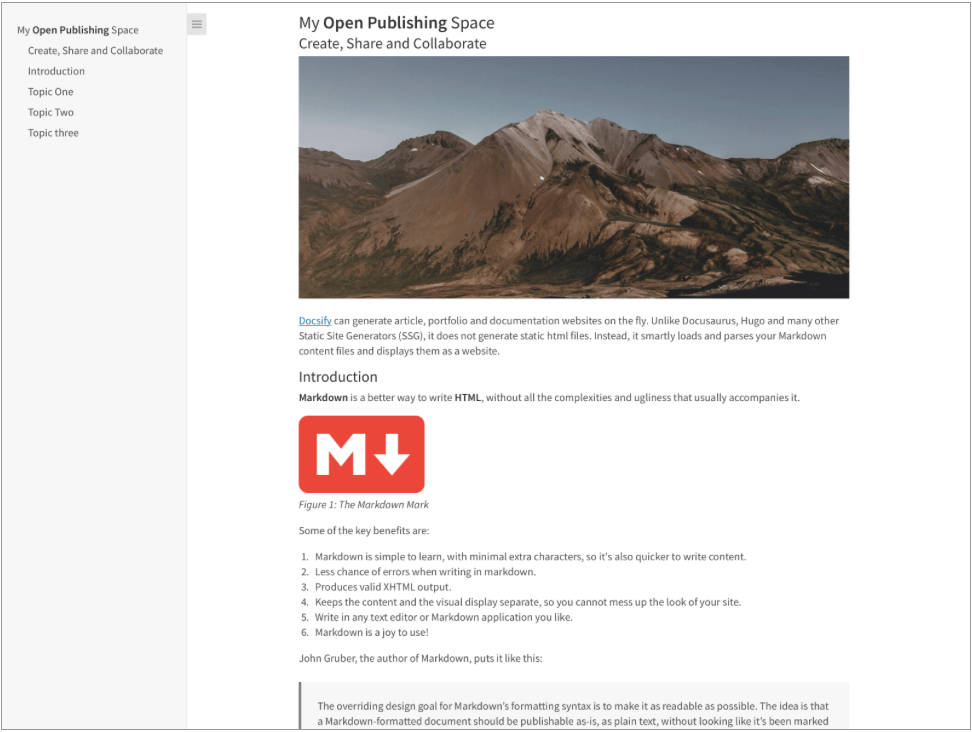
Satu halaman artikel home.md file yang ditampilkan oleh DocSify-ini sebagai:
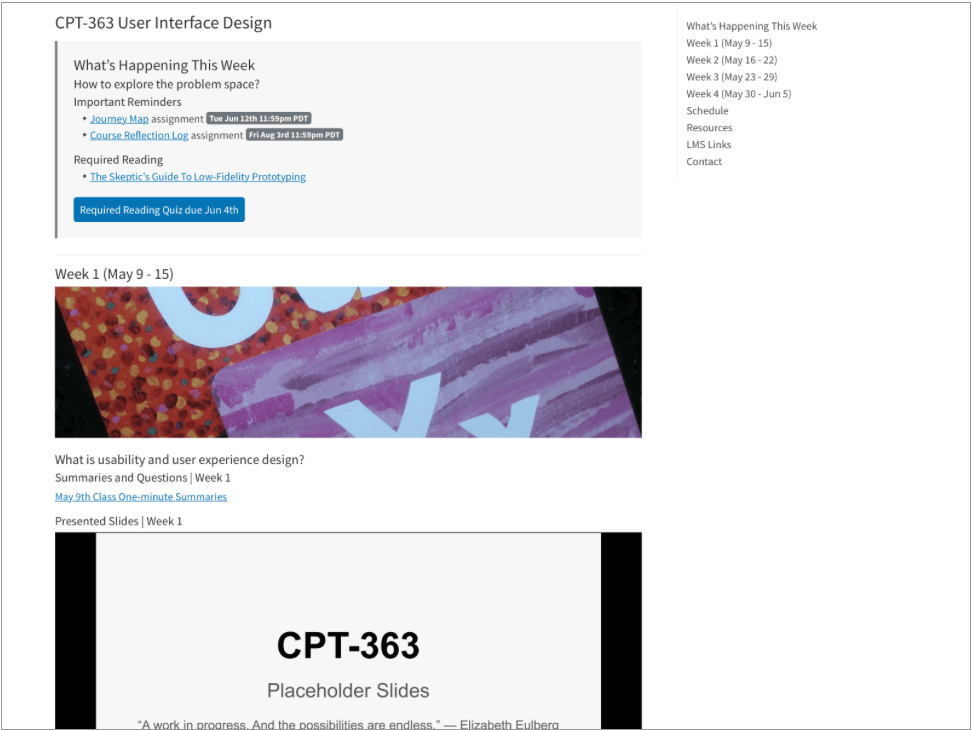
Satu halaman kursus file home.md yang ditampilkan oleh DocSify-ini sebagai:
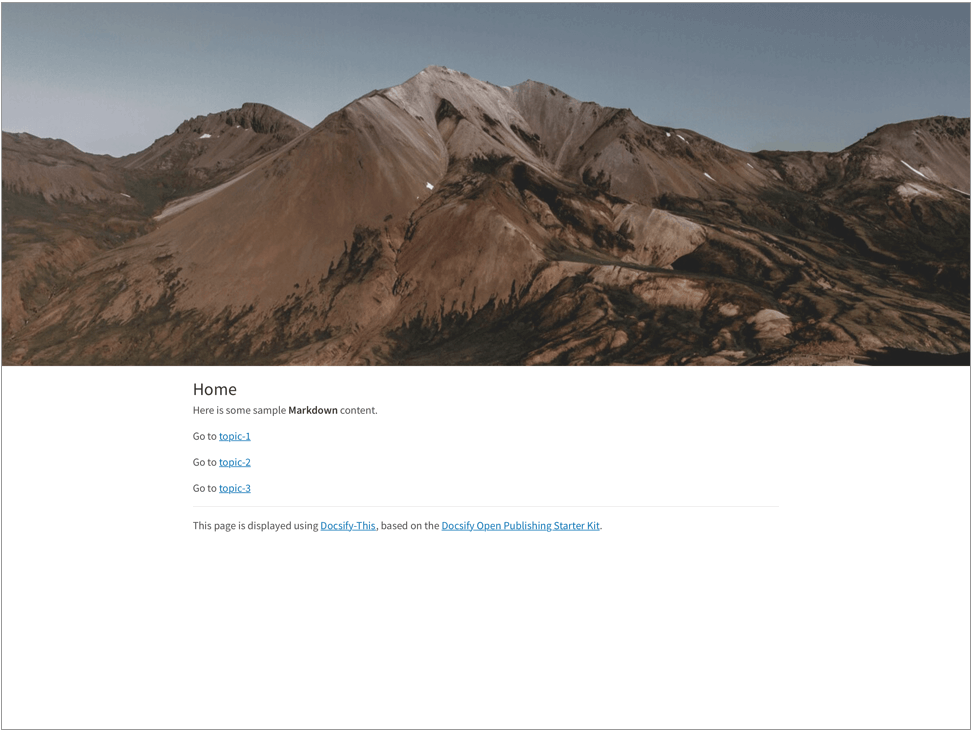
Beberapa halaman situs home.md file, termasuk penggunaan markdown css class header-image-full-width , ditampilkan oleh docsify-ini sebagai:
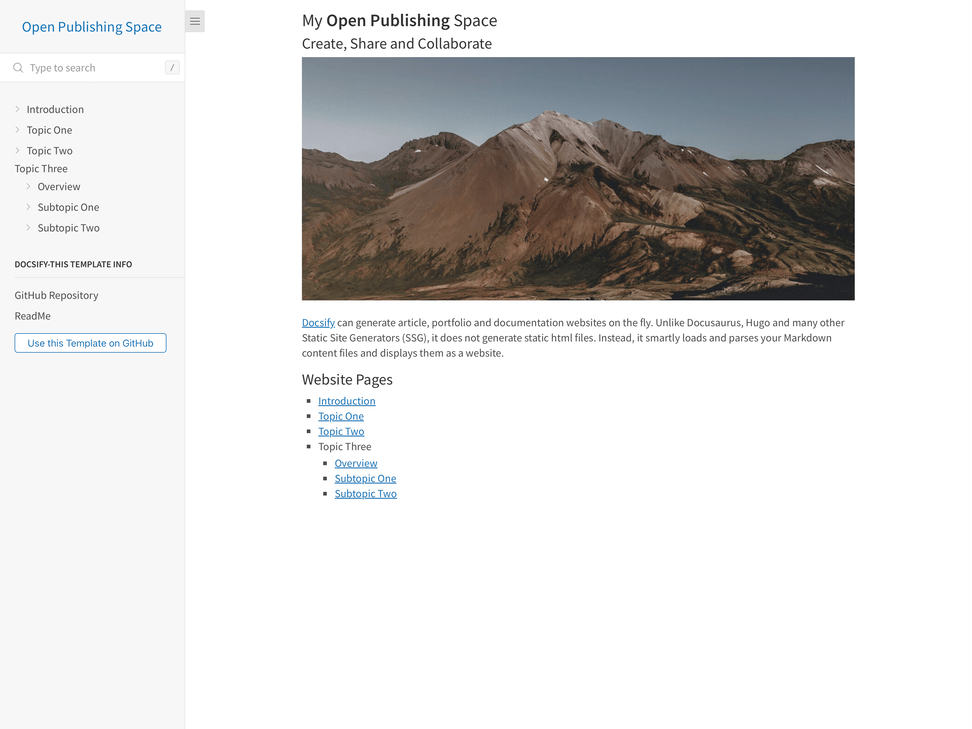
Beberapa halaman buka situs penerbitan home.md file, termasuk penggunaan file sidebar custom docsify, ditampilkan oleh docSify-ini sebagai:
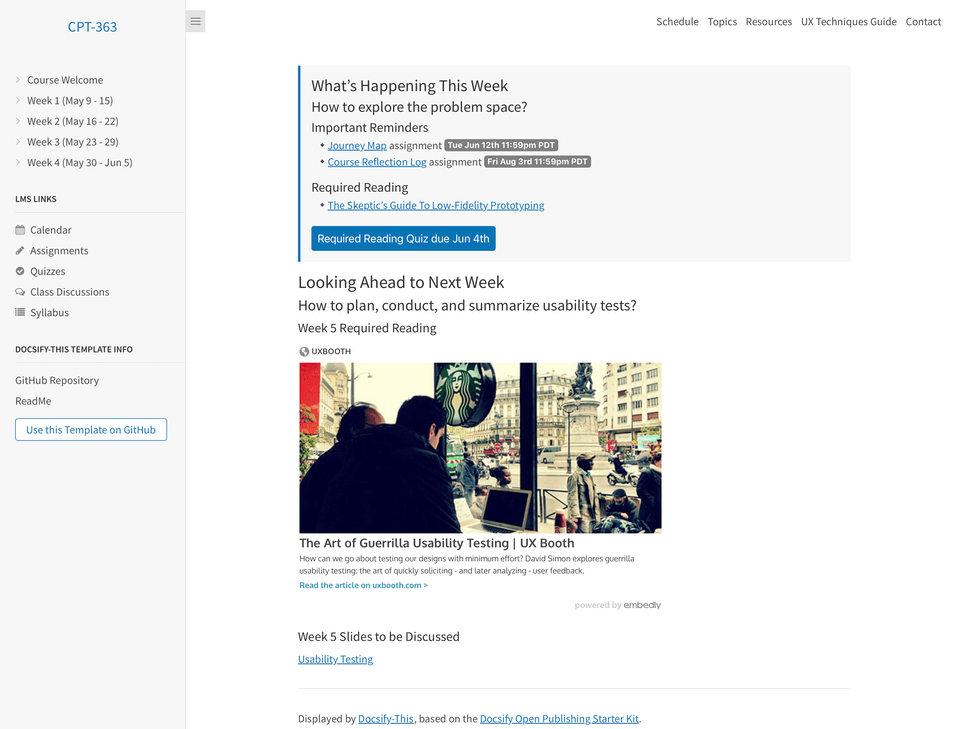
Beberapa halaman halaman kursus home.md file, termasuk penggunaan file sidebar kustom DocSify dan dokumen kustom navbar file, ditampilkan oleh docSify-ini sebagai:
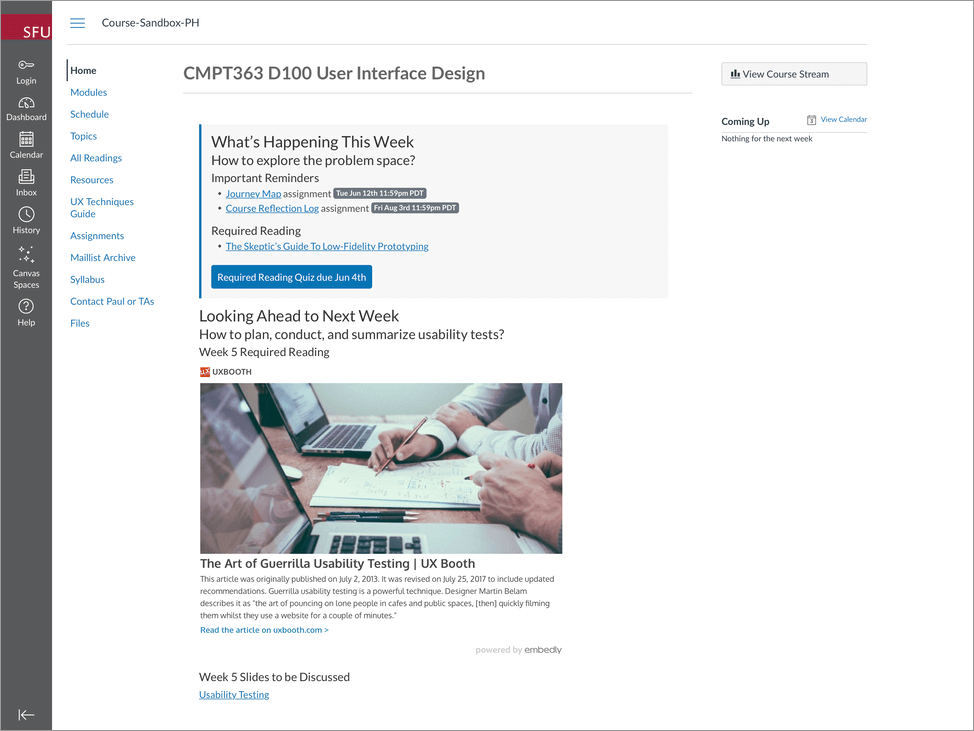
Contoh Halaman, termasuk penggunaan parameter URL font-family , font-size dan hide-credits untuk penyembatan konten tanpa batas di dalam Canvas LMS, seperti yang ditampilkan oleh Docsify-ini:
Lihat Contoh Situs Canvas LMS Menggunakan DOCSIFY-Konten ini di https://canvas.sfu.ca/courses/76692.
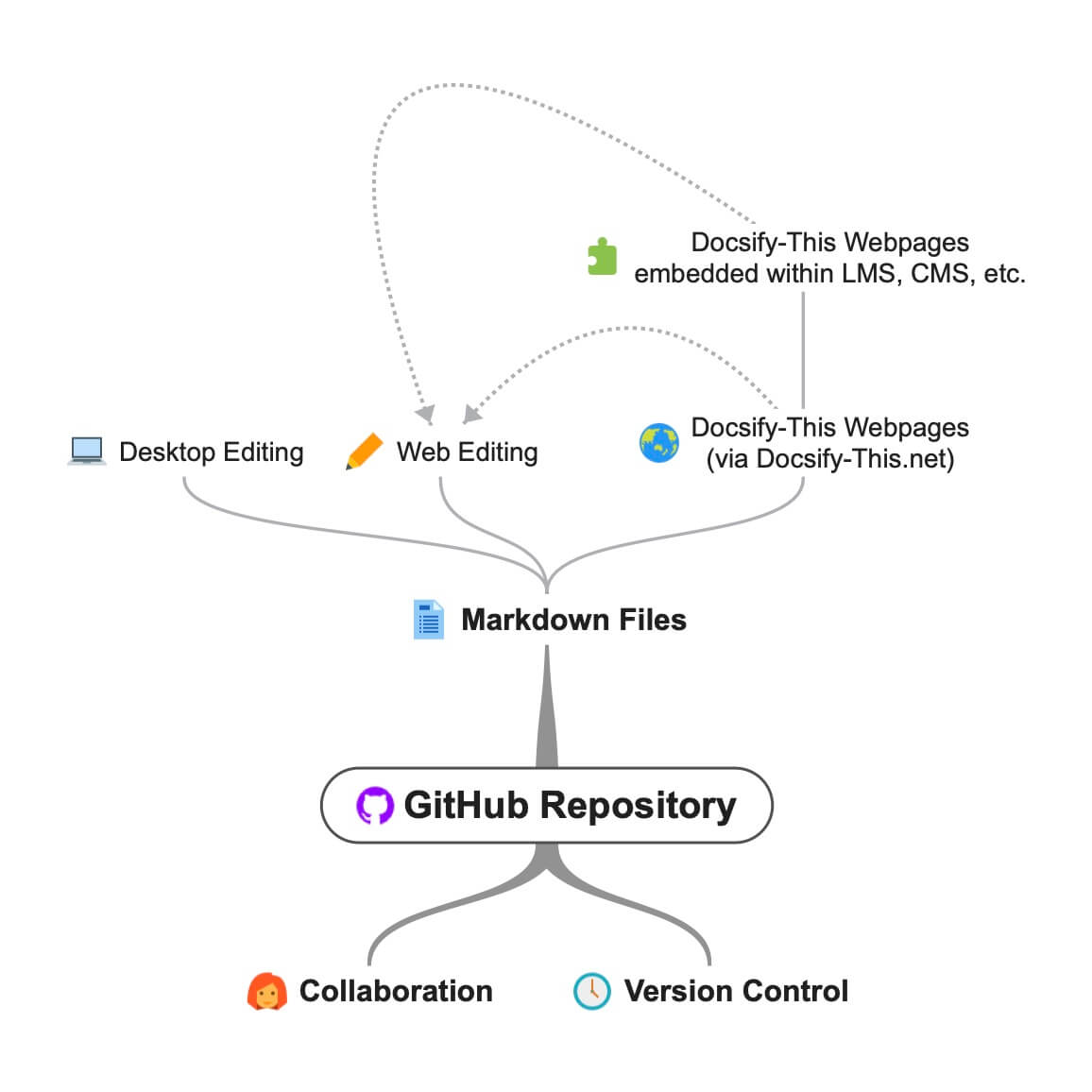
DOCSIFE-THIS.NET OPEN DAN Workflow kolaboratif menggunakan file Markdown GitHub.
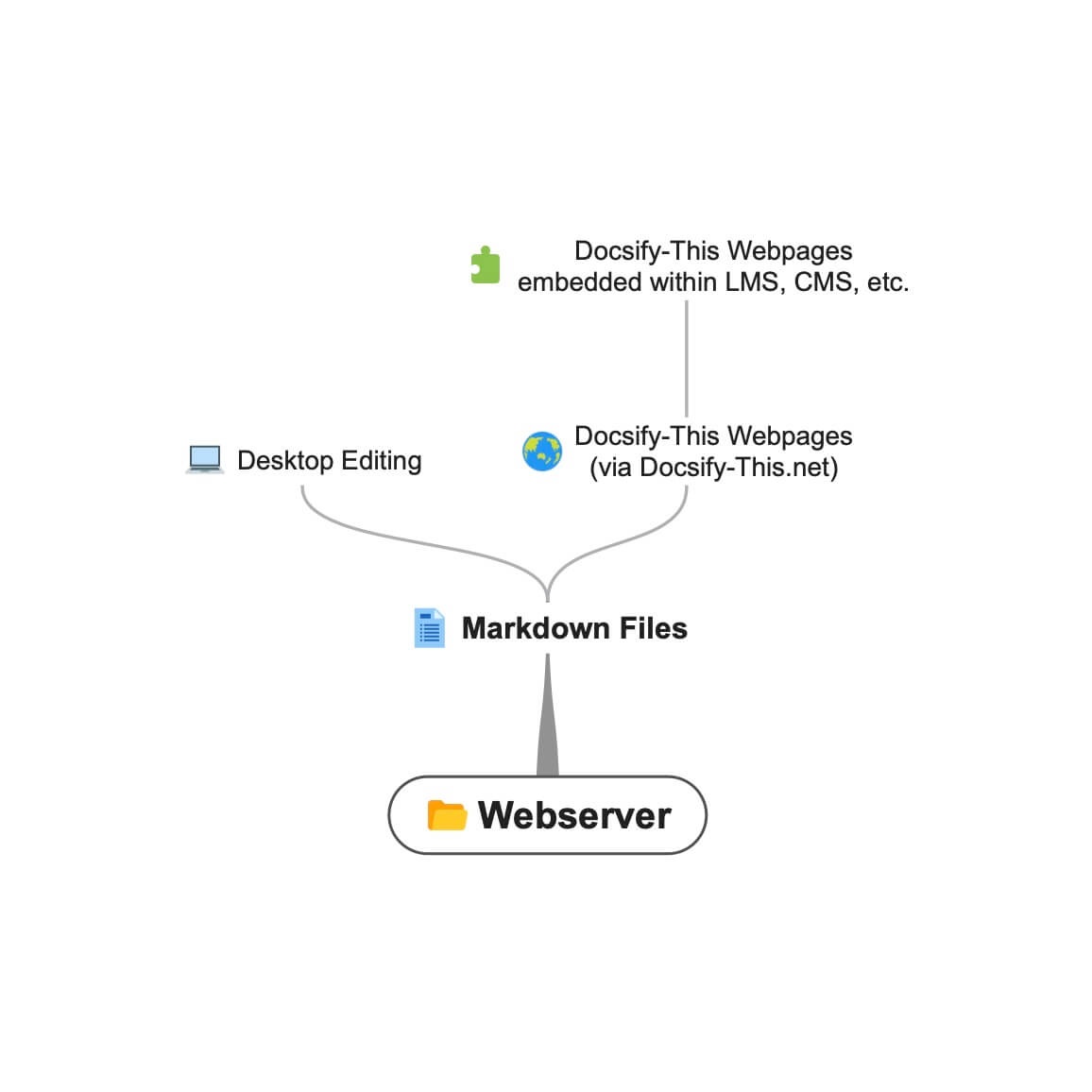 Alur kerja docsify- this.net menggunakan file markdown webserver.
Saat menggunakan DocSify-ini untuk menampilkan file Markdown yang terletak di layanan berbasis GIT seperti GitHub atau CodeBerg, Anda dapat mengunduh (klon) file ke desktop Anda untuk pengeditan lokal dan kemudian unggah (push) berubah kembali ke file online.
Misalnya, untuk mengedit file Markdown GitHub di desktop Anda, Anda akan melakukan hal berikut:
Pelajari lebih lanjut tentang memulai dengan Github Desktop.
Kelas CSS berikut tersedia saat mengutus konten penurunan harga Anda sendiri.
 < div class =" accordion " >

< details >
  < summary > Topic One </ summary >

  Topic one details here.

</ details >

< details >
  < summary > Topic Two </ summary >

  Topic two details here.

</ details >

</ div > < span class =' badge ' > Tue Jun 12th 11:59pm PDT </ span > < span class =' badge ' style =' --badge-bg-color: #0164db; ' > Tue Jun 12th 11:59pm PDT </ span > < span class =' badge ' style =' --badge-bg-color: #e7c500; --badge-text-color: #000; ' > Tue Jun 12th 11:59pm PDT </ span > < span class =' badge ' > [Tue May 16 2:30pm PT](https://www.timeanddate.com/worldclock/fixedtime.html?msg=CMPT-363+Blackboard+Mini-lectures+and+Activities&iso=20220516T1430&p1=256&ah=1&am=50) </ span > Dipotong hingga ketinggian 250px di layar besar, 125px pada layar kecil.
![ UX - User Experience ] ( images/12650723674_d5c85af332_k.jpg ' :class=banner-image ') Dipotong hingga ketinggian 350px di layar besar, 175px di layar kecil.
![ UX - User Experience ] ( images/12650723674_d5c85af332_k.jpg ' :class=banner-tall-image ') [ Required Reading Quiz due Jun 4th ] ( https://canvas.sfu.ca/courses/44038/quizzes/166553 ' :class=button ') [ : fa fa-download fa-fw : Download ] ( https://creativecommons.org/wp-content/uploads/2019/02/ccheart_black.svg_.zip ' :class=button ') < a class =" button " href =" https://creativecommons.org/wp-content/uploads/2019/02/ccheart_black.svg_.zip " target =" _blank " > < i class =" fa fa-download fa-fw " > </ i > Download </ a > [ Required Reading Quiz due Jun 4th ] ( https://canvas.sfu.ca/courses/44038/quizzes/166553 ' :class=button-rounded ') [ : fa fa-download fa-fw : Download ] ( https://creativecommons.org/wp-content/uploads/2019/02/ccheart_black.svg_.zip ' :class=button-rounded ') < a class =" button-rounded " href =" https://creativecommons.org/wp-content/uploads/2019/02/ccheart_black.svg_.zip " target =" _blank " > < i class =" fa fa-download fa-fw " > </ i > Download </ a > [ Required Reading Quiz due Jun 4th ] ( https://canvas.sfu.ca/courses/44038/quizzes/166553 ' :class=button-secondary ') [ : fa fa-download fa-fw : Download ] ( https://creativecommons.org/wp-content/uploads/2019/02/ccheart_black.svg_.zip ' :class=button ') < a class =" button-secondary " href =" https://creativecommons.org/wp-content/uploads/2019/02/ccheart_black.svg_.zip " target =" _blank " > < i class =" fa fa-download fa-fw " > </ i > Download </ a > [ Required Reading Quiz due Jun 4th ] ( https://canvas.sfu.ca/courses/44038/quizzes/166553 ' :class=button-secondary-rounded ') [ : fa fa-download fa-fw : Download ] ( https://creativecommons.org/wp-content/uploads/2019/02/ccheart_black.svg_.zip ' :class=button-secondary-rounded ') < a class =" button-secondary-rounded " href =" https://creativecommons.org/wp-content/uploads/2019/02/ccheart_black.svg_.zip " target =" _blank " > < i class =" fa fa-download fa-fw " > </ i > Download </ a > Untuk pratinjau artikel tertaut, slide/video tertanam, dll.
< a class =" embedly-card " data-card-controls =" 0 " data-card-align =" left " href =" https://blog.prototypr.io/defining-usability-e7bf42e8abd0 " > Defining usability </ a > Lebar 1200px yang disarankan hingga 2000px.
![ Photo of Mountain ] ( images/mountain.jpg ' :class=header-image-fade ') Lebar 1200px yang disarankan hingga 2000px, dan tampilan Daftar Isi tidak tersedia.
![ Photo of Mountain ] ( images/mountain.jpg ' :class=header-image-fade-full-width ') Ukuran yang disarankan dari 1200px hingga 2000px lebar dan 400px hingga 600px tinggi, dan tampilan Daftar Isi tidak tersedia.
![ Photo of Mountain ] ( images/mountain.jpg ' :class=header-image ') Skala gambar ke %.
![ Photo of Mountain ] ( images/mountain.jpg ' :class=image-75 ') Skala gambar dengan batas ke %.
![ Photo of Mountain ] ( images/mountain.jpg ' :class=image-75-border ') ![ Photo of Mountain ] ( images/mountain.jpg ' :class=image-border ') ![ Photo of Mountain ] ( images/mountain.jpg ' :class=image-border-rounded ') [ GitHub ] ( https://github.com/hibbitts-design/docsify-this ' :class=navpill ') [ : fab fa-github fa-fw : GitHub ] ( https://github.com/hibbitts-design/docsify-this ' :class=navpill ') < a class =" navpill " href =" https://github.com " target =" _blank " > < i class =" fab fa-github fa-fw " > </ i > GitHub </ a > Buat gambar HTML mentah yang mencakup dimensi ukuran responsif.
< img src =" https://raw.githubusercontent.com/hibbitts-design/publishing-with-docsify-this/main/images/docsify-this-web-page-builder.jpg " width =" 910 " height =" 682 " class =" responsive image-border " alt =" Docsify-This Web Page Builder " > < div class =" row " >
< div class =" column " >
Lorem ipsum dolor sit amet, consectetur adipiscing elit.
</ div >
< div class =" column " >
Lorem ipsum dolor sit amet, consectetur adipiscing elit.
</ div >
</ div > < div class =" row reverse-columns " >
< div class =" column " >
Lorem ipsum dolor sit amet, consectetur adipiscing elit.
</ div >
< div class =" column " >
Lorem ipsum dolor sit amet, consectetur adipiscing elit.
</ div >
</ div > < div class =" row " >
< div class =" column " >
Lorem ipsum dolor sit amet, consectetur adipiscing elit.
</ div >
< div class =" column-right " >
Lorem ipsum dolor sit amet, consectetur adipiscing elit.
</ div >
</ div > < div class =" video-container-4by3 " > < div class =" video-container-16by9 " > < iframe width =" 560 " height =" 315 " src =" https://www.youtube.com/embed/lJIrF4YjHfQ " > </ iframe > </ div > Secara otomatis ditambahkan ke semua iframes dengan domain sumber 'youtube.com' atau 'docs.google.com'.
< div class =" video-container-16by9 " > < iframe width =" 560 " height =" 315 " src =" https://www.youtube.com/embed/lJIrF4YjHfQ " > </ iframe > </ div > Selain kelas CSS Markdown yang didukung oleh DocSify-ini, Anda juga dapat mendefinisikan kelas khusus Anda sendiri dalam file Markdown yang ditampilkan, misalnya:
CSS dalam file Markdown:
<style >
. markdown-section . mybutton , . markdown-section . mybutton : hover {
  cursor : pointer;
  color : # CC0000 ;
  height : auto;
  display : inline-block;
  border : 2 px solid # CC0000 ;
  border-radius : 4 rem ;
  margin : 2 px 0 px 2 px 0 px ;
  padding : 8 px 18 px 8 px 18 px ;
  line-height : 1.2 rem ;
  background-color : white;
  font-family : -apple-system , "Segoe UI" , "Helvetica Neue" , sans-serif;
  font-weight : bold;
  text-decoration : none;
}
< / style >
Penurunan harga:
[ Required Reading Quiz due Jun 4th ] ( https://canvas.sfu.ca/courses/44038/quizzes/166553 ' :class=mybutton ') Docsify-Ini dirancang untuk dengan cepat dan mudah menampilkan satu atau lebih file markdown yang di-host dari jarak jauh. Untuk penyesuaian rendering file yang lebih besar dan untuk memastikan ketersediaan yang konsisten, bahkan jika instance public docsify-this.net tidak lagi tersedia, Anda dapat meng-host instance DocSify-ini sendiri.
To host your own instance on GitHub Pages, which also supports the option of a custom domain, fork or clone the Docsify-This repository to your GitHub account. Then, enable GitHub Pages using the /docs folder.
You can also have an instance of Docsify-This run on Codeberg such as https://docsify-this.codeberg.page by creating a new repository called pages , then choosing paulhibbitts/docsify-this-app in the template dropdown menu, choosing the Git Content (Default Branch) option and then tapping the Create Repository button.
Alternatively, you can upload the files in the Docsify-This /docs folder into a newly created Codeberg repository and then manually enable Codeberg Pages. An example Docsify-This instance running on Codeberg is available at https://codeberg.org/paulhibbitts/docsify-this-app, which uses a Branch renamed to pages .
If you want to run Docsify-This on your own Websever, create a destination folder on your server and then copy the files within the Docsify-This folder /docs to your newly created server folder. You could also use this docs folder as a custom domain root.
A more future-friendly setup would be to fork the Docsify-This repository (to support getting upstream updates) and use a GitHub Action such as FTP-Deploy to deploy all changed repository files to a webserver.
You can limit the domains which remote files can be rendered from by locating the line var allowedDomains = ''; within the index.html file and include your list of allowed domains separated by commas, for example var allowedDomains = 'codeberg.org,raw.githubusercontent.com,hibbittsdesign.org'; .
If you want to further customize and control the presentation of your Markdown content, especially when rendering multiple page sites, you can install your own Docsify Open Publishing Starter Kit (that this hosted web app is based on) and store all Markdown files within that site. You can learn more about the capabilities of Docsify itself at Docsify.js.org.
Looking for some help with getting a Docsify custom-This instance up and running for your organization? Paul provides a range of professional services related to Docsify-This - contact him to learn more.
The display of Font Awesome Free icons within Markdown content is supported with the following format:
: fas fa-home fa-fw :
The above Markdown is equivalent to the HTML markup <i class="fas fa-home fa-fw" aria-hidden="true"></i> .
When using the above shortcode for Font Awesome icons, it is assumed to be for decorative purposes, and so for improved accessibility an aria-hidden="true" attribute is automatically added to the icon. For semantic purposes, it is recommended you refer to the Font Awesome Icons and Accessibility guidelines.
The following style prefixes are available with Docsify-This:
GitHub Training Manual Working Locally with Git Markdown file, displayed by Docsify-This as a:
Easy Markdown to Github Pages linked set of Markdown files, displayed by Docsify-This as:
A Collection of GitHub Markdown files used as course content within an SFU CMPT-363 Canvas LMS site.
A Collection of GitHub Markdown files with inline CSS used as a multiple page SFU CMPT-363 course site with SFU visual branding and the Docsify Search plugin enabled, multiple page SFU CMPT-363 course site with SFU visual branding and website logo, and an example single Markdown file with default visual styling for embeddeding.
GitHub Markdown Content Demo file, displayed by Docsify-This as a Web Page with 'Edit this Page' link using the new GitHub.dev web editor (currently in Beta).
GitHub Markdown Content Demo file, displayed by Docsify-This as a Web Page with 'View raw Markdown' link.
Codeberg Markdown Content Demo file, displayed by Docsify-This as a Web Page with 'View raw Markdown' link.
GitHub's LaTeX Support Examples Markdown file, displayed by Docsify-This as a Web Page with an 'Edit this Page' link.
Mermaid-Docsify Example GitHub Markdown file, displayed by Docsify-This as a Web Page with an 'Edit this Page' link.
Docsify-This Multi-language Site Template, displayed by Docsify-This as a:
Docsify-This Simple Visual Portfolio Template (based on Notion Portfolio Template), displayed by Docsify-This as a:
Docsify-This Visual Portfolio Template (based on Notion Portfolio Template), displayed by Docsify-This as a:
A simple Markdown Student Portfolio Starter Template (based on Markdown Student Portfolio Template by Justin Thoreson) which is viewable on both GitHub and with Docsify-This.net, displayed by Docsify-This as:
Introduction to Docsify–This
Introductory, beginner to intermediate.
An introduction of Markdown publishing using the open source project Docsify–This.
Self-Publishing with Docsify–This
Intermediate, with a mix of basic and advanced aspects.
An overview to self-publishing with Markdown using the open source project Docsify–This, with a focus on digital literacy.
Use a page inspector to identify the font family and font size used in the platform you are embedding Docsify-This content in, and then pass that font family using the font-family (encoded, where spaces are replaced with '%20') and font-size (REM units) URL parameters to Docsify-This. For example, to match fonts with the Canvas LMS:
https://docsify-this.net?basePath=https://raw.githubusercontent.com/paulhibbitts/cmpt-363-222-pages/main&homepage=topics.md&font-family=Lato%20Extended,Lato,Helvetica%20Neue,Helvetica,Arial,sans-serif&font-size=1
If you want to include a Page Table of Contents with embedded Docsify-This content, but the destination platform screen area is not very wide, you might want to try the optional toc-narrow display option. For example, to use a narrower Table of Contents area that includes a smaller screen breakpoint: https://docsify-this.net?basePath=https://raw.githubusercontent.com/paulhibbitts/cmpt-363/main/docs/222&homepage=week-01.md&toc-narrow=true
Using Prismjs code blocks with syntax highlighting is supported for the languages included with Docsify and as well Bash, Go, Java, Kotlin, PHP, Python and Swift. To embed a code block use the Markdown standard of triple backticks and start the block with the name of the language, for example to embed a block of Javascript code with syntax highlight the following would be used:
 ```javascript
function test() {
  console.log("Hello world!");
}
`` `
Which would then appear as:
 function test ( ) {
  console . log ( "Hello world!" ) ;
} The content of external Markdown files can be embedded into Docisfy-This web pages with the following:
[ included Markdown from same source location ] ( example.md ' :include ') [ included Markdown from URL ] ( https://raw.githubusercontent.com/paulhibbitts/Markdown-File-Tests/main/itworks.md ' :include ')For additional examples of including external content, view Docsify Embeded Files.
WikiLinks format for links and images are supported, as also found in the desktop editor Obsidian and other platforms.
The display of AsciiDoc files ('.adoc' extension) via DownDoc is possible by manually passing the relevant filenames within a Docsify-This URL (not available in the Docisfy-This.net Web Page Builder), for example: https://docsify-this.net/?basePath=https://raw.githubusercontent.com/asciidoctor/asciidoctor-pdf/main/examples&homepage=basic-example.adoc&edit-link=https://github.com/asciidoctor/asciidoctor-pdf/blob/main/examples/basic-example.adoc
You can support the display of AsciiDoc files in the Web Page Builder of your own instance of Docsify-This by locating the function getAllowedFileExtensions() within the index.html file and add the file extension '.adoc' to the return statement, for example return ".md,.adoc"; .
The display of HedgeDoc files containing basic Markdown (as well as Mermaid and MathJax elements) is possible by manually using 'download' for the homepage URL parameter within a Docsify-This URL (not available in the Docisfy-This.net Web Page Builder), for example: https://docsify-this.net/?basePath=https://demo.hedgedoc.org/crN3ispNQdejWkUXXIXYQA&homepage=download
Here is an additional example, using the HedgeDoc file https://demo.hedgedoc.org/oisWMy9ZS36PE6TvYhJC4A?both (seen in split-screen view) and and rendered as a web page by Docsify-This https://docsify-this.net/?basePath=https://demo.hedgedoc.org&homepage=oisWMy9ZS36PE6TvYhJC4A/download&edit-link=https://demo.hedgedoc.org/oisWMy9ZS36PE6TvYhJC4A?both&toc=true&edit-link-text=Edit%20this%20Page%20in%20HedgeDoc
You can support HedgeDoc URLs (eg https://demo.hedgedoc.org/ip4SRxZYTEKa6JHr62XTiA) in the Web Page Builder of your own instance of Docsify-This by locating the line var hedgedocInstances = ''; within the index.html file and include your HedgeDoc instances separated by commas, for example var hedgedocInstances = 'demo.hedgedoc.org'; . Try out a demo instance of Docsify-This with support for demo.hedgedoc.org files at https://hibbitts-design.github.io/hedgedoc-docsify-this.
You can use camel case instead of hyphens for the names of Docsify-This URL parameters if prefered. Misalnya, https://docsify-this.net?basePath=https://raw.githubusercontent.com/hibbitts-design/docsify-this-one-page-article/main&homepage= home.md&toc=true&toc-headings=h2,h3&edit-link=https://github.com/hibbitts-design/docsify-this-one-page-article/blob/main/home.md Dan https://docsify-this.net?basePath=https://raw.githubusercontent.com/hibbitts-design/docsify-this-one-page-article/main&homepage =home.md&toc=true&tocHeadings=h2,h3&editLink=https://github.com/hibbitts-design/docsify-this-one-page-article/blob/main/home.md are equilivent.
To use the new GitHub.dev web editor (currently in Beta) for 'Edit this Page' links, change github.com to github.dev for GitHub.com files entered into the Web Page Builder Markdown File URL field.
There are multiple ways to get a raw Markdown file available online, here are three options to help you get started:
GitHub or Codeberg:
Gist (GitHub Gists):
.md (eg myfile.md )Personal or Organizational Website:
Some text editors, such as Microsoft Visual Studio (including the online GitHub.dev web editor), have the ability to link your own CSS so Markdown previews are more visually accurate. If your editor supports this ability, the below CSS files can be used.
Docsify-This (based on the Docsify Open Publishing Starter Kit) CSS:
https://docsify-this.net/assets/css/editor.css
FontAwesome CSS:
https://cdnjs.cloudflare.com/ajax/libs/font-awesome/4.7.0/css/font-awesome.css
Enhanced Previews with Microsoft Visual Studio
For an even closer visual representation of your Docsify-This pages in Microsoft Visual Studio, do the following:
docs folderTIP: If you change the VSCode setting for Workbench › Editor: Show Tabs to single then the docsify preview area will remain in place as you edit multiple Markdown files.
You can load custom default settings in the Docsify-This Web Page Builder using URL parameters. This ability is especially helpful for Docsify-This online sessions, workshops, or when users collaborate and assist one another. Along with the standard Docsify-This URL parameters, the Web Page Builder also offers the following specific parameters:
https://docsify-this.net/?url-field=https://codeberg.org/paulhibbitts/docsify-this-one-page-course/src/branch/main/home.mdhttps://docsify-this.net/?url-field=empty You can even just type docsify-this.net? in front of an online Markdown file URL that you are viewing (such as files hosted on GitHub, Codeberg, or raw source files) to instantly set up the Docsify-This Web Page Builder with that file. Once the Web Page Builder loads, press the Return key — no need to leave the keyboard — to see Docsify-This display the Markdown file as a web page! For example, https://docsify-this.net?https://github.com/hibbitts-design/docsify-this-one-page-course/blob/main/home.md .
https://docsify-this.net/?url-field=https://codeberg.org/paulhibbitts/docsify-this-one-page-course/src/branch/main/home.md&edit-link-checkbox=truehttps://docsify-this.net/?show-page-options=truehttps://docsify-this.net/?advanced=true For example, the following URL will display the Advanced Web Page Builder, with the Markdown file URL set to https://github.com/hibbitts-design/docsify-this-multiple-page-course-site/blob/main/home.md , the site name 'CPT-363' along with a Docsify custom Sidebar and Navbar to be included: https://docsify-this.net/?url-field=https://github.com/hibbitts-design/docsify-this-multiple-page-course-site/blob/main/home.md&sidebar=true&loadSidebar=true&loadNavbar=true&name=CPT-363
The quickest way to create such a shareable URL is to use the Docsify-This Web Page Builder to generate a Docisfy-This web page URL, and then replace the URL parameter basepath with url-field using the full path of the source Markdown file URL. For example, the URL https://docsify-this.net/?basePath=https://raw.githubusercontent.com/hibbitts-design/docsify-this-one-page-article/main&homepage=home.md&sidebar=true&maxLevel=3 would be changed to https://docsify-this.net/?url-field=https://github.com/hibbitts-design/docsify-this-one-page-article/blob/main/home.md&homepage=home.md&sidebar=true&maxLevel=3.
The provided basePath parameter and/or optional homepage parameter may not be correct, verify that these items lead to accessible content. This error message may also result from a Cross-Origin Resource Sharing (CORS) policy, which restricts resources on a web page to be requested from another domain. If possible, relocate files to a domain that supports cross-origin requests or alternatively if the domain in question is under your control explore re-configuring CORS related settings. You can confirm the cause of the 404 message by viewing the errors displayed in the Browser Javascript Console.
When displaying GitHub Markdown files, the branch name is assumed to be main , and other paths will likely cause a 404 file not found message. When displaying Codeberg Markdown files, the path is assumed to contain /src/branch/main and other paths will likely cause a 404 file not found message.
Due to not being able to update Navbar or custom Sidebar links before page rendering, 'Edit this Page' links cannot be automatically updated to their correct target pages. Manually pass a URL pointing to the Git Repository using the URL parameter edit-link as a workaround, for example https://docsify-this.net?basePath=https://raw.githubusercontent.com/hibbitts-design/docsify-this-multiple-page-site/main&homepage=home .md&loadNavbar=_navbar&edit-link=https://github.com/hibbitts-design/docsify-this-multiple-page-site&edit-link-text=GitHub%20Repository Dan https://docsify-this.net/?basePath=https://raw.githubusercontent.com/paulhibbitts/docsify-this-cmpt-363-222-site/main&homepage=home.md&loadNavbar=_navbar.m d&sidebar=true&loadSidebar=_sidebar.md&edit-link=https://github.com/paulhibbitts/docsify-this-cmpt-363-222-site/tree/main&edit-link-text=GitHub%20Repository
Docsify is likely displaying the last cached version. To ensure the most recent version of a file is loaded, do a hard refresh of your Browser cache.
The most likely cause for embedded images in Markdown not being displayed as expected is the use of relative paths (ie  ) - review image paths and ensure the full path to each image is used (ie  ). Likewise, if images in HTML are not being displayed as expected the likely cause is again the use of relative paths (ie <img src="images/filename.jpg" alt="Alt Text"> ) - use absolute URLs for HTML image sources (ie <img src="https://raw.githubusercontent.com/user/repository/main/images/filename.jpg" alt="Alt Text"> ).
Due to iframe cross-domain issues embedded content may not be able to be displayed. Use the included rich media embed service embed.ly as a workaround.
For example, the following iFrame HTML:
< iframe src =" https://docs.google.com/presentation/d/e/2PACX-1vRnnRFelgw1ksq_p8Eryg3dnyLCRRLPf5fBgdwdv9p-tCIwcxqWvzDGrGbjxGHL7HqEJVpmV26ntk3a/embed?start=false&loop=false&delayms=3000 " frameborder =" 0 " width = 780 " height="585" allowfullscreen="true" mozallowfullscreen="true" webkitallowfullscreen="true" > </ iframe >Would be changed to:
< a class =" embedly-card " data-card-controls =" 0 " data-card-align =" left " data-card-width =" 100% " href =" https://docs.google.com/presentation/d/1BLaaOTsGxDmNcAhg6pdx3hl9IvI8NErg8Oe5ceh83fw/edit?usp=sharing " > Grav and Docsify Slides Placeholder </ a > When displaying a Docsify Sidebar or custom Sidebar, it is expected that page header levels start with a H1 level header.
When the search field is enabled in a Docsify custom Sidebar, only pages listed and linked in the Sidebar will be indexed for the search. Any pages linked in an optional Navbar will not be included in searches.
Docsify-This (as with Docsify itself) will only execute the first script included in a Markdown page, as described in the Docsify documentation.
Have you tried out Docsify-This? Share your feedback about Docsify-This
By leveraging his extensive UX design expertise and systems-oriented approach, Paul helps teams and individuals utilize open content in a range of education and publication settings, especially in connection with his Markdown-based Docsify and Grav CMS open-source projects. Professional services include user experience and workflow consulting, premium support subscriptions, workshops, and custom development. Sound of interest? Send a note to [email protected].
This open source project is by Paul Hibbitts of HibbittsDesign.org.
??♂️Special Thanks
Beau Shaw for his Remote Docsify example.
Alan Levine for the inspiration of a consolidated ReadMe collection.







