docsify this
v1.9.16: Merge pull request #161 from hibbitts-design

يتيح لك تطبيق الويب المفتوح المصدر هذا ، المصمم باستخدام مستندات مولد موقع التوثيق السحري ، نشر ملفات Markdown عبر الإنترنت كصفحات ويب دون إعداد موقع الويب الخاص بك.
تحقق من ما يمكن أن يفعله Docsify-هذا من خلال عرض ملف ReadMe هذا كصفحة ويب مع شريط جانبي اختياري يتضمن عناوين ما يصل إلى 4 مستويات!
الشكل 1.
هل جربت المستندات-هذا؟ شارك ملاحظاتك حول المستندات-هذا
يوفر Docsify-this طريقة سهلة لعرض ومشاركة المحتوى المبرر في سياقات مختلفة ، مع عدم وجود إعداد موقع أو عملية بناء مطلوبة. من خلال استضافة ملفات Markdown على Github أو CodeBerg ، يمكنك أيضًا الاستفادة من التحكم في الإصدار (القدرة على تتبع التغييرات وعكسها) وتمكين التعاون.
مع docsify-يمكنك:
Docsify-this هو موقع مخصص لمستندات النشر المفتوح تم تكوينه لتقديم ملفات Markdown عن بُعد عبر معلمات URL بالتنسيق التالي:
https://docsify-this.net?basePath=URLpath&homepage=filename.md
معلمة Docsify BasePath هي مسار URL الذي يحتوي على ملف تخفيض المصدر الخام لتقديمه. إذا تم تسمية الملف باسم readMe.md الافتراضي المتوقع ، فلا يلزم أي معلمة أخرى ، وإلا يجب أيضًا تضمين معلمة Docsify الرئيسية للصفحة. مثال على ذلك ، سيكون عنوان url هذا هو: https://docsify-this.net/؟basepath=https://raw.githubusercontent.com/hibbitts-design/docsify- this-one-article/main&homepage=home.md
يمكن أن يؤدي ذلك إلى تقديم ملفات من أي مكان يمكن عرض محتوى ملف Markdown داخل متصفح الويب ، بما في ذلك:
لتقديم ملف مخزّن مباشرة في مستودع github العام عند عدم استخدام منشئ صفحة الويب أعلاه ، تحتاج إلى استخدام عنوان URL لمصدر RAW لهذا الملف (IE RAW.GITHUBUSERCONTENT.com) عن طريق الاستفادة من زر RAW عند عرض الملف. من الممكن أيضًا تقديم ملف مخزّن في مستودع GitHub خاص عن طريق تنشيط صفحات github داخل هذا المستودع ثم استخدام عنوان URL لصفحات Github لهذا الملف (أي username.github.io).
يمكن تخصيص ظهور ملفات Markdown المقدمة بواسطة معلمات URL اختيارية ومجموعة صغيرة من فئات CSS المتاحة داخل ملفات تخفيض المصدر. بالإضافة إلى دعم التخفيضات القياسية ، يتم تضمين مخططات التضمين. اختياريا ، يمكن تمكين شرح الصفحة مع الفرضيات.
هل تبحث عن مقدمة شاملة للنشر مع Docsify-هذا؟ تحقق من النشر Markdown مع Docsify-this.
أنا في مهب فقط من خلال حقيقة أن تضع عنوان URL (ملف markdown) في Docsify-this ، ثم تحصل على عنوان URL لصفحة ويب ... تم! خذ عنوان URL واذهب. انها سلسة جدا.
-J. Groom ، استعادة اليوم الحلقة 39 (المؤسس المشارك ، استضافة استضافة)
لقد كنت أستخدم Docsify-This لدورة إنتاج النشر العليا الخاصة بي ، جزئيًا لاستكشاف نماذج جديدة في النشر المبرر ، ولكن جزئيًا أيضًا إلى ترويض القماش ، الذي أجده محرجًا ومتعلمًا. الحفاظ على جميع ملاحظات الدورة التدريبية الخاصة بي كملفات نصية واضحة ونشرها من خلال github و docsify-هذا أمر سهل ويجعل تطوير الدورة الخاصة بي نسيمًا. بالإضافة إلى ذلك ، أحتفظ بجميع مواداتي محليًا ، ويمكنني استخدام إعادة استخدامها دون الاعتماد على قماش.
- J. Maxwell (مدير وأستاذ مشارك في برنامج النشر في جامعة سيمون فريزر)
أفضل أداة وجدتها منذ سنوات - هذه واحدة من تلك الإبداعات التي تم إنجازها للتو ، وصولاً إلى النخاع.
- D. Malawey (منسق مختبر متعدد التخصصات ، جامعة تكساس إيه آند إم)
لقد قام Docsify-this بتحسين موضوعات WordPress بشكل كبير من خلال القدرة على التضمين بسلاسة في الواجهة نفسها التي أستخدمها في مستودع GitHub. هذا بدوره دفعني إلى كتابة مستندات أفضل! بالكاد خدش سطح ما يمكن أن يفعله هذا كأداة نشر ويب بسيطة للاستخدام.
- A. Levine AKA Cogdog (تقني تعليمي مستقل)
تم الاعتراف بـ Docsify-this باعتباره نهائيًا في فئة البنية التحتية المفتوحة لجوائز التعليم المفتوح لعام 2024 للتميز-شكرًا لجميع Docsify.js.org المشرفون والمساهمين ، ولزملائه الناشرين المفتوحين والمعلمين والمبدعين الذين يشاركونهم محتوىهم المفتوح مع بقية العالم من خلال المستندات-هذا.
يمكن تغيير المظهر المرئي لملف التمييز عبر الإنترنت كصفحة ويب بواسطة docsify-هذا بطريقتين:
على سبيل المثال ، لعرض ملف markdown الموجود على https://raw.githubusercontent.com/hibbitts-design/docsify-tis-one-page-article/main/home.md مع جهاز جانبي مستدخل يشمل العناوين حتى 3 مستويات ، و docsify-this url هو:
https://docsify-this.net/?basePath=https://raw.githubusercontent.com/hibbitts-design/docsify-this-one-page-article/main&homepage=home.md&sidebar=true&maxLevel=3وإليك كيف يعرض Docsify-this.net عنوان URL نفسه:
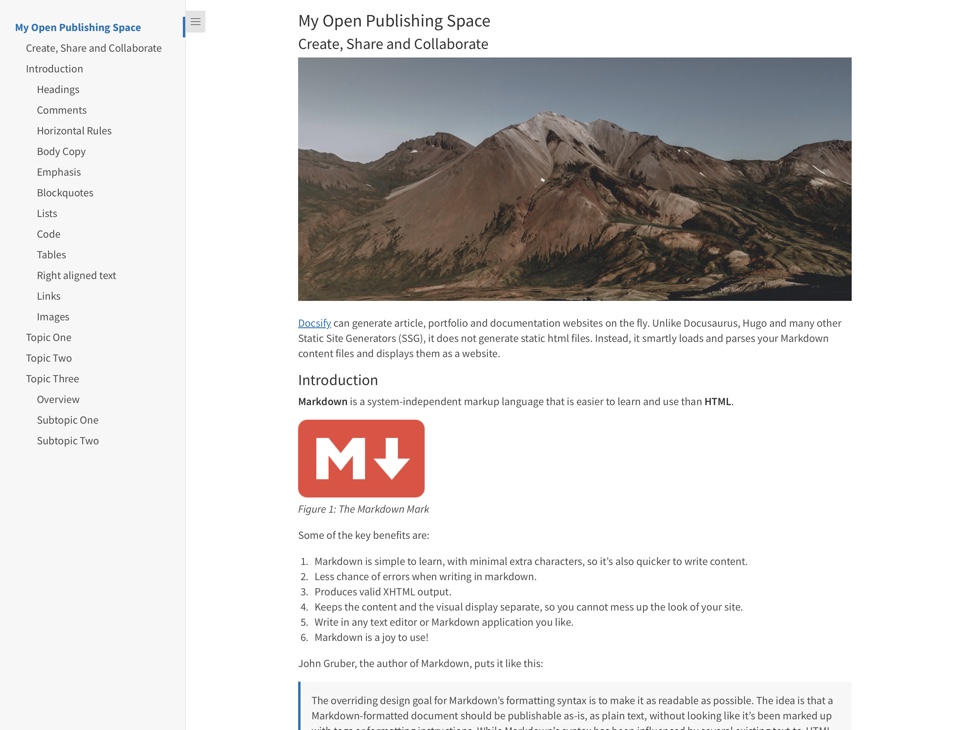 تُظهر صفحة الويب التي تم عرضها بواسطة Docsify-this.net ، والتي تُظهر ملف Markdown بشريط جانبي يتضمن عناوين ما يصل إلى 3 مستويات ، كما هو محدد من قبل عنوان URL Docsify-this.
تعرف على المزيد حول كل من معلمات عنوان URL BASIC DOCSIFY-واكتشف ما هو ممكن عند الجمع بين معلمات عنوان URL وملفات تخفيض عبر الإنترنت ومجموعة من قوالب MERLADEDES الجاهزة للاستخدام.
معلمات URL الأساسية (المدرجة في منشئ صفحة الويب القياسية)
اضبط عنوانًا مخصصًا على علامة تبويب المتصفح لصفحات الويب الخاصة بك مع معلمة متصفح TITLE اختياري ، على سبيل المثال:
https://docsify-this.net؟basepath=https://raw.githubusercontent.com/paulhibbitts/demo-grav-open-matter-course-hub/master/pages/04. صفحة "ستكون" ٪ 20 صفحة ".
عرض رابط "تحرير هذه الصفحة" (الموقع الافتراضي هو أسفل الصفحة) مع المعلمة اختيارية Link ، على سبيل المثال:
https://docsify-this.net؟basepath=https://raw.githubusercontent.com/hibbitts-design/docsify-open-course-starte r-kit/main & edit-link = https: //github.com/hibbitts-design/docsify-open-publishing-starter-kit/blob/main/readme.md
قم بتغيير النص الافتراضي لرابط "تحرير هذه الصفحة" مع المعلمة اختيارية تحرير الارتباط ، على سبيل المثال:
https://docsify-this.net؟basepath=https://raw.githubusercontent.com/hibbitts-design/docsify-open-course-starter-kit/main&edit-li nk = https: //github.com/hibbitts-design/docsify-open-publishing-starter-kit/blob/main/readme.md&edit-link-text=view٪20as٪20markdown يرجى ملاحظة استخدام النص مع المساحات التي يجب ترميزها ، لذا فإن "العرض كـ Markdown" سيكون "عرض ٪ 20AS ٪ 20Markdown".
قم بتغيير موقع رابط "تحرير هذه الصفحة" من أسفل الصفحات ليكون الجزء العلوي من الصفحات مع المعلمة اختيارية Link-Top ، على سبيل المثال:
https://docsify-this.net؟basepath=https://raw.githubusercontent.com/hibbitts-design/docsify-open-course-starter-kit/main&toc = true & edit-link = https: //github.com/hibbitts-design/docsify-open-publishing-starter-kit/blob/main/readme.md&edit-link-top=true
قم بتعيين خط مخصص لصفحات الويب الخاصة بك باستخدام معلمة الخطوط الاختيارية ، على سبيل المثال:
https://docsify-this.net؟basepath=https://raw.githubusercontent.com/hibbitts-sigign/docsify-open-course-starter-kit/main/docs&homepage=resources.md&font-family=helvetica ، يمكن أن تكون هذه المعلمة ذات قيمة خاصة عند محاولة مطابقة العرض المرئي للمحتوى المضمن مع نظام الوجهة الخاص بك. يرجى ملاحظة استخدام الخطوط مع مسافات في أسمائها يجب تشفيرها ، لذلك "Courier New" سيكون "Courier ٪ 20new".
اضبط حجم الخط المخصص لصفحات الويب الخاصة بك مع المعلمة اختياري حجم الخط ، على سبيل المثال:
https://docsify-this.net؟basepath=https://raw.githubusercontent.com/hibbitts-sigign/docsify-open-course-starter-kit/main/docs&homepage=resources.md&font-size=1. يمكن أن تكون هذه المعلمة ذات قيمة خاصة عند محاولة مطابقة العرض المرئي للمحتوى المضمن مع نظام الوجهة الخاص بك. يرجى ملاحظة أن حجم الخط في وحدات REM.
قم بتعيين وزن خط رأس مخصص (افتراضي هو 400 - منتظم) لصفحات الويب الخاصة بك مع معلمة الوزن الاختيارية ، على سبيل المثال:
https://docsify-this.net؟basepath=https://raw.githubusercontent.com/hibbitts-sigign/docsify-open-course-starter-kit/main/docs&homepage=resources.md&header-weight=600.
إخفاء الاعتمادات عادة ما تظهر في الجزء السفلي من كل صفحة Docsify-هذه معلمة Hide-Credits الاختيارية ، على سبيل المثال:
https://docsify-this.net؟basepath=https://raw.githubusercontent.com/hibbitts-sigign/docsify-open-course-starter-kit/main/docs&homepage=resources.md&hide-credits.
تمكين شرح الصفحة مع الفرضيات. مع معلمة الفرضية الاختيارية ، على سبيل المثال:
https://docsify-this.net؟basepath=https://raw.githubusercontent.com/hibbitts-design/docsify-open-course-starter-kit/main/docs&homepage=resources.md&hypothesis=true.
قم بتعيين ارتفاع خط مخصص لصفحات الويب الخاصة بك مع المعلمة اختياري لارتفاع الخط ، على سبيل المثال:
https://docsify-this.net؟basepath=https://raw.githubusercontent.com/hibbitts-design/docsify-open-course-starter-kit/main/docs&homepage=resources.md&line-hight=1.5.
اضبط لونًا مخصصًا لجميع الروابط ، المعرّفة باستخدام تنسيق سداسي عشري قياسي بدون رمز "#" مع المعلمة اختيارية لون الرابط ، على سبيل المثال:
https://docsify-this.net؟basepath=https://raw.githubusercontent.com/hibbitts-sigign/docsify-open-course-starter-kit/main/docs&homepage=resources.md&ink-color=cc0000.
اضبط مستوى الرأس الأقصى للشريط الجانبي Docsify مع معلمة Docsify الاختيارية ، على سبيل المثال:
https://docsify-this.net؟basepath=https://raw.githubusercontent.com/hibbitts-sign/docsify-open-publishing-starter-kit/main/docs&homepage=introduction.md&sidebar=truevelvel=3
عرض الشريط الجانبي Docsify مع معلمة الشريط الجانبي الاختياري ، على سبيل المثال:
https://docsify-this.net؟basepath=https://raw.githubusercontent.com/hibbitts-design/docsify-open-course-starter-kit/main&sidebar=true
اعرض جدول محتويات صفحة مع معلمة TOC الاختيارية ، على سبيل المثال:
https://docsify-this.net؟basepath=https://raw.githubusercontent.com/hibbitts-sigign/docsify-open-publishing-starter-kit/main/docs&homepage=introduction.md&toc=true
اضبط مستويات عنوان الصفحة (أي H1 ، H2 ، إلخ) ليتم تضمينها في جدول المحتويات مع معلمة TOC-Headings الاختيارية ، على سبيل المثال:
https://docsify-this.net؟basepath=https://raw.githubusercontent.com/hibbitts-sigign/docsify-open-publishing-starter-kit/main/docs&homepage=introduction.md&toc=true&tocings=h1،h3.
استخدم جدول محتويات صفحة أقل واسعة مع معلمة TOC-NARROW الاختيارية ، على سبيل المثال:
https://docsify-this.net؟basepath=https://raw.githubusercontent.com/hibbitts-sigign/docsify-open-publishing-starter-kit/main/docs&homepage=introduction.md&toc-narrow=true. يمكن أن تكون هذه المعلمة ذات قيمة خاصة عند تضمين المحتوى حيث من المحتمل أن تكون منطقة شاشة أصغر.
تمكين تكبير الصورة (النقر على صور الصفحة لتكبيرها) مع معلمة docsify Zoom-Imagages الاختيارية ، على سبيل المثال:
https://docsify-this.net؟basepath=https://raw.githubusercontent.com/paulhibbitts/docsify-this-markdown-content-demo/main&zoom-images=true. لاستبعاد الصور ، استخدم  .
تتوفر معلمات URL الإضافية التالية للاستخدام في Docsify-This url ، ويتم تضمينها في منشئ صفحة الويب المتقدمة ما لم يرد خلاف ذلك.
معلمات URL التكميلية (المدرجة في منشئ صفحة الويب المتقدمة)
عرض صفحة Coverpage مخصصة Docsify مع معلمة Coverpage الاختيارية ، على سبيل المثال:
https://docsify-this.net؟basepath=https://raw.githubusercontent.com/hibbitts-sigign/docsify-open-publishing-starter-kit/main/docs&homepage=home.md&coverpage=_coverpage.md
اضبط لونًا مخصصًا للـ Coverpage مع المعلمة اختيارية Coverpage-Color ، على سبيل المثال:
https://docsify-this.net؟basepath=https://raw.githubusercontent.com/hibbitts-sigign/docsify-open-publishing-starter-kit/main/docs&homepage=home.md&coverpage=_coverpage-md&coverpage
اضبط لونًا مخصصًا للـ Coverpage في وضع Dark مع معلمة وضع علامات CoverPage اختياري ، على سبيل المثال:
https://docsify-this.net؟basepath=https://raw.githubusercontent.com/hibbitts-design/docsify-open-publishing-starter-kit/main/docs&homepage=home .md & dark-mode = true & link-color = cc0000 & link-color-dark-mode = ff9e9e & coverpage = _coverpage.md & coverpage color = cc0000 & coverpage-color-dark-mode = 4d0000
تبديل الضوء/الظلام تلقائيًا استنادًا إلى تفضيل مستوى نظام نظام التشغيل ، على سبيل المثال:
https://docsify-this.net؟basepath=https://raw.githubusercontent.com/hibbitts-sigign/docsify-open-publishing-starter-kit/main/docs&homepage=introduction.md&dark-darke
قم بتغيير الرموز التعبيرية الافتراضية للحصول على رابط "تحرير هذه الصفحة" مع المعلمة اختيارية edit-link-emoji (غير مدرجة في منشئ صفحة الويب المتقدمة) ، على سبيل المثال:
https://docsify-this.net؟basepath=https://raw.githubusercontent.com/hibbitts-design/docsify-open-course-starter-kit/main&end-link=https://git hub.com/hibbitts-design/docsify-open-publishing-starter-kit/blob/main/readme.md&edit-link-text=view٪20on٪20github&edit-link-emoji=:file_folder:
قم بتمكين تحميل الصور الكسول للصور بواسطة المتصفحات باستخدام معلمة Lazy-Load-Load-Leaches الاختيارية (غير مدرجة في منشئ صفحة الويب المتقدمة) ، على سبيل المثال:
https://docsify-this.net؟basepath=https://raw.githubusercontent.com/hibbitts-sigign/docsify-open-publishing-starter-kit-kit-main/main/docs&homepage=introduction.md&lazy-images- على سبيل المثال بواسطة الشريط الجانبي المستندات وما إلى ذلك.
اضبط لونًا مخصصًا لجميع الروابط في الوضع المظلم ، والذي تم تعريفه باستخدام تنسيق سداسي عشري قياسي بدون رمز "#" مع المعلمة اختيارية لعلم الظهور ، على سبيل المثال: على سبيل المثال:
https://docsify-this.net؟basepath=https://raw.githubusercontent.com/hibbitts-sigign/docsify-open-course-starter-kit/main/docs&homepage=resources.md&ink-color=cc00.
اضبط لونًا مخصصًا لجميع الروابط ، تم تعريفه باستخدام تنسيق سداسي عشري قياسي بدون رمز "#" مع المعلمة اختيارية بلون الرابط ، على سبيل المثال:
https://docsify-this.net؟basepath=https://raw.githubusercontent.com/hibbitts-design/docsify-open-course-starter-kit/main/docs&homepage=resources.md&ink-shover-shover=cc0000.
اضبط لونًا مخصصًا لجميع الروابط في الوضع المظلم ، والذي تم تعريفه باستخدام تنسيق سداسي عشري قياسي بدون رمز "#" مع المعلمة اختيارية لعلم العلامات ، على سبيل المثال: على سبيل المثال:
https://docsify-this.net؟basepath=https://raw.githubusercontent.com/hibbitts-design/docsify-open-course-sta rter-kit/main/docs & homepage = resources.md & link-color = cc0000 & dark-mode = true & link-lover-color-dark-mode = ff9e9e.
قم بتعيين زخرفة نصية مخصصة لجميع الروابط ، مع معلمة إزالة النص الاختياري ، على سبيل المثال:
https://docsify-this.net؟basepath=https://raw.githubusercontent.com/hibbitts-sigign/docsify-open-course-starter-kit/main/docs&homepage=resources.md&ink-text-decoration=none
قم بتعيين زخرفة نصية مخصصة لجميع الروابط ، مع المعلمة الاختيارية للترابط-تحطم النص ، على سبيل المثال:
https://docsify-this.net؟basepath=https://raw.githubusercontent.com/hibbitts-design/docsify-open-course-starter-kit/main/docs&homepage=resources.md&ink-text-decoration-hoverdline
يمكنك تعيين Favicon مخصص من ملف الصورة الذي تم تمريره من معلمة LoadFavicon الاختيارية ، على سبيل المثال:
https://docsify-this.net؟basepath=https://raw.githubusercontent.com/paulhibbitts/docsify-this-markdown-content-demo/main&loadfavicon=open-access.png
قم بتحميل تذييل Docsify من ملف Markdown في الدليل الحالي الذي تم تمريره باستخدام معلمة Docsify الاختيارية ، على سبيل المثال: https://docsify-this.net؟basepath=https://raw.githubusercontent.com/hibbitts-sigign/docsify-open-publishing-starter-kit/main/docs&homepage=introduction.md&loadfooter=_foot.md
قم بتحميل Docsify Navbar المخصص من ملف Markdown الذي تم تمريره باستخدام معلمة Docsify الاختيارية ، على سبيل المثال:
https://docsify-this.net؟basepath=https://raw.githubusercontent.com/hibbitts-design/docsify-open-publishing-starter-kit/main/docs&homepage=introduction.md&loadnavbar=_navbar
قم بتحميل الشريط الجانبي المخصص Docsify من ملف Markdown الذي تم تمريره باستخدام معلمة Docsify الاختيارية ، على سبيل المثال:
https://docsify-this.net/؟basepath=https://raw.githubusercontent.com/paulhibbitts/docsify-this-cmpt-363-222-site/main&homepage=home.md&bybar=truebar=_sidebar-bar-with-her
عرض صورة شعار للموقع في شريط جانبي مخصص docsify (ie file 'logo.png) مع معلمة Docsify الاختيارية ، على سبيل المثال:
https://docsify-this.net/؟basepath=https://raw.githubusercontent.com/hibbitts-sigign/docsify-tis-multiple-page-course- الموقع/الرئيسي و Pagepage = home.md & sidebar = true & loadsidebar = _sidebar.md & loadnavbar = _navbar.md & name = cpt-363 & logo =/images/logo.png يجب توفير مسار المجلد الكامل واسم الملف. يجب أيضًا توفير اسم موقع ويب ، وسيتم استخدامه كنص ALT للشعار.
دمج عناصر Navbar إلى الجزء العلوي من الشريط الجانبي على شاشات أصغر مع معلمة Mergenavbar Docsify الاختيارية ، على سبيل المثال: https://docsify-this.net/؟basepath=https://raw.githubusercontent.com/hibbitts-sigign/docsify-tis-multiple-page-cours E-site/main & homepage = home.md & sidebar = true & loadsidebar = _sidebar.md & loadnavbar = _navbar.md & mergenavbar = true & name = cpt-363
عرض اسم موقع الويب في الشريط الجانبي المخصص Docsify (IE '_sideBar.md) مع معلمة Docsify الاسم الاختيارية ، على سبيل المثال:
https://docsify-this.net/؟basepath=https://raw.githubusercontent.com/hibbitts-design/docsify-this-multiple-page-co urse-site/main & homepage = home.md & sidebar = true & loadsidebar = _sidebar.md & loadnavbar = _navbar.md & search = true & name = cpt-363 عند توفير هذه المعلمة ، سيتم استخدامها تلقائيًا كعنوان علامة تبويب المتصفح أيضًا.
قم بتعيين عنوان صفحة مخصص في الجزء العلوي من صفحات الويب الخاصة بك مع المعلمة الاختيارية لعلم الصفحات ، على سبيل المثال:
https://docsify-this.net؟basepath=https://raw.githubusercontent.com/paulhibbitts/demo-grav-open-matter-course-hub/master/pages/0. كن "٪ 20 صفحة".
عرض أزرار ترقيم الصفحات في منطقة محتوى الصفحة (مطلوب شريط جانبي مخصص) مع معلمة ترقيم الصفحات الاختيارية ، على سبيل المثال:
https://docsify-this.net؟basepath=https://raw.githubusercontent.com/hibbitts-dosign/docsify-this-multiple-page-cour se-site/main & homepage = home.md & sidebar = true & loadsidebar = _sidebar.md & loadnavbar = _navbar.md & search = true & pagination = true
قم بتمكين مكون الإضافي بحث Docsify (والذي يتضمن حاليًا مطابقات للنص والارميات) على مواقع صفحات متعددة بما في ذلك الشريط الجانبي المخصص مع معلمة Docsify الاختيارية ، على سبيل المثال: على سبيل المثال:
https://docsify-this.net؟basepath=https://raw.githubusercontent.com/hibbitts-design/docsify-this-multiple-pag e-course-site/main & homepage = home.md & sidebar = true & loadsidebar = _sidebar.md & loadnavbar = _navbar.md & searchbox = true
قم بتعيين الحد الأقصى لمستويات رأس الجدول التلقائي للمحتويات في الشريط الجانبي المخصص للمستندات (IE '_sidebar.md) بمعلمة docsify submaxlevel الاختيارية ، على سبيل المثال:
https://docsify-this.net/؟basepath=https://raw.githubusercontent.com/paulhibbitts/docsify-tis-cmpt-363-222-site/main&homepage=home.md&sidebar=truebar=_sidebar-with-hery
استخدم إصدار SVG من Font Awesome Icons بدلاً من خطوط الويب مع معلمة SVG-Acons الاختيارية (غير مدرجة في منشئ صفحة الويب المتقدمة) ، على سبيل المثال:
https://v2.preview.docsify-This.net/؟basepath=https://raw.githubusercontent.com/hibbitts-design/docsify-this-lms-content-fages/main&homepage=schedule.md&svg-icons
تضمين المحتوى في قماش
مثال على رمز iframe ، بما في ذلك معلمات URL لمطابقة Docsify-هذا المحتوى بسلاسة مع قماش:
< p > < iframe style =" overflow: hidden; border: 0px #ffffff none; background: #ffffff; " src =" https://docsify-this.net?basePath=https://raw.githubusercontent.com/paulhibbitts/cmpt-363-222-pages/main&homepage=home.md&font-family=Lato%20Extended,Lato,Helvetica%20Neue,Helvetica,Arial,sans-serif&font-size=1&hide-credits=true " width =" 800px " height =" 1400px " allowfullscreen =" allowfullscreen " > </ iframe > </ p >في حالة وجود شريط التمرير ، قد ترغب في إعادة تحرير رمز iframe الخاص بك وضبط قيمة "الارتفاع".
كيف يمكنني إضافة عنوان URL الخارجي كعنصر وحدة؟
مثال على الارتباط الخارجي للوحدة ، مع جدول محتويات الصفحة:
https://docsify-this.net?basePath=https://raw.githubusercontent.com/paulhibbitts/cmpt-363/main/docs/222&homepage=week-02.md&toc-narrow=true&font-family=Lato%20Extended,Lato,Helvetica%20Neue,Helvetica,Arial,sans-serif&font-size=1&hide-credits=true إنشاء رابط مخصص في التنقل في الدورة التدريبية باستخدام أداة إعادة التوجيه
إعادة توجيه حقل عنوان URL:
https://docsify-this.net/?basePath=https://raw.githubusercontent.com/paulhibbitts/cmpt-363-222-pages/main&homepage=resources.md&edit-link=https://github.com/paulhibbitts/cmpt-363-222-pages/blob/main/resources.md&font-family=Lato%20Extended,Lato,Helvetica%20Neue,Helvetica,Arial,sans-serif&font-size=1&hide-credits=trueiframe (لتضمين المحتوى داخل الصفحات)
أداة خارجية (لإضافة رابط إلى التنقل أو العناصر الدورة التدريبية)
على الرغم من أن كل ما تحتاجه للذهاب مع Docsify-this هو ملف تخفيض أساسي ، فيما يلي بعض القوالب التي يمكنك استخدامها والتي تُظهر ما هو ممكن من خلال تخفيض الطلبات ، الصور ، معلمات URL ، وحتى عدد قليل من مقتطفات HTML!
لاستخدام هذه القوالب التي ستفعلها بشكل عام (يتم تضمين تعليمات محددة من القالب مع كل قالب):
قم بتسجيل الدخول إلى github ، أو إنشاء حساب إذا لم يكن لديك حساب بالفعل.
اضغط على استخدام هذا القالب في مستودع القالب المختار (الزر الأخضر اليميني العلوي) ثم اختر إنشاء مستودع جديد
اختر الاسم الخاص بمستودعك الجديد لاحتواء الملفات ثم انقر فوق إنشاء مستودع لنسخ ملفات القالب إلى حساب github الخاص بك
عرض ملف markdown المضمون ، على سبيل المثال home.md ، ونسخ عنوان URL الخاص به.
انتقل إلى https://docsify-this.net ولصق عنوان URL المنسق في حقل ملف URL
حدد خيارات الصفحة التي تريدها (مثل الشريط الجانبي Docsify) وانقر فوق النشر كزر صفحة ويب لعرض ملف Markdown كصفحة ويب للمشاركة أو التضمين
لتحرير ملف في github ، انقر فوق أيقونة القلم الرصاص (تحرير الملف) في الجزء العلوي الأيمن عند عرض الملف ، وقم بإجراء التغييرات ، ثم انقر فوق الزر " تغييرات الالتزام" ... لحفظ هذه التغييرات.
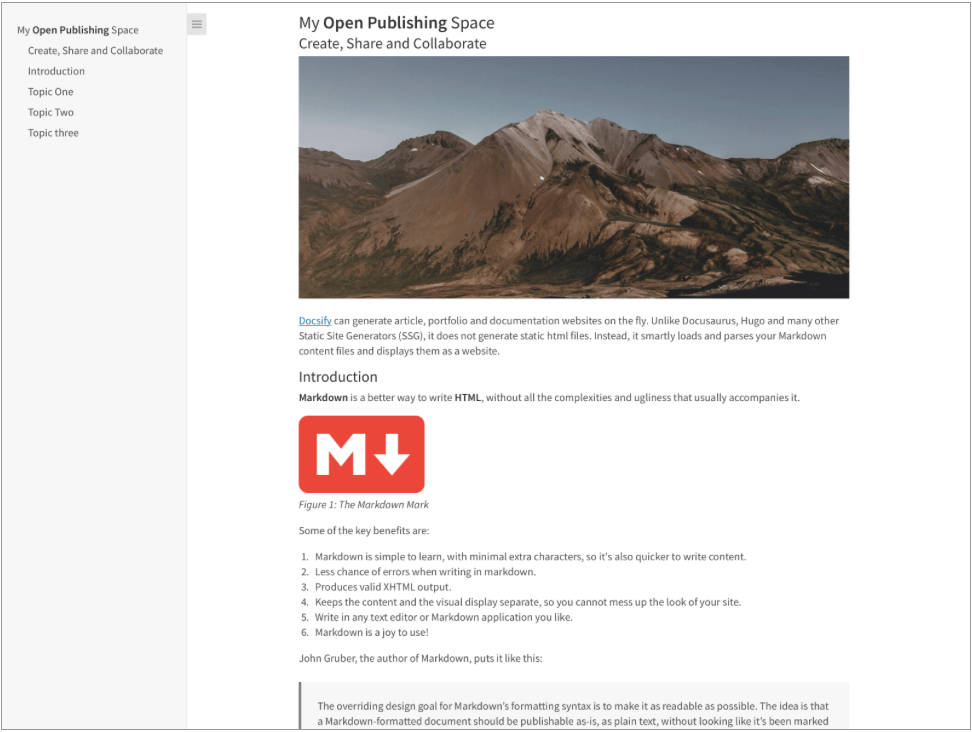
مقال واحد مقال home.md ملف عرضه docsify-this على أنه:
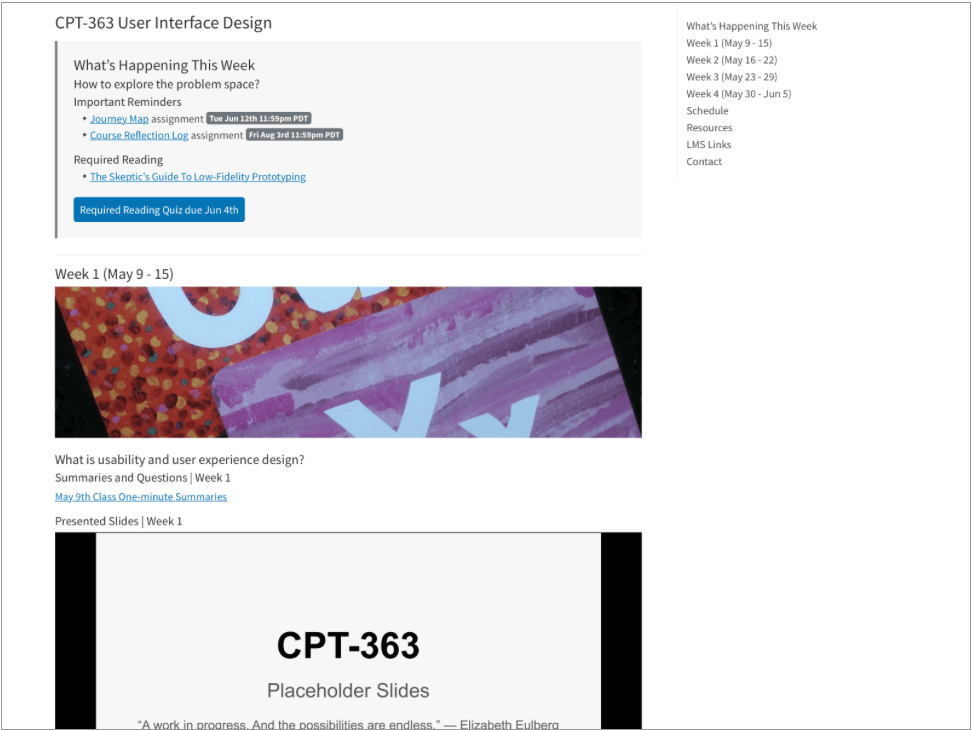
صفحة واحدة دورة الصفحة الرئيسية.
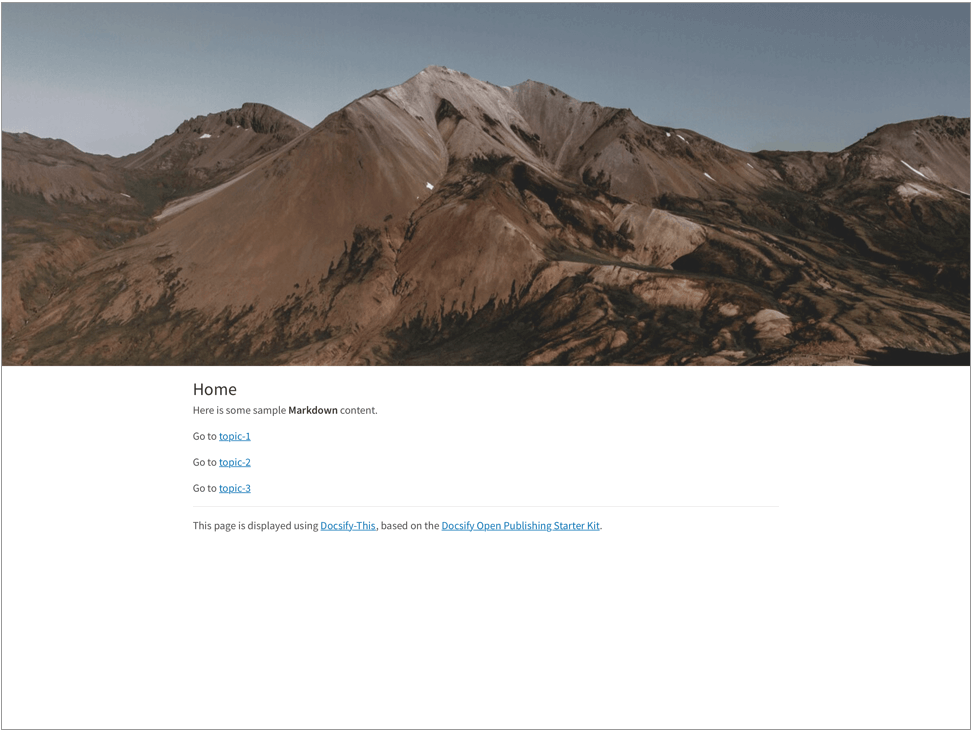
ملف Home.md متعدد صفحة الصفحة ، بما في ذلك استخدام عرض الفئة CSS Markdown header-image-full-width ، معروضة بواسطة Docsify-this على النحو التالي:
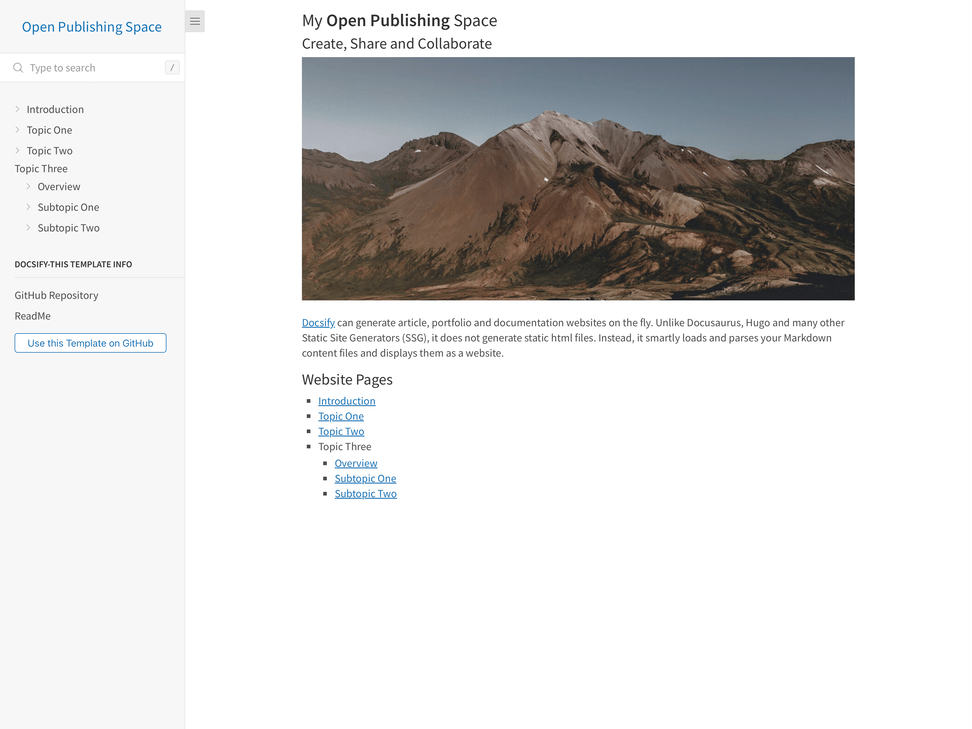
صفحة متعددة مفتوحة للنشر.
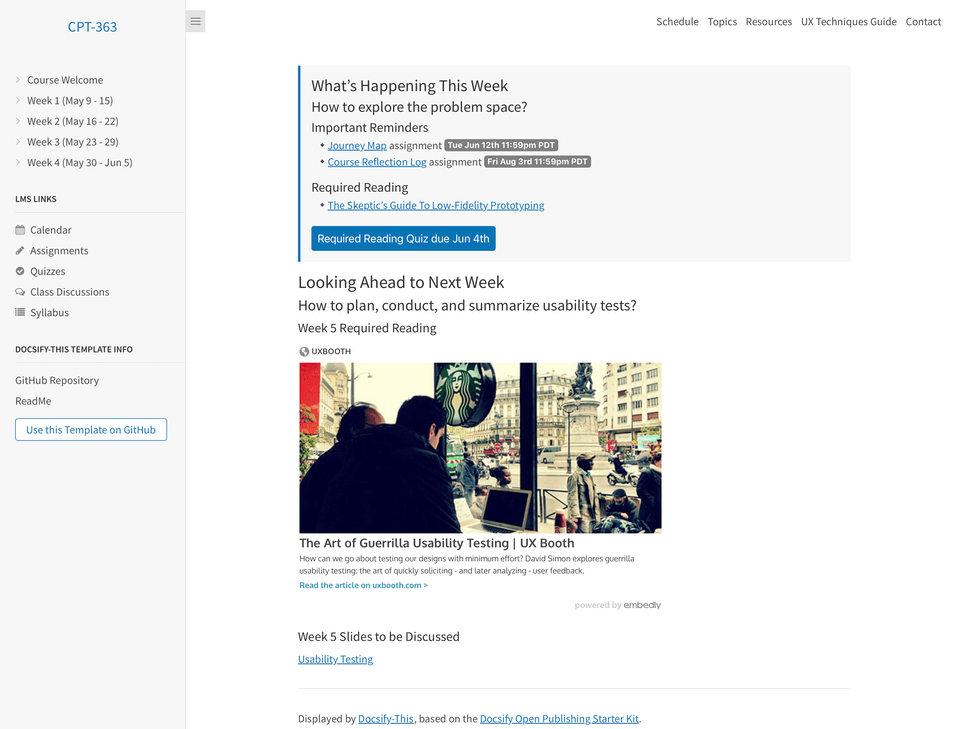
ملف Site Site Site.MD متعدد الصفحات ، بما في ذلك استخدام ملف الشريط الجانبي المخصص Docsify وملف NavBar المخصص ، الذي يتم عرضه بواسطة Docsify-this على النحو التالي:
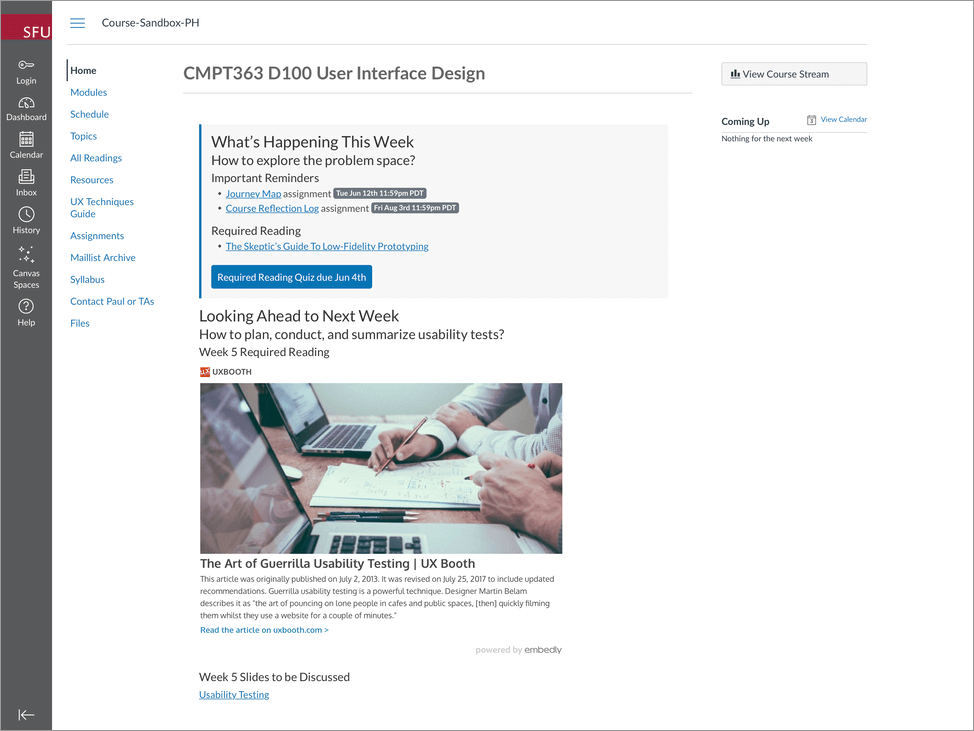
مثال ، على سبيل المثال ، بما في ذلك استخدام font-family ، معلمات عنوان URL font-size hide-credits لتضمين محتوى سلس ضمن LMS Canvas ، كما هو معروض بواسطة Docsify-this:
عرض مثال موقع Canvas LMS باستخدام محتوى Docsify-this على https://canvas.sfu.ca/courses/76692.
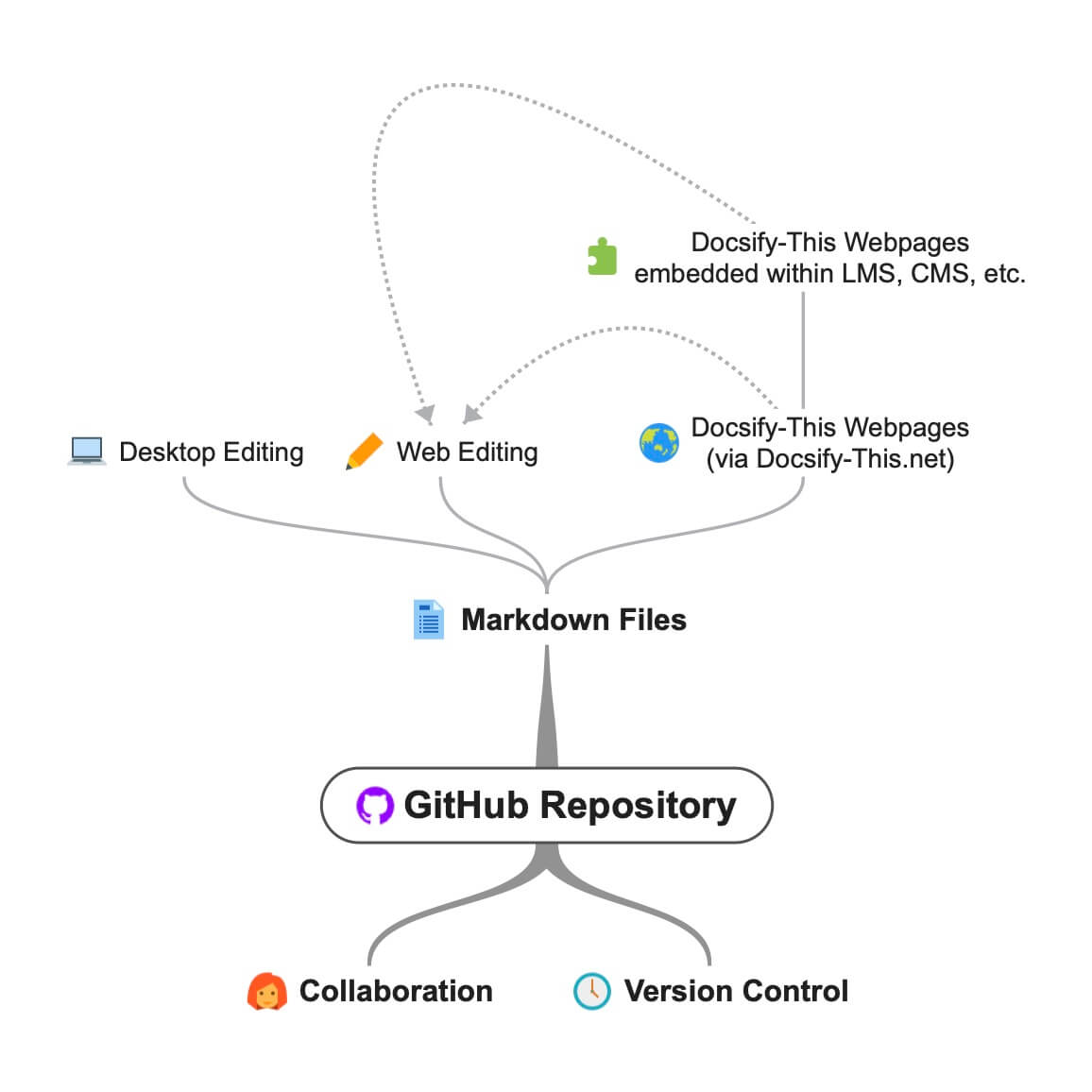
docsify-this.net سير العمل المفتوح والتعاون باستخدام ملفات GitHub Markdown.
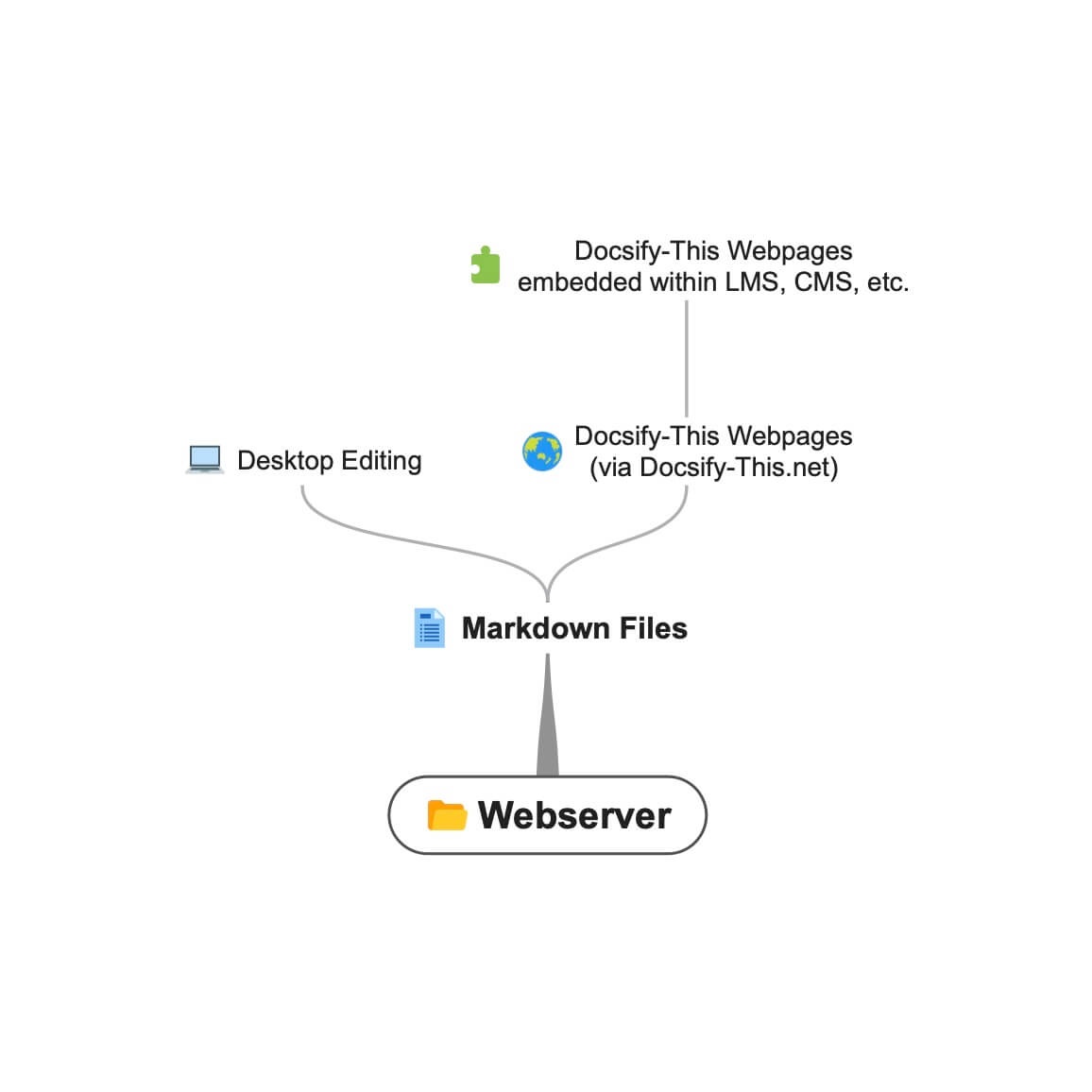 Docsify-this.net سير عمل باستخدام ملفات تخفيض ويب.
عند استخدام Docsify-this لعرض ملفات Markdown الموجودة على الخدمات المستندة إلى Git مثل Github أو CodeBerg ، يمكنك تنزيل (استنساخ) ملفات على سطح المكتب للتحرير المحلي ثم تحميل (Push) إلى الملفات عبر الإنترنت.
على سبيل المثال ، لتحرير ملفات GitHub Markdown على سطح المكتب الخاص بك ، ستفعل ما يلي:
تعرف على المزيد حول البدء مع سطح المكتب Github.
تتوفر فئات CSS التالية عند تأليف محتوى Markdown الخاص بك.
 < div class =" accordion " >

< details >
  < summary > Topic One </ summary >

  Topic one details here.

</ details >

< details >
  < summary > Topic Two </ summary >

  Topic two details here.

</ details >

</ div > < span class =' badge ' > Tue Jun 12th 11:59pm PDT </ span > < span class =' badge ' style =' --badge-bg-color: #0164db; ' > Tue Jun 12th 11:59pm PDT </ span > < span class =' badge ' style =' --badge-bg-color: #e7c500; --badge-text-color: #000; ' > Tue Jun 12th 11:59pm PDT </ span > < span class =' badge ' > [Tue May 16 2:30pm PT](https://www.timeanddate.com/worldclock/fixedtime.html?msg=CMPT-363+Blackboard+Mini-lectures+and+Activities&iso=20220516T1430&p1=256&ah=1&am=50) </ span > تم اقتصاصه إلى ارتفاع 250 بكسل على شاشات كبيرة ، 125 بكسل على شاشات صغيرة.
![ UX - User Experience ] ( images/12650723674_d5c85af332_k.jpg ' :class=banner-image ') تم اقتصاصه إلى ارتفاع 350 بكسل على شاشات كبيرة ، 175 بكسل على شاشات صغيرة.
![ UX - User Experience ] ( images/12650723674_d5c85af332_k.jpg ' :class=banner-tall-image ') [ Required Reading Quiz due Jun 4th ] ( https://canvas.sfu.ca/courses/44038/quizzes/166553 ' :class=button ') [ : fa fa-download fa-fw : Download ] ( https://creativecommons.org/wp-content/uploads/2019/02/ccheart_black.svg_.zip ' :class=button ') < a class =" button " href =" https://creativecommons.org/wp-content/uploads/2019/02/ccheart_black.svg_.zip " target =" _blank " > < i class =" fa fa-download fa-fw " > </ i > Download </ a > [ Required Reading Quiz due Jun 4th ] ( https://canvas.sfu.ca/courses/44038/quizzes/166553 ' :class=button-rounded ') [ : fa fa-download fa-fw : Download ] ( https://creativecommons.org/wp-content/uploads/2019/02/ccheart_black.svg_.zip ' :class=button-rounded ') < a class =" button-rounded " href =" https://creativecommons.org/wp-content/uploads/2019/02/ccheart_black.svg_.zip " target =" _blank " > < i class =" fa fa-download fa-fw " > </ i > Download </ a > [ Required Reading Quiz due Jun 4th ] ( https://canvas.sfu.ca/courses/44038/quizzes/166553 ' :class=button-secondary ') [ : fa fa-download fa-fw : Download ] ( https://creativecommons.org/wp-content/uploads/2019/02/ccheart_black.svg_.zip ' :class=button ') < a class =" button-secondary " href =" https://creativecommons.org/wp-content/uploads/2019/02/ccheart_black.svg_.zip " target =" _blank " > < i class =" fa fa-download fa-fw " > </ i > Download </ a > [ Required Reading Quiz due Jun 4th ] ( https://canvas.sfu.ca/courses/44038/quizzes/166553 ' :class=button-secondary-rounded ') [ : fa fa-download fa-fw : Download ] ( https://creativecommons.org/wp-content/uploads/2019/02/ccheart_black.svg_.zip ' :class=button-secondary-rounded ') < a class =" button-secondary-rounded " href =" https://creativecommons.org/wp-content/uploads/2019/02/ccheart_black.svg_.zip " target =" _blank " > < i class =" fa fa-download fa-fw " > </ i > Download </ a > لمعاينات المقالة المرتبطة ، الشرائح/مقاطع الفيديو المدمجة ، إلخ.
< a class =" embedly-card " data-card-controls =" 0 " data-card-align =" left " href =" https://blog.prototypr.io/defining-usability-e7bf42e8abd0 " > Defining usability </ a > عرض مقترح من 1200 بكسل إلى 2000 بكسل.
![ Photo of Mountain ] ( images/mountain.jpg ' :class=header-image-fade ') العرض المقترح من 1200 بكسل إلى 2000 بكسل ، وعرض جدول المحتويات غير متوفر.
![ Photo of Mountain ] ( images/mountain.jpg ' :class=header-image-fade-full-width ') حجم مقترح من 1200 بكسل إلى 2000 بكسل و 400 بكسل إلى 600 بكسل ، وعرض جدول المحتويات غير متوفر.
![ Photo of Mountain ] ( images/mountain.jpg ' :class=header-image ') مقياس الصور إلى ٪.
![ Photo of Mountain ] ( images/mountain.jpg ' :class=image-75 ') مقياس الصور مع الحدود إلى ٪.
![ Photo of Mountain ] ( images/mountain.jpg ' :class=image-75-border ') ![ Photo of Mountain ] ( images/mountain.jpg ' :class=image-border ') ![ Photo of Mountain ] ( images/mountain.jpg ' :class=image-border-rounded ') [ GitHub ] ( https://github.com/hibbitts-design/docsify-this ' :class=navpill ') [ : fab fa-github fa-fw : GitHub ] ( https://github.com/hibbitts-design/docsify-this ' :class=navpill ') < a class =" navpill " href =" https://github.com " target =" _blank " > < i class =" fab fa-github fa-fw " > </ i > GitHub </ a > اصنع صور HTML الخام التي تشمل أبعاد الحجم استجابة.
< img src =" https://raw.githubusercontent.com/hibbitts-design/publishing-with-docsify-this/main/images/docsify-this-web-page-builder.jpg " width =" 910 " height =" 682 " class =" responsive image-border " alt =" Docsify-This Web Page Builder " > < div class =" row " >
< div class =" column " >
Lorem ipsum dolor sit amet, consectetur adipiscing elit.
</ div >
< div class =" column " >
Lorem ipsum dolor sit amet, consectetur adipiscing elit.
</ div >
</ div > < div class =" row reverse-columns " >
< div class =" column " >
Lorem ipsum dolor sit amet, consectetur adipiscing elit.
</ div >
< div class =" column " >
Lorem ipsum dolor sit amet, consectetur adipiscing elit.
</ div >
</ div > < div class =" row " >
< div class =" column " >
Lorem ipsum dolor sit amet, consectetur adipiscing elit.
</ div >
< div class =" column-right " >
Lorem ipsum dolor sit amet, consectetur adipiscing elit.
</ div >
</ div > < div class =" video-container-4by3 " > < div class =" video-container-16by9 " > < iframe width =" 560 " height =" 315 " src =" https://www.youtube.com/embed/lJIrF4YjHfQ " > </ iframe > </ div > تمت إضافته تلقائيًا إلى جميع المعايير مع المجالات المصدر "YouTube.com" أو "docs.google.com".
< div class =" video-container-16by9 " > < iframe width =" 560 " height =" 315 " src =" https://www.youtube.com/embed/lJIrF4YjHfQ " > </ iframe > </ div > بالإضافة إلى فئات CSS Markdown التي تدعمها Docsify-This ، يمكنك أيضًا تحديد الفصول المخصصة الخاصة بك ضمن ملفات Markdown المعروضة ، على سبيل المثال:
CSS في ملف Markdown:
<style >
. markdown-section . mybutton , . markdown-section . mybutton : hover {
  cursor : pointer;
  color : # CC0000 ;
  height : auto;
  display : inline-block;
  border : 2 px solid # CC0000 ;
  border-radius : 4 rem ;
  margin : 2 px 0 px 2 px 0 px ;
  padding : 8 px 18 px 8 px 18 px ;
  line-height : 1.2 rem ;
  background-color : white;
  font-family : -apple-system , "Segoe UI" , "Helvetica Neue" , sans-serif;
  font-weight : bold;
  text-decoration : none;
}
< / style >
تخفيض السعر:
[ Required Reading Quiz due Jun 4th ] ( https://canvas.sfu.ca/courses/44038/quizzes/166553 ' :class=mybutton ') تم تصميم Docsify-this لعرض ملفات Markdown المستضافة عن بُعد بسرعة أو أكثر. لمزيد من التخصيص لتقديم الملفات ولضمان توافر ثابت ، حتى لو لم يعد مستندات المستندات العامة-لم يعد متاحًا ، فيمكنك استضافة مثيلك الخاص من Docsify-this.
To host your own instance on GitHub Pages, which also supports the option of a custom domain, fork or clone the Docsify-This repository to your GitHub account. Then, enable GitHub Pages using the /docs folder.
You can also have an instance of Docsify-This run on Codeberg such as https://docsify-this.codeberg.page by creating a new repository called pages , then choosing paulhibbitts/docsify-this-app in the template dropdown menu, choosing the Git Content (Default Branch) option and then tapping the Create Repository button.
Alternatively, you can upload the files in the Docsify-This /docs folder into a newly created Codeberg repository and then manually enable Codeberg Pages. An example Docsify-This instance running on Codeberg is available at https://codeberg.org/paulhibbitts/docsify-this-app, which uses a Branch renamed to pages .
If you want to run Docsify-This on your own Websever, create a destination folder on your server and then copy the files within the Docsify-This folder /docs to your newly created server folder. You could also use this docs folder as a custom domain root.
A more future-friendly setup would be to fork the Docsify-This repository (to support getting upstream updates) and use a GitHub Action such as FTP-Deploy to deploy all changed repository files to a webserver.
You can limit the domains which remote files can be rendered from by locating the line var allowedDomains = ''; within the index.html file and include your list of allowed domains separated by commas, for example var allowedDomains = 'codeberg.org,raw.githubusercontent.com,hibbittsdesign.org'; .
If you want to further customize and control the presentation of your Markdown content, especially when rendering multiple page sites, you can install your own Docsify Open Publishing Starter Kit (that this hosted web app is based on) and store all Markdown files within that site. You can learn more about the capabilities of Docsify itself at Docsify.js.org.
Looking for some help with getting a Docsify custom-This instance up and running for your organization? Paul provides a range of professional services related to Docsify-This - contact him to learn more.
The display of Font Awesome Free icons within Markdown content is supported with the following format:
: fas fa-home fa-fw :
The above Markdown is equivalent to the HTML markup <i class="fas fa-home fa-fw" aria-hidden="true"></i> .
When using the above shortcode for Font Awesome icons, it is assumed to be for decorative purposes, and so for improved accessibility an aria-hidden="true" attribute is automatically added to the icon. For semantic purposes, it is recommended you refer to the Font Awesome Icons and Accessibility guidelines.
The following style prefixes are available with Docsify-This:
GitHub Training Manual Working Locally with Git Markdown file, displayed by Docsify-This as a:
Easy Markdown to Github Pages linked set of Markdown files, displayed by Docsify-This as:
A Collection of GitHub Markdown files used as course content within an SFU CMPT-363 Canvas LMS site.
A Collection of GitHub Markdown files with inline CSS used as a multiple page SFU CMPT-363 course site with SFU visual branding and the Docsify Search plugin enabled, multiple page SFU CMPT-363 course site with SFU visual branding and website logo, and an example single Markdown file with default visual styling for embeddeding.
GitHub Markdown Content Demo file, displayed by Docsify-This as a Web Page with 'Edit this Page' link using the new GitHub.dev web editor (currently in Beta).
GitHub Markdown Content Demo file, displayed by Docsify-This as a Web Page with 'View raw Markdown' link.
Codeberg Markdown Content Demo file, displayed by Docsify-This as a Web Page with 'View raw Markdown' link.
GitHub's LaTeX Support Examples Markdown file, displayed by Docsify-This as a Web Page with an 'Edit this Page' link.
Mermaid-Docsify Example GitHub Markdown file, displayed by Docsify-This as a Web Page with an 'Edit this Page' link.
Docsify-This Multi-language Site Template, displayed by Docsify-This as a:
Docsify-This Simple Visual Portfolio Template (based on Notion Portfolio Template), displayed by Docsify-This as a:
Docsify-This Visual Portfolio Template (based on Notion Portfolio Template), displayed by Docsify-This as a:
A simple Markdown Student Portfolio Starter Template (based on Markdown Student Portfolio Template by Justin Thoreson) which is viewable on both GitHub and with Docsify-This.net, displayed by Docsify-This as:
Introduction to Docsify–This
Introductory, beginner to intermediate.
An introduction of Markdown publishing using the open source project Docsify–This.
Self-Publishing with Docsify–This
Intermediate, with a mix of basic and advanced aspects.
An overview to self-publishing with Markdown using the open source project Docsify–This, with a focus on digital literacy.
Use a page inspector to identify the font family and font size used in the platform you are embedding Docsify-This content in, and then pass that font family using the font-family (encoded, where spaces are replaced with '%20') and font-size (REM units) URL parameters to Docsify-This. For example, to match fonts with the Canvas LMS:
https://docsify-this.net?basePath=https://raw.githubusercontent.com/paulhibbitts/cmpt-363-222-pages/main&homepage=topics.md&font-family=Lato%20Extended,Lato,Helvetica%20Neue,Helvetica,Arial,sans-serif&font-size=1
If you want to include a Page Table of Contents with embedded Docsify-This content, but the destination platform screen area is not very wide, you might want to try the optional toc-narrow display option. For example, to use a narrower Table of Contents area that includes a smaller screen breakpoint: https://docsify-this.net?basePath=https://raw.githubusercontent.com/paulhibbitts/cmpt-363/main/docs/222&homepage=week-01.md&toc-narrow=true
Using Prismjs code blocks with syntax highlighting is supported for the languages included with Docsify and as well Bash, Go, Java, Kotlin, PHP, Python and Swift. To embed a code block use the Markdown standard of triple backticks and start the block with the name of the language, for example to embed a block of Javascript code with syntax highlight the following would be used:
 ```javascript
function test() {
  console.log("Hello world!");
}
`` `
Which would then appear as:
 function test ( ) {
  console . log ( "Hello world!" ) ;
} The content of external Markdown files can be embedded into Docisfy-This web pages with the following:
[ included Markdown from same source location ] ( example.md ' :include ') [ included Markdown from URL ] ( https://raw.githubusercontent.com/paulhibbitts/Markdown-File-Tests/main/itworks.md ' :include ')For additional examples of including external content, view Docsify Embeded Files.
WikiLinks format for links and images are supported, as also found in the desktop editor Obsidian and other platforms.
The display of AsciiDoc files ('.adoc' extension) via DownDoc is possible by manually passing the relevant filenames within a Docsify-This URL (not available in the Docisfy-This.net Web Page Builder), for example: https://docsify-this.net/?basePath=https://raw.githubusercontent.com/asciidoctor/asciidoctor-pdf/main/examples&homepage=basic-example.adoc&edit-link=https://github.com/asciidoctor/asciidoctor-pdf/blob/main/examples/basic-example.adoc
You can support the display of AsciiDoc files in the Web Page Builder of your own instance of Docsify-This by locating the function getAllowedFileExtensions() within the index.html file and add the file extension '.adoc' to the return statement, for example return ".md,.adoc"; .
The display of HedgeDoc files containing basic Markdown (as well as Mermaid and MathJax elements) is possible by manually using 'download' for the homepage URL parameter within a Docsify-This URL (not available in the Docisfy-This.net Web Page Builder), for example: https://docsify-this.net/?basePath=https://demo.hedgedoc.org/crN3ispNQdejWkUXXIXYQA&homepage=download
Here is an additional example, using the HedgeDoc file https://demo.hedgedoc.org/oisWMy9ZS36PE6TvYhJC4A?both (seen in split-screen view) and and rendered as a web page by Docsify-This https://docsify-this.net/?basePath=https://demo.hedgedoc.org&homepage=oisWMy9ZS36PE6TvYhJC4A/download&edit-link=https://demo.hedgedoc.org/oisWMy9ZS36PE6TvYhJC4A?both&toc=true&edit-link-text=Edit%20this%20Page%20in%20HedgeDoc
You can support HedgeDoc URLs (eg https://demo.hedgedoc.org/ip4SRxZYTEKa6JHr62XTiA) in the Web Page Builder of your own instance of Docsify-This by locating the line var hedgedocInstances = ''; within the index.html file and include your HedgeDoc instances separated by commas, for example var hedgedocInstances = 'demo.hedgedoc.org'; . Try out a demo instance of Docsify-This with support for demo.hedgedoc.org files at https://hibbitts-design.github.io/hedgedoc-docsify-this.
You can use camel case instead of hyphens for the names of Docsify-This URL parameters if prefered. على سبيل المثال، https://docsify-this.net?basePath=https://raw.githubusercontent.com/hibbitts-design/docsify-this-one-page-article/main&homepage= home.md&toc=true&toc-headings=h2,h3&edit-link=https://github.com/hibbitts-design/docsify-this-one-page-article/blob/main/home.md و https://docsify-this.net?basePath=https://raw.githubusercontent.com/hibbitts-design/docsify-this-one-page-article/main&homepage =home.md&toc=true&tocHeadings=h2,h3&editLink=https://github.com/hibbitts-design/docsify-this-one-page-article/blob/main/home.md are equilivent.
To use the new GitHub.dev web editor (currently in Beta) for 'Edit this Page' links, change github.com to github.dev for GitHub.com files entered into the Web Page Builder Markdown File URL field.
There are multiple ways to get a raw Markdown file available online, here are three options to help you get started:
GitHub or Codeberg:
Gist (GitHub Gists):
.md (eg myfile.md )Personal or Organizational Website:
Some text editors, such as Microsoft Visual Studio (including the online GitHub.dev web editor), have the ability to link your own CSS so Markdown previews are more visually accurate. If your editor supports this ability, the below CSS files can be used.
Docsify-This (based on the Docsify Open Publishing Starter Kit) CSS:
https://docsify-this.net/assets/css/editor.css
FontAwesome CSS:
https://cdnjs.cloudflare.com/ajax/libs/font-awesome/4.7.0/css/font-awesome.css
Enhanced Previews with Microsoft Visual Studio
For an even closer visual representation of your Docsify-This pages in Microsoft Visual Studio, do the following:
docs folderTIP: If you change the VSCode setting for Workbench › Editor: Show Tabs to single then the docsify preview area will remain in place as you edit multiple Markdown files.
You can load custom default settings in the Docsify-This Web Page Builder using URL parameters. This ability is especially helpful for Docsify-This online sessions, workshops, or when users collaborate and assist one another. Along with the standard Docsify-This URL parameters, the Web Page Builder also offers the following specific parameters:
https://docsify-this.net/?url-field=https://codeberg.org/paulhibbitts/docsify-this-one-page-course/src/branch/main/home.mdhttps://docsify-this.net/?url-field=empty You can even just type docsify-this.net? in front of an online Markdown file URL that you are viewing (such as files hosted on GitHub, Codeberg, or raw source files) to instantly set up the Docsify-This Web Page Builder with that file. Once the Web Page Builder loads, press the Return key — no need to leave the keyboard — to see Docsify-This display the Markdown file as a web page! For example, https://docsify-this.net?https://github.com/hibbitts-design/docsify-this-one-page-course/blob/main/home.md .
https://docsify-this.net/?url-field=https://codeberg.org/paulhibbitts/docsify-this-one-page-course/src/branch/main/home.md&edit-link-checkbox=truehttps://docsify-this.net/?show-page-options=truehttps://docsify-this.net/?advanced=true For example, the following URL will display the Advanced Web Page Builder, with the Markdown file URL set to https://github.com/hibbitts-design/docsify-this-multiple-page-course-site/blob/main/home.md , the site name 'CPT-363' along with a Docsify custom Sidebar and Navbar to be included: https://docsify-this.net/?url-field=https://github.com/hibbitts-design/docsify-this-multiple-page-course-site/blob/main/home.md&sidebar=true&loadSidebar=true&loadNavbar=true&name=CPT-363
The quickest way to create such a shareable URL is to use the Docsify-This Web Page Builder to generate a Docisfy-This web page URL, and then replace the URL parameter basepath with url-field using the full path of the source Markdown file URL. For example, the URL https://docsify-this.net/?basePath=https://raw.githubusercontent.com/hibbitts-design/docsify-this-one-page-article/main&homepage=home.md&sidebar=true&maxLevel=3 would be changed to https://docsify-this.net/?url-field=https://github.com/hibbitts-design/docsify-this-one-page-article/blob/main/home.md&homepage=home.md&sidebar=true&maxLevel=3.
The provided basePath parameter and/or optional homepage parameter may not be correct, verify that these items lead to accessible content. This error message may also result from a Cross-Origin Resource Sharing (CORS) policy, which restricts resources on a web page to be requested from another domain. If possible, relocate files to a domain that supports cross-origin requests or alternatively if the domain in question is under your control explore re-configuring CORS related settings. You can confirm the cause of the 404 message by viewing the errors displayed in the Browser Javascript Console.
When displaying GitHub Markdown files, the branch name is assumed to be main , and other paths will likely cause a 404 file not found message. When displaying Codeberg Markdown files, the path is assumed to contain /src/branch/main and other paths will likely cause a 404 file not found message.
Due to not being able to update Navbar or custom Sidebar links before page rendering, 'Edit this Page' links cannot be automatically updated to their correct target pages. Manually pass a URL pointing to the Git Repository using the URL parameter edit-link as a workaround, for example https://docsify-this.net?basePath=https://raw.githubusercontent.com/hibbitts-design/docsify-this-multiple-page-site/main&homepage=home .md&loadNavbar=_navbar&edit-link=https://github.com/hibbitts-design/docsify-this-multiple-page-site&edit-link-text=GitHub%20Repository و https://docsify-this.net/?basePath=https://raw.githubusercontent.com/paulhibbitts/docsify-this-cmpt-363-222-site/main&homepage=home.md&loadNavbar=_navbar.m d&sidebar=true&loadSidebar=_sidebar.md&edit-link=https://github.com/paulhibbitts/docsify-this-cmpt-363-222-site/tree/main&edit-link-text=GitHub%20Repository
Docsify is likely displaying the last cached version. To ensure the most recent version of a file is loaded, do a hard refresh of your Browser cache.
The most likely cause for embedded images in Markdown not being displayed as expected is the use of relative paths (ie  ) - review image paths and ensure the full path to each image is used (ie  ). Likewise, if images in HTML are not being displayed as expected the likely cause is again the use of relative paths (ie <img src="images/filename.jpg" alt="Alt Text"> ) - use absolute URLs for HTML image sources (ie <img src="https://raw.githubusercontent.com/user/repository/main/images/filename.jpg" alt="Alt Text"> ).
Due to iframe cross-domain issues embedded content may not be able to be displayed. Use the included rich media embed service embed.ly as a workaround.
For example, the following iFrame HTML:
< iframe src =" https://docs.google.com/presentation/d/e/2PACX-1vRnnRFelgw1ksq_p8Eryg3dnyLCRRLPf5fBgdwdv9p-tCIwcxqWvzDGrGbjxGHL7HqEJVpmV26ntk3a/embed?start=false&loop=false&delayms=3000 " frameborder =" 0 " width = 780 " height="585" allowfullscreen="true" mozallowfullscreen="true" webkitallowfullscreen="true" > </ iframe >Would be changed to:
< a class =" embedly-card " data-card-controls =" 0 " data-card-align =" left " data-card-width =" 100% " href =" https://docs.google.com/presentation/d/1BLaaOTsGxDmNcAhg6pdx3hl9IvI8NErg8Oe5ceh83fw/edit?usp=sharing " > Grav and Docsify Slides Placeholder </ a > When displaying a Docsify Sidebar or custom Sidebar, it is expected that page header levels start with a H1 level header.
When the search field is enabled in a Docsify custom Sidebar, only pages listed and linked in the Sidebar will be indexed for the search. Any pages linked in an optional Navbar will not be included in searches.
Docsify-This (as with Docsify itself) will only execute the first script included in a Markdown page, as described in the Docsify documentation.
Have you tried out Docsify-This? Share your feedback about Docsify-This
By leveraging his extensive UX design expertise and systems-oriented approach, Paul helps teams and individuals utilize open content in a range of education and publication settings, especially in connection with his Markdown-based Docsify and Grav CMS open-source projects. Professional services include user experience and workflow consulting, premium support subscriptions, workshops, and custom development. Sound of interest? Send a note to [email protected].
This open source project is by Paul Hibbitts of HibbittsDesign.org.
??♂️Special Thanks
Beau Shaw for his Remote Docsify example.
Alan Levine for the inspiration of a consolidated ReadMe collection.







