pynotif
1.0.0

API Python lain untuk mengakses libnotify , bersama dengan pemberitahuan dukungan suara (dengan vlc Backend) .
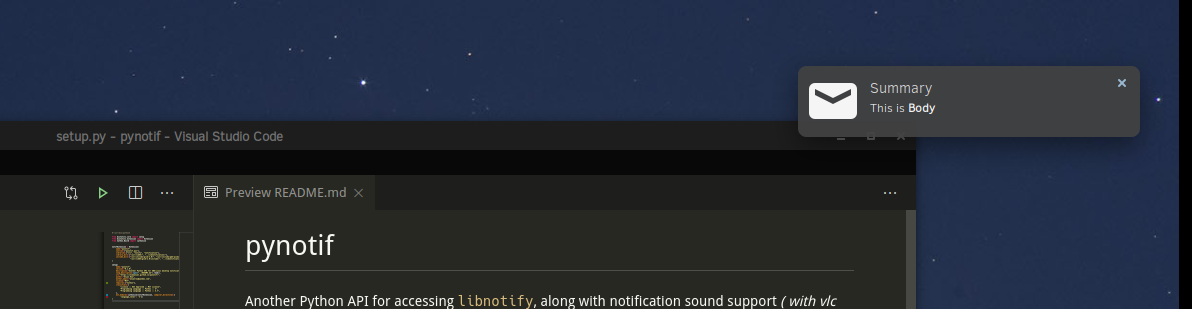
PERHATIAN: Anda harus melalui prodecure instalasi yang ketat, yang mungkin bukan pilihan yang lebih disukai. Tapi itu cukup terjamin, Anda akan belajar sesuatu yang baru.
Saya akan menunjukkan prosedur instalasi di Solus Linux .
gcc , glibc , glibc-devel . Saya akan menggunakan gcc 9.3.0 . $ sudo eopkg it gcc, glibc, glibc-devel
$ gcc --version # check versionCython , kami juga akan menginstal pip . Saya menggunakan Python3.7.6 . $ sudo eopkg it python3, python3-devel, pip
$ python3 --version
$ python3 -m pip install --user Cythonlibnotify , libnotify-devel , yang akan memberi kita antarmuka terprogram untuk berbicara dengan libnotify dari c-library kita. $ sudo eopkg it libnotify libnotify-devel$ notify-send " Summary " " Body of Notification "vlc , yang akan digunakan untuk bermain suara pemberitahuan, mungkin bermanfaat untuk memperingatkan pengguna. $ sudo eopkg it vlc vlc-develMari kita pergi ke lokasi yang nyaman dalam hierarki direktori mesin Anda, di mana Anda dapat mengkloning repo ini & mulai bekerja.
$ git clone https://github.com/itzmeanjan/pynotif.git Masuk ke direktori pynotif dan periksa konten direktori.
$ cd pynotif
$ tree -h
.
├── [4.0K]  libnotification
│   ├── [2.4K]  play_sound.c
│   ├── [  45]  play_sound.h
│   ├── [2.4K]  send_notification.c
│   └── [ 235]  send_notification.h
├── [1.0K]  LICENSE
├── [4.0K]  pynotif
│   ├── [1.5K]  pynotif.pyx
│   └── [1.1K]  setup.py
├── [7.0K]  README.md
├── [4.0K]  sound
│   ├── [ 30K]  button_sound.wav
│   └── [ 29K]  when.mp3
└── [4.0K]  ss
    └── [ 71K]  screenshot.png

4 directories, 11 files
Pertama kita akan ke libnotification , yang akan dikompilasi menjadi c-library statis. Nama file cukup jelas, untuk tujuan apa yang mereka layani.
$ cd libnotification
$ ls
play_sound.c  play_sound.h  send_notification.c  send_notification.h
Saatnya mengkompilasi masing -masing file C ini dan menghasilkan kode objek.
$ gcc -c play_sound.c
$ gcc -I /usr/include/glib-2.0/ -I /usr/include/gdk-pixbuf-2.0/ -I /usr/lib64/glib-2.0/include/ -c send_notification.c
Sekarang kita perlu mengarsipkan file objek ini ke dalam pustaka statis, yang akan dipanggil dari kode Cython (*.pyx file) .
$ ar rcs libnotification.a play_sound.o send_notification.oKarena kami telah memperoleh pustaka statis, kode objek yang dikompilasi dapat dihapus sekarang. Anda dapat mempertimbangkan untuk memeriksa jenis perpustakaan statis yang dihasilkan.
$ rm * .o
$ file libnotification.a
libnotification.a: current ar archive
Sekarang kita akan masuk ke direktori pynotif , yang memegang kode Cython, diperlukan untuk berbicara dengan c-library, libnotification.a .
$ cd ../pynotif
$ ls
pynotif.pyx  setup.py
pynotif.pyx memegang kode cython untuk berinteraksi dengan libnotification.a , yang akan dikompilasi ke dalam kode C yang setara (menggunakan cython compiler) . Kemudian kami akan membangun perpustakaan ekstensi C (perpustakaan yang ditautkan secara dinamis) , yang dapat dipanggil dari Python.
$ python3 setup.py build_ext --inplace
Compiling pynotif.pyx because it changed.
[1/1] Cythonizing pynotif.pyx
running build_ext
building ' pynotif ' extension
creating build
creating build/temp.linux-x86_64-3.7
x86_64-solus-linux-gcc -pthread -Wno-unused-result -Wsign-compare -DNDEBUG -g -fwrapv -O3 -Wall -mtune=generic -march=x86-64 -g2 -pipe -fPIC -Wformat -Wformat-security -D_FORTIFY_SOURCE=2 -fstack-protector-strong --param ssp-buffer-size=32 -fasynchronous-unwind-tables -ftree-vectorize -feliminate-unused-debug-types -Wall -Wno-error -Wp,-D_REENTRANT -fno-semantic-interposition -O3 -falign-functions=32 -I/usr/include -mtune=generic -march=x86-64 -g2 -pipe -fPIC -Wformat -Wformat-security -D_FORTIFY_SOURCE=2 -fstack-protector-strong --param ssp-buffer-size=32 -fasynchronous-unwind-tables -ftree-vectorize -feliminate-unused-debug-types -Wall -Wno-error -Wp,-D_REENTRANT -fno-semantic-interposition -O3 -falign-functions=32 -fPIC -I/usr/include/glib-2.0/ -I/usr/include/gdk-pixbuf-2.0/ -I/usr/lib64/glib-2.0/include/ -I../libnotification/ -I/usr/include/python3.7m -c pynotif.c -o build/temp.linux-x86_64-3.7/pynotif.o
x86_64-solus-linux-gcc -pthread -shared -Wl,--copy-dt-needed-entries -Wl,-O1 -Wl,-z,relro -Wl,-z,now -Wl,-z,max-page-size=0x1000 -Wl,-Bsymbolic-functions -Wl,--sort-common -Wl,--copy-dt-needed-entries -Wl,-O1 -Wl,-z,relro -Wl,-z,now -Wl,-z,max-page-size=0x1000 -Wl,-Bsymbolic-functions -Wl,--sort-common build/temp.linux-x86_64-3.7/pynotif.o -L/usr/lib64/ -L../libnotification/ -L/usr/lib64 -lvlc -lnotify -lnotification -lpython3.7m -o /home/anjan/Documents/my_programs/still_working/open/pynotif/pynotif/pynotif.cpython-37m-x86_64-linux-gnu.so

$ tree -h
.
├── [4.0K]  build
│   └── [4.0K]  temp.linux-x86_64-3.7
│       └── [203K]  pynotif.o
├── [125K]  pynotif.c
├── [146K]  pynotif.cpython-37m-x86_64-linux-gnu.so
├── [1.5K]  pynotif.pyx
└── [1.1K]  setup.py

2 directories, 5 files
pynotif.*.so juga objek bersama kami yang terkait secara statis, yang menarik. ./build Directory & pynotif.c dapat dihapus. Tetapi Anda mungkin tertarik untuk melihat pynotif.c , yang dihasilkan kode C dari pynotif.pyx oleh Cython compiler.
$ rm build/ pynotif.c -rv
$ file pynotif.cpython- * .so # check it out
Sekarang Anda dapat menggunakan pynotif , tetapi hanya dari direktori yang berfungsi ini. Mari kita periksa dulu.
$ python3
>>> import pynotif
>>> pynotif.__version__
' 0.1.0 '
>>> pynotif.startNotif(b " My Application " )
1
>>> pynotif.sendNotif(b " Summary " , b " Body of Notification " , 2, 1, b " /path/to/icon/file " , b " /path/to/notification/sound/file " )
1
>> pynotif.stopNotif ()
>>> help ()
help > pynotif # shows you API documentation
...
Tapi kami ingin membuatnya tersedia untuk semua skrip yang diinstal pada mesin ini, bukan? Kemudian kami akan menginstal pustaka ini ke beberapa lokasi standar.
$ python3 setup.py install --user Sekarang pergi ke $HOME directory & invoke python3 rept prompt.
$ cd
$ python3
>> import pynotif # and it works as expected
Selamat, Anda telah berhasil membangun & menginstal pynotif dari C-Library. Sekarang gunakan sesuai keinginan Anda.
Berterima kasih





