tvision
1.0.0

Port modern Turbo Vision 2.0, kerangka kerja klasik untuk antarmuka pengguna berbasis teks. Sekarang lintas platform dan dengan dukungan unicode.
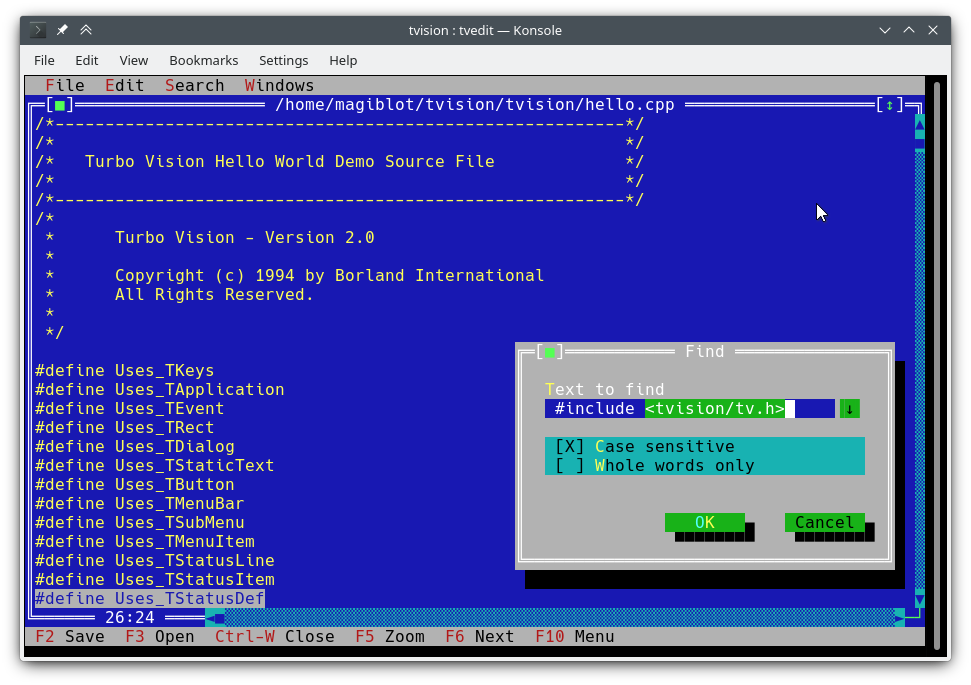
Saya memulai ini sebagai proyek pribadi pada akhir 2018. Pada Mei 2020 saya menganggap itu sangat dekat dengan paritas fitur dengan aslinya, dan memutuskan untuk membukanya.
Tujuan asli dari proyek ini adalah:
Pada satu titik saya mempertimbangkan saya telah melakukan cukup banyak, dan bahwa setiap upaya untuk memperbaiki perpustakaan dan mengatasi keterbatasan aslinya akan memerlukan memperluas API atau melanggar kompatibilitas ke belakang, dan bahwa penulisan ulang besar kemungkinan besar akan diperlukan.
Namun, antara Juli dan Agustus 2020 saya menemukan cara untuk mengintegrasikan dukungan unicode penuh ke dalam arsitektur yang ada, menulis Turbo Text Editor dan juga membuat fitur-fitur baru tersedia di Windows. Jadi saya yakin Turbo Vision sekarang dapat memenuhi banyak harapan pengguna dan pemrogram modern.
Lokasi asli dari proyek ini adalah https://github.com/magiblot/tvision.
Banyak yang telah berubah sejak Borland menciptakan Turbo Vision di awal 90 -an. Banyak alat GUI saat ini memisahkan spesifikasi penampilan dari spesifikasi perilaku, menggunakan bahasa yang lebih aman atau dinamis yang tidak segfault pada kesalahan, dan mendukung pemrograman paralel atau asinkron, atau keduanya.
Turbo Vision tidak unggul pada mereka, tetapi tentu saja mengatasi banyak masalah yang masih dihadapi oleh programmer saat ini saat menulis aplikasi terminal:
Lupakan kemampuan terminal dan terminal langsung I/O. Saat menulis aplikasi Turbo Vision, yang harus Anda pedulikan adalah apa yang Anda inginkan agar aplikasi Anda berperilaku dan terlihat - tidak perlu menambahkan solusi dalam kode Anda. Turbo Vision mencoba yang terbaik untuk menghasilkan hasil yang sama di semua lingkungan. Misalnya: Untuk mendapatkan warna latar belakang yang cerah pada konsol Linux, atribut Blink harus diatur. Turbo Vision melakukan ini untuk Anda.
Gunakan kembali apa yang telah dilakukan. Turbo Vision menyediakan banyak kelas widget (juga dikenal sebagai tampilan ), termasuk jendela yang dapat diatur ulang, tumpang tindih, menu pull-down, kotak dialog, tombol, bilah gulir, kotak input, kotak centang dan tombol radio. Anda dapat menggunakan dan memperluas ini; Tetapi bahkan jika Anda lebih suka membuat sendiri, Turbo Vision sudah menangani pengiriman acara, tampilan karakter unicode penuh, dll.: Anda tidak perlu membuang waktu menulis ulang semua itu.
Dapatkah Anda membayangkan menulis antarmuka berbasis teks yang berfungsi baik di Linux dan Windows (dan dengan demikian cross-platform) di luar kotak, tanpa #ifdef S? Turbo Vision memungkinkan ini. Pertama: Turbo Vision terus menggunakan array char alih-alih mengandalkan wchar_t atau TCHAR yang didefinisikan oleh implementasi dan bergantung pada platform. Kedua: Berkat dukungan UTF-8 di setlocale dalam versi terbaru dari RTL Microsoft, kode seperti berikut ini akan berfungsi sebagaimana dimaksud:
std::ifstream f ( "コンピュータ.txt " ); // On Windows, the RTL converts this to the system encoding on-the-fly. Anda dapat memulai dengan Turbo Vision untuk Panduan Pengguna C ++, dan lihat aplikasi sampel hello , tvdemo dan tvedit . Setelah Anda memahami dasar -dasarnya, saya sarankan Anda melihat Panduan Pemrograman Turbo Visi 2.0, yang, menurut pendapat saya, lebih intuitif dan lebih mudah dipahami, meskipun menggunakan Pascal. Pada saat itu Anda mungkin akan tertarik pada contoh palette , yang berisi deskripsi terperinci tentang bagaimana palet digunakan.
Jangan lupa untuk memeriksa fitur dan bagian perubahan API juga.
Proyek ini tidak memiliki rilis yang stabil untuk saat ini. Jika Anda seorang pengembang, cobalah untuk tetap berpegang pada komit terbaru dan laporkan masalah apa pun yang Anda temukan saat meningkatkan.
Jika Anda hanya ingin menguji aplikasi demo:
examples-dos32.zip : Eksekusi 32-bit yang dibangun dengan Borland C ++. Tidak ada dukungan Unicode.examples-x86.zip : Eksekusi 32-bit yang dibangun dengan MSVC. Windows Vista atau lebih baru diperlukan.examples-x64.zip : Eksekusi 64-bit yang dibangun dengan MSVC. X64 Windows Vista atau lebih baru diperlukan. Turbo Vision dapat dibangun sebagai perpustakaan statis dengan CMake dan GCC/Clang.
cmake . -B ./build -DCMAKE_BUILD_TYPE=Release && # Could also be 'Debug', 'MinSizeRel' or 'RelWithDebInfo'.
cmake --build ./build # or `cd ./build; make`
Versi CMake lebih tua dari 3,13 mungkin tidak mendukung opsi -B . Anda dapat mencoba yang berikut ini sebagai gantinya:
mkdir -p build ; cd build
cmake .. -DCMAKE_BUILD_TYPE=Release &&
cmake --build .
Di atas menghasilkan file -file berikut:
libtvision.a , yang merupakan perpustakaan Turbo Vision.hello , tvdemo , tvedit , tvdir , yang dibundel dengan Turbo Vision asli (meskipun beberapa dari mereka memiliki beberapa perbaikan).mmenu dan palette dari dukungan teknis Borland.tvhc , Turbo Vision membantu kompiler. Perpustakaan dan executable dapat ditemukan di ./build .
Persyaratan pembangunan adalah:
libncursesw (perhatikan 'W').libgpm untuk dukungan mouse pada konsol Linux (opsional). Jika distribusi Anda menyediakan paket devel terpisah (misalnya libncurses-dev , libgpm-dev dalam distro yang berbasis di Debian), instal juga.
Persyaratan runtime adalah:
xsel atau xclip untuk dukungan clipboard di lingkungan X11.wl-clipboard untuk dukungan clipboard di lingkungan Wayland. Baris perintah minimal yang diperlukan untuk membangun aplikasi Turbo Vision (misalnya hello.cpp dengan GCC) dari root proyek ini adalah:
g++ -std=c++14 -o hello hello.cpp ./build/libtvision.a -Iinclude -lncursesw -lgpmAnda mungkin juga membutuhkan:
-Iinclude/tvision Jika aplikasi Anda menggunakan turbo visi 1.x termasuk ( #include <tv.h> alih -alih #include <tvision/tv.h> ).
-Iinclude/tvision/compat/borland jika aplikasi Anda menyertakan header Borland ( dir.h , iostream.h , dll.).
Di gentoo (dan mungkin orang lain): -ltinfow jika libtinfo.so dan libtinfow.so tersedia di sistem Anda. Jika tidak, Anda mungkin mendapatkan kesalahan segmentasi saat menjalankan aplikasi Turbo Vision (#11). Perhatikan bahwa tinfo dibundel dengan ncurses .
-lgpm hanya diperlukan jika Turbo Vision dibangun dengan dukungan libgpm .
Header kompatibilitas mundur di include/tvision/compat/borland meniru Borland C ++ RTL. Kode sumber Turbo Vision masih tergantung padanya, dan mereka bisa berguna jika porting aplikasi lama. Ini juga berarti bahwa termasuk tvision/tv.h akan membawa beberapa nama std ke namespace global.
Proses pembuatan dengan MSVC sedikit lebih kompleks, karena ada lebih banyak opsi untuk dipilih. Perhatikan bahwa Anda akan membutuhkan direktori build yang berbeda untuk arsitektur target yang berbeda. Misalnya, untuk menghasilkan binari yang dioptimalkan:
cmake . -B ./build && # Add '-A x64' (64-bit) or '-A Win32' (32-bit) to override the default platform.
cmake --build ./build --config Release # Could also be 'Debug', 'MinSizeRel' or 'RelWithDebInfo'.
Dalam contoh di atas, tvision.lib dan contoh aplikasi akan ditempatkan di ./build/Release .
Jika Anda ingin menghubungkan Turbo Vision secara statis terhadap perpustakaan run -time Microsoft ( /MT bukan /MD ), aktifkan opsi TV_USE_STATIC_RTL ( -DTV_USE_STATIC_RTL=ON saat memanggil cmake ).
Jika Anda ingin menautkan aplikasi terhadap Turbo Vision, perhatikan bahwa MSVC tidak akan memungkinkan Anda untuk mencampur /MT dengan /MD atau debug dengan biner non-debug. Semua komponen harus dikaitkan dengan RTL dengan cara yang sama.
Jika Anda mengembangkan aplikasi turbo visi Anda sendiri, pastikan untuk mengaktifkan bendera kompiler berikut, atau Anda akan mendapatkan kesalahan kompilasi saat memasukkan <tvision/tv.h> :
 /permissive-
/Zc:__cplusplus
Jika Anda menggunakan Turbo Vision sebagai submodule CMake, bendera ini akan diaktifkan secara otomatis.
Catatan: Turbo Vision menggunakan setlocale untuk mengatur fungsi RTL dalam mode UTF-8. Ini tidak akan berhasil jika Anda menggunakan versi lama RTL.
Dengan RTL yang secara statis terhubung, dan jika UTF-8 didukung di setlocale , aplikasi Turbo Vision portabel dan berfungsi secara default pada Windows Vista dan kemudian .
Setelah lingkungan MINGW Anda diatur dengan benar, build dilakukan dengan cara yang mirip dengan Linux:
cmake . -B ./build -G " MinGW Makefiles " -DCMAKE_BUILD_TYPE=Release &&
cmake --build ./build
Dalam contoh di atas, libtvision.a dan semua contoh ada di ./build if TV_BUILD_EXAMPLES opsi ON (default).
Jika Anda ingin menautkan aplikasi terhadap Turbo Vision, cukup tambahkan -L./build/lib -ltvision ke tautan Anda dan -I./include ke kompiler Anda
Visi Turbo masih dapat dibangun baik sebagai perpustakaan DOS atau Windows dengan Borland C ++. Jelas, tidak ada dukungan unicode di sini.
Saya dapat mengonfirmasi proses pembangunan bekerja dengan:
Anda mungkin menghadapi masalah yang berbeda tergantung pada lingkungan build Anda. Misalnya, Turbo Assembler membutuhkan tambalan untuk bekerja di bawah Windows 95. Pada Windows XP semuanya tampaknya berfungsi dengan baik. Pada Windows 10, buat dapat memancarkan kesalahan Fatal: Command arguments too long , yang dapat diperbaiki dengan meningkatkan Make ke yang dibundel dengan Borland C ++ 5.x.
Ya, ini berfungsi pada Windows 10-bit 10. Yang tidak akan berhasil adalah pemasang Borland C ++, yang merupakan aplikasi 16-bit. Anda harus menjalankannya di lingkungan lain atau mencoba keberuntungan Anda dengan WinevDM.
Borland Makefile dapat ditemukan di direktori project . Build dapat dilakukan dengan melakukan:
 cd project
make.exe < options >
Di mana <options> bisa:
-DDOS32 untuk aplikasi DPMI 32-bit (yang masih berfungsi pada jendela 64-bit).-DWIN32 untuk aplikasi Win32 asli 32-bit (tidak mungkin untuk TVDemo, yang bergantung pada farcoreleft() dan barang antik lainnya).-DDEBUG untuk membangun versi debug aplikasi dan perpustakaan.-DTVDEBUG untuk menautkan aplikasi dengan versi debug perpustakaan.-DOVERLAY , -DALIGNMENT={2,4} , -DEXCEPTION , -DNO_STREAMABLE , -DNOTASM untuk hal -hal yang saya tidak pernah gunakan tetapi muncul di makefiles asli. Ini akan menyusun pustaka menjadi direktori LIB di sebelah project , dan akan menyusun executable untuk aplikasi demo dalam examples/* direktori.
Maaf, Root Makefile menganggap itu dieksekusi dari direktori project . Anda masih dapat menjalankan makefiles asli secara langsung (dalam source/tvision dan examples/* ) jika Anda ingin menggunakan pengaturan yang berbeda.
Turbo Vision dapat dibangun dan diinstal menggunakan manajer ketergantungan VCPKG:
git clone https://github.com/Microsoft/vcpkg.git
cd vcpkg
./bootstrap-vcpkg.sh
./vcpkg integrate install
./vcpkg install tvision
Port tvision di VCPKG selalu up to date oleh anggota tim Microsoft dan kontributor komunitas. Jika Anda merasa ketinggalan zaman, silakan buat masalah atau tarik permintaan di repositori VCPKG.
Jika Anda memilih sistem pembuatan CMake untuk aplikasi Anda, ada dua cara utama untuk menautkan terhadap Turbo Vision:
Menginstal Turbo Vision dan mengimpornya dengan find_package . Instalasi tergantung pada jenis generator:
Pertama, tentukan awalan instalasi. Yang default akan bekerja di luar kotak, tetapi biasanya membutuhkan hak istimewa admin. Pada sistem UNIX, Anda dapat menggunakan $HOME/.local sebagai gantinya. Di Windows, Anda dapat menggunakan jalur khusus apa pun yang Anda inginkan tetapi Anda harus menambahkannya ke variabel lingkungan CMAKE_PREFIX_PATH saat membangun aplikasi.
Untuk generator mono-konfigasi ( Unix Makefiles , Ninja ...), Anda hanya perlu membangun dan menginstal sekali:
cmake . -B ./build # '-DCMAKE_INSTALL_PREFIX=...' to override the install prefix.
cmake --build ./build
cmake --install ./build
Untuk generator multi-konfigasi ( Visual Studio , Ninja Multi-Config ...) Anda harus membangun dan menginstal semua konfigurasi:
cmake . -B ./build # '-DCMAKE_INSTALL_PREFIX=...' to override the install prefix.
cmake --build ./build --config Release
cmake --build ./build --config Debug --target tvision
cmake --build ./build --config RelWithDebInfo --target tvision
cmake --build ./build --config MinSizeRel --target tvision
cmake --install ./build --config Release
cmake --install ./build --config Debug --component library
cmake --install ./build --config RelWithDebInfo --component library
cmake --install ./build --config MinSizeRel --component library
Kemudian, di CMakeLists.txt aplikasi Anda, Anda dapat mengimpornya seperti ini:
 find_package (tvision CONFIG)
target_link_libraries (my_application tvision::tvision)
Memiliki visi turbo dalam submodule di repositori Anda dan mengimpornya dengan add_subdirectory :
 add_subdirectory (tvision) # Assuming Turbo Vision is in the 'tvision' directory.
target_link_libraries (my_application tvision)
Dalam kedua kasus tersebut, <tvision/tv.h> akan tersedia di jalur aplikasi Anda selama kompilasi, dan aplikasi Anda akan dikaitkan dengan perpustakaan yang diperlukan (NCURES, GPM ...) secara otomatis.
tvedit .~/ menjadi $HOME .stdin / stdout / stderr tidak mengganggu I / O terminal.Ada beberapa variabel lingkungan yang mempengaruhi perilaku semua aplikasi penglihatan turbo:
TVISION_MAX_FPS : Maksimum Refresh Rate, default 60 . Ini dapat membantu menjaga kelancaran pada emulator terminal dengan penanganan karakter yang tidak efisien. Nilai -nilai khusus untuk opsi ini adalah 0 , untuk menonaktifkan pembatasan tingkat penyegaran, dan -1 , untuk benar -benar menarik ke terminal dalam setiap panggilan ke THardwareInfo::screenWrite (berguna saat debugging).
TVISION_CODEPAGE : Set karakter yang digunakan secara internal oleh Turbo Vision untuk menerjemahkan ASCII yang diperluas ke dalam Unicode. Nilai yang valid saat ini adalah 437 dan 850 , dengan 437 menjadi default, meskipun menambahkan lebih banyak membutuhkan sedikit usaha.
win32-input-mode CONPTY (tersedia di WSL).TIOCLINUX ) dan mouse (melalui GPM) di konsol Linux.stderr adalah TTY, pesan yang ditulis untuk itu dialihkan ke buffer untuk mencegah mereka mengacaukan layar dan akhirnya dicetak ke konsol saat keluar atau menangguhkan aplikasi.stderr akan gagal setelah buffer penuh. Jika Anda ingin melestarikan semua stderr , arahkan kembali ke file dari baris perintah dengan 2> .Variabel lingkungan berikut juga diperhitungkan:
TERM : Ncurses menggunakannya untuk menentukan kemampuan terminal. Diatur secara otomatis oleh emulator terminal.
COLORTERM : Ketika diatur ke truecolor atau 24bit , Turbo Vision akan mengasumsikan emulator terminal mendukung warna 24-bit. Diatur secara otomatis oleh emulator terminal yang mendukungnya.
ESCDELAY : Jumlah milidetik yang harus ditunggu setelah menerima tekan tombol ESC, default 10 . Jika tombol lain ditekan selama penundaan ini, itu akan ditafsirkan sebagai kombinasi tombol ALT+. Menggunakan nilai yang lebih besar berguna ketika terminal tidak mendukung kunci ALT.
TVISION_USE_STDIO : Ketika tidak kosong, terminal I / O dilakukan melalui stdin / stdout , sehingga dapat dialihkan dari shell. Secara default, Turbo Vision melakukan terminal I/O hingga /dev/tty , memungkinkan pengguna untuk mengarahkan stdin , stdout dan stderr untuk kebutuhan mereka, tanpa mempengaruhi stabilitas aplikasi.
Misalnya, berikut ini akan meninggalkan out.txt kosong:
tvdemo | tee out.txt Sementara yang berikut ini akan membuang semua urutan pelarian dan teks yang dicetak oleh aplikasi ke out.txt :
TVISION_USE_STDIO=1 tvdemo | tee out.txtBerikut ini tidak tersedia saat menyusun dengan Borland C ++:
wchar_t . Catatan: Turbo Vision menulis teks UTF-8 langsung ke konsol Windows. Jika konsol diatur dalam mode Legacy dan font bitmap sedang digunakan, karakter unicode tidak akan ditampilkan dengan benar (foto). Untuk menghindari hal ini, Turbo Vision mendeteksi situasi ini dan mencoba mengubah font konsol menjadi Consolas atau Lucida Console .
Berikut ini adalah fitur -fitur baru yang tidak tersedia dalam rilis Turbo Vision Borland atau di port open source sebelumnya (Sigala, Set):
TInputLine s tidak lagi gulir tampilan teks pada fokus/tidak fokus, memungkinkan teks yang relevan tetap terlihat.TFileViewer ( tvdemo ) dan TEditor ( tvedit ). TEditor mempertahankan garis yang berakhir pada file simpan tetapi semua file yang baru dibuat menggunakan CRLF secara default.TEditor : Menu konteks pada klik kanan.TEditor : Seret gulir dengan tombol mouse tengah.TEditor , TInputLine : Hapus seluruh kata dengan kbAltBack , kbCtrlBack dan kbCtrlDel .TEditor : Kunci rumah beralih antara awal garis dan awal teks indentasi.TEditor : Dukungan untuk file yang lebih besar dari 64 kib pada bangunan 32-bit atau 64-bit.tvdemo : Applet Viewer Acara Berguna untuk Debugging Acara.tvdemo : Opsi untuk mengubah pola latar belakang. Layar menulis buffered dan biasanya dikirim ke terminal sekali untuk setiap iterasi loop acara aktif (lihat juga TVISION_MAX_FPS ). Jika Anda perlu memperbarui layar selama loop yang sibuk, Anda dapat menggunakan TScreen::flushScreen() .
TDrawBuffer tidak lagi menjadi array panjang tetap dan metodenya mencegah akses array lewat-lewat. Oleh karena itu, kode lama yang berisi perbandingan terhadap sizeof(TDrawBuffer)/sizeof(ushort) tidak lagi valid; Cek semacam itu harus dihapus.
TApplication sekarang menyediakan dosShell() , cascade() dan tile() , dan menangani cmDosShell , cmCascade dan cmTile secara default. Fungsi -fungsi ini dapat disesuaikan dengan menggantikan getTileRect() dan writeShellMsg() . Ini adalah perilaku yang sama seperti dalam versi Pascal.
Dukungan Roda Tikus: Acara Mouse Baru evMouseWheel . Arah roda ditentukan dalam event.mouse.wheel Field baru.mouse.wheel, yang kemungkinan nilainya adalah mwUp , mwDown , mwLeft atau mwRight .
Dukungan tombol mouse tengah: Bendera tombol mouse baru mbMiddleButton .
Bidang buttons dalam acara evMouseUp tidak lagi kosong. Sekarang menunjukkan tombol mana yang dilepaskan.
Dukungan Triple-Click: meTripleClick Acara Mouse New Mouse.
Metode TRect move , grow , intersect dan Union sekarang mengembalikan TRect& bukannya void sehingga mereka dapat dirantai.
TOutlineViewer sekarang memungkinkan node root untuk memiliki saudara kandung.
Fungsi Baru ushort popupMenu(TPoint where, TMenuItem &aMenu, TGroup *receiver=0) yang memicu TMenuPopup di desktop. Lihat source/tvision/popupmnu.cpp .
Metode Virtual Baru TMenuItem& TEditor::initContextMenu(TPoint p) yang menentukan entri menu konteks klik kanan di TEditor .
fexpand sekarang dapat mengambil relativeTo parameter kedua.
Kelas Baru TStringView , terinspirasi oleh std::string_view .
TStringView sebagai gantinya. TStringView kompatibel dengan std::string_view , std::string dan const char * (bahkan nullptr ). Kelas Baru TSpan<T> , terinspirasi oleh std::span .
Kelas Baru TDrawSurface dan TSurfaceView , lihat <tvision/surface.h> .
Subsistem Integrasi Sistem ( THardwareInfo , TScreen , TEventQueue ...) sekarang diinisialisasi saat membangun TApplication untuk pertama kalinya, bukan sebelum main . Mereka masih dihancurkan saat keluar dari main .
Metode baru TVMemMgr::reallocateDiscardable() yang dapat digunakan bersama allocateDiscardable dan freeDiscardable .
Metode baru TView::textEvent() yang memungkinkan menerima teks dengan cara yang efisien, lihat interaksi clipboard.
TClipboard kelas baru, lihat interaksi clipboard.
Dukungan Unicode, lihat Unicode.
Dukungan warna sejati, lihat warna yang diperpanjang.
Metode baru static void TEventQueue::waitForEvents(int timeoutMs) yang dapat memblokir hingga timeoutMs milidetik menunggu acara input. timeoutMs negatif dapat digunakan untuk menunggu tanpa batas. Jika memblokir, ia memiliki efek samping pembaruan layar Flushing (melalui TScreen::flushScreen() ). Ini dipanggil oleh TProgram::getEvent() dengan static int TProgram::eventTimeoutMs (default 20 ) sebagai argumen sehingga loop acara tidak berubah menjadi lingkaran sibuk yang mengkonsumsi 100% CPU.
Metode baru static void TEventQueue::wakeUp() yang menyebabkan loop peristiwa melanjutkan eksekusi jika diblokir di TEventQueue::waitForEvents() . Metode ini aman-utas, karena tujuannya adalah untuk membuka blokir loop acara dari utas sekunder.
Metode baru void TView::getEvent(TEvent &, int timeoutMs) yang memungkinkan menunggu acara dengan batas waktu yang disediakan pengguna (bukan TProgram::eventTimeoutMs ).
Sekarang dimungkinkan untuk menentukan lebar teks maksimum atau jumlah karakter maksimum dalam TInputLine . Ini dilakukan melalui parameter baru dalam konstruktor TInputLine , ushort limitMode , yang mengontrol bagaimana parameter konstruktor kedua, uint limit , harus diperlakukan. Konstanta ilXXXX menentukan nilai yang mungkin dari limitMode :
ilMaxBytes (default): Teks dapat limit byte byte, termasuk terminator nol.ilMaxWidth : Teks dapat dibatasi untuk limit kolom lebar.ilMaxChars : Teks dapat berisi hingga limit karakter atau grafem non-kombinasi. Fungsi baru yang memungkinkan mendapatkan nama -nama konstanta Turbo Vision saat runtime (misalnya evCommand , kbShiftIns , dll.):
 void printKeyCode (ostream &, ushort keyCode);
void printControlKeyState (ostream &, ushort controlKeyState);
void printEventCode (ostream &, ushort eventCode);
void printMouseButtonState (ostream &, ushort buttonState);
void printMouseWheelState (ostream &, ushort wheelState);
void printMouseEventFlags (ostream &, ushort eventFlags);
TKey kelas baru yang dapat digunakan untuk mendefinisikan kombinasi kunci baru (misalnya Shift+Alt+Up ) dengan menentukan kode kunci dan topeng pengubah kunci:
 auto kbShiftAltUp = TKey(kbUp, kbShift | kbAltShift);
assert (kbCtrlA == TKey( ' A ' , kbCtrlShift));
assert (TKey(kbCtrlTab, kbShift) == TKey(kbTab, kbShift | kbCtrlShift));
// Create menu hotkeys.
new TMenuItem( " ~R~estart " , cmRestart, TKey(kbDel, kbCtrlShift | kbAltShift), hcNoContext, " Ctrl-Alt-Del " )
// Examine KeyDown events:
if (event.keyDown == TKey(kbEnter, kbShift))
    doStuff ();
Metode baru yang memungkinkan penggunaan acara waktunya:
TTimerId TView::setTimer ( uint timeoutMs, int periodMs = - 1 );
void TView::killTimer (TTimerId id);
setTimer memulai timer yang pertama kali akan keluar dalam timeoutMs milidetik dan kemudian setiap periodMs milidetik.
Jika periodMs negatif, timer hanya kali keluar satu waktu dan dibersihkan secara otomatis. Kalau tidak, itu akan terus menentukan waktu secara berkala sampai killTimer dipanggil.
Ketika timer kali keluar, acara evBroadcast dengan perintah cmTimerExpired dipancarkan, dan message.infoPtr diatur ke TTimerId dari timer yang kadaluwarsa.
Acara timeout dihasilkan dalam TProgram::idle() . Oleh karena itu, mereka hanya diproses ketika tidak ada keyboard atau acara mouse yang tersedia.
Anda akan menemukan beberapa tangkapan layar di sini. Jangan ragu untuk menambahkan sendiri!
Jika Anda mengetahui aplikasi Turbo Vision yang kode sumbernya belum hilang dan itu bisa mendapat manfaat dari ini, beri tahu saya.
Jika aplikasi Anda didasarkan pada proyek ini dan Anda ingin muncul di daftar berikut, beri tahu saya.
Turbo Vision API telah diperluas untuk memungkinkan menerima input unicode dan menampilkan teks unicode. Pengkodean yang didukung adalah UTF-8, karena sejumlah alasan:
char * ), sehingga tidak memerlukan modifikasi mengganggu pada kode yang ada.Perhatikan bahwa ketika dibangun dengan Borland C ++, Turbo Vision tidak mendukung Unicode. Namun, ini tidak mempengaruhi cara aplikasi penglihatan turbo ditulis, karena ekstensi API dirancang untuk memungkinkan kode encoding-agnostik.
Cara tradisional untuk mendapatkan teks dari acara tekan tombol adalah sebagai berikut:
 // 'ev' is a TEvent, and 'ev.what' equals 'evKeyDown'.
switch (ev.keyDown.keyCode) {
    // Key shortcuts are usually checked first.
    // ...
    default : {
        // The character is encoded in the current codepage
        // (CP437 by default).
        char c = ev. keyDown . charScan . charCode ;
        // ...
    }
}
Beberapa kelas visi turbo yang ada yang berhubungan dengan input teks masih tergantung pada metodologi ini, yang belum berubah. Karakter tunggal-byte, ketika diwakili dalam codepage saat ini, terus tersedia di ev.keyDown.charScan.charCode .
Dukungan Unicode terdiri dari dua bidang baru di ev.keyDown (yang merupakan struct KeyDownEvent ):
char text[4] , yang mungkin berisi apa pun yang dibaca dari terminal: biasanya urutan UTF-8, tetapi mungkin segala jenis data mentah.uchar textLength , yang merupakan jumlah byte data yang tersedia dalam text , dari 0 hingga 4. Perhatikan bahwa string text tidak diakhiri nol. Anda bisa mendapatkan TStringView dari KeyDownEvent dengan metode getText() .
Jadi karakter Unicode dapat diambil dari TEvent dengan cara berikut:
 switch (ev.keyDown.keyCode) {
    // ...
    default : {
        std::string_view sv = ev. keyDown . getText ();
        processText (sv);
    }
}
Mari kita lihat dari perspektif lain. Jika pengguna mengetik ñ , TEvent dihasilkan dengan struct keyDown berikut:
KeyDownEvent {
    union {
        . keyCode = 0xA4 ,
        . charScan = CharScanType {
            . charCode = 164 ( ' ñ ' ), // In CP437
            . scanCode = 0
        }
    },
    . controlKeyState = 0x200 (kbInsState),
    . text = { ' xC3 ' , ' xB1 ' }, // In UTF-8
    . textLength = 2
}
Namun, jika mereka mengetik € berikut ini akan terjadi:
KeyDownEvent {
    union {
        . keyCode = 0x0 (kbNoKey), // '€' not part of CP437
        . charScan = CharScanType {
            . charCode = 0 ,
            . scanCode = 0
        }
    },
    . controlKeyState = 0x200 (kbInsState),
    . text = { ' xE2 ' , ' x82 ' , ' xAC ' }, // In UTF-8
    . textLength = 3
}
Jika pintasan tombol ditekan sebagai gantinya, text kosong:
KeyDownEvent {
    union {
        . keyCode = 0xB (kbCtrlK),
        . charScan = CharScanType {
            . charCode = 11 ( ' ♂ ' ),
            . scanCode = 0
        }
    },
    . controlKeyState = 0x20C (kbCtrlShift | kbInsState),
    . text = {},
    . textLength = 0
}
Jadi, singkatnya: pandangan yang dirancang tanpa input unicode dalam pikiran akan terus bekerja persis seperti yang mereka lakukan sebelumnya, dan pandangan yang ingin menjadi Unicode-Aware tidak akan memiliki masalah untuk menjadi demikian.
Desain asli Turbo Vision menggunakan 16 bit untuk mewakili sel layar —8 bit untuk karakter dan 8 bit untuk atribut warna BIOS.
Jenis TScreenCell baru didefinisikan dalam <tvision/scrncell.h> yang mampu memegang sejumlah titik codepoint UTF-8 selain atribut yang diperluas (tebal, garis bawah, miring ...). Namun, Anda tidak boleh menulis teks ke dalam TScreenCell secara langsung tetapi memanfaatkan fungsi API yang sadar unicode.
Karakter yang disediakan sebagai argumen untuk salah satu fungsi Turbo Vision API yang menangani teks yang menampilkan ditafsirkan sebagai berikut:
0x00 hingga 0xFF ditafsirkan sebagai karakter dalam codepage aktif. Misalnya, 0x7F ditampilkan sebagai ⌂ dan 0xF0 sebagai ≡ jika menggunakan CP437. Sebagai pengecualian, 0x00 selalu ditampilkan sebagai ruang biasa. Karakter ini semua satu kolom lebar. Misalnya, string "╔[xFE]╗" dapat ditampilkan sebagai ╔[■]╗ . Ini berarti bahwa karakter yang menggambar kotak dapat dicampur dengan UTF-8 secara umum, yang berguna untuk kompatibilitas ke belakang. Namun, jika Anda mengandalkan perilaku ini, Anda mungkin mendapatkan hasil yang tidak terduga: misalnya, "xC4xBF" adalah urutan UTF-8 yang valid dan ditampilkan sebagai Ŀ alih-alih ─┐ .
Salah satu masalah dukungan Unicode adalah keberadaan karakter lebar ganda dan menggabungkan karakter. Ini bertentangan dengan asumsi asli Turbo Vision bahwa layar adalah kisi -kisi sel yang ditempati oleh masing -masing karakter tunggal. Namun demikian, kasus -kasus ini ditangani dengan cara berikut:
Karakter lebar ganda dapat ditarik di mana saja di layar dan tidak ada yang buruk terjadi jika mereka tumpang tindih sebagian dengan karakter lain.
Karakter nol-lebar overlay karakter sebelumnya. Misalnya, urutan में terdiri dari karakter lebar tunggal म dan karakter kombinasi े dan ं . Dalam hal ini, tiga codepoint unicode cocok dengan sel yang sama.
ZERO WIDTH JOINER ( U+200D ) selalu dihilangkan, karena terlalu mempersulit banyak hal. Misalnya, itu bisa mengubah string seperti "??" (4 kolom lebar) menjadi "??" (2 kolom lebar). Tidak semua emulator terminal menghormati ZWJ, jadi, untuk menghasilkan hasil yang dapat diprediksi, Turbo Vision akan mencetak keduanya "??" Dan "??" sebagai ?? .
Tidak ada gangguan grafis penting yang akan terjadi selama emulator terminal Anda menghormati lebar karakter yang diukur dengan wcwidth .
Berikut adalah contoh karakter seperti itu di Turbo Text Editor: 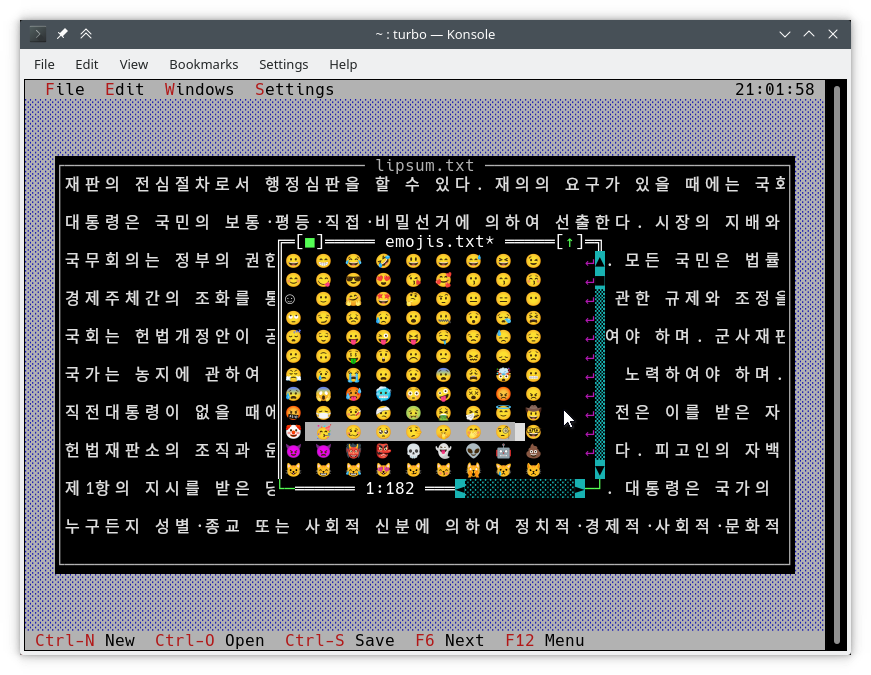
Cara menulis yang biasa ke layar adalah dengan menggunakan TDrawBuffer . Beberapa metode telah ditambahkan dan yang lain telah mengubah maknanya:
 void TDrawBuffer::moveChar ( ushort indent, char c, TColorAttr attr, ushort count);
void TDrawBuffer::putChar ( ushort indent, char c);
c selalu ditafsirkan sebagai karakter dalam codepage aktif.
 ushort TDrawBuffer::moveStr ( ushort indent, TStringView str, TColorAttr attr);
ushort TDrawBuffer::moveCStr ( ushort indent, TStringView str, TAttrPair attrs);
str ditafsirkan sesuai dengan aturan yang diekspos sebelumnya.
 ushort TDrawBuffer::moveStr ( ushort indent, TStringView str, TColorAttr attr, ushort maxWidth, ushort strOffset = 0 ); // New
ushort TDrawBuffer::moveCStr ( ushort indent, TStringView str, TColorAttr attr, ushort maxWidth, ushort strOffset = 0 ); // New
str ditafsirkan sesuai dengan aturan yang diekspos sebelumnya, tetapi:
maxWidth menentukan jumlah maksimum teks yang harus disalin dari str , diukur dalam lebar teks (bukan dalam byte).strOffset menentukan posisi awal di str tempat untuk menyalin dari, diukur dalam lebar teks (bukan dalam byte). Ini berguna untuk pengguliran horizontal. Jika strOffset menunjuk ke tengah karakter lebar ganda, ruang akan disalin alih-alih setengah kanan dari karakter lebar ganda, karena tidak mungkin melakukan hal seperti itu.Nilai pengembalian adalah jumlah sel dalam buffer yang sebenarnya diisi dengan teks (yang sama dengan lebar teks yang disalin).
void TDrawBuffer::moveBuf ( ushort indent, const void *source, TColorAttr attr, ushort count); Nama fungsi ini menyesatkan. Bahkan dalam implementasi aslinya, source diperlakukan sebagai string. Jadi setara dengan moveStr(indent, TStringView((const char*) source, count), attr) .
Ada fungsi sadar unicode lain yang berguna:
int cstrlen (TStringView s); Mengembalikan panjang s yang ditampilkan sesuai dengan aturan yang disebutkan di atas, membuang ~ karakter.
int strwidth (TStringView s); // New Mengembalikan panjang s yang ditampilkan.
Pada Borland C ++, metode ini mengasumsikan pengkodean byte tunggal dan semua karakter menjadi satu kolom lebar. Hal ini memungkinkan untuk menulis metode pengkodean-agnostik draw() dan handleEvent() yang bekerja pada kedua platform tanpa satu #ifdef .
Fungsi di atas diimplementasikan menggunakan fungsi dari TText namespace, ekstensi API lain. Anda harus menggunakannya secara langsung jika Anda ingin mengisi objek TScreenCell dengan teks secara manual. Untuk memberikan contoh, di bawah ini adalah beberapa fungsi TText . Anda dapat menemukan semuanya dengan deskripsi lengkap di <tvision/ttext.h> .
 size_t TText::next (TStringView text);
size_t TText::prev (TStringView text, size_t index);
void TText::drawChar (TSpan<TScreenCell> cells, char c);
size_t TText::drawStr (TSpan<TScreenCell> cells, size_t indent, TStringView text, int textIndent);
bool TText::drawOne (TSpan<TScreenCell> cells, size_t &i, TStringView text, size_t &j);
Untuk menggambar buffer TScreenCell ke dalam tampilan, metode berikut tersedia:
 void TView::writeBuf ( short x, short y, short w, short h, const TScreenCell *b); // New
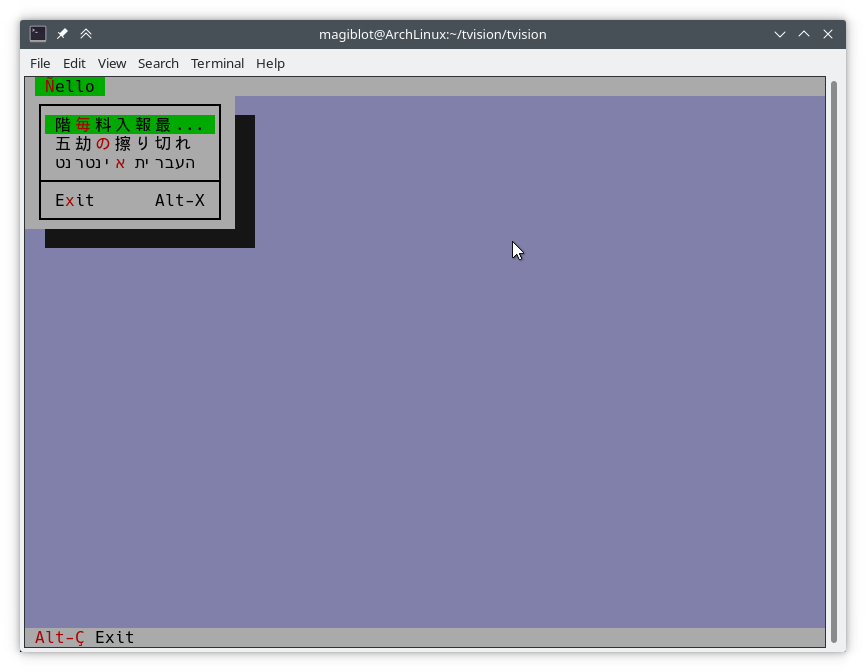
void TView::writeLine ( short x, short y, short w, short h, const TScreenCell *b); // New Sesederhana mungkin. Mari kita ubah hello.cpp sebagai berikut:
TMenuBar * THelloApp::initMenuBar ( TRect r )
{
    r. b . y = r. a . y + 1 ;
    return new TMenuBar ( r,
      * new TSubMenu ( " ~Ñ~ello " , kbAltH ) +
        * new TMenuItem ( "階~毎~料入報最... " , GreetThemCmd, kbAltG ) +
        * new TMenuItem ( "五劫~の~擦り切れ" , cmYes, kbNoKey, hcNoContext ) +
        * new TMenuItem ( " העברית ~א~ינטרנט " , cmNo, kbNoKey, hcNoContext ) +
         newLine () +
        * new TMenuItem ( " E~x~it " , cmQuit, cmQuit, hcNoContext, " Alt-X " )
        );
}

TStatusLine * THelloApp::initStatusLine ( TRect r )
{
    r. a . y = r. b . y - 1 ;
    return new TStatusLine ( r,
        * new TStatusDef ( 0 , 0xFFFF ) +
            * new TStatusItem ( " ~Alt-Ç~ Exit " , kbAltX, cmQuit ) +
            * new TStatusItem ( 0 , kbF10, cmMenu )
            );
}
Inilah yang terlihat seperti:
draw() Berikut ini adalah kutipan dari implementasi lama TFileViewer::draw() (bagian dari aplikasi tvdemo ), yang tidak menggambar teks Unicode dengan benar:
 if (delta.y + i < fileLines-> getCount ()) {
    char s[maxLineLength+ 1 ];
    p = ( char *)(fileLines-> at (delta. y +i));
    if (p == 0 || strlen (p) < delta. x )
        s[ 0 ] = EOS;
    else
        strnzcpy (s, p+delta. x , maxLineLength+ 1 );
    b. moveStr ( 0 , s, c);
}
writeBuf ( 0 , i, size.x, 1 , b );
Yang dilakukan hanyalah memindahkan sebagian string dalam fileLines ke b , yang merupakan TDrawBuffer . delta adalah TPoint yang mewakili gulir offset dalam tampilan teks, dan i adalah indeks dari garis yang terlihat sedang diproses. c adalah warna teks. Beberapa masalah hadir:
TDrawBuffer::moveStr(ushort, const char *, TColorAttr) mengambil string yang diakhiri nol. Untuk melewati substring dari baris saat ini, salinan dibuat ke array s , dengan risiko overrun buffer. Kasus di mana garis tidak cocok dengan s tidak ditangani, jadi paling banyak karakter maxLineLenght akan disalin. Terlebih lagi, karakter multibyte dekat posisi maxLineLength dapat disalin secara tidak lengkap dan ditampilkan sebagai sampah.delta.x adalah kolom yang terlihat pertama. Dengan teks yang dikodekan multibyte, tidak lagi benar bahwa kolom tersebut dimulai pada posisi delta.x di string.Di bawah ini adalah versi yang dikoreksi dari kode di atas yang menangani Unicode dengan benar:
 if (delta.y + i < fileLines-> getCount ()) {
    p = ( char *)(fileLines-> at (delta. y +i));
    if (p)
        b. moveStr ( 0 , p, c, size. x , delta. x );
}
writeBuf ( 0 , i, size.x, 1 , b );
Kelebihan moveStr yang digunakan di sini adalah TDrawBuffer::moveStr(ushort indent, TStringView str, TColorAttr attr, ushort width, ushort begin) . Fungsi ini tidak hanya memberikan dukungan unicode, tetapi juga membantu kita menulis kode yang lebih bersih dan mengatasi beberapa batasan yang sebelumnya ada:
maxLineLength .moveStr menangani pencetakan string mulai dari kolom delta.x . Kami bahkan tidak perlu khawatir tentang berapa banyak byte yang sesuai dengan kolom delta.x .moveStr is instructed to copy at most size.x columns of text without us having to care about how many bytes that is nor dealing with edge cases. The code is written in an encoding-agnostic way and will work whether multibyte characters are being considered or not.TView::writeBuf already takes care of not writing beyond it. Yet it is interesting to see how an unnecessary step not only was limiting functionality but also was prone to bugs. Support for creating Unicode-aware views is in place, and most views in the original Turbo Vision library have been adapted to handle Unicode.
The following views can display Unicode text properly. Some of them also do horizontal scrolling or word wrapping; all of that should work fine.
TStaticText ( 7b15d45d ). TFrame ( 81066ee5 ). TStatusLine ( 477b3ae9 ). THistoryViewer ( 81066ee5 ). THelpViewer ( 81066ee5 , 8c7dac2a , 20f331e3 ). TListViewer ( 81066ee5 ). TMenuBox ( 81066ee5 ). TTerminal ( ee821b69 ). TOutlineViewer ( 6cc8cd38 ). TFileViewer (from the tvdemo application) ( 068bbf7a ). TFilePane (from the tvdir application) ( 9bcd897c ).The following views can, in addition, process Unicode text or user input:
TInputLine ( 81066ee5 , cb489d42 ). TEditor ( 702114dc ). Instances are in UTF-8 mode by default. You may switch back to single-byte mode by pressing Ctrl+P . This only changes how the document is displayed and the encoding of user input; it does not alter the document. This class is used in the tvedit application; you may test it there.Views not in this list may not have needed any corrections or I simply forgot to fix them. Please submit an issue if you notice anything not working as expected.
Use cases where Unicode is not supported (not an exhaustive list):
TMenuBox , TStatusLine , TButton ...). Originally, Turbo Vision offered no integration with the system clipboard, since there was no such thing on MS-DOS.
It did offer the possibility of using an instance of TEditor as an internal clipboard, via the TEditor::clipboard static member. However, TEditor was the only class able to interact with this clipboard. It was not possible to use it with TInputLine , for example.
Turbo Vision applications are now most likely to be ran in a graphical environment through a terminal emulator. In this context, it would be desirable to interact with the system clipboard in the same way as a regular GUI application would do.
To deal with this, a new class TClipboard has been added which allows accessing the system clipboard. If the system clipboard is not accessible, it will instead use an internal clipboard.
On Windows (including WSL) and macOS, clipboard integration is supported out-of-the-box.
On Unix systems other than macOS, it is necessary to install some external dependencies. See runtime requirements.
For applications running remotely (eg through SSH), clipboard integration is supported in the following situations:
ssh -X ).allowWindowOps option is enabled. Additionally, it is always possible to paste text using your terminal emulator's own Paste command (usually Ctrl+Shift+V or Cmd+V ).
To use the TClipboard class, define the macro Uses_TClipboard before including <tvision/tv.h> .
static void TClipboard::setText (TStringView text); Sets the contents of the system clipboard to text . If the system clipboard is not accessible, an internal clipboard is used instead.
static void TClipboard::requestText (); Requests the contents of the system clipboard asynchronously, which will be later received in the form of regular evKeyDown events. If the system clipboard is not accessible, an internal clipboard is used instead.
A Turbo Vision application may receive a Paste event for two different reasons:
TClipboard::requestText() was invoked. In both cases the application will receive the clipboard contents in the form of regular evKeyDown events. These events will have a kbPaste flag in keyDown.controlKeyState so that they can be distinguished from regular key presses.
Therefore, if your view can handle user input it will also handle Paste events by default. However, if the user pastes 5000 characters, the application will behave as if the user pressed the keyboard 5000 times. This involves drawing views, completing the event loop, updating the screen..., which is far from optimal if your view is a text editing component, for example.
For the purpose of dealing with this situation, another function has been added:
bool TView::textEvent (TEvent &event, TSpan< char > dest, size_t &length); textEvent() attempts to read text from consecutive evKeyDown events and stores it in a user-provided buffer dest . It returns false when no more events are available or if a non-text event is found, in which case this event is saved with putEvent() so that it can be processed in the next iteration of the event loop. Finally, it calls clearEvent(event) .
The exact number of bytes read is stored in the output parameter length , which will never be larger than dest.size() .
Here is an example on how to use it:
 // 'ev' is a TEvent, and 'ev.what' equals 'evKeyDown'.
// If we received text from the clipboard...
if (ev.keyDown.controlKeyState & kbPaste) {
    char buf[ 512 ];
    size_t length;
    // Fill 'buf' with the text in 'ev' and in
    // upcoming events from the input queue.
    while ( textEvent (ev, buf, length)) {
        // Process 'length' bytes of text in 'buf'...
    }
} The standard views TEditor and TInputLine react to the cmCut , cmCopy and cmPaste commands. However, your application first has to be set up to use these commands. Misalnya:
TStatusLine * TMyApplication::initStatusLine ( TRect r )
{
    r. a . y = r. b . y - 1 ;
    return new TStatusLine ( r,
        * new TStatusDef ( 0 , 0xFFFF ) +
            // ...
            * new TStatusItem ( 0 , kbCtrlX, cmCut ) +
            * new TStatusItem ( 0 , kbCtrlC, cmCopy ) +
            * new TStatusItem ( 0 , kbCtrlV, cmPaste ) +
            // ...
    );
}
TEditor and TInputLine automatically enable and disable these commands. For example, if a TEditor or TInputLine is focused, the cmPaste command will be enabled. If there is selected text, the cmCut and cmCopy commands will also be enabled. If no TEditor or TInputLine s are focused, then these commands will be disabled.
The Turbo Vision API has been extended to allow more than the original 16 colors.
Colors can be specified using any of the following formats:
xterm-256color palette indices (8-bit).Although Turbo Vision applications are likely to be ran in a terminal emulator, the API makes no assumptions about the display device. That is to say, the complexity of dealing with terminal emulators is hidden from the programmer and managed by Turbo Vision itself.
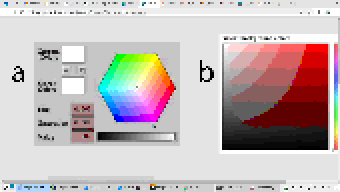
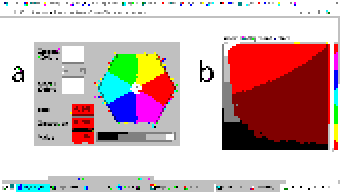
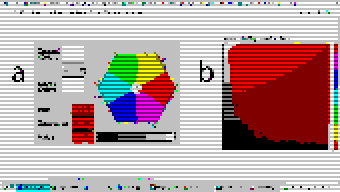
For example: color support varies among terminals. If the programmer uses a color format not supported by the terminal emulator, Turbo Vision will quantize it to what the terminal can display. The following images represent the quantization of a 24-bit RGB picture to 256, 16 and 8 color palettes:
| 24-bit color (original) | 256 colors |
|---|---|
 |  |
| 16 colors | 8 colors (bold as bright) |
|---|---|
 |  |
Extended color support basically comes down to the following:
uchar . ushort is used to represent attribute pairs. This is still the case when using Borland C++.TColorAttr has been added which replaces uchar . It specifies a foreground and background color and a style. Colors can be specified in different formats (BIOS color attributes, 24-bit RGB...). Styles are the typical ones (bold, italic, underline...). There's also TAttrPair , which replaces ushort .TDrawBuffer 's methods, which used to take uchar or ushort parameters to specify color attributes, now take TColorAttr or TAttrPair .TPalette , which used to contain an array of uchar , now contains an array of TColorAttr . The TView::mapColor method also returns TColorAttr instead of uchar .TView::mapColor has been made virtual so that the palette system can be bypassed without having to rewrite any draw methods.TColorAttr and TAttrPair can be initialized with and casted into uchar and ushort in a way such that legacy code still compiles out-of-the-box without any change in functionality.Below is a more detailed explanation aimed at developers.
In the first place we will explain the data types the programmer needs to know in order to take advantage of the extended color support. To get access to them, you may have to define the macro Uses_TColorAttr before including <tvision/tv.h> .
All the types described in this section are trivial . This means that they can be memset 'd and memcpy 'd. But variables of these types are uninitialized when declared without initializer, just like primitive types. So make sure you don't manipulate them before initializing them.
Several types are defined which represent different color formats. The reason why these types exist is to allow distinguishing color formats using the type system. Some of them also have public fields which make it easier to manipulate individual bits.
TColorBIOS represents a BIOS color. It allows accessing the r , g , b and bright bits individually, and can be casted implicitly into/from uint8_t .
The memory layout is:
b ).g ).r ).bright ). Examples of TColorBIOS usage:
TColorBIOS bios = 0x4 ;  // 0x4: red.
bios.bright = 1 ;        // 0xC: light red.
bios.b = bios.r;        // 0xD: light magenta.
bios = bios ^ 3 ;        // 0xE: yellow.
uint8_t c = bios;       // Implicit conversion to integer types.
In terminal emulators, BIOS colors are mapped to the basic 16 ANSI colors.
TColorRGB represents a color in 24-bit RGB. It allows accessing the r , g and b bit fields individually, and can be casted implicitly into/from uint32_t .
The memory layout is:
b ).g ).r ). Examples of TColorRGB usage:
TColorRGB rgb = 0x9370DB ;   // 0xRRGGBB.
rgb = { 0x93 , 0x70 , 0xDB };   // {R, G, B}.
rgb = rgb ^ 0xFFFFFF ;       // Negated.
rgb.g = rgb.r & 0x88 ;       // Access to individual components.
uint32_t c = rgb;           // Implicit conversion to integer types.
TColorXTerm represents an index into the xterm-256color color palette. It can be casted into and from uint8_t .
TColorDesired TColorDesired represents a color which the programmer intends to show on screen, encoded in any of the supported color types.
A TColorDesired can be initialized in the following ways:
As a BIOS color: with a char literal or a TColorBIOS object:
TColorDesired bios1 = ' xF ' ;
TColorDesired bios2 = TColorBIOS( 0xF );
As a RGB color: with an int literal or a TColorRGB object:
TColorDesired rgb1 = 0xFF7700 ; // 0xRRGGBB.
TColorDesired rgb2 = TColorRGB( 0xFF , 0x77 , 0x00 ); // {R, G, B}.
TColorDesired rgb3 = TColorRGB( 0xFF7700 ); // 0xRRGGBB.
As an XTerm palette index: with a TColorXTerm object.
As the terminal default color: through zero-initialization:
TColorDesired def1 {};
// Or with 'memset':
TColorDesired def2;
memset (&def2, 0 , sizeof (def2));
TColorDesired has methods to query the contained color, but you will usually not need to use them. See the struct definition in <tvision/colors.h> for more information.
Trivia: the name is inspired by Scintilla's ColourDesired .
TColorAttr TColorAttr describes the color attributes of a screen cell. This is the type you are most likely to interact with if you intend to change the colors in a view.
A TColorAttr is composed of:
A foreground color, of type TColorDesired .
A background color, of type TColorDesired .
A style bitmask containing a combination of the following flags:
slBold .slItalic .slUnderline .slBlink .slReverse .slStrike . These flags are based on the basic display attributes selectable through ANSI escape codes. The results may vary between terminal emulators. slReverse is probably the least reliable of them: prefer using the TColorAttr reverseAttribute(TColorAttr attr) free function over setting this flag.
The most straight-forward way to create a TColorAttr is by means of the TColorAttr(TColorDesired fg, TColorDesired bg, ushort style=0) and TColorAttr(int bios) constructors:
 // Foreground: RGB 0x892312
// Background: RGB 0x7F00BB
// Style: Normal.
TColorAttr a1 = { TColorRGB ( 0x89 , 0x23 , 0x12 ), TColorRGB ( 0x7F , 0x00 , 0xBB )};

// Foreground: BIOS 0x7.
// Background: RGB 0x7F00BB.
// Style: Bold, Italic.
TColorAttr a2 = { ' x7 ' , 0x7F00BB , slBold | slItalic};

// Foreground: Terminal default.
// Background: BIOS 0xF.
// Style: Normal.
TColorAttr a3 = {{}, TColorBIOS ( 0xF )};

// Foreground: Terminal default.
// Background: Terminal default.
// Style: Normal.
TColorAttr a4 = {};

// Foreground: BIOS 0x0
// Background: BIOS 0x7
// Style: Normal
TColorAttr a5 = 0x70 ;
The fields of a TColorAttr can be accessed with the following free functions:
TColorDesired getFore ( const TColorAttr &attr);
TColorDesired getBack ( const TColorAttr &attr);
ushort getStyle ( const TColorAttr &attr);
void setFore (TColorAttr &attr, TColorDesired fg);
void setBack (TColorAttr &attr, TColorDesired bg);
void setStyle (TColorAttr &attr, ushort style);
TAttrPair TAttrPair is a pair of TColorAttr , used by some API functions to pass two attributes at once.
You may initialize a TAttrPair with the TAttrPair(const TColorAttrs &lo, const TColorAttrs &hi) constructor:
TColorAttr cNormal = { 0x234983 , 0x267232 };
TColorAttr cHigh = { 0x309283 , 0x127844 };
TAttrPair attrs = {cNormal, cHigh};
TDrawBuffer b;
b.moveCStr( 0 , " Normal text, ~Highlighted text~ " , attrs);
The attributes can be accessed with the [0] and [1] subindices:
TColorAttr lo = { 0x892343 , 0x271274 };
TColorAttr hi = ' x93 ' ;
TAttrPair attrs = {lo, hi};
assert (lo == attrs[ 0 ]);
assert (hi == attrs[ 1 ]);TView Views are commonly drawn by means of a TDrawBuffer . Most TDrawBuffer member functions take color attributes by parameter. Misalnya:
 ushort TDrawBuffer::moveStr ( ushort indent, TStringView str, TColorAttr attr);
ushort TDrawBuffer::moveCStr ( ushort indent, TStringView str, TAttrPair attrs);
void TDrawBuffer::putAttribute ( ushort indent, TColorAttr attr);
However, the views provided with Turbo Vision usually store their color information in palettes. A view's palette can be queried with the following member functions:
TColorAttr TView::mapColor (uchar index);
TAttrPair TView::getColor ( ushort indices);
mapColor looks up a single color attribute in the view's palette, given an index into the palette. Remember that the palette indices for each view class can be found in the Turbo Vision headers. For example, <tvision/views.h> says the following about TScrollBar :
 /* ---------------------------------------------------------------------- */
/*      class TScrollBar                                                  */
/*                                                                        */
/*      Palette layout                                                    */
/*        1 = Page areas                                                  */
/*        2 = Arrows                                                      */
/*        3 = Indicator                                                   */
/* ---------------------------------------------------------------------- */
getColor is a helper function that allows querying two cell attributes at once. Each byte in the indices parameter contains an index into the palette. The TAttrPair result contains the two cell attributes.
For example, the following can be found in the draw method of TMenuBar :
TAttrPair cNormal = getColor( 0x0301 );
TAttrPair cSelect = getColor( 0x0604 );
Which would be equivalent to this:
TAttrPair cNormal = { mapColor ( 1 ), mapColor ( 3 )};
TAttrPair cSelect = { mapColor ( 4 ), mapColor ( 6 )};
As an API extension, the mapColor method has been made virtual . This makes it possible to override Turbo Vision's hierarchical palette system with a custom solution without having to rewrite the draw() method.
So, in general, there are three ways to use extended colors in views:
mapColor method: // The 'TMyScrollBar' class inherits from 'TScrollBar' and overrides 'TView::mapColor'.
TColorAttr TMyScrollBar::mapColor (uchar index) noexcept
{
// In this example the values are hardcoded,
// but they could be stored elsewhere if desired.
switch ( index )
{
case 1 : return { 0x492983 , 0x826124 }; // Page areas.
case 2 : return { 0x438939 , 0x091297 }; // Arrows.
case 3 : return { 0x123783 , 0x329812 }; // Indicator.
default : return errorAttr;
}
} By providing extended color attributes directly to TDrawBuffer methods, if the palette system is not being used. Misalnya:
 // The 'TMyView' class inherits from 'TView' and overrides 'TView::draw'.
void TMyView::draw ()
{
    TDrawBuffer b;
    TColorAttr color { 0x1F1C1B , 0xFAFAFA , slBold};
    b. moveStr ( 0 , " This is bold black text over a white background " , color);
    /* ... */
}
By modifying the palettes. There are two ways to do this:
TColorAttr . Misalnya: void updateAppPalette ()
{
TPalette &pal = TProgram::application-> getPalete ();
pal[ 1 ] = { 0x762892 , 0x828712 }; // TBackground.
pal[ 2 ] = { 0x874832 , 0x249838 , slBold}; // TMenuView normal text.
pal[ 3 ] = {{}, {}, slItalic | slUnderline}; // TMenuView disabled text.
/* ... */
} static const TColorAttr cpMyApp[] =
{
{ 0x762892 , 0x828712 }, // TBackground.
{ 0x874832 , 0x249838 , slBold}, // TMenuView normal text.
{{}, {}, slItalic | slUnderline}, // TMenuView disabled text.
/* ... */
};
// The 'TMyApp' class inherits from 'TApplication' and overrides 'TView::getPalette'.
TPalette & TMyApp::getPalette () const
{
static TPalette palette (cpMyApp);
return palette;
} TScreen::screenMode exposes some information about the display's color support:
(TScreen::screenMode & 0xFF) == TDisplay::smMono , the display is monocolor (only relevant in DOS).(TScreen::screenMode & 0xFF) == TDisplay::smBW80 , the display is grayscale (only relevant in DOS).(TScreen::screenMode & 0xFF) == TDisplay::smCO80 , the display supports at least 16 colors.TScreen::screenMode & TDisplay::smColor256 , the display supports at least 256 colors.TScreen::screenMode & TDisplay::smColorHigh , the display supports even more colors (eg 24-bit color). TDisplay::smColor256 is also set in this case. The types defined previously represent concepts that are also important when developing for Borland C++:
| Konsep | Layout in Borland C++ | Layout in modern platforms |
|---|---|---|
| Color Attribute | uchar . A BIOS color attribute. | struct TColorAttr . |
| Warna | A 4-bit number. | struct TColorDesired . |
| Attribute Pair | ushort . An attribute in each byte. | struct TAttrPair . |
One of this project's key principles is that the API should be used in the same way both in Borland C++ and modern platforms, that is to say, without the need for #ifdef s. Another principle is that legacy code should compile out-of-the-box, and adapting it to the new features should increase complexity as little as possible.
Backward-compatibility is accomplished in the following way:
In Borland C++, TColorAttr and TAttrPair are typedef 'd to uchar and ushort , respectively.
In modern platforms, TColorAttr and TAttrPair can be used in place of uchar and ushort , respectively, since they are able to hold any value that fits into them and can be casted implicitly into/from them.
A TColorAttr initialized with uchar represents a BIOS color attribute. When converting back to uchar , the following happens:
fg and bg are BIOS colors, and style is cleared, the resulting uchar represents the same BIOS color attribute contained in the TColorAttr (as in the code above).uchar / ushort with TColorAttr / TAttrPair if they intend to support the extended color attributes. The same goes for TAttrPair and ushort , considering that it is composed of two TColorAttr .
A use case of backward-compatibility within Turbo Vision itself is the TPalette class, core of the palette system. In its original design, it used a single data type ( uchar ) to represent different things: array length, palette indices or color attributes.
The new design simply replaces uchar with TColorAttr . This means there are no changes in the way TPalette is used, yet TPalette is now able to store extended color attributes.
TColorDialog hasn't been remodeled, and thus it can't be used to pick extended color attributes at runtime.
The following pattern of code is common across draw methods of views:
 void TMyView::draw ()
{
    ushort cFrame, cTitle;
    if (state & sfDragging)
    {
        cFrame = 0x0505 ;
        cTitle = 0x0005 ;
    }
    else
    {
        cFrame = 0x0503 ;
        cTitle = 0x0004 ;
    }
    cFrame = getColor (cFrame);
    cTitle = getColor (cTitle);
    /* ... */
}
In this case, ushort is used both as a pair of palette indices and as a pair of color attributes. getColor now returns a TAttrPair , so even though this compiles out-of-the-box, extended attributes will be lost in the implicit conversion to ushort .
The code above still works just like it did originally. It's only non-BIOS color attributes that don't produce the expected result. Because of the compatibility between TAttrPair and ushort , the following is enough to enable support for extended color attributes:
 -    ushort cFrame, cTitle;
+    TAttrPair cFrame, cTitle;
Nothing prevents you from using different variables for palette indices and color attributes, which is what should actually be done. The point of backward-compatibility is the ability to support new features without changing the program's logic, that is to say, minimizing the risk of increasing code complexity or introducing bugs.







