react native international phone number
v0.8.4

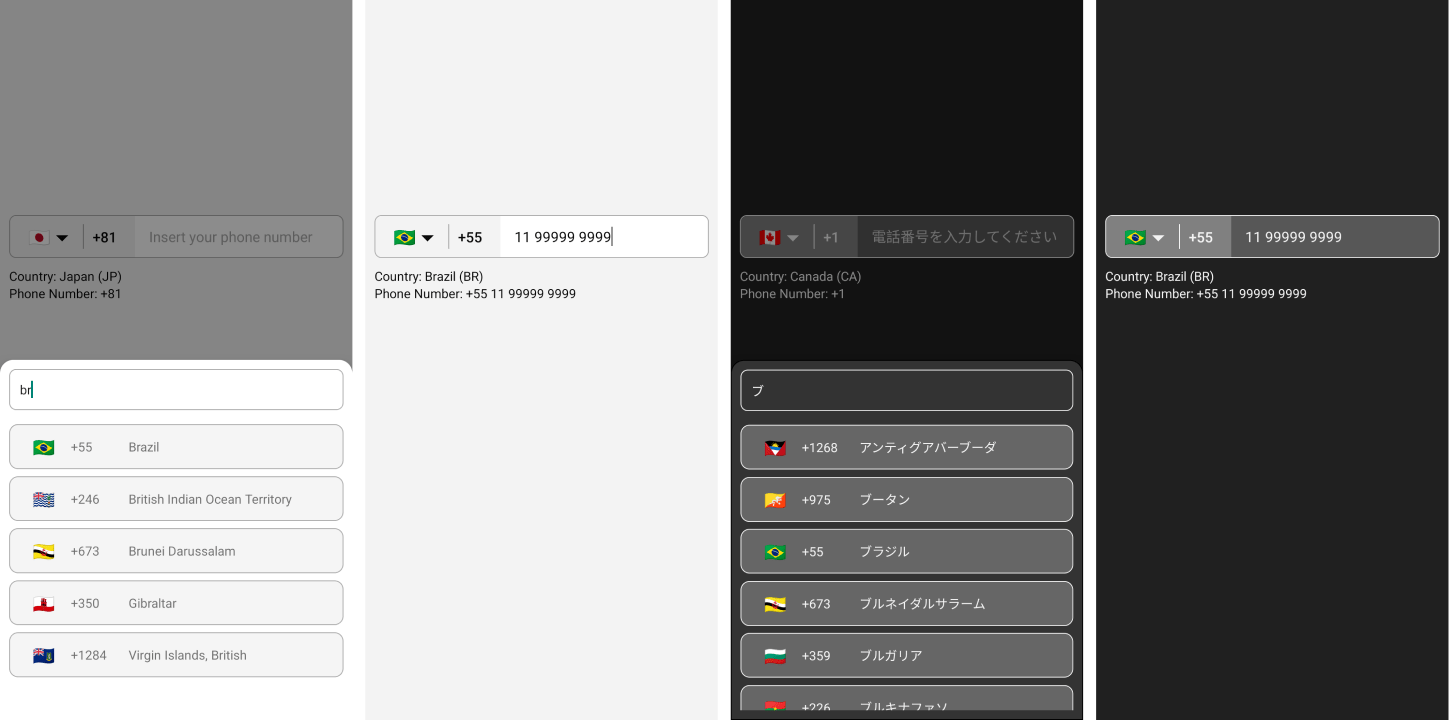
$ npm i --save react-native-international-phone-numberOU
$ yarn add react-native-international-phone-number Créez un fichier react-native.config.js à la racine de votre projet React-Native avec:
module.exports = {
  project: {
    ios: {},
    android: {},
  },
  assets: [
    ' ./node_modules/react-native-international-phone-number/lib/assets/fonts ' ,
  ],
} ;
Ensuite, liez la police à vos projets natifs avec:
npx react-native-assetnpx expo install expo-font ;expo-font : import { useFonts } from ' expo-font ' ;
...
useFonts({
' TwemojiMozilla ' : require( ' ./node_modules/react-native-international-phone-number/lib/assets/fonts/TwemojiMozilla.woff2 ' ),
}) ;
...Observation: vous devez recompiler votre projet après avoir ajouté de nouvelles polices.
Modifiez le fichier app.json en:
  ...

  " web " : {
    ...
    " output " : " single " ,
    ...
  },
... import React from 'react' ;
import { View , Text } from 'react-native' ;
import PhoneInput from 'react-native-international-phone-number' ;
export class App extends React . Component {
constructor ( props ) {
super ( props )
this . state = {
selectedCountry : null ,
inputValue : ''
}
}
function handleSelectedCountry ( country ) {
this . setState ( {
selectedCountry : country
} )
}
function handleInputValue ( phoneNumber ) {
this . setState ( {
inputValue : phoneNumber
} )
}
render ( ) {
return (
< View style = { { width : '100%' , flex : 1 , padding : 24 } } >
< PhoneInput
value = { this . state . inputValue }
onChangePhoneNumber = { this . handleInputValue }
selectedCountry = { this . state . selectedCountry }
onChangeSelectedCountry = { this . handleSelectedCountry }
/>
< View style = { { marginTop : 10 } } >
< Text >
Country: { ' ' }
{ ` ${ this . state . selectedCountry ?. name ?. en } ( ${ this . state . selectedCountry ?. cca2 } )` }
</ Text >
< Text >
Phone Number: { ` ${ this . state . selectedCountry ?. callingCode } ${ this . state . inputValue } ` }
</ Text >
</ View >
</ View >
) ;
}
} import React , { useState } from 'react' ;
import { View , Text } from 'react-native' ;
import PhoneInput from 'react-native-international-phone-number' ;
export default function App ( ) {
const [ selectedCountry , setSelectedCountry ] = useState ( null ) ;
const [ inputValue , setInputValue ] = useState ( '' ) ;
function handleInputValue ( phoneNumber ) {
setInputValue ( phoneNumber ) ;
}
function handleSelectedCountry ( country ) {
setSelectedCountry ( country ) ;
}
return (
< View style = { { width : '100%' , flex : 1 , padding : 24 } } >
< PhoneInput
value = { inputValue }
onChangePhoneNumber = { handleInputValue }
selectedCountry = { selectedCountry }
onChangeSelectedCountry = { handleSelectedCountry }
/>
< View style = { { marginTop : 10 } } >
< Text >
Country: { ' ' }
{ ` ${ selectedCountry ?. name ?. en } ( ${ selectedCountry ?. cca2 } )` }
</ Text >
< Text >
Phone Number: { ' ' }
{ ` ${ selectedCountry ?. callingCode } ${ inputValue } ` }
</ Text >
</ View >
</ View >
) ;
} import React , { useState } from 'react' ;
import { View , Text } from 'react-native' ;
import PhoneInput , {
ICountry ,
} from 'react-native-international-phone-number' ;
export default function App ( ) {
const [ selectedCountry , setSelectedCountry ] =
useState < null | ICountry > ( null ) ;
const [ inputValue , setInputValue ] = useState < string > ( '' ) ;
function handleInputValue ( phoneNumber : string ) {
setInputValue ( phoneNumber ) ;
}
function handleSelectedCountry ( country : ICountry ) {
setSelectedCountry ( country ) ;
}
return (
< View style = { { width : '100%' , flex : 1 , padding : 24 } } >
< PhoneInput
value = { inputValue }
onChangePhoneNumber = { handleInputValue }
selectedCountry = { selectedCountry }
onChangeSelectedCountry = { handleSelectedCountry }
/>
< View style = { { marginTop : 10 } } >
< Text >
Country: { ' ' }
{ ` ${ selectedCountry ?. name ?. en } ( ${ selectedCountry ?. cca2 } )` }
</ Text >
< Text >
Phone Number: { ' ' }
{ ` ${ selectedCountry ?. callingCode } ${ inputValue } ` }
</ Text >
</ View >
</ View >
) ;
} import React , { useRef } from 'react' ;
import { View , Text } from 'react-native' ;
import PhoneInput , {
ICountry ,
IPhoneInputRef ,
} from 'react-native-international-phone-number' ;
export default function App ( ) {
const phoneInputRef = useRef < IPhoneInputRef > ( null ) ;
function onSubmitRef ( ) {
Alert . alert (
'Intermediate Result' ,
` ${ phoneInputRef . current ?. selectedCountry ?. callingCode } ${ phoneInputRef . current ?. value } `
) ;
}
return (
< View style = { { width : '100%' , flex : 1 , padding : 24 } } >
< PhoneInput ref = { phoneInputRef } />
< TouchableOpacity
style = { {
width : '100%' ,
paddingVertical : 12 ,
backgroundColor : '#2196F3' ,
borderRadius : 4 ,
marginTop : 10 ,
} }
onPress = { onSubmit }
>
< Text
style = { {
color : '#F3F3F3' ,
textAlign : 'center' ,
fontSize : 16 ,
fontWeight : 'bold' ,
} }
>
Submit
</ Text >
</ TouchableOpacity >
</ View >
) ;
}Observation: N'utilisez pas le crochet Useref combiné avec le crochet UseState pour gérer les valeurs phonenumbres et sélectionnées. Au lieu de cela, choisissez d'utiliser un seul d'entre eux (Useref ou UseState).
 import React , { useState , useEffect } from 'react' ;
import { View , Text , TouchableOpacity , Alert } from 'react-native' ;
import PhoneInput , {
  ICountry ,
} from 'react-native-international-phone-number' ;
import { Controller , FieldValues } from 'react-hook-form' ;

interface FormProps extends FieldValues {
  phoneNumber : string ;
}

export default function App ( ) {
  const [ selectedCountry , setSelectedCountry ] = useState <
    undefined | ICountry
  > ( undefined ) ;

  function handleSelectedCountry ( country : ICountry ) {
    setSelectedCountry ( country ) ;
  }

  function onSubmit ( form : FormProps ) {
    Alert . alert (
      'Advanced Result' ,
      ` ${ selectedCountry ?. callingCode } ${ form . phoneNumber } `
    ) ;
  }

  return (
    < View style = { { width : '100%' , flex : 1 , padding : 24 } } >
      < Controller
        name = "phoneNumber"
        control = { control }
        render = { ( { field : { onChange , value } } ) => (
          < PhoneInput
            defaultValue = "+12505550199"
            value = { value }
            onChangePhoneNumber = { onChange }
            selectedCountry = { selectedCountry }
            onChangeSelectedCountry = { handleSelectedCountry }
          />
        ) }
      />
      < TouchableOpacity
        style = { {
          width : '100%' ,
          paddingVertical : 12 ,
          backgroundColor : '#2196F3' ,
          borderRadius : 4 ,
        } }
        onPress = { handleSubmit ( onSubmit ) }
      >
        < Text
          style = { {
            color : '#F3F3F3' ,
            textAlign : 'center' ,
            fontSize : 16 ,
            fontWeight : 'bold' ,
          } }
        >
          Submit
        </ Text >
      </ TouchableOpacity >
    </ View >
  ) ;
}
Observations:
- Vous devez utiliser une valeur par défaut avec le format suivant:
+(country callling code)(area code)(number phone)- La LIB a le mécanisme pour définir le drapeau et le masque de la
defaultValuefournie. Cependant, si ladefaultValuefournie ne correspond à aucune norme internationale, leinput mask of the defaultValuesera défini sur "BR" (veuillez vous assurer que la valeur par défaut est dans le format mentionné ci-dessus).
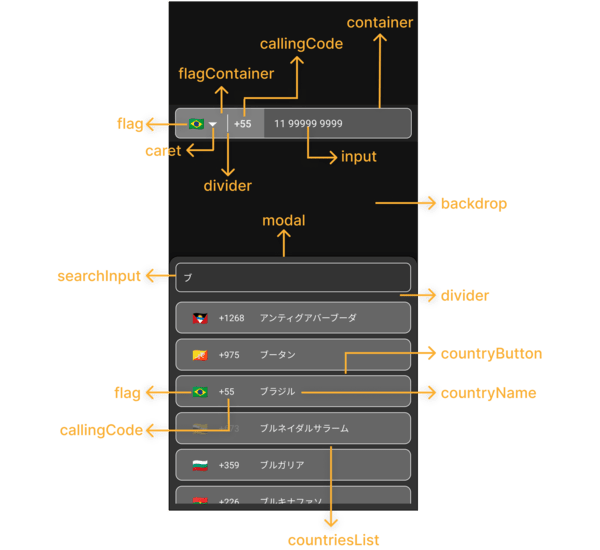
  ...
  < PhoneInput
    . . .
    theme = "dark"
  / >
... ...
< PhoneInput
. . .
phoneInputStyles = { {
container : {
backgroundColor : '#575757' ,
borderWidth : 1 ,
borderStyle : 'solid' ,
borderColor : '#F3F3F3' ,
} ,
flagContainer : {
borderTopLeftRadius : 7 ,
borderBottomLeftRadius : 7 ,
backgroundColor : '#808080' ,
justifyContent : 'center' ,
} ,
flag : { } ,
caret : {
color : '#F3F3F3' ,
fontSize : 16 ,
} ,
divider : {
backgroundColor : '#F3F3F3' ,
}
callingCode : {
fontSize : 16 ,
fontWeight : 'bold' ,
color : '#F3F3F3' ,
} ,
input : {
color : '#F3F3F3' ,
} ,
} }
modalStyles = { {
modal : {
backgroundColor : '#333333' ,
borderWidth : 1 ,
} ,
backdrop : { } ,
divider : {
backgroundColor : 'transparent' ,
} ,
countriesList : { } ,
searchInput : {
borderRadius : 8 ,
borderWidth : 1 ,
borderColor : '#F3F3F3' ,
color : '#F3F3F3' ,
backgroundColor : '#333333' ,
paddingHorizontal : 12 ,
height : 46 ,
} ,
countryButton : {
borderWidth : 1 ,
borderColor : '#F3F3F3' ,
backgroundColor : '#666666' ,
marginVertical : 4 ,
paddingVertical : 0 ,
} ,
noCountryText : { } ,
noCountryContainer : { } ,
flag : {
color : '#FFFFFF' ,
fontSize : 20 ,
} ,
callingCode : {
color : '#F3F3F3' ,
} ,
countryName : {
color : '#F3F3F3' ,
} ,
} }
/>
. . . ...
< PhoneInput
. . .
customCaret = { < Icon name = "chevron-down" size = { 30 } color = "#000000" /> } // react-native-vector-icons
/>
. . . ...
< PhoneInput
. . .
placeholder = "Custom Phone Input Placeholder"
modalSearchInputPlaceholder = "Custom Modal Search Input Placeholder"
modalNotFoundCountryMessage = "Custom Modal Not Found Country Message"
/ >
... ...
< PhoneInput
. . .
modalHeight = "80%"
/ >
... ...
< PhoneInput
. . .
modalDisabled
/>
. . . ...
< PhoneInput
. . .
disabled
/>
. . . const [ isDisabled , setIsDisabled ] = useState < boolean > ( true )
. . .
< PhoneInput
. . .
containerStyle = { isDisabled ? { backgroundColor : 'yellow' } : { } }
disabled = { isDisabled }
/ >
... ...
< PhoneInput
. . .
language = "pt"
/ >
... ...
< PhoneInput
. . .
customMask = { [ '#### ####' , '##### ####' ] }
/>
. . . ...
< PhoneInput
. . .
defaultCountry = "CA"
/ >
... ...
< PhoneInput
. . .
defaultValue = "+12505550199"
/ >
...Observations:
- Vous devez utiliser une valeur par défaut avec le format E164:
+(country callling code)(area code)(number phone)- La LIB a le mécanisme pour définir le drapeau et le masque de la
defaultValuefournie. Cependant, si ladefaultValuefournie ne correspond à aucune norme internationale, leinput mask of the defaultValuesera défini sur "BR" (veuillez vous assurer que la valeur par défaut est dans le format mentionné ci-dessus).
  ...
  < PhoneInput
    . . .
    showOnly = { [ 'BR' , 'PT' , 'CA' , 'US' ] }
  />
. . . ...
< PhoneInput
. . .
excludedCountries = { [ 'BR' , 'PT' , 'CA' , 'US' ] }
/>
. . . ...
< PhoneInput
. . .
popularCountriess = { [ 'BR' , 'PT' , 'CA' , 'US' ] }
popularCountriesSectionTitle = 'Suggested'
restOfCountriesSectionTitle = 'All'
/>
. . . import { I18nManager } from "react-native" ;
...
< PhoneInput
. . .
rtl = { I18nManager . isRTL }
/>
. . . ...
< PhoneInput
. . .
allowZeroAfterCallingCode = { false }
/>
. . . language?: Ilanguage;customMask?: String [];defaultValue?: String;value?: String;onChangePhoneNumber?: (phonenumber: string) => void;defaultCountry?: ICOUNTRYCCA2;selectedCountry?: Icounry;onChangeSelectedCountry?: (pays: icounry) => vide;showOnly?: iCountryCCA2 [];excludedCountries?: iCountryCCA2 [];popularCountries?: ICOUNTRYCCA2 [];popularCountriesSectionTitle?: String;restOfCountriesSectionTitle?: String;rtl?: Boolean;disabled?: Boolean;modalDisabled?: Boolean;modalHeight?: Numéro | chaîne;theme?: itheme;phoneInputStyles?: iPhoneInputStyles;modalStyles?: Imodalstyles;modalSearchInputPlaceholder?: String;modalSearchInputPlaceholderTextColor?: String;modalSearchInputSelectionColor?: String;modalNotFoundCountryMessage?: String;customCaret?: ReactNode;ref?: Ref <iPhoneInputRef>;allowZeroAfterCallingCode?: booléen getAllCountries: () => iCounry [];getCountriesByCallingCode: (CallingCode: String) => ICOUNTRY [] | indéfini;getCountryByCca2: (CCA2: String) => ICOUNTRY | indéfini;getCountriesByName: (nom: chaîne, langue: ilanguage) => iCounry [] | indéfini;getCountryByPhoneNumber: (Phonenumber: String) => iCounry | indéfini; "name" : {
"bg" : "Bulgarian" ,
"by" : "Belarusian" ,
"cn" : "Chinese" ,
"cz" : "Czech" ,
"de" : "German" ,
"ee" : "Estonian" ,
"el" : "Greek" ,
"en" : "English" ,
"es" : "Espanol" ,
"fr" : "French" ,
"he" : "Hebrew" ,
"it" : "Italian" ,
"jp" : "Japanese" ,
"nl" : "Dutch" ,
"pl" : "Polish" ,
"pt" : "Portuguese" ,
"ro" : "Romanian" ,
"ru" : "Russian" ,
"ua" : "Ukrainian" ,
"zh" : "Chinese (Simplified)" ,
"ar" : "Arabic" ,
"tr" : "Turkish"
} , $ git clone https://github.com/AstrOOnauta/react-native-international-phone-number.gitRéparer, mettre à jour et profiter?
Créez un nouveau PR à ce référentiel
Isc







