react native international phone number
v0.8.4

$ npm i --save react-native-international-phone-numberO
$ yarn add react-native-international-phone-number Cree un archivo react-native.config.js en la raíz de su proyecto react-nativo con:
module.exports = {
  project: {
    ios: {},
    android: {},
  },
  assets: [
    ' ./node_modules/react-native-international-phone-number/lib/assets/fonts ' ,
  ],
} ;
Luego vincule la fuente a sus proyectos nativos con:
npx react-native-assetnpx expo install expo-font ;expo-font : import { useFonts } from ' expo-font ' ;
...
useFonts({
' TwemojiMozilla ' : require( ' ./node_modules/react-native-international-phone-number/lib/assets/fonts/TwemojiMozilla.woff2 ' ),
}) ;
...Observación: debe recompilar su proyecto después de agregar nuevas fuentes.
Cambie el archivo app.json a:
  ...

  " web " : {
    ...
    " output " : " single " ,
    ...
  },
... import React from 'react' ;
import { View , Text } from 'react-native' ;
import PhoneInput from 'react-native-international-phone-number' ;
export class App extends React . Component {
constructor ( props ) {
super ( props )
this . state = {
selectedCountry : null ,
inputValue : ''
}
}
function handleSelectedCountry ( country ) {
this . setState ( {
selectedCountry : country
} )
}
function handleInputValue ( phoneNumber ) {
this . setState ( {
inputValue : phoneNumber
} )
}
render ( ) {
return (
< View style = { { width : '100%' , flex : 1 , padding : 24 } } >
< PhoneInput
value = { this . state . inputValue }
onChangePhoneNumber = { this . handleInputValue }
selectedCountry = { this . state . selectedCountry }
onChangeSelectedCountry = { this . handleSelectedCountry }
/>
< View style = { { marginTop : 10 } } >
< Text >
Country: { ' ' }
{ ` ${ this . state . selectedCountry ?. name ?. en } ( ${ this . state . selectedCountry ?. cca2 } )` }
</ Text >
< Text >
Phone Number: { ` ${ this . state . selectedCountry ?. callingCode } ${ this . state . inputValue } ` }
</ Text >
</ View >
</ View >
) ;
}
} import React , { useState } from 'react' ;
import { View , Text } from 'react-native' ;
import PhoneInput from 'react-native-international-phone-number' ;
export default function App ( ) {
const [ selectedCountry , setSelectedCountry ] = useState ( null ) ;
const [ inputValue , setInputValue ] = useState ( '' ) ;
function handleInputValue ( phoneNumber ) {
setInputValue ( phoneNumber ) ;
}
function handleSelectedCountry ( country ) {
setSelectedCountry ( country ) ;
}
return (
< View style = { { width : '100%' , flex : 1 , padding : 24 } } >
< PhoneInput
value = { inputValue }
onChangePhoneNumber = { handleInputValue }
selectedCountry = { selectedCountry }
onChangeSelectedCountry = { handleSelectedCountry }
/>
< View style = { { marginTop : 10 } } >
< Text >
Country: { ' ' }
{ ` ${ selectedCountry ?. name ?. en } ( ${ selectedCountry ?. cca2 } )` }
</ Text >
< Text >
Phone Number: { ' ' }
{ ` ${ selectedCountry ?. callingCode } ${ inputValue } ` }
</ Text >
</ View >
</ View >
) ;
} import React , { useState } from 'react' ;
import { View , Text } from 'react-native' ;
import PhoneInput , {
ICountry ,
} from 'react-native-international-phone-number' ;
export default function App ( ) {
const [ selectedCountry , setSelectedCountry ] =
useState < null | ICountry > ( null ) ;
const [ inputValue , setInputValue ] = useState < string > ( '' ) ;
function handleInputValue ( phoneNumber : string ) {
setInputValue ( phoneNumber ) ;
}
function handleSelectedCountry ( country : ICountry ) {
setSelectedCountry ( country ) ;
}
return (
< View style = { { width : '100%' , flex : 1 , padding : 24 } } >
< PhoneInput
value = { inputValue }
onChangePhoneNumber = { handleInputValue }
selectedCountry = { selectedCountry }
onChangeSelectedCountry = { handleSelectedCountry }
/>
< View style = { { marginTop : 10 } } >
< Text >
Country: { ' ' }
{ ` ${ selectedCountry ?. name ?. en } ( ${ selectedCountry ?. cca2 } )` }
</ Text >
< Text >
Phone Number: { ' ' }
{ ` ${ selectedCountry ?. callingCode } ${ inputValue } ` }
</ Text >
</ View >
</ View >
) ;
} import React , { useRef } from 'react' ;
import { View , Text } from 'react-native' ;
import PhoneInput , {
ICountry ,
IPhoneInputRef ,
} from 'react-native-international-phone-number' ;
export default function App ( ) {
const phoneInputRef = useRef < IPhoneInputRef > ( null ) ;
function onSubmitRef ( ) {
Alert . alert (
'Intermediate Result' ,
` ${ phoneInputRef . current ?. selectedCountry ?. callingCode } ${ phoneInputRef . current ?. value } `
) ;
}
return (
< View style = { { width : '100%' , flex : 1 , padding : 24 } } >
< PhoneInput ref = { phoneInputRef } />
< TouchableOpacity
style = { {
width : '100%' ,
paddingVertical : 12 ,
backgroundColor : '#2196F3' ,
borderRadius : 4 ,
marginTop : 10 ,
} }
onPress = { onSubmit }
>
< Text
style = { {
color : '#F3F3F3' ,
textAlign : 'center' ,
fontSize : 16 ,
fontWeight : 'bold' ,
} }
>
Submit
</ Text >
</ TouchableOpacity >
</ View >
) ;
}Observación: no use el gancho Useref combinado con el gancho USESTATE para administrar los valores PhoneNumber y SelectedCountry. En su lugar, elija usar solo uno de ellos (Useref o Usestate).
 import React , { useState , useEffect } from 'react' ;
import { View , Text , TouchableOpacity , Alert } from 'react-native' ;
import PhoneInput , {
  ICountry ,
} from 'react-native-international-phone-number' ;
import { Controller , FieldValues } from 'react-hook-form' ;

interface FormProps extends FieldValues {
  phoneNumber : string ;
}

export default function App ( ) {
  const [ selectedCountry , setSelectedCountry ] = useState <
    undefined | ICountry
  > ( undefined ) ;

  function handleSelectedCountry ( country : ICountry ) {
    setSelectedCountry ( country ) ;
  }

  function onSubmit ( form : FormProps ) {
    Alert . alert (
      'Advanced Result' ,
      ` ${ selectedCountry ?. callingCode } ${ form . phoneNumber } `
    ) ;
  }

  return (
    < View style = { { width : '100%' , flex : 1 , padding : 24 } } >
      < Controller
        name = "phoneNumber"
        control = { control }
        render = { ( { field : { onChange , value } } ) => (
          < PhoneInput
            defaultValue = "+12505550199"
            value = { value }
            onChangePhoneNumber = { onChange }
            selectedCountry = { selectedCountry }
            onChangeSelectedCountry = { handleSelectedCountry }
          />
        ) }
      />
      < TouchableOpacity
        style = { {
          width : '100%' ,
          paddingVertical : 12 ,
          backgroundColor : '#2196F3' ,
          borderRadius : 4 ,
        } }
        onPress = { handleSubmit ( onSubmit ) }
      >
        < Text
          style = { {
            color : '#F3F3F3' ,
            textAlign : 'center' ,
            fontSize : 16 ,
            fontWeight : 'bold' ,
          } }
        >
          Submit
        </ Text >
      </ TouchableOpacity >
    </ View >
  ) ;
}
Observaciones:
- Debe usar un valor predeterminado con el siguiente formato:
+(country callling code)(area code)(number phone)- El LIB tiene el mecanismo para establecer el indicador y la máscara del
defaultValuesuministrado. Sin embargo, si eldefaultValuesuministrado no coincide con ningún estándar internacional, lainput mask of the defaultValuese establecerá en "BR" (asegúrese de que el valor predeterminado esté en el formato mencionado anteriormente).
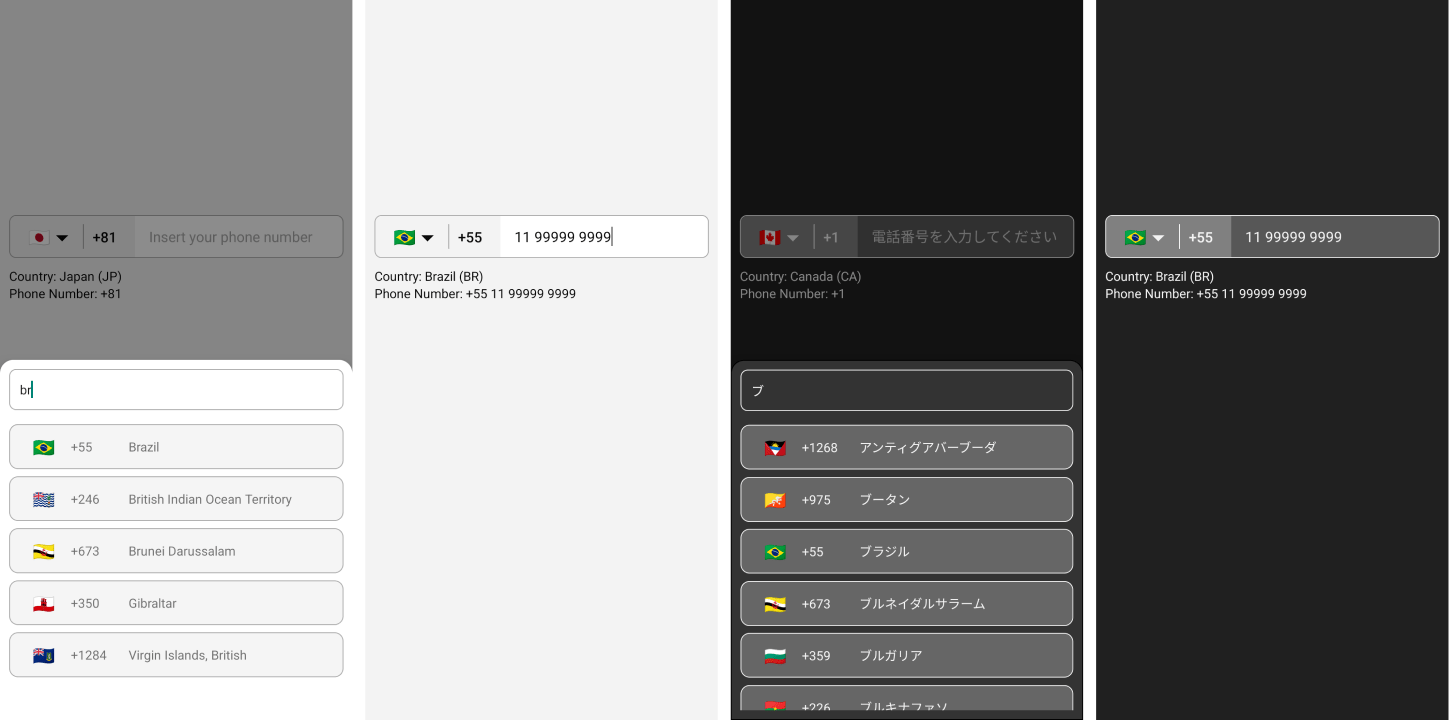
  ...
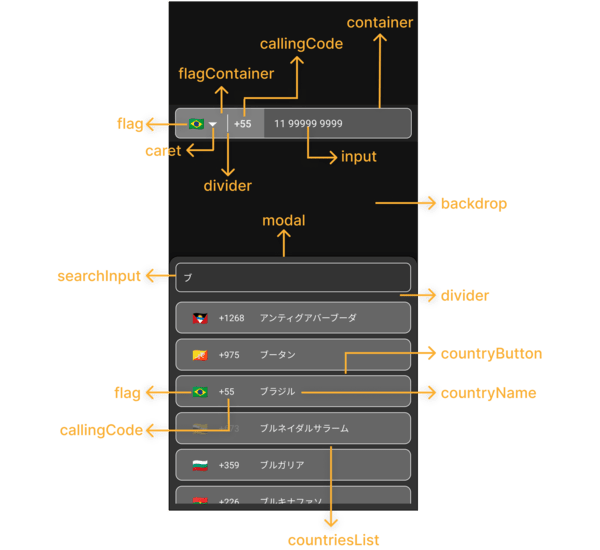
  < PhoneInput
    . . .
    theme = "dark"
  / >
... ...
< PhoneInput
. . .
phoneInputStyles = { {
container : {
backgroundColor : '#575757' ,
borderWidth : 1 ,
borderStyle : 'solid' ,
borderColor : '#F3F3F3' ,
} ,
flagContainer : {
borderTopLeftRadius : 7 ,
borderBottomLeftRadius : 7 ,
backgroundColor : '#808080' ,
justifyContent : 'center' ,
} ,
flag : { } ,
caret : {
color : '#F3F3F3' ,
fontSize : 16 ,
} ,
divider : {
backgroundColor : '#F3F3F3' ,
}
callingCode : {
fontSize : 16 ,
fontWeight : 'bold' ,
color : '#F3F3F3' ,
} ,
input : {
color : '#F3F3F3' ,
} ,
} }
modalStyles = { {
modal : {
backgroundColor : '#333333' ,
borderWidth : 1 ,
} ,
backdrop : { } ,
divider : {
backgroundColor : 'transparent' ,
} ,
countriesList : { } ,
searchInput : {
borderRadius : 8 ,
borderWidth : 1 ,
borderColor : '#F3F3F3' ,
color : '#F3F3F3' ,
backgroundColor : '#333333' ,
paddingHorizontal : 12 ,
height : 46 ,
} ,
countryButton : {
borderWidth : 1 ,
borderColor : '#F3F3F3' ,
backgroundColor : '#666666' ,
marginVertical : 4 ,
paddingVertical : 0 ,
} ,
noCountryText : { } ,
noCountryContainer : { } ,
flag : {
color : '#FFFFFF' ,
fontSize : 20 ,
} ,
callingCode : {
color : '#F3F3F3' ,
} ,
countryName : {
color : '#F3F3F3' ,
} ,
} }
/>
. . . ...
< PhoneInput
. . .
customCaret = { < Icon name = "chevron-down" size = { 30 } color = "#000000" /> } // react-native-vector-icons
/>
. . . ...
< PhoneInput
. . .
placeholder = "Custom Phone Input Placeholder"
modalSearchInputPlaceholder = "Custom Modal Search Input Placeholder"
modalNotFoundCountryMessage = "Custom Modal Not Found Country Message"
/ >
... ...
< PhoneInput
. . .
modalHeight = "80%"
/ >
... ...
< PhoneInput
. . .
modalDisabled
/>
. . . ...
< PhoneInput
. . .
disabled
/>
. . . const [ isDisabled , setIsDisabled ] = useState < boolean > ( true )
. . .
< PhoneInput
. . .
containerStyle = { isDisabled ? { backgroundColor : 'yellow' } : { } }
disabled = { isDisabled }
/ >
... ...
< PhoneInput
. . .
language = "pt"
/ >
... ...
< PhoneInput
. . .
customMask = { [ '#### ####' , '##### ####' ] }
/>
. . . ...
< PhoneInput
. . .
defaultCountry = "CA"
/ >
... ...
< PhoneInput
. . .
defaultValue = "+12505550199"
/ >
...Observaciones:
- Debe usar un valor predeterminado con el formato E164:
+(country callling code)(area code)(number phone)- El LIB tiene el mecanismo para establecer el indicador y la máscara del
defaultValuesuministrado. Sin embargo, si eldefaultValuesuministrado no coincide con ningún estándar internacional, lainput mask of the defaultValuese establecerá en "BR" (asegúrese de que el valor predeterminado esté en el formato mencionado anteriormente).
  ...
  < PhoneInput
    . . .
    showOnly = { [ 'BR' , 'PT' , 'CA' , 'US' ] }
  />
. . . ...
< PhoneInput
. . .
excludedCountries = { [ 'BR' , 'PT' , 'CA' , 'US' ] }
/>
. . . ...
< PhoneInput
. . .
popularCountriess = { [ 'BR' , 'PT' , 'CA' , 'US' ] }
popularCountriesSectionTitle = 'Suggested'
restOfCountriesSectionTitle = 'All'
/>
. . . import { I18nManager } from "react-native" ;
...
< PhoneInput
. . .
rtl = { I18nManager . isRTL }
/>
. . . ...
< PhoneInput
. . .
allowZeroAfterCallingCode = { false }
/>
. . . language?: Ilanguage;customMask?: cadena [];defaultValue?: String;value?: cadena;onChangePhoneNumber?: (PhoneNumber: String) => void;defaultCountry?: ICountryCCA2;selectedCountry?: icountry;onChangeSelectedCountry?: (País: icountry) => void;showOnly?: ICountryCCA2 [];excludedCountries?: ICountryCCA2 [];popularCountries?: ICountryCCA2 [];popularCountriesSectionTitle?: cadena;restOfCountriesSectionTitle?:rtl?: booleano;disabled?: booleano;modalDisabled?: boolean;modalHeight?: Número | cadena;theme?: ITHEME;phoneInputStyles?: iPhoneInputStyles;modalStyles?: iModalstyles;modalSearchInputPlaceholder?: cadena;modalSearchInputPlaceholderTextColor?: String;modalSearchInputSelectionColor?: String;modalNotFoundCountryMessage?: cadena;customCaret?: Reactnode;ref?: Ref <iPhoneInputRef>;allowZeroAfterCallingCode?: Boolean getAllCountries: () => icountry [];getCountriesByCallingCode: (llamadocode: string) => icountry [] | indefinido;getCountryByCca2: (cca2: string) => icountry | indefinido;getCountriesByName: (nombre: cadena, idioma: ilanguage) => icountry [] | indefinido;getCountryByPhoneNumber: (PhoneNumber: String) => icountry | indefinido; "name" : {
"bg" : "Bulgarian" ,
"by" : "Belarusian" ,
"cn" : "Chinese" ,
"cz" : "Czech" ,
"de" : "German" ,
"ee" : "Estonian" ,
"el" : "Greek" ,
"en" : "English" ,
"es" : "Espanol" ,
"fr" : "French" ,
"he" : "Hebrew" ,
"it" : "Italian" ,
"jp" : "Japanese" ,
"nl" : "Dutch" ,
"pl" : "Polish" ,
"pt" : "Portuguese" ,
"ro" : "Romanian" ,
"ru" : "Russian" ,
"ua" : "Ukrainian" ,
"zh" : "Chinese (Simplified)" ,
"ar" : "Arabic" ,
"tr" : "Turkish"
} , $ git clone https://github.com/AstrOOnauta/react-native-international-phone-number.gitReparar, actualizar y disfrutar?
Crea un nuevo PR a este repositorio
ISC







