react native international phone number
v0.8.4

$ npm i --save react-native-international-phone-numberATAU
$ yarn add react-native-international-phone-number Buat file react-native.config.js pada akar proyek reaksi-asli Anda dengan:
module.exports = {
  project: {
    ios: {},
    android: {},
  },
  assets: [
    ' ./node_modules/react-native-international-phone-number/lib/assets/fonts ' ,
  ],
} ;
Kemudian tautkan font ke proyek asli Anda dengan:
npx react-native-assetnpx expo install expo-font ;expo-font : import { useFonts } from ' expo-font ' ;
...
useFonts({
' TwemojiMozilla ' : require( ' ./node_modules/react-native-international-phone-number/lib/assets/fonts/TwemojiMozilla.woff2 ' ),
}) ;
...Observasi: Anda perlu mengkompilasi ulang proyek Anda setelah menambahkan font baru.
Ubah file app.json ke:
  ...

  " web " : {
    ...
    " output " : " single " ,
    ...
  },
... import React from 'react' ;
import { View , Text } from 'react-native' ;
import PhoneInput from 'react-native-international-phone-number' ;
export class App extends React . Component {
constructor ( props ) {
super ( props )
this . state = {
selectedCountry : null ,
inputValue : ''
}
}
function handleSelectedCountry ( country ) {
this . setState ( {
selectedCountry : country
} )
}
function handleInputValue ( phoneNumber ) {
this . setState ( {
inputValue : phoneNumber
} )
}
render ( ) {
return (
< View style = { { width : '100%' , flex : 1 , padding : 24 } } >
< PhoneInput
value = { this . state . inputValue }
onChangePhoneNumber = { this . handleInputValue }
selectedCountry = { this . state . selectedCountry }
onChangeSelectedCountry = { this . handleSelectedCountry }
/>
< View style = { { marginTop : 10 } } >
< Text >
Country: { ' ' }
{ ` ${ this . state . selectedCountry ?. name ?. en } ( ${ this . state . selectedCountry ?. cca2 } )` }
</ Text >
< Text >
Phone Number: { ` ${ this . state . selectedCountry ?. callingCode } ${ this . state . inputValue } ` }
</ Text >
</ View >
</ View >
) ;
}
} import React , { useState } from 'react' ;
import { View , Text } from 'react-native' ;
import PhoneInput from 'react-native-international-phone-number' ;
export default function App ( ) {
const [ selectedCountry , setSelectedCountry ] = useState ( null ) ;
const [ inputValue , setInputValue ] = useState ( '' ) ;
function handleInputValue ( phoneNumber ) {
setInputValue ( phoneNumber ) ;
}
function handleSelectedCountry ( country ) {
setSelectedCountry ( country ) ;
}
return (
< View style = { { width : '100%' , flex : 1 , padding : 24 } } >
< PhoneInput
value = { inputValue }
onChangePhoneNumber = { handleInputValue }
selectedCountry = { selectedCountry }
onChangeSelectedCountry = { handleSelectedCountry }
/>
< View style = { { marginTop : 10 } } >
< Text >
Country: { ' ' }
{ ` ${ selectedCountry ?. name ?. en } ( ${ selectedCountry ?. cca2 } )` }
</ Text >
< Text >
Phone Number: { ' ' }
{ ` ${ selectedCountry ?. callingCode } ${ inputValue } ` }
</ Text >
</ View >
</ View >
) ;
} import React , { useState } from 'react' ;
import { View , Text } from 'react-native' ;
import PhoneInput , {
ICountry ,
} from 'react-native-international-phone-number' ;
export default function App ( ) {
const [ selectedCountry , setSelectedCountry ] =
useState < null | ICountry > ( null ) ;
const [ inputValue , setInputValue ] = useState < string > ( '' ) ;
function handleInputValue ( phoneNumber : string ) {
setInputValue ( phoneNumber ) ;
}
function handleSelectedCountry ( country : ICountry ) {
setSelectedCountry ( country ) ;
}
return (
< View style = { { width : '100%' , flex : 1 , padding : 24 } } >
< PhoneInput
value = { inputValue }
onChangePhoneNumber = { handleInputValue }
selectedCountry = { selectedCountry }
onChangeSelectedCountry = { handleSelectedCountry }
/>
< View style = { { marginTop : 10 } } >
< Text >
Country: { ' ' }
{ ` ${ selectedCountry ?. name ?. en } ( ${ selectedCountry ?. cca2 } )` }
</ Text >
< Text >
Phone Number: { ' ' }
{ ` ${ selectedCountry ?. callingCode } ${ inputValue } ` }
</ Text >
</ View >
</ View >
) ;
} import React , { useRef } from 'react' ;
import { View , Text } from 'react-native' ;
import PhoneInput , {
ICountry ,
IPhoneInputRef ,
} from 'react-native-international-phone-number' ;
export default function App ( ) {
const phoneInputRef = useRef < IPhoneInputRef > ( null ) ;
function onSubmitRef ( ) {
Alert . alert (
'Intermediate Result' ,
` ${ phoneInputRef . current ?. selectedCountry ?. callingCode } ${ phoneInputRef . current ?. value } `
) ;
}
return (
< View style = { { width : '100%' , flex : 1 , padding : 24 } } >
< PhoneInput ref = { phoneInputRef } />
< TouchableOpacity
style = { {
width : '100%' ,
paddingVertical : 12 ,
backgroundColor : '#2196F3' ,
borderRadius : 4 ,
marginTop : 10 ,
} }
onPress = { onSubmit }
>
< Text
style = { {
color : '#F3F3F3' ,
textAlign : 'center' ,
fontSize : 16 ,
fontWeight : 'bold' ,
} }
>
Submit
</ Text >
</ TouchableOpacity >
</ View >
) ;
}Observasi: Jangan gunakan kait useref yang dikombinasikan dengan hook usestate untuk mengelola nilai foneneM dan nilainya selectedCountry. Sebaliknya, pilih untuk menggunakan hanya salah satunya (Useref atau Usestate).
 import React , { useState , useEffect } from 'react' ;
import { View , Text , TouchableOpacity , Alert } from 'react-native' ;
import PhoneInput , {
  ICountry ,
} from 'react-native-international-phone-number' ;
import { Controller , FieldValues } from 'react-hook-form' ;

interface FormProps extends FieldValues {
  phoneNumber : string ;
}

export default function App ( ) {
  const [ selectedCountry , setSelectedCountry ] = useState <
    undefined | ICountry
  > ( undefined ) ;

  function handleSelectedCountry ( country : ICountry ) {
    setSelectedCountry ( country ) ;
  }

  function onSubmit ( form : FormProps ) {
    Alert . alert (
      'Advanced Result' ,
      ` ${ selectedCountry ?. callingCode } ${ form . phoneNumber } `
    ) ;
  }

  return (
    < View style = { { width : '100%' , flex : 1 , padding : 24 } } >
      < Controller
        name = "phoneNumber"
        control = { control }
        render = { ( { field : { onChange , value } } ) => (
          < PhoneInput
            defaultValue = "+12505550199"
            value = { value }
            onChangePhoneNumber = { onChange }
            selectedCountry = { selectedCountry }
            onChangeSelectedCountry = { handleSelectedCountry }
          />
        ) }
      />
      < TouchableOpacity
        style = { {
          width : '100%' ,
          paddingVertical : 12 ,
          backgroundColor : '#2196F3' ,
          borderRadius : 4 ,
        } }
        onPress = { handleSubmit ( onSubmit ) }
      >
        < Text
          style = { {
            color : '#F3F3F3' ,
            textAlign : 'center' ,
            fontSize : 16 ,
            fontWeight : 'bold' ,
          } }
        >
          Submit
        </ Text >
      </ TouchableOpacity >
    </ View >
  ) ;
}
Pengamatan:
- Anda perlu menggunakan nilai default dengan format berikut:
+(country callling code)(area code)(number phone)- LIB memiliki mekanisme untuk mengatur bendera dan topeng dari
defaultValueyang disediakan. Namun, jikadefaultValueyang disediakan tidak cocok dengan standar internasional apa pun,input mask of the defaultValueakan diatur ke "BR" (pastikan bahwa nilai default dalam format yang disebutkan di atas).
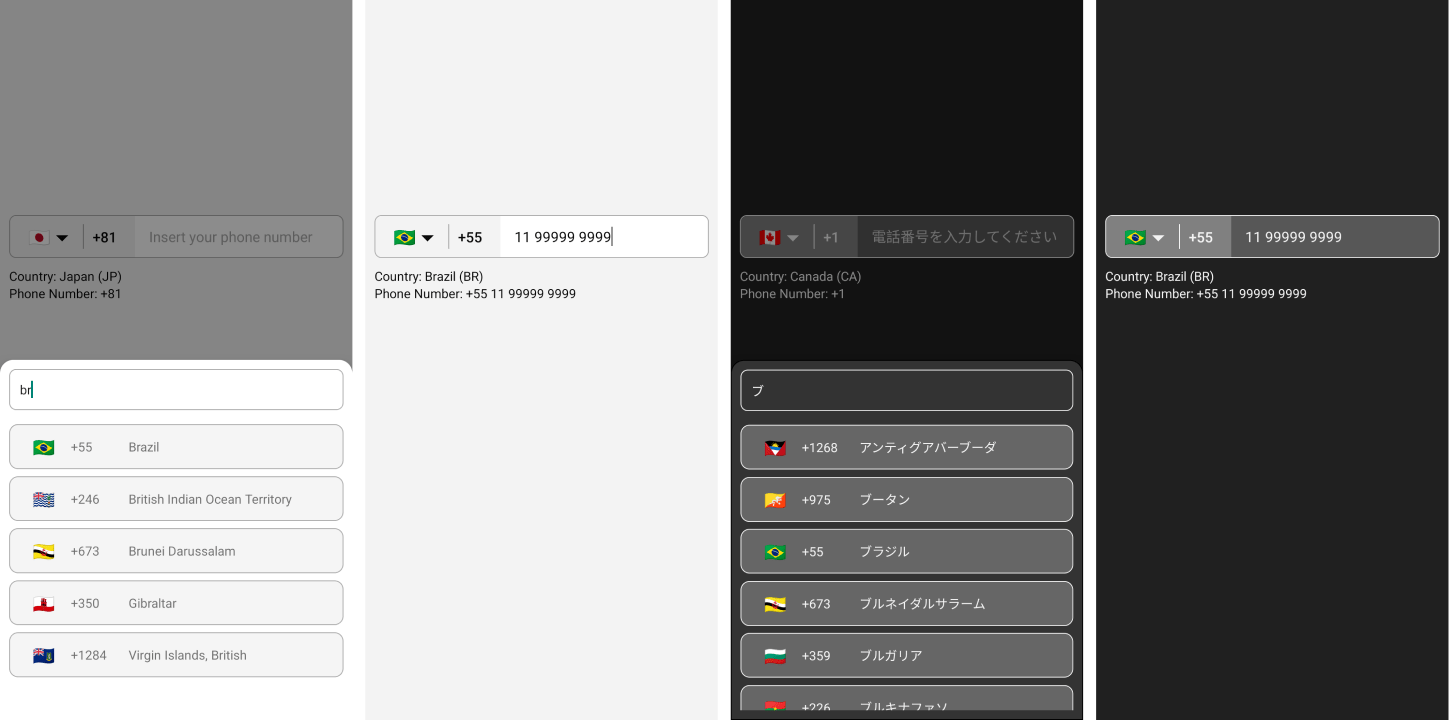
  ...
  < PhoneInput
    . . .
    theme = "dark"
  / >
... ...
< PhoneInput
. . .
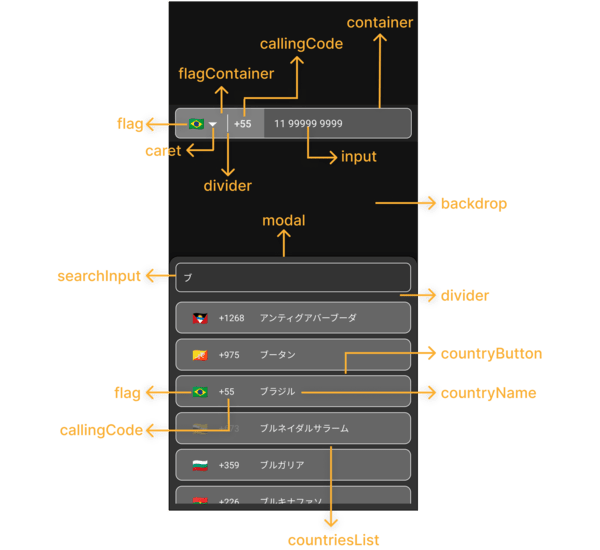
phoneInputStyles = { {
container : {
backgroundColor : '#575757' ,
borderWidth : 1 ,
borderStyle : 'solid' ,
borderColor : '#F3F3F3' ,
} ,
flagContainer : {
borderTopLeftRadius : 7 ,
borderBottomLeftRadius : 7 ,
backgroundColor : '#808080' ,
justifyContent : 'center' ,
} ,
flag : { } ,
caret : {
color : '#F3F3F3' ,
fontSize : 16 ,
} ,
divider : {
backgroundColor : '#F3F3F3' ,
}
callingCode : {
fontSize : 16 ,
fontWeight : 'bold' ,
color : '#F3F3F3' ,
} ,
input : {
color : '#F3F3F3' ,
} ,
} }
modalStyles = { {
modal : {
backgroundColor : '#333333' ,
borderWidth : 1 ,
} ,
backdrop : { } ,
divider : {
backgroundColor : 'transparent' ,
} ,
countriesList : { } ,
searchInput : {
borderRadius : 8 ,
borderWidth : 1 ,
borderColor : '#F3F3F3' ,
color : '#F3F3F3' ,
backgroundColor : '#333333' ,
paddingHorizontal : 12 ,
height : 46 ,
} ,
countryButton : {
borderWidth : 1 ,
borderColor : '#F3F3F3' ,
backgroundColor : '#666666' ,
marginVertical : 4 ,
paddingVertical : 0 ,
} ,
noCountryText : { } ,
noCountryContainer : { } ,
flag : {
color : '#FFFFFF' ,
fontSize : 20 ,
} ,
callingCode : {
color : '#F3F3F3' ,
} ,
countryName : {
color : '#F3F3F3' ,
} ,
} }
/>
. . . ...
< PhoneInput
. . .
customCaret = { < Icon name = "chevron-down" size = { 30 } color = "#000000" /> } // react-native-vector-icons
/>
. . . ...
< PhoneInput
. . .
placeholder = "Custom Phone Input Placeholder"
modalSearchInputPlaceholder = "Custom Modal Search Input Placeholder"
modalNotFoundCountryMessage = "Custom Modal Not Found Country Message"
/ >
... ...
< PhoneInput
. . .
modalHeight = "80%"
/ >
... ...
< PhoneInput
. . .
modalDisabled
/>
. . . ...
< PhoneInput
. . .
disabled
/>
. . . const [ isDisabled , setIsDisabled ] = useState < boolean > ( true )
. . .
< PhoneInput
. . .
containerStyle = { isDisabled ? { backgroundColor : 'yellow' } : { } }
disabled = { isDisabled }
/ >
... ...
< PhoneInput
. . .
language = "pt"
/ >
... ...
< PhoneInput
. . .
customMask = { [ '#### ####' , '##### ####' ] }
/>
. . . ...
< PhoneInput
. . .
defaultCountry = "CA"
/ >
... ...
< PhoneInput
. . .
defaultValue = "+12505550199"
/ >
...Pengamatan:
- Anda perlu menggunakan nilai default dengan format E164:
+(country callling code)(area code)(number phone)- LIB memiliki mekanisme untuk mengatur bendera dan topeng dari
defaultValueyang disediakan. Namun, jikadefaultValueyang disediakan tidak cocok dengan standar internasional apa pun,input mask of the defaultValueakan diatur ke "BR" (pastikan bahwa nilai default dalam format yang disebutkan di atas).
  ...
  < PhoneInput
    . . .
    showOnly = { [ 'BR' , 'PT' , 'CA' , 'US' ] }
  />
. . . ...
< PhoneInput
. . .
excludedCountries = { [ 'BR' , 'PT' , 'CA' , 'US' ] }
/>
. . . ...
< PhoneInput
. . .
popularCountriess = { [ 'BR' , 'PT' , 'CA' , 'US' ] }
popularCountriesSectionTitle = 'Suggested'
restOfCountriesSectionTitle = 'All'
/>
. . . import { I18nManager } from "react-native" ;
...
< PhoneInput
. . .
rtl = { I18nManager . isRTL }
/>
. . . ...
< PhoneInput
. . .
allowZeroAfterCallingCode = { false }
/>
. . . language?: ilanguage;customMask?: string [];defaultValue?: String;value?: string;onChangePhoneNumber?: (Phonenumber: string) => void;defaultCountry?: icountrycca2;selectedCountry?: Icountry;onChangeSelectedCountry?: (negara: icountry) => void;showOnly?: icountrycca2 [];excludedCountries?: icountrycca2 [];popularCountries?: icountrycca2 [];popularCountriesSectionTitle?: String;restOfCountriesSectionTitle?: string;rtl?: boolean;disabled?: boolean;modalDisabled?: boolean;modalHeight?: Number | rangkaian;theme?: Itheme;phoneInputStyles?: iPhoneInputStyles;modalStyles?: Imodalstyles;modalSearchInputPlaceholder?: String;modalSearchInputPlaceholderTextColor?: String;modalSearchInputSelectionColor?: String;modalNotFoundCountryMessage?: String;customCaret?: ReactNode;ref?: Ref <phoneInputRef>;allowZeroAfterCallingCode?: Boolean getAllCountries: () => icountry [];getCountriesByCallingCode: (CallingCode: String) => icountry [] | belum diartikan;getCountryByCca2: (cca2: string) => icountry | belum diartikan;getCountriesByName: (nama: string, bahasa: ilanguage) => icountry [] | belum diartikan;getCountryByPhoneNumber: (Phonenumber: string) => icountry | belum diartikan; "name" : {
"bg" : "Bulgarian" ,
"by" : "Belarusian" ,
"cn" : "Chinese" ,
"cz" : "Czech" ,
"de" : "German" ,
"ee" : "Estonian" ,
"el" : "Greek" ,
"en" : "English" ,
"es" : "Espanol" ,
"fr" : "French" ,
"he" : "Hebrew" ,
"it" : "Italian" ,
"jp" : "Japanese" ,
"nl" : "Dutch" ,
"pl" : "Polish" ,
"pt" : "Portuguese" ,
"ro" : "Romanian" ,
"ru" : "Russian" ,
"ua" : "Ukrainian" ,
"zh" : "Chinese (Simplified)" ,
"ar" : "Arabic" ,
"tr" : "Turkish"
} , $ git clone https://github.com/AstrOOnauta/react-native-international-phone-number.gitPerbarui, perbarui dan nikmati?
Buat PR baru ke repositori ini
ISC







