react native international phone number
v0.8.4

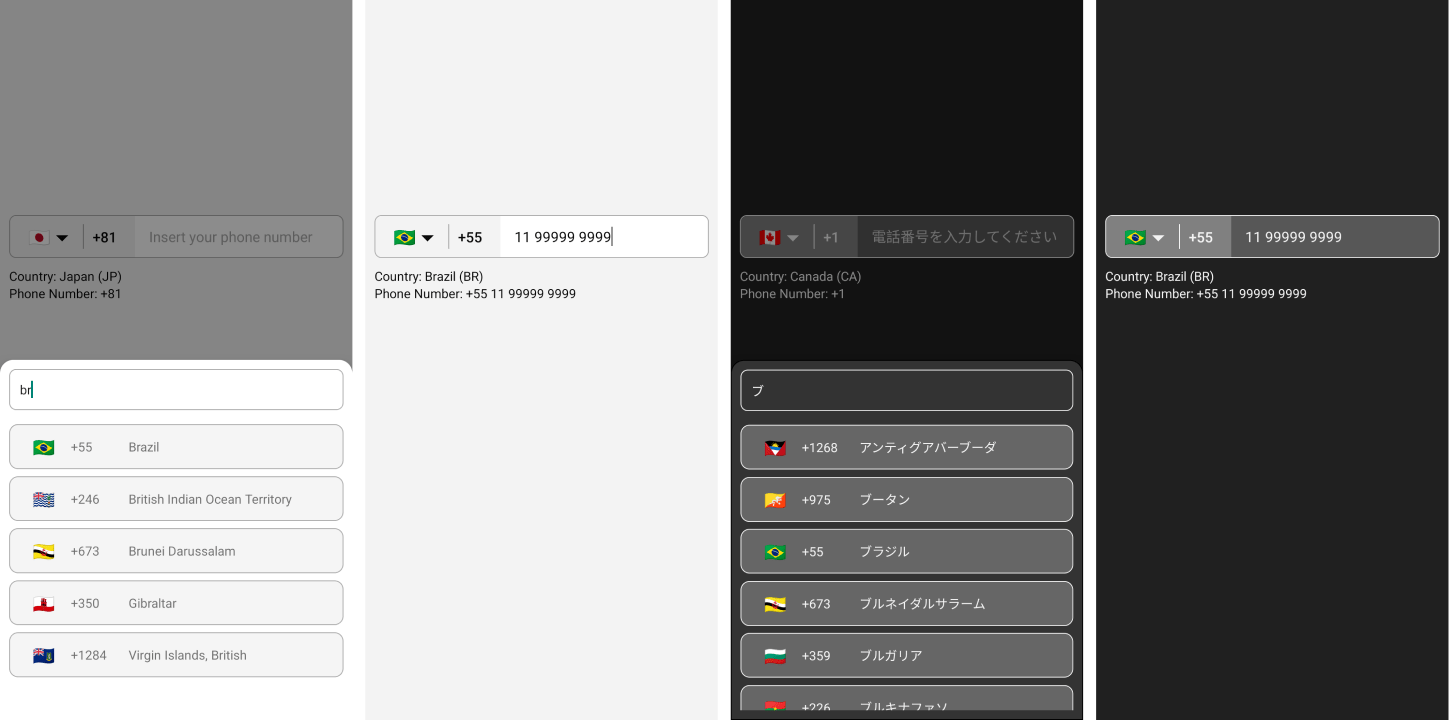
$ npm i --save react-native-international-phone-numberまたは
$ yarn add react-native-international-phone-number react-native.config.jsファイルを作成します。
module.exports = {
  project: {
    ios: {},
    android: {},
  },
  assets: [
    ' ./node_modules/react-native-international-phone-number/lib/assets/fonts ' ,
  ],
} ;
次に、フォントをネイティブプロジェクトにリンクします。
npx react-native-assetnpx expo install expo-font ;expo-fontの初期化: import { useFonts } from ' expo-font ' ;
...
useFonts({
' TwemojiMozilla ' : require( ' ./node_modules/react-native-international-phone-number/lib/assets/fonts/TwemojiMozilla.woff2 ' ),
}) ;
...観察:新しいフォントを追加した後、プロジェクトを再コンパイルする必要があります。
app.jsonファイルを以下に変更します。
  ...

  " web " : {
    ...
    " output " : " single " ,
    ...
  },
... import React from 'react' ;
import { View , Text } from 'react-native' ;
import PhoneInput from 'react-native-international-phone-number' ;
export class App extends React . Component {
constructor ( props ) {
super ( props )
this . state = {
selectedCountry : null ,
inputValue : ''
}
}
function handleSelectedCountry ( country ) {
this . setState ( {
selectedCountry : country
} )
}
function handleInputValue ( phoneNumber ) {
this . setState ( {
inputValue : phoneNumber
} )
}
render ( ) {
return (
< View style = { { width : '100%' , flex : 1 , padding : 24 } } >
< PhoneInput
value = { this . state . inputValue }
onChangePhoneNumber = { this . handleInputValue }
selectedCountry = { this . state . selectedCountry }
onChangeSelectedCountry = { this . handleSelectedCountry }
/>
< View style = { { marginTop : 10 } } >
< Text >
Country: { ' ' }
{ ` ${ this . state . selectedCountry ?. name ?. en } ( ${ this . state . selectedCountry ?. cca2 } )` }
</ Text >
< Text >
Phone Number: { ` ${ this . state . selectedCountry ?. callingCode } ${ this . state . inputValue } ` }
</ Text >
</ View >
</ View >
) ;
}
} import React , { useState } from 'react' ;
import { View , Text } from 'react-native' ;
import PhoneInput from 'react-native-international-phone-number' ;
export default function App ( ) {
const [ selectedCountry , setSelectedCountry ] = useState ( null ) ;
const [ inputValue , setInputValue ] = useState ( '' ) ;
function handleInputValue ( phoneNumber ) {
setInputValue ( phoneNumber ) ;
}
function handleSelectedCountry ( country ) {
setSelectedCountry ( country ) ;
}
return (
< View style = { { width : '100%' , flex : 1 , padding : 24 } } >
< PhoneInput
value = { inputValue }
onChangePhoneNumber = { handleInputValue }
selectedCountry = { selectedCountry }
onChangeSelectedCountry = { handleSelectedCountry }
/>
< View style = { { marginTop : 10 } } >
< Text >
Country: { ' ' }
{ ` ${ selectedCountry ?. name ?. en } ( ${ selectedCountry ?. cca2 } )` }
</ Text >
< Text >
Phone Number: { ' ' }
{ ` ${ selectedCountry ?. callingCode } ${ inputValue } ` }
</ Text >
</ View >
</ View >
) ;
} import React , { useState } from 'react' ;
import { View , Text } from 'react-native' ;
import PhoneInput , {
ICountry ,
} from 'react-native-international-phone-number' ;
export default function App ( ) {
const [ selectedCountry , setSelectedCountry ] =
useState < null | ICountry > ( null ) ;
const [ inputValue , setInputValue ] = useState < string > ( '' ) ;
function handleInputValue ( phoneNumber : string ) {
setInputValue ( phoneNumber ) ;
}
function handleSelectedCountry ( country : ICountry ) {
setSelectedCountry ( country ) ;
}
return (
< View style = { { width : '100%' , flex : 1 , padding : 24 } } >
< PhoneInput
value = { inputValue }
onChangePhoneNumber = { handleInputValue }
selectedCountry = { selectedCountry }
onChangeSelectedCountry = { handleSelectedCountry }
/>
< View style = { { marginTop : 10 } } >
< Text >
Country: { ' ' }
{ ` ${ selectedCountry ?. name ?. en } ( ${ selectedCountry ?. cca2 } )` }
</ Text >
< Text >
Phone Number: { ' ' }
{ ` ${ selectedCountry ?. callingCode } ${ inputValue } ` }
</ Text >
</ View >
</ View >
) ;
} import React , { useRef } from 'react' ;
import { View , Text } from 'react-native' ;
import PhoneInput , {
ICountry ,
IPhoneInputRef ,
} from 'react-native-international-phone-number' ;
export default function App ( ) {
const phoneInputRef = useRef < IPhoneInputRef > ( null ) ;
function onSubmitRef ( ) {
Alert . alert (
'Intermediate Result' ,
` ${ phoneInputRef . current ?. selectedCountry ?. callingCode } ${ phoneInputRef . current ?. value } `
) ;
}
return (
< View style = { { width : '100%' , flex : 1 , padding : 24 } } >
< PhoneInput ref = { phoneInputRef } />
< TouchableOpacity
style = { {
width : '100%' ,
paddingVertical : 12 ,
backgroundColor : '#2196F3' ,
borderRadius : 4 ,
marginTop : 10 ,
} }
onPress = { onSubmit }
>
< Text
style = { {
color : '#F3F3F3' ,
textAlign : 'center' ,
fontSize : 16 ,
fontWeight : 'bold' ,
} }
>
Submit
</ Text >
</ TouchableOpacity >
</ View >
) ;
}観察:userefフックを使用してUseStateフックを組み合わせて、PhoneNumberとSelectedCountryの値を管理しないでください。代わりに、そのうちの1つだけを使用することを選択します(userefまたはusestate)。
 import React , { useState , useEffect } from 'react' ;
import { View , Text , TouchableOpacity , Alert } from 'react-native' ;
import PhoneInput , {
  ICountry ,
} from 'react-native-international-phone-number' ;
import { Controller , FieldValues } from 'react-hook-form' ;

interface FormProps extends FieldValues {
  phoneNumber : string ;
}

export default function App ( ) {
  const [ selectedCountry , setSelectedCountry ] = useState <
    undefined | ICountry
  > ( undefined ) ;

  function handleSelectedCountry ( country : ICountry ) {
    setSelectedCountry ( country ) ;
  }

  function onSubmit ( form : FormProps ) {
    Alert . alert (
      'Advanced Result' ,
      ` ${ selectedCountry ?. callingCode } ${ form . phoneNumber } `
    ) ;
  }

  return (
    < View style = { { width : '100%' , flex : 1 , padding : 24 } } >
      < Controller
        name = "phoneNumber"
        control = { control }
        render = { ( { field : { onChange , value } } ) => (
          < PhoneInput
            defaultValue = "+12505550199"
            value = { value }
            onChangePhoneNumber = { onChange }
            selectedCountry = { selectedCountry }
            onChangeSelectedCountry = { handleSelectedCountry }
          />
        ) }
      />
      < TouchableOpacity
        style = { {
          width : '100%' ,
          paddingVertical : 12 ,
          backgroundColor : '#2196F3' ,
          borderRadius : 4 ,
        } }
        onPress = { handleSubmit ( onSubmit ) }
      >
        < Text
          style = { {
            color : '#F3F3F3' ,
            textAlign : 'center' ,
            fontSize : 16 ,
            fontWeight : 'bold' ,
          } }
        >
          Submit
        </ Text >
      </ TouchableOpacity >
    </ View >
  ) ;
}
観察:
- 次の形式でデフォルト値
+(country callling code)(area code)(number phone)使用する必要があります。- LIBには、付属の
defaultValueのフラグとマスクを設定するメカニズムがあります。ただし、提供されたdefaultValue国際標準と一致しない場合、input mask of the defaultValue「BR」に設定されます(デフォルト値が上記の形式であることを確認してください)。
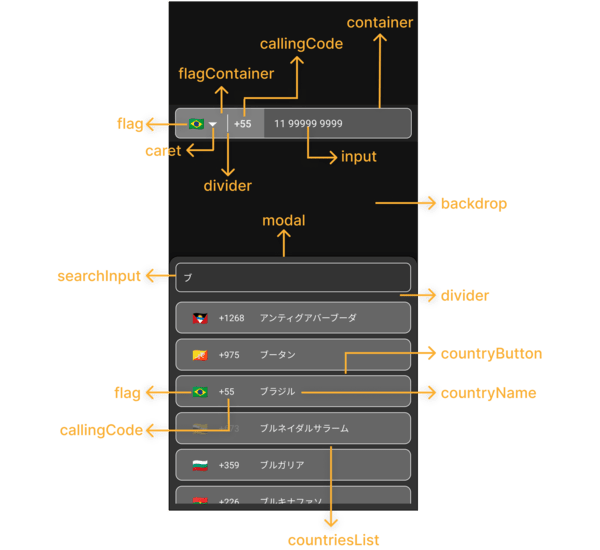
  ...
  < PhoneInput
    . . .
    theme = "dark"
  / >
... ...
< PhoneInput
. . .
phoneInputStyles = { {
container : {
backgroundColor : '#575757' ,
borderWidth : 1 ,
borderStyle : 'solid' ,
borderColor : '#F3F3F3' ,
} ,
flagContainer : {
borderTopLeftRadius : 7 ,
borderBottomLeftRadius : 7 ,
backgroundColor : '#808080' ,
justifyContent : 'center' ,
} ,
flag : { } ,
caret : {
color : '#F3F3F3' ,
fontSize : 16 ,
} ,
divider : {
backgroundColor : '#F3F3F3' ,
}
callingCode : {
fontSize : 16 ,
fontWeight : 'bold' ,
color : '#F3F3F3' ,
} ,
input : {
color : '#F3F3F3' ,
} ,
} }
modalStyles = { {
modal : {
backgroundColor : '#333333' ,
borderWidth : 1 ,
} ,
backdrop : { } ,
divider : {
backgroundColor : 'transparent' ,
} ,
countriesList : { } ,
searchInput : {
borderRadius : 8 ,
borderWidth : 1 ,
borderColor : '#F3F3F3' ,
color : '#F3F3F3' ,
backgroundColor : '#333333' ,
paddingHorizontal : 12 ,
height : 46 ,
} ,
countryButton : {
borderWidth : 1 ,
borderColor : '#F3F3F3' ,
backgroundColor : '#666666' ,
marginVertical : 4 ,
paddingVertical : 0 ,
} ,
noCountryText : { } ,
noCountryContainer : { } ,
flag : {
color : '#FFFFFF' ,
fontSize : 20 ,
} ,
callingCode : {
color : '#F3F3F3' ,
} ,
countryName : {
color : '#F3F3F3' ,
} ,
} }
/>
. . . ...
< PhoneInput
. . .
customCaret = { < Icon name = "chevron-down" size = { 30 } color = "#000000" /> } // react-native-vector-icons
/>
. . . ...
< PhoneInput
. . .
placeholder = "Custom Phone Input Placeholder"
modalSearchInputPlaceholder = "Custom Modal Search Input Placeholder"
modalNotFoundCountryMessage = "Custom Modal Not Found Country Message"
/ >
... ...
< PhoneInput
. . .
modalHeight = "80%"
/ >
... ...
< PhoneInput
. . .
modalDisabled
/>
. . . ...
< PhoneInput
. . .
disabled
/>
. . . const [ isDisabled , setIsDisabled ] = useState < boolean > ( true )
. . .
< PhoneInput
. . .
containerStyle = { isDisabled ? { backgroundColor : 'yellow' } : { } }
disabled = { isDisabled }
/ >
... ...
< PhoneInput
. . .
language = "pt"
/ >
... ...
< PhoneInput
. . .
customMask = { [ '#### ####' , '##### ####' ] }
/>
. . . ...
< PhoneInput
. . .
defaultCountry = "CA"
/ >
... ...
< PhoneInput
. . .
defaultValue = "+12505550199"
/ >
...観察:
- e164形式でデフォルト値を使用する必要があります:
+(country callling code)(area code)(number phone)- LIBには、付属の
defaultValueのフラグとマスクを設定するメカニズムがあります。ただし、提供されたdefaultValue国際標準と一致しない場合、input mask of the defaultValue「BR」に設定されます(デフォルト値が上記の形式であることを確認してください)。
  ...
  < PhoneInput
    . . .
    showOnly = { [ 'BR' , 'PT' , 'CA' , 'US' ] }
  />
. . . ...
< PhoneInput
. . .
excludedCountries = { [ 'BR' , 'PT' , 'CA' , 'US' ] }
/>
. . . ...
< PhoneInput
. . .
popularCountriess = { [ 'BR' , 'PT' , 'CA' , 'US' ] }
popularCountriesSectionTitle = 'Suggested'
restOfCountriesSectionTitle = 'All'
/>
. . . import { I18nManager } from "react-native" ;
...
< PhoneInput
. . .
rtl = { I18nManager . isRTL }
/>
. . . ...
< PhoneInput
. . .
allowZeroAfterCallingCode = { false }
/>
. . . language?: ilanguage;customMask?: string [];defaultValue?:文字列;value?:文字列;onChangePhoneNumber?: :( PhoneNumber:String)=> void;defaultCountry?: icountrycca2;selectedCountry?: icountry;onChangeSelectedCountry?: :(国:icountry)=> void;showOnly?: icountrycca2 [];excludedCountries?: icountrycca2 [];popularCountries?: icountrycca2 [];popularCountriesSectionTitle?: string;restOfCountriesSectionTitle?: string;rtl?: boolean;disabled?: Boolean;modalDisabled?: boolean;modalHeight?:番号|弦;theme?: itheme;phoneInputStyles?: iPhoneInputStyles;modalStyles?: imodalstyles;modalSearchInputPlaceholder?: string;modalSearchInputPlaceholderTextColor?: string;modalSearchInputSelectionColor?: String;modalNotFoundCountryMessage?: String;customCaret?: ReactNode;ref?: ref <iphoneInputref>;allowZeroAfterCallingCode?: Boolean getAllCountries: ()=> icountry [];getCountriesByCallingCode:呼び出しコード:文字列)=> icountry [] |未定義;getCountryByCca2: (cca2:string)=> icountry |未定義;getCountriesByName:名前:文字列、言語:ilanguage)=> icountry [] |未定義;getCountryByPhoneNumber: (PhoneNumber:String)=> icountry |未定義; "name" : {
"bg" : "Bulgarian" ,
"by" : "Belarusian" ,
"cn" : "Chinese" ,
"cz" : "Czech" ,
"de" : "German" ,
"ee" : "Estonian" ,
"el" : "Greek" ,
"en" : "English" ,
"es" : "Espanol" ,
"fr" : "French" ,
"he" : "Hebrew" ,
"it" : "Italian" ,
"jp" : "Japanese" ,
"nl" : "Dutch" ,
"pl" : "Polish" ,
"pt" : "Portuguese" ,
"ro" : "Romanian" ,
"ru" : "Russian" ,
"ua" : "Ukrainian" ,
"zh" : "Chinese (Simplified)" ,
"ar" : "Arabic" ,
"tr" : "Turkish"
} , $ git clone https://github.com/AstrOOnauta/react-native-international-phone-number.git修理、更新、楽しんでいますか?
このリポジトリに新しいPRを作成します
ISC







