react native international phone number
v0.8.4

$ npm i --save react-native-international-phone-numberODER
$ yarn add react-native-international-phone-number Erstellen Sie eine react-native.config.js Datei im Root Ihres React-nativen Projekts mit:
module.exports = {
  project: {
    ios: {},
    android: {},
  },
  assets: [
    ' ./node_modules/react-native-international-phone-number/lib/assets/fonts ' ,
  ],
} ;
Verknüpfen Sie dann die Schriftart mit Ihren nativen Projekten mit:
npx react-native-assetnpx expo install expo-font ;expo-font : import { useFonts } from ' expo-font ' ;
...
useFonts({
' TwemojiMozilla ' : require( ' ./node_modules/react-native-international-phone-number/lib/assets/fonts/TwemojiMozilla.woff2 ' ),
}) ;
...Beobachtung: Sie müssen Ihr Projekt nach dem Hinzufügen neuer Schriftarten neu kompilieren.
Ändern Sie die app.json -Datei in:
  ...

  " web " : {
    ...
    " output " : " single " ,
    ...
  },
... import React from 'react' ;
import { View , Text } from 'react-native' ;
import PhoneInput from 'react-native-international-phone-number' ;
export class App extends React . Component {
constructor ( props ) {
super ( props )
this . state = {
selectedCountry : null ,
inputValue : ''
}
}
function handleSelectedCountry ( country ) {
this . setState ( {
selectedCountry : country
} )
}
function handleInputValue ( phoneNumber ) {
this . setState ( {
inputValue : phoneNumber
} )
}
render ( ) {
return (
< View style = { { width : '100%' , flex : 1 , padding : 24 } } >
< PhoneInput
value = { this . state . inputValue }
onChangePhoneNumber = { this . handleInputValue }
selectedCountry = { this . state . selectedCountry }
onChangeSelectedCountry = { this . handleSelectedCountry }
/>
< View style = { { marginTop : 10 } } >
< Text >
Country: { ' ' }
{ ` ${ this . state . selectedCountry ?. name ?. en } ( ${ this . state . selectedCountry ?. cca2 } )` }
</ Text >
< Text >
Phone Number: { ` ${ this . state . selectedCountry ?. callingCode } ${ this . state . inputValue } ` }
</ Text >
</ View >
</ View >
) ;
}
} import React , { useState } from 'react' ;
import { View , Text } from 'react-native' ;
import PhoneInput from 'react-native-international-phone-number' ;
export default function App ( ) {
const [ selectedCountry , setSelectedCountry ] = useState ( null ) ;
const [ inputValue , setInputValue ] = useState ( '' ) ;
function handleInputValue ( phoneNumber ) {
setInputValue ( phoneNumber ) ;
}
function handleSelectedCountry ( country ) {
setSelectedCountry ( country ) ;
}
return (
< View style = { { width : '100%' , flex : 1 , padding : 24 } } >
< PhoneInput
value = { inputValue }
onChangePhoneNumber = { handleInputValue }
selectedCountry = { selectedCountry }
onChangeSelectedCountry = { handleSelectedCountry }
/>
< View style = { { marginTop : 10 } } >
< Text >
Country: { ' ' }
{ ` ${ selectedCountry ?. name ?. en } ( ${ selectedCountry ?. cca2 } )` }
</ Text >
< Text >
Phone Number: { ' ' }
{ ` ${ selectedCountry ?. callingCode } ${ inputValue } ` }
</ Text >
</ View >
</ View >
) ;
} import React , { useState } from 'react' ;
import { View , Text } from 'react-native' ;
import PhoneInput , {
ICountry ,
} from 'react-native-international-phone-number' ;
export default function App ( ) {
const [ selectedCountry , setSelectedCountry ] =
useState < null | ICountry > ( null ) ;
const [ inputValue , setInputValue ] = useState < string > ( '' ) ;
function handleInputValue ( phoneNumber : string ) {
setInputValue ( phoneNumber ) ;
}
function handleSelectedCountry ( country : ICountry ) {
setSelectedCountry ( country ) ;
}
return (
< View style = { { width : '100%' , flex : 1 , padding : 24 } } >
< PhoneInput
value = { inputValue }
onChangePhoneNumber = { handleInputValue }
selectedCountry = { selectedCountry }
onChangeSelectedCountry = { handleSelectedCountry }
/>
< View style = { { marginTop : 10 } } >
< Text >
Country: { ' ' }
{ ` ${ selectedCountry ?. name ?. en } ( ${ selectedCountry ?. cca2 } )` }
</ Text >
< Text >
Phone Number: { ' ' }
{ ` ${ selectedCountry ?. callingCode } ${ inputValue } ` }
</ Text >
</ View >
</ View >
) ;
} import React , { useRef } from 'react' ;
import { View , Text } from 'react-native' ;
import PhoneInput , {
ICountry ,
IPhoneInputRef ,
} from 'react-native-international-phone-number' ;
export default function App ( ) {
const phoneInputRef = useRef < IPhoneInputRef > ( null ) ;
function onSubmitRef ( ) {
Alert . alert (
'Intermediate Result' ,
` ${ phoneInputRef . current ?. selectedCountry ?. callingCode } ${ phoneInputRef . current ?. value } `
) ;
}
return (
< View style = { { width : '100%' , flex : 1 , padding : 24 } } >
< PhoneInput ref = { phoneInputRef } />
< TouchableOpacity
style = { {
width : '100%' ,
paddingVertical : 12 ,
backgroundColor : '#2196F3' ,
borderRadius : 4 ,
marginTop : 10 ,
} }
onPress = { onSubmit }
>
< Text
style = { {
color : '#F3F3F3' ,
textAlign : 'center' ,
fontSize : 16 ,
fontWeight : 'bold' ,
} }
>
Submit
</ Text >
</ TouchableOpacity >
</ View >
) ;
}Beobachtung: Verwenden Sie den Useref -Hook nicht in Kombination mit dem Usestate -Hook, um die Werte von PhoneNumber- und SelectedCountry zu verwalten. Verwenden Sie stattdessen nur einen von ihnen (Useref oder Usestate).
 import React , { useState , useEffect } from 'react' ;
import { View , Text , TouchableOpacity , Alert } from 'react-native' ;
import PhoneInput , {
  ICountry ,
} from 'react-native-international-phone-number' ;
import { Controller , FieldValues } from 'react-hook-form' ;

interface FormProps extends FieldValues {
  phoneNumber : string ;
}

export default function App ( ) {
  const [ selectedCountry , setSelectedCountry ] = useState <
    undefined | ICountry
  > ( undefined ) ;

  function handleSelectedCountry ( country : ICountry ) {
    setSelectedCountry ( country ) ;
  }

  function onSubmit ( form : FormProps ) {
    Alert . alert (
      'Advanced Result' ,
      ` ${ selectedCountry ?. callingCode } ${ form . phoneNumber } `
    ) ;
  }

  return (
    < View style = { { width : '100%' , flex : 1 , padding : 24 } } >
      < Controller
        name = "phoneNumber"
        control = { control }
        render = { ( { field : { onChange , value } } ) => (
          < PhoneInput
            defaultValue = "+12505550199"
            value = { value }
            onChangePhoneNumber = { onChange }
            selectedCountry = { selectedCountry }
            onChangeSelectedCountry = { handleSelectedCountry }
          />
        ) }
      />
      < TouchableOpacity
        style = { {
          width : '100%' ,
          paddingVertical : 12 ,
          backgroundColor : '#2196F3' ,
          borderRadius : 4 ,
        } }
        onPress = { handleSubmit ( onSubmit ) }
      >
        < Text
          style = { {
            color : '#F3F3F3' ,
            textAlign : 'center' ,
            fontSize : 16 ,
            fontWeight : 'bold' ,
          } }
        >
          Submit
        </ Text >
      </ TouchableOpacity >
    </ View >
  ) ;
}
Beobachtungen:
- Sie müssen einen Standardwert mit dem folgenden Format verwenden:
+(country callling code)(area code)(number phone)- Die LIB hat den Mechanismus, die Flagge und Maske des gelieferten
defaultValueeinzustellen. Wenn der mitgeliefertedefaultValuejedoch nicht mit einem internationalen Standard übereinstimmt, wird dieinput mask of the defaultValueauf "BR" festgelegt (bitte stellen Sie sicher, dass der Standardwert im oben genannten Format ist).
  ...
  < PhoneInput
    . . .
    theme = "dark"
  / >
... ...
< PhoneInput
. . .
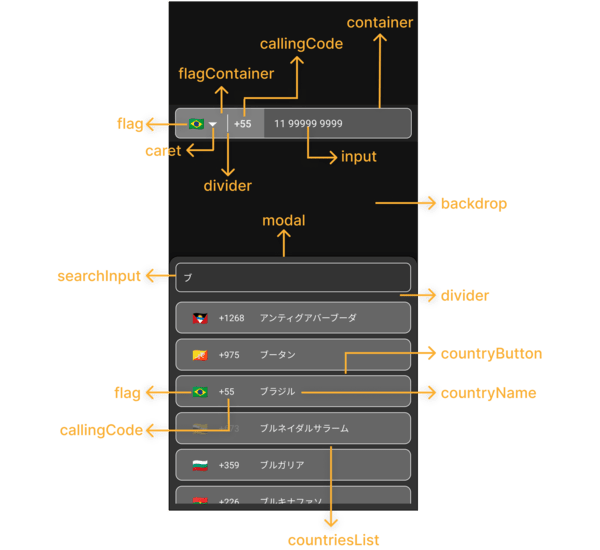
phoneInputStyles = { {
container : {
backgroundColor : '#575757' ,
borderWidth : 1 ,
borderStyle : 'solid' ,
borderColor : '#F3F3F3' ,
} ,
flagContainer : {
borderTopLeftRadius : 7 ,
borderBottomLeftRadius : 7 ,
backgroundColor : '#808080' ,
justifyContent : 'center' ,
} ,
flag : { } ,
caret : {
color : '#F3F3F3' ,
fontSize : 16 ,
} ,
divider : {
backgroundColor : '#F3F3F3' ,
}
callingCode : {
fontSize : 16 ,
fontWeight : 'bold' ,
color : '#F3F3F3' ,
} ,
input : {
color : '#F3F3F3' ,
} ,
} }
modalStyles = { {
modal : {
backgroundColor : '#333333' ,
borderWidth : 1 ,
} ,
backdrop : { } ,
divider : {
backgroundColor : 'transparent' ,
} ,
countriesList : { } ,
searchInput : {
borderRadius : 8 ,
borderWidth : 1 ,
borderColor : '#F3F3F3' ,
color : '#F3F3F3' ,
backgroundColor : '#333333' ,
paddingHorizontal : 12 ,
height : 46 ,
} ,
countryButton : {
borderWidth : 1 ,
borderColor : '#F3F3F3' ,
backgroundColor : '#666666' ,
marginVertical : 4 ,
paddingVertical : 0 ,
} ,
noCountryText : { } ,
noCountryContainer : { } ,
flag : {
color : '#FFFFFF' ,
fontSize : 20 ,
} ,
callingCode : {
color : '#F3F3F3' ,
} ,
countryName : {
color : '#F3F3F3' ,
} ,
} }
/>
. . . ...
< PhoneInput
. . .
customCaret = { < Icon name = "chevron-down" size = { 30 } color = "#000000" /> } // react-native-vector-icons
/>
. . . ...
< PhoneInput
. . .
placeholder = "Custom Phone Input Placeholder"
modalSearchInputPlaceholder = "Custom Modal Search Input Placeholder"
modalNotFoundCountryMessage = "Custom Modal Not Found Country Message"
/ >
... ...
< PhoneInput
. . .
modalHeight = "80%"
/ >
... ...
< PhoneInput
. . .
modalDisabled
/>
. . . ...
< PhoneInput
. . .
disabled
/>
. . . const [ isDisabled , setIsDisabled ] = useState < boolean > ( true )
. . .
< PhoneInput
. . .
containerStyle = { isDisabled ? { backgroundColor : 'yellow' } : { } }
disabled = { isDisabled }
/ >
... ...
< PhoneInput
. . .
language = "pt"
/ >
... ...
< PhoneInput
. . .
customMask = { [ '#### ####' , '##### ####' ] }
/>
. . . ...
< PhoneInput
. . .
defaultCountry = "CA"
/ >
... ...
< PhoneInput
. . .
defaultValue = "+12505550199"
/ >
...Beobachtungen:
- Sie müssen einen Standardwert mit dem E164 -Format verwenden:
+(country callling code)(area code)(number phone)- Die LIB hat den Mechanismus, die Flagge und Maske des gelieferten
defaultValueeinzustellen. Wenn der mitgeliefertedefaultValuejedoch nicht mit einem internationalen Standard übereinstimmt, wird dieinput mask of the defaultValueauf "BR" festgelegt (bitte stellen Sie sicher, dass der Standardwert im oben genannten Format ist).
  ...
  < PhoneInput
    . . .
    showOnly = { [ 'BR' , 'PT' , 'CA' , 'US' ] }
  />
. . . ...
< PhoneInput
. . .
excludedCountries = { [ 'BR' , 'PT' , 'CA' , 'US' ] }
/>
. . . ...
< PhoneInput
. . .
popularCountriess = { [ 'BR' , 'PT' , 'CA' , 'US' ] }
popularCountriesSectionTitle = 'Suggested'
restOfCountriesSectionTitle = 'All'
/>
. . . import { I18nManager } from "react-native" ;
...
< PhoneInput
. . .
rtl = { I18nManager . isRTL }
/>
. . . ...
< PhoneInput
. . .
allowZeroAfterCallingCode = { false }
/>
. . . language?: Ilanguage;customMask?: String [];defaultValue?: String;value?: String;onChangePhoneNumber?: (PhoneNumber: String) => void;defaultCountry?: icountrycca2;selectedCountry?: Socountry;onChangeSelectedCountry?: (Land: icountry) => void;showOnly?: icountrycca2 [];excludedCountries?: icountrycca2 [];popularCountries?: icountrycca2 [];popularCountriesSectionTitle?: String;restOfCountriesSectionTitle?: String;rtl?: boolean;disabled?: Boolean;modalDisabled?: boolean;modalHeight?: Nummer | String;theme?: iTheme;phoneInputStyles?: iPhoneInputStyles;modalStyles?: Imodalstyles;modalSearchInputPlaceholder?: String;modalSearchInputPlaceholderTextColor?: String;modalSearchInputSelectionColor?: String;modalNotFoundCountryMessage?: String;customCaret?: Reactnode;ref?: Ref <PhoneInputRef>;allowZeroAfterCallingCode?: boolean getAllCountries: () => icountry [];getCountriesByCallingCode: (Aufrufcode: String) => icountry [] | undefiniert;getCountryByCca2: (CCA2: String) => icountry | undefiniert;getCountriesByName: (Name: String, Sprache: Ilanguage) => icountry [] | undefiniert;getCountryByPhoneNumber: (PhoneNumber: String) => icountry | undefiniert; "name" : {
"bg" : "Bulgarian" ,
"by" : "Belarusian" ,
"cn" : "Chinese" ,
"cz" : "Czech" ,
"de" : "German" ,
"ee" : "Estonian" ,
"el" : "Greek" ,
"en" : "English" ,
"es" : "Espanol" ,
"fr" : "French" ,
"he" : "Hebrew" ,
"it" : "Italian" ,
"jp" : "Japanese" ,
"nl" : "Dutch" ,
"pl" : "Polish" ,
"pt" : "Portuguese" ,
"ro" : "Romanian" ,
"ru" : "Russian" ,
"ua" : "Ukrainian" ,
"zh" : "Chinese (Simplified)" ,
"ar" : "Arabic" ,
"tr" : "Turkish"
} , $ git clone https://github.com/AstrOOnauta/react-native-international-phone-number.gitReparieren, aktualisieren und genießen?
Erstellen Sie ein neues PR für dieses Repository
ISC







