eCalendario
version 1.1


You can read this readme.md in English if you want by clicking here.
Description: Delphi Firemonkey component that can be easily implemented on all platforms that Firemonkey Framework Compila (Windows 32-bit, Windows 64-bit, macos, iOS, Linux, Android). The goal is to be a simple calendar to implement in Runtime (this component does not work in Design Time).
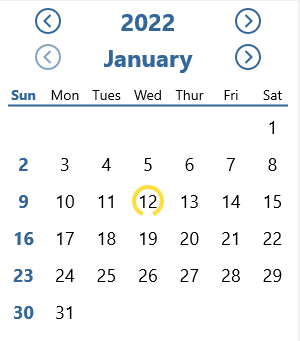
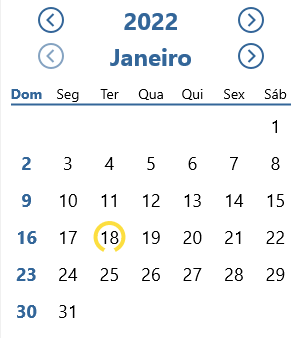
To start using Ecalendar, you only need Unit Ecalendario.component.pas and Ecalendario.component.fmx. You can download the code zip (or even the release that is more recommended) and add to your project or use Boss, with the commands below:
To start the project (create Boss.json file and be able to control the facilities)
Boss init
To install the ecalendario as dependence
Boss install https://github.com/rafael-figueiredo-alves/eCalendario
Then just use the section code below to use and not forget to declare unit ecalendario.component.pas in the uses where you want to use the calendar.
The first thing to do to be able to use Ecalendario on one of your project forms is to put a Tlayout on the Form with the Height properties of at least 340 and width of at least 300 .

Now, at the onCreate event (it may also be on onShow ), you should use the following commands in the following order:
TeCalendario.New(form to which calendar will be linked,layout where the calendar will be rendered)
This command serves to create the ecalendarium, calling the class (which is an interface) tecalendario and calling the new method (which will create a class instance), where we will define two parameters: the form where the calendar will be used, and the tlayout where it will be rendered.
onClickDate(function to be triggered when clicking on a day or when changing the months and years in the calendar)
This command should come after creation to associate the method (action) that will be used when we change the date, whether by clicking on a day, changing the month or year. The parameter must be a function with the following signature: function nome_da_função (Data: TDate);
Locale(accepts the values: ptbr | en | spanol | fr | it | ger)
The Locale command is used to define the calendar language. There are six possibilities:
StartDate(accepts a value of the TDATE or ADATETIME, such as now ())
StartDate is used to set the current date (today) or the date that must be selected by default. It should receive a parameter in ADATE or ADATETIME format.
ShowCalendar;
It is this last command that performs the magic of displaying a calendar on our form within the layout defined in the New method. See below an example of code to use the ecalendario using what was presented:
 procedure TFormMain.FormCreate (Sender: TObject);
begin
  teCalendario.New(self, Layout1)
                .onClickDate(ExibeData)
                .Locale(ptBr)
                .StartDate(Now)
                .ShowCalendar;
end ;

procedure TFormMain.ExibeData (Data: TDate);
begin
  Label1.Text := DateToStr(Data);
end ;If you want to customize the calendar, you can edit directly to the ecalendario file.component.fmx or the following code can be used:
                .config
                  .BackgroundColor(talphaColors.Yellow)
                  .SundaysColor(talphacolors.Red)
                  .SelectorColor(TAlphaColors.Blue)
                  .DaysColor(TAlphaColors.Blue)
                  .LineColor(TAlphaColors.Blue)
                  .MonthYearColor(TAlphaColors.Blue)
                  .ButtonsColor(TAlphaColors.Blue)
                  .& End
The Config Command allows you to open editing options. In BackgroundColor() , you set the background color of the calendar (which is white by default), and the parameter to be used should be Talphacolors type. The SundaysColor() command is responsible for defining the color of Sundays on the calendar (which by default is blue). Accept Talphacolors type parameter. The SelectorColor() command is responsible for setting the color of the selector and accepting to remote at Talphacolors. To set the color of the line, the buttons, the name of the month and year use the respective commands: LineColor() , MonthYearColor() , ButtonsColor() . To define the color of the days, except for Sundays, use the DaysColor() command. All of these commands expect a parameter of Talphacolors type. The &End command comes out of the configuration interface and returns to the main one. See the Code Excerpt below with the addition of a simple customization:
 procedure TFormMain.FormCreate (Sender: TObject);
begin
  teCalendario.New(self, Layout1)
                .onClickDate(ExibeData)
                .Locale(ptBr)
                .StartDate(Now)
                .config
                  .BackgroundColor(talphaColors.Yellow)
                  .SundaysColor(talphacolors.Red)
                  .& End
                .ShowCalendar;
end ;Your contribution is very welcome, whether an error identification (Issue) or a pull request. Feel free to contribute. If you wish, you would be happy if you can publicize this work to other people.
Rafael de Figueiredo Alves








