WEB_GUARDIAN_GUARDIAN
1.0.0


'Guardian' is a video surveillance web application that automatically monitors military CCTVs.
Development background
In recent years, some troops emphasized alert work due to failure
"The longevity who failed in the operation can be forgiven, but the longevity who failed the boundary cannot be forgiven."
As there is such an ambassador, the boundary work is important in the military unit.
But somewhere, there were cases where civilians came in because they were broken, but they were later identified.
Based on these examples, the boundary work is emphasized.
Many ccTVs are simultaneously monitored by surveillance bottles
If one surveillance is concurrently monitoring more than 10 CCTVs and focuses on one screen, other screens may be overwhelming.
Indiscriminate alarm sounds for minor detection
The CCTV, which has a movement detection function, is vulnerable to the shaking of the leaves and the sudden change of light. For this reason, the guards did not care about the beef, whether there was a movement or not.
Development goal
CCTV identification with people in CCTV, automation of movement movements
In the set area, the situation journal is written when identifying a person or vehicle, and if the found object disappears, track the route.
Identified past situation database inquiry
Identified data and automatic recording videos can be viewed at any time to help track the accident.
TTS alarm sound that users can recognize
When the movement detection occurs, it is not the sound of the ringing, but when only a person and a vehicle are detected, it will inform the person or vehicle detection with TTS.
PPT file
PDF file
| Presentation | Demonstration |
|---|---|
| Google Drive | Google Drive |
Oven
2020 Defense Open Source Academy Hackathon -Guardian Development Review
| RTSP streaming and situation journal |
|---|
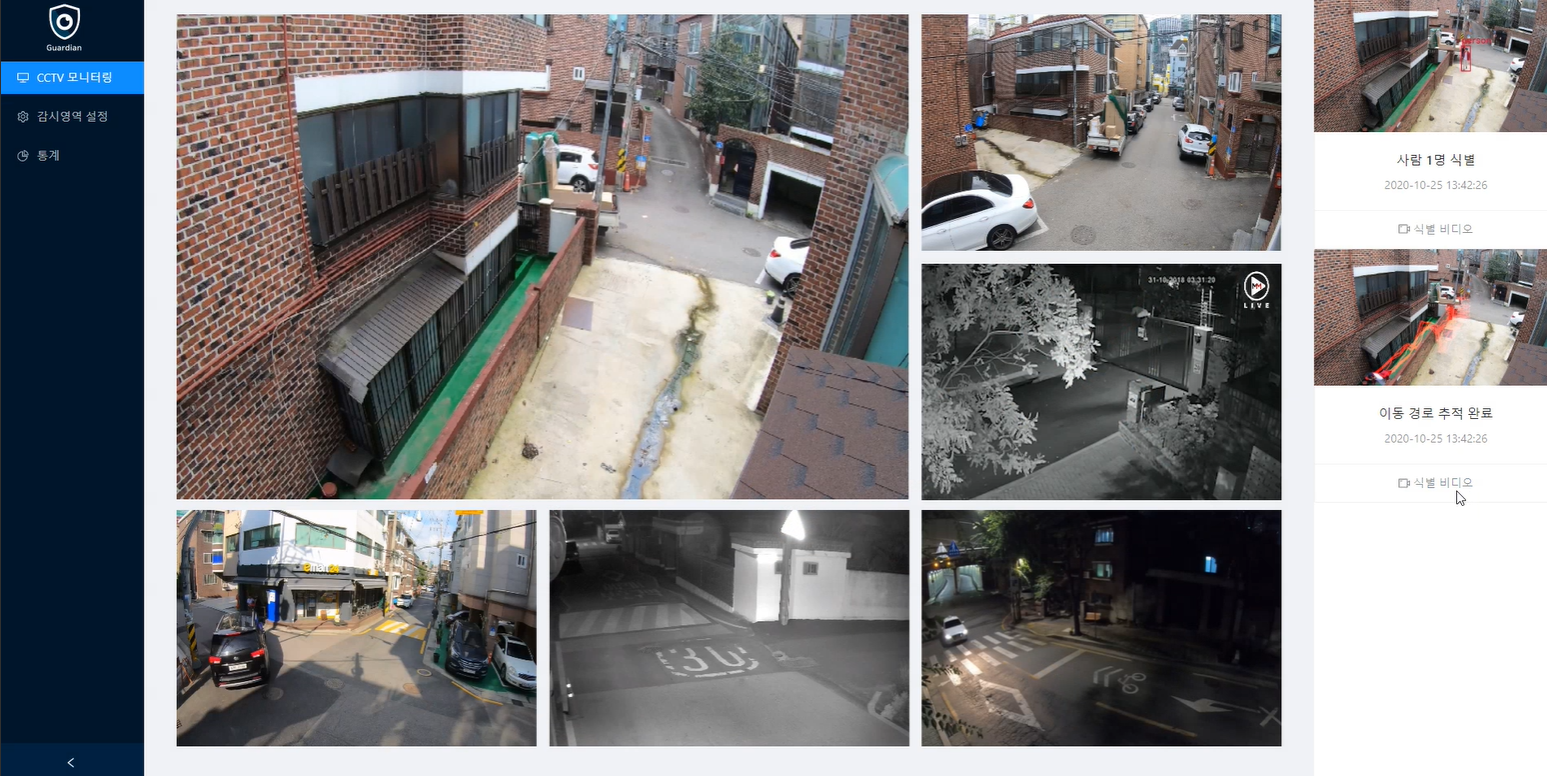 |
| It shows the RTSP stream data supported by network cameras or DVRs on the web. |
| People and vehicles detection |
|---|
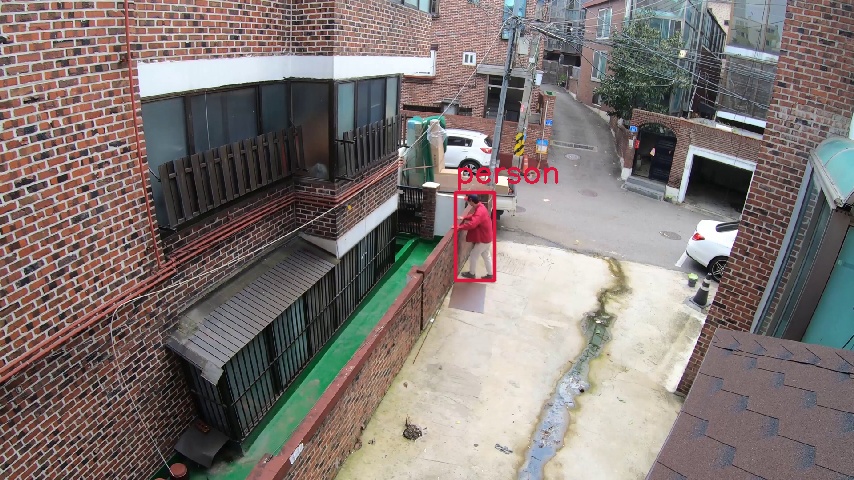 |
| YOLO -based Object Detection identifies people and cars. |
| After detection distance tracking and automatic recording |
|---|
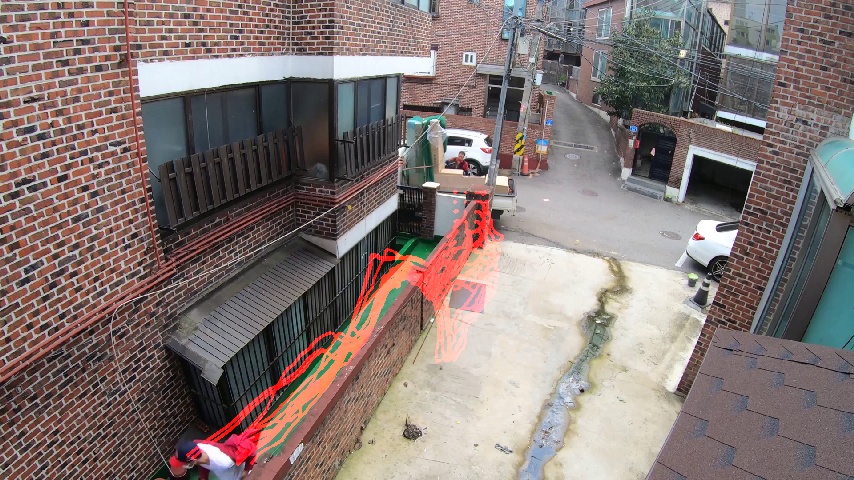 |
| If the object disappears, track the path and show it to the user. |
| When you have a certain detection |
| (Detection ~ Movement Detection End) Record the branch and show it to the user. |
| Automatic recording video preview |
|---|
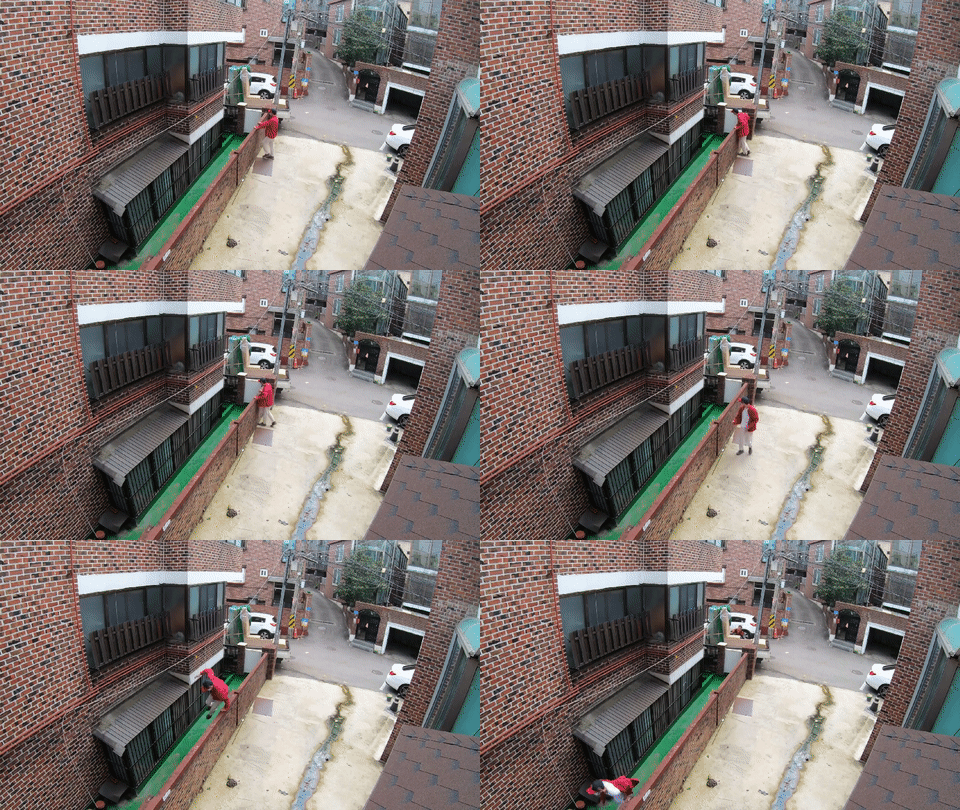 |
| This is an automatic recording video detected in the example above. |
| Daily time series statistics |
|---|
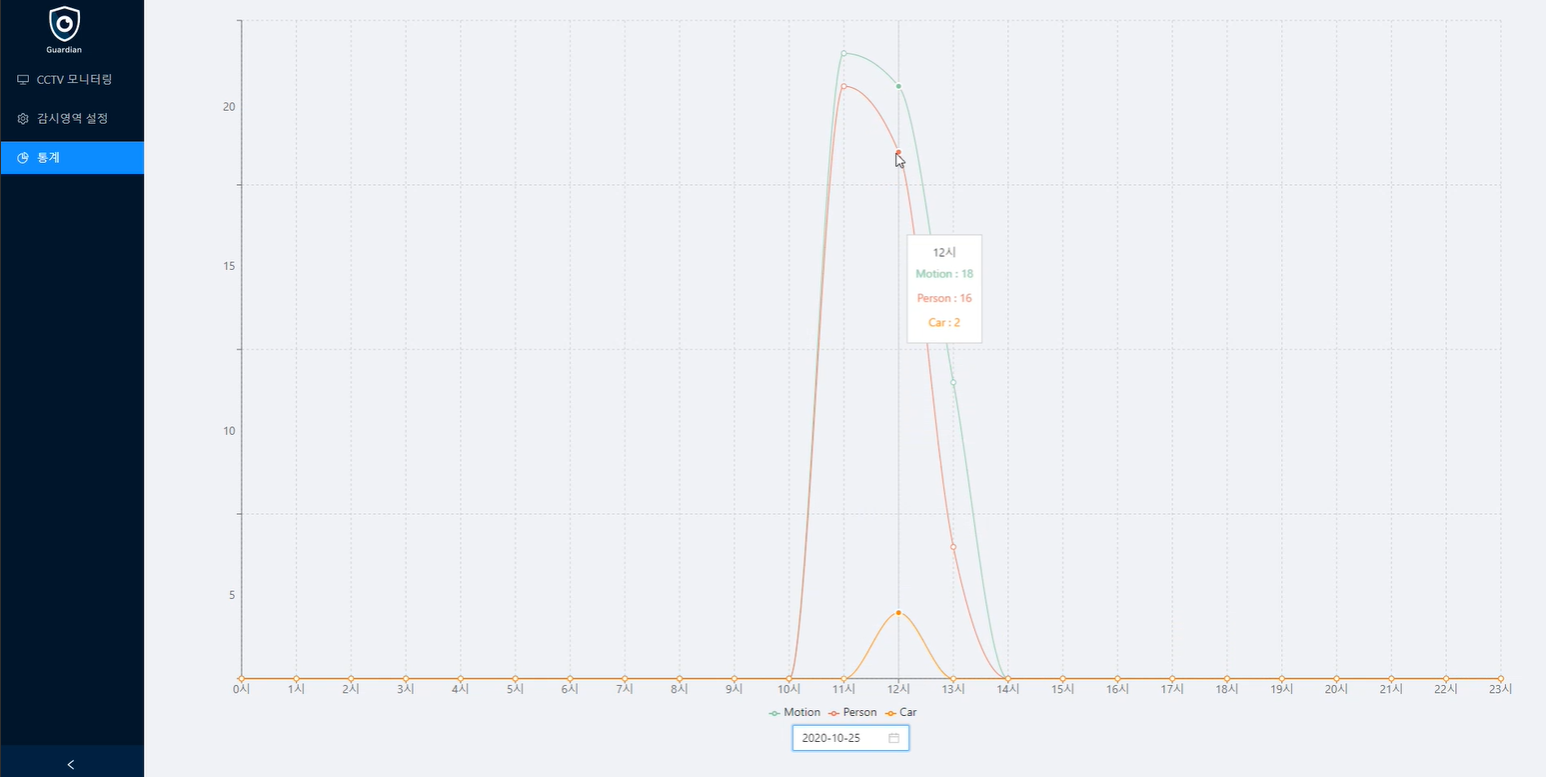 |
| Record data by day to inform the detected information from 0 to 24:00. |
| Past identification data streaming |
|---|
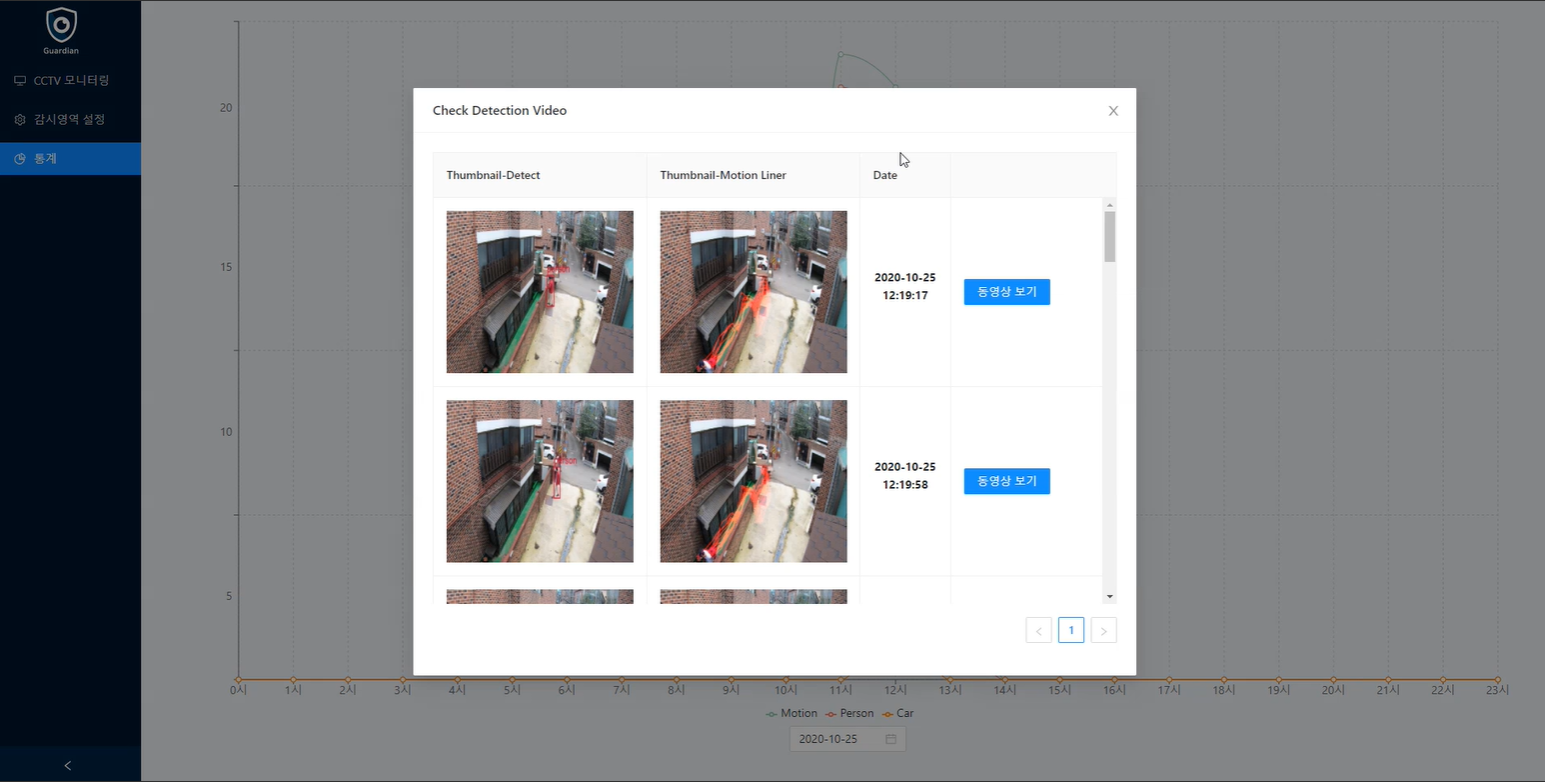 |
| If you choose the time in statistics, you can see the identification video that was detected at that time. |
Reasons for selecting major technologies
GOLANG : Video Surveillance Project has chosen a GO language with performance, concurrency, and HTTP because it processes large real -time data.
OpenCV : As a project with a lot of computer vision, I chose the open source 'OpenCV' library.
Darknet YOLOV4-TINY : The YOLO model itself was born to detect real-time objects.
Since the development environment is limited in VM, I chose a TINY model that can be operated in small CPU core.
REACT : A front end frame walk that is easy to develop web applications.
Backend
| golang | Echo | OpenCV | MongoDB |
|---|---|---|---|
| TypeScript | React.js | Antd UI Framework | Socket.io | Video.js |
|---|---|---|---|---|
| Docker |
|---|
| Darknet YOLOV4 |
|---|
OpenCV library installation for use of GOCV
 > go get -u -d gocv.io/x/gocv
> cd $GOPATH /src/gocv.io/x/gocv
> make install
Front end module installation
 > git clone https://github.com/osamhack2020/WEB_GUARDIAN_GUARDIAN.git
> cd frontend
> yarn installBuild a virtual CCTV environment
 > git clone https://github.com/gron1gh1/docker-rtsp-video-streaming.git
> cd docker-rtsp-video-streaming
> vi .env
# Modify .env file
> HOST_PORT={Port to be actually serviced}
> VIDEO_FILE ={Video File to be actually streamed}
> docker-compose up -d
Database execution
 > cd infra/mongo
# 데이터베이스 패스워드 설정
> echo MONGO_PW={set_password} > .env
> docker-compose up -d
Front End Run
 > cd frontend
> yarn start
Run backend
 > cd backend
# 데이터베이스 패스워드 설정
> echo {set_password} > MONGO_PW
> go run cv_core.go cv_motion_liner.go cv_util.go http.go cv_motion.go cv_yolo.go mongo.go :8081
Backend Run (Docker)
 # OpenCV 라이브러리를 설치하지 않았을 때 쓰는 방법입니다.
# 데이터베이스 패스워드 설정
> cd WEB_GUARDIAN_GUARDIAN
> docker -v $PWD /backend:/ gocv/opencv ' go run cv_core.go cv_motion_liner.go cv_util.go http.go cv_motion.go cv_yolo.go mongo.go :8081 '
> echo {set_password} > MONGO_PW
> go run cv_core.go cv_motion_liner.go cv_util.go http.go cv_motion.go cv_yolo.go mongo.go :8081
Internet browser access http: // localhost: 8080







