mbp fedora
v6.4.4-f38

Fedora ISO with Apple T2 patches built-in (Macbooks produced >= 2018).
All available Apple T2 drivers and patches are integrated into this ISO.
Kernel: https://github.com/mikeeq/mbp-fedora-kernel
Kernel patches: https://github.com/t2linux/linux-t2-patches
Tested on: Macbook Pro 15,2 13" 2019 i5 TouchBar Z0WQ000AR MV972ZE/A/R1 && Macbook Pro 16,2 13" 2020 i5
Boot ROM Version:	220.270.99.0.0 (iBridge: 16.16.6571.0.0,0)
macOS Mojave: 10.14.6 (18G103)
Turn off secure boot and allow booting from external media - https://support.apple.com/en-us/HT208330
Download .iso from releases section - https://github.com/mikeeq/mbp-fedora/releases/latest
livecd.zip and livecd.z01 you need to download all zip parts and then
unzip
winrar or other supported tool like 7zipp7zip, dnf install p7zip and then to extract 7za x livecd.zipthe unarchiver from AppStore: https://apps.apple.com/us/app/the-unarchiver/id425424353?mt=12p7zip via brew brew install p7zip and use 7za x livecd.zip command mentioned above
brew follow this tutorial: https://brew.sh/Next you can check the SHA256 checksum of extracted .ISO to verify if your extraction process went well
shasum -a 256 livecd-fedora-mbp.isosha256sum livecd-fedora-mbp.isosha256 file available in github releasesBurn the image on USB stick >=8GB via:
dd
sudo dd bs=4M if=/home/user/Downloads/livecd-fedora-mbp-201908181858.iso of=/dev/sdc conv=fdatasync status=progresstry to find under which /dev/ your USB stick is available sudo diskutil list
check if any partitions from it are mounted df -h, if they are please unmount sudo diskutil unmount /dev/disk2s1
exec sudo dd if=/Users/user/Downloads/livecd-fedora-mbp-201908181858.iso of=/dev/disk2 bs=4m
if dd is not working for you for some reason you can try to install gdd via brew and use GNU dd command instead sudo gdd bs=4M if=/Users/user/Downloads/livecd-fedora-mbp-201908181858.iso of=/dev/disk2 conv=fdatasync status=progress
# To install gdd via brew, execute
brew install coreutils
don't worry if dd command execution is slow on MacOS, it can take a while due to XNU's poor I/O performance
Rufus (GPT)- https://rufus.ie/, if prompted use DD modelivecd-iso-to-disk as it's overwriting ISO default grub settings and Fedora will not boot correctly!Install Fedora
First of all I recommend to shrink (resize) macOS APFS partition and not removing macOS installation entirely from your MacBook, because it's the only way to keep your device up-to-date. macOS OS updates also contains security patches to EFI/Apple T2
Boot Fedora Installer from USB drive directly from macOS boot manager. (You can boot into it by pressing and holding Option key (ALT key) after clicking the power-on button when your computer was turned off or on restart/reboot when Apple logo is shown on the screen).
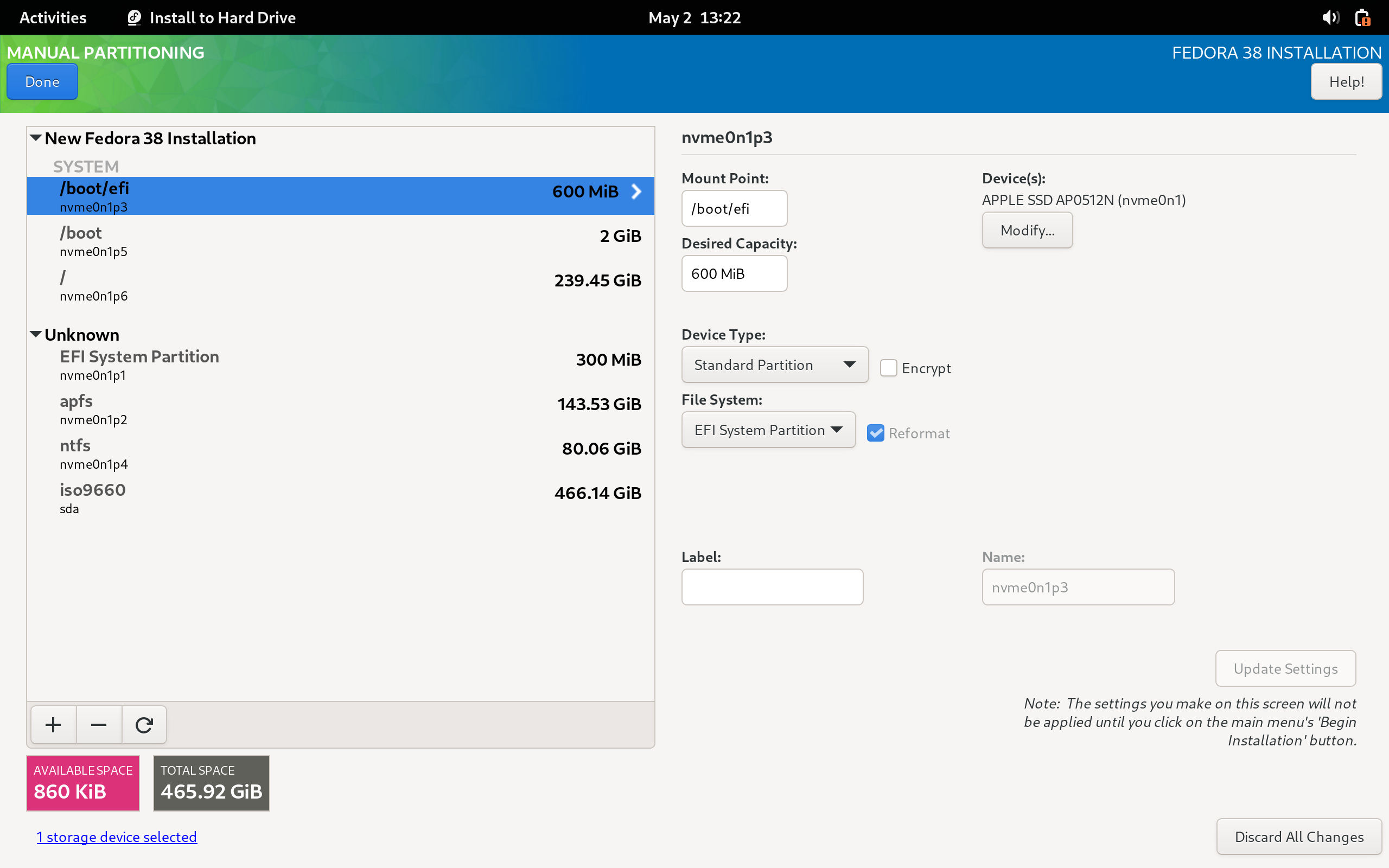
I recommend using standard partition layout during partitioning your Disk in Anaconda (Fedora Installer)
  /boot/efi - 600MiB EFI FAT32
  /boot - 2GiB EXT4
  / - xxxGiB EXT4
You can leave the desired capacity value empty for the last partition, Anaconda will allocate all free disk space to that partition when defining it.
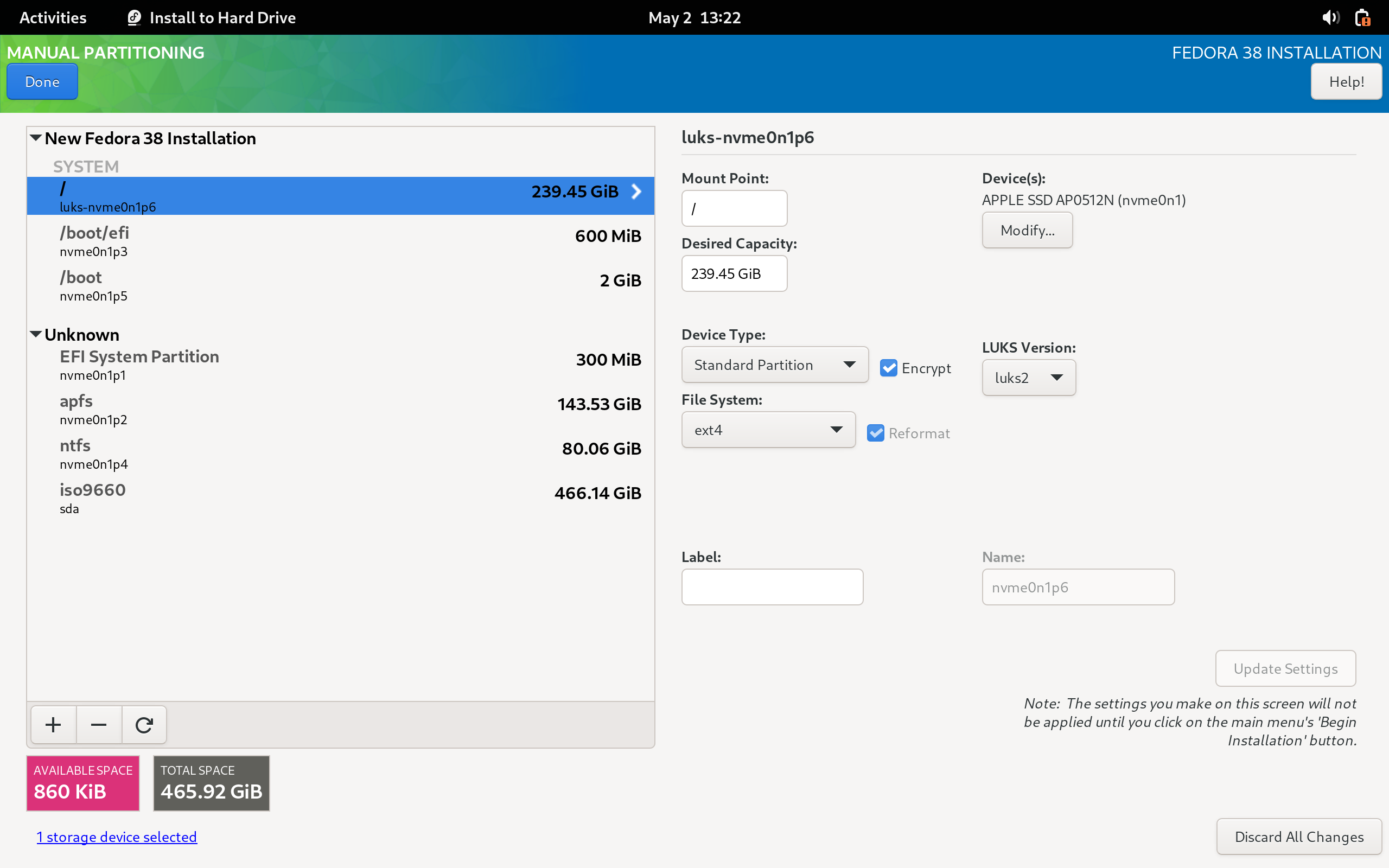
You can also encrypt your main partition using LUKS
To install additional languages (only English is available out of the box), install appropriate langpack via dnf dnf search langpacks, i.e.: to install Polish language pack execute: dnf install langpacks-pl
You can change mappings of ctrl, option keys (PC keyboard mappings) by creating /etc/modprobe.d/hid_apple.conf file and recreating grub config. All available modifications could be found here: https://github.com/free5lot/hid-apple-patched
sudo -i

# /etc/modprobe.d/hid_apple.conf
options hid_apple swap_fn_leftctrl=1
options hid_apple swap_opt_cmd=1

# Refresh dracut (initramfs)
dracut -f
To change function key mappings for models with touchbar see modinfo apple_ib_tb and use echo 2 > /sys/class/input/*/device/fnmode instead of the hid_apple options. See
this issue
Setup wifi and other model specific devices by following guides on wiki.t2linux.org - https://wiki.t2linux.org/guides/wifi/
# Docs: https://docs.fedoraproject.org/en-US/quick-docs/dnf-system-upgrade/
sudo -i

# 1. Make sure your OS is up to date
dnf update -y --refresh
reboot

# 2. Update mbp-fedora-kernel
## update_kernel_mbp has built-in selfupgrade function, so when it fails it's just due to script update - please rerun everything should be good on second run
KERNEL_VERSION="6.4.4-f38" UPDATE_SCRIPT_BRANCH="v6.4-f38" update_kernel_mbp
reboot

# 3. Update your OS to include all changes made in mbp-fedora-t2-config RPM
dnf update -y --refresh
reboot

# 4. Install dnf-plugin-system-upgrade
dnf install -y dnf-plugin-system-upgrade

# 5. Upgrade to new OS version
## If you're trying to upgrade older version of mbp-fedora to latest version, please repeat a process by upgrading only to one major release of Fedora, i.e.: Fedora 33 -> 34, 34 -> 35, 35 -> 36, 36 -> 37 -> 38, by changing the number in `--releasever` argument

dnf system-upgrade download -y --releasever=38

# 6. Reboot your Mac
dnf system-upgrade reboot

# 7. After reboot clean old packages
dnf clean packages

## 7.1 Clean all dnf cache
dnf clean all

## 8. Clean all unneeded packages
dnf autoremove -y

## 9. Update your new version of Fedora
dnf update -y --refresh
rebootthere are two video devices (web cameras) initialized/discovered, don't know why yet
➜ ls -l /sys/class/video4linux/
total 0
lrwxrwxrwx. 1 root root 0 Aug 23 15:14 video0 -> ../../devices/pci0000:00/0000:00:1d.4/0000:02:00.1/bce/bce/bce-vhci/usb7/7-2/7-2:1.0/video4linux/video0
lrwxrwxrwx. 1 root root 0 Aug 23 15:14 video1 -> ../../devices/pci0000:00/0000:00:1d.4/0000:02:00.1/bce/bce/bce-vhci/usb7/7-2/7-2:1.0/video4linux/video1
➜ cat /sys/class/video4linux/*/dev
81:0
81:1Network Configuration step, probably due to iBridge internal network interfaceworkaround - two kernel modules responsible for loading it are disabled by default in mbp-fedora
echo "# Disable Unused Apple Ethernet
blacklist cdc_ncm
blacklist cdc_mbim" | sudo tee -a /etc/modprobe.d/apple_internal_eth_blacklist.conf
workaround applied - HFS+ ESP is reformatted to FAT32 in post-scripts step and labelled asfixed in upstreammsftdata
ctrl+x is not working in GRUB, so if you are trying to change kernel parameters - start your OS by clicking ctrl+shift+f10 on external keyboardGitHub issue (RE history): Dunedan/mbp-2016-linux#71
@kekerby T2 Audio Config: https://github.com/kekrby/t2-better-audio
Apple BCE repository (Apple T2 HID): https://github.com/kekrby/apple-bce.git
Apple iBridge repository (TouchBar): https://github.com/Redecorating/apple-ib-drv.git
hid-apple-patched module for changing mappings of ctrl, fn, option keys: https://github.com/free5lot/hid-apple-patched
Linux T2 kernel patches: https://github.com/t2linux/linux-t2-patches
Ubuntu
Arch Linux
Installing Fedora 31 on a 2018 Mac mini: https://linuxwit.ch/blog/2020/01/installing-fedora-on-mac-mini/




