handtype
1.0.0

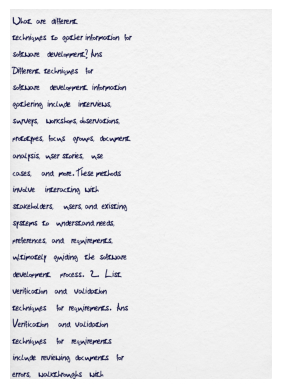
To convert text to handwriting in a seemingly authentic manner. To achieve a realistic conversion of typed text into handwritten-style content, creating a genuine vintage appearance through deep learning techniques, commonly referred to as 'deep faking.'
Example -
I would like to work on this issue. Can you assign it to me?
Clone the Repository: Clone your forked repository to your local machine using the following command:
git clone https://github.com/Aatmaj-Zephyr/handtype.git
Create a Branch: Create a new branch for your work with a descriptive name. Use the following format:
git checkout -b feature/your-feature-namePrefix your branch name with "feature/" for feature additions, "bugfix/" for bug fixes, or choose an appropriate prefix that reflects the purpose of your branch.
Make Changes: Implement your changes and ensure that they adhere to our coding and style guidelines.
Commit Your Changes: Commit your changes with a meaningful commit message. Include a reference to relevant issues or pull requests.
git commit -m "Add your descriptive commit message here"Push to Your Fork: Push your branch to your forked repository on GitHub.
git push origin feature/your-feature-nameOpen a Pull Request: Go to the original repository on GitHub and click the "New Pull Request" button. Provide a clear and concise title and description for your pull request, and reference any related issues.
This repository ensures the quality of Jupyter .ipynb notebooks by integrating a linting process using GitHub Actions. Here's a brief overview of how it works and why it's essential:
Jupyter notebooks, while extremely versatile, pose a challenge when it comes to maintaining code quality. They intermingle code, output, and markdown in a JSON format, which makes traditional Python linting tools incompatible with .ipynb files out of the box.
To address this challenge, we use a tool called nbqa. nbqa acts as a bridge, allowing us to run popular Python linting tools, like flake8, directly on Jupyter notebooks.
Setting Up Locally: Before pushing to the repository, you can check for linting errors locally. To do this, ensure you have nbqa and flake8 installed:
pip install nbqa flake8With the tools installed, you can lint your notebooks:
nbqa flake8 handtype.ipynbThis command will highlight any linting errors in your notebook based on PEP-8 standards.
Linting provides several benefits:
We strongly encourage all contributors to run the linting checks locally before pushing, to ensure faster integration and fewer CI build failures.
MIT
Note: Currently, work in progress of making the paper folded in the centre using image processing for a more faking effect. It currently is just a google collab file, but let's see what happens in the future. #goOpenSource





