postgresql exercises
1.0.0

هذا عبارة عن مجموعة من جميع الأسئلة والأجوبة على تمارين Alisdair Owen PostgreSQL. ضع في اعتبارك أن حل هذه المشكلات في الواقع سيجعلك تذهب إلى أبعد من مجرد قشط هذا الدليل ، لذا تأكد من دفع زيارة PostgreSQL.
من السهل جدًا الذهاب مع التمارين: كل ما عليك فعله هو فتح التدريبات ، وإلقاء نظرة على الأسئلة ، وحاول الإجابة عليها!
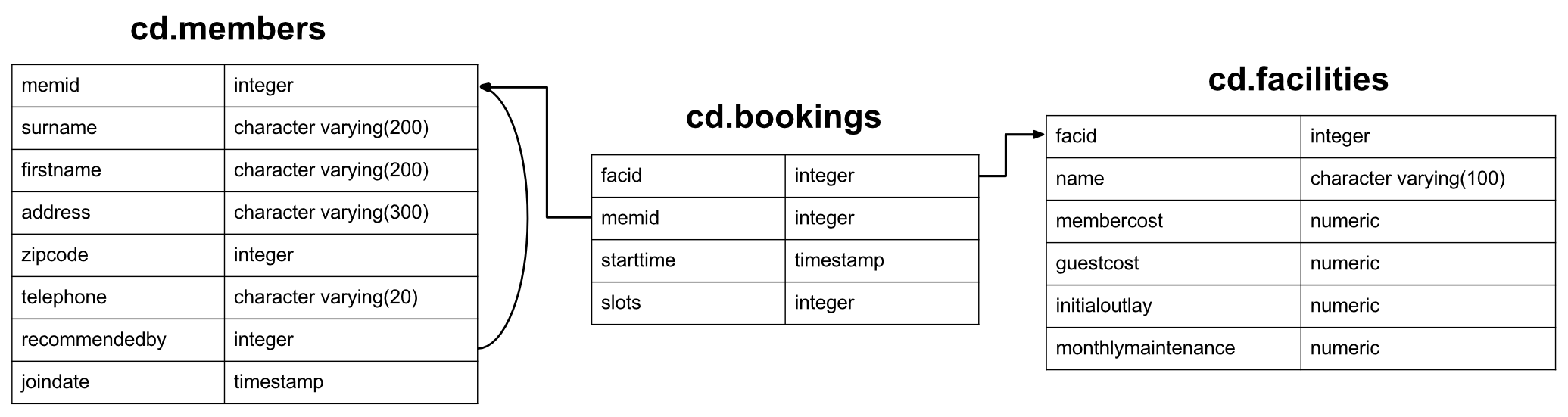
مجموعة البيانات لهذه التمارين مخصصة للنادي الريفي الذي تم إنشاؤه حديثًا ، مع مجموعة من الأعضاء ، ومرافق مثل ملاعب التنس ، وتاريخ الحجز لتلك المنشآت. من بين أشياء أخرى ، يريد النادي أن يفهم كيف يمكنهم استخدام معلوماتهم لتحليل استخدام/الطلب على المنشأة. يرجى ملاحظة: تم تصميم مجموعة البيانات هذه بحتة لدعم مجموعة مثيرة للاهتمام من التمارين ، ومخطط قاعدة البيانات معيب في عدة جوانب - من فضلك لا تأخذها كمثال على التصميم الجيد. سنبدأ بإلقاء نظرة على جدول الأعضاء:
 CREATE TABLE cd .members
(
    memid integer NOT NULL ,
    surname character varying ( 200 ) NOT NULL ,
    firstname character varying ( 200 ) NOT NULL ,
    address character varying ( 300 ) NOT NULL ,
    zipcode integer NOT NULL ,
    telephone character varying ( 20 ) NOT NULL ,
    recommendedby integer ,
    joindate timestamp not null ,
    CONSTRAINT members_pk PRIMARY KEY (memid),
    CONSTRAINT fk_members_recommendedby FOREIGN KEY (recommendedby)
        REFERENCES cd . members (memid) ON DELETE SET NULL
);
كل عضو لديه معرف (غير مضمون ليكون متسلسلًا) ، ومعلومات العنوان الأساسية ، والمرجع إلى العضو الذي أوصت به (إن وجد) ، وجدول زمني عند انضمامهم. العناوين في مجموعة البيانات ملفقة بالكامل (وغير واقعية).
 CREATE TABLE cd .facilities
(
    facid integer NOT NULL ,
    name character varying ( 100 ) NOT NULL ,
    membercost numeric NOT NULL ,
    guestcost numeric NOT NULL ,
    initialoutlay numeric NOT NULL ,
    monthlymaintenance numeric NOT NULL ,
    CONSTRAINT facilities_pk PRIMARY KEY (facid)
);
يسرد جدول المرافق جميع المرافق القابلة للحجز التي يمتلكها النادي الريفي. معلومات المعرف/الاسم في النادي ، وتكلفة حجز كل من الأعضاء والضيوف ، والتكلفة الأولية لبناء المنشأة ، وتقدير تكاليف الصيانة الشهرية. إنهم يأملون في استخدام هذه المعلومات لتتبع مدى جدارة كل مرفق مالياً.
 CREATE TABLE cd .bookings
(
    bookid integer NOT NULL ,
    facid integer NOT NULL ,
    memid integer NOT NULL ,
    starttime timestamp NOT NULL ,
    slots integer NOT NULL ,
    CONSTRAINT bookings_pk PRIMARY KEY (bookid),
    CONSTRAINT fk_bookings_facid FOREIGN KEY (facid) REFERENCES cd . facilities (facid),
    CONSTRAINT fk_bookings_memid FOREIGN KEY (memid) REFERENCES cd . members (memid)
);
أخيرًا ، هناك حجوزات تتبع الطاولة للمرافق. هذا يخزن معرف المنشأة ، والعضو الذي قام بالحجز ، وبداية الحجز ، وعدد "فتحات" نصف ساعة تم إجراؤها. سيجعل هذا التصميم الخاص بخصوصية بعض الاستفسارات أكثر صعوبة ، ولكن يجب أن يوفر لك بعض التحديات المثيرة للاهتمام-وكذلك إعدادك لرعب العمل مع بعض قواعد بيانات العالم الحقيقي :-).
حسنًا ، يجب أن تكون كل المعلومات التي تحتاجها. يمكنك تحديد فئة من الاستعلام لمحاولة من القائمة أعلاه ، أو البدء بدلاً من البداية.
لا مشكلة! الاستيقاظ والجري ليس صعبًا جدًا. أولاً ، ستحتاج إلى تثبيت PostgreSQL ، والتي يمكنك الحصول عليها من هنا. بمجرد بدء تشغيله ، قم بتنزيل SQL.
أخيرًا ، قم بتشغيل psql -U <username> -f clubdata.sql -d postgres -x -q لإنشاء قاعدة بيانات "تمارين" ، ومستخدم pgexerceres postgres '، على الأرجح على الويب: على الأرجح ، فإن تحميل البيانات الخاصة بك. لغة C)
عندما تقوم بتشغيل استفسارات ، قد تجد PSQL قليلاً. إذا كان الأمر كذلك ، أوصي بتجربة أدوات تطوير قاعدة بيانات Eclipse.
تتناول هذه الفئة أساسيات SQL. ويغطي اختيار وحيث الجمل ، تعبيرات الحالات ، النقابات ، وبعض الاحتمالات والنهايات الأخرى. إذا كنت قد تعلمت بالفعل في SQL ، فربما تجد هذه التمارين سهلة إلى حد ما. إذا لم يكن الأمر كذلك ، فيجب أن تجدهم نقطة جيدة لبدء التعلم للفئات الأكثر صعوبة في المستقبل!
إذا كنت تكافح مع هذه الأسئلة ، فإنني أوصي بشدة بتعلم SQL ، من تأليف Alan Beaulieu ، ككتاب موجز ومكتوب جيدًا حول هذا الموضوع. إذا كنت مهتمًا بأساسيات أنظمة قاعدة البيانات (على عكس كيفية استخدامها) ، فيجب عليك أيضًا التحقيق في مقدمة لأنظمة قاعدة البيانات حسب تاريخ CJ.
كيف يمكنك استرداد جميع المعلومات من جدول CD.Facilities؟
النتائج المتوقعة:
| وجه | اسم | MemberCost | GuestCost | initialoutlay | الصيانة الشهرية |
|---|---|---|---|---|---|
| 0 | محكمة التنس 1 | 5 | 25 | 10000 | 200 |
| 1 | تنس محكمة 2 | 5 | 25 | 8000 | 200 |
| 2 | محكمة الريشة | 0 | 15.5 | 4000 | 50 |
| 3 | كرة الطاولة | 0 | 5 | 320 | 10 |
| 4 | غرفة التدليك 1 | 35 | 80 | 4000 | 3000 |
| 5 | غرفة التدليك 2 | 35 | 80 | 4000 | 3000 |
| 6 | محكمة الاسكواش | 3.5 | 17.5 | 5000 | 80 |
| 7 | جدول السنوكر | 0 | 5 | 450 | 15 |
| 8 | طاولة البلياردو | 0 | 5 | 400 | 15 |
إجابة:
select * from cd . facilities ; عبارة SELECT هي كتلة البدء الأساسية للاستعلامات التي تقرأ المعلومات خارج قاعدة البيانات. تتألف عبارة تحديد الحد الأدنى عمومًا من select [some set of columns] from [some table or group of tables] .
في هذه الحالة ، نريد جميع المعلومات من جدول المرافق. من السهل القسم - نحتاج فقط إلى تحديد جدول cd.facilities . "القرص المضغوط" هو مخطط الجدول - وهو مصطلح يستخدم لتجميع منطقي للمعلومات ذات الصلة في قاعدة البيانات.
بعد ذلك ، نحتاج إلى تحديد أننا نريد جميع الأعمدة. مريح ، هناك اختصار لـ "جميع الأعمدة" - *. يمكننا استخدام هذا بدلاً من تحديد جميع أسماء الأعمدة بجد.
تريد طباعة قائمة بجميع المنشآت وتكلفة الأعضاء. كيف يمكنك استرداد قائمة بأسماء وتكاليف المنشأة فقط؟
النتائج المتوقعة:
| اسم | MemberCost |
|---|---|
| محكمة التنس 1 | 5 |
| تنس محكمة 2 | 5 |
| محكمة الريشة | 0 |
| كرة الطاولة | 0 |
| غرفة التدليك 1 | 35 |
| غرفة التدليك 2 | 35 |
| محكمة الاسكواش | 3.5 |
| جدول السنوكر | 0 |
| طاولة البلياردو | 0 |
إجابة:
select name, membercost from cd . facilities ; لهذا السؤال ، نحتاج إلى تحديد الأعمدة التي نريدها. يمكننا القيام بذلك باستخدام قائمة بسيطة من أسماء الأعمدة المحددة في عبارة SELECT. جميع قاعدة البيانات التي تقوم بها قاعدة البيانات هي النظر إلى الأعمدة المتوفرة في الفقرة ، وإرجاع تلك التي طلبناها ، كما هو موضح أدناه
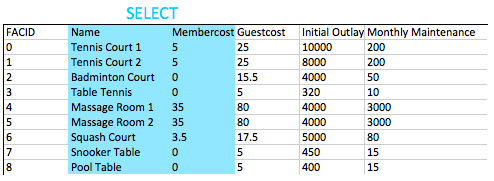
بشكل عام ، بالنسبة للاستفسارات غير المتواجئة ، يُعتبر مرغوبًا في تحديد أسماء الأعمدة التي تريدها في استفساراتك بدلاً من استخدام *. وذلك لأن التطبيق الخاص بك قد لا يكون قادرًا على التعامل مع المزيد من الأعمدة في الجدول.
كيف يمكنك إنتاج قائمة بالمرافق التي تتقاضى رسومًا للأعضاء؟
النتائج المتوقعة:
| وجه | اسم | MemberCost | GuestCost | initialoutlay | الصيانة الشهرية |
|---|---|---|---|---|---|
| 0 | محكمة التنس 1 | 5 | 25 | 10000 | 200 |
| 1 | تنس محكمة 2 | 5 | 25 | 8000 | 200 |
| 4 | غرفة التدليك 1 | 35 | 80 | 4000 | 3000 |
| 5 | غرفة التدليك 2 | 35 | 80 | 4000 | 3000 |
| 6 | محكمة الاسكواش | 3.5 | 17.5 | 5000 | 80 |
إجابة:
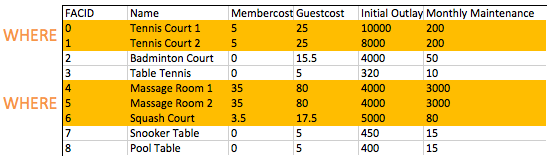
select * from cd . facilities where membercost > 0 ; يتم استخدام FROM من لبناء مجموعة من صفوف المرشحين لقراءة النتائج. في أمثلةنا حتى الآن ، كانت هذه المجموعة من الصفوف ببساطة محتويات الجدول. في المستقبل سوف نستكشف الانضمام ، والذي يسمح لنا بإنشاء مرشحين أكثر إثارة للاهتمام.
بمجرد قيامنا ببناء مجموعة من صفوف المرشحين لدينا ، يتيح لنا البند WHERE تصفية الصفوف التي مهتمون بها - في هذه الحالة ، أولئك الذين لديهم عضو يزيد عن صفر. كما سترى في تمارين لاحقة ، WHERE يمكن أن تحتوي الجمل على مكونات متعددة مقترنة بالمنطق المنطقي - من الممكن ، على سبيل المثال ، البحث عن المنشآت بتكلفة تزيد عن 0 وأقل من 10. تم توضيح إجراء ترشيح WHERE في جدول المرافق أدناه:
كيف يمكنك إنتاج قائمة بالمرافق التي تتقاضى رسومًا للأعضاء ، وهذه الرسوم أقل من 1/10 من تكلفة الصيانة الشهرية؟ إرجاع Facid واسم المنشأة وتكلفة العضو والصيانة الشهرية للمرافق المعنية.
النتائج المتوقعة:
| وجه | اسم | MemberCost | الصيانة الشهرية |
|---|---|---|---|
| 4 | غرفة التدليك 1 | 35 | 3000 |
| 5 | غرفة التدليك 2 | 35 | 3000 |
إجابة:
 select facid, name, membercost, monthlymaintenance
	from cd . facilities
	where
		membercost > 0 and
		(membercost < monthlymaintenance / 50 . 0 );
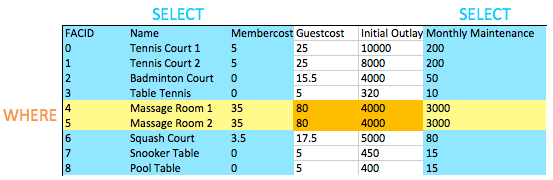
يتيح لنا البند WHERE تصفية الصفوف التي مهتمون بها - في هذه الحالة ، أولئك الذين لديهم أعضاء يزيد عن صفر ، وأقل من 1/10 من تكلفة الصيانة الشهرية. كما ترون ، فإن غرف التدليك مكلفة للغاية للتشغيل بفضل تكاليف التوظيف!
عندما نريد اختبار شرطين أو أكثر ، نستخدم AND . يمكننا ، كما قد تتوقع ، استخدام OR اختبار ما إذا كان أي من الشروط صحيحًا.
ربما لاحظت أن هذا هو الاستعلام الأول الذي يجمع بين WHERE حيث اختيار أعمدة محددة. يمكنك أن ترى في الصورة أدناه تأثير هذا: تقاطع الأعمدة المحددة والصفوف المحددة يعطينا البيانات المراد إرجاعها. قد لا يبدو هذا مثيرًا للاهتمام الآن ، ولكننا نضيف عمليات أكثر تعقيدًا مثل Joins لاحقًا ، سترى الأناقة البسيطة لهذا السلوك.
كيف يمكنك إنتاج قائمة بجميع المرافق بكلمة "تنس" باسمهم؟
النتائج المتوقعة:
| وجه | اسم | MemberCost | GuestCost | initialoutlay | الصيانة الشهرية |
|---|---|---|---|---|---|
| 0 | محكمة التنس 1 | 5 | 25 | 10000 | 200 |
| 1 | تنس محكمة 2 | 5 | 25 | 8000 | 200 |
| 3 | كرة الطاولة | 0 | 5 | 320 | 10 |
إجابة:
 select *
	from cd . facilities
	where
		name like ' %Tennis% ' ;
يوفر SQL's LIKE Operator مطابقة أنماط بسيطة على الأوتار. لقد تم تنفيذها عالميًا إلى حد كبير ، وهي لطيفة وبسيطة للاستخدام - إنها تتطلب سلسلة مع حرف ٪ مطابقة لأي سلسلة ، و _ مطابقة أي حرف واحد. في هذه الحالة ، نحن نبحث عن أسماء تحتوي على كلمة "تنس" ، لذا فإن وضع ٪ على كلا الجانبين يناسب الفاتورة.
هناك طرق أخرى لإنجاز هذه المهمة: يدعم Postgres التعبيرات العادية مع المشغل ~ ، على سبيل المثال. استخدم كل ما يجعلك تشعر بالراحة ، ولكن عليك أن تدرك أن المشغل LIKE هو أكثر قدرة على الحمل بين الأنظمة.
كيف يمكنك استرداد تفاصيل المرافق مع المعرف 1 و 5؟ حاول القيام بذلك دون استخدام أو المشغل.
النتائج المتوقعة:
| وجه | اسم | MemberCost | GuestCost | initialoutlay | الصيانة الشهرية |
|---|---|---|---|---|---|
| 1 | تنس محكمة 2 | 5 | 25 | 8000 | 200 |
| 5 | غرفة التدليك 2 | 35 | 80 | 4000 | 3000 |
إجابة:
 select *
	from cd . facilities
	where
		facid in ( 1 , 5 );
الإجابة الواضحة على هذا السؤال هي استخدام WHERE where facid = 1 or facid = 5 . البديل الذي يكون أسهل مع عدد كبير من المباريات الممكنة هو IN . يأخذ IN قائمة القيم المحتملة ، ويطابقها مع (في هذه الحالة) Facid. إذا كان أحد القيم يتطابق مع البند ، فسيكون الشرط صحيحًا لهذا الصف ، ويتم إرجاع الصف.
IN المشغل هو متظاهر مبكر جيد لأناقة النموذج العلائقي. الوسيطة التي يتطلبها ليست مجرد قائمة بالقيم - إنها في الواقع جدول مع عمود واحد. نظرًا لأن الاستعلامات تقوم أيضًا بإرجاع الجداول ، إذا قمت بإنشاء استعلام يرجع عمودًا واحدًا ، فيمكنك إطعام هذه النتائج في IN . لإعطاء مثال لعبة:
 select *
	from cd . facilities
	where
		facid in (
			select facid from cd . facilities
			);
هذا المثال مكافئ وظيفيًا فقط لاختيار جميع المنشآت ، ولكنه يوضح لك كيفية إطعام نتائج استعلام في آخر. يسمى الاستعلام الداخلي الاستعلام الفرعي .
كيف يمكنك إنتاج قائمة بالمرافق ، حيث تم تصنيف كل منها على أنها "رخيصة" أو "باهظة الثمن" بناءً على ما إذا كانت تكلفة الصيانة الشهرية أكثر من 100 دولار؟ إرجاع الاسم والصيانة الشهرية للمرافق المعنية.
النتائج المتوقعة:
| اسم | يكلف |
|---|---|
| محكمة التنس 1 | غالي |
| تنس محكمة 2 | غالي |
| محكمة الريشة | رخيص |
| كرة الطاولة | رخيص |
| غرفة التدليك 1 | غالي |
| غرفة التدليك 2 | غالي |
| محكمة الاسكواش | رخيص |
| جدول السنوكر | رخيص |
| طاولة البلياردو | رخيص |
إجابة:
 select name,
	case when (monthlymaintenance > 100 ) then
		' expensive '
	else
		' cheap '
	end as cost
	from cd . facilities ;
يحتوي هذا التمرين على بعض المفاهيم الجديدة. الأول هو حقيقة أننا نقوم بحساب في منطقة الاستعلام بين SELECT FROM . في السابق ، استخدمنا هذا فقط لتحديد الأعمدة التي نريد إرجاعها ، ولكن يمكنك وضع أي شيء هنا من شأنه أن ينتج نتيجة واحدة لكل صف تم إرجاعه - بما في ذلك الفطر الفرعي.
المفهوم الجديد الثاني هو بيان CASE نفسه. تشبه CASE بفعالية إذا/تبديل عبارات بلغات أخرى ، مع نموذج كما هو موضح في الاستعلام. لإضافة خيار "middling" ، سنقوم ببساطة بإدراج آخر when...then القسم.
أخيرًا ، هناك AS . يتم استخدام هذا ببساطة لتسمية الأعمدة أو التعبيرات ، لجعلها تعرض بشكل جيد أو لتسهيل الرجوع إليها عند استخدامها كجزء من مساع فرعي.
كيف يمكنك إنتاج قائمة بالأعضاء الذين انضموا بعد بداية سبتمبر 2012؟ أعد المذكرات ، اللقب ، FirstName ، و Joindate من الأعضاء المعنيين.
النتائج المتوقعة:
| مذكرات | اسم العائلة | الاسم الأول | Joindate |
|---|---|---|---|
| 24 | ساروين | رامناريش | 2012-09-01 08:44:42 |
| 26 | جونز | دوغلاس | 2012-09-02 18:43:05 |
| 27 | رومني | هنريتا | 2012-09-05 08:42:35 |
| 28 | فاريل | ديفيد | 2012-09-15 08:22:05 |
| 29 | ورثينجتون سميث | هنري | 2012-09-17 12:27:15 |
| 30 | اختصاص | ميلي | 2012-09-18 19:04:01 |
| 33 | Tupperware | صفير | 2012-09-18 19:32:05 |
| 35 | مطاردة | جون | 2012-09-19 11:32:45 |
| 36 | Crumpet | إيريكا | 2012-09-22 08:36:38 |
| 37 | سميث | دارين | 2012-09-26 18:08:45 |
إجابة:
 select memid, surname, firstname, joindate
	from cd . members
	where joindate >= ' 2012-09-01 ' ;
هذا هو أول نظرة لنا على الطوابع الزمنية SQL. إنها منسقة بترتيب تنازلي من حيث الحجم: YYYY-MM-DD HH:MM:SS.nnnnnn . يمكننا مقارنتها تمامًا كما قد نكون طابعًا زمنيًا لـ UNIX ، على الرغم من أن الحصول على الاختلافات بين التواريخ أكثر مشاركة (وقوية!). في هذه الحالة ، حددنا فقط جزء التاريخ من الطابع الزمني. يتم إلقاء هذا تلقائيًا بواسطة Postgres في الطابع الزمني الكامل 2012-09-01 00:00:00 .
كيف يمكنك إنتاج قائمة مرتبة من الألقاب العشرة الأولى في جدول الأعضاء؟ يجب ألا تحتوي القائمة على التكرارات.
النتائج المتوقعة:
| اسم العائلة |
|---|
| بدر |
| بيكر |
| بوث |
| زبدة |
| كوبلين |
| Crumpet |
| يجرؤ |
| فاريل |
| ضيف |
| جنتنج |
إجابة:
 select distinct surname
	from cd . members
order by surname
limit 10 ;
هناك ثلاثة مفاهيم جديدة هنا ، لكنها كلها بسيطة للغاية.
DISTINCT بعد SELECT يزيل الصفوف المكررة من مجموعة النتائج. لاحظ أن هذا ينطبق على الصفوف : إذا كان الصف A يحتوي على أعمدة متعددة ، فإن الصف B يساويه فقط إذا كانت القيم في جميع الأعمدة هي نفسها. كقاعدة عامة ، لا تستخدم DISTINCT بطريقة وليمة-ليس من المجاني إزالة التكرارات من مجموعات نتائج الاستعلام الكبيرة ، لذا فعل ذلك.ORDER BY (بعد من FROM WHERE الجمل ، بالقرب من نهاية الاستعلام) أن يتم طلب النتائج بواسطة عمود أو مجموعة من الأعمدة (مفصول الفاصلة).LIMIT الحد الحد من عدد النتائج التي تم استردادها. يعد هذا مفيدًا للحصول على نتائج في وقت واحد ، ويمكن دمجها مع الكلمة الرئيسية OFFSET للحصول على الصفحات التالية. هذا هو نفس النهج الذي تستخدمه MySQL وهو مريح للغاية - قد تجد ، للأسف ، أن هذه العملية أكثر تعقيدًا في DBS الأخرى.أنت ، لسبب ما ، تريد قائمة مجتمعة بجميع الأسماء وجميع أسماء المنشآت. نعم ، هذا مثال مفتعل :-). إنتاج تلك القائمة!
النتائج المتوقعة:
| اسم العائلة |
|---|
| تنس محكمة 2 |
| ورثينجتون سميث |
| محكمة الريشة |
| بينكر |
| يجرؤ |
| بدر |
| ماكنزي |
| Crumpet |
| غرفة التدليك 1 |
| محكمة الاسكواش |
إجابة:
 select surname
	from cd . members
union
select name
	from cd . facilities ;
يقوم مشغل UNION بما قد تتوقعه: يجمع بين نتائج استعلامات SQL في جدول واحد. التحذير هو أن كلا النتائج من الاستعلامات يجب أن يكون لها نفس عدد الأعمدة وأنواع البيانات المتوافقة.
يزيل UNION الصفوف المكررة ، في حين أن UNION ALL لا. استخدم UNION ALL افتراضيًا ، إلا إذا كنت تهتم بنتائج مكررة.
ترغب في الحصول على تاريخ الاشتراك في آخر عضو لك. كيف يمكنك استرداد هذه المعلومات؟
النتائج المتوقعة:
| أحدث |
|---|
| 2012-09-26 18:08:45 |
إجابة:
 select max (joindate) as latest
	from cd . members ;
هذا هو أول غزو لدينا في وظائف SQL الإجمالية. لقد اعتادوا على استخراج معلومات حول مجموعات كاملة من الصفوف ، والسماح لنا بطرح أسئلة مثل:
وظيفة Max Aggregate هنا بسيطة للغاية: فهي تتلقى جميع القيم الممكنة لـ Joindate ، وتخرج تلك التي تعد أكبر. هناك الكثير من القوة لتجميع الوظائف ، والتي ستصادفها في تمارين مستقبلية.
كنت ترغب في الحصول على الاسم الأول والأخير للعضو الأخير (الأعضاء) الذين قاموا بالتسجيل - وليس فقط التاريخ. كيف يمكنك أن تفعل ذلك؟
النتائج المتوقعة:
| الاسم الأول | اسم العائلة | Joindate |
|---|---|---|
| دارين | سميث | 2012-09-26 18:08:45 |
إجابة:
 select firstname, surname, joindate
	from cd . members
	where joindate =
		( select max (joindate)
			from cd . members );
في النهج المقترح أعلاه ، يمكنك استخدام مسمة فرعية لمعرفة ماهية الأحدث. إرجاع هذا الاستماع الفرعي جدولًا قياسيًا - أي جدول مع عمود واحد وصف واحد. نظرًا لأن لدينا قيمة واحدة فقط ، يمكننا استبدال الاسم الفرعي في أي مكان قد نضع قيمة ثابتة واحدة. في هذه الحالة ، نستخدمه لإكمال WHERE مكان الاستعلام للعثور على عضو معين.
قد تأمل أن تتمكن من القيام بشيء ما أدناه:
 select firstname, surname, max (joindate)
        from cd . members
لسوء الحظ ، هذا لا يعمل. لا تقيد وظيفة MAX صفوفًا مثل الفقرة WHERE - إنها ببساطة تتطلب مجموعة من القيم وتُرجع أكبرها. ثم يتم ترك قاعدة البيانات تتساءل عن كيفية إقران قائمة طويلة من الأسماء مع تاريخ الانضمام المفرد الذي يخرج من وظيفة Max ، ويفشل. بدلاً من ذلك ، تركت يجب أن تقول "ابحث عن صف (الصفوف) التي لديها تاريخ انضمام هو نفس تاريخ الانضمام القصوى".
كما ذكر التلميح ، هناك طرق أخرى لإنجاز هذه المهمة - مثال واحد أدناه. في هذا النهج ، بدلاً من اكتشاف تاريخ الانضمام الأخير ، نطلب ببساطة جدول أعضائنا بترتيب تنازلي لتاريخ الانضمام ، ونختار الأول. لاحظ أن هذا النهج لا يغطي الاحتمالات غير المرجح للغاية لشخصين ينضم في نفس الوقت بالضبط :-).
 select firstname, surname, joindate
	from cd . members
order by joindate desc
limit 1 ;تتعامل هذه الفئة في المقام الأول مع مفهوم أساسي في أنظمة قاعدة البيانات العلائقية: الانضمام. يتيح لك الانضمام الجمع بين المعلومات ذات الصلة من جداول متعددة للإجابة على سؤال. هذا ليس مفيدًا فقط لسهولة الاستعلام: إن الافتقار إلى إمكانية الانضمام يشجع على إلغاء بيانات البيانات ، مما يزيد من تعقيد الحفاظ على بياناتك داخليًا.
يغطي هذا الموضوع صلة داخلية وخارجية وذاتية ، بالإضافة إلى قضاء بعض الوقت على الفائقين الفرعيين (الاستعلامات داخل الاستعلامات). إذا كنت تكافح مع هذه الأسئلة ، فإنني أوصي بشدة بتعلم SQL ، من تأليف Alan Beaulieu ، ككتاب موجز ومكتوب جيدًا حول هذا الموضوع.
كيف يمكنك إنتاج قائمة بأوقات البدء للحجوزات من قبل الأعضاء المسمى "ديفيد فاريل"؟
النتائج المتوقعة:
| وقت البدء |
|---|
| 2012-09-18 09:00:00 |
| 2012-09-18 17:30:00 |
| 2012-09-18 13:30:00 |
| 2012-09-18 20:00:00 |
| 2012-09-19 09:30:00 |
| 2012-09-19 15:00:00 |
| 2012-09-19 12:00:00 |
| 2012-09-20 15:30:00 |
| 2012-09-20 11:30:00 |
| 2012-09-20 14:00:00 |
إجابة:
 select bks . starttime
	from
		cd . bookings bks
		inner join cd . members mems
			on mems . memid = bks . memid
	where
		mems . firstname = ' David '
		and mems . surname = ' Farrell ' ;
النوع الأكثر شيوعا من الانضمام هو INNER JOIN . ما يفعله هذا هو الجمع بين جدولين بناءً على تعبير صلة - في هذه الحالة ، لكل معرف عضو في جدول الأعضاء ، نبحث عن قيم مطابقة في جدول الحجوزات. حيث نجد تطابقًا ، يتم إرجاع صف يجمع بين القيم لكل جدول. لاحظ أننا قدمنا كل جدول اسم مستعار (BKS و MEMS). يتم استخدام هذا لسببين: أولاً ، إنه مناسب ، وثانياً قد ننضم إلى نفس الجدول عدة مرات ، مما يتطلب منا التمييز بين الأعمدة عن كل وقت مختلف.
دعونا نتجاهل اختيارنا وأين الجمل في الوقت الحالي ، ونركز على ما ينتج عنه FROM . في جميع أمثلةنا السابقة ، كان فقط FROM بسيطًا. ما هو الآن؟ طاولة أخرى! هذه المرة ، يتم إنتاجها كمركب من الحجوزات والأعضاء. يمكنك رؤية مجموعة فرعية من إخراج Join أدناه:

لكل عضو في جدول الأعضاء ، عثرت Join على جميع معرفات الأعضاء المطابقة في جدول الحجوزات. لكل مباراة ، يتم إنتاج صف بعد ذلك يجمع بين الصف من جدول الأعضاء ، والصف من جدول الحجوزات.
من الواضح أن هذا الكثير من المعلومات من تلقاء نفسها ، وأي سؤال مفيد سيرغب في تصفيةها. في استعلامنا ، نستخدم بداية شرط SELECT لاختيار الأعمدة ، والفقرة WHERE لاختيار الصفوف ، كما هو موضح أدناه:

هذا كل ما نحتاجه للعثور على حجوزات ديفيد! بشكل عام ، أشجعك على أن تتذكر أن إخراج FROM من هو في الأساس جدول كبير واحد تقوم به بعد ذلك تصفية المعلومات. قد يبدو هذا غير فعال - ولكن لا تقلق ، تحت الأغطية ، سوف يتصرف DB بذكاء أكبر :-).
ملاحظة أخيرة: هناك جملة مختلفة للوصول الداخلي. لقد أظهرت لك الشخص الذي أفضله ، وأجد أكثر اتساقًا مع أنواع الانضمام الأخرى. سترى عادة بناء جملة مختلف ، كما هو موضح أدناه:
 select bks . starttime
        from
                cd . bookings bks,
                cd . members mems
        where
                mems . firstname = ' David '
                and mems . surname = ' Farrell '
                and mems . memid = bks . memid ;
هذا وظيفيا بالضبط نفس الإجابة المعتمدة. إذا كنت تشعر بالراحة أكثر مع هذا الجملة ، فلا تتردد في استخدامه!
كيف يمكنك إنتاج قائمة بأوقات البدء للحجوزات لمحاكم التنس ، لتاريخ "2012-09-21"؟ إرجاع قائمة بوقت البدء وأزواج الأسماء المرفقة ، التي تم طلبها في ذلك الوقت.
النتائج المتوقعة:
| يبدأ | اسم |
|---|---|
| 2012-09-21 08:00:00 | محكمة التنس 1 |
| 2012-09-21 08:00:00 | تنس محكمة 2 |
| 2012-09-21 09:30:00 | محكمة التنس 1 |
| 2012-09-21 10:00:00 | تنس محكمة 2 |
| 2012-09-21 11:30:00 | تنس محكمة 2 |
| 2012-09-21 12:00:00 | محكمة التنس 1 |
| 2012-09-21 13:30:00 | محكمة التنس 1 |
| 2012-09-21 14:00:00 | تنس محكمة 2 |
| 2012-09-21 15:30:00 | محكمة التنس 1 |
| 2012-09-21 16:00:00 | تنس محكمة 2 |
| 2012-09-21 17:00:00 | محكمة التنس 1 |
| 2012-09-21 18:00:00 | تنس محكمة 2 |
إجابة:
 select bks . starttime as start, facs . name as name
	from
		cd . facilities facs
		inner join cd . bookings bks
			on facs . facid = bks . facid
	where
		facs . facid in ( 0 , 1 ) and
		bks . starttime >= ' 2012-09-21 ' and
		bks . starttime < ' 2012-09-22 '
order by bks . starttime ;
هذا هو الاستعلام الآخر INNER JOIN ، على الرغم من أنه يحتوي على المزيد من التعقيد في ذلك! من السهل FROM جزء من الاستعلام - نحن ببساطة ننضم إلى مرافق وجداول الحجوزات معًا على Facid. ينتج هذا جدولًا حيث ، لكل صف في الحجوزات ، قمنا بتوصيل معلومات مفصلة حول المنشأة التي يتم حجزها.
إلى WHERE مكون الاستعلام. تعد الشيكات في وقت البدء توضيحيًا إلى حد ما - نحن نتأكد من أن جميع الحجوزات تبدأ بين التواريخ المحددة. نظرًا لأننا مهتمون فقط بمحاكم التنس ، فإننا نستخدم أيضًا IN في إخبار نظام قاعدة البيانات بإعادتنا فقط معرفات المنشأة 0 أو 1 - معرفات المحاكم. هناك طرق أخرى للتعبير عن هذا: كان يمكن أن نستخدم where facs.facid = 0 or facs.facid = 1 ، أو حتى where facs.name like 'Tennis%' .
الباقي بسيط للغاية: SELECT الأعمدة التي مهتمون بها ، ونطلبها ORDER BY وقت البدء.
كيف يمكنك إخراج قائمة بجميع الأعضاء الذين أوصوا عضوًا آخر؟ تأكد من عدم وجود تكرارات في القائمة ، وأن النتائج يتم طلبها بواسطة (اللقب ، FirstName).
النتائج المتوقعة:
| الاسم الأول | اسم العائلة |
|---|---|
| فلورنسا | بدر |
| تيموثي | بيكر |
| جيرالد | زبدة |
| جيميما | فاريل |
| ماثيو | جنتنج |
| ديفيد | جونز |
| جانيس | Joplette |
| ميلي | اختصاص |
| تيم | رونام |
| دارين | سميث |
| تريسي | سميث |
| تأمل | Stibbons |
| بيرتون | تريسي |
إجابة:
 select distinct recs . firstname as firstname, recs . surname as surname
	from
		cd . members mems
		inner join cd . members recs
			on recs . memid = mems . recommendedby
order by surname, firstname;
إليك مفهوم يجد بعض الناس مربكًا: يمكنك الانضمام إلى طاولة لنفسها! يعد هذا مفيدًا حقًا إذا كان لديك أعمدة تشير إلى البيانات في نفس الجدول ، كما نفعل مع الموصى بها في CD.Members.
إذا كنت تواجه مشكلة في تصور هذا ، تذكر أن هذا يعمل بنفس القدر مثل أي انضمام داخلي آخر. يأخذ JOIND لدينا كل صف في الأعضاء التي لديها قيمة موصى بها ، وينظر في الأعضاء مرة أخرى للصف الذي يحتوي على معرف عضو مطابق. ثم يولد صف الإخراج يجمع بين إدخالات العضوين. هذا يبدو مثل الرسم البياني أدناه:

لاحظ أنه على الرغم من أننا قد يكون لدينا عمودين "لقب" في مجموعة الإخراج ، إلا أنه يمكن تمييزهما عن طريق الاسم المستعار في الجدول. بمجرد اختيارنا للأعمدة التي نريدها ، نستخدم ببساطة DISTINCT للتأكد من عدم وجود تكرارات.
كيف يمكنك إخراج قائمة بجميع الأعضاء ، بما في ذلك الفرد الذي أوصى بهم (إن وجد)؟ تأكد من أن النتائج قد تم طلبها بواسطة (اللقب ، FirstName).
النتائج المتوقعة:
| memfname | memsname | recfname | اسم recsname |
|---|---|---|---|
| فلورنسا | بدر | تأمل | Stibbons |
| آن | بيكر | تأمل | Stibbons |
| تيموثي | بيكر | جيميما | فاريل |
| تيم | بوث | تيم | رونام |
| جيرالد | زبدة | دارين | سميث |
| جوان | كوبلين | تيموثي | بيكر |
| إيريكا | Crumpet | تريسي | سميث |
| نانسي | يجرؤ | جانيس | Joplette |
| ديفيد | فاريل | ||
| جيميما | فاريل | ||
| ضيف | ضيف | ||
| ماثيو | جنتنج | جيرالد | زبدة |
| جون | مطاردة | ميلي | اختصاص |
| ديفيد | جونز | جانيس | Joplette |
| دوغلاس | جونز | ديفيد | جونز |
| جانيس | Joplette | دارين | سميث |
| آنا | ماكنزي | دارين | سميث |
| تشارلز | أوين | دارين | سميث |
| ديفيد | بينكر | جيميما | فاريل |
| ميلي | اختصاص | تريسي | سميث |
| تيم | رونام | ||
| هنريتا | رومني | ماثيو | جنتنج |
| رامناريش | ساروين | فلورنسا | بدر |
| دارين | سميث | ||
| دارين | سميث | ||
| جاك | سميث | دارين | سميث |
| تريسي | سميث | ||
| تأمل | Stibbons | بيرتون | تريسي |
| بيرتون | تريسي | ||
| صفير | Tupperware | ||
| هنري | ورثينجتون سميث | تريسي | سميث |
إجابة:
 select mems . firstname as memfname, mems . surname as memsname, recs . firstname as recfname, recs . surname as recsname
	from
		cd . members mems
		left outer join cd . members recs
			on recs . memid = mems . recommendedby
order by memsname, memfname;
دعونا نقدم مفهومًا جديدًا آخر: LEFT OUTER JOIN . من الأفضل شرحها من خلال الطريقة التي تختلف بها عن الوصلات الداخلية. تصل إلى INNER إلى الجدول الأيسر واليمين ، وابحث عن صفوف مطابقة بناءً على حالة انضمام ( ON ). عندما يتم استيفاء الشرط ، يتم إنتاج صف مرتبط. تعمل LEFT OUTER JOIN بشكل مشابه ، باستثناء أنه إذا كان صف معين على طاولة اليد اليسرى لا يتطابق مع أي شيء ، فإنه لا يزال ينتج صف الإخراج. يتكون صف الإخراج هذا من صف الجدول الأيسر ، ومجموعة من NULLS بدلاً من صف الجدول الأيمن.
يعد هذا مفيدًا في مثل هذا السؤال ، حيث نريد إنتاج الإخراج ببيانات اختيارية. نريد أسماء جميع الأعضاء ، واسم توصيتهم إذا كان هذا الشخص موجودًا . لا يمكنك التعبير عن ذلك بشكل صحيح مع انضمام داخلي.
كما قد تكون خمنت ، هناك صلة خارجية أخرى أيضًا. تشبه RIGHT OUTER JOIN إلى حد كبير LEFT OUTER JOIN ، باستثناء أن الجانب الأيسر من التعبير هو الجانب الذي يحتوي على البيانات الاختيارية. تعامل FULL OUTER JOIN نادراً ما تعامل على جانبي التعبير على أنها اختيارية.
كيف يمكنك إنتاج قائمة بجميع الأعضاء الذين استخدموا محكمة التنس؟ قم بتضمين في إخراجك اسم المحكمة ، واسم العضو تم تنسيقه كعمود واحد. تأكد من عدم وجود بيانات مكررة ، وطلب اسم العضو.
النتائج المتوقعة:
| عضو | منشأة |
|---|---|
| آن بيكر | تنس محكمة 2 |
| آن بيكر | محكمة التنس 1 |
| بيرتون تريسي | تنس محكمة 2 |
| بيرتون تريسي | محكمة التنس 1 |
| تشارلز أوين | تنس محكمة 2 |
| تشارلز أوين | محكمة التنس 1 |
| دارين سميث | تنس محكمة 2 |
| ديفيد فاريل | تنس محكمة 2 |
| ديفيد فاريل | محكمة التنس 1 |
| ديفيد جونز | محكمة التنس 1 |
| ديفيد جونز | تنس محكمة 2 |
| ديفيد بينكر | محكمة التنس 1 |
| دوغلاس جونز | محكمة التنس 1 |
| إيريكا كرومت | محكمة التنس 1 |
| فلورنسا بادر | محكمة التنس 1 |
| فلورنسا بادر | تنس محكمة 2 |
| ضيف ضيف | تنس محكمة 2 |
| ضيف ضيف | محكمة التنس 1 |
| جيرالد زبدة | محكمة التنس 1 |
| جيرالد زبدة | تنس محكمة 2 |
| هنريتا رومني | تنس محكمة 2 |
| جاك سميث | محكمة التنس 1 |
| جاك سميث | تنس محكمة 2 |
| جانيس جوبليت | محكمة التنس 1 |
| جانيس جوبليت | تنس محكمة 2 |
| جيميما فاريل | تنس محكمة 2 |
| جيميما فاريل | محكمة التنس 1 |
| جوان كوبلين | محكمة التنس 1 |
| جون هانت | محكمة التنس 1 |
| جون هانت | تنس محكمة 2 |
| ماثيو جنتنج | محكمة التنس 1 |
| اختصاص Millicent | تنس محكمة 2 |
| نانسي يجرؤ | تنس محكمة 2 |
| نانسي يجرؤ | محكمة التنس 1 |
| تأمل stibbons | تنس محكمة 2 |
| تأمل stibbons | محكمة التنس 1 |
| رامناريش ساروين | تنس محكمة 2 |
| رامناريش ساروين | محكمة التنس 1 |
| تيم بوث | محكمة التنس 1 |
| تيم بوث | تنس محكمة 2 |
| تيم رونام | محكمة التنس 1 |
| تيم رونام | تنس محكمة 2 |
| تيموثي بيكر | تنس محكمة 2 |
| تيموثي بيكر | محكمة التنس 1 |
| تريسي سميث | تنس محكمة 2 |
| تريسي سميث | محكمة التنس 1 |
إجابة:
 select distinct mems . firstname || ' ' || mems . surname as member, facs . name as facility
	from
		cd . members mems
		inner join cd . bookings bks
			on mems . memid = bks . memid
		inner join cd . facilities facs
			on bks . facid = facs . facid
	where
		bks . facid in ( 0 , 1 )
order by member
هذا التمرين هو إلى حد كبير تطبيق أكثر تعقيدًا لما تعلمته في الأسئلة السابقة. إنها أيضًا المرة الأولى التي استخدمنا فيها أكثر من انضمام ، والتي قد تكون مربكة بعض الشيء بالنسبة للبعض. عند قراءة التعبيرات ، تذكر أن الانضمام هو فعليًا وظيفة تأخذ جدولين ، أحدهما يطلق على الجدول الأيسر ، والآخر اليمين. من السهل تصورها مع انضمام واحد فقط في الاستعلام ، ولكن أكثر مربكا بقليل مع اثنين.
إن INNER JOIN الثاني في هذا الاستعلام له الجانب الأيمن من CD.facilities. هذا سهل بما يكفي لفهم. ومع ذلك ، فإن الجانب الأيسر هو الجدول الذي تم إرجاعه عن طريق الانضمام إلى CD.Members إلى CD.Bookings. من المهم التأكيد على هذا: النموذج العلائقي هو كل شيء عن الجداول. إخراج أي انضمام هو جدول آخر. إخراج الاستعلام هو جدول. قوائم columned واحدة هي جداول. بمجرد أن تفهم ذلك ، فهمت الجمال الأساسي للنموذج.
كملاحظة أخيرة ، نقدم شيئًا جديدًا هنا: The || يستخدم المشغل لتسلسل السلاسل.
كيف يمكنك إنتاج قائمة من الحجوزات في يوم 2012-09-14 والتي ستكلف العضو (أو الضيف) أكثر من 30 دولارًا؟ تذكر أن الضيوف لديهم تكاليف مختلفة للأعضاء (التكاليف المدرجة في كل نصف ساعة "فتحة") ، وأن المستخدم الضيف هو معرف 0 دائمًا. اطلب التكلفة التنازلية ، ولا تستخدم أي قاعة فرعية.
النتائج المتوقعة:
| عضو | منشأة | يكلف |
|---|---|---|
| ضيف ضيف | غرفة التدليك 2 | 320 |
| ضيف ضيف | غرفة التدليك 1 | 160 |
| ضيف ضيف | غرفة التدليك 1 | 160 |
| ضيف ضيف | غرفة التدليك 1 | 160 |
| ضيف ضيف | تنس محكمة 2 | 150 |
| جيميما فاريل | غرفة التدليك 1 | 140 |
| ضيف ضيف | محكمة التنس 1 | 75 |
| ضيف ضيف | تنس محكمة 2 | 75 |
| ضيف ضيف | محكمة التنس 1 | 75 |
| ماثيو جنتنج | غرفة التدليك 1 | 70 |
| فلورنسا بادر | غرفة التدليك 2 | 70 |
| ضيف ضيف | محكمة الاسكواش | 70.0 |
| جيميما فاريل | غرفة التدليك 1 | 70 |
| تأمل stibbons | غرفة التدليك 1 | 70 |
| بيرتون تريسي | غرفة التدليك 1 | 70 |
| جاك سميث | غرفة التدليك 1 | 70 |
| ضيف ضيف | محكمة الاسكواش | 35.0 |
| ضيف ضيف | محكمة الاسكواش | 35.0 |
إجابة:
 select mems . firstname || ' ' || mems . surname as member,
	facs . name as facility,
	case
		when mems . memid = 0 then
			bks . slots * facs . guestcost
		else
			bks . slots * facs . membercost
	end as cost
        from
                cd . members mems
                inner join cd . bookings bks
                        on mems . memid = bks . memid
                inner join cd . facilities facs
                        on bks . facid = facs . facid
        where
		bks . starttime >= ' 2012-09-14 ' and
		bks . starttime < ' 2012-09-15 ' and (
			( mems . memid = 0 and bks . slots * facs . guestcost > 30 ) or
			( mems . memid != 0 and bks . slots * facs . membercost > 30 )
		)
order by cost desc ;
هذا قليلا من معقدة! على الرغم من أن منطقه الأكثر تعقيدًا مما استخدمناه سابقًا ، إلا أنه لا يوجد الكثير من الرهيب. يقيد الفقرة WHERE ناتجنا على صفوف مكلفة بما فيه الكفاية في 2012-09-14 ، مع تذكر التمييز بين الضيوف والآخرين. ثم نستخدم عبارة CASE في اختيارات العمود لإخراج التكلفة الصحيحة للعضو أو الضيف.
كيف يمكنك إخراج قائمة بجميع الأعضاء ، بما في ذلك الفرد الذي أوصى بهم (إن وجد) ، دون استخدام أي توصيلات؟ تأكد من عدم وجود تكرارات في القائمة ، وأنه يتم تنسيق كل إقران اسم FirstName + كعمود وترتيبه.
النتائج المتوقعة:
| عضو | يوصي |
|---|---|
| آنا ماكنزي | دارين سميث |
| آن بيكر | تأمل stibbons |
| بيرتون تريسي | |
| تشارلز أوين | دارين سميث |
| دارين سميث | |
| ديفيد فاريل | |
| ديفيد جونز | جانيس جوبليت |
| ديفيد بينكر | جيميما فاريل |
| دوغلاس جونز | ديفيد جونز |
| إيريكا كرومت | تريسي سميث |
| فلورنسا بادر | تأمل stibbons |
| ضيف ضيف | |
| جيرالد زبدة | دارين سميث |
| هنريتا رومني | ماثيو جنتنج |
| هنري وورثينجتون سميث | تريسي سميث |
| صفير tupperware | |
| جاك سميث | دارين سميث |
| جانيس جوبليت | دارين سميث |
| جيميما فاريل | |
| جوان كوبلين | تيموثي بيكر |
| جون هانت | اختصاص Millicent |
| ماثيو جنتنج | جيرالد زبدة |
| اختصاص Millicent | تريسي سميث |
| نانسي يجرؤ | جانيس جوبليت |
| تأمل stibbons | بيرتون تريسي |
| رامناريش ساروين | فلورنسا بادر |
| تيم بوث | تيم رونام |
| تيم رونام | |
| Timothy Baker | Jemima Farrell |
| Tracy Smith |
إجابة:
 select distinct mems . firstname || ' ' ||  mems . surname as member,
	( select recs . firstname || ' ' || recs . surname as recommender
		from cd . members recs
		where recs . memid = mems . recommendedby
	)
	from
		cd . members mems
order by member;
This exercise marks the introduction of subqueries. Subqueries are, as the name implies, queries within a query. They're commonly used with aggregates, to answer questions like 'get me all the details of the member who has spent the most hours on Tennis Court 1'.
In this case, we're simply using the subquery to emulate an outer join. For every value of member, the subquery is run once to find the name of the individual who recommended them (if any). A subquery that uses information from the outer query in this way (and thus has to be run for each row in the result set) is known as a correlated subquery .
The Produce a list of costly bookings exercise contained some messy logic: we had to calculate the booking cost in both the WHERE clause and the CASE statement. Try to simplify this calculation using subqueries. For reference, the question was:
How can you produce a list of bookings on the day of 2012-09-14 which will cost the member (or guest) more than $30? Remember that guests have different costs to members (the listed costs are per half-hour 'slot'), and the guest user is always ID 0. Include in your output the name of the facility, the name of the member formatted as a single column, and the cost. Order by descending cost.
Expected results:
| عضو | منشأة | يكلف |
|---|---|---|
| GUEST GUEST | Massage Room 2 | 320 |
| GUEST GUEST | Massage Room 1 | 160 |
| GUEST GUEST | Massage Room 1 | 160 |
| GUEST GUEST | Massage Room 1 | 160 |
| GUEST GUEST | Tennis Court 2 | 150 |
| Jemima Farrell | Massage Room 1 | 140 |
| GUEST GUEST | Tennis Court 1 | 75 |
| GUEST GUEST | Tennis Court 2 | 75 |
| GUEST GUEST | Tennis Court 1 | 75 |
| Matthew Genting | Massage Room 1 | 70 |
| Florence Bader | Massage Room 2 | 70 |
| GUEST GUEST | Squash Court | 70.0 |
| Jemima Farrell | Massage Room 1 | 70 |
| Ponder Stibbons | Massage Room 1 | 70 |
| Burton Tracy | Massage Room 1 | 70 |
| Jack Smith | Massage Room 1 | 70 |
| GUEST GUEST | Squash Court | 35.0 |
| GUEST GUEST | Squash Court | 35.0 |
إجابة:
 select member, facility, cost from (
	select
		mems . firstname || ' ' || mems . surname as member,
		facs . name as facility,
		case
			when mems . memid = 0 then
				bks . slots * facs . guestcost
			else
				bks . slots * facs . membercost
		end as cost
		from
			cd . members mems
			inner join cd . bookings bks
				on mems . memid = bks . memid
			inner join cd . facilities facs
				on bks . facid = facs . facid
		where
			bks . starttime >= ' 2012-09-14 ' and
			bks . starttime < ' 2012-09-15 '
	) as bookings
	where cost > 30
order by cost desc ;
This answer provides a mild simplification to the previous iteration: in the no-subquery version, we had to calculate the member or guest's cost in both the WHERE clause and the CASE statement. In our new version, we produce an inline query that calculates the total booking cost for us, allowing the outer query to simply select the bookings it's looking for. For reference, you may also see subqueries in the FROM clause referred to as inline views .
Querying data is all well and good, but at some point you're probably going to want to put data into your database! This section deals with inserting, updating, and deleting information. Operations that alter your data like this are collectively known as Data Manipulation Language, or DML.
In previous sections, we returned to you the results of the query you've performed. Since modifications like the ones we're making in this section don't return any query results, we instead show you the updated content of the table you're supposed to be working on. You can compare this with the table shown in 'Expected Results' to see how you've done.
If you struggle with these questions, I strongly recommend Learning SQL, by Alan Beaulieu.
The club is adding a new facility - a spa. We need to add it into the facilities table. Use the following values:
Expected results:
| facid | اسم | membercost | guestcost | initialoutlay | monthlymaintenance |
|---|---|---|---|---|---|
| 0 | Tennis Court 1 | 5 | 25 | 10000 | 200 |
| 1 | Tennis Court 2 | 5 | 25 | 8000 | 200 |
| 2 | Badminton Court | 0 | 15.5 | 4000 | 50 |
| 3 | كرة الطاولة | 0 | 5 | 320 | 10 |
| 4 | Massage Room 1 | 35 | 80 | 4000 | 3000 |
| 5 | Massage Room 2 | 35 | 80 | 4000 | 3000 |
| 6 | Squash Court | 3.5 | 17.5 | 5000 | 80 |
| 7 | Snooker Table | 0 | 5 | 450 | 15 |
| 8 | Pool Table | 0 | 5 | 400 | 15 |
| 9 | سبا | 20 | 30 | 100000 | 800 |
إجابة:
 insert into cd . facilities
    (facid, name, membercost, guestcost, initialoutlay, monthlymaintenance)
    values ( 9 , ' Spa ' , 20 , 30 , 100000 , 800 );
INSERT INTO ... VALUES is the simplest way to insert data into a table. There's not a whole lot to discuss here: VALUES is used to construct a row of data, which the INSERT statement inserts into the table. It's a simple as that.
You can see that there's two sections in parentheses. The first is part of the INSERT statement, and specifies the columns that we're providing data for. The second is part of VALUES , and specifies the actual data we want to insert into each column.
If we're inserting data into every column of the table, as in this example, explicitly specifying the column names is optional. As long as you fill in data for all columns of the table, in the order they were defined when you created the table, you can do something like the following:
insert into cd . facilities values ( 9 , ' Spa ' , 20 , 30 , 100000 , 800 );Generally speaking, for SQL that's going to be reused I tend to prefer being explicit and specifying the column names.
In the previous exercise, you learned how to add a facility. Now you're going to add multiple facilities in one command. Use the following values:
Expected results:
| facid | اسم | membercost | guestcost | initialoutlay | monthlymaintenance |
|---|---|---|---|---|---|
| 0 | Tennis Court 1 | 5 | 25 | 10000 | 200 |
| 1 | Tennis Court 2 | 5 | 25 | 8000 | 200 |
| 2 | Badminton Court | 0 | 15.5 | 4000 | 50 |
| 3 | كرة الطاولة | 0 | 5 | 320 | 10 |
| 4 | Massage Room 1 | 35 | 80 | 4000 | 3000 |
| 5 | Massage Room 2 | 35 | 80 | 4000 | 3000 |
| 6 | Squash Court | 3.5 | 17.5 | 5000 | 80 |
| 7 | Snooker Table | 0 | 5 | 450 | 15 |
| 8 | Pool Table | 0 | 5 | 400 | 15 |
| 9 | سبا | 20 | 30 | 100000 | 800 |
| 10 | Squash Court 2 | 3.5 | 17.5 | 5000 | 80 |
إجابة:
 insert into cd . facilities
    (facid, name, membercost, guestcost, initialoutlay, monthlymaintenance)
    values
        ( 9 , ' Spa ' , 20 , 30 , 100000 , 800 ),
        ( 10 , ' Squash Court 2 ' , 3 . 5 , 17 . 5 , 5000 , 80 );
VALUES can be used to generate more than one row to insert into a table, as seen in this example. Hopefully it's clear what's going on here: the output of VALUES is a table, and that table is copied into cd.facilities, the table specified in the INSERT command.
While you'll most commonly see VALUES when inserting data, Postgres allows you to use VALUES wherever you might use a SELECT . This makes sense: the output of both commands is a table, it's just that VALUES is a bit more ergonomic when working with constant data.
Similarly, it's possible to use SELECT wherever you see a VALUES . This means that you can INSERT the results of a SELECT . على سبيل المثال:
 insert into cd . facilities
    (facid, name, membercost, guestcost, initialoutlay, monthlymaintenance)
    SELECT 9 , ' Spa ' , 20 , 30 , 100000 , 800
    UNION ALL
        SELECT 10 , ' Squash Court 2 ' , 3 . 5 , 17 . 5 , 5000 , 80 ;
In later exercises you'll see us using INSERT ... SELECT to generate data to insert based on the information already in the database.
Let's try adding the spa to the facilities table again. This time, though, we want to automatically generate the value for the next facid, rather than specifying it as a constant. Use the following values for everything else:
Expected results:
| facid | اسم | membercost | guestcost | initialoutlay | monthlymaintenance |
|---|---|---|---|---|---|
| 0 | Tennis Court 1 | 5 | 25 | 10000 | 200 |
| 1 | Tennis Court 2 | 5 | 25 | 8000 | 200 |
| 2 | Badminton Court | 0 | 15.5 | 4000 | 50 |
| 3 | كرة الطاولة | 0 | 5 | 320 | 10 |
| 4 | Massage Room 1 | 35 | 80 | 4000 | 3000 |
| 5 | Massage Room 2 | 35 | 80 | 4000 | 3000 |
| 6 | Squash Court | 3.5 | 17.5 | 5000 | 80 |
| 7 | Snooker Table | 0 | 5 | 450 | 15 |
| 8 | Pool Table | 0 | 5 | 400 | 15 |
| 9 | سبا | 20 | 30 | 100000 | 800 |
إجابة:
 insert into cd . facilities
    (facid, name, membercost, guestcost, initialoutlay, monthlymaintenance)
    select ( select max (facid) from cd . facilities ) + 1 , ' Spa ' , 20 , 30 , 100000 , 800 ;
In the previous exercises we used VALUES to insert constant data into the facilities table. Here, though, we have a new requirement: a dynamically generated ID. This gives us a real quality of life improvement, as we don't have to manually work out what the current largest ID is: the SQL command does it for us.
Since the VALUES clause is only used to supply constant data, we need to replace it with a query instead. The SELECT statement is fairly simple: there's an inner subquery that works out the next facid based on the largest current id, and the rest is just constant data. The output of the statement is a row that we insert into the facilities table.
While this works fine in our simple example, it's not how you would generally implement an incrementing ID in the real world. Postgres provides SERIAL types that are auto-filled with the next ID when you insert a row. As well as saving us effort, these types are also safer: unlike the answer given in this exercise, there's no need to worry about concurrent operations generating the same ID.
We made a mistake when entering the data for the second tennis court. The initial outlay was 10000 rather than 8000: you need to alter the data to fix the error.
Expected results:
| facid | اسم | membercost | guestcost | initialoutlay | monthlymaintenance |
|---|---|---|---|---|---|
| 0 | Tennis Court 1 | 5 | 25 | 10000 | 200 |
| 1 | Tennis Court 2 | 5 | 25 | 10000 | 200 |
| 2 | Badminton Court | 0 | 15.5 | 4000 | 50 |
| 3 | كرة الطاولة | 0 | 5 | 320 | 10 |
| 4 | Massage Room 1 | 35 | 80 | 4000 | 3000 |
| 5 | Massage Room 2 | 35 | 80 | 4000 | 3000 |
| 6 | Squash Court | 3.5 | 17.5 | 5000 | 80 |
| 7 | Snooker Table | 0 | 5 | 450 | 15 |
| 8 | Pool Table | 0 | 5 | 400 | 15 |
إجابة:
 update cd . facilities
    set initialoutlay = 10000
    where facid = 1 ;
The UPDATE statement is used to alter existing data. If you're familiar with SELECT queries, it's pretty easy to read: the WHERE clause works in exactly the same fashion, allowing us to filter the set of rows we want to work with. These rows are then modified according to the specifications of the SET clause: in this case, setting the initial outlay.
The WHERE clause is extremely important. It's easy to get it wrong or even omit it, with disastrous results. Consider the following command:
 update cd . facilities
    set initialoutlay = 10000 ;
There's no WHERE clause to filter for the rows we're interested in. The result of this is that the update runs on every row in the table! This is rarely what we want to happen.
We want to increase the price of the tennis courts for both members and guests. Update the costs to be 6 for members, and 30 for guests.
| facid | اسم | membercost | guestcost | initialoutlay | monthlymaintenance |
|---|---|---|---|---|---|
| 0 | Tennis Court 1 | 6 | 30 | 10000 | 200 |
| 1 | Tennis Court 2 | 6 | 30 | 8000 | 200 |
| 2 | Badminton Court | 0 | 15.5 | 4000 | 50 |
| 3 | كرة الطاولة | 0 | 5 | 320 | 10 |
| 4 | Massage Room 1 | 35 | 80 | 4000 | 3000 |
| 5 | Massage Room 2 | 35 | 80 | 4000 | 3000 |
| 6 | Squash Court | 3.5 | 17.5 | 5000 | 80 |
| 7 | Snooker Table | 0 | 5 | 450 | 15 |
| 8 | Pool Table | 0 | 5 | 400 | 15 |
إجابة:
 update cd . facilities
    set
        membercost = 6 ,
        guestcost = 30
    where facid in ( 0 , 1 );
The SET clause accepts a comma separated list of values that you want to update.
We want to alter the price of the second tennis court so that it costs 10% more than the first one. Try to do this without using constant values for the prices, so that we can reuse the statement if we want to.
Expected results:
| facid | اسم | membercost | guestcost | initialoutlay | monthlymaintenance |
|---|---|---|---|---|---|
| 0 | Tennis Court 1 | 5 | 25 | 10000 | 200 |
| 1 | Tennis Court 2 | 5.5 | 27.5 | 8000 | 200 |
| 2 | Badminton Court | 0 | 15.5 | 4000 | 50 |
| 3 | كرة الطاولة | 0 | 5 | 320 | 10 |
| 4 | Massage Room 1 | 35 | 80 | 4000 | 3000 |
| 5 | Massage Room 2 | 35 | 80 | 4000 | 3000 |
| 6 | Squash Court | 3.5 | 17.5 | 5000 | 80 |
| 7 | Snooker Table | 0 | 5 | 450 | 15 |
| 8 | Pool Table | 0 | 5 | 400 | 15 |
إجابة:
 update cd . facilities facs
    set
        membercost = ( select membercost * 1 . 1 from cd . facilities where facid = 0 ),
        guestcost = ( select guestcost * 1 . 1 from cd . facilities where facid = 0 )
    where facs . facid = 1 ;
Updating columns based on calculated data is not too intrinsically difficult: we can do so pretty easily using subqueries. You can see this approach in our selected answer.
As the number of columns we want to update increases, standard SQL can start to get pretty awkward: you don't want to be specifying a separate subquery for each of 15 different column updates. Postgres provides a nonstandard extension to SQL called UPDATE...FROM that addresses this: it allows you to supply a FROM clause to generate values for use in the SET clause. Example below:
 update cd . facilities facs
    set
        membercost = facs2 . membercost * 1 . 1 ,
        guestcost = facs2 . guestcost * 1 . 1
    from ( select * from cd . facilities where facid = 0 ) facs2
where facs . facid = 1 ;As part of a clearout of our database, we want to delete all bookings from the cd.bookings table. How can we accomplish this?
Expected results:
| bookid | facid | memid | starttime | slots |
|---|---|---|---|---|
إجابة:
delete from cd . bookings ; The DELETE statement does what it says on the tin: deletes rows from the table. Here, we show the command in its simplest form, with no qualifiers. In this case, it deletes everything from the table. Obviously, you should be careful with your deletes and make sure they're always limited - we'll see how to do that in the next exercise.
An alternative to unqualified DELETE s is the following:
truncate cd . bookings ; TRUNCATE also deletes everything in the table, but does so using a quicker underlying mechanism. It's not perfectly safe in all circumstances, though, so use judiciously. When in doubt, use DELETE .
We want to remove member 37, who has never made a booking, from our database. How can we achieve that?
Expected results:
| memid | اسم العائلة | الاسم الأول | عنوان | الرمز البريدي | الهاتف | recommendedby | joindate |
|---|---|---|---|---|---|---|---|
| 0 | ضيف | ضيف | ضيف | 0 | (000) 000-0000 | 2012-07-01 00:00:00 | |
| 1 | سميث | دارين | 8 Bloomsbury Close, Boston | 4321 | 555-555-5555 | 2012-07-02 12:02:05 | |
| 2 | سميث | Tracy | 8 Bloomsbury Close, New York | 4321 | 555-555-5555 | 2012-07-02 12:08:23 | |
| 3 | Rownam | تيم | 23 Highway Way, Boston | 23423 | (844) 693-0723 | 2012-07-03 09:32:15 | |
| 4 | Joplette | جانيس | 20 Crossing Road, New York | 234 | (833) 942-4710 | 1 | 2012-07-03 10:25:05 |
| 5 | Butters | Gerald | 1065 Huntingdon Avenue, Boston | 56754 | (844) 078-4130 | 1 | 2012-07-09 10:44:09 |
| 6 | Tracy | Burton | 3 Tunisia Drive, Boston | 45678 | (822) 354-9973 | 2012-07-15 08:52:55 | |
| 7 | يجرؤ | نانسي | 6 Hunting Lodge Way, Boston | 10383 | (833) 776-4001 | 4 | 2012-07-25 08:59:12 |
| 8 | Boothe | تيم | 3 Bloomsbury Close, Reading, 00234 | 234 | (811) 433-2547 | 3 | 2012-07-25 16:02:35 |
| 9 | Stibbons | Ponder | 5 Dragons Way, Winchester | 87630 | (833) 160-3900 | 6 | 2012-07-25 17:09:05 |
| 10 | أوين | Charles | 52 Cheshire Grove, Winchester, 28563 | 28563 | (855) 542-5251 | 1 | 2012-08-03 19:42:37 |
| 11 | جونز | ديفيد | 976 Gnats Close, Reading | 33862 | (844) 536-8036 | 4 | 2012-08-06 16:32:55 |
| 12 | بيكر | آن | 55 Powdery Street, Boston | 80743 | 844-076-5141 | 9 | 2012-08-10 14:23:22 |
| 13 | Farrell | Jemima | 103 Firth Avenue, North Reading | 57392 | (855) 016-0163 | 2012-08-10 14:28:01 | |
| 14 | سميث | جاك | 252 Binkington Way, Boston | 69302 | (822) 163-3254 | 1 | 2012-08-10 16:22:05 |
| 15 | Bader | فلورنسا | 264 Ursula Drive, Westford | 84923 | (833) 499-3527 | 9 | 2012-08-10 17:52:03 |
| 16 | بيكر | تيموثي | 329 James Street, Reading | 58393 | 833-941-0824 | 13 | 2012-08-15 10:34:25 |
| 17 | بينكر | ديفيد | 5 Impreza Road, Boston | 65332 | 811 409-6734 | 13 | 2012-08-16 11:32:47 |
| 20 | Genting | ماثيو | 4 Nunnington Place, Wingfield, Boston | 52365 | (811) 972-1377 | 5 | 2012-08-19 14:55:55 |
| 21 | Mackenzie | آنا | 64 Perkington Lane, Reading | 64577 | (822) 661-2898 | 1 | 2012-08-26 09:32:05 |
| 22 | Coplin | Joan | 85 Bard Street, Bloomington, Boston | 43533 | (822) 499-2232 | 16 | 2012-08-29 08:32:41 |
| 24 | Sarwin | Ramnaresh | 12 Bullington Lane, Boston | 65464 | (822) 413-1470 | 15 | 2012-09-01 08:44:42 |
| 26 | جونز | دوغلاس | 976 Gnats Close, Reading | 11986 | 844 536-8036 | 11 | 2012-09-02 18:43:05 |
| 27 | Rumney | Henrietta | 3 Burkington Plaza, Boston | 78533 | (822) 989-8876 | 20 | 2012-09-05 08:42:35 |
| 28 | Farrell | ديفيد | 437 Granite Farm Road, Westford | 43532 | (855) 755-9876 | 2012-09-15 08:22:05 | |
| 29 | Worthington-Smyth | هنري | 55 Jagbi Way, North Reading | 97676 | (855) 894-3758 | 2 | 2012-09-17 12:27:15 |
| 30 | Purview | Millicent | 641 Drudgery Close, Burnington, Boston | 34232 | (855) 941-9786 | 2 | 2012-09-18 19:04:01 |
| 33 | Tupperware | Hyacinth | 33 Cheerful Plaza, Drake Road, Westford | 68666 | (822) 665-5327 | 2012-09-18 19:32:05 | |
| 35 | مطاردة | جون | 5 Bullington Lane, Boston | 54333 | (899) 720-6978 | 30 | 2012-09-19 11:32:45 |
| 36 | Crumpet | إيريكا | Crimson Road, North Reading | 75655 | (811) 732-4816 | 2 | 2012-09-22 08:36:38 |
إجابة:
delete from cd . members where memid = 37 ; This exercise is a small increment on our previous one. Instead of deleting all bookings, this time we want to be a bit more targeted, and delete a single member that has never made a booking. To do this, we simply have to add a WHERE clause to our command, specifying the member we want to delete. You can see the parallels with SELECT and UPDATE statements here.
There's one interesting wrinkle here. Try this command out, but substituting in member id 0 instead. This member has made many bookings, and you'll find that the delete fails with an error about a foreign key constraint violation. This is an important concept in relational databases, so let's explore a little further.
Foreign keys are a mechanism for defining relationships between columns of different tables. In our case we use them to specify that the memid column of the bookings table is related to the memid column of the members table. The relationship (or 'constraint') specifies that for a given booking, the member specified in the booking must exist in the members table. It's useful to have this guarantee enforced by the database: it means that code using the database can rely on the presence of the member. It's hard (even impossible) to enforce this at higher levels: concurrent operations can interfere and leave your database in a broken state.
PostgreSQL supports various different kinds of constraints that allow you to enforce structure upon your data. For more information on constraints, check out the PostgreSQL documentation on foreign keys
In our previous exercises, we deleted a specific member who had never made a booking. How can we make that more general, to delete all members who have never made a booking?
Expected results:
| memid | اسم العائلة | الاسم الأول | عنوان | الرمز البريدي | الهاتف | recommendedby | joindate |
|---|---|---|---|---|---|---|---|
| 0 | ضيف | ضيف | ضيف | 0 | (000) 000-0000 | 2012-07-01 00:00:00 | |
| 1 | سميث | دارين | 8 Bloomsbury Close, Boston | 4321 | 555-555-5555 | 2012-07-02 12:02:05 | |
| 2 | سميث | Tracy | 8 Bloomsbury Close, New York | 4321 | 555-555-5555 | 2012-07-02 12:08:23 | |
| 3 | Rownam | تيم | 23 Highway Way, Boston | 23423 | (844) 693-0723 | 2012-07-03 09:32:15 | |
| 4 | Joplette | جانيس | 20 Crossing Road, New York | 234 | (833) 942-4710 | 1 | 2012-07-03 10:25:05 |
| 5 | Butters | Gerald | 1065 Huntingdon Avenue, Boston | 56754 | (844) 078-4130 | 1 | 2012-07-09 10:44:09 |
| 6 | Tracy | Burton | 3 Tunisia Drive, Boston | 45678 | (822) 354-9973 | 2012-07-15 08:52:55 | |
| 7 | يجرؤ | نانسي | 6 Hunting Lodge Way, Boston | 10383 | (833) 776-4001 | 4 | 2012-07-25 08:59:12 |
| 8 | Boothe | تيم | 3 Bloomsbury Close, Reading, 00234 | 234 | (811) 433-2547 | 3 | 2012-07-25 16:02:35 |
| 9 | Stibbons | Ponder | 5 Dragons Way, Winchester | 87630 | (833) 160-3900 | 6 | 2012-07-25 17:09:05 |
| 10 | أوين | Charles | 52 Cheshire Grove, Winchester, 28563 | 28563 | (855) 542-5251 | 1 | 2012-08-03 19:42:37 |
| 11 | جونز | ديفيد | 976 Gnats Close, Reading | 33862 | (844) 536-8036 | 4 | 2012-08-06 16:32:55 |
| 12 | بيكر | آن | 55 Powdery Street, Boston | 80743 | 844-076-5141 | 9 | 2012-08-10 14:23:22 |
| 13 | Farrell | Jemima | 103 Firth Avenue, North Reading | 57392 | (855) 016-0163 | 2012-08-10 14:28:01 | |
| 14 | سميث | جاك | 252 Binkington Way, Boston | 69302 | (822) 163-3254 | 1 | 2012-08-10 16:22:05 |
| 15 | Bader | فلورنسا | 264 Ursula Drive, Westford | 84923 | (833) 499-3527 | 9 | 2012-08-10 17:52:03 |
| 16 | بيكر | تيموثي | 329 James Street, Reading | 58393 | 833-941-0824 | 13 | 2012-08-15 10:34:25 |
| 17 | بينكر | ديفيد | 5 Impreza Road, Boston | 65332 | 811 409-6734 | 13 | 2012-08-16 11:32:47 |
| 20 | Genting | ماثيو | 4 Nunnington Place, Wingfield, Boston | 52365 | (811) 972-1377 | 5 | 2012-08-19 14:55:55 |
| 21 | Mackenzie | آنا | 64 Perkington Lane, Reading | 64577 | (822) 661-2898 | 1 | 2012-08-26 09:32:05 |
| 22 | Coplin | Joan | 85 Bard Street, Bloomington, Boston | 43533 | (822) 499-2232 | 16 | 2012-08-29 08:32:41 |
| 24 | Sarwin | Ramnaresh | 12 Bullington Lane, Boston | 65464 | (822) 413-1470 | 15 | 2012-09-01 08:44:42 |
| 26 | جونز | دوغلاس | 976 Gnats Close, Reading | 11986 | 844 536-8036 | 11 | 2012-09-02 18:43:05 |
| 27 | Rumney | Henrietta | 3 Burkington Plaza, Boston | 78533 | (822) 989-8876 | 20 | 2012-09-05 08:42:35 |
| 28 | Farrell | ديفيد | 437 Granite Farm Road, Westford | 43532 | (855) 755-9876 | 2012-09-15 08:22:05 | |
| 29 | Worthington-Smyth | هنري | 55 Jagbi Way, North Reading | 97676 | (855) 894-3758 | 2 | 2012-09-17 12:27:15 |
| 30 | Purview | Millicent | 641 Drudgery Close, Burnington, Boston | 34232 | (855) 941-9786 | 2 | 2012-09-18 19:04:01 |
| 33 | Tupperware | Hyacinth | 33 Cheerful Plaza, Drake Road, Westford | 68666 | (822) 665-5327 | 2012-09-18 19:32:05 | |
| 35 | مطاردة | جون | 5 Bullington Lane, Boston | 54333 | (899) 720-6978 | 30 | 2012-09-19 11:32:45 |
| 36 | Crumpet | إيريكا | Crimson Road, North Reading | 75655 | (811) 732-4816 | 2 | 2012-09-22 08:36:38 |
إجابة:
delete from cd . members where memid not in ( select memid from cd . bookings ); We can use subqueries to determine whether a row should be deleted or not. There's a couple of standard ways to do this. In our featured answer, the subquery produces a list of all the different member ids in the cd.bookings table. If a row in the table isn't in the list generated by the subquery, it gets deleted.
An alternative is to use a correlated subquery . Where our previous example runs a large subquery once, the correlated approach instead specifies a smaller subqueryto run against every row.
delete from cd . members mems where not exists ( select 1 from cd . bookings where memid = mems . memid );The two different forms can have different performance characteristics. Under the hood, your database engine is free to transform your query to execute it in a correlated or uncorrelated fashion, though, so things can be a little hard to predict.
Aggregation is one of those capabilities that really make you appreciate the power of relational database systems. It allows you to move beyond merely persisting your data, into the realm of asking truly interesting questions that can be used to inform decision making. This category covers aggregation at length, making use of standard grouping as well as more recent window functions.
If you struggle with these questions, I strongly recommend Learning SQL, by Alan Beaulieu and SQL Cookbook by Anthony Molinaro. In fact, get the latter anyway - it'll take you beyond anything you find on this site, and on multiple different database systems to boot.
For our first foray into aggregates, we're going to stick to something simple. We want to know how many facilities exist - simply produce a total count.
Expected results:
| عدد |
|---|
| 9 |
إجابة:
select count ( * ) from cd . facilities ; Aggregation starts out pretty simply! The SQL above selects everything from our facilities table, and then counts the number of rows in the result set. The count function has a variety of uses:
COUNT(*) simply returns the number of rowsCOUNT(address) counts the number of non-null addresses in the result set.COUNT(DISTINCT address) counts the number of different addresses in the facilities table. The basic idea of an aggregate function is that it takes in a column of data, performs some function upon it, and outputs a scalar (single) value. There are a bunch more aggregation functions, including MAX , MIN , SUM , and AVG . These all do pretty much what you'd expect from their names :-).
One aspect of aggregate functions that people often find confusing is in queries like the below:
select facid, count ( * ) from cd . facilitiesTry it out, and you'll find that it doesn't work. This is because count(*) wants to collapse the facilities table into a single value - unfortunately, it can't do that, because there's a lot of different facids in cd.facilities - Postgres doesn't know which facid to pair the count with.
Instead, if you wanted a query that returns all the facids along with a count on each row, you can break the aggregation out into a subquery as below:
 select facid,
	( select count ( * ) from cd . facilities )
	from cd . facilities
When we have a subquery that returns a scalar value like this, Postgres knows to simply repeat the value for every row in cd.facilities.
Produce a count of the number of facilities that have a cost to guests of 10 or more.
| عدد |
|---|
| 6 |
إجابة:
select count ( * ) from cd . facilities where guestcost >= 10 ; This one is only a simple modification to the previous question: we need to weed out the inexpensive facilities. This is easy to do using a WHERE clause. Our aggregation can now only see the expensive facilities.
Produce a count of the number of recommendations each member has made. Order by member ID.
Expected results:
| recommendedby | عدد |
|---|---|
| 1 | 5 |
| 2 | 3 |
| 3 | 1 |
| 4 | 2 |
| 5 | 1 |
| 6 | 1 |
| 9 | 2 |
| 11 | 1 |
| 13 | 2 |
| 15 | 1 |
| 16 | 1 |
| 20 | 1 |
| 30 | 1 |
إجابة:
 select recommendedby, count ( * )
	from cd . members
	where recommendedby is not null
	group by recommendedby
order by recommendedby;
Previously, we've seen that aggregation functions are applied to a column of values, and convert them into an aggregated scalar value. This is useful, but we often find that we don't want just a single aggregated result: for example, instead of knowing the total amount of money the club has made this month, I might want to know how much money each different facility has made, or which times of day were most lucrative.
In order to support this kind of behaviour, SQL has the GROUP BY construct. What this does is batch the data together into groups, and run the aggregation function separately for each group. When you specify a GROUP BY , the database produces an aggregated value for each distinct value in the supplied columns. In this case, we're saying 'for each distinct value of recommendedby, get me the number of times that value appears'.
Produce a list of the total number of slots booked per facility. For now, just produce an output table consisting of facility id and slots, sorted by facility id.
Expected results:
| facid | Total Slots |
|---|---|
| 0 | 1320 |
| 1 | 1278 |
| 2 | 1209 |
| 3 | 830 |
| 4 | 1404 |
| 5 | 228 |
| 6 | 1104 |
| 7 | 908 |
| 8 | 911 |
إجابة:
 select facid, sum (slots) as " Total Slots "
	from cd . bookings
	group by facid
order by facid;
Other than the fact that we've introduced the SUM aggregate function, there's not a great deal to say about this exercise. For each distinct facility id, the SUM function adds together everything in the slots column.
Produce a list of the total number of slots booked per facility in the month of September 2012. Produce an output table consisting of facility id and slots, sorted by the number of slots.
Expected results:
| facid | Total Slots |
|---|---|
| 5 | 122 |
| 3 | 422 |
| 7 | 426 |
| 8 | 471 |
| 6 | 540 |
| 2 | 570 |
| 1 | 588 |
| 0 | 591 |
| 4 | 648 |
إجابة:
 select facid, sum (slots) as " Total Slots "
	from cd . bookings
	where
		starttime >= ' 2012-09-01 '
		and starttime < ' 2012-10-01 '
	group by facid
order by sum (slots);
This is only a minor alteration of our previous example. Remember that aggregation happens after the WHERE clause is evaluated: we thus use the WHERE to restrict the data we aggregate over, and our aggregation only sees data from a single month.
Produce a list of the total number of slots booked per facility per month in the year of 2012. Produce an output table consisting of facility id and slots, sorted by the id and month.
Expected results:
| facid | شهر | Total Slots |
|---|---|---|
| 0 | 7 | 270 |
| 0 | 8 | 459 |
| 0 | 9 | 591 |
| 1 | 7 | 207 |
| 1 | 8 | 483 |
| 1 | 9 | 588 |
| 2 | 7 | 180 |
| 2 | 8 | 459 |
| 2 | 9 | 570 |
| 3 | 7 | 104 |
| 3 | 8 | 304 |
| 3 | 9 | 422 |
| 4 | 7 | 264 |
| 4 | 8 | 492 |
| 4 | 9 | 648 |
| 5 | 7 | 24 |
| 5 | 8 | 82 |
| 5 | 9 | 122 |
| 6 | 7 | 164 |
| 6 | 8 | 400 |
| 6 | 9 | 540 |
| 7 | 7 | 156 |
| 7 | 8 | 326 |
| 7 | 9 | 426 |
| 8 | 7 | 117 |
| 8 | 8 | 322 |
| 8 | 9 | 471 |
إجابة:
 select facid, extract(month from starttime) as month, sum (slots) as " Total Slots "
	from cd . bookings
	where
		starttime >= ' 2012-01-01 '
		and starttime < ' 2013-01-01 '
	group by facid, month
order by facid, month;
The main piece of new functionality in this question is the EXTRACT function. EXTRACT allows you to get individual components of a timestamp, like day, month, year, etc. We group by the output of this function to provide per-month values. An alternative, if we needed to distinguish between the same month in different years, is to make use of the DATE_TRUNC function, which truncates a date to a given granularity.
It's also worth noting that this is the first time we've truly made use of the ability to group by more than one column.
Find the total number of members who have made at least one booking.
Expected results:
| عدد |
|---|
| 30 |
إجابة:
select count (distinct memid) from cd . bookings Your first instinct may be to go for a subquery here. Something like the below:
 select count ( * ) from
	( select distinct memid from cd . bookings ) as mems
This does work perfectly well, but we can simplify a touch with the help of a little extra knowledge in the form of COUNT DISTINCT . This does what you might expect, counting the distinct values in the passed column.
Produce a list of facilities with more than 1000 slots booked. Produce an output table consisting of facility id and hours, sorted by facility id.
Expected results:
| facid | Total Slots |
|---|---|
| 0 | 1320 |
| 1 | 1278 |
| 2 | 1209 |
| 4 | 1404 |
| 6 | 1104 |
إجابة:
 select facid, sum (slots) as " Total Slots "
        from cd . bookings
        group by facid
        having sum (slots) > 1000
        order by facid
It turns out that there's actually an SQL keyword designed to help with the filtering of output from aggregate functions. This keyword is HAVING .
The behaviour of HAVING is easily confused with that of WHERE . The best way to think about it is that in the context of a query with an aggregate function, WHERE is used to filter what data gets input into the aggregate function, while HAVING is used to filter the data once it is output from the function. Try experimenting to explore this difference!
Produce a list of facilities along with their total revenue. The output table should consist of facility name and revenue, sorted by revenue. Remember that there's a different cost for guests and members!
Expected results:
| اسم | ربح |
|---|---|
| كرة الطاولة | 180 |
| Snooker Table | 240 |
| Pool Table | 270 |
| Badminton Court | 1906.5 |
| Squash Court | 13468.0 |
| Tennis Court 1 | 13860 |
| Tennis Court 2 | 14310 |
| Massage Room 2 | 15810 |
| Massage Room 1 | 72540 |
إجابة:
 select facs . name , sum (slots * case
			when memid = 0 then facs . guestcost
			else facs . membercost
		end) as revenue
	from cd . bookings bks
	inner join cd . facilities facs
		on bks . facid = facs . facid
	group by facs . name
order by revenue;
The only real complexity in this query is that guests (member ID 0) have a different cost to everyone else. We use a case statement to produce the cost for each session, and then sum each of those sessions, grouped by facility.
Produce a list of facilities with a total revenue less than 1000. Produce an output table consisting of facility name and revenue, sorted by revenue. Remember that there's a different cost for guests and members!
Expected results:
| اسم | ربح |
|---|---|
| كرة الطاولة | 180 |
| Snooker Table | 240 |
| Pool Table | 270 |
إجابة:
 select name, revenue from (
	select facs . name , sum (case
				when memid = 0 then slots * facs . guestcost
				else slots * membercost
			end) as revenue
		from cd . bookings bks
		inner join cd . facilities facs
			on bks . facid = facs . facid
		group by facs . name
	) as agg where revenue < 1000
order by revenue;
You may well have tried to use the HAVING keyword we introduced in an earlier exercise, producing something like below:
 select facs . name , sum (case
		when memid = 0 then slots * facs . guestcost
		else slots * membercost
	end) as revenue
	from cd . bookings bks
	inner join cd . facilities facs
		on bks . facid = facs . facid
	group by facs . name
	having revenue < 1000
order by revenue;
Unfortunately, this doesn't work! You'll get an error along the lines of ERROR: column "revenue" does not exist . Postgres, unlike some other RDBMSs like SQL Server and MySQL, doesn't support putting column names in the HAVING clause. This means that for this query to work, you'd have to produce something like below:
 select facs . name , sum (case
		when memid = 0 then slots * facs . guestcost
		else slots * membercost
	end) as revenue
	from cd . bookings bks
	inner join cd . facilities facs
		on bks . facid = facs . facid
	group by facs . name
	having sum (case
		when memid = 0 then slots * facs . guestcost
		else slots * membercost
	end) < 1000
order by revenue;
Having to repeat significant calculation code like this is messy, so our anointed solution instead just wraps the main query body as a subquery, and selects from it using a WHERE clause. In general, I recommend using HAVING for simple queries, as it increases clarity. Otherwise, this subquery approach is often easier to use.
Output the facility id that has the highest number of slots booked. For bonus points, try a version without a LIMIT clause. This version will probably look messy!
Expected results:
| facid | Total Slots |
|---|---|
| 4 | 1404 |
إجابة:
 select facid, sum (slots) as " Total Slots "
	from cd . bookings
	group by facid
order by sum (slots) desc
LIMIT 1 ;
Let's start off with what's arguably the simplest way to do this: produce a list of facility IDs and the total number of slots used, order by the total number of slots used, and pick only the top result.
It's worth realising, though, that this method has a significant weakness. In the event of a tie, we will still only get one result! To get all the relevant results, we might try using the MAX aggregate function, something like below:
 select facid, max (totalslots) from (
	select facid, sum (slots) as totalslots
		from cd . bookings
		group by facid
	) as sub group by facid
The intent of this query is to get the highest totalslots value and its associated facid(s). Unfortunately, this just won't work! In the event of multiple facids having the same number of slots booked, it would be ambiguous which facid should be paired up with the single (or scalar ) value coming out of the MAX function. This means that Postgres will tell you that facid ought to be in a GROUP BY section, which won't produce the results we're looking for.
Let's take a first stab at a working query:
 select facid, sum (slots) as totalslots
	from cd . bookings
	group by facid
	having sum (slots) = ( select max ( sum2 . totalslots ) from
		( select sum (slots) as totalslots
		from cd . bookings
		group by facid
		) as sum2);
The query produces a list of facility IDs and number of slots used, and then uses a HAVING clause that works out the maximum totalslots value. We're essentially saying: 'produce a list of facids and their number of slots booked, and filter out all the ones that doen't have a number of slots booked equal to the maximum.'
Useful as HAVING is, however, our query is pretty ugly. To improve on that, let's introduce another new concept: Common Table Expressions (CTEs). CTEs can be thought of as allowing you to define a database view inline in your query. It's really helpful in situations like this, where you're having to repeat yourself a lot.
CTEs are declared in the form WITH CTEName as (SQL-Expression) . You can see our query redefined to use a CTE below:
with sum as ( select facid, sum (slots) as totalslots
	from cd . bookings
	group by facid
)
select facid, totalslots
	from sum
	where totalslots = ( select max (totalslots) from sum);
You can see that we've factored out our repeated selections from cd.bookings into a single CTE, and made the query a lot simpler to read in the process!
BUT WAIT. هناك المزيد. It's also possible to complete this problem using Window Functions. We'll leave these until later, but even better solutions to problems like these are available.
That's a lot of information for a single exercise. Don't worry too much if you don't get it all right now - we'll reuse these concepts in later exercises.
Produce a list of the total number of slots booked per facility per month in the year of 2012. In this version, include output rows containing totals for all months per facility, and a total for all months for all facilities. The output table should consist of facility id, month and slots, sorted by the id and month. When calculating the aggregated values for all months and all facids, return null values in the month and facid columns.
Expected results:
| facid | شهر | slots |
|---|---|---|
| 0 | 7 | 270 |
| 0 | 8 | 459 |
| 0 | 9 | 591 |
| 0 | 1320 | |
| 1 | 7 | 207 |
| 1 | 8 | 483 |
| 1 | 9 | 588 |
| 1 | 1278 | |
| 2 | 7 | 180 |
| 2 | 8 | 459 |
| 2 | 9 | 570 |
| 2 | 1209 | |
| 3 | 7 | 104 |
| 3 | 8 | 304 |
| 3 | 9 | 422 |
| 3 | 830 | |
| 4 | 7 | 264 |
| 4 | 8 | 492 |
| 4 | 9 | 648 |
| 4 | 1404 | |
| 5 | 7 | 24 |
| 5 | 8 | 82 |
| 5 | 9 | 122 |
| 5 | 228 | |
| 6 | 7 | 164 |
| 6 | 8 | 400 |
| 6 | 9 | 540 |
| 6 | 1104 | |
| 7 | 7 | 156 |
| 7 | 8 | 326 |
| 7 | 9 | 426 |
| 7 | 908 | |
| 8 | 7 | 117 |
| 8 | 8 | 322 |
| 8 | 9 | 471 |
| 8 | 910 | |
| 9191 |
إجابة:
 select facid, extract(month from starttime) as month, sum (slots) as slots
	from cd . bookings
	where
		starttime >= ' 2012-01-01 '
		and starttime < ' 2013-01-01 '
	group by rollup(facid, month)
order by facid, month;
When we are doing data analysis, we sometimes want to perform multiple levels of aggregation to allow ourselves to 'zoom' in and out to different depths. In this case, we might be looking at each facility's overall usage, but then want to dive in to see how they've performed on a per-month basis. Using the SQL we know so far, it's quite cumbersome to produce a single query that does what we want - we effectively have to resort to concatenating multiple queries using UNION ALL :
 select facid, extract(month from starttime) as month, sum (slots) as slots
    from cd . bookings
    where
        starttime >= ' 2012-01-01 '
        and starttime < ' 2013-01-01 '
    group by facid, month
union all
select facid, null , sum (slots) as slots
    from cd . bookings
    where
        starttime >= ' 2012-01-01 '
        and starttime < ' 2013-01-01 '
    group by facid
union all
select null , null , sum (slots) as slots
    from cd . bookings
    where
        starttime >= ' 2012-01-01 '
        and starttime < ' 2013-01-01 '
order by facid, month;
As you can see, each subquery performs a different level of aggregation, and we just combine the results. We can clean this up a lot by factoring out commonalities using a CTE:
with bookings as (
	select facid, extract(month from starttime) as month, slots
	from cd . bookings
	where
		starttime >= ' 2012-01-01 '
		and starttime < ' 2013-01-01 '
)
select facid, month, sum (slots) from bookings group by facid, month
union all
select facid, null , sum (slots) from bookings group by facid
union all
select null , null , sum (slots) from bookings
order by facid, month;
This version is not excessively hard on the eyes, but it becomes cumbersome as the number of aggregation columns increases. Fortunately, PostgreSQL 9.5 introduced support for the ROLLUP operator, which we've used to simplify our accepted answer.
ROLLUP produces a hierarchy of aggregations in the order passed into it: for example, ROLLUP(facid, month) outputs aggregations on (facid, month), (facid), and (). If we wanted an aggregation of all facilities for a month (instead of all months for a facility) we'd have to reverse the order, using ROLLUP(month, facid) . Alternatively, if we instead want all possible permutations of the columns we pass in, we can use CUBE rather than ROLLUP . This will produce (facid, month), (month), (facid), and ().
ROLLUP and CUBE are special cases of GROUPING SETS . GROUPING SETS allow you to specify the exact aggregation permutations you want: you could, for example, ask for just (facid, month) and (facid), skipping the top-level aggregation.
Produce a list of the total number of hours booked per facility, remembering that a slot lasts half an hour. The output table should consist of the facility id, name, and hours booked, sorted by facility id. Try formatting the hours to two decimal places.
Expected results:
| facid | اسم | Total Hours |
|---|---|---|
| 0 | Tennis Court 1 | 660.00 |
| 1 | Tennis Court 2 | 639.00 |
| 2 | Badminton Court | 604.50 |
| 3 | كرة الطاولة | 415.00 |
| 4 | Massage Room 1 | 702.00 |
| 5 | Massage Room 2 | 114.00 |
| 6 | Squash Court | 552.00 |
| 7 | Snooker Table | 454.00 |
| 8 | Pool Table | 455.50 |
إجابة:
 select facs . facid , facs . name ,
	trim (to_char( sum ( bks . slots ) / 2 . 0 , ' 9999999999999999D99 ' )) as " Total Hours "

	from cd . bookings bks
	inner join cd . facilities facs
		on facs . facid = bks . facid
	group by facs . facid , facs . name
order by facs . facid ;
There's a few little pieces of interest in this question. Firstly, you can see that our aggregation works just fine when we join to another table on a 1:1 basis. Also note that we group by both facs.facid and facs.name . This is might seem odd: after all, since facid is the primary key of the facilities table, each facid has exactly one name, and grouping by both fields is the same as grouping by facid alone. In fact, you'll find that if you remove facs.name from the GROUP BY clause, the query works just fine: Postgres works out that this 1:1 mapping exists, and doesn't insist that we group by both columns.
Unfortunately, depending on which database system we use, validation might not be so smart, and may not realise that the mapping is strictly 1:1. That being the case, if there were multiple names for each facid and we hadn't grouped by name , the DBMS would have to choose between multiple (equally valid) choices for the name . Since this is invalid, the database system will insist that we group by both fields. In general, I recommend grouping by all columns you don't have an aggregate function on: this will ensure better cross-platform compatibility.
Next up is the division. Those of you familiar with MySQL may be aware that integer divisions are automatically cast to floats. Postgres is a little more traditional in this respect, and expects you to tell it if you want a floating point division. You can do that easily in this case by dividing by 2.0 rather than 2.
Finally, let's take a look at formatting. The TO_CHAR function converts values to character strings. It takes a formatting string, which we specify as (up to) lots of numbers before the decimal place, decimal place, and two numbers after the decimal place. The output of this function can be prepended with a space, which is why we include the outer TRIM function.
Produce a list of each member name, id, and their first booking after September 1st 2012. Order by member ID.
Expected results:
| اسم العائلة | الاسم الأول | memid | starttime |
|---|---|---|---|
| ضيف | ضيف | 0 | 2012-09-01 08:00:00 |
| سميث | دارين | 1 | 2012-09-01 09:00:00 |
| سميث | Tracy | 2 | 2012-09-01 11:30:00 |
| Rownam | تيم | 3 | 2012-09-01 16:00:00 |
| Joplette | جانيس | 4 | 2012-09-01 15:00:00 |
| Butters | Gerald | 5 | 2012-09-02 12:30:00 |
| Tracy | Burton | 6 | 2012-09-01 15:00:00 |
| يجرؤ | نانسي | 7 | 2012-09-01 12:30:00 |
| Boothe | تيم | 8 | 2012-09-01 08:30:00 |
| Stibbons | Ponder | 9 | 2012-09-01 11:00:00 |
| أوين | Charles | 10 | 2012-09-01 11:00:00 |
| جونز | ديفيد | 11 | 2012-09-01 09:30:00 |
| بيكر | آن | 12 | 2012-09-01 14:30:00 |
| Farrell | Jemima | 13 | 2012-09-01 09:30:00 |
| سميث | جاك | 14 | 2012-09-01 11:00:00 |
| Bader | فلورنسا | 15 | 2012-09-01 10:30:00 |
| بيكر | تيموثي | 16 | 2012-09-01 15:00:00 |
| بينكر | ديفيد | 17 | 2012-09-01 08:30:00 |
| Genting | ماثيو | 20 | 2012-09-01 18:00:00 |
| Mackenzie | آنا | 21 | 2012-09-01 08:30:00 |
| Coplin | Joan | 22 | 2012-09-02 11:30:00 |
| Sarwin | Ramnaresh | 24 | 2012-09-04 11:00:00 |
| جونز | دوغلاس | 26 | 2012-09-08 13:00:00 |
| Rumney | Henrietta | 27 | 2012-09-16 13:30:00 |
| Farrell | ديفيد | 28 | 2012-09-18 09:00:00 |
| Worthington-Smyth | هنري | 29 | 2012-09-19 09:30:00 |
| Purview | Millicent | 30 | 2012-09-19 11:30:00 |
| Tupperware | Hyacinth | 33 | 2012-09-20 08:00:00 |
| مطاردة | جون | 35 | 2012-09-23 14:00:00 |
| Crumpet | إيريكا | 36 | 2012-09-27 11:30:00 |
إجابة:
 select mems . surname , mems . firstname , mems . memid , min ( bks . starttime ) as starttime
	from cd . bookings bks
	inner join cd . members mems on
		mems . memid = bks . memid
	where starttime >= ' 2012-09-01 '
	group by mems . surname , mems . firstname , mems . memid
order by mems . memid ;
This answer demonstrates the use of aggregate functions on dates. MIN works exactly as you'd expect, pulling out the lowest possible date in the result set. To make this work, we need to ensure that the result set only contains dates from September onwards. We do this using the WHERE clause.
You might typically use a query like this to find a customer's next booking. You can use this by replacing the date '2012-09-01' with the function now()
Produce a list of member names, with each row containing the total member count. Order by join date.
Expected results:
| عدد | الاسم الأول | اسم العائلة |
|---|---|---|
| 31 | ضيف | ضيف |
| 31 | دارين | سميث |
| 31 | Tracy | سميث |
| 31 | تيم | Rownam |
| 31 | جانيس | Joplette |
| 31 | Gerald | Butters |
| 31 | Burton | Tracy |
| 31 | نانسي | يجرؤ |
| 31 | تيم | Boothe |
| 31 | Ponder | Stibbons |
| 31 | Charles | أوين |
| 31 | ديفيد | جونز |
| 31 | آن | بيكر |
| 31 | Jemima | Farrell |
| 31 | جاك | سميث |
| 31 | فلورنسا | Bader |
| 31 | تيموثي | بيكر |
| 31 | ديفيد | بينكر |
| 31 | ماثيو | Genting |
| 31 | آنا | Mackenzie |
| 31 | Joan | Coplin |
| 31 | Ramnaresh | Sarwin |
| 31 | دوغلاس | جونز |
| 31 | Henrietta | Rumney |
| 31 | ديفيد | Farrell |
| 31 | هنري | Worthington-Smyth |
| 31 | Millicent | Purview |
| 31 | Hyacinth | Tupperware |
| 31 | جون | مطاردة |
| 31 | إيريكا | Crumpet |
| 31 | دارين | سميث |
إجابة:
 select count ( * ) over(), firstname, surname
	from cd . members
order by joindate
Using the knowledge we've built up so far, the most obvious answer to this is below. We use a subquery because otherwise SQL will require us to group by firstname and surname, producing a different result to what we're looking for.
 select ( select count ( * ) from cd . members ) as count, firstname, surname
	from cd . members
order by joindate
There's nothing at all wrong with this answer, but we've chosen a different approach to introduce a new concept called window functions. Window functions provide enormously powerful capabilities, in a form often more convenient than the standard aggregation functions. While this exercise is only a toy, we'll be working on more complicated examples in the near future.
Window functions operate on the result set of your (sub-)query, after the WHERE clause and all standard aggregation. They operate on a window of data. By default this is unrestricted: the entire result set, but it can be restricted to provide more useful results. For example, suppose instead of wanting the count of all members, we want the count of all members who joined in the same month as that member:
 select count ( * ) over(partition by date_trunc( ' month ' ,joindate)),
	firstname, surname
	from cd . members
order by joindate
In this example, we partition the data by month. For each row the window function operates over, the window is any rows that have a joindate in the same month. The window function thus produces a count of the number of members who joined in that month.
You can go further. Imagine if, instead of the total number of members who joined that month, you want to know what number joinee they were that month. You can do this by adding in an ORDER BY to the window function:
 select count ( * ) over(partition by date_trunc( ' month ' ,joindate) order by joindate),
	firstname, surname
	from cd . members
order by joindate
The ORDER BY changes the window again. Instead of the window for each row being the entire partition, the window goes from the start of the partition to the current row, and not beyond. Thus, for the first member who joins in a given month, the count is 1. For the second, the count is 2, and so on.
One final thing that's worth mentioning about window functions: you can have multiple unrelated ones in the same query. Try out the query below for an example - you'll see the numbers for the members going in opposite directions! This flexibility can lead to more concise, readable, and maintainable queries.
 select count ( * ) over(partition by date_trunc( ' month ' ,joindate) order by joindate asc ),
	count ( * ) over(partition by date_trunc( ' month ' ,joindate) order by joindate desc ),
	firstname, surname
	from cd . members
order by joindate
Window functions are extraordinarily powerful, and they will change the way you write and think about SQL. Make good use of them!
Produce a monotonically increasing numbered list of members, ordered by their date of joining. Remember that member IDs are not guaranteed to be sequential.
Expected results:
| row_number | الاسم الأول | اسم العائلة |
|---|---|---|
| 1 | ضيف | ضيف |
| 2 | دارين | سميث |
| 3 | Tracy | سميث |
| 4 | تيم | Rownam |
| 5 | جانيس | Joplette |
| 6 | Gerald | Butters |
| 7 | Burton | Tracy |
| 8 | نانسي | يجرؤ |
| 9 | تيم | Boothe |
| 10 | Ponder | Stibbons |
| 11 | Charles | أوين |
| 12 | ديفيد | جونز |
| 13 | آن | بيكر |
| 14 | Jemima | Farrell |
| 15 | جاك | سميث |
| 16 | فلورنسا | Bader |
| 17 | تيموثي | بيكر |
| 18 | ديفيد | بينكر |
| 19 | ماثيو | Genting |
| 20 | آنا | Mackenzie |
| 21 | Joan | Coplin |
| 22 | Ramnaresh | Sarwin |
| 23 | دوغلاس | جونز |
| 24 | Henrietta | Rumney |
| 25 | ديفيد | Farrell |
| 26 | هنري | Worthington-Smyth |
| 27 | Millicent | Purview |
| 28 | Hyacinth | Tupperware |
| 29 | جون | مطاردة |
| 30 | إيريكا | Crumpet |
| 31 | دارين | سميث |
إجابة:
 select row_number() over( order by joindate), firstname, surname
	from cd . members
order by joindate
This exercise is a simple bit of window function practise! You could just as easily use count(*) over(order by joindate) here, so don't worry if you used that instead.
In this query, we don't define a partition, meaning that the partition is the entire dataset. Since we define an order for the window function, for any given row the window is: start of the dataset -> current row.
Output the facility id that has the highest number of slots booked. Ensure that in the event of a tie, all tieing results get output.
Expected results:
| facid | المجموع |
|---|---|
| 4 | 1404 |
إجابة:
 select facid, total from (
	select facid, sum (slots) total, rank() over ( order by sum (slots) desc ) rank
        	from cd . bookings
		group by facid
	) as ranked
	where rank = 1
You may recall that this is a problem we've already solved in an earlier exercise. We came up with an answer something like below, which we then cut down using CTEs:
 select facid, sum (slots) as totalslots
	from cd . bookings
	group by facid
	having sum (slots) = ( select max ( sum2 . totalslots ) from
		( select sum (slots) as totalslots
		from cd . bookings
		group by facid
		) as sum2);
Once we've cleaned it up, this solution is perfectly adequate. Explaining how the query works makes it seem a little odd, though - 'find the number of slots booked by the best facility. Calculate the total slots booked for each facility, and return only the rows where the slots booked are the same as for the best'. Wouldn't it be nicer to be able to say 'calculate the number of slots booked for each facility, rank them, and pick out any at rank 1'?
Fortunately, window functions allow us to do this - although it's fair to say that doing so is not trivial to the untrained eye. The first key piece of information is the existence of the éfunction. This ranks values based on the ORDER BY that is passed to it. If there's a tie for (say) second place), the next gets ranked at position 4. So, what we need to do is get the number of slots for each facility, rank them, and pick off the ones at the top rank. A first pass at this might look something like the below:
 select facid, total from (
	select facid, total, rank() over ( order by total desc ) rank from (
		select facid, sum (slots) total
			from cd . bookings
			group by facid
		) as sumslots
	) as ranked
where rank = 1
The inner query calculates the total slots booked, the middle one ranks them, and the outer one creams off the top ranked. We can actually tidy this up a little: recall that window function get applied pretty late in the select function, after aggregation. That being the case, we can move the aggregation into the ORDER BY part of the function, as shown in the approved answer.
While the window function approach isn't massively simpler in terms of lines of code, it arguably makes more semantic sense.
Produce a list of members, along with the number of hours they've booked in facilities, rounded to the nearest ten hours. Rank them by this rounded figure, producing output of first name, surname, rounded hours, rank. Sort by rank, surname, and first name.
Expected results:
| الاسم الأول | اسم العائلة | ساعات | رتبة |
|---|---|---|---|
| ضيف | ضيف | 1200 | 1 |
| دارين | سميث | 340 | 2 |
| تيم | Rownam | 330 | 3 |
| تيم | Boothe | 220 | 4 |
| Tracy | سميث | 220 | 4 |
| Gerald | Butters | 210 | 6 |
| Burton | Tracy | 180 | 7 |
| Charles | أوين | 170 | 8 |
| جانيس | Joplette | 160 | 9 |
| آن | بيكر | 150 | 10 |
| تيموثي | بيكر | 150 | 10 |
| ديفيد | جونز | 150 | 10 |
| نانسي | يجرؤ | 130 | 13 |
| فلورنسا | Bader | 120 | 14 |
| آنا | Mackenzie | 120 | 14 |
| Ponder | Stibbons | 120 | 14 |
| جاك | سميث | 110 | 17 |
| Jemima | Farrell | 90 | 18 |
| ديفيد | بينكر | 80 | 19 |
| Ramnaresh | Sarwin | 80 | 19 |
| ماثيو | Genting | 70 | 21 |
| Joan | Coplin | 50 | 22 |
| ديفيد | Farrell | 30 | 23 |
| هنري | Worthington-Smyth | 30 | 23 |
| جون | مطاردة | 20 | 25 |
| دوغلاس | جونز | 20 | 25 |
| Millicent | Purview | 20 | 25 |
| Henrietta | Rumney | 20 | 25 |
| إيريكا | Crumpet | 10 | 29 |
| Hyacinth | Tupperware | 10 | 29 |
إجابة:
 select firstname, surname,
	(( sum ( bks . slots ) + 10 ) / 20 ) * 10 as hours,
	rank() over ( order by (( sum ( bks . slots ) + 10 ) / 20 ) * 10 desc ) as rank

	from cd . bookings bks
	inner join cd . members mems
		on bks . memid = mems . memid
	group by mems . memid
order by rank, surname, firstname;
This answer isn't a great stretch over our previous exercise, although it does illustrate the function of RANK better. You can see that some of the clubgoers have an equal rounded number of hours booked in, and their rank is the same. If position 2 is shared between two members, the next one along gets position 4. There's a different function, DENSE_RANK , that would assign that member position 3 instead.
It's worth noting the technique we use to do rounding here. Adding 5, dividing by 10, and multiplying by 10 has the effect (thanks to integer arithmetic cutting off fractions) of rounding a number to the nearest 10. In our case, because slots are half an hour, we need to add 10, divide by 20, and multiply by 10. One could certainly make the argument that we should do the slots -> hours conversion independently of the rounding, which would increase clarity.
Talking of clarity, this rounding malarky is starting to introduce a noticeable amount of code repetition. At this point it's a judgement call, but you may wish to factor it out using a subquery as below:
 select firstname, surname, hours, rank() over ( order by hours desc ) from
	( select firstname, surname,
		(( sum ( bks . slots ) + 10 ) / 20 ) * 10 as hours

		from cd . bookings bks
		inner join cd . members mems
			on bks . memid = mems . memid
		group by mems . memid
	) as subq
order by rank, surname, firstname;Produce a list of the top three revenue generating facilities (including ties). Output facility name and rank, sorted by rank and facility name.
Expected results:
| اسم | رتبة |
|---|---|
| Massage Room 1 | 1 |
| Massage Room 2 | 2 |
| Tennis Court 2 | 3 |
إجابة:
 select name, rank from (
	select facs . name as name, rank() over ( order by sum (case
				when memid = 0 then slots * facs . guestcost
				else slots * membercost
			end) desc ) as rank
		from cd . bookings bks
		inner join cd . facilities facs
			on bks . facid = facs . facid
		group by facs . name
	) as subq
	where rank <= 3
order by rank;
This question doesn't introduce any new concepts, and is just intended to give you the opportunity to practise what you already know. We use the CASE statement to calculate the revenue for each slot, and aggregate that on a per-facility basis using SUM . We then use the RANK window function to produce a ranking, wrap it all up in a subquery, and extract everything with a rank less than or equal to 3.
Classify facilities into equally sized groups of high, average, and low based on their revenue. Order by classification and facility name.
Expected results:
| اسم | ربح |
|---|---|
| Massage Room 1 | عالي |
| Massage Room 2 | عالي |
| Tennis Court 2 | عالي |
| Badminton Court | متوسط |
| Squash Court | متوسط |
| Tennis Court 1 | متوسط |
| Pool Table | قليل |
| Snooker Table | قليل |
| كرة الطاولة | قليل |
إجابة:
 select name, case when class = 1 then ' high '
		when class = 2 then ' average '
		else ' low '
		end revenue
	from (
		select facs . name as name, ntile( 3 ) over ( order by sum (case
				when memid = 0 then slots * facs . guestcost
				else slots * membercost
			end) desc ) as class
		from cd . bookings bks
		inner join cd . facilities facs
			on bks . facid = facs . facid
		group by facs . name
	) as subq
order by class, name;
This exercise should mostly use familiar concepts, although we do introduce the NTILE window function. NTILE groups values into a passed-in number of groups, as evenly as possible. It outputs a number from 1->number of groups. We then use a CASE statement to turn that number into a label!
Based on the 3 complete months of data so far, calculate the amount of time each facility will take to repay its cost of ownership. Remember to take into account ongoing monthly maintenance. Output facility name and payback time in months, order by facility name. Don't worry about differences in month lengths, we're only looking for a rough value here!
Expected results:
| اسم | شهور |
|---|---|
| Badminton Court | 6.8317677198975235 |
| Massage Room 1 | 0.18885741265344664778 |
| Massage Room 2 | 1.7621145374449339 |
| Pool Table | 5.3333333333333333 |
| Snooker Table | 6.9230769230769231 |
| Squash Court | 1.1339582703356516 |
| كرة الطاولة | 6.4000000000000000 |
| Tennis Court 1 | 2.2624434389140271 |
| Tennis Court 2 | 1.7505470459518600 |
إجابة:
 select 	facs . name as name,
	facs . initialoutlay / (( sum (case
			when memid = 0 then slots * facs . guestcost
			else slots * membercost
		end) / 3 ) - facs . monthlymaintenance ) as months
	from cd . bookings bks
	inner join cd . facilities facs
		on bks . facid = facs . facid
	group by facs . facid
order by name;
In contrast to all our recent exercises, there's no need to use window functions to solve this problem: it's just a bit of maths involving monthly revenue, initial outlay, and monthly maintenance. Again, for production code you might want to clarify what's going on a little here using a subquery (although since we've hard-coded the number of months, putting this into production is unlikely!). A tidied-up version might look like:
 select 	name,
	initialoutlay / (monthlyrevenue - monthlymaintenance) as repaytime
	from
		( select facs . name as name,
			facs . initialoutlay as initialoutlay,
			facs . monthlymaintenance as monthlymaintenance,
			sum (case
				when memid = 0 then slots * facs . guestcost
				else slots * membercost
			end) / 3 as monthlyrevenue
		from cd . bookings bks
		inner join cd . facilities facs
			on bks . facid = facs . facid
		group by facs . facid
	) as subq
order by name;
But, I hear you ask, what would an automatic version of this look like? One that didn't need to have a hard-coded number of months in it? That's a little more complicated, and involves some date arithmetic. I've factored that out into a CTE to make it a little more clear.
with monthdata as (
	select 	mincompletemonth,
		maxcompletemonth,
		(extract(year from maxcompletemonth) * 12 ) +
			extract(month from maxcompletemonth) -
			(extract(year from mincompletemonth) * 12 ) -
			extract(month from mincompletemonth) as nummonths
	from (
		select 	date_trunc( ' month ' ,
				( select max (starttime) from cd . bookings )) as maxcompletemonth,
			date_trunc( ' month ' ,
				( select min (starttime) from cd . bookings )) as mincompletemonth
	) as subq
)
select 	name,
	initialoutlay / (monthlyrevenue - monthlymaintenance) as repaytime

	from
		( select facs . name as name,
			facs . initialoutlay as initialoutlay,
			facs . monthlymaintenance as monthlymaintenance,
			sum (case
				when memid = 0 then slots * facs . guestcost
				else slots * membercost
			end) / ( select nummonths from monthdata) as monthlyrevenue

			from cd . bookings bks
			inner join cd . facilities facs
				on bks . facid = facs . facid
			where bks . starttime < ( select maxcompletemonth from monthdata)
			group by facs . facid
		) as subq
order by name;
This code restricts the data that goes in to complete months. It does this by selecting the maximum date, rounding down to the month, and stripping out all dates larger than that. Even this code is not completely-complete. It doesn't handle the case of a facility making a loss. Fixing that is not too hard, and is left as (another) exercise for the reader!
For each day in August 2012, calculate a rolling average of total revenue over the previous 15 days. Output should contain date and revenue columns, sorted by the date. Remember to account for the possibility of a day having zero revenue. This one's a bit tough, so don't be afraid to check out the hint!
Expected results:
| تاريخ | ربح |
|---|---|
| 2012-08-01 | 1126.8333333333333333 |
| 2012-08-02 | 1153.0000000000000000 |
| 2012-08-03 | 1162.9000000000000000 |
| 2012-08-04 | 1177.3666666666666667 |
| 2012-08-05 | 1160.9333333333333333 |
| 2012-08-06 | 1185.4000000000000000 |
| 2012-08-07 | 1182.8666666666666667 |
| 2012-08-08 | 1172.6000000000000000 |
| 2012-08-09 | 1152.4666666666666667 |
| 2012-08-10 | 1175.0333333333333333 |
| 2012-08-11 | 1176.6333333333333333 |
| 2012-08-12 | 1195.6666666666666667 |
| 2012-08-13 | 1218.0000000000000000 |
| 2012-08-14 | 1247.4666666666666667 |
| 2012-08-15 | 1274.1000000000000000 |
| 2012-08-16 | 1281.2333333333333333 |
| 2012-08-17 | 1324.4666666666666667 |
| 2012-08-18 | 1373.7333333333333333 |
| 2012-08-19 | 1406.0666666666666667 |
| 2012-08-20 | 1427.0666666666666667 |
| 2012-08-21 | 1450.3333333333333333 |
| 2012-08-22 | 1539.7000000000000000 |
| 2012-08-23 | 1567.3000000000000000 |
| 2012-08-24 | 1592.3333333333333333 |
| 2012-08-25 | 1615.0333333333333333 |
| 2012-08-26 | 1631.2000000000000000 |
| 2012-08-27 | 1659.4333333333333333 |
| 2012-08-28 | 1687.0000000000000000 |
| 2012-08-29 | 1684.6333333333333333 |
| 2012-08-30 | 1657.9333333333333333 |
| 2012-08-31 | 1703.4000000000000000 |
إجابة:
 select 	dategen . date ,
	(
		-- correlated subquery that, for each day fed into it,
		-- finds the average revenue for the last 15 days
		select sum (case
			when memid = 0 then slots * facs . guestcost
			else slots * membercost
		end) as rev

		from cd . bookings bks
		inner join cd . facilities facs
			on bks . facid = facs . facid
		where bks . starttime > dategen . date - interval ' 14 days '
			and bks . starttime < dategen . date + interval ' 1 day '
	) / 15 as revenue
	from
	(
		-- generates a list of days in august
		select 	cast(generate_series( timestamp ' 2012-08-01 ' ,
			' 2012-08-31 ' , ' 1 day ' ) as date ) as date
	)  as dategen
order by dategen . date ;
There's at least two equally good solutions to this question. I've put the simplest to write as the answer, but there's also a more flexible solution that uses window functions.
Let's look at the selected answer first. When I read SQL queries, I tend to read the SELECT part of the statement last - the FROM and WHERE parts tend to be more interesting. So, what do we have in our FROM ? A call to the GENERATE_SERIES function. This does pretty much what it says on the tin - generates a series of values. You can specify a start value, a stop value, and an increment. It works for integer types and dates - although, as you can see, we need to be explicit about what types are going into and out of the function. Try removing the casts, and seeing the result!
So, we've generated a timestamp for each day in August. Now, for each day, we need to generate our average. We can do this using a correlated subquery . If you remember, a correlated subquery is a subquery that uses values from the outer query. This means that it gets executed once for each result row in the outer query. This is in contrast to an uncorrelated subquery, which only has to be executed once.
If we look at our correlated subquery, we can see that it's correlated on the dategen.date field. It produces a sum of revenue for this day and the 14 days prior to it, and then divides that sum by 15. This produces the output we're looking for!
I mentioned that there's a window function-based solution for this problem as well - you can see it below. The approach we use for this is generating a list of revenue for each day, and then using window function aggregation over that list. The nice thing about this method is that once you have the per-day revenue, you can produce a wide range of results quite easily - you might, for example, want rolling averages for the previous month, 15 days, and 5 days. This is easy to do using this method, and rather harder using conventional aggregation.
 select date , avgrev from (
	-- AVG over this row and the 14 rows before it.
	select 	dategen . date as date ,
		avg ( revdata . rev ) over( order by dategen . date rows 14 preceding) as avgrev
	from
		-- generate a list of days.  This ensures that a row gets generated
		-- even if the day has 0 revenue.  Note that we generate days before
		-- the start of october - this is because our window function needs
		-- to know the revenue for those days for its calculations.
		( select
			cast(generate_series( timestamp ' 2012-07-10 ' , ' 2012-08-31 ' , ' 1 day ' ) as date ) as date
		)  as dategen
		left outer join
			-- left join to a table of per-day revenue
			( select cast( bks . starttime as date ) as date ,
				sum (case
					when memid = 0 then slots * facs . guestcost
					else slots * membercost
				end) as rev

				from cd . bookings bks
				inner join cd . facilities facs
					on bks . facid = facs . facid
				group by cast( bks . starttime as date )
			) as revdata
			on dategen . date = revdata . date
	) as subq
	where date >= ' 2012-08-01 '
order by date ;
You'll note that we've been wanting to work out daily revenue quite frequently. Rather than inserting that calculation into all our queries, which is rather messy (and will cause us a big headache if we ever change our schema), we probably want to store that information somewhere. Your first thought might be to calculate information and store it somewhere for later use. This is a common tactic for large data warehouses, but it can cause us some problems - if we ever go back and edit our data, we need to remember to recalculate. For non-enormous-scale data like we're looking at here, we can just create a view instead. A view is essentially a stored query that looks exactly like a table. Under the covers, the DBMS just subsititutes in the relevant portion of the view definition when you select data from it. They're very easy to create, as you can see below:
 create or replace view cd .dailyrevenue as
	select 	cast( bks . starttime as date ) as date ,
		sum (case
			when memid = 0 then slots * facs . guestcost
			else slots * membercost
		end) as rev

		from cd . bookings bks
		inner join cd . facilities facs
			on bks . facid = facs . facid
		group by cast( bks . starttime as date );
You can see that this makes our query an awful lot simpler!
 select date , avgrev from (
	select  dategen . date as date ,
		avg ( revdata . rev ) over( order by dategen . date rows 14 preceding) as avgrev
	from
		( select
			cast(generate_series( timestamp ' 2012-07-10 ' , ' 2012-08-31 ' , ' 1 day ' ) as date ) as date
		)  as dategen
		left outer join
			cd . dailyrevenue as revdata on dategen . date = revdata . date
		) as subq
	where date >= ' 2012-08-01 '
order by date ;
As well as storing frequently-used query fragments, views can be used for a variety of purposes, including restricting access to certain columns of a table.
Dates/Times in SQL are a complex topic, deserving of a category of their own. They're also fantastically powerful, making it easier to work with variable-length concepts like 'months' than many programming languages.
Before getting started on this category, it's probably worth taking a look over the PostgreSQL docs page on date/time functions. You might also want to complete the aggregate functions category, since we'll use some of those capabilities in this section.
Produce a timestamp for 1 am on the 31st of August 2012.
Expected results:
| timestamp |
|---|
| 2012-08-31 01:00:00 |
إجابة:
select timestamp ' 2012-08-31 01:00:00 ' ; Here's a pretty easy question to start off with! SQL has a bunch of different date and time types, which you can peruse at your leisure over at the excellent Postgres documentation. These basically allow you to store dates, times, or timestamps (date+time).
The approved answer is the best way to create a timestamp under normal circumstances. You can also use casts to change a correctly formatted string into a timestamp, for example:
 select ' 2012-08-31 01:00:00 ' :: timestamp ;
select cast( ' 2012-08-31 01:00:00 ' as timestamp );
The former approach is a Postgres extension, while the latter is SQL-standard. You'll note that in many of our earlier questions, we've used bare strings without specifying a data type. This works because when Postgres is working with a value coming out of a timestamp column of a table (say), it knows to cast our strings to timestamps.
Timestamps can be stored with or without time zone information. We've chosen not to here, but if you like you could format the timestamp like "2012-08-31 01:00:00 +00:00", assuming UTC. Note that timestamp with time zone is a different type to timestamp - when you're declaring it, you should use TIMESTAMP WITH TIME ZONE 2012-08-31 01:00:00 +00:00.
Finally, have a bit of a play around with some of the different date/time serialisations described in the Postgres docs. You'll find that Postgres is extremely flexible with the formats it accepts, although my recommendation to you would be to use the standard serialisation we've used here - you'll find it unambiguous and easy to port to other DBs.
Find the result of subtracting the timestamp '2012-07-30 01:00:00' from the timestamp '2012-08-31 01:00:00'
Expected results:
| فاصلة |
|---|
| 32 days |
إجابة:
select timestamp ' 2012-08-31 01:00:00 ' - timestamp ' 2012-07-30 01:00:00 ' as interval; Subtracting timestamps produces an INTERVAL data type. INTERVAL s are a special data type for representing the difference between two TIMESTAMP types. When subtracting timestamps, Postgres will typically give an interval in terms of days, hours, minutes, seconds, without venturing into months. This generally makes life easier, since months are of variable lengths.
One of the useful things about intervals, though, is the fact that they can encode months. Let's imagine that I want to schedule something to occur in exactly one month's time, regardless of the length of my month. To do this, I could use [timestamp] + interval '1 month' .
Intervals stand in contrast to SQL's treatment of DATE types. Dates don't use intervals - instead, subtracting two dates will return an integer representing the number of days between the two dates. You can also add integer values to dates. This is sometimes more convenient, depending on how much intelligence you require in the handling of your dates!
Produce a list of all the dates in October 2012. They can be output as a timestamp (with time set to midnight) or a date.
Expected results:
| ts |
|---|
| 2012-10-01 00:00:00 |
| 2012-10-02 00:00:00 |
| 2012-10-03 00:00:00 |
| 2012-10-04 00:00:00 |
| 2012-10-05 00:00:00 |
| 2012-10-06 00:00:00 |
| 2012-10-07 00:00:00 |
| 2012-10-08 00:00:00 |
| 2012-10-09 00:00:00 |
| 2012-10-10 00:00:00 |
| 2012-10-11 00:00:00 |
| 2012-10-12 00:00:00 |
| 2012-10-13 00:00:00 |
| 2012-10-14 00:00:00 |
| 2012-10-15 00:00:00 |
| 2012-10-16 00:00:00 |
| 2012-10-17 00:00:00 |
| 2012-10-18 00:00:00 |
| 2012-10-19 00:00:00 |
| 2012-10-20 00:00:00 |
| 2012-10-21 00:00:00 |
| 2012-10-22 00:00:00 |
| 2012-10-23 00:00:00 |
| 2012-10-24 00:00:00 |
| 2012-10-25 00:00:00 |
| 2012-10-26 00:00:00 |
| 2012-10-27 00:00:00 |
| 2012-10-28 00:00:00 |
| 2012-10-29 00:00:00 |
| 2012-10-30 00:00:00 |
| 2012-10-31 00:00:00 |
إجابة:
select generate_series( timestamp ' 2012-10-01 ' , timestamp ' 2012-10-31 ' , interval ' 1 day ' ) as ts; One of the best features of Postgres over other DBs is a simple function called GENERATE_SERIES . This function allows you to generate a list of dates or numbers, specifying a start, an end, and an increment value. It's extremely useful for situations where you want to output, say, sales per day over the course of a month. A typical way to do that on a table containing a list of sales might be to use a SUM aggregation, grouping by the date and product type. Unfortunately, this approach has a flaw: if there are no sales for a given day, it won't show up! To make it work properly, you need to left join from a sequential list of timestamps to the aggregated data to fill in the blank spaces.
On other database systems, it's not uncommon to keep a 'calendar table' full of dates, with which you can perform these joins. Alternatively, on some systems you can write an analogue to generate_series using recursive CTEs. Fortunately for us, Postgres makes our lives a lot easier!
Get the day of the month from the timestamp '2012-08-31' as an integer.
Expected results:
| date_part |
|---|
| 31 |
إجابة:
select extract(day from timestamp ' 2012-08-31 ' ); The EXTRACT function is used for getting sections of a timestamp or interval. You can get the value of any field in the timestamp as an integer.
Work out the number of seconds between the timestamps '2012-08-31 01:00:00' and '2012-09-02 00:00:00'
Expected results:
| date_part |
|---|
| 169200 |
إجابة:
select extract(epoch from ( timestamp ' 2012-09-02 00:00:00 ' - ' 2012-08-31 01:00:00 ' )); The above answer is a Postgres-specific trick. Extracting the epoch converts an interval or timestamp into a number of seconds, or the number of seconds since epoch (January 1st, 1970) respectively. If you want the number of minutes, hours, etc you can just divide the number of seconds appropriately.
If you want to write more portable code, you will unfortunately find that you cannot use extract epoch . Instead you will need to use something like:
 select 	extract(day from ts . int ) * 60 * 60 * 24 +
	extract(hour from ts . int ) * 60 * 60 +
	extract(minute from ts . int ) * 60 +
	extract(second from ts . int )
	from
		( select timestamp ' 2012-09-02 00:00:00 ' - ' 2012-08-31 01:00:00 ' as int ) ts
إجابة:
This is, as you can observe, rather awful. If you're planning to write cross platform SQL, I would consider having a library of common user defined functions for each DBMS, allowing you to normalise any common requirements like this. This keeps your main codebase a lot cleaner.
For each month of the year in 2012, output the number of days in that month. Format the output as an integer column containing the month of the year, and a second column containing an interval data type.
Expected results:
| شهر | طول |
|---|---|
| 1 | 31 days |
| 2 | 29 days |
| 3 | 31 days |
| 4 | 30 يومًا |
| 5 | 31 days |
| 6 | 30 يومًا |
| 7 | 31 days |
| 8 | 31 days |
| 9 | 30 يومًا |
| 10 | 31 days |
| 11 | 30 يومًا |
| 12 | 31 days |
إجابة:
 select 	extract(month from cal . month ) as month,
	( cal . month + interval ' 1 month ' ) - cal . month as length
	from
	(
		select generate_series( timestamp ' 2012-01-01 ' , timestamp ' 2012-12-01 ' , interval ' 1 month ' ) as month
	) cal
order by month;
This answer shows several of the concepts we've learned. We use the GENERATE_SERIES function to produce a year's worth of timestamps, incrementing a month at a time. We then use the EXTRACT function to get the month number. Finally, we subtract each timestamp + 1 month from itself.
It's worth noting that subtracting two timestamps will always produce an interval in terms of days (or portions of a day). You won't just get an answer in terms of months or years, because the length of those time periods is variable.
For any given timestamp, work out the number of days remaining in the month. The current day should count as a whole day, regardless of the time. Use '2012-02-11 01:00:00' as an example timestamp for the purposes of making the answer. Format the output as a single interval value.
Expected results:
| متبقي |
|---|
| 19 days |
إجابة:
 select (date_trunc( ' month ' , ts . testts ) + interval ' 1 month ' )
		- date_trunc( ' day ' , ts . testts ) as remaining
	from ( select timestamp ' 2012-02-11 01:00:00 ' as testts) ts
The star of this particular show is the DATE_TRUNC function. It does pretty much what you'd expect - truncates a date to a given minute, hour, day, month, and so on. The way we've solved this problem is to truncate our timestamp to find the month we're in, add a month to that, and subtract our timestamp. To ensure partial days get treated as whole days, the timestamp we subtract is truncated to the nearest day.
Note the way we've put the timestamp into a subquery. This isn't required, but it does mean you can give the timestamp a name, rather than having to list the literal repeatedly.
Return a list of the start and end time of the last 10 bookings (ordered by the time at which they end, followed by the time at which they start) in the system.
Expected results:
| starttime | endtime |
|---|---|
| 2013-01-01 15:30:00 | 2013-01-01 16:00:00 |
| 2012-09-30 19:30:00 | 2012-09-30 20:30:00 |
| 2012-09-30 19:00:00 | 2012-09-30 20:30:00 |
| 2012-09-30 19:30:00 | 2012-09-30 20:00:00 |
| 2012-09-30 19:00:00 | 2012-09-30 20:00:00 |
| 2012-09-30 19:00:00 | 2012-09-30 20:00:00 |
| 2012-09-30 18:30:00 | 2012-09-30 20:00:00 |
| 2012-09-30 18:30:00 | 2012-09-30 20:00:00 |
| 2012-09-30 19:00:00 | 2012-09-30 19:30:00 |
| 2012-09-30 18:30:00 | 2012-09-30 19:30:00 |
إجابة:
 select starttime, starttime + slots * (interval ' 30 minutes ' ) endtime
	from cd . bookings
	order by endtime desc , starttime desc
	limit 10
This question simply returns the start time for a booking, and a calculated end time which is equal to start time + (30 minutes * slots) . Note that it's perfectly okay to multiply intervals.
The other thing you'll notice is the use of order by and limit to get the last ten bookings. All this does is order the bookings by the (descending) time at which they end, and pick off the top ten.
Return a count of bookings for each month, sorted by month
Expected results:
| شهر | عدد |
|---|---|
| 2012-07-01 00:00:00 | 658 |
| 2012-08-01 00:00:00 | 1472 |
| 2012-09-01 00:00:00 | 1913 |
| 2013-01-01 00:00:00 | 1 |
إجابة:
 select date_trunc( ' month ' , starttime) as month, count ( * )
	from cd . bookings
	group by month
	order by month
This one is a fairly simple reuse of concepts we've seen before. We simply count the number of bookings, and aggregate by the booking's start time, truncated to the month.
Work out the utilisation percentage for each facility by month, sorted by name and month, rounded to 1 decimal place. Opening time is 8am, closing time is 8.30pm. You can treat every month as a full month, regardless of if there were some dates the club was not open.
Expected results:
| اسم | شهر | استخدام |
|---|---|---|
| Badminton Court | 2012-07-01 00:00:00 | 23.2 |
| Badminton Court | 2012-08-01 00:00:00 | 59.2 |
| Badminton Court | 2012-09-01 00:00:00 | 76.0 |
| Massage Room 1 | 2012-07-01 00:00:00 | 34.1 |
| Massage Room 1 | 2012-08-01 00:00:00 | 63.5 |
| Massage Room 1 | 2012-09-01 00:00:00 | 86.4 |
| Massage Room 2 | 2012-07-01 00:00:00 | 3.1 |
| Massage Room 2 | 2012-08-01 00:00:00 | 10.6 |
| Massage Room 2 | 2012-09-01 00:00:00 | 16.3 |
| Pool Table | 2012-07-01 00:00:00 | 15.1 |
| Pool Table | 2012-08-01 00:00:00 | 41.5 |
| Pool Table | 2012-09-01 00:00:00 | 62.8 |
| Pool Table | 2013-01-01 00:00:00 | 0.1 |
| Snooker Table | 2012-07-01 00:00:00 | 20.1 |
| Snooker Table | 2012-08-01 00:00:00 | 42.1 |
| Snooker Table | 2012-09-01 00:00:00 | 56.8 |
| Squash Court | 2012-07-01 00:00:00 | 21.2 |
| Squash Court | 2012-08-01 00:00:00 | 51.6 |
| Squash Court | 2012-09-01 00:00:00 | 72.0 |
| كرة الطاولة | 2012-07-01 00:00:00 | 13.4 |
| كرة الطاولة | 2012-08-01 00:00:00 | 39.2 |
| كرة الطاولة | 2012-09-01 00:00:00 | 56.3 |
| Tennis Court 1 | 2012-07-01 00:00:00 | 34.8 |
| Tennis Court 1 | 2012-08-01 00:00:00 | 59.2 |
| Tennis Court 1 | 2012-09-01 00:00:00 | 78.8 |
| Tennis Court 2 | 2012-07-01 00:00:00 | 26.7 |
| Tennis Court 2 | 2012-08-01 00:00:00 | 62.3 |
| Tennis Court 2 | 2012-09-01 00:00:00 | 78.4 |
إجابة:
 select name, month,
	round(( 100 * slots) /
		cast(
			25 * (cast((month + interval ' 1 month ' ) as date )
			- cast (month as date )) as numeric ), 1 ) as utilisation
	from  (
		select facs . name as name, date_trunc( ' month ' , starttime) as month, sum (slots) as slots
			from cd . bookings bks
			inner join cd . facilities facs
				on bks . facid = facs . facid
			group by facs . facid , month
	) as inn
order by name, month
The meat of this query (the inner subquery) is really quite simple: an aggregation to work out the total number of slots used per facility per month. If you've covered the rest of this section and the category on aggregates, you likely didn't find this bit too challenging.
This query does, unfortunately, have some other complexity in it: working out the number of days in each month. We can calculate the number of days between two months by subtracting two timestamps with a month between them. This, unfortunately, gives us back on interval datatype, which we can't use to do mathematics. In this case we've worked around that limitation by converting our timestamps into dates before subtracting. Subtracting date types gives us an integer number of days.
A alternative to this workaround is to convert the interval into an epoch value: that is, a number of seconds. To do this use EXTRACT(EPOCH FROM month)/(24*60*60) . This is arguably a much nicer way to do things, but is much less portable to other database systems.
String operations in most RDBMSs are, arguably, needlessly painful. Fortunately, Postgres is better than most in this regard, providing strong regular expression support. This section covers basic string manipulation, use of the LIKE operator, and use of regular expressions. I also make an effort to show you some alternative approaches that work reliably in most RDBMSs. Be sure to check out Postgres' string function docs page if you're not confident about these exercises.
Anthony Molinaro's SQL Cookbook provides some excellent documentation of (difficult) cross-DBMS compliant SQL string manipulation. I'd strongly recommend his book, particularly as it's published by O'Reilly, whose ethical policy of DRM-free ebook distribution deserves rich rewards.
Output the names of all members, formatted as 'Surname, Firstname'
Expected results:
| اسم |
|---|
| GUEST, GUEST |
| Smith, Darren |
| Smith, Tracy |
| Rownam, Tim |
| Joplette, Janice |
| Butters, Gerald |
| Tracy, Burton |
| Dare, Nancy |
| Boothe, Tim |
| Stibbons, Ponder |
| Owen, Charles |
| Jones, David |
| Baker, Anne |
| Farrell, Jemima |
| Smith, Jack |
| Bader, Florence |
| Baker, Timothy |
| Pinker, David |
| Genting, Matthew |
| Mackenzie, Anna |
| Coplin, Joan |
| Sarwin, Ramnaresh |
| Jones, Douglas |
| Rumney, Henrietta |
| Farrell, David |
| Worthington-Smyth, Henry |
| Purview, Millicent |
| Tupperware, Hyacinth |
| Hunt, John |
| Crumpet, Erica |
| Smith, Darren |
إجابة:
select surname || ' , ' || firstname as name from cd . members Building strings in sql is similar to other languages, with the exception of the concatenation operator: ||. Some systems (like SQL Server) use +, but || is the SQL standard.
Find all facilities whose name begins with 'Tennis'. Retrieve all columns.
Expected results:
| facid | اسم | membercost | guestcost | initialoutlay | monthlymaintenance |
|---|---|---|---|---|---|
| 0 | Tennis Court 1 | 5 | 25 | 10000 | 200 |
| 1 | Tennis Court 2 | 5 | 25 | 8000 | 200 |
إجابة:
select * from cd . facilities where name like ' Tennis% ' ; The SQL LIKE operator is a highly standard way of searching for a string using basic matching. The % character matches any string, while _ matches any single character.
One point that's worth considering when you use LIKE is how it uses indexes. If you're using the 'C' locale, any LIKE string with a fixed beginning (as in our example here) can use an index. If you're using any other locale, LIKE will not use any index by default. See here for details on how to change that.
Perform a case-insensitive search to find all facilities whose name begins with 'tennis'. Retrieve all columns.
Expected results:
| facid | اسم | membercost | guestcost | initialoutlay | monthlymaintenance |
|---|---|---|---|---|---|
| 0 | Tennis Court 1 | 5 | 25 | 10000 | 200 |
| 1 | Tennis Court 2 | 5 | 25 | 8000 | 200 |
إجابة:
select * from cd . facilities where upper (name) like ' TENNIS% ' ; There's no direct operator for case-insensitive comparison in standard SQL. Fortunately, we can take a page from many other language's books, and simply force all values into upper case when we do our comparison. This renders case irrelevant, and gives us our result.
Alternatively, Postgres does provide the ILIKE operator, which performs case insensitive searches. This isn't standard SQL, but it's arguably more clear.
You should realise that running a function like UPPER over a column value prevents Postgres from making use of any indexes on the column (the same is true for ILIKE ). Fortunately, Postgres has got your back: rather than simply creating indexes over columns, you can also create indexes over expressions. If you created an index over UPPER(name) , this query could use it quite happily.
You've noticed that the club's member table has telephone numbers with very inconsistent formatting. You'd like to find all the telephone numbers that contain parentheses, returning the member ID and telephone number sorted by member ID.
Expected results:
| memid | الهاتف |
|---|---|
| 0 | (000) 000-0000 |
| 3 | (844) 693-0723 |
| 4 | (833) 942-4710 |
| 5 | (844) 078-4130 |
| 6 | (822) 354-9973 |
| 7 | (833) 776-4001 |
| 8 | (811) 433-2547 |
| 9 | (833) 160-3900 |
| 10 | (855) 542-5251 |
| 11 | (844) 536-8036 |
| 13 | (855) 016-0163 |
| 14 | (822) 163-3254 |
| 15 | (833) 499-3527 |
| 20 | (811) 972-1377 |
| 21 | (822) 661-2898 |
| 22 | (822) 499-2232 |
| 24 | (822) 413-1470 |
| 27 | (822) 989-8876 |
| 28 | (855) 755-9876 |
| 29 | (855) 894-3758 |
| 30 | (855) 941-9786 |
| 33 | (822) 665-5327 |
| 35 | (899) 720-6978 |
| 36 | (811) 732-4816 |
| 37 | (822) 577-3541 |
إجابة:
select memid, telephone from cd . members where telephone ~ ' [()] ' ; We've chosen to answer this using regular expressions, although Postgres does provide other string functions like POSITION that would do the job at least as well. Postgres implements POSIX regular expression matching via the ~ operator. If you've used regular expressions before, the functionality of the operator will be very familiar to you.
As an alternative, you can use the SQL standard SIMILAR TO operator. The regular expressions for this have similarities to the POSIX standard, but a lot of differences as well. Some of the most notable differences are:
LIKE operator, SIMILAR TO uses the '_' character to mean 'any character', and the '%' character to mean 'any string'.SIMILAR TO expression must match the whole string, not just a substring as in posix regular expressions. This means that you'll typically end up bracketing an expression in '%' characters.SIMILAR TO regexes: it's just a plain character. The SIMILAR TO equivalent of the given answer is shown below:
select memid, telephone from cd . members where telephone similar to ' %[()]% ' ;Finally, it's worth noting that regular expressions usually don't use indexes. Generally you don't want your regex to be responsible for doing heavy lifting in your query, because it will be slow. If you need fuzzy matching that works fast, consider working out if your needs can be met by full text search.
The zip codes in our example dataset have had leading zeroes removed from them by virtue of being stored as a numeric type. Retrieve all zip codes from the members table, padding any zip codes less than 5 characters long with leading zeroes. Order by the new zip code.
Expected results:
| أَزِيز |
|---|
| 00000 |
| 00234 |
| 00234 |
| 04321 |
| 04321 |
| 10383 |
| 11986 |
| 23423 |
| 28563 |
| 33862 |
| 34232 |
| 43532 |
| 43533 |
| 45678 |
| 52365 |
| 54333 |
| 56754 |
| 57392 |
| 58393 |
| 64577 |
| 65332 |
| 65464 |
| 66796 |
| 68666 |
| 69302 |
| 75655 |
| 78533 |
| 80743 |
| 84923 |
| 87630 |
| 97676 |
إجابة:
select lpad(cast(zipcode as char ( 5 )), 5 , ' 0 ' ) zip from cd . members order by zip Postgres' LPAD function is the star of this particular show. It does basically what you'd expect: allow us to produce a padded string. We need to remember to cast the zipcode to a string for it to be accepted by the LPAD function.
When inheriting an old database, It's not that unusual to find wonky decisions having been made over data types. You may wish to fix mistakes like these, but have a lot of code that would break if you changed datatypes. In that case, one option (depending on performance requirements) is to create a view over your table which presents the data in a fixed-up manner, and gradually migrate.
You'd like to produce a count of how many members you have whose surname starts with each letter of the alphabet. Sort by the letter, and don't worry about printing out a letter if the count is 0.
Expected results:
| خطاب | عدد |
|---|---|
| ب | 5 |
| ج | 2 |
| د | 1 |
| و | 2 |
| ز | 2 |
| ح | 1 |
| ي | 3 |
| م | 1 |
| س | 1 |
| ص | 2 |
| ص | 2 |
| ق | 6 |
| ر | 2 |
| ث | 1 |
إجابة:
 select substr ( mems . surname , 1 , 1 ) as letter, count ( * ) as count
    from cd . members mems
    group by letter
    order by letter
This exercise is fairly straightforward. You simply need to retrieve the first letter of the member's surname, and do some basic aggregation to achieve a count. We use the SUBSTR function here, but there's a variety of other ways you can achieve the same thing. The LEFT function, for example, returns you the first n characters from the left of the string. Alternatively, you could use the SUBSTRING function, which allows you to use regular expressions to extract a portion of the string.
One point worth noting: as you can see, string functions in SQL are based on 1-indexing, not the 0-indexing that you're probably used to. This will likely trip you up once or twice before you get used to it :-)
The telephone numbers in the database are very inconsistently formatted. You'd like to print a list of member ids and numbers that have had '-','(',')', and ' ' characters removed. Order by member id.
Expected results:
| memid | الهاتف |
|---|---|
| 0 | 0000000000 |
| 1 | 5555555555 |
| 2 | 5555555555 |
| 3 | 8446930723 |
| 4 | 8339424710 |
| 5 | 8440784130 |
| 6 | 8223549973 |
| 7 | 8337764001 |
| 8 | 8114332547 |
| 9 | 8331603900 |
| 10 | 8555425251 |
| 11 | 8445368036 |
| 12 | 8440765141 |
| 13 | 8550160163 |
| 14 | 8221633254 |
| 15 | 8334993527 |
| 16 | 8339410824 |
| 17 | 8114096734 |
| 20 | 8119721377 |
| 21 | 8226612898 |
| 22 | 8224992232 |
| 24 | 8224131470 |
| 26 | 8445368036 |
| 27 | 8229898876 |
| 28 | 8557559876 |
| 29 | 8558943758 |
| 30 | 8559419786 |
| 33 | 8226655327 |
| 35 | 8997206978 |
| 36 | 8117324816 |
| 37 | 8225773541 |
إجابة:
 select memid, translate (telephone, ' -() ' , ' ' ) as telephone
    from cd . members
    order by memid;
The most direct solution is probably the TRANSLATE function, which can be used to replace characters in a string. You pass it three strings: the value you want altered, the characters to replace, and the characters you want them replaced with. In our case, we want all the characters deleted, so our third parameter is an empty string.
As is often the way with strings, we can also use regular expressions to solve our problem. The REGEXP_REPLACE function provides what we're looking for: we simply pass a regex that matches all non-digit characters, and replace them with nothing, as shown below. The 'g' flag tells the function to replace as many instances of the pattern as it can find. This solution is perhaps more robust, as it cleans out more bad formatting.
 select memid, regexp_replace(telephone, ' [^0-9] ' , ' ' , ' g ' ) as telephone
    from cd . members
    order by memid;
Making automated use of free-formatted text data can be a chore. Ideally you want to avoid having to constantly write code to clean up the data before using it, so you should consider having your database enforce correct formatting for you. You can do this using a CHECK constraint on your column, which allow you to reject any poorly-formatted entry. It's tempting to perform this kind of validation in the application layer, and this is certainly a valid approach. As a general rule, if your database is getting used by multiple applications, favour pushing more of your checks down into the database to ensure consistent behaviour between the apps.
Occasionally, adding a constraint isn't feasible. You may, for example, have two different legacy applications asserting differently formatted information. If you're unable to alter the applications, you have a couple of options to consider. Firstly, you can define a trigger on your table. This allows you to intercept data before (or after) it gets asserted to your table, and normalise it into a single format. Alternatively, you could build a view over your table that cleans up information on the fly, as it's read out. Newer applications can read from the view and benefit from more reliably formatted information.
Common Table Expressions allow us to, effectively, create our own temporary tables for the duration of a query - they're largely a convenience to help us make more readable SQL. Using the WITH RECURSIVE modifier, however, it's possible for us to create recursive queries. This is enormously advantageous for working with tree and graph-structured data - imagine retrieving all of the relations of a graph node to a given depth, for example.
This category shows you some basic recursive queries that are possible using our dataset.
Find the upward recommendation chain for member ID 27: that is, the member who recommended them, and the member who recommended that member, and so on. Return member ID, first name, and surname. Order by descending member id.
Expected results:
| recommender | الاسم الأول | اسم العائلة |
|---|---|---|
| 20 | ماثيو | Genting |
| 5 | Gerald | Butters |
| 1 | دارين | سميث |
إجابة:
with recursive recommenders(recommender) as (
	select recommendedby from cd . members where memid = 27
	union all
	select mems . recommendedby
		from recommenders recs
		inner join cd . members mems
			on mems . memid = recs . recommender
)
select recs . recommender , mems . firstname , mems . surname
	from recommenders recs
	inner join cd . members mems
		on recs . recommender = mems . memid
order by memid desc
WITH RECURSIVE is a fantastically useful piece of functionality that many developers are unaware of. It allows you to perform queries over hierarchies of data, which is very difficult by other means in SQL. Such scenarios often leave developers resorting to multiple round trips to the database system.
You've seen WITH before. The Common Table Expressions (CTEs) defined by WITH give you the ability to produce inline views over your data. This is normally just a syntactic convenience, but the RECURSIVE modifier adds the ability to join against results already produced to produce even more. A recursive WITH takes the basic form of:
WITH RECURSIVE NAME(columns) as (
	< initial statement >
	UNION ALL
	< recursive statement >
)
The initial statement populates the initial data, and then the recursive statement runs repeatedly to produce more. Each step of the recursion can access the CTE, but it sees within it only the data produced by the previous iteration. It repeats until an iteration produces no additional data.
The most simple example of a recursive WITH might look something like this:
with recursive increment(num) as (
	select 1
	union all
	select increment . num + 1 from increment where increment . num < 5
)
select * from increment;
The initial statement produces '1'. The first iteration of the recursive statement sees this as the content of increment , and produces '2'. The next iteration sees the content of increment as '2', and so on. Execution terminates when the recursive statement produces no additional data.
With the basics out of the way, it's fairly easy to explain our answer here. The initial statement gets the ID of the person who recommended the member we're interested in. The recursive statement takes the results of the initial statement, and finds the ID of the person who recommended them. This value gets forwarded on to the next iteration, and so on.
Now that we've constructed the recommenders CTE, all our main SELECT statement has to do is get the member IDs from recommenders, and join to them members table to find out their names.
Find the downward recommendation chain for member ID 1: that is, the members they recommended, the members those members recommended, and so on. Return member ID and name, and order by ascending member id.
Expected results:
| memid | الاسم الأول | اسم العائلة |
|---|---|---|
| 4 | جانيس | Joplette |
| 5 | Gerald | Butters |
| 7 | نانسي | يجرؤ |
| 10 | Charles | أوين |
| 11 | ديفيد | جونز |
| 14 | جاك | سميث |
| 20 | ماثيو | Genting |
| 21 | آنا | Mackenzie |
| 26 | دوغلاس | جونز |
| 27 | Henrietta | Rumney |
إجابة:
with recursive recommendeds(memid) as (
	select memid from cd . members where recommendedby = 1
	union all
	select mems . memid
		from recommendeds recs
		inner join cd . members mems
			on mems . recommendedby = recs . memid
)
select recs . memid , mems . firstname , mems . surname
	from recommendeds recs
	inner join cd . members mems
		on recs . memid = mems . memid
order by memid
This is a pretty minor variation on the previous question. The essential difference is that we're now heading in the opposite direction. One interesting point to note is that unlike the previous example, this CTE produces multiple rows per iteration, by virtue of the fact that we're heading down the recommendation tree (following all branches) rather than up it.
Produce a CTE that can return the upward recommendation chain for any member. You should be able to select recommender from recommenders where member=x. Demonstrate it by getting the chains for members 12 and 22. Results table should have member and recommender, ordered by member ascending, recommender descending.
Expected results:
| عضو | recommender | الاسم الأول | اسم العائلة |
|---|---|---|---|
| 12 | 9 | Ponder | Stibbons |
| 12 | 6 | Burton | Tracy |
| 22 | 16 | تيموثي | بيكر |
| 22 | 13 | Jemima | Farrell |
إجابة:
with recursive recommenders(recommender, member) as (
	select recommendedby, memid
		from cd . members
	union all
	select mems . recommendedby , recs . member
		from recommenders recs
		inner join cd . members mems
			on mems . memid = recs . recommender
)
select recs . member member, recs . recommender , mems . firstname , mems . surname
	from recommenders recs
	inner join cd . members mems
		on recs . recommender = mems . memid
	where recs . member = 22 or recs . member = 12
order by recs . member asc , recs . recommender desc
This question requires us to produce a CTE that can calculate the upward recommendation chain for any user. Most of the complexity of working out the answer is in realising that we now need our CTE to produce two columns: one to contain the member we're asking about, and another to contain the members in their recommendation tree. Essentially what we're doing is producing a table that flattens out the recommendation hierarchy.
Since we're looking to produce the chain for every user, our initial statement needs to select data for each user: their ID and who recommended them. Subsequently, we want to pass the member field through each iteration without changing it, while getting the next recommender. You can see that the recursive part of our statement hasn't really changed, except to pass through the 'member' field.





