nestedtextto
1.0.0


該項目是為了感謝NestedText的設計,YamlPath查詢的可讀性,Cattrs的效用以及Plumbum和Ward的喜悅而創建的 - 這不是作者的項目。
該項目NestedTextto提供了六個命令行工具,可在NestedText和其他格式之間方便地轉換:
nt2json , nt2toml , nt2yamljson2nt , toml2nt , yaml2nt從NestedText文檔中添加了重點:
NestedText是一種文件格式,用於保存人們要輸入,編輯或查看的結構化數據。它將數據組織成嵌套的字典,列表和字符串集合,而無需引用或逃脫。此文件格式的獨特功能是它僅支持一種標量類型:字符串。雖然避開整數,真實,日期等的決定似乎是對立的,但它會導致更簡單的數據文件和應用程序更強大。
從嵌套文本轉換為支持更多值類型的格式時,默認情況下,所有平原值將是字符串。但是,如果目標格式支持使用功能強大,簡潔的YAML路徑查詢語法,則可以提供選項,將任何值作為數字,布爾值,空或日期/時間(如果對其進行支持)。
$ cat example.nt people :
-
name : Bill Sky
problems : 99
happy : False
-
name : Vorbis Florbis
problems : 6
happy : yes $ nt2json example.nt --number /people/problems --boolean /people/happy {
"people" : [
{
"name" : " Bill Sky " ,
"problems" : 99 ,
"happy" : false
},
{
"name" : " Vorbis Florbis " ,
"problems" : 6 ,
"happy" : true
}
]
}您可以將這些類型映射存儲在嵌套“架構”文件中。
$ cat example.types.nt boolean :
- /people/happy
number :
- /people/problems然後,以下命令還將產生上述JSON:
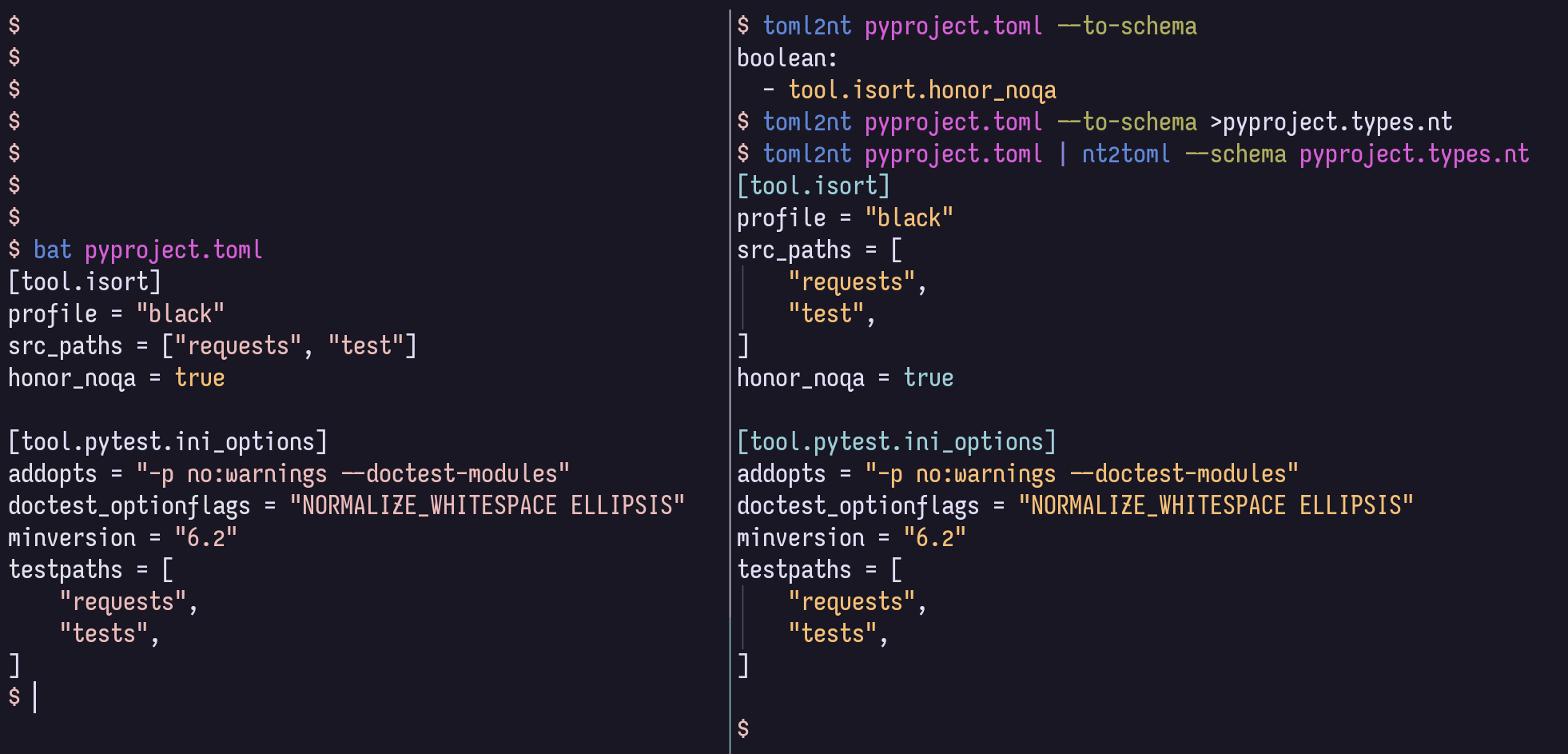
$ nt2json example.nt --schema example.types.nt這樣的模式可以自動從JSON/TOML/YAML生成:
$ json2nt --to-schema example.json可以在文檔之前或之後提供選項,並且可以將內容直接輸送到命令,而不是指定文件。
有關更多YAML路徑語法信息,請參見YAML路徑Wiki。
例如,您可以將所有旨在作為布爾值的項目匹配任何深度,並與--boolean '/**[.=~/^(?i)(yes|no|true|false)$/]' .
如果您不需要TOML支持,則可以省略下面的[toml]位。
以下是安裝它的一些方法:
$ uv tool install ' nt2[toml] '     # Install using uv (Python all-around manager)
$ pipx install ' nt2[toml] '        # Install using pipx (Python app manager)
$ pipz install ' nt2[toml] '        # Install using zpy (Python app and environment manager for Zsh)
$ pip install --user ' nt2[toml] '  # Install in your user's environment
$ pip install ' nt2[toml] ' # Install in current environment我建議使用ZPY的UV,PIPX或pipz 。
對於ZSH完成,請在compinit之後的任何時候將此行添加到您的.zshrc :
if (( $ + functions[compdef] )) && (( $ + commands[nt 2 json] )) compdef _gnu_generic nt2yaml nt2toml nt2json json2nt toml2nt yaml2nt nt2json 0.2.7
Read NestedText and output its content as JSON.
By default, generated JSON values will only contain strings, arrays, and maps,
but you can cast nodes matching YAML Paths to boolean, null, or number.
Casting switches may be before or after file arguments.
Examples:
nt2json example.nt
nt2json <example.nt
cat example.nt | nt2json
nt2json --int People.age --boolean 'People."is a wizard"' example.nt
Usage:
nt2json [SWITCHES] input_files...
Meta-switches:
-h, --help Prints this help message and quits
-v, --version Prints the program's version and quits
Switches:
--boolean, -b YAMLPATH:str Cast each node matching the given YAML Path
query as boolean; may be given multiple
times
--null, -n YAMLPATH:str Cast each node matching the given YAML Path
query as null, if it is an empty string; may
be given multiple times
--number, --int, --float, -i, -f YAMLPATH:str
Cast each node matching the given YAML Path
query as a number; may be given multiple
times
--schema, -s NESTEDTEXTFILE:ExistingFile
Cast nodes matching YAML Path queries
specified in a NestedText document. It must
be a map with one or more of the keys:
'null', 'boolean', 'number'Each key's value
is a list of YAML Paths.; may be given
multiple times
 nt2yaml 0.2.7

Read NestedText and output its content as YAML.

By default, generated YAML values will only contain strings, arrays, and maps,
but you can cast nodes matching YAML Paths to boolean, null, number, or date.

Casting switches may be before or after file arguments.

Examples:
    nt2yaml example.nt
    nt2yaml <example.nt
    cat example.nt | nt2yaml
    nt2yaml --int People.age --boolean 'People."is a wizard"' example.nt

Usage:
    nt2yaml [SWITCHES] input_files...

Meta-switches:
    -h, --help                      Prints this help message and quits
    -v, --version                   Prints the program's version and quits

Switches:
    --boolean, -b YAMLPATH:str      Cast each node matching the given YAML Path
                                    query as boolean; may be given multiple
                                    times
    --date, -d YAMLPATH:str         Cast each node matching the given YAML Path
                                    query as a date, assuming it's ISO 8601; may
                                    be given multiple times
    --null, -n YAMLPATH:str         Cast each node matching the given YAML Path
                                    query as null, if it is an empty string; may
                                    be given multiple times
    --number, --int, --float, -i, -f YAMLPATH:str
                                    Cast each node matching the given YAML Path
                                    query as a number; may be given multiple
                                    times
    --schema, -s NESTEDTEXTFILE:ExistingFile
                                    Cast nodes matching YAML Path queries
                                    specified in a NestedText document. It must
                                    be a map with one or more of the keys:
                                    'null', 'boolean', 'number'Each key's value
                                    is a list of YAML Paths.; may be given
                                    multiple times
 nt2toml 0.2.7

Read NestedText and output its content as TOML.

By default, generated TOML values will only contain strings, arrays, and maps,
but you can cast nodes matching YAML Paths to boolean, number, or date.

Casting switches may be before or after file arguments.

Examples:
    nt2toml example.nt
    nt2toml <example.nt
    cat example.nt | nt2toml
    nt2toml --int People.age --boolean 'People."is a wizard"' example.nt

Usage:
    nt2toml [SWITCHES] input_files...

Meta-switches:
    -h, --help                      Prints this help message and quits
    -v, --version                   Prints the program's version and quits

Switches:
    --boolean, -b YAMLPATH:str      Cast each node matching the given YAML Path
                                    query as boolean; may be given multiple
                                    times
    --date, -d YAMLPATH:str         Cast each node matching the given YAML Path
                                    query as a date, assuming it's ISO 8601; may
                                    be given multiple times
    --number, --int, --float, -i, -f YAMLPATH:str
                                    Cast each node matching the given YAML Path
                                    query as a number; may be given multiple
                                    times
    --schema, -s NESTEDTEXTFILE:ExistingFile
                                    Cast nodes matching YAML Path queries
                                    specified in a NestedText document. It must
                                    be a map with one or more of the keys:
                                    'null', 'boolean', 'number'Each key's value
                                    is a list of YAML Paths.; may be given
                                    multiple times
 json2nt 0.2.7

Read JSON and output its content as NestedText.

Examples:
    json2nt example.json
    json2nt <example.json
    cat example.json | json2nt

Usage:
    json2nt [SWITCHES] input_files...

Meta-switches:
    -h, --help           Prints this help message and quits
    -v, --version        Prints the program's version and quits

Switches:
    --to-schema, -s      Rather than convert the inputs, generate a schema
 yaml2nt 0.2.7

Read YAML and output its content as NestedText.

Examples:
    yaml2nt example.yml
    yaml2nt <example.yml
    cat example.yml | yaml2nt

Usage:
    yaml2nt [SWITCHES] input_files...

Meta-switches:
    -h, --help           Prints this help message and quits
    -v, --version        Prints the program's version and quits

Switches:
    --to-schema, -s      Rather than convert the inputs, generate a schema
 toml2nt 0.2.7

Read TOML and output its content as NestedText.

Examples:
    toml2nt example.yml
    toml2nt <example.yml
    cat example.yml | toml2nt

Usage:
    toml2nt [SWITCHES] input_files...

Meta-switches:
    -h, --help           Prints this help message and quits
    -v, --version        Prints the program's version and quits

Switches:
    --to-schema, -s      Rather than convert the inputs, generate a schema
YAML正式支持非弦樂密鑰類型,例如地圖,列表和數字。對非弦鍵的支持從一個YAML解析器到另一個不同,目前卻不由NestedTextto處理。
如果有人有興趣將NestedTextto與非弦樂密鑰類型一起使用,請打開一個問題,我會看看我可以做什麼!
$ cat log.jsonl{ "chat_id" : 651321 , "event" : " receiving code " , "user_first_name" : " Andy " , "user_id" : 651321 }
{ "event" : " guessed syntax " , "ext" : null , "probability" : 0.05201493203639984 , "probability_min" : 0.12 , "syntax" : " Matlab " }
{ "chat_id" : 651321 , "event" : " colorizing code " , "syntax" : " py3 " , "user_first_name" : " Andy " , "user_id" : 651321 }
{ "event" : " Got deletion request " , "reply_to_msg_user_id" : 651321 , "user_id" : 651321 }
{"chat_id": 651321, "event": "failed to delete message (it's probably gone already)", "exception": "Traceback (most recent call last):n File "/home/andy/Code/colorcodebot/app/colorcodebot.py", line 278, in delete_after_delayn bot.delete_message(message.chat.id, message.message_id)n File "/home/andy/.local/share/venvs/84f7fb558856f9ccc2c54e3d122862b6/venv/lib/python3.10/site-packages/telebot/__init__.py", line 1081, in delete_messagen return apihelper.delete_message(self.token, chat_id, message_id, timeout)n File "/home/andy/.local/share/venvs/84f7fb558856f9ccc2c54e3d122862b6/venv/lib/python3.10/site-packages/telebot/apihelper.py", line 1299, in delete_messagen return _make_request(token, method_url, params=payload, method='post')n File "/home/andy/.local/share/venvs/84f7fb558856f9ccc2c54e3d122862b6/venv/lib/python3.10/site-packages/telebot/apihelper.py", line 152, in _make_requestn json_result = _check_result(method_name, result)n File "/home/andy/.local/share/venvs/84f7fb558856f9ccc2c54e3d122862b6/venv/lib/python3.10/site-packages/telebot/apihelper.py", line 179, in _check_resultn raise ApiTelegramException(method_name, result, result_json)ntelebot.apihelper.ApiTelegramException: A request to the Telegram API was unsuccessful. Error code: 400. Description: Bad Request: message to delete not found"}$ json2nt log.jsonl-
chat_id : 651321
event : receiving code
user_first_name : Andy
user_id : 651321
-
event : guessed syntax
ext :
probability : 0.05201493203639984
probability_min : 0.12
syntax : Matlab
-
chat_id : 651321
event : colorizing code
syntax : py3
user_first_name : Andy
user_id : 651321
-
event : Got deletion request
reply_to_msg_user_id : 651321
user_id : 651321
-
chat_id : 651321
event : failed to delete message (it's probably gone already)
exception :
> Traceback (most recent call last):
> File "/home/andy/Code/colorcodebot/app/colorcodebot.py", line 278, in delete_after_delay
> bot.delete_message(message.chat.id, message.message_id)
> File "/home/andy/.local/share/venvs/84f7fb558856f9ccc2c54e3d122862b6/venv/lib/python3.10/site-packages/telebot/__init__.py", line 1081, in delete_message
> return apihelper.delete_message(self.token, chat_id, message_id, timeout)
> File "/home/andy/.local/share/venvs/84f7fb558856f9ccc2c54e3d122862b6/venv/lib/python3.10/site-packages/telebot/apihelper.py", line 1299, in delete_message
> return _make_request(token, method_url, params=payload, method='post')
> File "/home/andy/.local/share/venvs/84f7fb558856f9ccc2c54e3d122862b6/venv/lib/python3.10/site-packages/telebot/apihelper.py", line 152, in _make_request
> json_result = _check_result(method_name, result)
> File "/home/andy/.local/share/venvs/84f7fb558856f9ccc2c54e3d122862b6/venv/lib/python3.10/site-packages/telebot/apihelper.py", line 179, in _check_result
> raise ApiTelegramException(method_name, result, result_json)
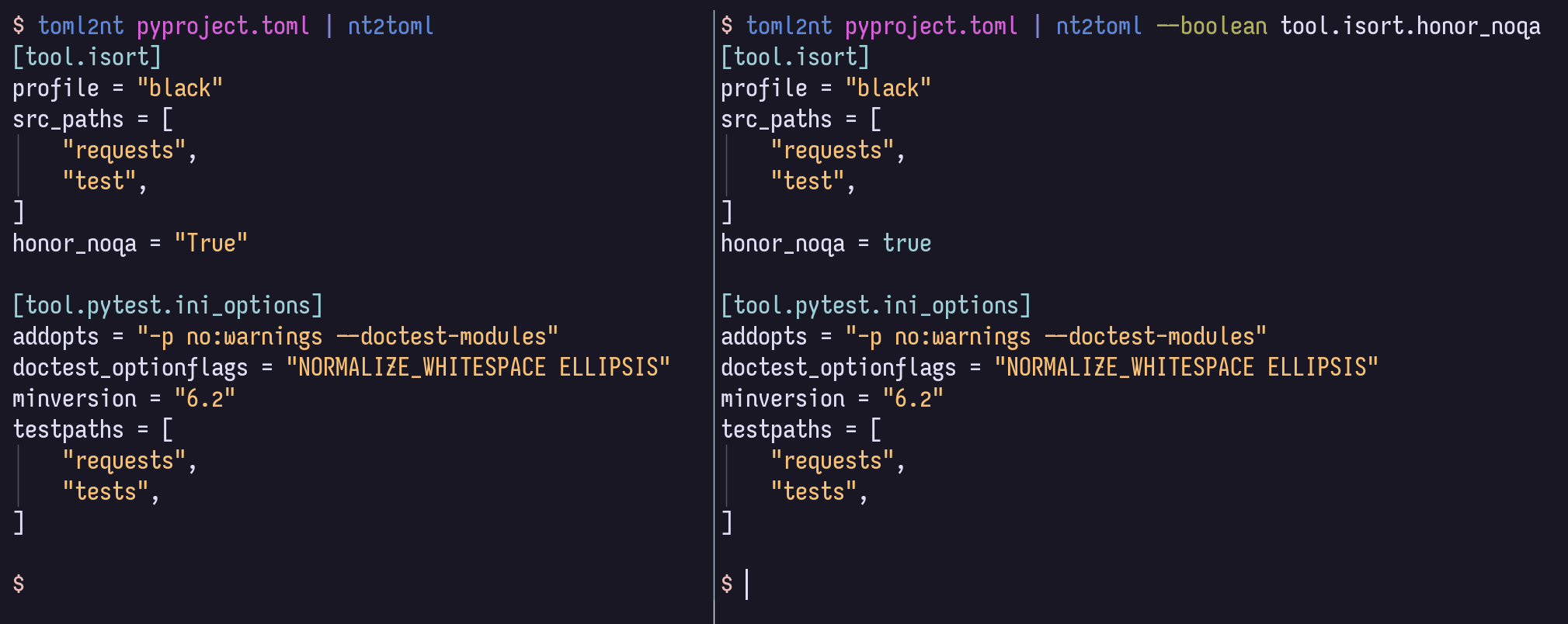
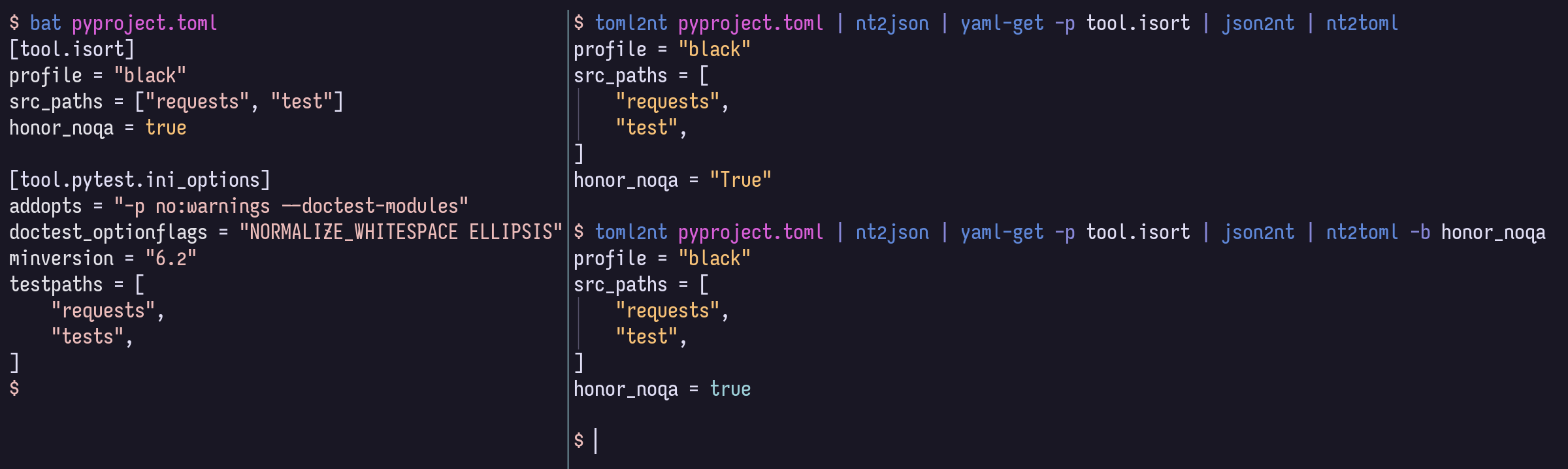
> telebot.apihelper.ApiTelegramException: A request to the Telegram API was unsuccessful. Error code: 400. Description: Bad Request: message to delete not found 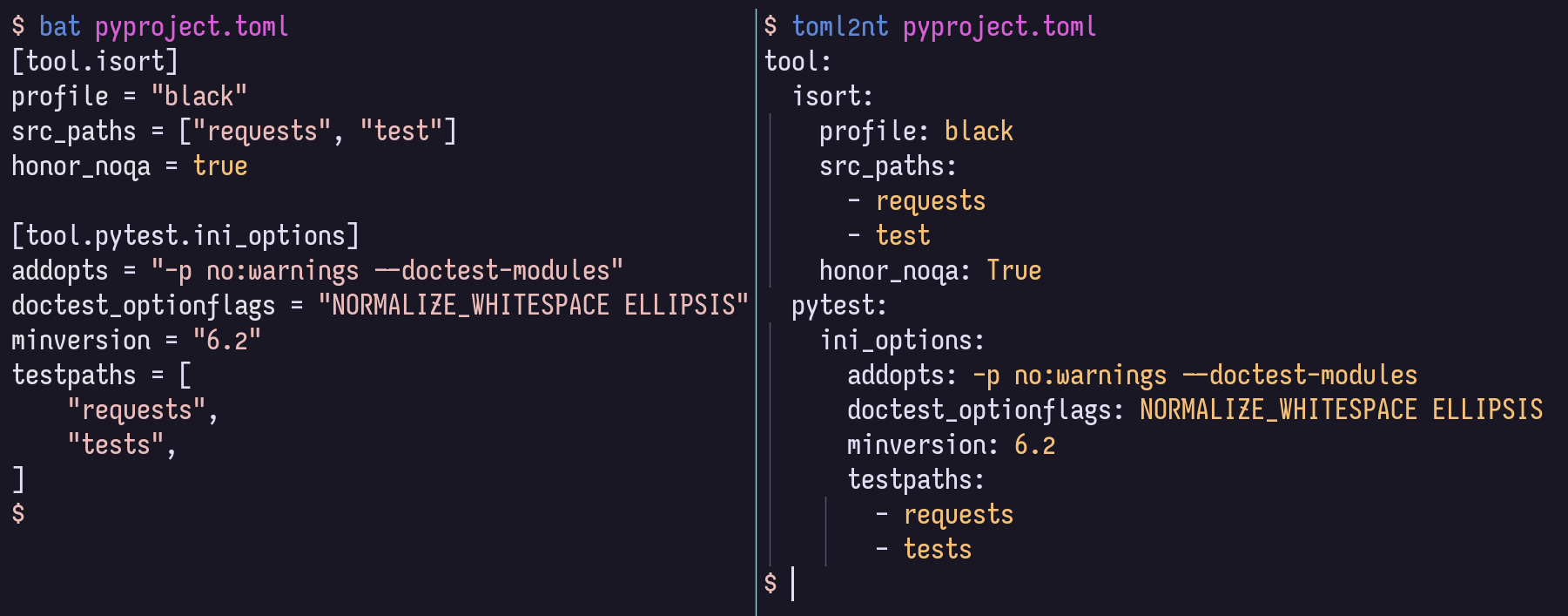
對於本地開發,建議激活VENV,然後
$ pip install -r local-requirements.txt從那裡,您可能需要查看常見的任務定義:
$ task -l
$ nox -l
您可能希望在GitHub頁面網站上瀏覽html的結構和編碼文檔。







