nestedtextto
1.0.0


Этот проект был создан в оценке дизайна вложенного текста, читаемости запросов Yamlpath, полезности CATTRS и радости Plumbum и Ward - ни один из которых не является проектами этого автора.
Этот проект, InstedTextto, предоставляет шесть инструментов командной строки для удобного преобразования между InstedText и другими форматами:
nt2json , nt2toml , nt2yamljson2nt , toml2nt , yaml2ntИз документов вложенного текста с добавлением акцента:
InstedText - это формат файла для хранения структурированных данных, которые будут введены, отредактированы или просмотрены людьми. Он организует данные в вложенную коллекцию словарей , списков и строк без необходимости цитирования или побега . Уникальная особенность этого формата файла заключается в том, что он поддерживает только один скалярный тип: строки . В то время как решение о том, чтобы отказаться от целочисленного, реального, даты и т. Д. Типы могут показаться непреодолимыми, оно приводит к более простым файлам данных и приложениям, которые являются более надежными.
При преобразовании из вложенного текста в форматы, поддерживающие больше типов значений, все простые значения будут строками по умолчанию. Но вы можете предоставить варианты для составления любых значений в виде чисел, логических, нулевых или дат/времени, если целевой формат поддерживает его, используя мощный и краткий синтаксис запросов на путь YAML.
$ cat example.nt people :
-
name : Bill Sky
problems : 99
happy : False
-
name : Vorbis Florbis
problems : 6
happy : yes $ nt2json example.nt --number /people/problems --boolean /people/happy {
"people" : [
{
"name" : " Bill Sky " ,
"problems" : 99 ,
"happy" : false
},
{
"name" : " Vorbis Florbis " ,
"problems" : 6 ,
"happy" : true
}
]
}Вместо этого вы можете хранить эти типовые сопоставления в вложенном текстовом файле «Схема».
$ cat example.types.nt boolean :
- /people/happy
number :
- /people/problemsСледующая команда также даст вышеуказанный JSON:
$ nt2json example.nt --schema example.types.ntТакая схема может быть автоматически сгенерирована из JSON/Toml/Yaml:
$ json2nt --to-schema example.jsonПараметры могут быть предоставлены до или после документа, а содержимое может быть передано непосредственно в команду вместо того, чтобы указать файл.
Для получения дополнительной информации о синтаксисе пута YAML см. Ямл Вики.
Например, вы можете сравниться со всеми предметами, которые, вероятно, предназначены как логические, на любой глубине, с --boolean '/**[.=~/^(?i)(yes|no|true|false)$/]' .
Если вам не нужна поддержка TOML, вы можете опустить биты [toml] ниже.
Вот несколько способов установить его:
$ uv tool install ' nt2[toml] '     # Install using uv (Python all-around manager)
$ pipx install ' nt2[toml] '        # Install using pipx (Python app manager)
$ pipz install ' nt2[toml] '        # Install using zpy (Python app and environment manager for Zsh)
$ pip install --user ' nt2[toml] '  # Install in your user's environment
$ pip install ' nt2[toml] '         # Install in current environment
Я рекомендую использовать УФ, PIPX или pipz из ZPY.
Для завершения ZSH добавьте эту линию в свой .zshrc , в любое время после compinit :
if (( $ + functions[compdef] )) && (( $ + commands[nt 2 json] )) compdef _gnu_generic nt2yaml nt2toml nt2json json2nt toml2nt yaml2nt nt2json 0.2.7
Read NestedText and output its content as JSON.
By default, generated JSON values will only contain strings, arrays, and maps,
but you can cast nodes matching YAML Paths to boolean, null, or number.
Casting switches may be before or after file arguments.
Examples:
nt2json example.nt
nt2json <example.nt
cat example.nt | nt2json
nt2json --int People.age --boolean 'People."is a wizard"' example.nt
Usage:
nt2json [SWITCHES] input_files...
Meta-switches:
-h, --help Prints this help message and quits
-v, --version Prints the program's version and quits
Switches:
--boolean, -b YAMLPATH:str Cast each node matching the given YAML Path
query as boolean; may be given multiple
times
--null, -n YAMLPATH:str Cast each node matching the given YAML Path
query as null, if it is an empty string; may
be given multiple times
--number, --int, --float, -i, -f YAMLPATH:str
Cast each node matching the given YAML Path
query as a number; may be given multiple
times
--schema, -s NESTEDTEXTFILE:ExistingFile
Cast nodes matching YAML Path queries
specified in a NestedText document. It must
be a map with one or more of the keys:
'null', 'boolean', 'number'Each key's value
is a list of YAML Paths.; may be given
multiple times
 nt2yaml 0.2.7

Read NestedText and output its content as YAML.

By default, generated YAML values will only contain strings, arrays, and maps,
but you can cast nodes matching YAML Paths to boolean, null, number, or date.

Casting switches may be before or after file arguments.

Examples:
    nt2yaml example.nt
    nt2yaml <example.nt
    cat example.nt | nt2yaml
    nt2yaml --int People.age --boolean 'People."is a wizard"' example.nt

Usage:
    nt2yaml [SWITCHES] input_files...

Meta-switches:
    -h, --help                      Prints this help message and quits
    -v, --version                   Prints the program's version and quits

Switches:
    --boolean, -b YAMLPATH:str      Cast each node matching the given YAML Path
                                    query as boolean; may be given multiple
                                    times
    --date, -d YAMLPATH:str         Cast each node matching the given YAML Path
                                    query as a date, assuming it's ISO 8601; may
                                    be given multiple times
    --null, -n YAMLPATH:str         Cast each node matching the given YAML Path
                                    query as null, if it is an empty string; may
                                    be given multiple times
    --number, --int, --float, -i, -f YAMLPATH:str
                                    Cast each node matching the given YAML Path
                                    query as a number; may be given multiple
                                    times
    --schema, -s NESTEDTEXTFILE:ExistingFile
                                    Cast nodes matching YAML Path queries
                                    specified in a NestedText document. It must
                                    be a map with one or more of the keys:
                                    'null', 'boolean', 'number'Each key's value
                                    is a list of YAML Paths.; may be given
                                    multiple times
 nt2toml 0.2.7

Read NestedText and output its content as TOML.

By default, generated TOML values will only contain strings, arrays, and maps,
but you can cast nodes matching YAML Paths to boolean, number, or date.

Casting switches may be before or after file arguments.

Examples:
    nt2toml example.nt
    nt2toml <example.nt
    cat example.nt | nt2toml
    nt2toml --int People.age --boolean 'People."is a wizard"' example.nt

Usage:
    nt2toml [SWITCHES] input_files...

Meta-switches:
    -h, --help                      Prints this help message and quits
    -v, --version                   Prints the program's version and quits

Switches:
    --boolean, -b YAMLPATH:str      Cast each node matching the given YAML Path
                                    query as boolean; may be given multiple
                                    times
    --date, -d YAMLPATH:str         Cast each node matching the given YAML Path
                                    query as a date, assuming it's ISO 8601; may
                                    be given multiple times
    --number, --int, --float, -i, -f YAMLPATH:str
                                    Cast each node matching the given YAML Path
                                    query as a number; may be given multiple
                                    times
    --schema, -s NESTEDTEXTFILE:ExistingFile
                                    Cast nodes matching YAML Path queries
                                    specified in a NestedText document. It must
                                    be a map with one or more of the keys:
                                    'null', 'boolean', 'number'Each key's value
                                    is a list of YAML Paths.; may be given
                                    multiple times
 json2nt 0.2.7

Read JSON and output its content as NestedText.

Examples:
    json2nt example.json
    json2nt <example.json
    cat example.json | json2nt

Usage:
    json2nt [SWITCHES] input_files...

Meta-switches:
    -h, --help           Prints this help message and quits
    -v, --version        Prints the program's version and quits

Switches:
    --to-schema, -s      Rather than convert the inputs, generate a schema
 yaml2nt 0.2.7

Read YAML and output its content as NestedText.

Examples:
    yaml2nt example.yml
    yaml2nt <example.yml
    cat example.yml | yaml2nt

Usage:
    yaml2nt [SWITCHES] input_files...

Meta-switches:
    -h, --help           Prints this help message and quits
    -v, --version        Prints the program's version and quits

Switches:
    --to-schema, -s      Rather than convert the inputs, generate a schema
 toml2nt 0.2.7

Read TOML and output its content as NestedText.

Examples:
    toml2nt example.yml
    toml2nt <example.yml
    cat example.yml | toml2nt

Usage:
    toml2nt [SWITCHES] input_files...

Meta-switches:
    -h, --help           Prints this help message and quits
    -v, --version        Prints the program's version and quits

Switches:
    --to-schema, -s      Rather than convert the inputs, generate a schema
YAML официально поддерживает типы ключей без строги, такие как карты, списки и цифры. Поддержка не строгих клавиш варьируется от одного анализатора YAML к следующему и в настоящее время не обрабатывается inesteTextto.
Если кто-то заинтересован в использовании InstedTextto с типами не String, пожалуйста, откройте проблему, и я посмотрю, что я могу сделать!
$ cat log.jsonl{ "chat_id" : 651321 , "event" : " receiving code " , "user_first_name" : " Andy " , "user_id" : 651321 }
{ "event" : " guessed syntax " , "ext" : null , "probability" : 0.05201493203639984 , "probability_min" : 0.12 , "syntax" : " Matlab " }
{ "chat_id" : 651321 , "event" : " colorizing code " , "syntax" : " py3 " , "user_first_name" : " Andy " , "user_id" : 651321 }
{ "event" : " Got deletion request " , "reply_to_msg_user_id" : 651321 , "user_id" : 651321 }
{"chat_id": 651321, "event": "failed to delete message (it's probably gone already)", "exception": "Traceback (most recent call last):n File "/home/andy/Code/colorcodebot/app/colorcodebot.py", line 278, in delete_after_delayn bot.delete_message(message.chat.id, message.message_id)n File "/home/andy/.local/share/venvs/84f7fb558856f9ccc2c54e3d122862b6/venv/lib/python3.10/site-packages/telebot/__init__.py", line 1081, in delete_messagen return apihelper.delete_message(self.token, chat_id, message_id, timeout)n File "/home/andy/.local/share/venvs/84f7fb558856f9ccc2c54e3d122862b6/venv/lib/python3.10/site-packages/telebot/apihelper.py", line 1299, in delete_messagen return _make_request(token, method_url, params=payload, method='post')n File "/home/andy/.local/share/venvs/84f7fb558856f9ccc2c54e3d122862b6/venv/lib/python3.10/site-packages/telebot/apihelper.py", line 152, in _make_requestn json_result = _check_result(method_name, result)n File "/home/andy/.local/share/venvs/84f7fb558856f9ccc2c54e3d122862b6/venv/lib/python3.10/site-packages/telebot/apihelper.py", line 179, in _check_resultn raise ApiTelegramException(method_name, result, result_json)ntelebot.apihelper.ApiTelegramException: A request to the Telegram API was unsuccessful. Error code: 400. Description: Bad Request: message to delete not found"}$ json2nt log.jsonl-
chat_id : 651321
event : receiving code
user_first_name : Andy
user_id : 651321
-
event : guessed syntax
ext :
probability : 0.05201493203639984
probability_min : 0.12
syntax : Matlab
-
chat_id : 651321
event : colorizing code
syntax : py3
user_first_name : Andy
user_id : 651321
-
event : Got deletion request
reply_to_msg_user_id : 651321
user_id : 651321
-
chat_id : 651321
event : failed to delete message (it's probably gone already)
exception :
> Traceback (most recent call last):
> File "/home/andy/Code/colorcodebot/app/colorcodebot.py", line 278, in delete_after_delay
> bot.delete_message(message.chat.id, message.message_id)
> File "/home/andy/.local/share/venvs/84f7fb558856f9ccc2c54e3d122862b6/venv/lib/python3.10/site-packages/telebot/__init__.py", line 1081, in delete_message
> return apihelper.delete_message(self.token, chat_id, message_id, timeout)
> File "/home/andy/.local/share/venvs/84f7fb558856f9ccc2c54e3d122862b6/venv/lib/python3.10/site-packages/telebot/apihelper.py", line 1299, in delete_message
> return _make_request(token, method_url, params=payload, method='post')
> File "/home/andy/.local/share/venvs/84f7fb558856f9ccc2c54e3d122862b6/venv/lib/python3.10/site-packages/telebot/apihelper.py", line 152, in _make_request
> json_result = _check_result(method_name, result)
> File "/home/andy/.local/share/venvs/84f7fb558856f9ccc2c54e3d122862b6/venv/lib/python3.10/site-packages/telebot/apihelper.py", line 179, in _check_result
> raise ApiTelegramException(method_name, result, result_json)
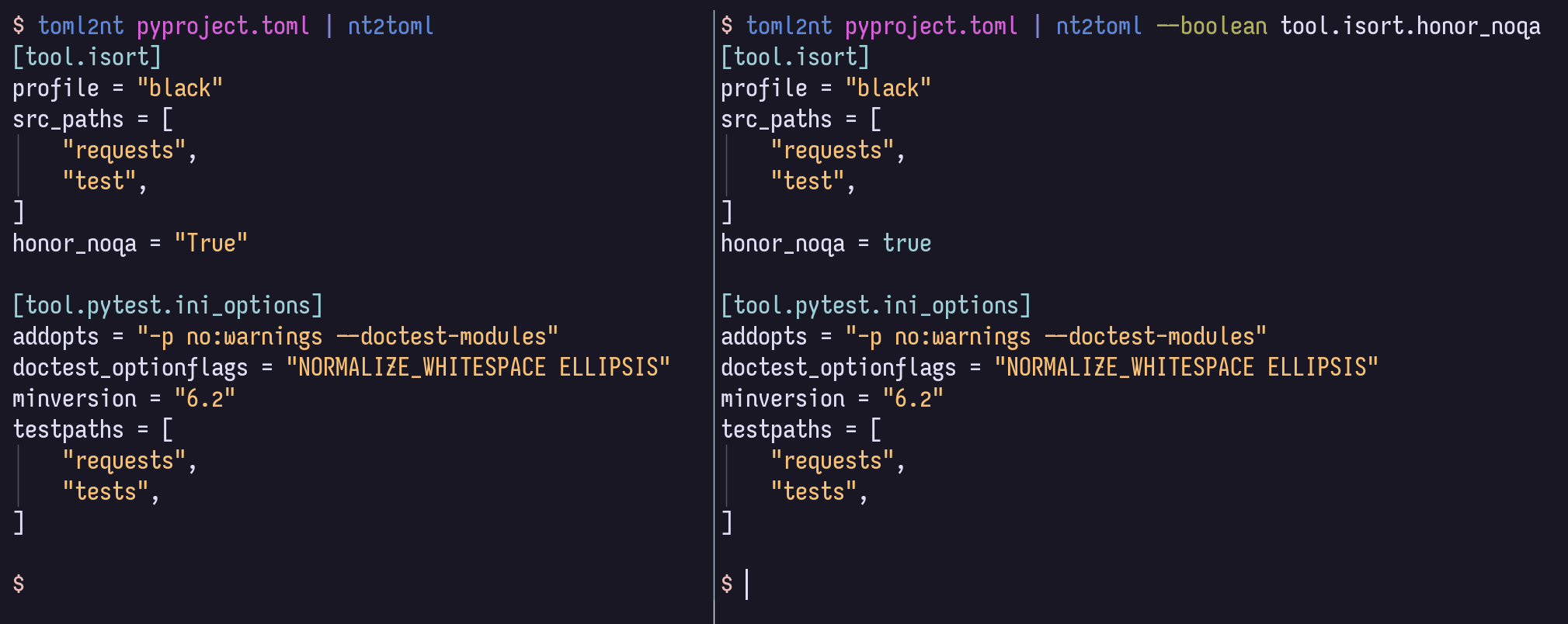
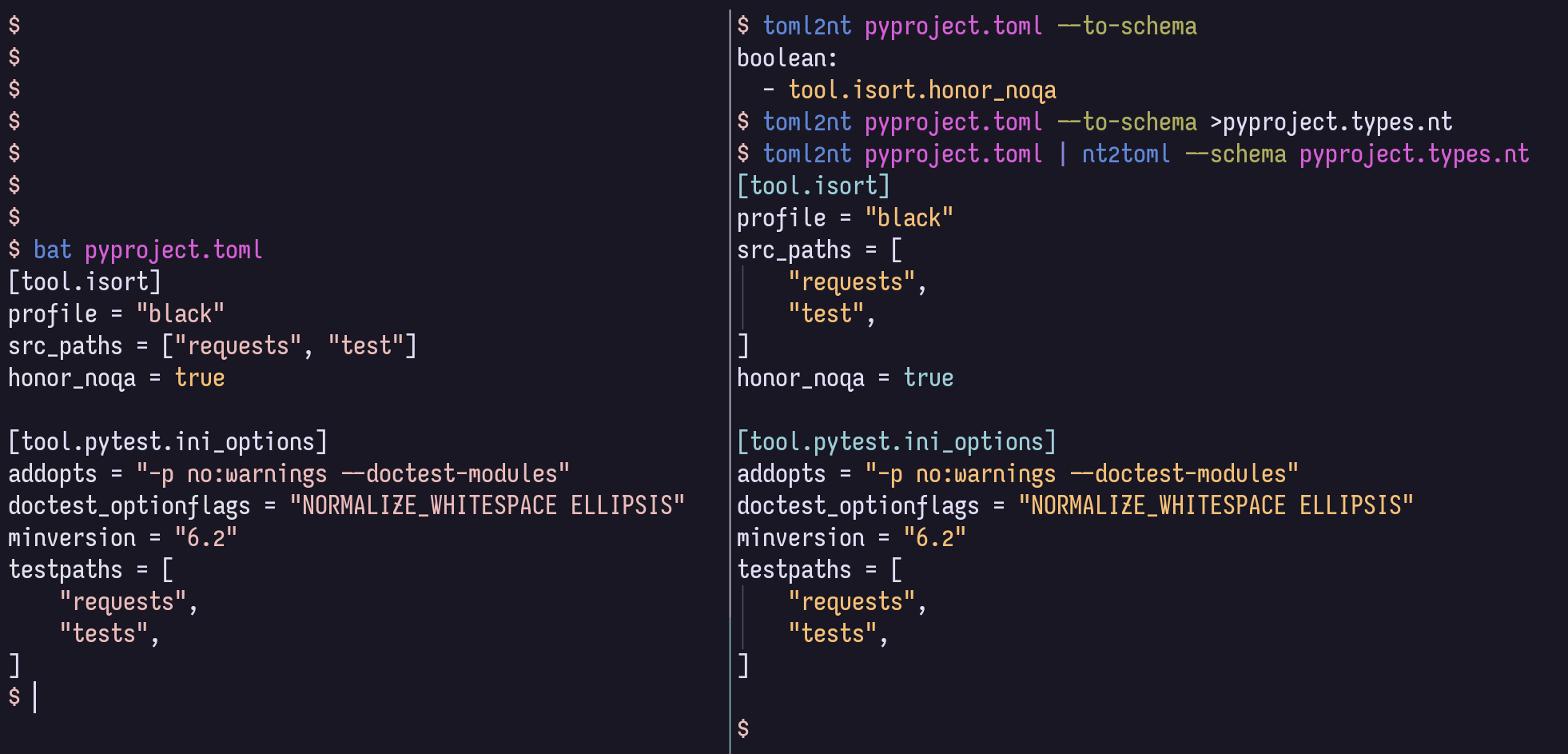
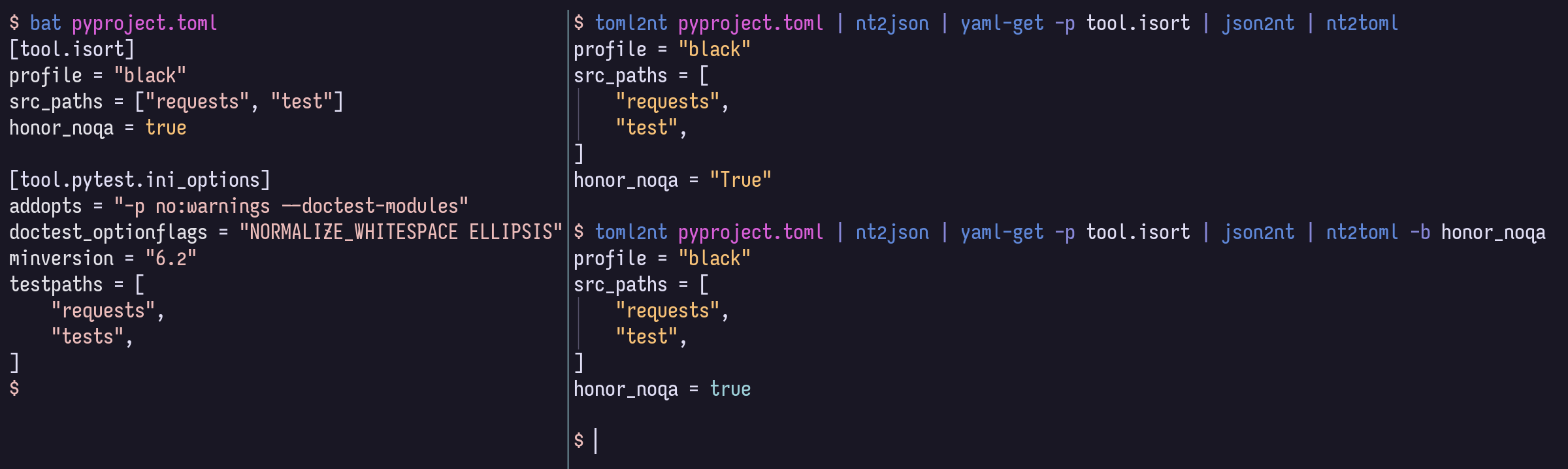
> telebot.apihelper.ApiTelegramException: A request to the Telegram API was unsuccessful. Error code: 400. Description: Bad Request: message to delete not found 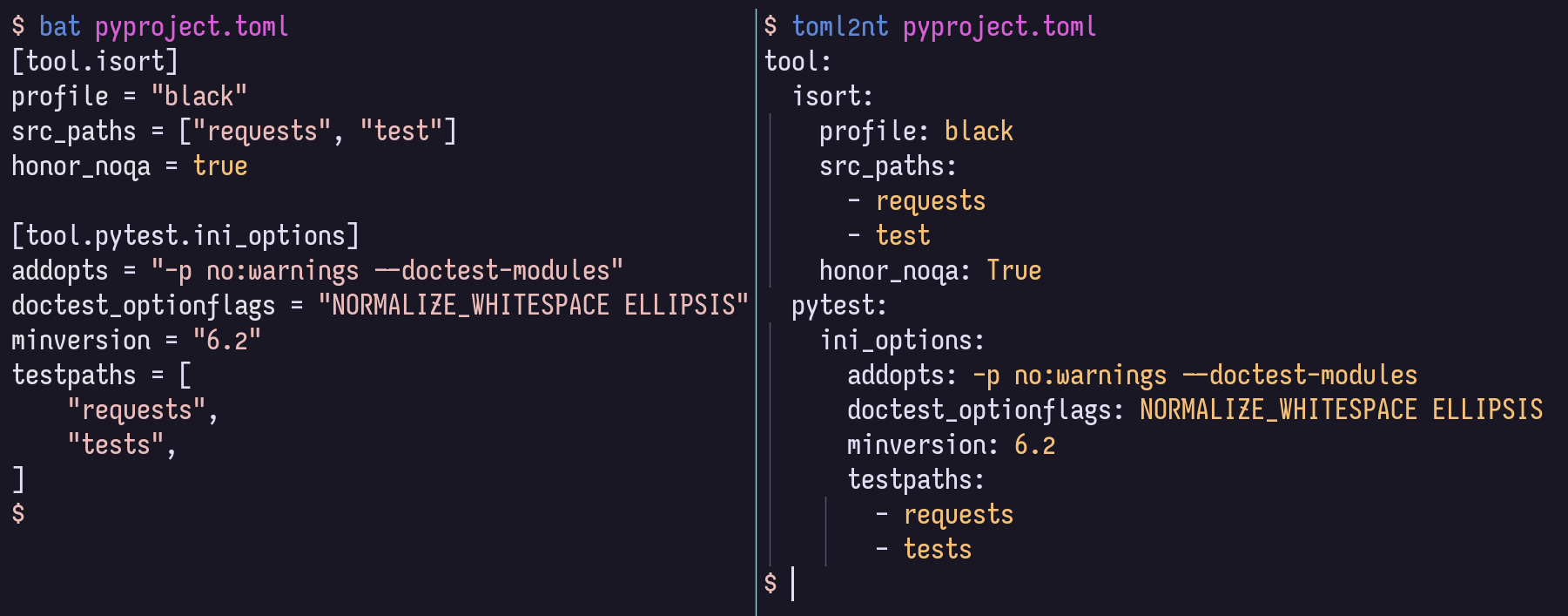
Для местного развития рекомендуется активировать Venv, затем
$ pip install -r local-requirements.txtОттуда вы можете посмотреть на определения общих задач:
$ task -l
$ nox -l
И вы можете просмотреть структуру и документацию в коде как визуализированную HTML, на сайте страниц GitHub.







