nestedtextto
1.0.0


このプロジェクトは、NestedTextの設計、Yamlpathクエリの読みやすさ、Cattrsの有用性、PlumbumとWardの喜びに感謝して作成されました。
このプロジェクトであるNestedTexttoは、NestedTextと他の形式の間に便利な変換のための6つのコマンドラインツールを提供します。
nt2json 、 nt2toml 、 nt2yamljson2nt 、 toml2nt 、 yaml2ntNestedTextドキュメントから、強調が追加されています。
NestedTextは、人が入力、編集、または表示する構造化データを保持するためのファイル形式です。それは、引用したり逃げたりする必要なく、辞書、リスト、文字列のネストされたコレクションにデータを整理します。このファイル形式のユニークな機能は、 1つのスカラータイプ、文字列のみをサポートすることです。整数、実際の、日付などを避けるという決定は、直感的に対抗するように見えるかもしれませんが、より堅牢なより単純なデータファイルとアプリケーションにつながります。
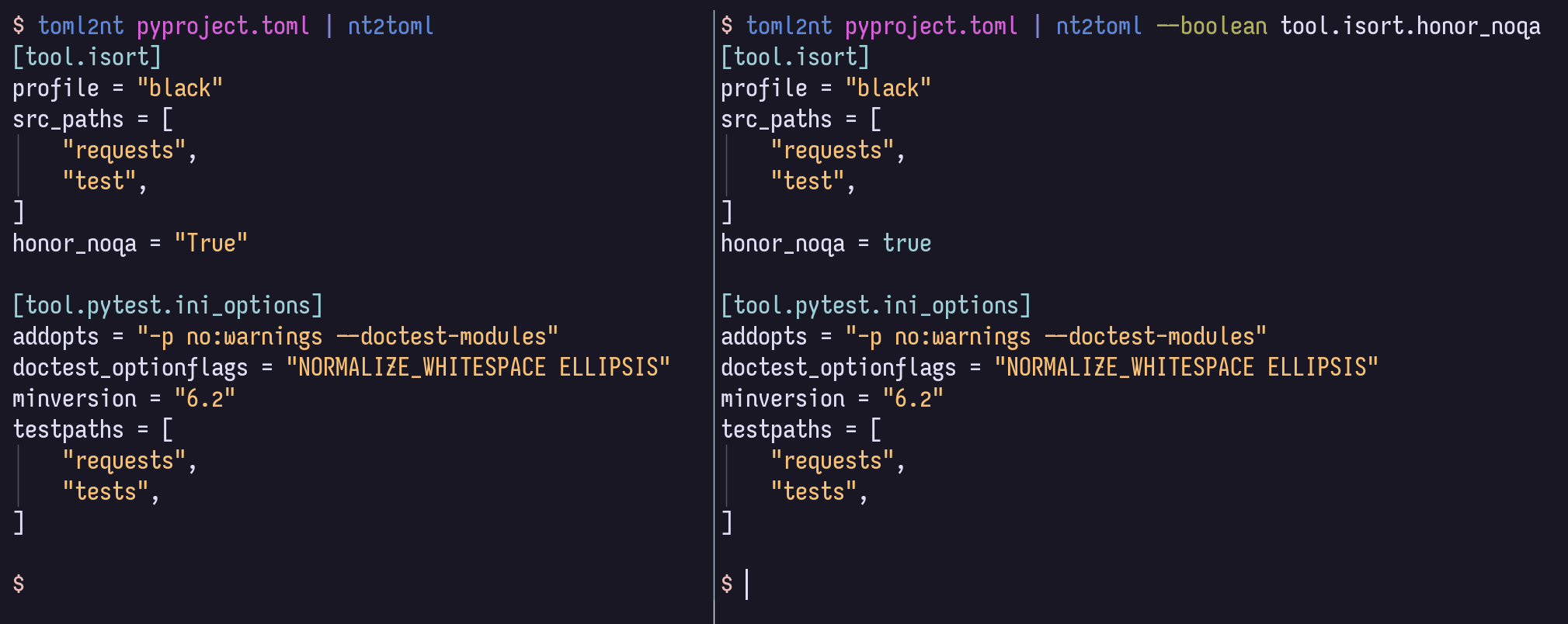
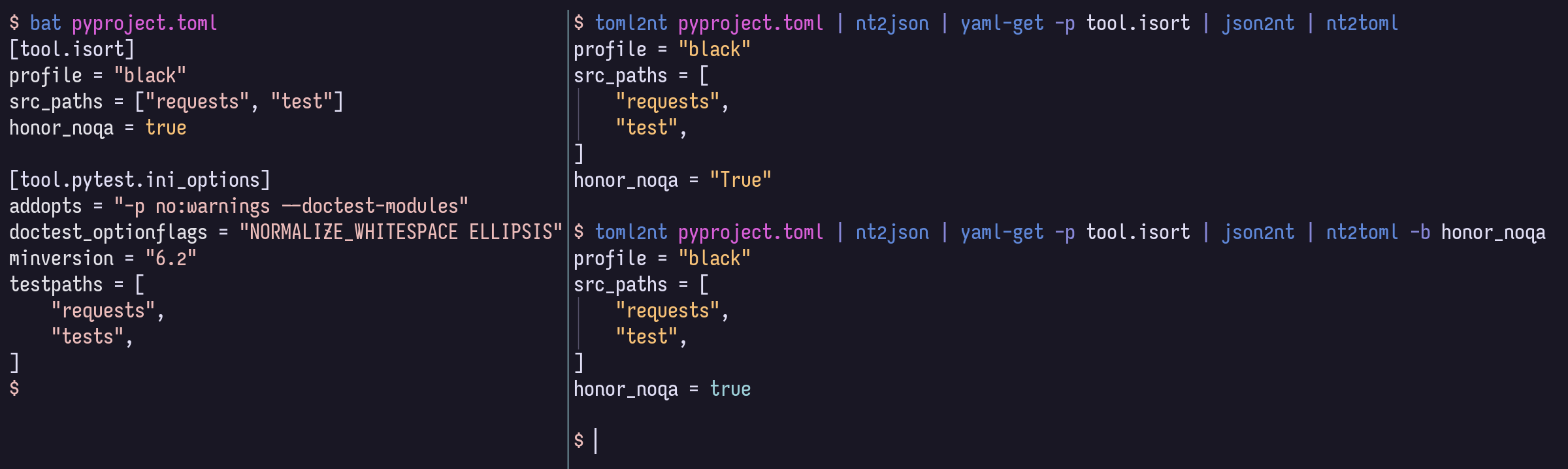
NestedTextからより多くの値タイプをサポートするフォーマットに変換する場合、すべての平易な値はデフォルトで文字列になります。ただし、ターゲット形式がサポートしている場合は、強力で簡潔なYAMLパスクエリの構文を使用して、ターゲット形式がサポートする場合、数字、ブール膜、ヌル、または日付/時間として値をキャストするオプションを提供できます。
$ cat example.nt people :
-
name : Bill Sky
problems : 99
happy : False
-
name : Vorbis Florbis
problems : 6
happy : yes $ nt2json example.nt --number /people/problems --boolean /people/happy {
"people" : [
{
"name" : " Bill Sky " ,
"problems" : 99 ,
"happy" : false
},
{
"name" : " Vorbis Florbis " ,
"problems" : 6 ,
"happy" : true
}
]
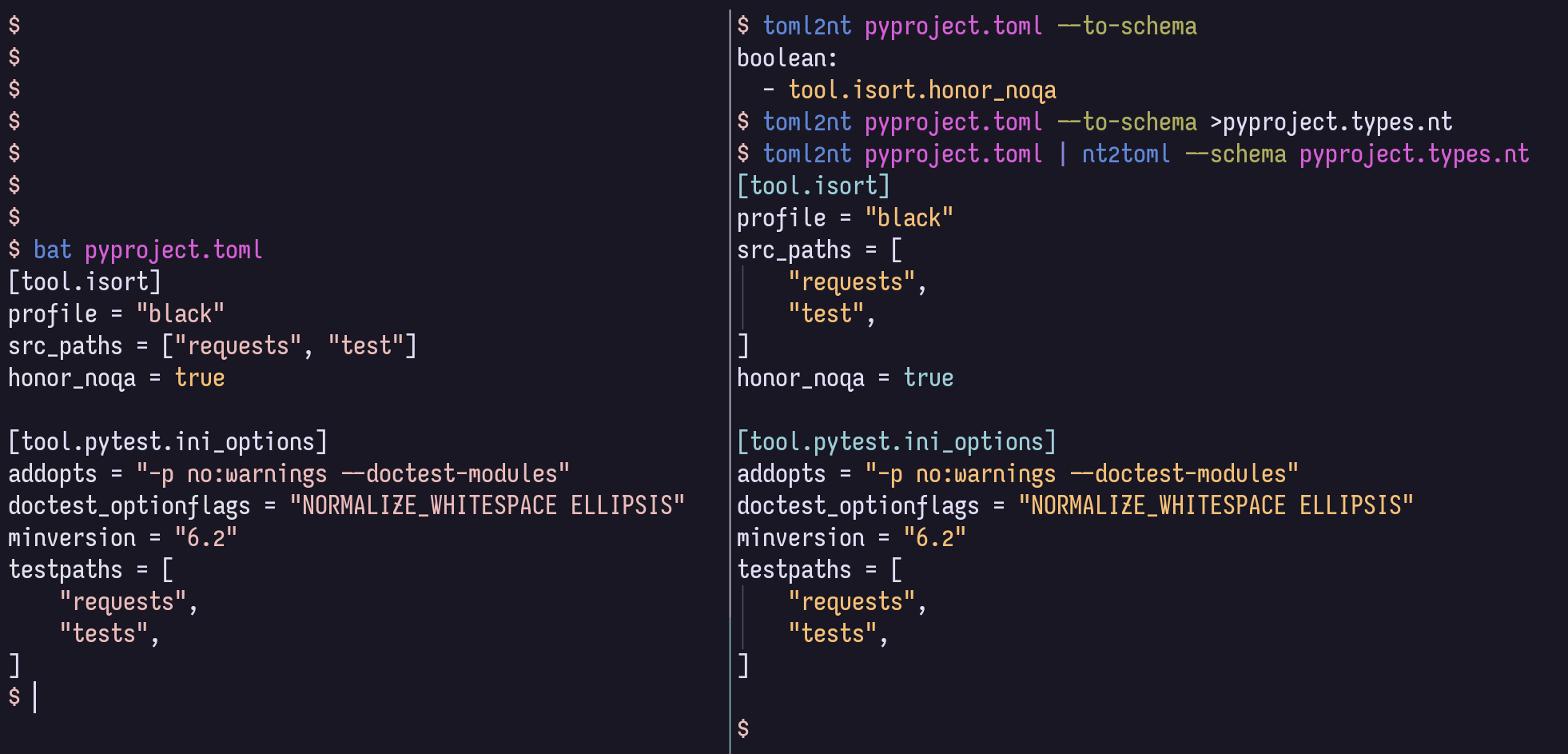
}代わりに、これらのタイプマッピングをNestedTextの「スキーマ」ファイルに保存できます。
$ cat example.types.nt boolean :
- /people/happy
number :
- /people/problems次のコマンドは、上記のJSONも生成します。
$ nt2json example.nt --schema example.types.ntこのようなスキーマは、JSON/TOML/YAMLから自動的に生成される場合があります。
$ json2nt --to-schema example.jsonオプションはドキュメントの前または後に提供される場合があり、コンテンツはファイルを指定する代わりにコマンドに直接配管できます。
その他のYAMLパスの構文情報については、YAMLパスwikiを参照してください。
たとえば、おそらく任意の深さでブレアとして意図されているすべてのアイテムを、 --boolean '/**[.=~/^(?i)(yes|no|true|false)$/]'で一致させることができます。
TOMLサポートが必要ない場合は、以下の[toml]ビットを省略できます。
インストールする方法は次のとおりです。
$ uv tool install ' nt2[toml] '     # Install using uv (Python all-around manager)
$ pipx install ' nt2[toml] '        # Install using pipx (Python app manager)
$ pipz install ' nt2[toml] '        # Install using zpy (Python app and environment manager for Zsh)
$ pip install --user ' nt2[toml] '  # Install in your user's environment
$ pip install ' nt2[toml] ' # Install in current environment ZPYのUV、PIPX、またはpipzを使用することをお勧めします。
ZSHの完了については、このラインを.zshrcに追加して、いつでもcompinit後はいつでも追加します。
if (( $ + functions[compdef] )) && (( $ + commands[nt 2 json] )) compdef _gnu_generic nt2yaml nt2toml nt2json json2nt toml2nt yaml2nt nt2json 0.2.7
Read NestedText and output its content as JSON.
By default, generated JSON values will only contain strings, arrays, and maps,
but you can cast nodes matching YAML Paths to boolean, null, or number.
Casting switches may be before or after file arguments.
Examples:
nt2json example.nt
nt2json <example.nt
cat example.nt | nt2json
nt2json --int People.age --boolean 'People."is a wizard"' example.nt
Usage:
nt2json [SWITCHES] input_files...
Meta-switches:
-h, --help Prints this help message and quits
-v, --version Prints the program's version and quits
Switches:
--boolean, -b YAMLPATH:str Cast each node matching the given YAML Path
query as boolean; may be given multiple
times
--null, -n YAMLPATH:str Cast each node matching the given YAML Path
query as null, if it is an empty string; may
be given multiple times
--number, --int, --float, -i, -f YAMLPATH:str
Cast each node matching the given YAML Path
query as a number; may be given multiple
times
--schema, -s NESTEDTEXTFILE:ExistingFile
Cast nodes matching YAML Path queries
specified in a NestedText document. It must
be a map with one or more of the keys:
'null', 'boolean', 'number'Each key's value
is a list of YAML Paths.; may be given
multiple times
 nt2yaml 0.2.7

Read NestedText and output its content as YAML.

By default, generated YAML values will only contain strings, arrays, and maps,
but you can cast nodes matching YAML Paths to boolean, null, number, or date.

Casting switches may be before or after file arguments.

Examples:
    nt2yaml example.nt
    nt2yaml <example.nt
    cat example.nt | nt2yaml
    nt2yaml --int People.age --boolean 'People."is a wizard"' example.nt

Usage:
    nt2yaml [SWITCHES] input_files...

Meta-switches:
    -h, --help                      Prints this help message and quits
    -v, --version                   Prints the program's version and quits

Switches:
    --boolean, -b YAMLPATH:str      Cast each node matching the given YAML Path
                                    query as boolean; may be given multiple
                                    times
    --date, -d YAMLPATH:str         Cast each node matching the given YAML Path
                                    query as a date, assuming it's ISO 8601; may
                                    be given multiple times
    --null, -n YAMLPATH:str         Cast each node matching the given YAML Path
                                    query as null, if it is an empty string; may
                                    be given multiple times
    --number, --int, --float, -i, -f YAMLPATH:str
                                    Cast each node matching the given YAML Path
                                    query as a number; may be given multiple
                                    times
    --schema, -s NESTEDTEXTFILE:ExistingFile
                                    Cast nodes matching YAML Path queries
                                    specified in a NestedText document. It must
                                    be a map with one or more of the keys:
                                    'null', 'boolean', 'number'Each key's value
                                    is a list of YAML Paths.; may be given
                                    multiple times
 nt2toml 0.2.7

Read NestedText and output its content as TOML.

By default, generated TOML values will only contain strings, arrays, and maps,
but you can cast nodes matching YAML Paths to boolean, number, or date.

Casting switches may be before or after file arguments.

Examples:
    nt2toml example.nt
    nt2toml <example.nt
    cat example.nt | nt2toml
    nt2toml --int People.age --boolean 'People."is a wizard"' example.nt

Usage:
    nt2toml [SWITCHES] input_files...

Meta-switches:
    -h, --help                      Prints this help message and quits
    -v, --version                   Prints the program's version and quits

Switches:
    --boolean, -b YAMLPATH:str      Cast each node matching the given YAML Path
                                    query as boolean; may be given multiple
                                    times
    --date, -d YAMLPATH:str         Cast each node matching the given YAML Path
                                    query as a date, assuming it's ISO 8601; may
                                    be given multiple times
    --number, --int, --float, -i, -f YAMLPATH:str
                                    Cast each node matching the given YAML Path
                                    query as a number; may be given multiple
                                    times
    --schema, -s NESTEDTEXTFILE:ExistingFile
                                    Cast nodes matching YAML Path queries
                                    specified in a NestedText document. It must
                                    be a map with one or more of the keys:
                                    'null', 'boolean', 'number'Each key's value
                                    is a list of YAML Paths.; may be given
                                    multiple times
 json2nt 0.2.7

Read JSON and output its content as NestedText.

Examples:
    json2nt example.json
    json2nt <example.json
    cat example.json | json2nt

Usage:
    json2nt [SWITCHES] input_files...

Meta-switches:
    -h, --help           Prints this help message and quits
    -v, --version        Prints the program's version and quits

Switches:
    --to-schema, -s      Rather than convert the inputs, generate a schema
 yaml2nt 0.2.7

Read YAML and output its content as NestedText.

Examples:
    yaml2nt example.yml
    yaml2nt <example.yml
    cat example.yml | yaml2nt

Usage:
    yaml2nt [SWITCHES] input_files...

Meta-switches:
    -h, --help           Prints this help message and quits
    -v, --version        Prints the program's version and quits

Switches:
    --to-schema, -s      Rather than convert the inputs, generate a schema
 toml2nt 0.2.7

Read TOML and output its content as NestedText.

Examples:
    toml2nt example.yml
    toml2nt <example.yml
    cat example.yml | toml2nt

Usage:
    toml2nt [SWITCHES] input_files...

Meta-switches:
    -h, --help           Prints this help message and quits
    -v, --version        Prints the program's version and quits

Switches:
    --to-schema, -s      Rather than convert the inputs, generate a schema
YAMLは、マップ、リスト、番号などの非ストリングキータイプを正式にサポートしています。非ストリングキーのサポートは、ヤムルパーサーから次のヤムルパーサーまでさまざまであり、現在はNestedTexttoによって処理されていません。
誰かがstringのキータイプでnestedtexttoを使用することに興味がある場合は、問題を開いてください。
$ cat log.jsonl{ "chat_id" : 651321 , "event" : " receiving code " , "user_first_name" : " Andy " , "user_id" : 651321 }
{ "event" : " guessed syntax " , "ext" : null , "probability" : 0.05201493203639984 , "probability_min" : 0.12 , "syntax" : " Matlab " }
{ "chat_id" : 651321 , "event" : " colorizing code " , "syntax" : " py3 " , "user_first_name" : " Andy " , "user_id" : 651321 }
{ "event" : " Got deletion request " , "reply_to_msg_user_id" : 651321 , "user_id" : 651321 }
{"chat_id": 651321, "event": "failed to delete message (it's probably gone already)", "exception": "Traceback (most recent call last):n File "/home/andy/Code/colorcodebot/app/colorcodebot.py", line 278, in delete_after_delayn bot.delete_message(message.chat.id, message.message_id)n File "/home/andy/.local/share/venvs/84f7fb558856f9ccc2c54e3d122862b6/venv/lib/python3.10/site-packages/telebot/__init__.py", line 1081, in delete_messagen return apihelper.delete_message(self.token, chat_id, message_id, timeout)n File "/home/andy/.local/share/venvs/84f7fb558856f9ccc2c54e3d122862b6/venv/lib/python3.10/site-packages/telebot/apihelper.py", line 1299, in delete_messagen return _make_request(token, method_url, params=payload, method='post')n File "/home/andy/.local/share/venvs/84f7fb558856f9ccc2c54e3d122862b6/venv/lib/python3.10/site-packages/telebot/apihelper.py", line 152, in _make_requestn json_result = _check_result(method_name, result)n File "/home/andy/.local/share/venvs/84f7fb558856f9ccc2c54e3d122862b6/venv/lib/python3.10/site-packages/telebot/apihelper.py", line 179, in _check_resultn raise ApiTelegramException(method_name, result, result_json)ntelebot.apihelper.ApiTelegramException: A request to the Telegram API was unsuccessful. Error code: 400. Description: Bad Request: message to delete not found"}$ json2nt log.jsonl-
chat_id : 651321
event : receiving code
user_first_name : Andy
user_id : 651321
-
event : guessed syntax
ext :
probability : 0.05201493203639984
probability_min : 0.12
syntax : Matlab
-
chat_id : 651321
event : colorizing code
syntax : py3
user_first_name : Andy
user_id : 651321
-
event : Got deletion request
reply_to_msg_user_id : 651321
user_id : 651321
-
chat_id : 651321
event : failed to delete message (it's probably gone already)
exception :
> Traceback (most recent call last):
> File "/home/andy/Code/colorcodebot/app/colorcodebot.py", line 278, in delete_after_delay
> bot.delete_message(message.chat.id, message.message_id)
> File "/home/andy/.local/share/venvs/84f7fb558856f9ccc2c54e3d122862b6/venv/lib/python3.10/site-packages/telebot/__init__.py", line 1081, in delete_message
> return apihelper.delete_message(self.token, chat_id, message_id, timeout)
> File "/home/andy/.local/share/venvs/84f7fb558856f9ccc2c54e3d122862b6/venv/lib/python3.10/site-packages/telebot/apihelper.py", line 1299, in delete_message
> return _make_request(token, method_url, params=payload, method='post')
> File "/home/andy/.local/share/venvs/84f7fb558856f9ccc2c54e3d122862b6/venv/lib/python3.10/site-packages/telebot/apihelper.py", line 152, in _make_request
> json_result = _check_result(method_name, result)
> File "/home/andy/.local/share/venvs/84f7fb558856f9ccc2c54e3d122862b6/venv/lib/python3.10/site-packages/telebot/apihelper.py", line 179, in _check_result
> raise ApiTelegramException(method_name, result, result_json)
> telebot.apihelper.ApiTelegramException: A request to the Telegram API was unsuccessful. Error code: 400. Description: Bad Request: message to delete not found 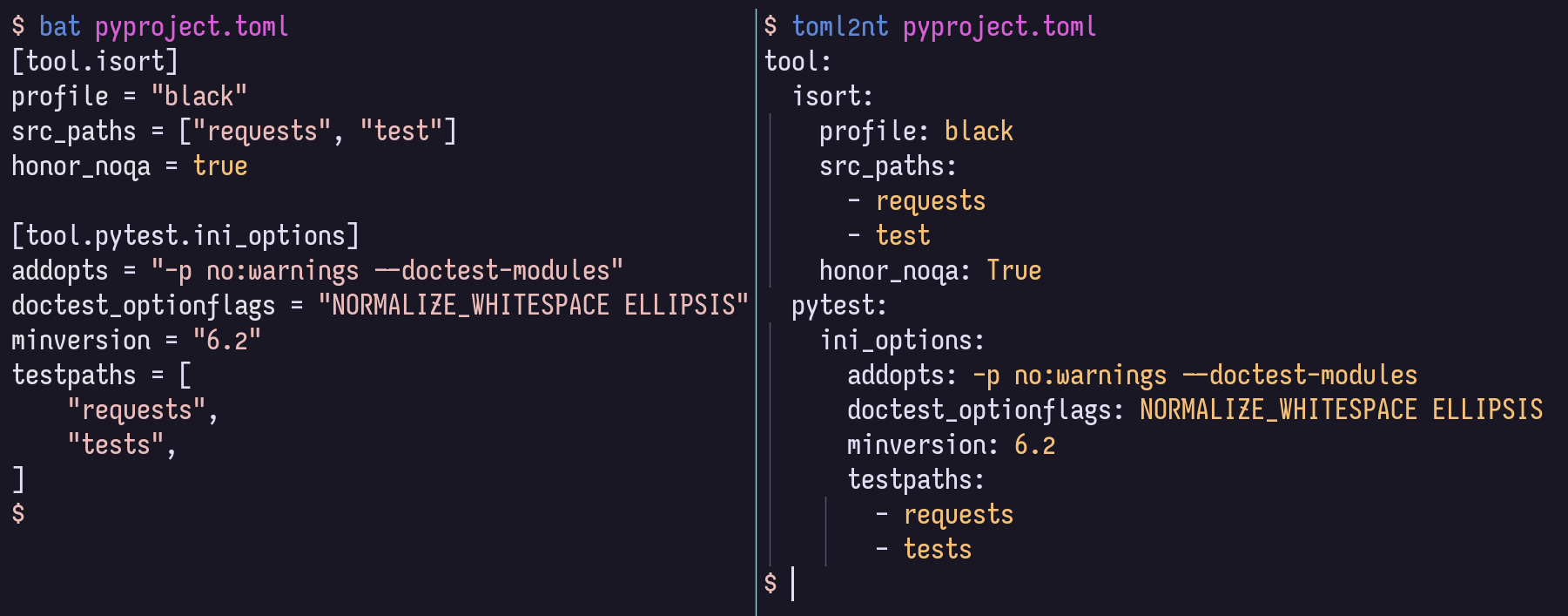
地元の開発のために、VENVをアクティブにすることをお勧めします。
$ pip install -r local-requirements.txtそこから、一般的なタスクの定義を見てみることができます。
$ task -l
$ nox -l
また、GitHubページサイトで、HTMLのレンダリングとして構造とコード内のドキュメントを閲覧することをお勧めします。







