nestedtextto
1.0.0


โครงการนี้ถูกสร้างขึ้นเพื่อชื่นชมการออกแบบของ NestedText ความสามารถในการอ่านของ Queries Yamlpath ยูทิลิตี้ของ CATTRs และความสุขของ Plumbum และ Ward - ไม่มีโครงการใด ๆ ของผู้เขียนคนนี้
โครงการนี้ NestedTextto จัดเตรียมเครื่องมือบรรทัดคำสั่งหกรายการเพื่อการแปลงที่สะดวกระหว่าง NestedText และรูปแบบอื่น ๆ :
nt2json , nt2toml , nt2yamljson2nt , toml2nt , yaml2ntจากเอกสาร NestedText โดยเน้น:
NestedText เป็นรูปแบบไฟล์สำหรับการเก็บข้อมูลที่มีโครงสร้างที่จะป้อนแก้ไขหรือดูโดยผู้คน มันจัดระเบียบข้อมูลเป็นคอลเลกชันที่ซ้อนกันของ พจนานุกรม รายการ และ สตริง โดยไม่จำเป็นต้องอ้างหรือหลบหนี คุณสมบัติที่ไม่ซ้ำกันของรูปแบบไฟล์นี้คือรองรับเฉพาะ ประเภทสเกลาร์หนึ่งประเภท: สตริง ในขณะที่การตัดสินใจหลีกเลี่ยงจำนวนเต็ม, จริง, วันที่และอื่น ๆ ประเภทอาจดูเหมือนตอบโต้ที่ใช้งานง่าย แต่ก็นำไปสู่ไฟล์ข้อมูลและแอปพลิเคชันที่ง่ายกว่าซึ่งมีความแข็งแกร่งมากขึ้น
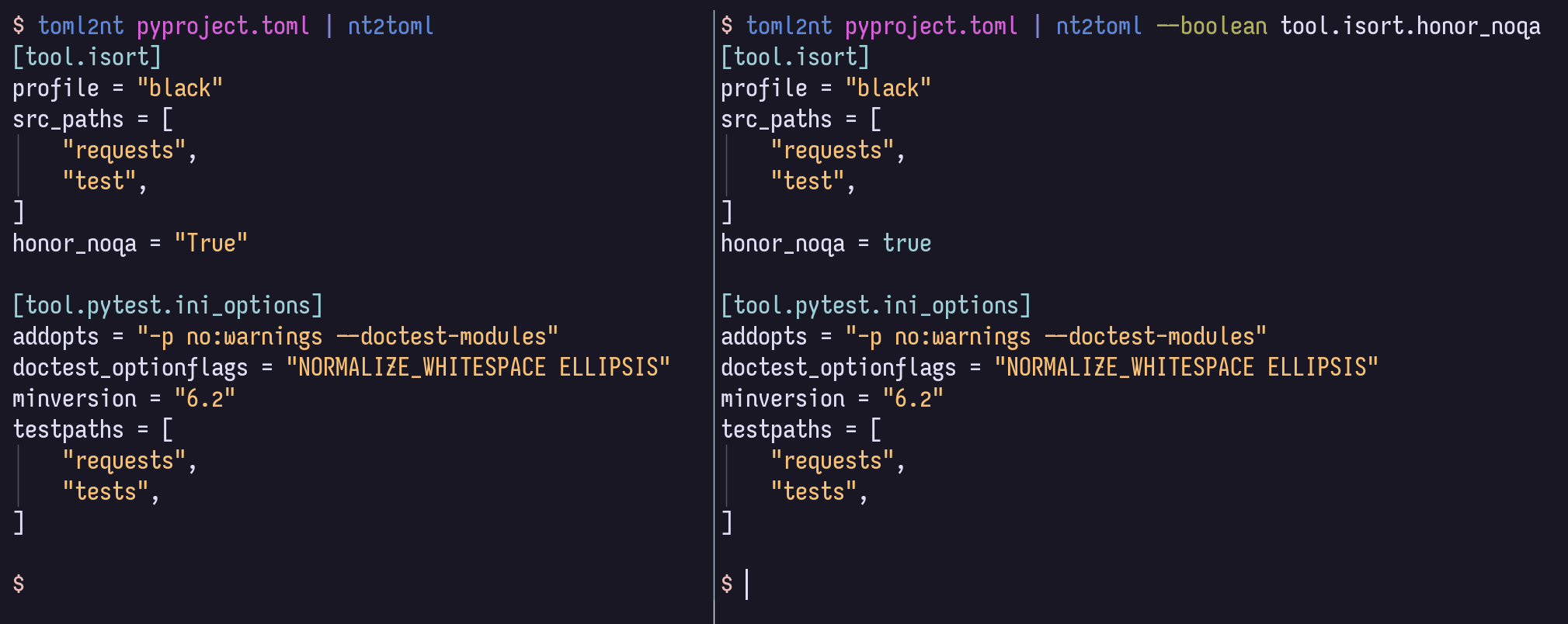
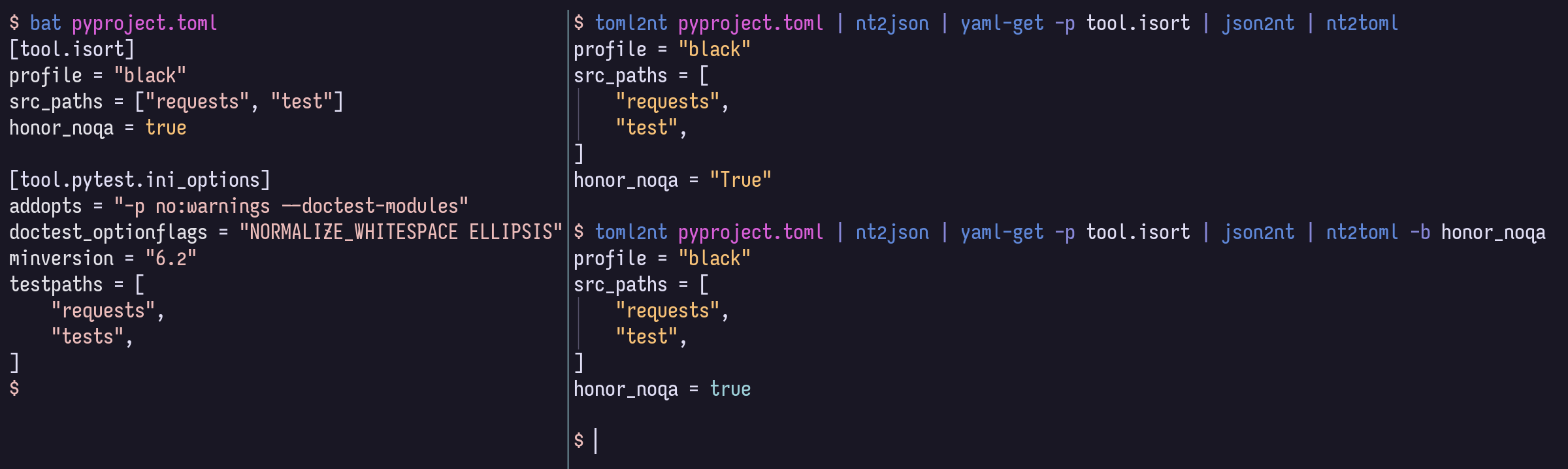
เมื่อแปลงจาก NestedText เป็นรูปแบบที่รองรับประเภทค่าที่มากขึ้นค่าธรรมดาทั้งหมดจะเป็นสตริงตามค่าเริ่มต้น แต่คุณสามารถให้ตัวเลือกในการเลือกค่าใด ๆ เป็นตัวเลขบูลีนโมฆะหรือวันที่/เวลาหากรูปแบบเป้าหมายรองรับโดยใช้ไวยากรณ์การค้นหาเส้นทาง YAML ที่ทรงพลังและรัดกุม
$ cat example.nt people :
-
name : Bill Sky
problems : 99
happy : False
-
name : Vorbis Florbis
problems : 6
happy : yes $ nt2json example.nt --number /people/problems --boolean /people/happy {
"people" : [
{
"name" : " Bill Sky " ,
"problems" : 99 ,
"happy" : false
},
{
"name" : " Vorbis Florbis " ,
"problems" : 6 ,
"happy" : true
}
]
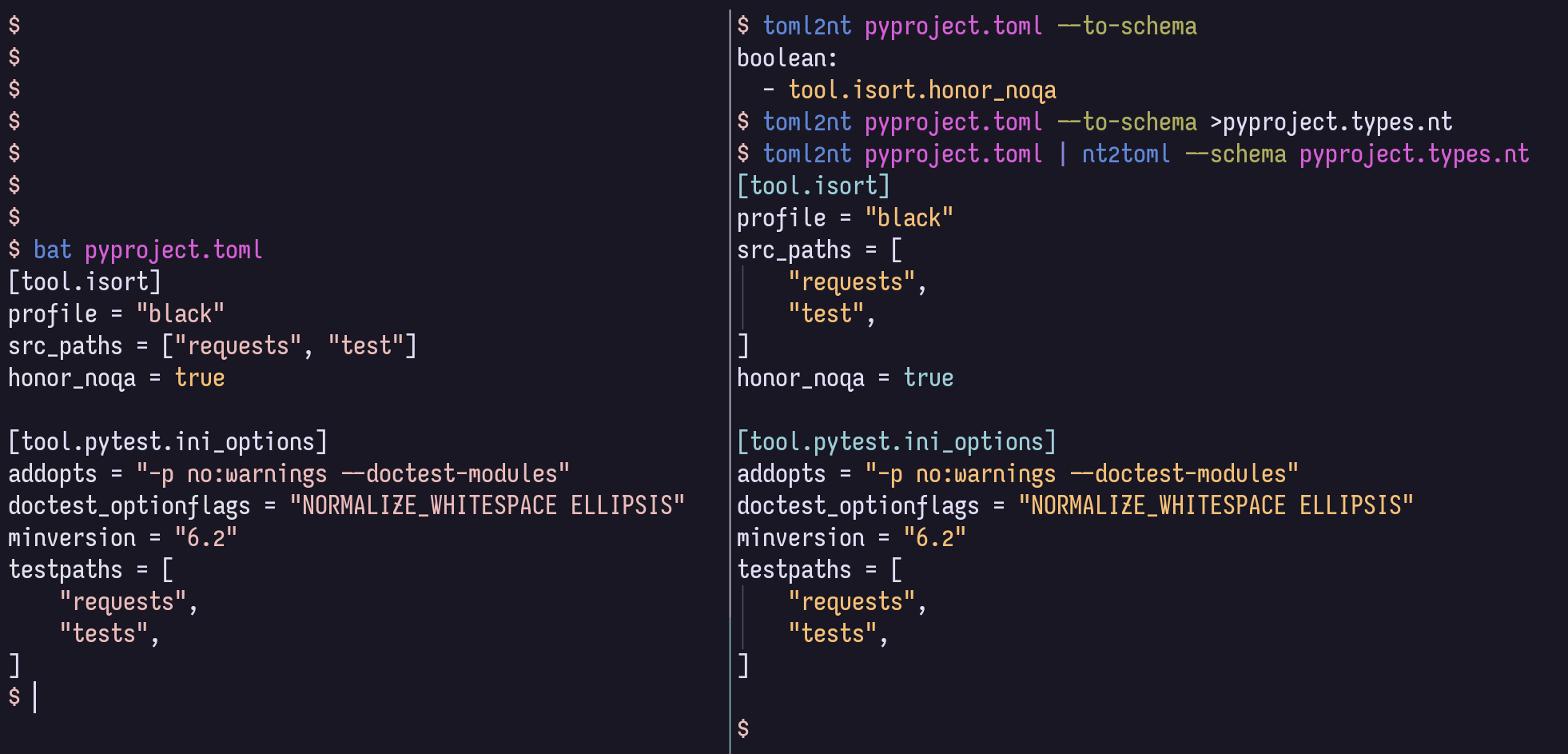
}คุณสามารถจัดเก็บการแมปประเภทเหล่านี้ในไฟล์ "schema" nestedtext
$ cat example.types.nt boolean :
- /people/happy
number :
- /people/problemsคำสั่งต่อไปนี้จะให้ JSON ด้านบน:
$ nt2json example.nt --schema example.types.ntสคีมาดังกล่าวอาจถูกสร้างขึ้นโดยอัตโนมัติจาก JSON/TOML/YAML:
$ json2nt --to-schema example.jsonอาจมีตัวเลือกก่อนหรือหลังเอกสารและเนื้อหาอาจถูกส่งไปยังคำสั่งโดยตรงแทนการระบุไฟล์
สำหรับข้อมูลไวยากรณ์ของ Yaml Path เพิ่มเติมโปรดดูเส้นทาง Yaml Path Wiki
ตัวอย่างเช่นคุณสามารถจับคู่รายการทั้งหมดที่ อาจ เป็น booleans ไม่ว่าในเชิงลึกใด ๆ ด้วย --boolean '/**[.=~/^(?i)(yes|no|true|false)$/]'
หากคุณไม่ต้องการการสนับสนุน Toml คุณสามารถละเว้นบิต [toml] ด้านล่าง
นี่คือวิธีการติดตั้ง:
$ uv tool install ' nt2[toml] '     # Install using uv (Python all-around manager)
$ pipx install ' nt2[toml] '        # Install using pipx (Python app manager)
$ pipz install ' nt2[toml] '        # Install using zpy (Python app and environment manager for Zsh)
$ pip install --user ' nt2[toml] '  # Install in your user's environment
$ pip install ' nt2[toml] '         # Install in current environment
ฉันแนะนำให้ใช้ UV, PIPX หรือ pipz จาก ZPY
สำหรับการเสร็จสิ้น ZSH ให้เพิ่มบรรทัดนี้ใน .zshrc ของคุณทุกเวลาหลังจาก compinit :
if (( $ + functions[compdef] )) && (( $ + commands[nt 2 json] )) compdef _gnu_generic nt2yaml nt2toml nt2json json2nt toml2nt yaml2nt nt2json 0.2.7
Read NestedText and output its content as JSON.
By default, generated JSON values will only contain strings, arrays, and maps,
but you can cast nodes matching YAML Paths to boolean, null, or number.
Casting switches may be before or after file arguments.
Examples:
nt2json example.nt
nt2json <example.nt
cat example.nt | nt2json
nt2json --int People.age --boolean 'People."is a wizard"' example.nt
Usage:
nt2json [SWITCHES] input_files...
Meta-switches:
-h, --help Prints this help message and quits
-v, --version Prints the program's version and quits
Switches:
--boolean, -b YAMLPATH:str Cast each node matching the given YAML Path
query as boolean; may be given multiple
times
--null, -n YAMLPATH:str Cast each node matching the given YAML Path
query as null, if it is an empty string; may
be given multiple times
--number, --int, --float, -i, -f YAMLPATH:str
Cast each node matching the given YAML Path
query as a number; may be given multiple
times
--schema, -s NESTEDTEXTFILE:ExistingFile
Cast nodes matching YAML Path queries
specified in a NestedText document. It must
be a map with one or more of the keys:
'null', 'boolean', 'number'Each key's value
is a list of YAML Paths.; may be given
multiple times
 nt2yaml 0.2.7

Read NestedText and output its content as YAML.

By default, generated YAML values will only contain strings, arrays, and maps,
but you can cast nodes matching YAML Paths to boolean, null, number, or date.

Casting switches may be before or after file arguments.

Examples:
    nt2yaml example.nt
    nt2yaml <example.nt
    cat example.nt | nt2yaml
    nt2yaml --int People.age --boolean 'People."is a wizard"' example.nt

Usage:
    nt2yaml [SWITCHES] input_files...

Meta-switches:
    -h, --help                      Prints this help message and quits
    -v, --version                   Prints the program's version and quits

Switches:
    --boolean, -b YAMLPATH:str      Cast each node matching the given YAML Path
                                    query as boolean; may be given multiple
                                    times
    --date, -d YAMLPATH:str         Cast each node matching the given YAML Path
                                    query as a date, assuming it's ISO 8601; may
                                    be given multiple times
    --null, -n YAMLPATH:str         Cast each node matching the given YAML Path
                                    query as null, if it is an empty string; may
                                    be given multiple times
    --number, --int, --float, -i, -f YAMLPATH:str
                                    Cast each node matching the given YAML Path
                                    query as a number; may be given multiple
                                    times
    --schema, -s NESTEDTEXTFILE:ExistingFile
                                    Cast nodes matching YAML Path queries
                                    specified in a NestedText document. It must
                                    be a map with one or more of the keys:
                                    'null', 'boolean', 'number'Each key's value
                                    is a list of YAML Paths.; may be given
                                    multiple times
 nt2toml 0.2.7

Read NestedText and output its content as TOML.

By default, generated TOML values will only contain strings, arrays, and maps,
but you can cast nodes matching YAML Paths to boolean, number, or date.

Casting switches may be before or after file arguments.

Examples:
    nt2toml example.nt
    nt2toml <example.nt
    cat example.nt | nt2toml
    nt2toml --int People.age --boolean 'People."is a wizard"' example.nt

Usage:
    nt2toml [SWITCHES] input_files...

Meta-switches:
    -h, --help                      Prints this help message and quits
    -v, --version                   Prints the program's version and quits

Switches:
    --boolean, -b YAMLPATH:str      Cast each node matching the given YAML Path
                                    query as boolean; may be given multiple
                                    times
    --date, -d YAMLPATH:str         Cast each node matching the given YAML Path
                                    query as a date, assuming it's ISO 8601; may
                                    be given multiple times
    --number, --int, --float, -i, -f YAMLPATH:str
                                    Cast each node matching the given YAML Path
                                    query as a number; may be given multiple
                                    times
    --schema, -s NESTEDTEXTFILE:ExistingFile
                                    Cast nodes matching YAML Path queries
                                    specified in a NestedText document. It must
                                    be a map with one or more of the keys:
                                    'null', 'boolean', 'number'Each key's value
                                    is a list of YAML Paths.; may be given
                                    multiple times
 json2nt 0.2.7

Read JSON and output its content as NestedText.

Examples:
    json2nt example.json
    json2nt <example.json
    cat example.json | json2nt

Usage:
    json2nt [SWITCHES] input_files...

Meta-switches:
    -h, --help           Prints this help message and quits
    -v, --version        Prints the program's version and quits

Switches:
    --to-schema, -s      Rather than convert the inputs, generate a schema
 yaml2nt 0.2.7

Read YAML and output its content as NestedText.

Examples:
    yaml2nt example.yml
    yaml2nt <example.yml
    cat example.yml | yaml2nt

Usage:
    yaml2nt [SWITCHES] input_files...

Meta-switches:
    -h, --help           Prints this help message and quits
    -v, --version        Prints the program's version and quits

Switches:
    --to-schema, -s      Rather than convert the inputs, generate a schema
 toml2nt 0.2.7

Read TOML and output its content as NestedText.

Examples:
    toml2nt example.yml
    toml2nt <example.yml
    cat example.yml | toml2nt

Usage:
    toml2nt [SWITCHES] input_files...

Meta-switches:
    -h, --help           Prints this help message and quits
    -v, --version        Prints the program's version and quits

Switches:
    --to-schema, -s      Rather than convert the inputs, generate a schema
Yaml สนับสนุนประเภทคีย์ที่ไม่ใช่สายอย่างเป็นทางการเช่นแผนที่รายการและตัวเลข การสนับสนุนสำหรับคีย์ที่ไม่ใช่สตริงแตกต่างกันไปจากตัวแยกวิเคราะห์ Yaml หนึ่งไปยังอีกตัวหนึ่งและปัจจุบันไม่ได้รับการจัดการโดย NestedTextto
หากใครสนใจใช้ nestedTextto กับประเภทคีย์ที่ไม่ใช่สายโปรดเปิดปัญหาและฉันจะดูว่าฉันสามารถทำอะไรได้!
$ cat log.jsonl{ "chat_id" : 651321 , "event" : " receiving code " , "user_first_name" : " Andy " , "user_id" : 651321 }
{ "event" : " guessed syntax " , "ext" : null , "probability" : 0.05201493203639984 , "probability_min" : 0.12 , "syntax" : " Matlab " }
{ "chat_id" : 651321 , "event" : " colorizing code " , "syntax" : " py3 " , "user_first_name" : " Andy " , "user_id" : 651321 }
{ "event" : " Got deletion request " , "reply_to_msg_user_id" : 651321 , "user_id" : 651321 }
{"chat_id": 651321, "event": "failed to delete message (it's probably gone already)", "exception": "Traceback (most recent call last):n File "/home/andy/Code/colorcodebot/app/colorcodebot.py", line 278, in delete_after_delayn bot.delete_message(message.chat.id, message.message_id)n File "/home/andy/.local/share/venvs/84f7fb558856f9ccc2c54e3d122862b6/venv/lib/python3.10/site-packages/telebot/__init__.py", line 1081, in delete_messagen return apihelper.delete_message(self.token, chat_id, message_id, timeout)n File "/home/andy/.local/share/venvs/84f7fb558856f9ccc2c54e3d122862b6/venv/lib/python3.10/site-packages/telebot/apihelper.py", line 1299, in delete_messagen return _make_request(token, method_url, params=payload, method='post')n File "/home/andy/.local/share/venvs/84f7fb558856f9ccc2c54e3d122862b6/venv/lib/python3.10/site-packages/telebot/apihelper.py", line 152, in _make_requestn json_result = _check_result(method_name, result)n File "/home/andy/.local/share/venvs/84f7fb558856f9ccc2c54e3d122862b6/venv/lib/python3.10/site-packages/telebot/apihelper.py", line 179, in _check_resultn raise ApiTelegramException(method_name, result, result_json)ntelebot.apihelper.ApiTelegramException: A request to the Telegram API was unsuccessful. Error code: 400. Description: Bad Request: message to delete not found"}$ json2nt log.jsonl-
chat_id : 651321
event : receiving code
user_first_name : Andy
user_id : 651321
-
event : guessed syntax
ext :
probability : 0.05201493203639984
probability_min : 0.12
syntax : Matlab
-
chat_id : 651321
event : colorizing code
syntax : py3
user_first_name : Andy
user_id : 651321
-
event : Got deletion request
reply_to_msg_user_id : 651321
user_id : 651321
-
chat_id : 651321
event : failed to delete message (it's probably gone already)
exception :
> Traceback (most recent call last):
> File "/home/andy/Code/colorcodebot/app/colorcodebot.py", line 278, in delete_after_delay
> bot.delete_message(message.chat.id, message.message_id)
> File "/home/andy/.local/share/venvs/84f7fb558856f9ccc2c54e3d122862b6/venv/lib/python3.10/site-packages/telebot/__init__.py", line 1081, in delete_message
> return apihelper.delete_message(self.token, chat_id, message_id, timeout)
> File "/home/andy/.local/share/venvs/84f7fb558856f9ccc2c54e3d122862b6/venv/lib/python3.10/site-packages/telebot/apihelper.py", line 1299, in delete_message
> return _make_request(token, method_url, params=payload, method='post')
> File "/home/andy/.local/share/venvs/84f7fb558856f9ccc2c54e3d122862b6/venv/lib/python3.10/site-packages/telebot/apihelper.py", line 152, in _make_request
> json_result = _check_result(method_name, result)
> File "/home/andy/.local/share/venvs/84f7fb558856f9ccc2c54e3d122862b6/venv/lib/python3.10/site-packages/telebot/apihelper.py", line 179, in _check_result
> raise ApiTelegramException(method_name, result, result_json)
> telebot.apihelper.ApiTelegramException: A request to the Telegram API was unsuccessful. Error code: 400. Description: Bad Request: message to delete not found 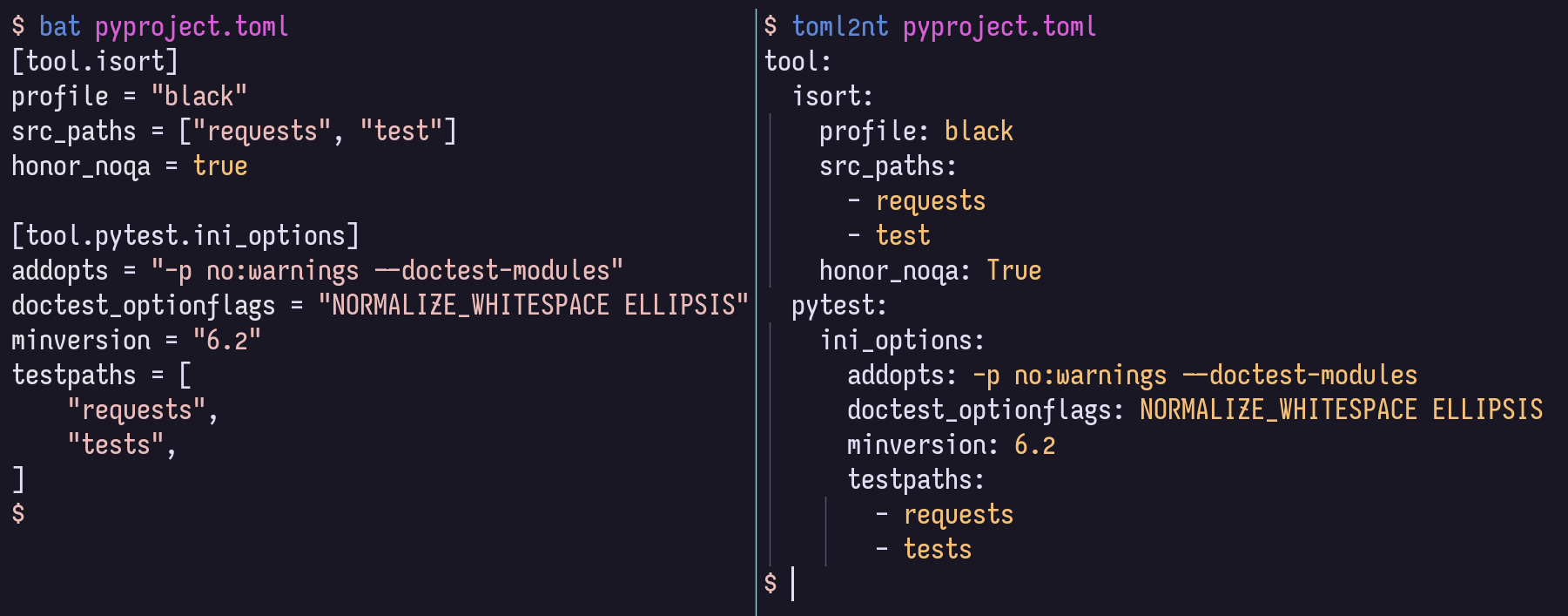
สำหรับการพัฒนาในท้องถิ่นขอแนะนำให้เปิดใช้งาน VENV แล้ว
$ pip install -r local-requirements.txtจากนั้นคุณอาจต้องการดูคำจำกัดความงานทั่วไป:
$ task -l
$ nox -l
และคุณอาจต้องการเรียกดูโครงสร้างและเอกสารในรหัสเป็น HTML ที่แสดงผลที่ไซต์ GitHub Pages







