nestedtextto
1.0.0


Este projeto foi criado em apreciação pelo design do TEXT NETENTE, pela legibilidade das consultas Yamlpath, pela utilidade dos Cattrs e pela alegria de Plumbum e Ward - nenhum dos quais são os projetos deste autor.
Este projeto, NtestTextTo, fornece seis ferramentas de linha de comando para uma conversão conveniente entre o NtestText e outros formatos:
nt2json , nt2toml , nt2yamljson2nt , toml2nt , yaml2ntDos documentos de text itens, com ênfase adicionada:
O NtestText é um formato de arquivo para manter dados estruturados a serem inseridos, editados ou visualizados pelas pessoas. Ele organiza os dados em uma coleção aninhada de dicionários , listas e cordas sem a necessidade de citar ou escapar . Um recurso exclusivo desse formato de arquivo é que ele suporta apenas um tipo escalar: strings . Embora a decisão de evitar o número inteiro, real, data, etc. possa parecer contra -intuitivo, leva a arquivos de dados e aplicativos mais simples que são mais robustos.
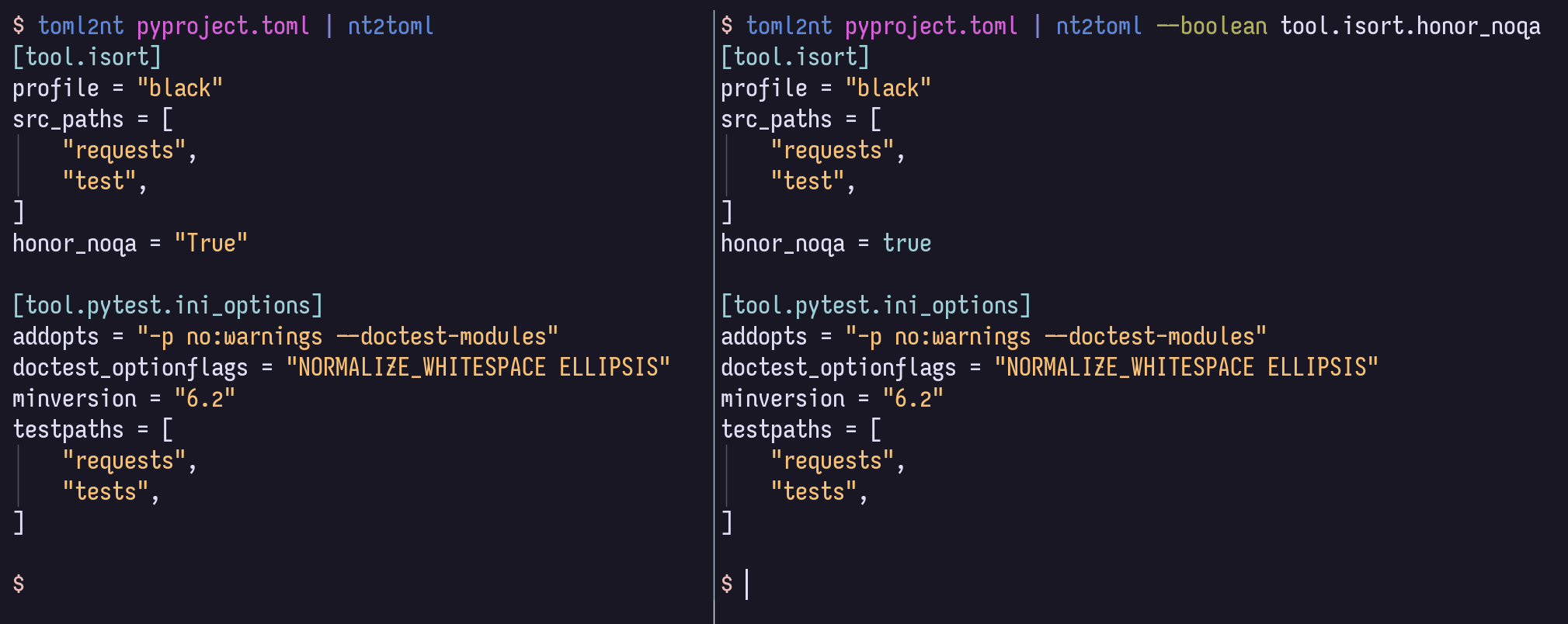
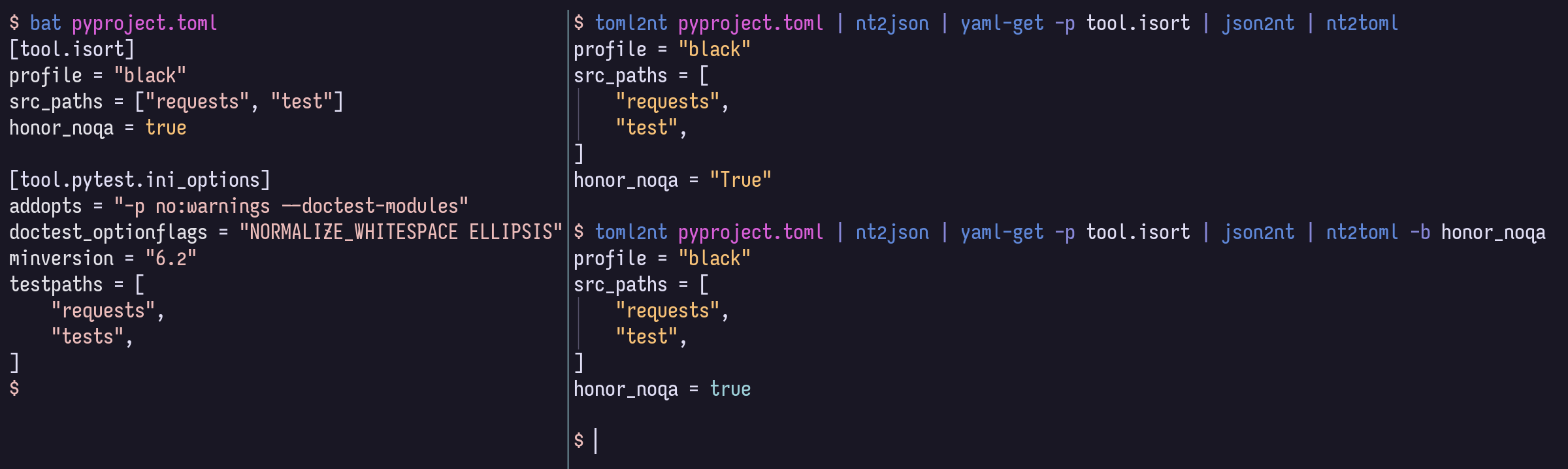
Ao converter do TEXT NETEXT em formatos que suportam mais tipos de valor, todos os valores simples serão strings por padrão. Mas você pode fornecer opções para lançar valores como números, booleanos, nulos ou datas/horários, se o formato de destino o suportar, usando a sintaxe de consulta de caminho YAML poderoso e conciso.
$ cat example.nt people :
-
name : Bill Sky
problems : 99
happy : False
-
name : Vorbis Florbis
problems : 6
happy : yes $ nt2json example.nt --number /people/problems --boolean /people/happy {
"people" : [
{
"name" : " Bill Sky " ,
"problems" : 99 ,
"happy" : false
},
{
"name" : " Vorbis Florbis " ,
"problems" : 6 ,
"happy" : true
}
]
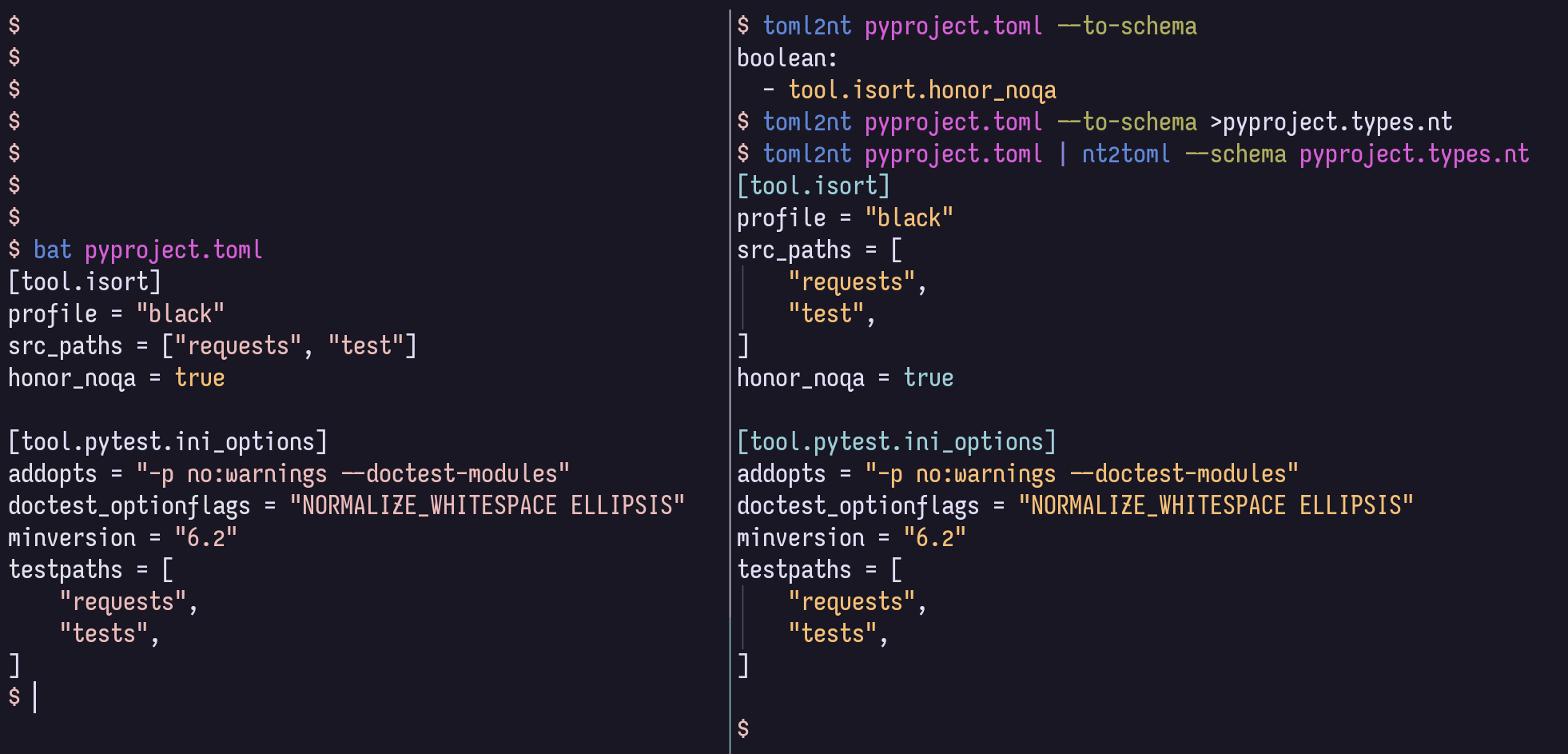
}Em vez disso, você pode armazenar esses mapeamentos de tipos em um arquivo "esquema" de texto aninhado.
$ cat example.types.nt boolean :
- /people/happy
number :
- /people/problemsO comando a seguir também produzirá o JSON acima:
$ nt2json example.nt --schema example.types.ntEsse esquema pode ser gerado automaticamente a partir de JSON/TOML/YAML:
$ json2nt --to-schema example.jsonAs opções podem ser fornecidas antes ou depois do documento, e o conteúdo pode ser canalizado diretamente para o comando em vez de especificar um arquivo.
Para obter mais informações de sintaxe do caminho YAML, consulte o Wiki do caminho YAML.
Por exemplo, você pode corresponder a todos os itens que provavelmente se destinam a booleanos, em qualquer profundidade, com --boolean '/**[.=~/^(?i)(yes|no|true|false)$/]' .
Se você não precisar de suporte à TOML, poderá omitir os bits [toml] abaixo.
Aqui estão algumas maneiras de instalá -lo:
$ uv tool install ' nt2[toml] '     # Install using uv (Python all-around manager)
$ pipx install ' nt2[toml] '        # Install using pipx (Python app manager)
$ pipz install ' nt2[toml] '        # Install using zpy (Python app and environment manager for Zsh)
$ pip install --user ' nt2[toml] '  # Install in your user's environment
$ pip install ' nt2[toml] '         # Install in current environment
Eu recomendo usar UV, PIPX ou pipz da ZPY.
Para a conclusão do ZSH, adicione esta linha ao seu .zshrc , a qualquer momento após compinit :
if (( $ + functions[compdef] )) && (( $ + commands[nt 2 json] )) compdef _gnu_generic nt2yaml nt2toml nt2json json2nt toml2nt yaml2nt nt2json 0.2.7
Read NestedText and output its content as JSON.
By default, generated JSON values will only contain strings, arrays, and maps,
but you can cast nodes matching YAML Paths to boolean, null, or number.
Casting switches may be before or after file arguments.
Examples:
nt2json example.nt
nt2json <example.nt
cat example.nt | nt2json
nt2json --int People.age --boolean 'People."is a wizard"' example.nt
Usage:
nt2json [SWITCHES] input_files...
Meta-switches:
-h, --help Prints this help message and quits
-v, --version Prints the program's version and quits
Switches:
--boolean, -b YAMLPATH:str Cast each node matching the given YAML Path
query as boolean; may be given multiple
times
--null, -n YAMLPATH:str Cast each node matching the given YAML Path
query as null, if it is an empty string; may
be given multiple times
--number, --int, --float, -i, -f YAMLPATH:str
Cast each node matching the given YAML Path
query as a number; may be given multiple
times
--schema, -s NESTEDTEXTFILE:ExistingFile
Cast nodes matching YAML Path queries
specified in a NestedText document. It must
be a map with one or more of the keys:
'null', 'boolean', 'number'Each key's value
is a list of YAML Paths.; may be given
multiple times
 nt2yaml 0.2.7

Read NestedText and output its content as YAML.

By default, generated YAML values will only contain strings, arrays, and maps,
but you can cast nodes matching YAML Paths to boolean, null, number, or date.

Casting switches may be before or after file arguments.

Examples:
    nt2yaml example.nt
    nt2yaml <example.nt
    cat example.nt | nt2yaml
    nt2yaml --int People.age --boolean 'People."is a wizard"' example.nt

Usage:
    nt2yaml [SWITCHES] input_files...

Meta-switches:
    -h, --help                      Prints this help message and quits
    -v, --version                   Prints the program's version and quits

Switches:
    --boolean, -b YAMLPATH:str      Cast each node matching the given YAML Path
                                    query as boolean; may be given multiple
                                    times
    --date, -d YAMLPATH:str         Cast each node matching the given YAML Path
                                    query as a date, assuming it's ISO 8601; may
                                    be given multiple times
    --null, -n YAMLPATH:str         Cast each node matching the given YAML Path
                                    query as null, if it is an empty string; may
                                    be given multiple times
    --number, --int, --float, -i, -f YAMLPATH:str
                                    Cast each node matching the given YAML Path
                                    query as a number; may be given multiple
                                    times
    --schema, -s NESTEDTEXTFILE:ExistingFile
                                    Cast nodes matching YAML Path queries
                                    specified in a NestedText document. It must
                                    be a map with one or more of the keys:
                                    'null', 'boolean', 'number'Each key's value
                                    is a list of YAML Paths.; may be given
                                    multiple times
 nt2toml 0.2.7

Read NestedText and output its content as TOML.

By default, generated TOML values will only contain strings, arrays, and maps,
but you can cast nodes matching YAML Paths to boolean, number, or date.

Casting switches may be before or after file arguments.

Examples:
    nt2toml example.nt
    nt2toml <example.nt
    cat example.nt | nt2toml
    nt2toml --int People.age --boolean 'People."is a wizard"' example.nt

Usage:
    nt2toml [SWITCHES] input_files...

Meta-switches:
    -h, --help                      Prints this help message and quits
    -v, --version                   Prints the program's version and quits

Switches:
    --boolean, -b YAMLPATH:str      Cast each node matching the given YAML Path
                                    query as boolean; may be given multiple
                                    times
    --date, -d YAMLPATH:str         Cast each node matching the given YAML Path
                                    query as a date, assuming it's ISO 8601; may
                                    be given multiple times
    --number, --int, --float, -i, -f YAMLPATH:str
                                    Cast each node matching the given YAML Path
                                    query as a number; may be given multiple
                                    times
    --schema, -s NESTEDTEXTFILE:ExistingFile
                                    Cast nodes matching YAML Path queries
                                    specified in a NestedText document. It must
                                    be a map with one or more of the keys:
                                    'null', 'boolean', 'number'Each key's value
                                    is a list of YAML Paths.; may be given
                                    multiple times
 json2nt 0.2.7

Read JSON and output its content as NestedText.

Examples:
    json2nt example.json
    json2nt <example.json
    cat example.json | json2nt

Usage:
    json2nt [SWITCHES] input_files...

Meta-switches:
    -h, --help           Prints this help message and quits
    -v, --version        Prints the program's version and quits

Switches:
    --to-schema, -s      Rather than convert the inputs, generate a schema
 yaml2nt 0.2.7

Read YAML and output its content as NestedText.

Examples:
    yaml2nt example.yml
    yaml2nt <example.yml
    cat example.yml | yaml2nt

Usage:
    yaml2nt [SWITCHES] input_files...

Meta-switches:
    -h, --help           Prints this help message and quits
    -v, --version        Prints the program's version and quits

Switches:
    --to-schema, -s      Rather than convert the inputs, generate a schema
 toml2nt 0.2.7

Read TOML and output its content as NestedText.

Examples:
    toml2nt example.yml
    toml2nt <example.yml
    cat example.yml | toml2nt

Usage:
    toml2nt [SWITCHES] input_files...

Meta-switches:
    -h, --help           Prints this help message and quits
    -v, --version        Prints the program's version and quits

Switches:
    --to-schema, -s      Rather than convert the inputs, generate a schema
A YAML suporta oficialmente os tipos de chaves que não correm, como mapas, listas e números. O suporte a teclas que não são de string varia de um analisador YAML para o outro e atualmente não é tratado pelo NtestTextTo.
Se alguém estiver interessado em usar o NestedTextTo com os tipos de chave não corda, abra um problema e verei o que posso fazer!
$ cat log.jsonl{ "chat_id" : 651321 , "event" : " receiving code " , "user_first_name" : " Andy " , "user_id" : 651321 }
{ "event" : " guessed syntax " , "ext" : null , "probability" : 0.05201493203639984 , "probability_min" : 0.12 , "syntax" : " Matlab " }
{ "chat_id" : 651321 , "event" : " colorizing code " , "syntax" : " py3 " , "user_first_name" : " Andy " , "user_id" : 651321 }
{ "event" : " Got deletion request " , "reply_to_msg_user_id" : 651321 , "user_id" : 651321 }
{"chat_id": 651321, "event": "failed to delete message (it's probably gone already)", "exception": "Traceback (most recent call last):n File "/home/andy/Code/colorcodebot/app/colorcodebot.py", line 278, in delete_after_delayn bot.delete_message(message.chat.id, message.message_id)n File "/home/andy/.local/share/venvs/84f7fb558856f9ccc2c54e3d122862b6/venv/lib/python3.10/site-packages/telebot/__init__.py", line 1081, in delete_messagen return apihelper.delete_message(self.token, chat_id, message_id, timeout)n File "/home/andy/.local/share/venvs/84f7fb558856f9ccc2c54e3d122862b6/venv/lib/python3.10/site-packages/telebot/apihelper.py", line 1299, in delete_messagen return _make_request(token, method_url, params=payload, method='post')n File "/home/andy/.local/share/venvs/84f7fb558856f9ccc2c54e3d122862b6/venv/lib/python3.10/site-packages/telebot/apihelper.py", line 152, in _make_requestn json_result = _check_result(method_name, result)n File "/home/andy/.local/share/venvs/84f7fb558856f9ccc2c54e3d122862b6/venv/lib/python3.10/site-packages/telebot/apihelper.py", line 179, in _check_resultn raise ApiTelegramException(method_name, result, result_json)ntelebot.apihelper.ApiTelegramException: A request to the Telegram API was unsuccessful. Error code: 400. Description: Bad Request: message to delete not found"}$ json2nt log.jsonl-
chat_id : 651321
event : receiving code
user_first_name : Andy
user_id : 651321
-
event : guessed syntax
ext :
probability : 0.05201493203639984
probability_min : 0.12
syntax : Matlab
-
chat_id : 651321
event : colorizing code
syntax : py3
user_first_name : Andy
user_id : 651321
-
event : Got deletion request
reply_to_msg_user_id : 651321
user_id : 651321
-
chat_id : 651321
event : failed to delete message (it's probably gone already)
exception :
> Traceback (most recent call last):
> File "/home/andy/Code/colorcodebot/app/colorcodebot.py", line 278, in delete_after_delay
> bot.delete_message(message.chat.id, message.message_id)
> File "/home/andy/.local/share/venvs/84f7fb558856f9ccc2c54e3d122862b6/venv/lib/python3.10/site-packages/telebot/__init__.py", line 1081, in delete_message
> return apihelper.delete_message(self.token, chat_id, message_id, timeout)
> File "/home/andy/.local/share/venvs/84f7fb558856f9ccc2c54e3d122862b6/venv/lib/python3.10/site-packages/telebot/apihelper.py", line 1299, in delete_message
> return _make_request(token, method_url, params=payload, method='post')
> File "/home/andy/.local/share/venvs/84f7fb558856f9ccc2c54e3d122862b6/venv/lib/python3.10/site-packages/telebot/apihelper.py", line 152, in _make_request
> json_result = _check_result(method_name, result)
> File "/home/andy/.local/share/venvs/84f7fb558856f9ccc2c54e3d122862b6/venv/lib/python3.10/site-packages/telebot/apihelper.py", line 179, in _check_result
> raise ApiTelegramException(method_name, result, result_json)
> telebot.apihelper.ApiTelegramException: A request to the Telegram API was unsuccessful. Error code: 400. Description: Bad Request: message to delete not found 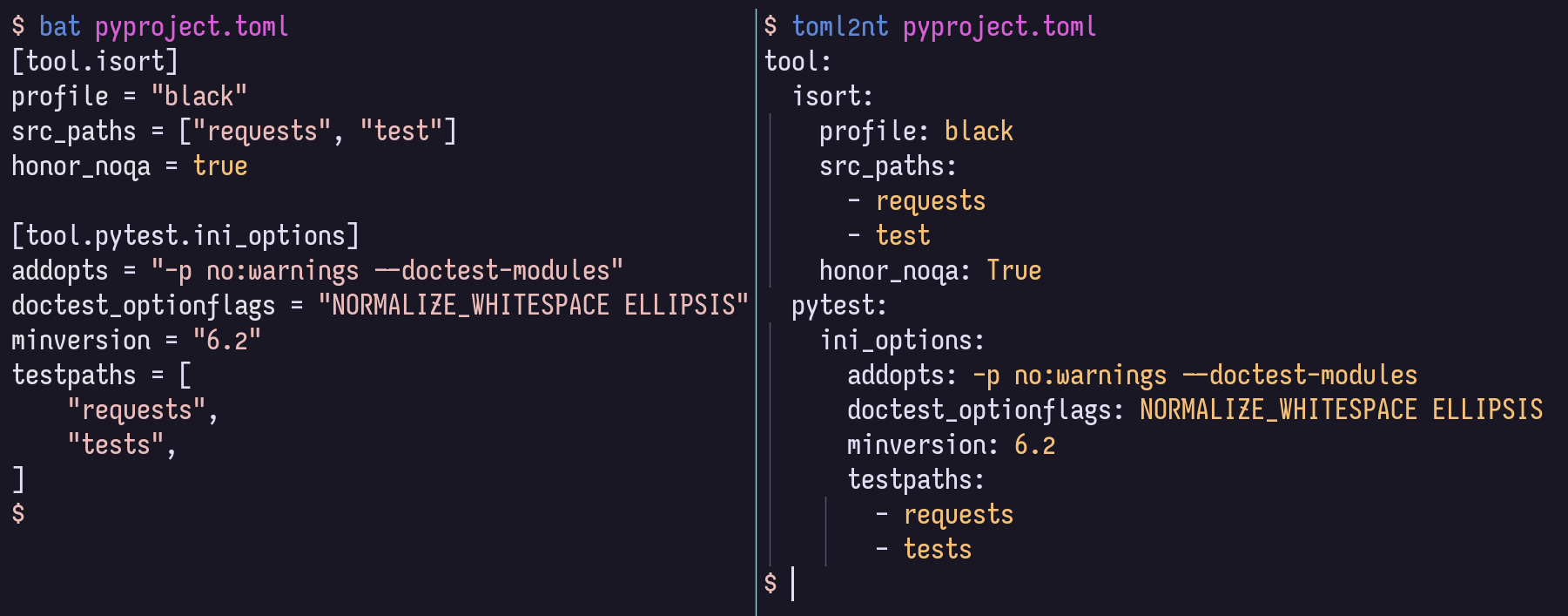
Para o desenvolvimento local, é recomendável ativar um VENV, então
$ pip install -r local-requirements.txtA partir daí, você pode querer olhar para as definições de tarefas comuns:
$ task -l
$ nox -l
E você pode procurar a estrutura e a documentação no código como HTML renderizado, no site do Github Pages.







