next sitemap
v4.2.3: Merge pull request #677 from Barokai

yarn add next-sitemapnext-sitemap需要一個基本的配置文件( next-sitemap.config.js )
next-sitemap將默認情況下從.env文件加載環境變量。
 /** @type {import('next-sitemap').IConfig} */
module . exports = {
  siteUrl : process . env . SITE_URL || 'https://example.com' ,
  generateRobotsTxt : true , // (optional)
  // ...other options
}添加臨時SiteMap作為您的後腳本
{
  "build" : " next build " ,
  "postbuild" : " next-sitemap "
}您還可以使用自定義配置文件代替next-sitemap.config.js 。只需通過--config <your-config-file>.js構建命令(示例:custom-config-file)
{
  "build" : " next build " ,
  "postbuild" : " next-sitemap --config awesome.config.js "
}使用PNPM時.npmrc如果要使用後建築步驟:
 //.npmrc
enable-pre-post-scripts=true
從next-sitemap v2.x開始, sitemap.xml將為索引站點地圖。它將包含所有其他生成的SiteMap端點的URL。
可以通過設置generateIndexSitemap: false在NextSitemap Config File中關閉索引站點地圖的生成。 (這對於不需要索引站點地圖的小/愛好站點很有用)(例如:no-index-sitemaps)
在next-sitemap.config.js中定義sitemapSize屬性,以將大型站點地圖拆分為多個文件。
 /** @type {import('next-sitemap').IConfig} */
module . exports = {
  siteUrl : 'https://example.com' ,
  generateRobotsTxt : true ,
  sitemapSize : 7000 ,
}
上面是拆分大型站點地圖的最小配置。當SiteMap中的URL數量超過7000時, next-sitemap將創建SiteMap(例如SiteMap-0.xml,SiteMap-1.xml)和index(例如SiteMap.xml)文件。
| 財產 | 描述 | 類型 |
|---|---|---|
| Siteurl | 您網站的基礎網址 | 細繩 |
| 輸出(可選) | Next.js輸出模式。檢查文檔。 | standalone , export |
| changefreq(可選) | 變更頻率。默認daily | 細繩 |
| 優先級(可選) | 優先事項。默認為0.7 | 數字 |
| SiteMapbaseFilename(可選) | 文件擴展程序之前生成的SiteMap文件的名稱。默認"sitemap" | 細繩 |
| 替代(可選) | 用唯一URL表示多語言支持。預設[] | 替代[] |
| Sitemapsize(可選) | 通過指定站點地圖大小,將大型站點地圖拆分為多個文件。默認5000 | 數字 |
| AutolastMod(可選) | 添加<lastmod/>屬性。默認為true | 真的 |
| 排除(可選) | 相對路徑的數組(支持的通配符模式)將排除在sitemap.xml或sitemap-*.xml上的列表中。例如: ['/page-0', '/page-*', '/private/*'] 。除此選項外, next-sitemap還提供了一個自定義transform選項,該選項可用於排除匹配特定模式的URL | 細繩[] |
| sourcedir(可選) | next.js構建目錄。默認.next | 細繩 |
| OUTDIR(可選) | 所有生成的文件將導出到此目錄。默認public | 細繩 |
| 變換(可選) | 一個轉換函數,該函數為站點地圖中的每個relative-path運行。從轉換函數返回null值將導致從生成的站點地圖列表中排除該特定path 。 | 異步函數 |
| 其他路徑(可選) | 異步函數返回要添加到生成的站點地圖列表的其他路徑列表。 | 異步函數 |
| 生成indeDexSitemap | 生成索引站點地圖。默認為true | 布爾 |
| GeneratatRobotSTXT(可選) | 生成一個robots.txt文件並列出生成的站點地圖。默認false | 布爾 |
| robotstxtxtoptions.transformrobotstxt(可選) | 自定義Robots.txt變形金剛功能。 (示例:custom-robots-txt-transformer) 默認值: async(config, robotsTxt)=> robotsTxt | 異步函數 |
| robotstxtxtoptions.policies(可選) | 生成robots.txt的策略.txt。預設: [{ userAgent: '*', allow: '/' }] | iRobotpolicy [] |
| RobotStxtOptions.AdditionalSitemaps(可選) | 將其他站點地圖添加到robots.txt主機條目的選項 | 細繩[] |
| RobotStxtOptions.includenonIndexSitemaps(可選) | 從v2.4x開始,生成的robots.txt將僅包含index sitemap的URL和從robotsTxtOptions.additionalSitemaps提供的自定義提供的端點。這是為了防止重複的URL提交(一旦通過index -sitemap-> sitemap -url,然後通過robots.txt->主機) 設置此選項為 true ,將所有生成的SiteMap端點添加到robots.txt默認 false (推薦) | 布爾 |
自定義轉換提供了一種擴展方法,可以從URL集合中添加,刪除或排除path或properties 。轉換函數為站點地圖中的每個relative path運行。並使用key : value對像在XML中添加屬性。
從轉換函數返回的null值將導致從生成的站點地圖列表中排除該特定的relative-path 。
 /** @type {import('next-sitemap').IConfig} */
module . exports = {
  transform : async ( config , path ) => {
    // custom function to ignore the path
    if ( customIgnoreFunction ( path ) ) {
      return null
    }

    // only create changefreq along with path
    // returning partial properties will result in generation of XML field with only returned values.
    if ( customLimitedField ( path ) ) {
      // This returns `path` & `changefreq`. Hence it will result in the generation of XML field with `path` and  `changefreq` properties only.
      return {
        loc : path , // => this will be exported as http(s)://<config.siteUrl>/<path>
        changefreq : 'weekly' ,
      }
    }

    // Use default transformation for all other cases
    return {
      loc : path , // => this will be exported as http(s)://<config.siteUrl>/<path>
      changefreq : config . changefreq ,
      priority : config . priority ,
      lastmod : config . autoLastmod ? new Date ( ) . toISOString ( ) : undefined ,
      alternateRefs : config . alternateRefs ?? [ ] ,
    }
  } ,
} 如果您有大量頁面列表, additionalPaths此功能可能會很有用,但是您不想渲染所有頁面並使用後備:true。執行此功能的結果將添加到一般路徑列表中,並使用sitemapSize處理。您可以自由添加動態路徑,但是與additionalSitemap不同,您無需將路徑列表劃分為不同的文件,以防一個文件有很多路徑。
如果您的功能返回已經存在的路徑,則將簡單地進行更新,重複將不會發生。
 /** @type {import('next-sitemap').IConfig} */
module . exports = {
  additionalPaths : async ( config ) => {
    const result = [ ]

    // required value only
    result . push ( { loc : '/additional-page-1' } )

    // all possible values
    result . push ( {
      loc : '/additional-page-2' ,
      changefreq : 'yearly' ,
      priority : 0.7 ,
      lastmod : new Date ( ) . toISOString ( ) ,

      // acts only on '/additional-page-2'
      alternateRefs : [
        {
          href : 'https://es.example.com' ,
          hreflang : 'es' ,
        } ,
        {
          href : 'https://fr.example.com' ,
          hreflang : 'fr' ,
        } ,
      ] ,
    } )

    // using transformation from the current configuration
    result . push ( await config . transform ( config , '/additional-page-3' ) )

    return result
  } ,
} URL集可以包含Google定義的其他站點地圖。這些是Google新聞站點地圖,圖像站點地圖或視頻站點地圖。您可以通過在transform函數中更新輸入或與additionalPaths添加該站點來添加這些站點地圖的值。在兩種情況下,您都必須返回站點地圖條目,因此它是更新輸出的最佳場所。此示例將為每個條目添加圖像和新聞標籤,但是IRL您當然會在某種情況下或在additionalPaths結果中使用它。
 /** @type {import('next-sitemap').IConfig} */
const config = {
  transform : async ( config , path ) => {
    return {
      loc : path , // => this will be exported as http(s)://<config.siteUrl>/<path>
      changefreq : config . changefreq ,
      priority : config . priority ,
      lastmod : config . autoLastmod ? new Date ( ) . toISOString ( ) : undefined ,
      images : [ { loc : 'https://example.com/image.jpg' } ] ,
      news : {
        title : 'Article 1' ,
        publicationName : 'Google Scholar' ,
        publicationLanguage : 'en' ,
        date : new Date ( ) ,
      } ,
    }
  } ,
}

export default config 這是帶有所有選項的示例next-sitemap.config.js配置
 /** @type {import('next-sitemap').IConfig} */

module . exports = {
  siteUrl : 'https://example.com' ,
  changefreq : 'daily' ,
  priority : 0.7 ,
  sitemapSize : 5000 ,
  generateRobotsTxt : true ,
  exclude : [ '/protected-page' , '/awesome/secret-page' ] ,
  alternateRefs : [
    {
      href : 'https://es.example.com' ,
      hreflang : 'es' ,
    } ,
    {
      href : 'https://fr.example.com' ,
      hreflang : 'fr' ,
    } ,
  ] ,
  // Default transformation function
  transform : async ( config , path ) => {
    return {
      loc : path , // => this will be exported as http(s)://<config.siteUrl>/<path>
      changefreq : config . changefreq ,
      priority : config . priority ,
      lastmod : config . autoLastmod ? new Date ( ) . toISOString ( ) : undefined ,
      alternateRefs : config . alternateRefs ?? [ ] ,
    }
  } ,
  additionalPaths : async ( config ) => [
    await config . transform ( config , '/additional-page' ) ,
  ] ,
  robotsTxtOptions : {
    policies : [
      {
        userAgent : '*' ,
        allow : '/' ,
      } ,
      {
        userAgent : 'test-bot' ,
        allow : [ '/path' , '/path-2' ] ,
      } ,
      {
        userAgent : 'black-listed-bot' ,
        disallow : [ '/sub-path-1' , '/path-2' ] ,
      } ,
    ] ,
    additionalSitemaps : [
      'https://example.com/my-custom-sitemap-1.xml' ,
      'https://example.com/my-custom-sitemap-2.xml' ,
      'https://example.com/my-custom-sitemap-3.xml' ,
    ] ,
  } ,
}上面的配置將基於您的項目和robots.txt生成站點地圖。
 # *
User-agent: *
Allow: /

# test-bot
User-agent: test-bot
Allow: /path
Allow: /path-2

# black-listed-bot
User-agent: black-listed-bot
Disallow: /sub-path-1
Disallow: /path-2

# Host
Host: https://example.com

# Sitemaps
Sitemap: https://example.com/sitemap.xml # Index sitemap
Sitemap: https://example.com/my-custom-sitemap-1.xml
Sitemap: https://example.com/my-custom-sitemap-2.xml
Sitemap: https://example.com/my-custom-sitemap-3.xmlnext-sitemap現在提供兩個API來生成服務器端站點地圖。這將有助於通過從CMS或自定義源中採購數據來動態生成index-sitemap和sitemap 。
getServerSideSitemapIndex :基於提供的URL生成索引站點地圖,並返回application/xml響應。支持Next13+路由。 {TS,JS}文件。
getServerSideSitemapIndexLegacy 。 getServerSideSitemap :基於字段的整體生成站點地圖,並返回application/xml響應。支持Next13+路由。 {TS,JS}文件。
getServerSideSitemapLegacy 。這是一個示例腳本,可以在服務器端生成索引sitemap。
創建app/server-sitemap-index.xml/route.ts文件。
 // app/server-sitemap-index.xml/route.ts
import { getServerSideSitemapIndex } from 'next-sitemap'

export async function GET ( request : Request ) {
  // Method to source urls from cms
  // const urls = await fetch('https//example.com/api')

  return getServerSideSitemapIndex ( [
    'https://example.com/path-1.xml' ,
    'https://example.com/path-2.xml' ,
  ] )
}創建pages/server-sitemap-index.xml/index.tsx文件。
 // pages/server-sitemap-index.xml/index.tsx
import { getServerSideSitemapIndexLegacy } from 'next-sitemap'
import { GetServerSideProps } from 'next'

export const getServerSideProps : GetServerSideProps = async ( ctx ) => {
  // Method to source urls from cms
  // const urls = await fetch('https//example.com/api')

  return getServerSideSitemapIndexLegacy ( ctx , [
    'https://example.com/path-1.xml' ,
    'https://example.com/path-2.xml' ,
  ] )
}

// Default export to prevent next.js errors
export default function SitemapIndex ( ) { } 現在, next.js從http://localhost:3000/server-sitemap-index.xml提供動態索引 - sitemap。
在robotsTxtOptions.additionalSitemaps中列出動態站點地圖頁面,並將此路徑排除在靜態站點列表中。
 // next-sitemap.config.js

/** @type {import('next-sitemap').IConfig} */
module . exports = {
  siteUrl : 'https://example.com' ,
  generateRobotsTxt : true ,
  exclude : [ '/server-sitemap-index.xml' ] , // <= exclude here
  robotsTxtOptions : {
    additionalSitemaps : [
      'https://example.com/server-sitemap-index.xml' , // <==== Add here
    ] ,
  } ,
}
這樣, next-sitemap將管理所有靜態頁面的站點地圖,並且您的動態index-sitemap將在robots.txt上列出。
這是一個示例腳本,可以在服務器端生成站點地圖。
創建app/server-sitemap.xml/route.ts文件。
 // app/server-sitemap.xml/route.ts
import { getServerSideSitemap } from 'next-sitemap'

export async function GET ( request : Request ) {
  // Method to source urls from cms
  // const urls = await fetch('https//example.com/api')

  return getServerSideSitemap ( [
    {
      loc : 'https://example.com' ,
      lastmod : new Date ( ) . toISOString ( ) ,
      // changefreq
      // priority
    } ,
    {
      loc : 'https://example.com/dynamic-path-2' ,
      lastmod : new Date ( ) . toISOString ( ) ,
      // changefreq
      // priority
    } ,
  ] )
}創建pages/server-sitemap.xml/index.tsx文件。
 // pages/server-sitemap.xml/index.tsx
import { getServerSideSitemapLegacy } from 'next-sitemap'
import { GetServerSideProps } from 'next'

export const getServerSideProps : GetServerSideProps = async ( ctx ) => {
  // Method to source urls from cms
  // const urls = await fetch('https//example.com/api')

  const fields = [
    {
      loc : 'https://example.com' , // Absolute url
      lastmod : new Date ( ) . toISOString ( ) ,
      // changefreq
      // priority
    } ,
    {
      loc : 'https://example.com/dynamic-path-2' , // Absolute url
      lastmod : new Date ( ) . toISOString ( ) ,
      // changefreq
      // priority
    } ,
  ]

  return getServerSideSitemapLegacy ( ctx , fields )
}

// Default export to prevent next.js errors
export default function Sitemap ( ) { }
現在, next.js將從http://localhost:3000/server-sitemap.xml提供動態站點地圖。
在robotsTxtOptions.additionalSitemaps中列出動態站點地圖頁面,並將此路徑排除在靜態站點列表中。
 // next-sitemap.config.js

/** @type {import('next-sitemap').IConfig} */
module . exports = {
  siteUrl : 'https://example.com' ,
  generateRobotsTxt : true ,
  exclude : [ '/server-sitemap.xml' ] , // <= exclude here
  robotsTxtOptions : {
    additionalSitemaps : [
      'https://example.com/server-sitemap.xml' , // <==== Add here
    ] ,
  } ,
}
這樣, next-sitemap將管理所有靜態頁面的站點地圖,並且您的動態站點地圖將在robots.txt上列出。
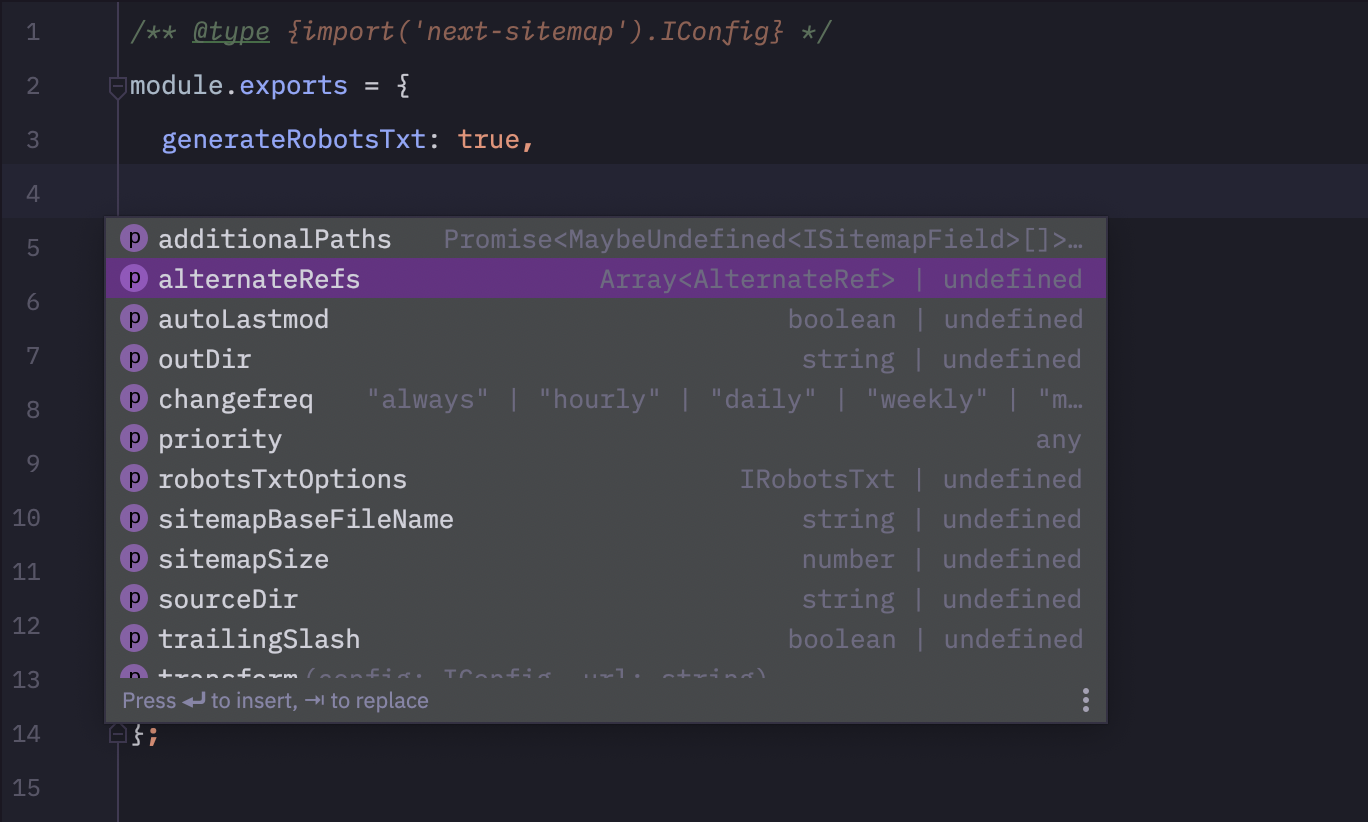
在您的next-sitemap.config.js中添加以下代碼行,以使其均為打字稿自動完成! ?
 /** @type {import('next-sitemap').IConfig} */
module . exports = {
  // YOUR CONFIG
} 
歡迎所有PR :)







