next sitemap
v4.2.3: Merge pull request #677 from Barokai

yarn add next-sitemap next-sitemap 프로젝트 루트 아래에 기본 구성 파일 ( next-sitemap.config.js )이 필요합니다.
next-sitemap기본적으로.env파일에서 환경 변수를로드합니다.
 /** @type {import('next-sitemap').IConfig} */
module . exports = {
  siteUrl : process . env . SITE_URL || 'https://example.com' ,
  generateRobotsTxt : true , // (optional)
  // ...other options
}Build 스크립트로 차세대 맵을 추가하십시오
{
  "build" : " next build " ,
  "postbuild" : " next-sitemap "
} next-sitemap.config.js 대신 사용자 정의 구성 파일을 사용할 수도 있습니다. Just Pass --config <your-config-file>.js to build 명령 (예 : custom-config-file)
{
  "build" : " next build " ,
  "postbuild" : " next-sitemap --config awesome.config.js "
}
PNPM을 사용할 때는 구축 후 단계를 사용하려면 프로젝트의 루트에서 .npmrc 파일을 만들어야합니다.
 //.npmrc
enable-pre-post-scripts=true
next-sitemap v2.x 이후에서 sitemap.xml Index Sitemap이됩니다. 여기에는 다른 모든 생성 된 사이트 맵 엔드 포인트의 URL이 포함됩니다.
Next-Sitemap 구성 파일에서 generateIndexSitemap: false 설정하여 인덱스 사이트 맵 생성을 꺼질 수 있습니다. (인덱스 사이트 맵이 필요하지 않은 소형/취미 사이트에 유용합니다) (예 : No-Index-Sitemaps)
sitemapSize 속성을 next-sitemap.config.js 에서 정의하여 대형 사이트 맵을 여러 파일로 분할하십시오.
 /** @type {import('next-sitemap').IConfig} */
module . exports = {
  siteUrl : 'https://example.com' ,
  generateRobotsTxt : true ,
  sitemapSize : 7000 ,
}
위는 큰 사이트 맵을 분할하기위한 최소 구성입니다. Siteemap의 URL 수가 7000 이상인 경우 next-sitemap Siteemap (예 : SiteMap-0.xml, Sitemap-1.xml) 및 Index (예 : sitemap.xml) 파일을 생성합니다.
| 재산 | 설명 | 유형 |
|---|---|---|
| siteUrl | 웹 사이트의 기본 URL | 끈 |
| 출력 (선택 사항) | 다음 .js 출력 모드. 문서를 확인하십시오. | standalone , export |
| changefreq (선택 사항) | 주파수를 변경하십시오. daily 기본값 | 끈 |
| 우선 순위 (선택 사항) | 우선 사항. 기본 0.7 | 숫자 |
| siteemapbasefilename (선택 사항) | 파일 확장 전에 생성 된 Siteemap 파일의 이름입니다. 기본 "sitemap" | 끈 |
| Alternaterefs (선택 사항) | 고유 한 URL로 다중 언어 지원을 나타냅니다. 기본 [] | alternateref [] |
| siteMapsize (선택 사항) | 사이트 맵 크기를 지정하여 대형 사이트 맵을 여러 파일로 분할하십시오. 기본 5000 | 숫자 |
| autolastmod (선택 사항) | <lastmod/> 속성을 추가하십시오. true | 진실 |
| 제외 (선택 사항) | sitemap.xml 또는 sitemap-*.xml 에서 목록에서 제외 할 상대 경로 (와일드 카드 패턴 지원) 배열. 예 : ['/page-0', '/page-*', '/private/*'] .이 옵션 외에도 next-sitemap 특정 패턴과 일치하는 URL을 제외하는 데 사용할 수있는 사용자 정의 transform 옵션도 제공합니다. | 끈[] |
| Sourcedir (선택 사항) | 다음 .js 빌드 디렉토리. 기본 .next | 끈 |
| 아웃 디르 (선택 사항) | 생성 된 모든 파일은이 디렉토리로 내 보냅니다. 기본 public | 끈 |
| 변환 (선택 사항) | 사이트 맵에서 각 relative-path 에 대해 실행되는 변환 함수. 변환 함수에서 null 값을 반환하면 생성 된 사이트 맵 목록에서 해당 특정 path 제외됩니다. | 비동기 기능 |
| 추가 경로 (선택 사항) | 생성 된 사이트 맵 목록에 추가 할 추가 경로 목록을 반환하는 비동기 기능. | 비동기 기능 |
| 생성 인덱스 시티 맵 | 인덱스 사이트 맵을 생성합니다. true | 부울 |
| GeneraterObotStxt (선택 사항) | robots.txt 파일을 생성하고 생성 된 사이트 맵을 나열하십시오. 기본 false | 부울 |
| robotStxtOptions.transformRobotStxt (선택 사항) | Custom Robots.txt 변압기 기능. (예 : Custom-Robots-Txt-Transformer) 기본값 : async(config, robotsTxt)=> robotsTxt | 비동기 기능 |
| robotstxtoptions.policies (선택 사항) | robots.txt 생성 정책.기본: [{ userAgent: '*', allow: '/' }] | irobotpolicy [] |
| robotStxtOptions.additionalSitemaps (선택 사항) | robots.txt 호스트 항목에 추가 사이트 맵을 추가하는 옵션 | 끈[] |
| robotStxtOptions.includenonIndexSitemaps (선택 사항) | v2.4x에서 생성 된 robots.txt 에는 robotsTxtOptions.additionalSitemaps 의 index sitemap 의 URL과 사용자 정의 제공 엔드 포인트 만 포함됩니다.이것은 중복 URL 제출을 방지하기위한 것입니다 (인덱스 -시트 맵을 통해 한 번 그리고 siteemap -url을 통해 robots.txt-> host를 통해 한 번) 이 옵션을 true SET TRUE를 robots.txt 에 추가하십시오.기본 false (권장) | 부울 |
사용자 정의 변환은 URL 세트에서 path 또는 properties 추가, 제거 또는 제외 할 확장 방법을 제공합니다. 변환 기능은 사이트 맵의 각 relative path 에 대해 실행됩니다. XML에 value 을 추가하려면 key 사용하십시오.
변환 함수에서 null 값을 반환하면 생성 된 사이트 맵 목록에서 해당 특정 relative-path 제외됩니다.
 /** @type {import('next-sitemap').IConfig} */
module . exports = {
  transform : async ( config , path ) => {
    // custom function to ignore the path
    if ( customIgnoreFunction ( path ) ) {
      return null
    }

    // only create changefreq along with path
    // returning partial properties will result in generation of XML field with only returned values.
    if ( customLimitedField ( path ) ) {
      // This returns `path` & `changefreq`. Hence it will result in the generation of XML field with `path` and  `changefreq` properties only.
      return {
        loc : path , // => this will be exported as http(s)://<config.siteUrl>/<path>
        changefreq : 'weekly' ,
      }
    }

    // Use default transformation for all other cases
    return {
      loc : path , // => this will be exported as http(s)://<config.siteUrl>/<path>
      changefreq : config . changefreq ,
      priority : config . priority ,
      lastmod : config . autoLastmod ? new Date ( ) . toISOString ( ) : undefined ,
      alternateRefs : config . alternateRefs ?? [ ] ,
    }
  } ,
} additionalPaths 기능은 많은 페이지 목록이있는 경우 유용 할 수 있지만 모든 페이지를 렌더링하고 폴백을 사용하고 싶지는 않습니다. 이 기능을 실행 한 결과는 일반적인 경로 목록에 추가되고 sitemapSize 로 처리됩니다. 동적 경로를 자유롭게 추가 할 수는 있지만 additionalSitemap 과 달리 하나의 파일에 대한 많은 경로가있는 경우 경로 목록을 다른 파일로 분할 할 필요가 없습니다.
함수가 이미 존재하는 경로를 반환하면 단순히 업데이트되면 복제가 발생하지 않습니다.
 /** @type {import('next-sitemap').IConfig} */
module . exports = {
  additionalPaths : async ( config ) => {
    const result = [ ]

    // required value only
    result . push ( { loc : '/additional-page-1' } )

    // all possible values
    result . push ( {
      loc : '/additional-page-2' ,
      changefreq : 'yearly' ,
      priority : 0.7 ,
      lastmod : new Date ( ) . toISOString ( ) ,

      // acts only on '/additional-page-2'
      alternateRefs : [
        {
          href : 'https://es.example.com' ,
          hreflang : 'es' ,
        } ,
        {
          href : 'https://fr.example.com' ,
          hreflang : 'fr' ,
        } ,
      ] ,
    } )

    // using transformation from the current configuration
    result . push ( await config . transform ( config , '/additional-page-3' ) )

    return result
  } ,
} URL 세트에는 Google에서 정의한 추가 사이트 맵이 포함될 수 있습니다. Google 뉴스 사이트 맵, 이미지 사이트 맵 또는 비디오 사이트 맵입니다. transform 함수의 항목을 업데이트하거나 additionalPaths 로 추가하여 이러한 사이트 맵의 값을 추가 할 수 있습니다. 두 경우 모두 사이트 맵 항목을 반환해야하므로 출력을 업데이트하기에 가장 적합한 장소입니다. 이 예제는 각 항목에 이미지와 뉴스 태그를 추가하지만 IRL은 물론 어떤 조건이나 additionalPaths 결과 내에서 사용합니다.
 /** @type {import('next-sitemap').IConfig} */
const config = {
  transform : async ( config , path ) => {
    return {
      loc : path , // => this will be exported as http(s)://<config.siteUrl>/<path>
      changefreq : config . changefreq ,
      priority : config . priority ,
      lastmod : config . autoLastmod ? new Date ( ) . toISOString ( ) : undefined ,
      images : [ { loc : 'https://example.com/image.jpg' } ] ,
      news : {
        title : 'Article 1' ,
        publicationName : 'Google Scholar' ,
        publicationLanguage : 'en' ,
        date : new Date ( ) ,
      } ,
    }
  } ,
}

export default config 다음은 모든 옵션이 포함 된 next-sitemap.config.js 구성 예입니다
 /** @type {import('next-sitemap').IConfig} */

module . exports = {
  siteUrl : 'https://example.com' ,
  changefreq : 'daily' ,
  priority : 0.7 ,
  sitemapSize : 5000 ,
  generateRobotsTxt : true ,
  exclude : [ '/protected-page' , '/awesome/secret-page' ] ,
  alternateRefs : [
    {
      href : 'https://es.example.com' ,
      hreflang : 'es' ,
    } ,
    {
      href : 'https://fr.example.com' ,
      hreflang : 'fr' ,
    } ,
  ] ,
  // Default transformation function
  transform : async ( config , path ) => {
    return {
      loc : path , // => this will be exported as http(s)://<config.siteUrl>/<path>
      changefreq : config . changefreq ,
      priority : config . priority ,
      lastmod : config . autoLastmod ? new Date ( ) . toISOString ( ) : undefined ,
      alternateRefs : config . alternateRefs ?? [ ] ,
    }
  } ,
  additionalPaths : async ( config ) => [
    await config . transform ( config , '/additional-page' ) ,
  ] ,
  robotsTxtOptions : {
    policies : [
      {
        userAgent : '*' ,
        allow : '/' ,
      } ,
      {
        userAgent : 'test-bot' ,
        allow : [ '/path' , '/path-2' ] ,
      } ,
      {
        userAgent : 'black-listed-bot' ,
        disallow : [ '/sub-path-1' , '/path-2' ] ,
      } ,
    ] ,
    additionalSitemaps : [
      'https://example.com/my-custom-sitemap-1.xml' ,
      'https://example.com/my-custom-sitemap-2.xml' ,
      'https://example.com/my-custom-sitemap-3.xml' ,
    ] ,
  } ,
}
위의 구성은 프로젝트 및 robots.txt 를 기반으로 사이트 맵을 생성합니다.
 # *
User-agent: *
Allow: /

# test-bot
User-agent: test-bot
Allow: /path
Allow: /path-2

# black-listed-bot
User-agent: black-listed-bot
Disallow: /sub-path-1
Disallow: /path-2

# Host
Host: https://example.com

# Sitemaps
Sitemap: https://example.com/sitemap.xml # Index sitemap
Sitemap: https://example.com/my-custom-sitemap-1.xml
Sitemap: https://example.com/my-custom-sitemap-2.xml
Sitemap: https://example.com/my-custom-sitemap-3.xml next-sitemap 이제 서버 측 사이트 맵을 생성하기 위해 두 개의 API를 제공합니다. 이는 CMS 또는 사용자 정의 소스에서 데이터를 소싱하여 index-sitemap 및 sitemap 동적으로 생성하는 데 도움이됩니다.
getServerSideSitemapIndex : 제공된 URL을 기반으로 인덱스 사이트 맵을 생성하고 application/xml 응답을 반환합니다. Next13+ Route를 지원합니다. {TS, JS} 파일.
getServerSideSitemapIndexLegacy 가져 오십시오. getServerSideSitemap : 필드 엔티어를 기반으로 Siteemap을 생성하고 application/xml 응답을 반환합니다. Next13+ Route를 지원합니다. {TS, JS} 파일.
getServerSideSitemapLegacy 대신 가져옵니다.다음은 서버 측에서 인덱스 시트 맵을 생성하는 샘플 스크립트입니다.
app/server-sitemap-index.xml/route.ts 파일을 만듭니다.
 // app/server-sitemap-index.xml/route.ts
import { getServerSideSitemapIndex } from 'next-sitemap'

export async function GET ( request : Request ) {
  // Method to source urls from cms
  // const urls = await fetch('https//example.com/api')

  return getServerSideSitemapIndex ( [
    'https://example.com/path-1.xml' ,
    'https://example.com/path-2.xml' ,
  ] )
} pages/server-sitemap-index.xml/index.tsx 파일을 만듭니다.
 // pages/server-sitemap-index.xml/index.tsx
import { getServerSideSitemapIndexLegacy } from 'next-sitemap'
import { GetServerSideProps } from 'next'

export const getServerSideProps : GetServerSideProps = async ( ctx ) => {
  // Method to source urls from cms
  // const urls = await fetch('https//example.com/api')

  return getServerSideSitemapIndexLegacy ( ctx , [
    'https://example.com/path-1.xml' ,
    'https://example.com/path-2.xml' ,
  ] )
}

// Default export to prevent next.js errors
export default function SitemapIndex ( ) { } 이제 next.js http://localhost:3000/server-sitemap-index.xml 에서 동적 인덱스 시트 맵을 제공하고 있습니다.
robotsTxtOptions.additionalSitemaps 에 동적 사이트 맵 페이지를 나열하고 정적 사이트 맵 목록 에서이 경로를 제외하십시오.
 // next-sitemap.config.js

/** @type {import('next-sitemap').IConfig} */
module . exports = {
  siteUrl : 'https://example.com' ,
  generateRobotsTxt : true ,
  exclude : [ '/server-sitemap-index.xml' ] , // <= exclude here
  robotsTxtOptions : {
    additionalSitemaps : [
      'https://example.com/server-sitemap-index.xml' , // <==== Add here
    ] ,
  } ,
}
이러한 방식으로 next-sitemap 모든 정적 페이지의 사이트 맵을 관리하며 동적 index-sitemap robots.txt에 나열됩니다.
다음은 서버 측에서 사이트 맵을 생성하는 샘플 스크립트입니다.
app/server-sitemap.xml/route.ts 파일을 만듭니다.
 // app/server-sitemap.xml/route.ts
import { getServerSideSitemap } from 'next-sitemap'

export async function GET ( request : Request ) {
  // Method to source urls from cms
  // const urls = await fetch('https//example.com/api')

  return getServerSideSitemap ( [
    {
      loc : 'https://example.com' ,
      lastmod : new Date ( ) . toISOString ( ) ,
      // changefreq
      // priority
    } ,
    {
      loc : 'https://example.com/dynamic-path-2' ,
      lastmod : new Date ( ) . toISOString ( ) ,
      // changefreq
      // priority
    } ,
  ] )
} pages/server-sitemap.xml/index.tsx 파일을 만듭니다.
 // pages/server-sitemap.xml/index.tsx
import { getServerSideSitemapLegacy } from 'next-sitemap'
import { GetServerSideProps } from 'next'

export const getServerSideProps : GetServerSideProps = async ( ctx ) => {
  // Method to source urls from cms
  // const urls = await fetch('https//example.com/api')

  const fields = [
    {
      loc : 'https://example.com' , // Absolute url
      lastmod : new Date ( ) . toISOString ( ) ,
      // changefreq
      // priority
    } ,
    {
      loc : 'https://example.com/dynamic-path-2' , // Absolute url
      lastmod : new Date ( ) . toISOString ( ) ,
      // changefreq
      // priority
    } ,
  ]

  return getServerSideSitemapLegacy ( ctx , fields )
}

// Default export to prevent next.js errors
export default function Sitemap ( ) { }
이제 next.js http://localhost:3000/server-sitemap.xml 에서 동적 사이트 맵을 제공하고 있습니다.
robotsTxtOptions.additionalSitemaps 에 동적 사이트 맵 페이지를 나열하고 정적 사이트 맵 목록 에서이 경로를 제외하십시오.
 // next-sitemap.config.js

/** @type {import('next-sitemap').IConfig} */
module . exports = {
  siteUrl : 'https://example.com' ,
  generateRobotsTxt : true ,
  exclude : [ '/server-sitemap.xml' ] , // <= exclude here
  robotsTxtOptions : {
    additionalSitemaps : [
      'https://example.com/server-sitemap.xml' , // <==== Add here
    ] ,
  } ,
}
이러한 방식으로 next-sitemap 모든 정적 페이지의 사이트 맵을 관리하며 동적 사이트 맵은 robots.txt에 나열됩니다.
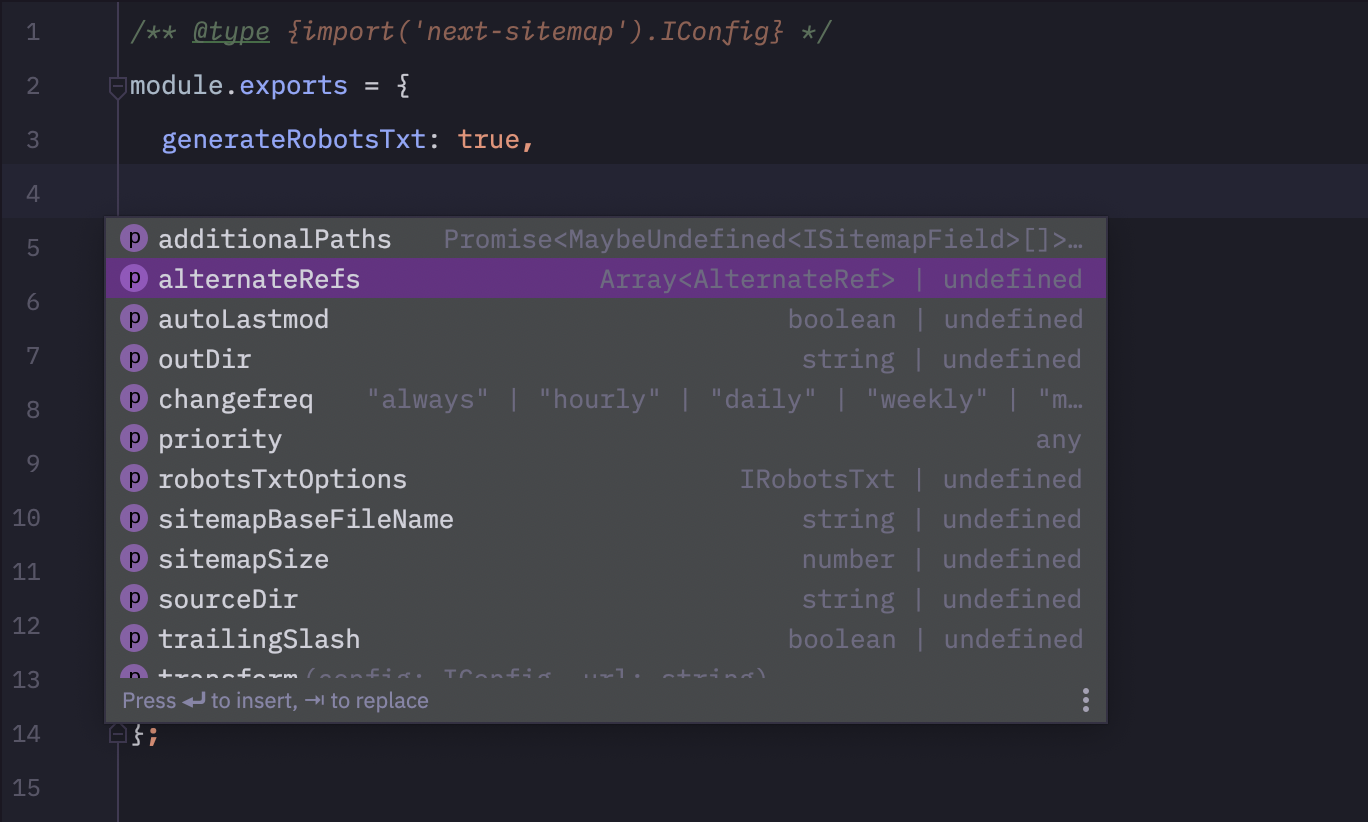
next-sitemap.config.js 에 다음 코드 줄을 추가하십시오. ?
 /** @type {import('next-sitemap').IConfig} */
module . exports = {
  // YOUR CONFIG
} 
모든 PR은 환영합니다 :)







