next sitemap
v4.2.3: Merge pull request #677 from Barokai

yarn add next-sitemap next-sitemap ต้องใช้ไฟล์กำหนดค่าพื้นฐาน ( next-sitemap.config.js ) ภายใต้รูทโครงการของคุณ
✅
next-sitemapจะโหลดตัวแปรสภาพแวดล้อมจากไฟล์.envตามค่าเริ่มต้น
 /** @type {import('next-sitemap').IConfig} */
module . exports = {
  siteUrl : process . env . SITE_URL || 'https://example.com' ,
  generateRobotsTxt : true , // (optional)
  // ...other options
}เพิ่มรายการถัดไปเป็นสคริปต์ postbuild ของคุณ
{
  "build" : " next build " ,
  "postbuild" : " next-sitemap "
} คุณยังสามารถใช้ไฟล์กำหนดค่าที่กำหนดเองแทน next-sitemap.config.js เพียงแค่ผ่าน --config <your-config-file>.js เพื่อสร้างคำสั่ง (ตัวอย่าง: custom-config-file)
{
  "build" : " next build " ,
  "postbuild" : " next-sitemap --config awesome.config.js "
} เมื่อใช้ PNPM คุณต้องสร้างไฟล์ .npmrc ในรูทของโครงการของคุณหากคุณต้องการใช้ขั้นตอนหลังการสร้าง:
 //.npmrc
enable-pre-post-scripts=true
จาก next-sitemap v2.x เป็นต้นไป sitemap.xml จะเป็นดัชนีไซต์ Sitemap มันจะมี URL ของจุดปลายไซต์ที่สร้างขึ้นอื่น ๆ ทั้งหมด
การสร้างดัชนี sitemap สามารถปิดได้โดยการตั้งค่า generateIndexSitemap: false ในไฟล์กำหนดค่า NEXT-SITEMAP (สิ่งนี้มีประโยชน์สำหรับไซต์ขนาดเล็ก/งานอดิเรกซึ่งไม่จำเป็นต้องใช้ดัชนีไซต์ Sitemap) (ตัวอย่าง: No-Index-Sitemaps)
กำหนดคุณสมบัติ sitemapSize ใน next-sitemap.config.js เพื่อแยก sitemap ขนาดใหญ่เป็นหลายไฟล์
 /** @type {import('next-sitemap').IConfig} */
module . exports = {
  siteUrl : 'https://example.com' ,
  generateRobotsTxt : true ,
  sitemapSize : 7000 ,
}
ด้านบนคือการกำหนดค่าขั้นต่ำในการแบ่งแผนผังไซต์ขนาดใหญ่ เมื่อจำนวน URL ในแผนผังไซต์มากกว่า 7000 รายการ next-sitemap จะสร้าง Sitemap (เช่น SITEMAP-0.XML, ไฟล์ siteMap -1.xml) และดัชนี (เช่น sitemap.xml) ไฟล์
| คุณสมบัติ | คำอธิบาย | พิมพ์ |
|---|---|---|
| ไซต์ | URL พื้นฐานของเว็บไซต์ของคุณ | สาย |
| เอาต์พุต (ไม่บังคับ) | Next.js โหมดเอาต์พุต ตรวจสอบเอกสาร | standalone export |
| ChangeFreq (ไม่บังคับ) | เปลี่ยนความถี่ เริ่มต้น daily | สาย |
| ลำดับความสำคัญ (ไม่บังคับ) | ลำดับความสำคัญ. ค่าเริ่มต้น 0.7 | ตัวเลข |
| SiteMapBaseFileName (ไม่บังคับ) | ชื่อของไฟล์ SiteMap ที่สร้างขึ้นก่อนนามสกุลไฟล์ ค่าเริ่มต้น "sitemap" | สาย |
| Alternaterefs (ไม่บังคับ) | แสดงถึงการสนับสนุนหลายภาษาโดย URL ที่ไม่เหมือนใคร ค่าเริ่มต้น [] | ทางเลือก [] |
| sitemapsize (ไม่บังคับ) | แบ่งแผนผังไซต์ขนาดใหญ่ออกเป็นหลายไฟล์โดยระบุขนาดแผนที่ไซต์ ค่าเริ่มต้น 5000 | ตัวเลข |
| AutolastMod (ไม่บังคับ) | เพิ่ม <lastmod/> คุณสมบัติ เริ่มต้น true | จริง |
| ยกเว้น (ไม่บังคับ) | อาร์เรย์ของเส้นทาง สัมพัทธ์ (รองรับรูปแบบไวด์การ์ด) เพื่อแยกออกจากรายการบน sitemap.xml หรือ sitemap-*.xml เช่น: ['/page-0', '/page-*', '/private/*']นอกเหนือจากตัวเลือกนี้ next-sitemap ยังมีตัวเลือก transform แบบกำหนดเองซึ่งสามารถใช้เพื่อแยก URL ที่ตรงกับรูปแบบเฉพาะ | สตริง [] |
| Sourcedir (ไม่บังคับ) | Next.js สร้างไดเรกทอรี ค่าเริ่มต้น .next | สาย |
| outdir (ไม่บังคับ) | ไฟล์ที่สร้างขึ้นทั้งหมดจะถูกส่งออกไปยังไดเรกทอรีนี้ public เริ่มต้น | สาย |
| แปลง (ไม่บังคับ) | ฟังก์ชั่นการแปลงซึ่งทำงาน สำหรับแต่ละ relative-path ในแผนผังไซต์ การส่งคืนค่า null จากฟังก์ชั่นการแปลงจะส่งผลให้เกิดการยกเว้น path เฉพาะนั้นจากรายการ Sitemap ที่สร้างขึ้น | ฟังก์ชัน async |
| MOTEPATHS (ไม่บังคับ) | ฟังก์ชั่น Async ที่ส่งคืนรายการเส้นทางเพิ่มเติมที่จะเพิ่มในรายการ Sitemap ที่สร้างขึ้น | ฟังก์ชัน async |
| generateIndexSitemap | สร้างดัชนีไซต์ เริ่มต้น true | บูลีน |
| Generaterobotstxt (ไม่บังคับ) | สร้างไฟล์ robots.txt และแสดงรายการไซต์ที่สร้างขึ้น ค่าเริ่มต้น false | บูลีน |
| Robotstxtoptions.transformrobotstxt (ไม่บังคับ) | Custom Robots.txt Transformer ฟังก์ชั่น (ตัวอย่าง: Custom-Robots-txt-transformer) ค่าเริ่มต้น: async(config, robotsTxt)=> robotsTxt | ฟังก์ชัน async |
| Robotstxtoptions.policies (ไม่บังคับ) | นโยบายสำหรับการสร้าง robots.txtค่าเริ่มต้น: [{ userAgent: '*', allow: '/' }] | Irobotpolicy [] |
| Robotstxtoptions.additionalsItemaps (ไม่บังคับ) | ตัวเลือกในการเพิ่ม SiteMaps เพิ่มเติมใน robots.txt รายการโฮสต์ | สตริง [] |
| Robotstxtoptions.includenonindexsitemaps (ไม่บังคับ) | จาก v2.4x เป็นต้นไป robots.txt ที่สร้างขึ้นจะมี URL ของ index sitemap และจุดสิ้นสุดที่กำหนดเองจาก robotsTxtOptions.additionalSitemapsนี่คือการป้องกันการส่ง URL ซ้ำ (หนึ่งครั้งผ่าน INDEX -SITEMAP -> SITEMAP -URL และอีกครั้งผ่าน Robots.txt -> Host) ตั้งค่าตัวเลือกนี้ true เพื่อเพิ่มจุดสิ้นสุดของเว็บไซต์ที่สร้างขึ้นทั้งหมดเป็น robots.txtค่าเริ่ม false (แนะนำ) | บูลีน |
การแปลงแบบกำหนดเองให้วิธีการขยายเพื่อเพิ่มลบหรือยกเว้น path หรือ properties จากชุด URL ฟังก์ชั่นแปลงทำงาน สำหรับแต่ละ relative path ในแผนที่ไซต์ และใช้ key : วัตถุ value เพื่อเพิ่มคุณสมบัติใน XML
การส่งคืนค่า null จากฟังก์ชั่นการแปลงจะส่งผลให้เกิดการยกเว้น relative-path เฉพาะนั้นออกจากรายการ SitEmap ที่สร้างขึ้น
 /** @type {import('next-sitemap').IConfig} */
module . exports = {
  transform : async ( config , path ) => {
    // custom function to ignore the path
    if ( customIgnoreFunction ( path ) ) {
      return null
    }

    // only create changefreq along with path
    // returning partial properties will result in generation of XML field with only returned values.
    if ( customLimitedField ( path ) ) {
      // This returns `path` & `changefreq`. Hence it will result in the generation of XML field with `path` and  `changefreq` properties only.
      return {
        loc : path , // => this will be exported as http(s)://<config.siteUrl>/<path>
        changefreq : 'weekly' ,
      }
    }

    // Use default transformation for all other cases
    return {
      loc : path , // => this will be exported as http(s)://<config.siteUrl>/<path>
      changefreq : config . changefreq ,
      priority : config . priority ,
      lastmod : config . autoLastmod ? new Date ( ) . toISOString ( ) : undefined ,
      alternateRefs : config . alternateRefs ?? [ ] ,
    }
  } ,
} ฟังก์ additionalPaths ฟังก์ชั่นนี้จะมีประโยชน์หากคุณมีรายการจำนวนมากของหน้า แต่คุณไม่ต้องการแสดงผลทั้งหมดและใช้ทางเลือก: จริง ผลลัพธ์ของการดำเนินการฟังก์ชั่นนี้จะถูกเพิ่มเข้าไปในรายการทั่วไปของเส้นทางและประมวลผลด้วย sitemapSize คุณมีอิสระที่จะเพิ่มเส้นทางแบบไดนามิก แต่ไม่เหมือนกับ additionalSitemap คุณไม่จำเป็นต้องแยกรายการพา ธ ออกเป็นไฟล์ต่าง ๆ ในกรณีที่มีเส้นทางจำนวนมากสำหรับไฟล์เดียว
หากฟังก์ชั่นของคุณส่งคืนเส้นทางที่มีอยู่แล้วมันก็จะได้รับการอัปเดตการทำซ้ำจะไม่เกิดขึ้น
 /** @type {import('next-sitemap').IConfig} */
module . exports = {
  additionalPaths : async ( config ) => {
    const result = [ ]

    // required value only
    result . push ( { loc : '/additional-page-1' } )

    // all possible values
    result . push ( {
      loc : '/additional-page-2' ,
      changefreq : 'yearly' ,
      priority : 0.7 ,
      lastmod : new Date ( ) . toISOString ( ) ,

      // acts only on '/additional-page-2'
      alternateRefs : [
        {
          href : 'https://es.example.com' ,
          hreflang : 'es' ,
        } ,
        {
          href : 'https://fr.example.com' ,
          hreflang : 'fr' ,
        } ,
      ] ,
    } )

    // using transformation from the current configuration
    result . push ( await config . transform ( config , '/additional-page-3' ) )

    return result
  } ,
} ชุด URL สามารถมี sitemaps เพิ่มเติมที่กำหนดโดย Google นี่คือแผนผังไซต์ของ Google News, ภาพแผนที่หรือวิดีโอไซต์ คุณสามารถเพิ่มค่าสำหรับ SiteMaps เหล่านี้ได้โดยการอัปเดตรายการในฟังก์ชั่น transform หรือเพิ่มด้วย additionalPaths คุณต้องส่งคืนรายการแผนผังไซต์ในทั้งสองกรณีดังนั้นจึงเป็นสถานที่ที่ดีที่สุดสำหรับการอัปเดตผลลัพธ์ ตัวอย่างนี้จะเพิ่มรูปภาพและแท็กข่าวในแต่ละรายการ แต่ IRL แน่นอนว่าคุณจะใช้มันกับเงื่อนไขบางอย่างหรือภายในผลลัพธ์ additionalPaths
 /** @type {import('next-sitemap').IConfig} */
const config = {
  transform : async ( config , path ) => {
    return {
      loc : path , // => this will be exported as http(s)://<config.siteUrl>/<path>
      changefreq : config . changefreq ,
      priority : config . priority ,
      lastmod : config . autoLastmod ? new Date ( ) . toISOString ( ) : undefined ,
      images : [ { loc : 'https://example.com/image.jpg' } ] ,
      news : {
        title : 'Article 1' ,
        publicationName : 'Google Scholar' ,
        publicationLanguage : 'en' ,
        date : new Date ( ) ,
      } ,
    }
  } ,
}

export default config นี่คือตัวอย่างการกำหนดค่า next-sitemap.config.js พร้อมตัวเลือกทั้งหมด
 /** @type {import('next-sitemap').IConfig} */

module . exports = {
  siteUrl : 'https://example.com' ,
  changefreq : 'daily' ,
  priority : 0.7 ,
  sitemapSize : 5000 ,
  generateRobotsTxt : true ,
  exclude : [ '/protected-page' , '/awesome/secret-page' ] ,
  alternateRefs : [
    {
      href : 'https://es.example.com' ,
      hreflang : 'es' ,
    } ,
    {
      href : 'https://fr.example.com' ,
      hreflang : 'fr' ,
    } ,
  ] ,
  // Default transformation function
  transform : async ( config , path ) => {
    return {
      loc : path , // => this will be exported as http(s)://<config.siteUrl>/<path>
      changefreq : config . changefreq ,
      priority : config . priority ,
      lastmod : config . autoLastmod ? new Date ( ) . toISOString ( ) : undefined ,
      alternateRefs : config . alternateRefs ?? [ ] ,
    }
  } ,
  additionalPaths : async ( config ) => [
    await config . transform ( config , '/additional-page' ) ,
  ] ,
  robotsTxtOptions : {
    policies : [
      {
        userAgent : '*' ,
        allow : '/' ,
      } ,
      {
        userAgent : 'test-bot' ,
        allow : [ '/path' , '/path-2' ] ,
      } ,
      {
        userAgent : 'black-listed-bot' ,
        disallow : [ '/sub-path-1' , '/path-2' ] ,
      } ,
    ] ,
    additionalSitemaps : [
      'https://example.com/my-custom-sitemap-1.xml' ,
      'https://example.com/my-custom-sitemap-2.xml' ,
      'https://example.com/my-custom-sitemap-3.xml' ,
    ] ,
  } ,
}
การกำหนดค่าข้างต้นจะสร้าง Sitemaps ตามโครงการของคุณและ robots.txt เช่นนี้
 # *
User-agent: *
Allow: /

# test-bot
User-agent: test-bot
Allow: /path
Allow: /path-2

# black-listed-bot
User-agent: black-listed-bot
Disallow: /sub-path-1
Disallow: /path-2

# Host
Host: https://example.com

# Sitemaps
Sitemap: https://example.com/sitemap.xml # Index sitemap
Sitemap: https://example.com/my-custom-sitemap-1.xml
Sitemap: https://example.com/my-custom-sitemap-2.xml
Sitemap: https://example.com/my-custom-sitemap-3.xml next-sitemap ให้ API สองตัวเพื่อสร้าง SeriS SITEMAPS สิ่งนี้จะช่วยในการสร้าง index-sitemap และ sitemap (S) แบบไดนามิกโดยการจัดหาข้อมูลจาก CMS หรือแหล่งที่มาที่กำหนดเอง
getServerSideSitemapIndex : สร้างดัชนีไซต์ sitempure ตาม URL ที่ให้ไว้และส่งคืนการตอบสนอง application/xml รองรับไฟล์ Next13+ Route. {TS, JS}
getServerSideSitemapIndexLegacy หน้าภายในต่อไป getServerSideSitemap : สร้าง SitEmap ตาม Field Everes และส่งคืนการตอบสนอง application/xml รองรับไฟล์ Next13+ Route. {TS, JS}
getServerSideSitemapLegacy หน้าภายในต่อไปนี่คือสคริปต์ตัวอย่างเพื่อสร้าง INDEX-SITEMAP ทางฝั่งเซิร์ฟเวอร์
สร้างไฟล์ app/server-sitemap-index.xml/route.ts
 // app/server-sitemap-index.xml/route.ts
import { getServerSideSitemapIndex } from 'next-sitemap'

export async function GET ( request : Request ) {
  // Method to source urls from cms
  // const urls = await fetch('https//example.com/api')

  return getServerSideSitemapIndex ( [
    'https://example.com/path-1.xml' ,
    'https://example.com/path-2.xml' ,
  ] )
} สร้าง pages/server-sitemap-index.xml/index.tsx
 // pages/server-sitemap-index.xml/index.tsx
import { getServerSideSitemapIndexLegacy } from 'next-sitemap'
import { GetServerSideProps } from 'next'

export const getServerSideProps : GetServerSideProps = async ( ctx ) => {
  // Method to source urls from cms
  // const urls = await fetch('https//example.com/api')

  return getServerSideSitemapIndexLegacy ( ctx , [
    'https://example.com/path-1.xml' ,
    'https://example.com/path-2.xml' ,
  ] )
}

// Default export to prevent next.js errors
export default function SitemapIndex ( ) { } ตอนนี้ next.js กำลังให้บริการดัชนีแบบไดนามิกจาก http://localhost:3000/server-sitemap-index.xml
แสดงรายการหน้าแผนผังไดนามิกใน robotsTxtOptions.additionalSitemaps และไม่รวมเส้นทางนี้จากรายการแผนที่แบบคงที่
 // next-sitemap.config.js

/** @type {import('next-sitemap').IConfig} */
module . exports = {
  siteUrl : 'https://example.com' ,
  generateRobotsTxt : true ,
  exclude : [ '/server-sitemap-index.xml' ] , // <= exclude here
  robotsTxtOptions : {
    additionalSitemaps : [
      'https://example.com/server-sitemap-index.xml' , // <==== Add here
    ] ,
  } ,
}
ด้วยวิธีนี้ next-sitemap จะจัดการ Sitemaps สำหรับหน้าคงที่ทั้งหมดของคุณและ INDEXIC index-sitemap แบบไดนามิกของคุณจะถูกระบุไว้ใน Robots.txt
นี่คือสคริปต์ตัวอย่างเพื่อสร้าง Sitemaps ทางฝั่งเซิร์ฟเวอร์
สร้างไฟล์ app/server-sitemap.xml/route.ts
 // app/server-sitemap.xml/route.ts
import { getServerSideSitemap } from 'next-sitemap'

export async function GET ( request : Request ) {
  // Method to source urls from cms
  // const urls = await fetch('https//example.com/api')

  return getServerSideSitemap ( [
    {
      loc : 'https://example.com' ,
      lastmod : new Date ( ) . toISOString ( ) ,
      // changefreq
      // priority
    } ,
    {
      loc : 'https://example.com/dynamic-path-2' ,
      lastmod : new Date ( ) . toISOString ( ) ,
      // changefreq
      // priority
    } ,
  ] )
} สร้างไฟล์ pages/server-sitemap.xml/index.tsx
 // pages/server-sitemap.xml/index.tsx
import { getServerSideSitemapLegacy } from 'next-sitemap'
import { GetServerSideProps } from 'next'

export const getServerSideProps : GetServerSideProps = async ( ctx ) => {
  // Method to source urls from cms
  // const urls = await fetch('https//example.com/api')

  const fields = [
    {
      loc : 'https://example.com' , // Absolute url
      lastmod : new Date ( ) . toISOString ( ) ,
      // changefreq
      // priority
    } ,
    {
      loc : 'https://example.com/dynamic-path-2' , // Absolute url
      lastmod : new Date ( ) . toISOString ( ) ,
      // changefreq
      // priority
    } ,
  ]

  return getServerSideSitemapLegacy ( ctx , fields )
}

// Default export to prevent next.js errors
export default function Sitemap ( ) { }
ตอนนี้ next.js กำลังให้บริการแผนผังไซต์แบบไดนามิกจาก http://localhost:3000/server-sitemap.xml
แสดงรายการหน้าแผนผังไดนามิกใน robotsTxtOptions.additionalSitemaps และไม่รวมเส้นทางนี้จากรายการแผนที่แบบคงที่
 // next-sitemap.config.js

/** @type {import('next-sitemap').IConfig} */
module . exports = {
  siteUrl : 'https://example.com' ,
  generateRobotsTxt : true ,
  exclude : [ '/server-sitemap.xml' ] , // <= exclude here
  robotsTxtOptions : {
    additionalSitemaps : [
      'https://example.com/server-sitemap.xml' , // <==== Add here
    ] ,
  } ,
}
ด้วยวิธีนี้ next-sitemap จะจัดการ SiteMaps สำหรับหน้าคงที่ทั้งหมดของคุณและแผนผังไซต์แบบไดนามิกของคุณจะถูกระบุไว้ใน robots.txt
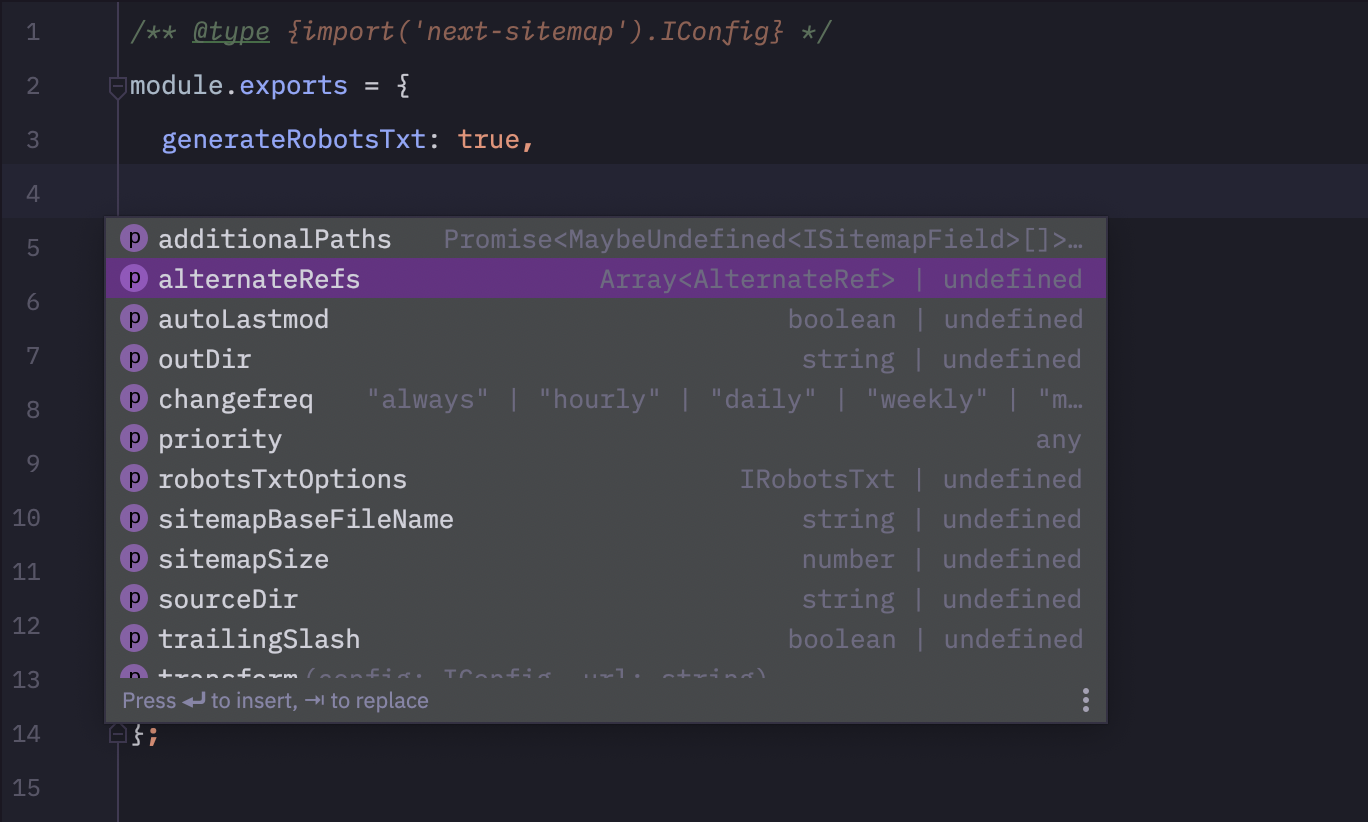
เพิ่มบรรทัดของโค้ดต่อไปนี้ใน next-sitemap.config.js สำหรับการเติมข้อความที่ดี TypeScript ที่ดี! -
 /** @type {import('next-sitemap').IConfig} */
module . exports = {
  // YOUR CONFIG
} 
ยินดีต้อนรับ PRS ทั้งหมด :)







