next sitemap
v4.2.3: Merge pull request #677 from Barokai

yarn add next-sitemapnext-sitemapには、プロジェクトルートの下に基本的な構成ファイル( next-sitemap.config.js )が必要です
come
next-sitemap、デフォルトで.envファイルから環境変数をロードします。
 /** @type {import('next-sitemap').IConfig} */
module . exports = {
  siteUrl : process . env . SITE_URL || 'https://example.com' ,
  generateRobotsTxt : true , // (optional)
  // ...other options
}[ポストビルド]スクリプトとして次の号を追加します
{
  "build" : " next build " ,
  "postbuild" : " next-sitemap "
}next-sitemap.config.jsの代わりにカスタム構成ファイルを使用することもできます。 Just Pass --config <your-config-file>.jsコマンドを作成する(例:custom-config-file)
{
  "build" : " next build " ,
  "postbuild" : " next-sitemap --config awesome.config.js "
}PNPMを使用する場合、ポストビルドステップを使用する場合は、プロジェクトのルートで.npmrcファイルを作成する必要があります。
 //.npmrc
enable-pre-post-scripts=true
next-sitemap v2.x以降、 sitemap.xmlインデックスサイトマップになります。他のすべての生成されたサイトマップエンドポイントのURLが含まれます。
Index SiteMapの生成は、 generateIndexSitemap: falseを設定することでオフにできます。 (これは、インデックスサイトマップを必要としない小型/趣味のサイトに役立ちます)(例:no-index-sitemaps)
next-sitemap.config.jsのsitemapSizeプロパティを定義して、大きなサイトマップを複数のファイルに分割します。
 /** @type {import('next-sitemap').IConfig} */
module . exports = {
  siteUrl : 'https://example.com' ,
  generateRobotsTxt : true ,
  sitemapSize : 7000 ,
}
上記は、大きなサイトマップを分割するための最小構成です。サイトマップ内のURLの数が7000を超えると、 next-sitemapがサイトマップ(SiteMap-0.XML、SiteMap-1.XML)およびインデックス(SiteMap.xmlなど)ファイルを作成します。
| 財産 | 説明 | タイプ |
|---|---|---|
| Siteurl | あなたのウェブサイトのベースURL | 弦 |
| 出力(オプション) | next.js出力モード。ドキュメントを確認してください。 | standalone 、 export |
| changefreq(オプション) | 頻度を変更します。 dailyのデフォルト | 弦 |
| 優先度(オプション) | 優先度。デフォルト0.7 | 番号 |
| SiteMapBaseFileName(オプション) | ファイル拡張子の前の生成されたサイトマップファイルの名前。デフォルトの"sitemap" | 弦 |
| Alternaterefs(オプション) | 一意のURLによる多言語サポートを示します。デフォルト[] | Alternateref [] |
| sitemapsize(オプション) | SiteMapサイズを指定して、大きなサイトマップを複数のファイルに分割します。デフォルト5000 | 番号 |
| autolastmod(オプション) | <lastmod/>プロパティを追加します。デフォルトはtrue | 真実 |
| 除外(オプション) | sitemap.xmlまたはsitemap-*.xmlのリストから除外する相対パス(サポートされているワイルドカードパターン)の配列。例: ['/page-0', '/page-*', '/private/*'] 。このオプションとは別に next-sitemap特定のパターンに一致するURLを除外するために使用できるカスタムtransformオプションも提供します | 弦[] |
| Sourcedir(オプション) | next.jsビルドディレクトリ。デフォルト.next | 弦 |
| oututdir(オプション) | 生成されたすべてのファイルがこのディレクトリにエクスポートされます。デフォルトのpublic | 弦 |
| 変換(オプション) | サイトマップ内のrelative-pathごとに実行される変換関数。変換関数からnull値を返すと、生成されたサイトマップリストからその特定のpathが除外されます。 | 非同期関数 |
| 追加のパス(オプション) | 生成されたサイトマップリストに追加される追加のパスのリストを返すASYNC関数。 | 非同期関数 |
| generatedexsitemap | インデックスサイトマップを生成します。デフォルトはtrue | ブール |
| GenerateBotStxt(オプション) | robots.txtファイルを生成し、生成されたサイトマップをリストします。デフォルトのfalse | ブール |
| robotstxtoptions.transformrobotstxt(オプション) | カスタムrobots.txtトランス機能。 (例:custom-robots-txt-transformer) デフォルト: async(config, robotsTxt)=> robotsTxt | 非同期関数 |
| robotstxtoptions.policies(オプション) | robots.txtを生成するためのポリシー。デフォルト: [{ userAgent: '*', allow: '/' }] | iRobotpolicy [] |
| robotstxtoptions.additionalSitemaps(オプション) | robots.txtホストエントリに追加のサイトマップを追加するオプション | 弦[] |
| robotstxtoptions.includenoninindexsitemaps(オプション) | V2.4X以降、生成されたrobots.txtには、 robotsTxtOptions.additionalSitemapsからのindex sitemapのURLとカスタム提供エンドポイントのみが含まれます。これは、URLの提出の重複を防ぐためです(index -sitemap-> sitemap -urlを1回介してrobots.txt-> hostを介して) このオプションを true設定して、生成されたすべてのサイトマップエンドポイントをrobots.txtに追加するデフォルトの false (推奨) | ブール |
カスタム変換は、URLセットからpathまたはpropertiesを追加、削除、または除外する拡張メソッドを提供します。変換関数は、サイトマップ内のrelative pathごとに実行されます。 key : valueオブジェクトを使用して、XMLにプロパティを追加します。
変換関数からnull値を返すと、生成されたサイトマップリストからその特定のrelative-pathが除外されます。
 /** @type {import('next-sitemap').IConfig} */
module . exports = {
  transform : async ( config , path ) => {
    // custom function to ignore the path
    if ( customIgnoreFunction ( path ) ) {
      return null
    }

    // only create changefreq along with path
    // returning partial properties will result in generation of XML field with only returned values.
    if ( customLimitedField ( path ) ) {
      // This returns `path` & `changefreq`. Hence it will result in the generation of XML field with `path` and  `changefreq` properties only.
      return {
        loc : path , // => this will be exported as http(s)://<config.siteUrl>/<path>
        changefreq : 'weekly' ,
      }
    }

    // Use default transformation for all other cases
    return {
      loc : path , // => this will be exported as http(s)://<config.siteUrl>/<path>
      changefreq : config . changefreq ,
      priority : config . priority ,
      lastmod : config . autoLastmod ? new Date ( ) . toISOString ( ) : undefined ,
      alternateRefs : config . alternateRefs ?? [ ] ,
    }
  } ,
} additionalPathsこの関数は、ページの大きなリストがある場合に役立ちますが、それらをすべてレンダリングしてFallback:trueを使用したくありません。この関数を実行した結果は、パスの一般リストに追加され、 sitemapSizeで処理されます。動的なパスを自由に追加できますが、 additionalSitemapとは異なり、1つのファイルに多くのパスがある場合に備えて、パスのリストを異なるファイルに分割する必要はありません。
機能が既に存在するパスを返す場合、単に更新されるだけで、複製は発生しません。
 /** @type {import('next-sitemap').IConfig} */
module . exports = {
  additionalPaths : async ( config ) => {
    const result = [ ]

    // required value only
    result . push ( { loc : '/additional-page-1' } )

    // all possible values
    result . push ( {
      loc : '/additional-page-2' ,
      changefreq : 'yearly' ,
      priority : 0.7 ,
      lastmod : new Date ( ) . toISOString ( ) ,

      // acts only on '/additional-page-2'
      alternateRefs : [
        {
          href : 'https://es.example.com' ,
          hreflang : 'es' ,
        } ,
        {
          href : 'https://fr.example.com' ,
          hreflang : 'fr' ,
        } ,
      ] ,
    } )

    // using transformation from the current configuration
    result . push ( await config . transform ( config , '/additional-page-3' ) )

    return result
  } ,
} URLセットには、Googleによって定義された追加のサイトマップを含めることができます。これらは、Google News SiteMap、Image SiteMap、またはビデオサイトマップです。 transform関数のエントリを更新するか、 additionalPathsで追加することにより、これらのサイトマップの値を追加できます。どちらの場合もサイトマップエントリを返す必要があるため、出力を更新するのに最適な場所です。この例では、各エントリに画像とニュースタグを追加しますが、IRLはもちろん、何らかの条件またはadditionalPaths結果でそれを使用します。
 /** @type {import('next-sitemap').IConfig} */
const config = {
  transform : async ( config , path ) => {
    return {
      loc : path , // => this will be exported as http(s)://<config.siteUrl>/<path>
      changefreq : config . changefreq ,
      priority : config . priority ,
      lastmod : config . autoLastmod ? new Date ( ) . toISOString ( ) : undefined ,
      images : [ { loc : 'https://example.com/image.jpg' } ] ,
      news : {
        title : 'Article 1' ,
        publicationName : 'Google Scholar' ,
        publicationLanguage : 'en' ,
        date : new Date ( ) ,
      } ,
    }
  } ,
}

export default config 以下は、すべてのオプションを備えたnext-sitemap.config.js構成の例です
 /** @type {import('next-sitemap').IConfig} */

module . exports = {
  siteUrl : 'https://example.com' ,
  changefreq : 'daily' ,
  priority : 0.7 ,
  sitemapSize : 5000 ,
  generateRobotsTxt : true ,
  exclude : [ '/protected-page' , '/awesome/secret-page' ] ,
  alternateRefs : [
    {
      href : 'https://es.example.com' ,
      hreflang : 'es' ,
    } ,
    {
      href : 'https://fr.example.com' ,
      hreflang : 'fr' ,
    } ,
  ] ,
  // Default transformation function
  transform : async ( config , path ) => {
    return {
      loc : path , // => this will be exported as http(s)://<config.siteUrl>/<path>
      changefreq : config . changefreq ,
      priority : config . priority ,
      lastmod : config . autoLastmod ? new Date ( ) . toISOString ( ) : undefined ,
      alternateRefs : config . alternateRefs ?? [ ] ,
    }
  } ,
  additionalPaths : async ( config ) => [
    await config . transform ( config , '/additional-page' ) ,
  ] ,
  robotsTxtOptions : {
    policies : [
      {
        userAgent : '*' ,
        allow : '/' ,
      } ,
      {
        userAgent : 'test-bot' ,
        allow : [ '/path' , '/path-2' ] ,
      } ,
      {
        userAgent : 'black-listed-bot' ,
        disallow : [ '/sub-path-1' , '/path-2' ] ,
      } ,
    ] ,
    additionalSitemaps : [
      'https://example.com/my-custom-sitemap-1.xml' ,
      'https://example.com/my-custom-sitemap-2.xml' ,
      'https://example.com/my-custom-sitemap-3.xml' ,
    ] ,
  } ,
}上記の構成は、プロジェクトとこのようなrobots.txtに基づいてサイトマップを生成します。
 # *
User-agent: *
Allow: /

# test-bot
User-agent: test-bot
Allow: /path
Allow: /path-2

# black-listed-bot
User-agent: black-listed-bot
Disallow: /sub-path-1
Disallow: /path-2

# Host
Host: https://example.com

# Sitemaps
Sitemap: https://example.com/sitemap.xml # Index sitemap
Sitemap: https://example.com/my-custom-sitemap-1.xml
Sitemap: https://example.com/my-custom-sitemap-2.xml
Sitemap: https://example.com/my-custom-sitemap-3.xmlnext-sitemap 、サーバーサイドサイトマップを生成する2つのAPIを提供するようになりました。これにより、CMSまたはカスタムソースからのデータを調達することにより、 index-sitemapとsitemap動的に生成するのに役立ちます。
getServerSideSitemapIndex :提供されたURLに基づいてインデックスサイトマップを生成し、 application/xml応答を返します。次の13+ルートをサポートします。{ts、js}ファイル。
getServerSideSitemapIndexLegacyをインポートします。 getServerSideSitemap :フィールド全体に基づいてサイトマップを生成し、 application/xml応答を返します。次の13+ルートをサポートします。{ts、js}ファイル。
getServerSideSitemapLegacyインポートします。サーバー側でインデックス表示を生成するサンプルスクリプトは次のとおりです。
app/server-sitemap-index.xml/route.tsファイルを作成します。
 // app/server-sitemap-index.xml/route.ts
import { getServerSideSitemapIndex } from 'next-sitemap'

export async function GET ( request : Request ) {
  // Method to source urls from cms
  // const urls = await fetch('https//example.com/api')

  return getServerSideSitemapIndex ( [
    'https://example.com/path-1.xml' ,
    'https://example.com/path-2.xml' ,
  ] )
} pages/server-sitemap-index.xml/index.tsxファイルを作成します。
 // pages/server-sitemap-index.xml/index.tsx
import { getServerSideSitemapIndexLegacy } from 'next-sitemap'
import { GetServerSideProps } from 'next'

export const getServerSideProps : GetServerSideProps = async ( ctx ) => {
  // Method to source urls from cms
  // const urls = await fetch('https//example.com/api')

  return getServerSideSitemapIndexLegacy ( ctx , [
    'https://example.com/path-1.xml' ,
    'https://example.com/path-2.xml' ,
  ] )
}

// Default export to prevent next.js errors
export default function SitemapIndex ( ) { } 次に、 next.js http://localhost:3000/server-sitemap-index.xmlから動的なインデックスsitemapを提供しています。
robotsTxtOptions.additionalSitemapsの動的サイトマップページをリストし、静的SiteMapリストからこのパスを除外します。
 // next-sitemap.config.js

/** @type {import('next-sitemap').IConfig} */
module . exports = {
  siteUrl : 'https://example.com' ,
  generateRobotsTxt : true ,
  exclude : [ '/server-sitemap-index.xml' ] , // <= exclude here
  robotsTxtOptions : {
    additionalSitemaps : [
      'https://example.com/server-sitemap-index.xml' , // <==== Add here
    ] ,
  } ,
}
このようにして、 next-sitemapすべての静的ページのサイトマップを管理し、動的なindex-sitemap robots.txtにリストされます。
サーバー側でサイトマップを生成するためのサンプルスクリプトは次のとおりです。
app/server-sitemap.xml/route.tsファイルを作成します。
 // app/server-sitemap.xml/route.ts
import { getServerSideSitemap } from 'next-sitemap'

export async function GET ( request : Request ) {
  // Method to source urls from cms
  // const urls = await fetch('https//example.com/api')

  return getServerSideSitemap ( [
    {
      loc : 'https://example.com' ,
      lastmod : new Date ( ) . toISOString ( ) ,
      // changefreq
      // priority
    } ,
    {
      loc : 'https://example.com/dynamic-path-2' ,
      lastmod : new Date ( ) . toISOString ( ) ,
      // changefreq
      // priority
    } ,
  ] )
} pages/server-sitemap.xml/index.tsxファイルを作成します。
 // pages/server-sitemap.xml/index.tsx
import { getServerSideSitemapLegacy } from 'next-sitemap'
import { GetServerSideProps } from 'next'

export const getServerSideProps : GetServerSideProps = async ( ctx ) => {
  // Method to source urls from cms
  // const urls = await fetch('https//example.com/api')

  const fields = [
    {
      loc : 'https://example.com' , // Absolute url
      lastmod : new Date ( ) . toISOString ( ) ,
      // changefreq
      // priority
    } ,
    {
      loc : 'https://example.com/dynamic-path-2' , // Absolute url
      lastmod : new Date ( ) . toISOString ( ) ,
      // changefreq
      // priority
    } ,
  ]

  return getServerSideSitemapLegacy ( ctx , fields )
}

// Default export to prevent next.js errors
export default function Sitemap ( ) { }
次に、 next.js http://localhost:3000/server-sitemap.xmlから動的なサイトマップを提供しています。
robotsTxtOptions.additionalSitemapsの動的サイトマップページをリストし、静的SiteMapリストからこのパスを除外します。
 // next-sitemap.config.js

/** @type {import('next-sitemap').IConfig} */
module . exports = {
  siteUrl : 'https://example.com' ,
  generateRobotsTxt : true ,
  exclude : [ '/server-sitemap.xml' ] , // <= exclude here
  robotsTxtOptions : {
    additionalSitemaps : [
      'https://example.com/server-sitemap.xml' , // <==== Add here
    ] ,
  } ,
}
このようにして、 next-sitemapすべての静的ページのサイトマップを管理し、動的サイトマップはrobots.txtにリストされます。
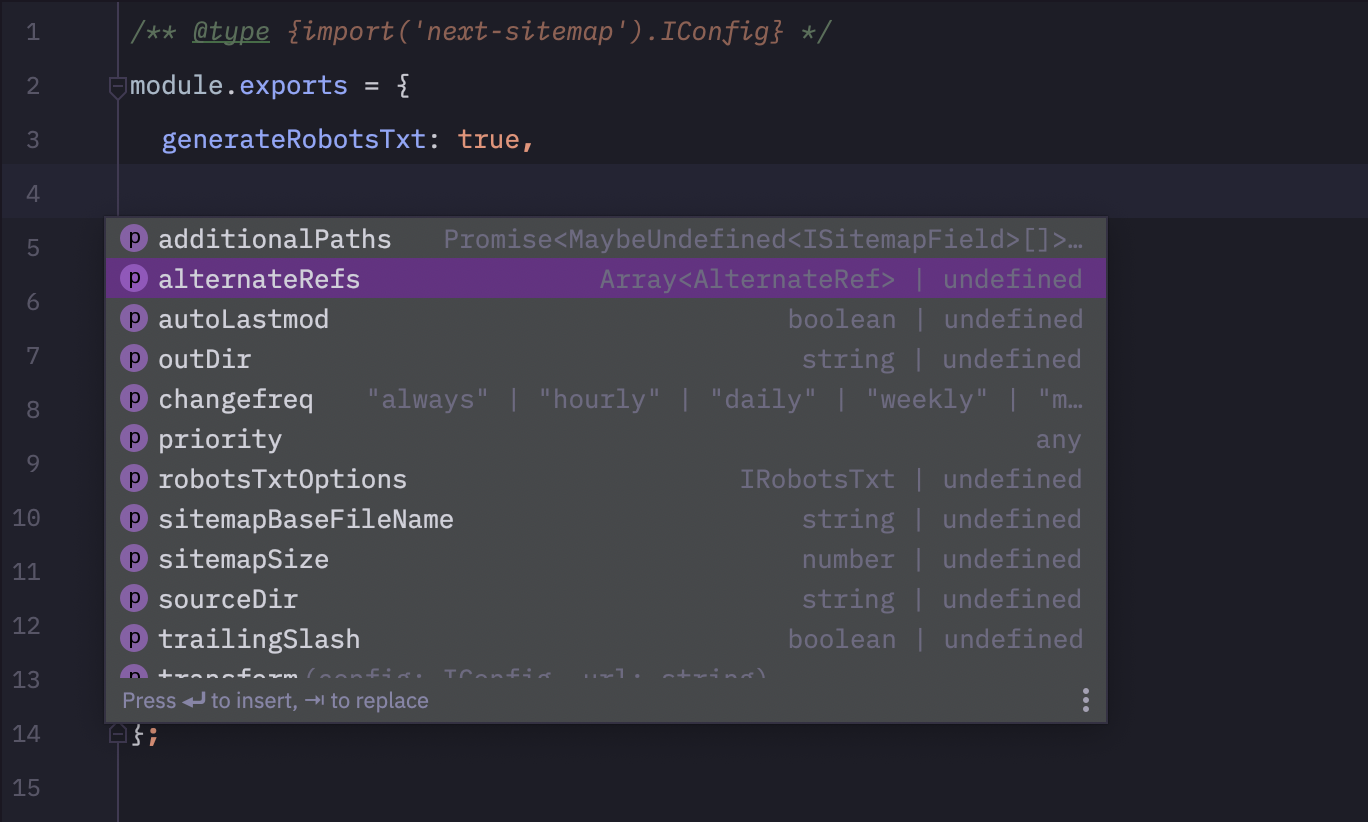
next-sitemap.config.jsに次のコード行を追加してください。 ?
 /** @type {import('next-sitemap').IConfig} */
module . exports = {
  // YOUR CONFIG
} 
すべてのPRは大歓迎です:)







