next sitemap
v4.2.3: Merge pull request #677 from Barokai

yarn add next-sitemap next-sitemap membutuhkan file konfigurasi dasar ( next-sitemap.config.js ) di bawah root proyek Anda
✅
next-sitemapakan memuat variabel lingkungan dari file.envsecara default.
 /** @type {import('next-sitemap').IConfig} */
module . exports = {
  siteUrl : process . env . SITE_URL || 'https://example.com' ,
  generateRobotsTxt : true , // (optional)
  // ...other options
}Tambahkan Sitemap Berikutnya sebagai Skrip Postbuild Anda
{
  "build" : " next build " ,
  "postbuild" : " next-sitemap "
} Anda juga dapat menggunakan file konfigurasi khusus alih-alih next-sitemap.config.js . Lulus saja --config <your-config-file>.js untuk membangun perintah (Contoh: Kustom-Konfigurasi-File)
{
  "build" : " next build " ,
  "postbuild" : " next-sitemap --config awesome.config.js "
} Saat menggunakan PNPM, Anda perlu membuat file .npmrc di root proyek Anda jika Anda ingin menggunakan langkah pasca -pembangunan:
 //.npmrc
enable-pre-post-scripts=true
Dari next-sitemap V2.x dan seterusnya, sitemap.xml akan menjadi indeks sitemap. Ini akan berisi URL dari semua titik akhir sitemap yang dihasilkan lainnya.
Indeks Sitemap Generation dapat dimatikan dengan mengatur generateIndexSitemap: false dalam file konfigurasi sitemap berikutnya. (Ini berguna untuk situs kecil/hobi yang tidak memerlukan situs indeks) (Contoh: no-index-sitemaps)
Tentukan properti sitemapSize di next-sitemap.config.js untuk membagi sitemap besar menjadi beberapa file.
 /** @type {import('next-sitemap').IConfig} */
module . exports = {
  siteUrl : 'https://example.com' ,
  generateRobotsTxt : true ,
  sitemapSize : 7000 ,
}
Di atas adalah konfigurasi minimal untuk membagi situs besar. Ketika jumlah URL dalam sitemap lebih dari 7000, next-sitemap akan membuat sitemap (misalnya file sitemap-0.xml, sitemap-1.xml) dan indeks (misalnya sitemap.xml).
| milik | keterangan | jenis |
|---|---|---|
| situsurl | URL dasar situs web Anda | rangkaian |
| output (opsional) | Mode Output Next.js. Periksa dokumentasi. | standalone , export |
| changefreq (opsional) | Ubah frekuensi. Default daily | rangkaian |
| Prioritas (opsional) | Prioritas. Default 0.7 | nomor |
| SitemapBaseFilename (opsional) | Nama file sitemap yang dihasilkan sebelum ekstensi file. Default "sitemap" | rangkaian |
| alternatif (opsional) | Menunjukkan dukungan multi-bahasa oleh URL unik. Bawaan [] | Alternatif [] |
| sitemapsize (opsional) | Pisahkan sitemap besar menjadi beberapa file dengan menentukan ukuran sitemap. Default 5000 | nomor |
| AutolastMod (opsional) | Tambahkan properti <lastmod/> . Default true | BENAR |
| Kecualikan (opsional) | Array jalur relatif (pola wildcard didukung) untuk dikecualikan dari daftar di sitemap.xml atau sitemap-*.xml . misalnya: ['/page-0', '/page-*', '/private/*'] .Terlepas dari opsi ini next-sitemap juga menawarkan opsi transform khusus yang dapat digunakan untuk mengecualikan URL yang cocok dengan pola tertentu | rangkaian[] |
| Sourcedir (opsional) | Next.js Build Directory. Default .next | rangkaian |
| Outdir (opsional) | Semua file yang dihasilkan akan diekspor ke direktori ini. public default | rangkaian |
| transformasi (opsional) | Fungsi transformasi, yang berjalan untuk setiap relative-path di sitemap. Mengembalikan nilai null dari fungsi transformasi akan menghasilkan pengecualian path spesifik tersebut dari daftar sitemap yang dihasilkan. | fungsi async |
| Tambahan (opsional) | Fungsi async yang mengembalikan daftar jalur tambahan yang akan ditambahkan ke daftar sitemap yang dihasilkan. | fungsi async |
| GenerateIndExsItemap | Hasilkan situs indeks. Default true | Boolean |
| GenerateroBotStxt (Opsional) | Hasilkan file robots.txt dan daftar sitemaps yang dihasilkan. false default | Boolean |
| robotstxtoptions.transformrobotstxt (opsional) | Fungsi Transformator ROBOTS.TXT Kustom. (Contoh: kustom-robots-transformer) Default: async(config, robotsTxt)=> robotsTxt | fungsi async |
| robotstxtoptions.policies (opsional) | Kebijakan untuk menghasilkan robots.txt .Bawaan: [{ userAgent: '*', allow: '/' }] | Irobotpolicy [] |
| robotstxtoptions.additionalsitemaps (opsional) | Opsi untuk Menambahkan Situs Tambahan ke Entri Host robots.txt | rangkaian[] |
| robotstxtoptions.includenonIndexsitemaps (opsional) | Dari v2.4x dan seterusnya, robots.txt yang dihasilkan hanya akan berisi URL index sitemap dan titik akhir yang disediakan dari robotsTxtOptions.additionalSitemaps .Ini untuk mencegah pengiriman URL duplikat (sekali melalui indeks -sitemap -> sitemap -url dan sekali melalui robots.txt -> host) Setel opsi ini true untuk menambahkan semua titik akhir sitemap yang dihasilkan ke robots.txtfalse default (disarankan) | Boolean |
Transformasi khusus menyediakan metode ekstensi untuk menambah, menghapus atau mengecualikan path atau properties dari URL-set. Transformasi fungsi berjalan untuk setiap relative path di sitemap. Dan gunakan objek key : value untuk menambahkan properti di XML.
Mengembalikan nilai null dari fungsi transformasi akan menghasilkan pengecualian relative-path spesifik dari daftar sitemap yang dihasilkan.
 /** @type {import('next-sitemap').IConfig} */
module . exports = {
  transform : async ( config , path ) => {
    // custom function to ignore the path
    if ( customIgnoreFunction ( path ) ) {
      return null
    }

    // only create changefreq along with path
    // returning partial properties will result in generation of XML field with only returned values.
    if ( customLimitedField ( path ) ) {
      // This returns `path` & `changefreq`. Hence it will result in the generation of XML field with `path` and  `changefreq` properties only.
      return {
        loc : path , // => this will be exported as http(s)://<config.siteUrl>/<path>
        changefreq : 'weekly' ,
      }
    }

    // Use default transformation for all other cases
    return {
      loc : path , // => this will be exported as http(s)://<config.siteUrl>/<path>
      changefreq : config . changefreq ,
      priority : config . priority ,
      lastmod : config . autoLastmod ? new Date ( ) . toISOString ( ) : undefined ,
      alternateRefs : config . alternateRefs ?? [ ] ,
    }
  } ,
} additionalPaths Fungsi ini dapat bermanfaat jika Anda memiliki daftar halaman yang besar, tetapi Anda tidak ingin membuat semuanya dan menggunakan Fallback: True. Hasil dari menjalankan fungsi ini akan ditambahkan ke daftar umum jalur dan diproses dengan sitemapSize . Anda bebas untuk menambahkan jalur dinamis, tetapi tidak seperti additionalSitemap , Anda tidak perlu membagi daftar jalur menjadi file yang berbeda jika ada banyak jalur untuk satu file.
Jika fungsi Anda mengembalikan jalur yang sudah ada, maka itu hanya akan diperbarui, duplikasi tidak akan terjadi.
 /** @type {import('next-sitemap').IConfig} */
module . exports = {
  additionalPaths : async ( config ) => {
    const result = [ ]

    // required value only
    result . push ( { loc : '/additional-page-1' } )

    // all possible values
    result . push ( {
      loc : '/additional-page-2' ,
      changefreq : 'yearly' ,
      priority : 0.7 ,
      lastmod : new Date ( ) . toISOString ( ) ,

      // acts only on '/additional-page-2'
      alternateRefs : [
        {
          href : 'https://es.example.com' ,
          hreflang : 'es' ,
        } ,
        {
          href : 'https://fr.example.com' ,
          hreflang : 'fr' ,
        } ,
      ] ,
    } )

    // using transformation from the current configuration
    result . push ( await config . transform ( config , '/additional-page-3' ) )

    return result
  } ,
} Set URL dapat berisi peta situs tambahan yang ditentukan oleh Google. Ini adalah sitemap Google News, sitemap gambar atau sitemap video. Anda dapat menambahkan nilai untuk sitemaps ini dengan memperbarui entri dalam fungsi transform atau menambahkannya dengan additionalPaths . Anda harus mengembalikan entri Sitemap dalam kedua kasus, jadi ini adalah tempat terbaik untuk memperbarui output. Contoh ini akan menambahkan gambar dan tag berita untuk setiap entri tetapi IRL Anda tentu saja akan menggunakannya dengan beberapa kondisi atau dalam hasil additionalPaths .
 /** @type {import('next-sitemap').IConfig} */
const config = {
  transform : async ( config , path ) => {
    return {
      loc : path , // => this will be exported as http(s)://<config.siteUrl>/<path>
      changefreq : config . changefreq ,
      priority : config . priority ,
      lastmod : config . autoLastmod ? new Date ( ) . toISOString ( ) : undefined ,
      images : [ { loc : 'https://example.com/image.jpg' } ] ,
      news : {
        title : 'Article 1' ,
        publicationName : 'Google Scholar' ,
        publicationLanguage : 'en' ,
        date : new Date ( ) ,
      } ,
    }
  } ,
}

export default config Berikut adalah contoh konfigurasi next-sitemap.config.js dengan semua opsi
 /** @type {import('next-sitemap').IConfig} */

module . exports = {
  siteUrl : 'https://example.com' ,
  changefreq : 'daily' ,
  priority : 0.7 ,
  sitemapSize : 5000 ,
  generateRobotsTxt : true ,
  exclude : [ '/protected-page' , '/awesome/secret-page' ] ,
  alternateRefs : [
    {
      href : 'https://es.example.com' ,
      hreflang : 'es' ,
    } ,
    {
      href : 'https://fr.example.com' ,
      hreflang : 'fr' ,
    } ,
  ] ,
  // Default transformation function
  transform : async ( config , path ) => {
    return {
      loc : path , // => this will be exported as http(s)://<config.siteUrl>/<path>
      changefreq : config . changefreq ,
      priority : config . priority ,
      lastmod : config . autoLastmod ? new Date ( ) . toISOString ( ) : undefined ,
      alternateRefs : config . alternateRefs ?? [ ] ,
    }
  } ,
  additionalPaths : async ( config ) => [
    await config . transform ( config , '/additional-page' ) ,
  ] ,
  robotsTxtOptions : {
    policies : [
      {
        userAgent : '*' ,
        allow : '/' ,
      } ,
      {
        userAgent : 'test-bot' ,
        allow : [ '/path' , '/path-2' ] ,
      } ,
      {
        userAgent : 'black-listed-bot' ,
        disallow : [ '/sub-path-1' , '/path-2' ] ,
      } ,
    ] ,
    additionalSitemaps : [
      'https://example.com/my-custom-sitemap-1.xml' ,
      'https://example.com/my-custom-sitemap-2.xml' ,
      'https://example.com/my-custom-sitemap-3.xml' ,
    ] ,
  } ,
}
Konfigurasi di atas akan menghasilkan sitemaps berdasarkan proyek Anda dan robots.txt seperti ini.
 # *
User-agent: *
Allow: /

# test-bot
User-agent: test-bot
Allow: /path
Allow: /path-2

# black-listed-bot
User-agent: black-listed-bot
Disallow: /sub-path-1
Disallow: /path-2

# Host
Host: https://example.com

# Sitemaps
Sitemap: https://example.com/sitemap.xml # Index sitemap
Sitemap: https://example.com/my-custom-sitemap-1.xml
Sitemap: https://example.com/my-custom-sitemap-2.xml
Sitemap: https://example.com/my-custom-sitemap-3.xml next-sitemap sekarang menyediakan dua API untuk menghasilkan sitemaps sisi server. Ini akan membantu untuk secara dinamis menghasilkan index-sitemap (s) dan sitemap dengan sumber data dari CMS atau sumber khusus.
getServerSideSitemapIndex : Menghasilkan Sitemap Indeks berdasarkan URL yang disediakan dan Mengembalikan application/xml . Mendukung rute next13+. {Ts, js} file.
getServerSideSitemapIndexLegacy sebagai gantinya. getServerSideSitemap : Menghasilkan Sitemap Berdasarkan Entir Field dan Returns application/xml Respons. Mendukung rute next13+. {Ts, js} file.
getServerSideSitemapLegacy sebagai gantinya.Berikut skrip sampel untuk menghasilkan indeks-sitemap di sisi server.
Buat file app/server-sitemap-index.xml/route.ts .
 // app/server-sitemap-index.xml/route.ts
import { getServerSideSitemapIndex } from 'next-sitemap'

export async function GET ( request : Request ) {
  // Method to source urls from cms
  // const urls = await fetch('https//example.com/api')

  return getServerSideSitemapIndex ( [
    'https://example.com/path-1.xml' ,
    'https://example.com/path-2.xml' ,
  ] )
} Buat pages/server-sitemap-index.xml/index.tsx file.
 // pages/server-sitemap-index.xml/index.tsx
import { getServerSideSitemapIndexLegacy } from 'next-sitemap'
import { GetServerSideProps } from 'next'

export const getServerSideProps : GetServerSideProps = async ( ctx ) => {
  // Method to source urls from cms
  // const urls = await fetch('https//example.com/api')

  return getServerSideSitemapIndexLegacy ( ctx , [
    'https://example.com/path-1.xml' ,
    'https://example.com/path-2.xml' ,
  ] )
}

// Default export to prevent next.js errors
export default function SitemapIndex ( ) { } Sekarang, next.js melayani indeks-sitemap dinamis dari http://localhost:3000/server-sitemap-index.xml .
Sebutkan halaman Dynamic Sitemap di robotsTxtOptions.additionalSitemaps dan mengecualikan jalur ini dari daftar sitemap statis.
 // next-sitemap.config.js

/** @type {import('next-sitemap').IConfig} */
module . exports = {
  siteUrl : 'https://example.com' ,
  generateRobotsTxt : true ,
  exclude : [ '/server-sitemap-index.xml' ] , // <= exclude here
  robotsTxtOptions : {
    additionalSitemaps : [
      'https://example.com/server-sitemap-index.xml' , // <==== Add here
    ] ,
  } ,
}
Dengan cara ini, next-sitemap akan mengelola sitemaps untuk semua halaman statis Anda dan index-sitemap dinamis Anda akan terdaftar di robot.txt.
Berikut adalah skrip sampel untuk menghasilkan sitemaps di sisi server.
Buat file app/server-sitemap.xml/route.ts .
 // app/server-sitemap.xml/route.ts
import { getServerSideSitemap } from 'next-sitemap'

export async function GET ( request : Request ) {
  // Method to source urls from cms
  // const urls = await fetch('https//example.com/api')

  return getServerSideSitemap ( [
    {
      loc : 'https://example.com' ,
      lastmod : new Date ( ) . toISOString ( ) ,
      // changefreq
      // priority
    } ,
    {
      loc : 'https://example.com/dynamic-path-2' ,
      lastmod : new Date ( ) . toISOString ( ) ,
      // changefreq
      // priority
    } ,
  ] )
} Buat file pages/server-sitemap.xml/index.tsx .
 // pages/server-sitemap.xml/index.tsx
import { getServerSideSitemapLegacy } from 'next-sitemap'
import { GetServerSideProps } from 'next'

export const getServerSideProps : GetServerSideProps = async ( ctx ) => {
  // Method to source urls from cms
  // const urls = await fetch('https//example.com/api')

  const fields = [
    {
      loc : 'https://example.com' , // Absolute url
      lastmod : new Date ( ) . toISOString ( ) ,
      // changefreq
      // priority
    } ,
    {
      loc : 'https://example.com/dynamic-path-2' , // Absolute url
      lastmod : new Date ( ) . toISOString ( ) ,
      // changefreq
      // priority
    } ,
  ]

  return getServerSideSitemapLegacy ( ctx , fields )
}

// Default export to prevent next.js errors
export default function Sitemap ( ) { }
Sekarang, next.js melayani sitemap dinamis dari http://localhost:3000/server-sitemap.xml .
Sebutkan halaman Dynamic Sitemap di robotsTxtOptions.additionalSitemaps dan mengecualikan jalur ini dari daftar sitemap statis.
 // next-sitemap.config.js

/** @type {import('next-sitemap').IConfig} */
module . exports = {
  siteUrl : 'https://example.com' ,
  generateRobotsTxt : true ,
  exclude : [ '/server-sitemap.xml' ] , // <= exclude here
  robotsTxtOptions : {
    additionalSitemaps : [
      'https://example.com/server-sitemap.xml' , // <==== Add here
    ] ,
  } ,
}
Dengan cara ini, next-sitemap akan mengelola sitemap untuk semua halaman statis Anda dan sitemap dinamis Anda akan terdaftar di robot.txt.
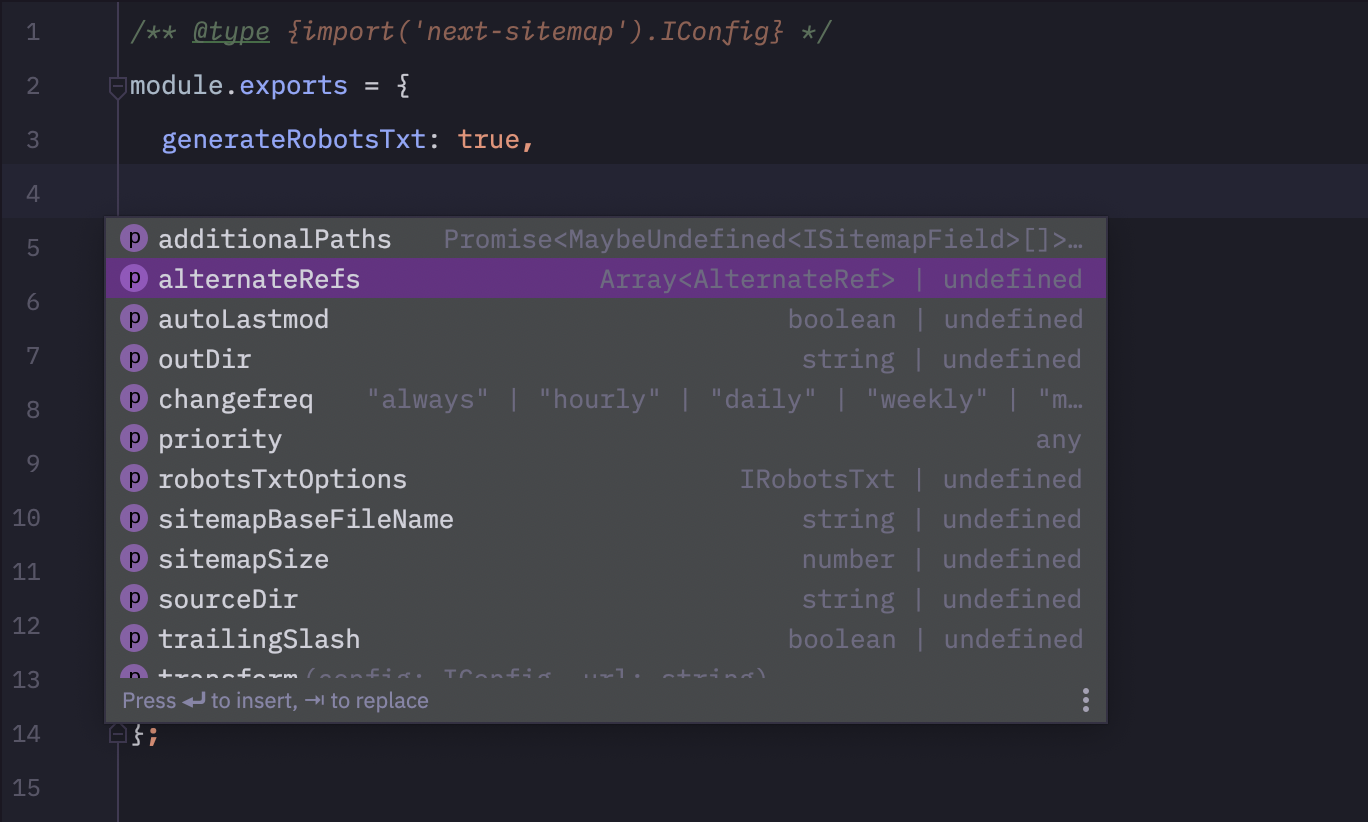
Tambahkan baris kode berikut di next-sitemap.config.js untuk nick ncript autocomplete! ?
 /** @type {import('next-sitemap').IConfig} */
module . exports = {
  // YOUR CONFIG
} 
Semua PR dipersilakan :)







