astro-font將自動優化您的自定義字體,本地字體,字體,以供性能優化任何CDN和Google字體。
該項目的靈感來自下一項。 JS字體優化。
npm install astro-font
# # or yarn
yarn add astro-font
# # or pnpm
pnpm add astro-font自動優化任何Google字體。要在所有頁面中使用字體,請將其添加到Astro佈局中的<head>文件:
 ---
import { AstroFont } from " astro-font " ;
---

< head >
    < AstroFont
      config = { [
        {
          src: [],
          name: " Poppins " ,
          // Google Fonts URL
          googleFontsURL: ' https://fonts.googleapis.com/css2?family=Poppins:ital,wght@0,400;0,600;1,400;1,700&display=swap ' ,
          preload: true ,
          display: " swap " ,
          selector: " body " ,
          fallback: " sans-serif " ,
        },
      ] }
    />
</ head > ---
import { AstroFont } from " astro-font " ;
---
< head >
< AstroFont
config = { [
{
name: " Afacad " ,
src: [
{
style: ' bold ' ,
weight: ' 700 ' ,
// Picked up font URL by manually visiting Google Fonts URL
path: ' https://fonts.gstatic.com/s/afacad/v1/6NUK8FKMIQOGaw6wjYT7ZHG_zsBBfvLqagk-80KjZfJ_uw.woff2 '
},
],
preload: true ,
display: " swap " ,
selector: " body " ,
fallback: " sans-serif " ,
},
] }
/>
</ head > ---
import { join } from " node:path " ;
import { AstroFont } from " astro-font " ;
---
< head >
< AstroFont
config = { [
{
name: " Afacad " ,
src: [
{
style: ' normal ' ,
weight: ' 400 ' ,
path: join ( process . cwd (), ' public ' , ' fonts ' , ' Afacad-Regular.ttf ' )
},
{
style: ' medium ' ,
weight: ' 500 ' ,
path: join ( process . cwd (), ' public ' , ' fonts ' , ' Afacad-Medium.ttf ' )
},
],
preload: false ,
display: " swap " ,
selector: " body " ,
fallback: " sans-serif " ,
},
] }
/>
</ head >您可以在應用程序中導入並使用多個字體。您可以採用兩種方法。
只需將配置的數組擴展到包含字體的新集合:
 ---
import { join } from " node:path " ;
import { AstroFont } from " astro-font " ;
---

< head >
    < AstroFont
      config = { [
        {
          name: " Afacad " ,
          src: [
            {
              style: ' bold ' ,
              weight: ' 700 ' ,
              path: ' https://fonts.gstatic.com/s/afacad/v1/6NUK8FKMIQOGaw6wjYT7ZHG_zsBBfvLqagk-80KjZfJ_uw.woff2 '
            },
          ],
          preload: true ,
          display: " swap " ,
          selector: " body " ,
          fallback: " sans-serif " ,
        },
        {
          name: " Inter " ,
          src: [
            {
              weight: ' 400 ' ,
              style: ' normal ' ,
              path: join ( process . cwd (), ' public ' , ' fonts ' , ' Inter-Regular.ttf ' )
            }
          ],
          preload: true ,
          display: " swap " ,
          selector: " body > span " ,
          fallback: " serif " ,
        },
      ] }
    />
</ head >每個配置對象的selector屬性可用於配置哪些CSS類將反映整個CSS(自動包括對後備字體CSS的引用)。
 ---
import { join } from " node:path "
---

< AstroFont
  config = { [
    {
      name: " Afacad " ,
      src: [
        {
          style: ' bold ' ,
          weight: ' 700 ' ,
          path: ' https://fonts.gstatic.com/s/afacad/v1/6NUK8FKMIQOGaw6wjYT7ZHG_zsBBfvLqagk-80KjZfJ_uw.woff2 '
        },
      ],
      preload: true ,
      display: " swap " ,
      fallback: " sans-serif " ,

      // My Custom CSS Selector
      // Type: ClassName
      selector: " .custom_class " ,

    },
    {
      name: " Inter " ,
      src: [
        {
          weight: ' 400 ' ,
          style: ' normal ' ,
          path: join ( process . cwd (), ' public ' , ' fonts ' , ' Inter-Regular.ttf ' )
        }
      ],
      preload: true ,
      display: " swap " ,
      fallback: " serif " ,

      // My Custom CSS Selector
      // Type: CSS Selector
      selector: " body > span " ,
    },
  ] }
/>每個配置對象的cssVariable屬性可用於配置CSS變量將在您的文檔的:root CSS選擇器中反映的css變量(自動包括對後備字體CSS的引用)。
 ---
import { join } from " node:path "
---

< AstroFont
  config = { [
    {
      name: " Afacad " ,
      src: [
        {
          style: ' bold ' ,
          weight: ' 700 ' ,
          path: ' https://fonts.gstatic.com/s/afacad/v1/6NUK8FKMIQOGaw6wjYT7ZHG_zsBBfvLqagk-80KjZfJ_uw.woff2 '
        },
      ],
      preload: true ,
      display: " swap " ,
      fallback: " sans-serif " ,

      // My Custom CSS Selector
      // Type: ClassName
      selector: " .custom_class " ,

    },
    {
      name: " Inter " ,
      src: [
        {
          weight: ' 400 ' ,
          style: ' normal ' ,
          path: join ( process . cwd (), ' public ' , ' fonts ' , ' Inter-Regular.ttf ' )
        }
      ],
      preload: true ,
      display: " swap " ,
      fallback: " serif " ,

      // My Custom CSS Variable
      // Type: CSS Variable
      cssVariable: " astro-font " ,

      // and now use it as style="font-family: var(--astro-font)"
    },
  ] }
/>每個配置對象的fallbackName屬性可用於配置後備字體的姓氏(在CSS中)。
 ---
import { join } from " node:path "
---

< AstroFont
  config = { [
    {
      name: " Afacad " ,
      src: [
        {
          style: ' bold ' ,
          weight: ' 700 ' ,
          path: ' https://fonts.gstatic.com/s/afacad/v1/6NUK8FKMIQOGaw6wjYT7ZHG_zsBBfvLqagk-80KjZfJ_uw.woff2 '
        },
      ],
      preload: true ,
      display: " swap " ,
      fallback: " sans-serif " ,
      selector: " .custom_class " ,

      // My Custom Fallback Font Name
      fallbackName: " Afacad Override " ,

    },
    {
      name: " Inter " ,
      src: [
        {
          weight: ' 400 ' ,
          style: ' normal ' ,
          path: join ( process . cwd (), ' public ' , ' fonts ' , ' Inter-Regular.ttf ' )
        }
      ],
      preload: true ,
      display: " swap " ,
      fallback: " serif " ,
      cssVariable: " astro-font " ,

      // My Custom Fallback Font Name
      fallbackName: " Inter Custom Override " ,

    },
  ] }
/>astro-font使用以下節點導入:
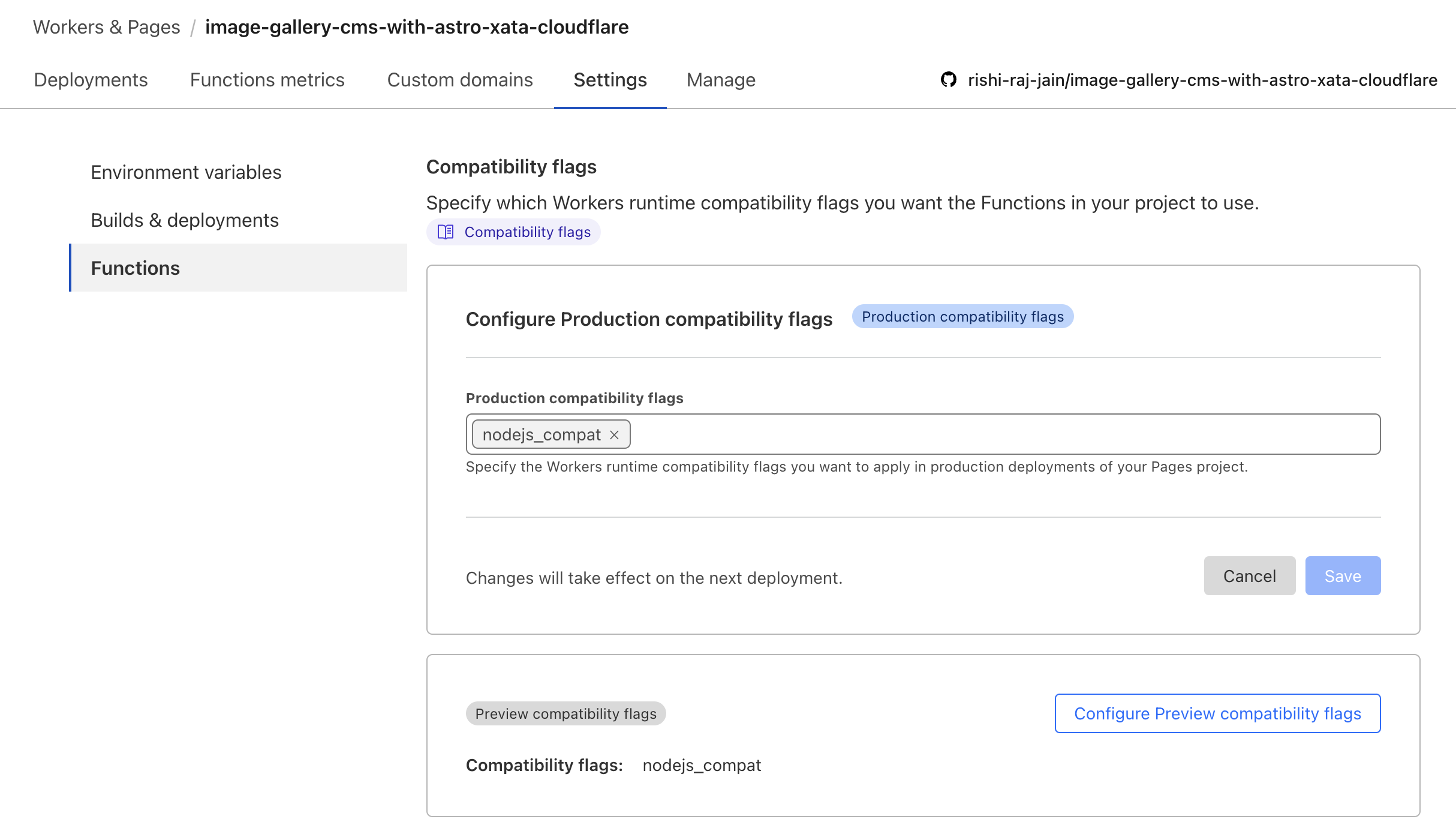
node:pathnode:buffer 為了確保它在CloudFlare工人中工作,請根據指南啟用node_compatibiliy標誌https://developers.cloudflare.com/workers/runtime-apis/nodejs/nodejs/#enable-nodejs-with-with-workers。
如果以上指南無法正常工作,請轉到您的CloudFlare項目>“設置”>“功能>兼容標誌”並添加標誌(如下)。
根據Astro + CloudFlare文檔,您需要修改VITE配置以允許節點:*導入語法:
// File: astro.config.mjs

import { defineConfig } from 'astro/config';
import cloudflare from '@astrojs/cloudflare';

// https://astro.build/config
export default defineConfig({
    output: 'server',
    adapter: cloudflare(),
+    vite: {
+        ssr: {
+          external: ["buffer", "path", "fs", "os", "crypto", "async_hooks"].map((i) => `node:${i}`),
+        },
+        // make sure to use node:fs, node:path, or node:os if you are using it in your project instead of fs, path or os
+    },
});由於在Cloublflare頁面(服務器端渲染)上下文中無法訪問public目錄中的文件,因此您需要在CDN上使用字體。為了使開發人員體驗無痛,請在Astro中使用CloudFlare設置本地字體時使用以下代碼段:
 ---
import { join } from " node:path " ;
import { AstroFont } from " astro-font " ;

const fontPrefix = import . meta . env . PROD
  ? Astro . site . toString ()
  : join ( process . cwd (), " public " );
---

< AstroFont
    config = { [
        {
            name: " Editorial New " ,
            src: [
                {
                    style: " italic " ,
                    weight: " 500 " ,
                    path: join (
                        fontPrefix ,
                        " fonts " ,
                        " PPEditorialNew-MediumItalic.woff2 "
                    ),
                },
            ],
            preload: true ,
            display: " swap " ,
            selector: " body " ,
            fallback: " sans-serif " ,
        }
    ] }
/>我們愛我們的貢獻者!您可以做出貢獻: