astro-font optimiert automatisch Ihre benutzerdefinierten Schriftarten, lokalen Schriftarten, Schriftarten über CDN und Google-Schriftarten für die Leistung.
Das Projekt ist von der nächsten.js -Schriftoptimierung inspiriert.
npm install astro-font
# # or yarn
yarn add astro-font
# # or pnpm
pnpm add astro-font Optimieren Sie automatisch eine Google -Schriftart. Um die Schriftart auf allen Seiten zu verwenden, fügen Sie sie in einem Astro -Layout in die Datei <head> hinzu:
 ---
import { AstroFont } from " astro-font " ;
---

< head >
    < AstroFont
      config = { [
        {
          src: [],
          name: " Poppins " ,
          // Google Fonts URL
          googleFontsURL: ' https://fonts.googleapis.com/css2?family=Poppins:ital,wght@0,400;0,600;1,400;1,700&display=swap ' ,
          preload: true ,
          display: " swap " ,
          selector: " body " ,
          fallback: " sans-serif " ,
        },
      ] }
    />
</ head > ---
import { AstroFont } from " astro-font " ;
---
< head >
< AstroFont
config = { [
{
name: " Afacad " ,
src: [
{
style: ' bold ' ,
weight: ' 700 ' ,
// Picked up font URL by manually visiting Google Fonts URL
path: ' https://fonts.gstatic.com/s/afacad/v1/6NUK8FKMIQOGaw6wjYT7ZHG_zsBBfvLqagk-80KjZfJ_uw.woff2 '
},
],
preload: true ,
display: " swap " ,
selector: " body " ,
fallback: " sans-serif " ,
},
] }
/>
</ head > ---
import { join } from " node:path " ;
import { AstroFont } from " astro-font " ;
---
< head >
< AstroFont
config = { [
{
name: " Afacad " ,
src: [
{
style: ' normal ' ,
weight: ' 400 ' ,
path: join ( process . cwd (), ' public ' , ' fonts ' , ' Afacad-Regular.ttf ' )
},
{
style: ' medium ' ,
weight: ' 500 ' ,
path: join ( process . cwd (), ' public ' , ' fonts ' , ' Afacad-Medium.ttf ' )
},
],
preload: false ,
display: " swap " ,
selector: " body " ,
fallback: " sans-serif " ,
},
] }
/>
</ head >Sie können mehrere Schriftarten in Ihrer Anwendung importieren und verwenden. Es gibt zwei Ansätze, die Sie verfolgen können.
Erweitern Sie einfach das Array der Konfiguration, um die neue Sammlung der Schriftarten zu enthalten:
 ---
import { join } from " node:path " ;
import { AstroFont } from " astro-font " ;
---

< head >
    < AstroFont
      config = { [
        {
          name: " Afacad " ,
          src: [
            {
              style: ' bold ' ,
              weight: ' 700 ' ,
              path: ' https://fonts.gstatic.com/s/afacad/v1/6NUK8FKMIQOGaw6wjYT7ZHG_zsBBfvLqagk-80KjZfJ_uw.woff2 '
            },
          ],
          preload: true ,
          display: " swap " ,
          selector: " body " ,
          fallback: " sans-serif " ,
        },
        {
          name: " Inter " ,
          src: [
            {
              weight: ' 400 ' ,
              style: ' normal ' ,
              path: join ( process . cwd (), ' public ' , ' fonts ' , ' Inter-Regular.ttf ' )
            }
          ],
          preload: true ,
          display: " swap " ,
          selector: " body > span " ,
          fallback: " serif " ,
        },
      ] }
    />
</ head > Das selector pro Konfigurationsobjekt kann verwendet werden, um zu konfigurieren, welche CSS -Klasse das gesamte CSS widerspiegelt (automatisch einschließlich der Verweise auf Fallback -Schriftarten CSS).
 ---
import { join } from " node:path "
---

< AstroFont
  config = { [
    {
      name: " Afacad " ,
      src: [
        {
          style: ' bold ' ,
          weight: ' 700 ' ,
          path: ' https://fonts.gstatic.com/s/afacad/v1/6NUK8FKMIQOGaw6wjYT7ZHG_zsBBfvLqagk-80KjZfJ_uw.woff2 '
        },
      ],
      preload: true ,
      display: " swap " ,
      fallback: " sans-serif " ,

      // My Custom CSS Selector
      // Type: ClassName
      selector: " .custom_class " ,

    },
    {
      name: " Inter " ,
      src: [
        {
          weight: ' 400 ' ,
          style: ' normal ' ,
          path: join ( process . cwd (), ' public ' , ' fonts ' , ' Inter-Regular.ttf ' )
        }
      ],
      preload: true ,
      display: " swap " ,
      fallback: " serif " ,

      // My Custom CSS Selector
      // Type: CSS Selector
      selector: " body > span " ,
    },
  ] }
/> Das cssVariable -Attribut pro Konfigurationsobjekt kann verwendet werden, um zu konfigurieren, welche CSS -Variable in Ihrem Dokument :root CSS -Selektor (automatisch einschließlich der Verweise auf Fallback -Schriftarten CSS) widerspiegelt.
 ---
import { join } from " node:path "
---

< AstroFont
  config = { [
    {
      name: " Afacad " ,
      src: [
        {
          style: ' bold ' ,
          weight: ' 700 ' ,
          path: ' https://fonts.gstatic.com/s/afacad/v1/6NUK8FKMIQOGaw6wjYT7ZHG_zsBBfvLqagk-80KjZfJ_uw.woff2 '
        },
      ],
      preload: true ,
      display: " swap " ,
      fallback: " sans-serif " ,

      // My Custom CSS Selector
      // Type: ClassName
      selector: " .custom_class " ,

    },
    {
      name: " Inter " ,
      src: [
        {
          weight: ' 400 ' ,
          style: ' normal ' ,
          path: join ( process . cwd (), ' public ' , ' fonts ' , ' Inter-Regular.ttf ' )
        }
      ],
      preload: true ,
      display: " swap " ,
      fallback: " serif " ,

      // My Custom CSS Variable
      // Type: CSS Variable
      cssVariable: " astro-font " ,

      // and now use it as style="font-family: var(--astro-font)"
    },
  ] }
/> Das fallbackName -Attribut pro Konfigurationsobjekt kann verwendet werden, um den Familiennamen der Fallback -Schriftart (in CSS) zu konfigurieren.
 ---
import { join } from " node:path "
---

< AstroFont
  config = { [
    {
      name: " Afacad " ,
      src: [
        {
          style: ' bold ' ,
          weight: ' 700 ' ,
          path: ' https://fonts.gstatic.com/s/afacad/v1/6NUK8FKMIQOGaw6wjYT7ZHG_zsBBfvLqagk-80KjZfJ_uw.woff2 '
        },
      ],
      preload: true ,
      display: " swap " ,
      fallback: " sans-serif " ,
      selector: " .custom_class " ,

      // My Custom Fallback Font Name
      fallbackName: " Afacad Override " ,

    },
    {
      name: " Inter " ,
      src: [
        {
          weight: ' 400 ' ,
          style: ' normal ' ,
          path: join ( process . cwd (), ' public ' , ' fonts ' , ' Inter-Regular.ttf ' )
        }
      ],
      preload: true ,
      display: " swap " ,
      fallback: " serif " ,
      cssVariable: " astro-font " ,

      // My Custom Fallback Font Name
      fallbackName: " Inter Custom Override " ,

    },
  ] }
/> astro-font verwendet die folgenden Knotenimporte:
node:pathnode:buffer Um sicherzustellen, dass es in Cloudflare-Mitarbeitern funktioniert, aktivieren Sie bitte das Flag node_compatibiliy gemäß dem Leitfaden https://developers.cloudflare.com/worker/runtime-apis/nodejs/#enable-nodejs-with-witers.
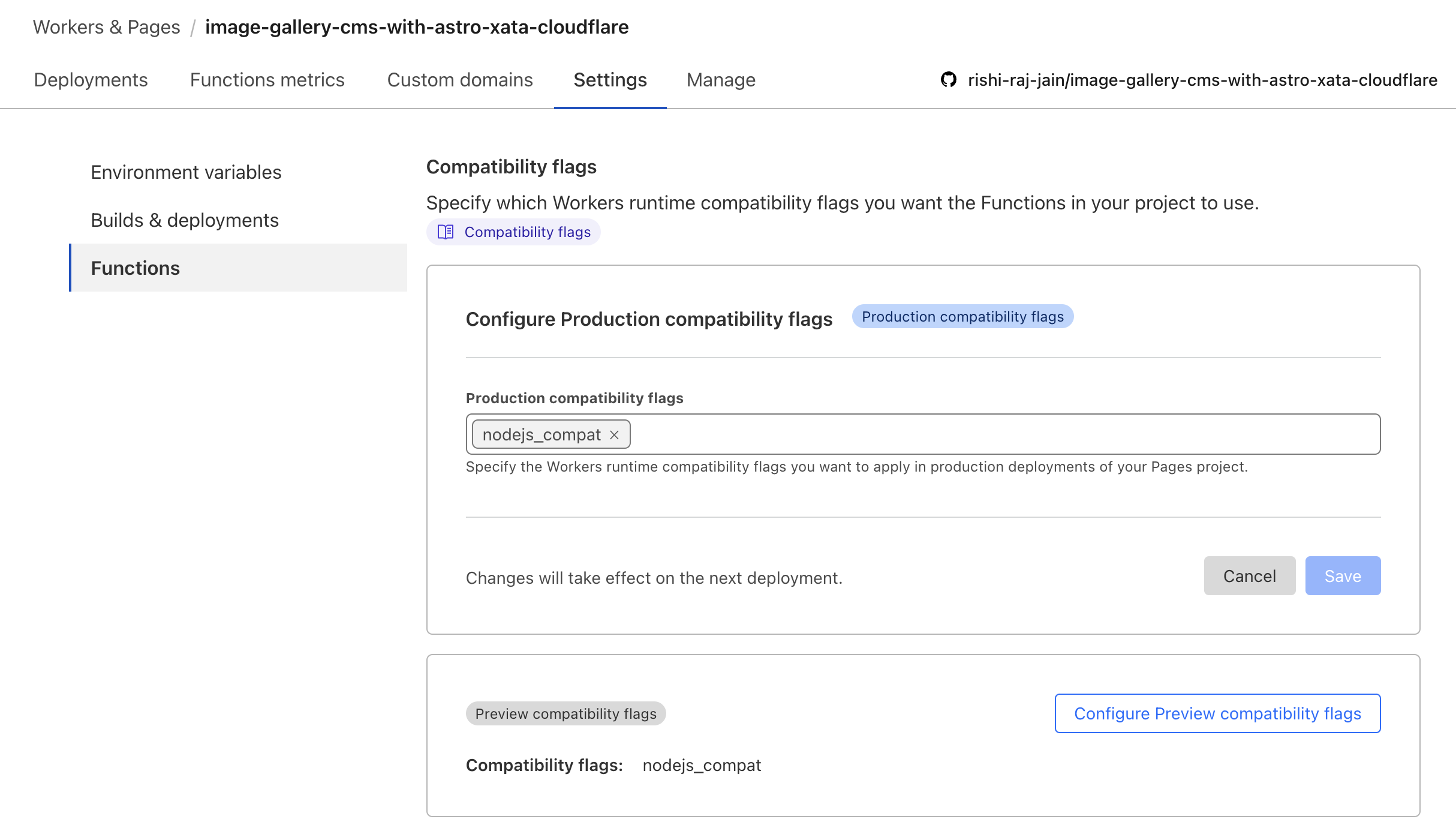
Wenn die obige Anleitung nicht funktioniert, gehen Sie zu Ihrem Cloudflare -Projekt> Einstellungen> Funktionen> Kompatibilitätsflags und fügen Sie das Flag (wie folgt) hinzu.
Per Astro + Cloudflare -Dokumente müssen Sie die VITE -Konfiguration ändern, um den Knoten zu ermöglichen:* Syntax importieren:
// File: astro.config.mjs

import { defineConfig } from 'astro/config';
import cloudflare from '@astrojs/cloudflare';

// https://astro.build/config
export default defineConfig({
    output: 'server',
    adapter: cloudflare(),
+    vite: {
+        ssr: {
+          external: ["buffer", "path", "fs", "os", "crypto", "async_hooks"].map((i) => `node:${i}`),
+        },
+        // make sure to use node:fs, node:path, or node:os if you are using it in your project instead of fs, path or os
+    },
}); Da es keinen Zugriff auf die Dateien im public Verzeichnis im CloudFlare-Seiten (Server-Side-Render) -Kontext gibt, möchten Sie Schriftarten über CDN verwenden. Verwenden Sie den folgenden Code -Snippet, um den Entwicklererlebnis schmerzlos zu machen, während Sie lokale Schriftarten mit CloudFlare in Astro einrichten:
 ---
import { join } from " node:path " ;
import { AstroFont } from " astro-font " ;

const fontPrefix = import . meta . env . PROD
  ? Astro . site . toString ()
  : join ( process . cwd (), " public " );
---

< AstroFont
    config = { [
        {
            name: " Editorial New " ,
            src: [
                {
                    style: " italic " ,
                    weight: " 500 " ,
                    path: join (
                        fontPrefix ,
                        " fonts " ,
                        " PPEditorialNew-MediumItalic.woff2 "
                    ),
                },
            ],
            preload: true ,
            display: " swap " ,
            selector: " body " ,
            fallback: " sans-serif " ,
        }
    ] }
/>Wir lieben unsere Mitwirkenden! So können Sie dazu beitragen: