astro-font 성능을 위해 사용자 정의 글꼴, 로컬 글꼴, 글꼴 및 Google 글꼴의 글꼴을 자동으로 최적화합니다.
이 프로젝트는 Next.js 글꼴 최적화에서 영감을 얻었습니다.
npm install astro-font
# # or yarn
yarn add astro-font
# # or pnpm
pnpm add astro-font
Google 글꼴을 자동으로 최적화합니다. 모든 페이지에서 글꼴을 사용하려면 Astro 레이아웃에서 <head> 파일에 추가하십시오.
 ---
import { AstroFont } from " astro-font " ;
---

< head >
    < AstroFont
      config = { [
        {
          src: [],
          name: " Poppins " ,
          // Google Fonts URL
          googleFontsURL: ' https://fonts.googleapis.com/css2?family=Poppins:ital,wght@0,400;0,600;1,400;1,700&display=swap ' ,
          preload: true ,
          display: " swap " ,
          selector: " body " ,
          fallback: " sans-serif " ,
        },
      ] }
    />
</ head > ---
import { AstroFont } from " astro-font " ;
---
< head >
< AstroFont
config = { [
{
name: " Afacad " ,
src: [
{
style: ' bold ' ,
weight: ' 700 ' ,
// Picked up font URL by manually visiting Google Fonts URL
path: ' https://fonts.gstatic.com/s/afacad/v1/6NUK8FKMIQOGaw6wjYT7ZHG_zsBBfvLqagk-80KjZfJ_uw.woff2 '
},
],
preload: true ,
display: " swap " ,
selector: " body " ,
fallback: " sans-serif " ,
},
] }
/>
</ head > ---
import { join } from " node:path " ;
import { AstroFont } from " astro-font " ;
---
< head >
< AstroFont
config = { [
{
name: " Afacad " ,
src: [
{
style: ' normal ' ,
weight: ' 400 ' ,
path: join ( process . cwd (), ' public ' , ' fonts ' , ' Afacad-Regular.ttf ' )
},
{
style: ' medium ' ,
weight: ' 500 ' ,
path: join ( process . cwd (), ' public ' , ' fonts ' , ' Afacad-Medium.ttf ' )
},
],
preload: false ,
display: " swap " ,
selector: " body " ,
fallback: " sans-serif " ,
},
] }
/>
</ head >응용 프로그램에서 여러 글꼴을 가져오고 사용할 수 있습니다. 당신이 취할 수있는 두 가지 접근법이 있습니다.
새로운 글꼴 모음을 포함하도록 구성 배열을 확장하십시오.
 ---
import { join } from " node:path " ;
import { AstroFont } from " astro-font " ;
---

< head >
    < AstroFont
      config = { [
        {
          name: " Afacad " ,
          src: [
            {
              style: ' bold ' ,
              weight: ' 700 ' ,
              path: ' https://fonts.gstatic.com/s/afacad/v1/6NUK8FKMIQOGaw6wjYT7ZHG_zsBBfvLqagk-80KjZfJ_uw.woff2 '
            },
          ],
          preload: true ,
          display: " swap " ,
          selector: " body " ,
          fallback: " sans-serif " ,
        },
        {
          name: " Inter " ,
          src: [
            {
              weight: ' 400 ' ,
              style: ' normal ' ,
              path: join ( process . cwd (), ' public ' , ' fonts ' , ' Inter-Regular.ttf ' )
            }
          ],
          preload: true ,
          display: " swap " ,
          selector: " body > span " ,
          fallback: " serif " ,
        },
      ] }
    />
</ head > 구성 객체 당 selector 속성을 사용하여 전체 CSS를 반영하는 CSS 클래스 (폴백 글꼴 CSS에 대한 참조 포함)를 반영하는 CSS 클래스를 구성 할 수 있습니다.
 ---
import { join } from " node:path "
---

< AstroFont
  config = { [
    {
      name: " Afacad " ,
      src: [
        {
          style: ' bold ' ,
          weight: ' 700 ' ,
          path: ' https://fonts.gstatic.com/s/afacad/v1/6NUK8FKMIQOGaw6wjYT7ZHG_zsBBfvLqagk-80KjZfJ_uw.woff2 '
        },
      ],
      preload: true ,
      display: " swap " ,
      fallback: " sans-serif " ,

      // My Custom CSS Selector
      // Type: ClassName
      selector: " .custom_class " ,

    },
    {
      name: " Inter " ,
      src: [
        {
          weight: ' 400 ' ,
          style: ' normal ' ,
          path: join ( process . cwd (), ' public ' , ' fonts ' , ' Inter-Regular.ttf ' )
        }
      ],
      preload: true ,
      display: " swap " ,
      fallback: " serif " ,

      // My Custom CSS Selector
      // Type: CSS Selector
      selector: " body > span " ,
    },
  ] }
/> 구성 객체 당 cssVariable 속성은 문서에 반영되는 CSS 변수를 구성하는 데 사용될 수 있습니다 :root CSS 선택기 (자동으로 폴백 글꼴 CSS에 대한 참조 포함).
 ---
import { join } from " node:path "
---

< AstroFont
  config = { [
    {
      name: " Afacad " ,
      src: [
        {
          style: ' bold ' ,
          weight: ' 700 ' ,
          path: ' https://fonts.gstatic.com/s/afacad/v1/6NUK8FKMIQOGaw6wjYT7ZHG_zsBBfvLqagk-80KjZfJ_uw.woff2 '
        },
      ],
      preload: true ,
      display: " swap " ,
      fallback: " sans-serif " ,

      // My Custom CSS Selector
      // Type: ClassName
      selector: " .custom_class " ,

    },
    {
      name: " Inter " ,
      src: [
        {
          weight: ' 400 ' ,
          style: ' normal ' ,
          path: join ( process . cwd (), ' public ' , ' fonts ' , ' Inter-Regular.ttf ' )
        }
      ],
      preload: true ,
      display: " swap " ,
      fallback: " serif " ,

      // My Custom CSS Variable
      // Type: CSS Variable
      cssVariable: " astro-font " ,

      // and now use it as style="font-family: var(--astro-font)"
    },
  ] }
/> 구성 객체 당 fallbackName 속성을 사용하여 폴백 글꼴의 패밀리 이름 (CSS)을 구성 할 수 있습니다.
 ---
import { join } from " node:path "
---

< AstroFont
  config = { [
    {
      name: " Afacad " ,
      src: [
        {
          style: ' bold ' ,
          weight: ' 700 ' ,
          path: ' https://fonts.gstatic.com/s/afacad/v1/6NUK8FKMIQOGaw6wjYT7ZHG_zsBBfvLqagk-80KjZfJ_uw.woff2 '
        },
      ],
      preload: true ,
      display: " swap " ,
      fallback: " sans-serif " ,
      selector: " .custom_class " ,

      // My Custom Fallback Font Name
      fallbackName: " Afacad Override " ,

    },
    {
      name: " Inter " ,
      src: [
        {
          weight: ' 400 ' ,
          style: ' normal ' ,
          path: join ( process . cwd (), ' public ' , ' fonts ' , ' Inter-Regular.ttf ' )
        }
      ],
      preload: true ,
      display: " swap " ,
      fallback: " serif " ,
      cssVariable: " astro-font " ,

      // My Custom Fallback Font Name
      fallbackName: " Inter Custom Override " ,

    },
  ] }
/> astro-font 다음 노드 가져 오기를 사용합니다.
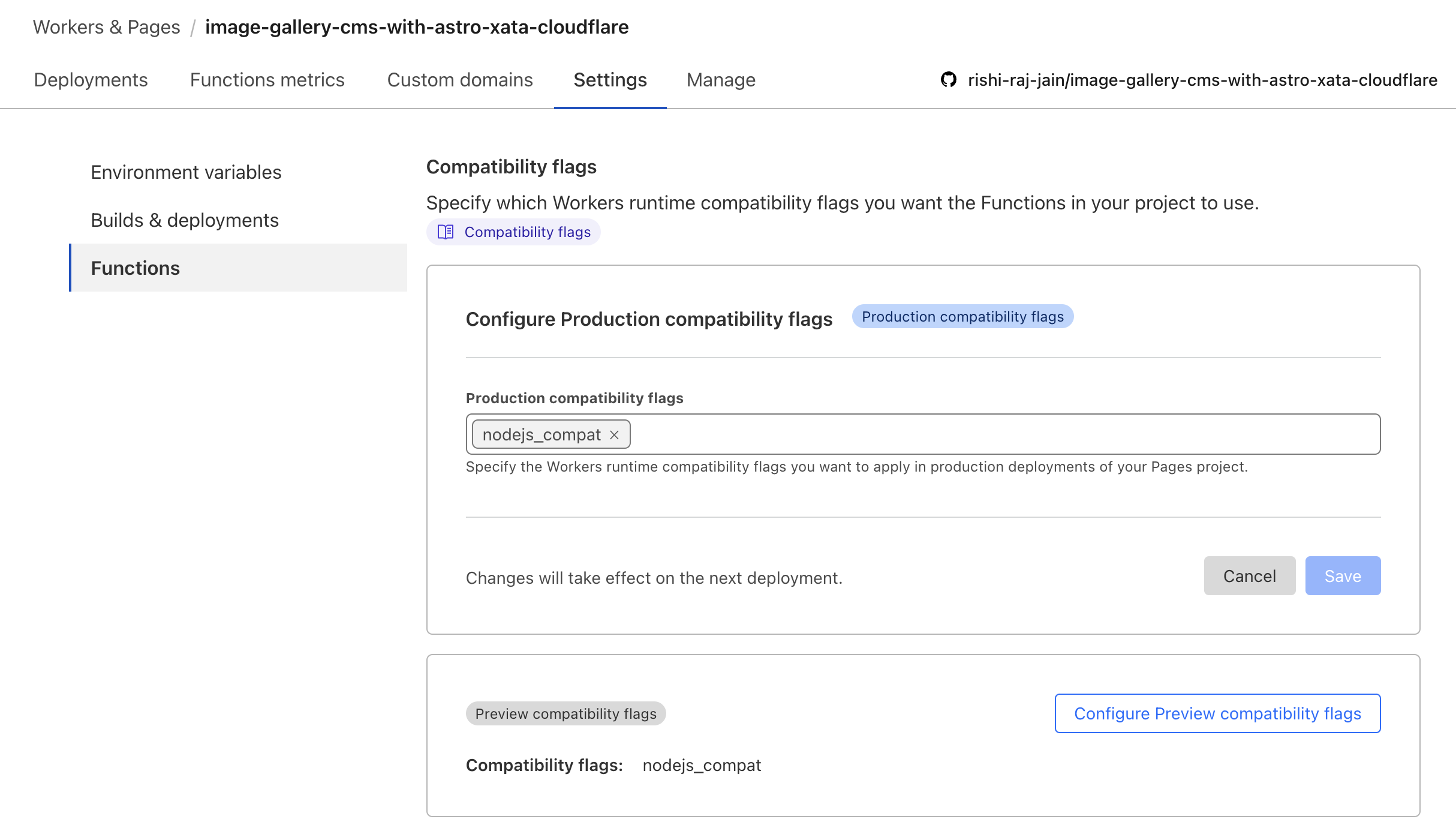
node:pathnode:buffer CloudFlare Workers에서 작동하는지 확인하려면 안내서 https://developers.cloudflare.com/workers/runtime-apis/nodejs/#enable-nodejs-with-workers에 따라 node_compatibiliy 플래그를 활성화하십시오.
위의 안내서가 작동하지 않으면 CloudFlare 프로젝트> 설정> 기능> 호환 플래그 로 이동하여 플래그를 추가하십시오 (다음과 같이).
Astro + CloudFlare 문서에 따라 노드를 허용하려면 Vite 구성을 수정해야합니다.* 가져 오기 구문 :
// File: astro.config.mjs

import { defineConfig } from 'astro/config';
import cloudflare from '@astrojs/cloudflare';

// https://astro.build/config
export default defineConfig({
    output: 'server',
    adapter: cloudflare(),
+    vite: {
+        ssr: {
+          external: ["buffer", "path", "fs", "os", "crypto", "async_hooks"].map((i) => `node:${i}`),
+        },
+        // make sure to use node:fs, node:path, or node:os if you are using it in your project instead of fs, path or os
+    },
}); CloudFlare Pages (Server-Side Render) 컨텍스트의 public 디렉토리의 파일에 액세스 할 수 없으므로 CDN의 글꼴을 사용하려고합니다. 개발자가 통증이없는 경험을하려면 Astro에서 CloudFlare와 함께 로컬 글꼴을 설정하는 동안 다음 코드 스 니펫을 사용하십시오.
 ---
import { join } from " node:path " ;
import { AstroFont } from " astro-font " ;

const fontPrefix = import . meta . env . PROD
  ? Astro . site . toString ()
  : join ( process . cwd (), " public " );
---

< AstroFont
    config = { [
        {
            name: " Editorial New " ,
            src: [
                {
                    style: " italic " ,
                    weight: " 500 " ,
                    path: join (
                        fontPrefix ,
                        " fonts " ,
                        " PPEditorialNew-MediumItalic.woff2 "
                    ),
                },
            ],
            preload: true ,
            display: " swap " ,
            selector: " body " ,
            fallback: " sans-serif " ,
        }
    ] }
/>우리는 기고자를 사랑합니다! 기여하는 방법은 다음과 같습니다.