astro-font จะเพิ่มประสิทธิภาพแบบอักษรที่กำหนดเองแบบอักษรท้องถิ่นแบบอักษรผ่านแบบอักษร CDN และ Google เพื่อประสิทธิภาพใด ๆ โดยอัตโนมัติ
โครงการได้รับแรงบันดาลใจจากการเพิ่มประสิทธิภาพแบบอักษรต่อไป
npm install astro-font
# # or yarn
yarn add astro-font
# # or pnpm
pnpm add astro-font เพิ่มประสิทธิภาพของ Google แบบอักษรใด ๆ โดยอัตโนมัติ หากต้องการใช้แบบอักษรในทุกหน้าของคุณให้เพิ่มไฟล์ <head> ในรูปแบบ Astro:
 ---
import { AstroFont } from " astro-font " ;
---

< head >
    < AstroFont
      config = { [
        {
          src: [],
          name: " Poppins " ,
          // Google Fonts URL
          googleFontsURL: ' https://fonts.googleapis.com/css2?family=Poppins:ital,wght@0,400;0,600;1,400;1,700&display=swap ' ,
          preload: true ,
          display: " swap " ,
          selector: " body " ,
          fallback: " sans-serif " ,
        },
      ] }
    />
</ head > ---
import { AstroFont } from " astro-font " ;
---
< head >
< AstroFont
config = { [
{
name: " Afacad " ,
src: [
{
style: ' bold ' ,
weight: ' 700 ' ,
// Picked up font URL by manually visiting Google Fonts URL
path: ' https://fonts.gstatic.com/s/afacad/v1/6NUK8FKMIQOGaw6wjYT7ZHG_zsBBfvLqagk-80KjZfJ_uw.woff2 '
},
],
preload: true ,
display: " swap " ,
selector: " body " ,
fallback: " sans-serif " ,
},
] }
/>
</ head > ---
import { join } from " node:path " ;
import { AstroFont } from " astro-font " ;
---
< head >
< AstroFont
config = { [
{
name: " Afacad " ,
src: [
{
style: ' normal ' ,
weight: ' 400 ' ,
path: join ( process . cwd (), ' public ' , ' fonts ' , ' Afacad-Regular.ttf ' )
},
{
style: ' medium ' ,
weight: ' 500 ' ,
path: join ( process . cwd (), ' public ' , ' fonts ' , ' Afacad-Medium.ttf ' )
},
],
preload: false ,
display: " swap " ,
selector: " body " ,
fallback: " sans-serif " ,
},
] }
/>
</ head >คุณสามารถนำเข้าและใช้แบบอักษรหลายตัวในแอปพลิเคชันของคุณ มีสองวิธีที่คุณสามารถทำได้
เพียงขยายอาร์เรย์ของการกำหนดค่าเพื่อให้มีคอลเลกชันใหม่ของแบบอักษร:
 ---
import { join } from " node:path " ;
import { AstroFont } from " astro-font " ;
---

< head >
    < AstroFont
      config = { [
        {
          name: " Afacad " ,
          src: [
            {
              style: ' bold ' ,
              weight: ' 700 ' ,
              path: ' https://fonts.gstatic.com/s/afacad/v1/6NUK8FKMIQOGaw6wjYT7ZHG_zsBBfvLqagk-80KjZfJ_uw.woff2 '
            },
          ],
          preload: true ,
          display: " swap " ,
          selector: " body " ,
          fallback: " sans-serif " ,
        },
        {
          name: " Inter " ,
          src: [
            {
              weight: ' 400 ' ,
              style: ' normal ' ,
              path: join ( process . cwd (), ' public ' , ' fonts ' , ' Inter-Regular.ttf ' )
            }
          ],
          preload: true ,
          display: " swap " ,
          selector: " body > span " ,
          fallback: " serif " ,
        },
      ] }
    />
</ head > แอตทริบิวต์ selector ต่อวัตถุการกำหนดค่าสามารถใช้เพื่อกำหนดค่าคลาส CSS ที่จะสะท้อนให้เห็นถึง CS ทั้งหมด (โดยอัตโนมัติรวมถึงการอ้างอิงถึงแบบอักษรทางเลือก CSS)
 ---
import { join } from " node:path "
---

< AstroFont
  config = { [
    {
      name: " Afacad " ,
      src: [
        {
          style: ' bold ' ,
          weight: ' 700 ' ,
          path: ' https://fonts.gstatic.com/s/afacad/v1/6NUK8FKMIQOGaw6wjYT7ZHG_zsBBfvLqagk-80KjZfJ_uw.woff2 '
        },
      ],
      preload: true ,
      display: " swap " ,
      fallback: " sans-serif " ,

      // My Custom CSS Selector
      // Type: ClassName
      selector: " .custom_class " ,

    },
    {
      name: " Inter " ,
      src: [
        {
          weight: ' 400 ' ,
          style: ' normal ' ,
          path: join ( process . cwd (), ' public ' , ' fonts ' , ' Inter-Regular.ttf ' )
        }
      ],
      preload: true ,
      display: " swap " ,
      fallback: " serif " ,

      // My Custom CSS Selector
      // Type: CSS Selector
      selector: " body > span " ,
    },
  ] }
/> แอตทริบิวต์ cssVariable ต่อวัตถุ config สามารถใช้เพื่อกำหนดค่าตัวแปร CSS ที่จะสะท้อนในเอกสารของคุณ :root CSS (โดยอัตโนมัติรวมถึงการอ้างอิงไปยังแบบอักษรทางเลือก CSS)
 ---
import { join } from " node:path "
---

< AstroFont
  config = { [
    {
      name: " Afacad " ,
      src: [
        {
          style: ' bold ' ,
          weight: ' 700 ' ,
          path: ' https://fonts.gstatic.com/s/afacad/v1/6NUK8FKMIQOGaw6wjYT7ZHG_zsBBfvLqagk-80KjZfJ_uw.woff2 '
        },
      ],
      preload: true ,
      display: " swap " ,
      fallback: " sans-serif " ,

      // My Custom CSS Selector
      // Type: ClassName
      selector: " .custom_class " ,

    },
    {
      name: " Inter " ,
      src: [
        {
          weight: ' 400 ' ,
          style: ' normal ' ,
          path: join ( process . cwd (), ' public ' , ' fonts ' , ' Inter-Regular.ttf ' )
        }
      ],
      preload: true ,
      display: " swap " ,
      fallback: " serif " ,

      // My Custom CSS Variable
      // Type: CSS Variable
      cssVariable: " astro-font " ,

      // and now use it as style="font-family: var(--astro-font)"
    },
  ] }
/> แอตทริบิวต์ fallbackName ต่อวัตถุ config สามารถใช้ในการกำหนดค่าชื่อตระกูล Fallback Font (ใน CSS)
 ---
import { join } from " node:path "
---

< AstroFont
  config = { [
    {
      name: " Afacad " ,
      src: [
        {
          style: ' bold ' ,
          weight: ' 700 ' ,
          path: ' https://fonts.gstatic.com/s/afacad/v1/6NUK8FKMIQOGaw6wjYT7ZHG_zsBBfvLqagk-80KjZfJ_uw.woff2 '
        },
      ],
      preload: true ,
      display: " swap " ,
      fallback: " sans-serif " ,
      selector: " .custom_class " ,

      // My Custom Fallback Font Name
      fallbackName: " Afacad Override " ,

    },
    {
      name: " Inter " ,
      src: [
        {
          weight: ' 400 ' ,
          style: ' normal ' ,
          path: join ( process . cwd (), ' public ' , ' fonts ' , ' Inter-Regular.ttf ' )
        }
      ],
      preload: true ,
      display: " swap " ,
      fallback: " serif " ,
      cssVariable: " astro-font " ,

      // My Custom Fallback Font Name
      fallbackName: " Inter Custom Override " ,

    },
  ] }
/> astro-font ใช้การนำเข้าโหนดต่อไปนี้:
node:pathnode:buffer เพื่อให้แน่ใจว่ามันทำงานในคนงาน CloudFlare โปรดเปิดใช้งานธง node_compatibiliy ตามคำแนะนำ https://developers.cloudflare.com/workers/runtime-apis/nodejs/#enable-nodejs-with-workers
หากคู่มือข้างต้นไม่ทำงานให้ไปที่ โครงการ CloudFlare ของคุณ> การตั้งค่า> ฟังก์ชั่น> การตั้งค่าความเข้ากันได้ และเพิ่มค่าสถานะ (ดังนี้)
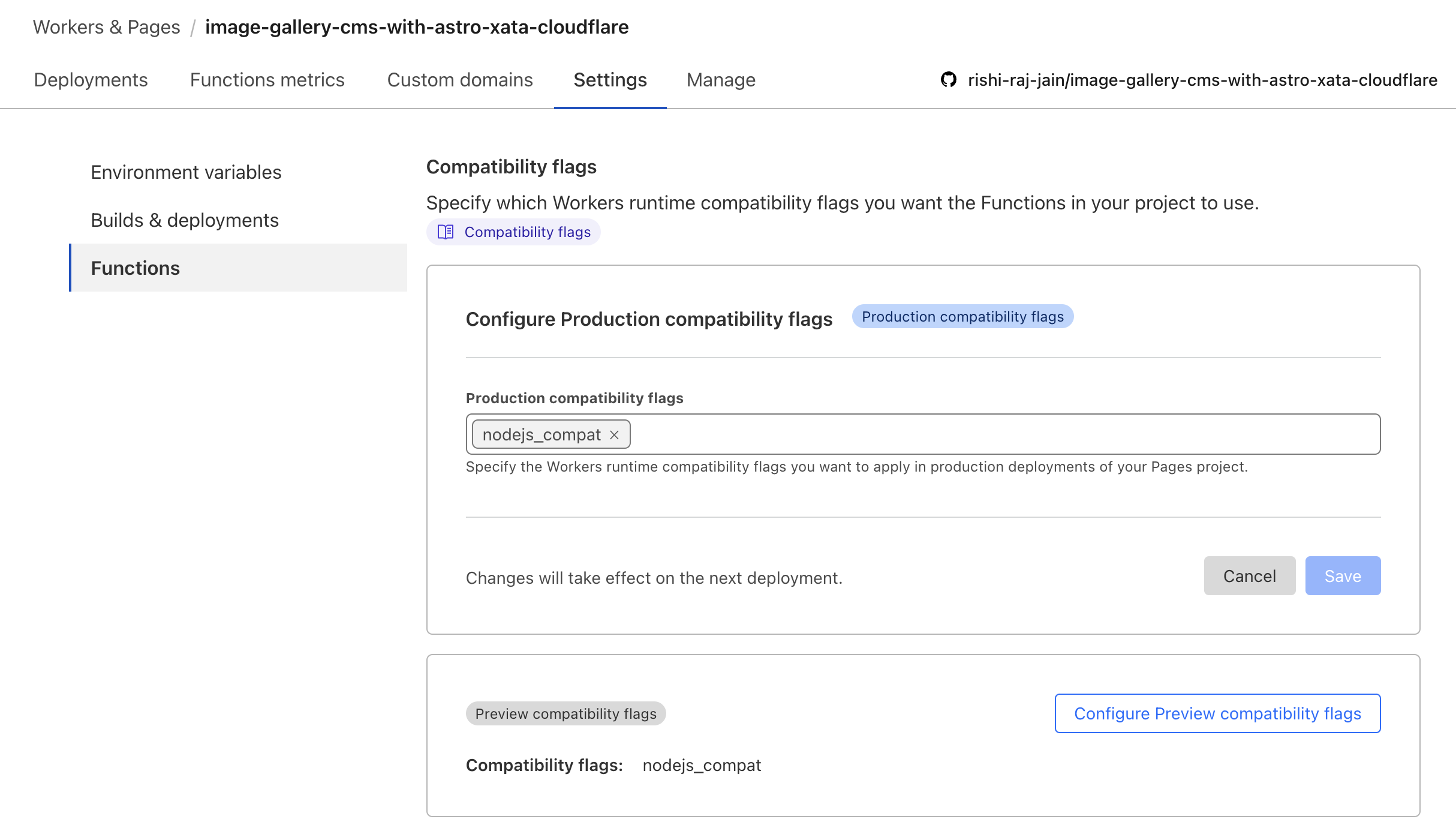
ต่อเอกสาร Astro + CloudFlare คุณจะต้องแก้ไขการกำหนดค่า VITE เพื่อให้โหนด:* นำเข้าไวยากรณ์:
// File: astro.config.mjs

import { defineConfig } from 'astro/config';
import cloudflare from '@astrojs/cloudflare';

// https://astro.build/config
export default defineConfig({
    output: 'server',
    adapter: cloudflare(),
+    vite: {
+        ssr: {
+          external: ["buffer", "path", "fs", "os", "crypto", "async_hooks"].map((i) => `node:${i}`),
+        },
+        // make sure to use node:fs, node:path, or node:os if you are using it in your project instead of fs, path or os
+    },
}); เนื่องจากไม่มีการเข้าถึงไฟล์ในไดเรกทอรี public ในบริบท CloudFlare Pages (Server Render) คุณต้องการใช้ฟอนต์ผ่าน CDN เพื่อให้ประสบการณ์นักพัฒนาไม่เจ็บปวดให้ใช้ตัวอย่างโค้ดต่อไปนี้ในขณะที่ตั้งค่าแบบอักษรท้องถิ่นด้วย CloudFlare ใน Astro:
 ---
import { join } from " node:path " ;
import { AstroFont } from " astro-font " ;

const fontPrefix = import . meta . env . PROD
  ? Astro . site . toString ()
  : join ( process . cwd (), " public " );
---

< AstroFont
    config = { [
        {
            name: " Editorial New " ,
            src: [
                {
                    style: " italic " ,
                    weight: " 500 " ,
                    path: join (
                        fontPrefix ,
                        " fonts " ,
                        " PPEditorialNew-MediumItalic.woff2 "
                    ),
                },
            ],
            preload: true ,
            display: " swap " ,
            selector: " body " ,
            fallback: " sans-serif " ,
        }
    ] }
/>เรารักผู้มีส่วนร่วมของเรา! นี่คือวิธีที่คุณสามารถมีส่วนร่วม: