astro-font optimisera automatiquement vos polices personnalisées, polices locales, polices sur toutes les polices CDN et Google pour les performances.
Le projet est inspiré par l'optimisation de la police suivante.
npm install astro-font
# # or yarn
yarn add astro-font
# # or pnpm
pnpm add astro-font Optimiser automatiquement toute police Google. Pour utiliser la police dans toutes vos pages, ajoutez-le au fichier <head> dans une disposition Astro:
 ---
import { AstroFont } from " astro-font " ;
---

< head >
    < AstroFont
      config = { [
        {
          src: [],
          name: " Poppins " ,
          // Google Fonts URL
          googleFontsURL: ' https://fonts.googleapis.com/css2?family=Poppins:ital,wght@0,400;0,600;1,400;1,700&display=swap ' ,
          preload: true ,
          display: " swap " ,
          selector: " body " ,
          fallback: " sans-serif " ,
        },
      ] }
    />
</ head > ---
import { AstroFont } from " astro-font " ;
---
< head >
< AstroFont
config = { [
{
name: " Afacad " ,
src: [
{
style: ' bold ' ,
weight: ' 700 ' ,
// Picked up font URL by manually visiting Google Fonts URL
path: ' https://fonts.gstatic.com/s/afacad/v1/6NUK8FKMIQOGaw6wjYT7ZHG_zsBBfvLqagk-80KjZfJ_uw.woff2 '
},
],
preload: true ,
display: " swap " ,
selector: " body " ,
fallback: " sans-serif " ,
},
] }
/>
</ head > ---
import { join } from " node:path " ;
import { AstroFont } from " astro-font " ;
---
< head >
< AstroFont
config = { [
{
name: " Afacad " ,
src: [
{
style: ' normal ' ,
weight: ' 400 ' ,
path: join ( process . cwd (), ' public ' , ' fonts ' , ' Afacad-Regular.ttf ' )
},
{
style: ' medium ' ,
weight: ' 500 ' ,
path: join ( process . cwd (), ' public ' , ' fonts ' , ' Afacad-Medium.ttf ' )
},
],
preload: false ,
display: " swap " ,
selector: " body " ,
fallback: " sans-serif " ,
},
] }
/>
</ head >Vous pouvez importer et utiliser plusieurs polices dans votre application. Il y a deux approches que vous pouvez adopter.
Étendez simplement le tableau de la configuration pour contenir la nouvelle collection des polices:
 ---
import { join } from " node:path " ;
import { AstroFont } from " astro-font " ;
---

< head >
    < AstroFont
      config = { [
        {
          name: " Afacad " ,
          src: [
            {
              style: ' bold ' ,
              weight: ' 700 ' ,
              path: ' https://fonts.gstatic.com/s/afacad/v1/6NUK8FKMIQOGaw6wjYT7ZHG_zsBBfvLqagk-80KjZfJ_uw.woff2 '
            },
          ],
          preload: true ,
          display: " swap " ,
          selector: " body " ,
          fallback: " sans-serif " ,
        },
        {
          name: " Inter " ,
          src: [
            {
              weight: ' 400 ' ,
              style: ' normal ' ,
              path: join ( process . cwd (), ' public ' , ' fonts ' , ' Inter-Regular.ttf ' )
            }
          ],
          preload: true ,
          display: " swap " ,
          selector: " body > span " ,
          fallback: " serif " ,
        },
      ] }
    />
</ head > L'attribut selector par objet config peut être utilisé pour configurer la classe CSS reflétera l'intégralité de CSS (y compris automatiquement les références aux polices de secours CSS).
 ---
import { join } from " node:path "
---

< AstroFont
  config = { [
    {
      name: " Afacad " ,
      src: [
        {
          style: ' bold ' ,
          weight: ' 700 ' ,
          path: ' https://fonts.gstatic.com/s/afacad/v1/6NUK8FKMIQOGaw6wjYT7ZHG_zsBBfvLqagk-80KjZfJ_uw.woff2 '
        },
      ],
      preload: true ,
      display: " swap " ,
      fallback: " sans-serif " ,

      // My Custom CSS Selector
      // Type: ClassName
      selector: " .custom_class " ,

    },
    {
      name: " Inter " ,
      src: [
        {
          weight: ' 400 ' ,
          style: ' normal ' ,
          path: join ( process . cwd (), ' public ' , ' fonts ' , ' Inter-Regular.ttf ' )
        }
      ],
      preload: true ,
      display: " swap " ,
      fallback: " serif " ,

      // My Custom CSS Selector
      // Type: CSS Selector
      selector: " body > span " ,
    },
  ] }
/> L'attribut cssVariable par configuration peut être utilisé pour configurer la variable CSS reflétera dans votre document :root CSS Selector (y compris automatiquement les références aux polices de secours CSS).
 ---
import { join } from " node:path "
---

< AstroFont
  config = { [
    {
      name: " Afacad " ,
      src: [
        {
          style: ' bold ' ,
          weight: ' 700 ' ,
          path: ' https://fonts.gstatic.com/s/afacad/v1/6NUK8FKMIQOGaw6wjYT7ZHG_zsBBfvLqagk-80KjZfJ_uw.woff2 '
        },
      ],
      preload: true ,
      display: " swap " ,
      fallback: " sans-serif " ,

      // My Custom CSS Selector
      // Type: ClassName
      selector: " .custom_class " ,

    },
    {
      name: " Inter " ,
      src: [
        {
          weight: ' 400 ' ,
          style: ' normal ' ,
          path: join ( process . cwd (), ' public ' , ' fonts ' , ' Inter-Regular.ttf ' )
        }
      ],
      preload: true ,
      display: " swap " ,
      fallback: " serif " ,

      // My Custom CSS Variable
      // Type: CSS Variable
      cssVariable: " astro-font " ,

      // and now use it as style="font-family: var(--astro-font)"
    },
  ] }
/> L'attribut fallbackName par configy peut être utilisé pour configurer le nom de famille de la police de secours (dans CSS).
 ---
import { join } from " node:path "
---

< AstroFont
  config = { [
    {
      name: " Afacad " ,
      src: [
        {
          style: ' bold ' ,
          weight: ' 700 ' ,
          path: ' https://fonts.gstatic.com/s/afacad/v1/6NUK8FKMIQOGaw6wjYT7ZHG_zsBBfvLqagk-80KjZfJ_uw.woff2 '
        },
      ],
      preload: true ,
      display: " swap " ,
      fallback: " sans-serif " ,
      selector: " .custom_class " ,

      // My Custom Fallback Font Name
      fallbackName: " Afacad Override " ,

    },
    {
      name: " Inter " ,
      src: [
        {
          weight: ' 400 ' ,
          style: ' normal ' ,
          path: join ( process . cwd (), ' public ' , ' fonts ' , ' Inter-Regular.ttf ' )
        }
      ],
      preload: true ,
      display: " swap " ,
      fallback: " serif " ,
      cssVariable: " astro-font " ,

      // My Custom Fallback Font Name
      fallbackName: " Inter Custom Override " ,

    },
  ] }
/> astro-font utilise les importations de nœuds suivantes:
node:pathnode:buffer Pour vous assurer que cela fonctionne dans les travailleurs de CloudFlare, veuillez activer le drapeau node_compatibiliy selon le guide https://developers.cloudflare.com/workers/runtime-apis/nodejs/#enable-nodejs-with-workers.
Si le guide ci-dessus ne fonctionne pas, accédez à votre projet CloudFlare> Paramètres> Fonctions> Indicateurs de compatibilité et ajoutez l'indicateur (comme suit).
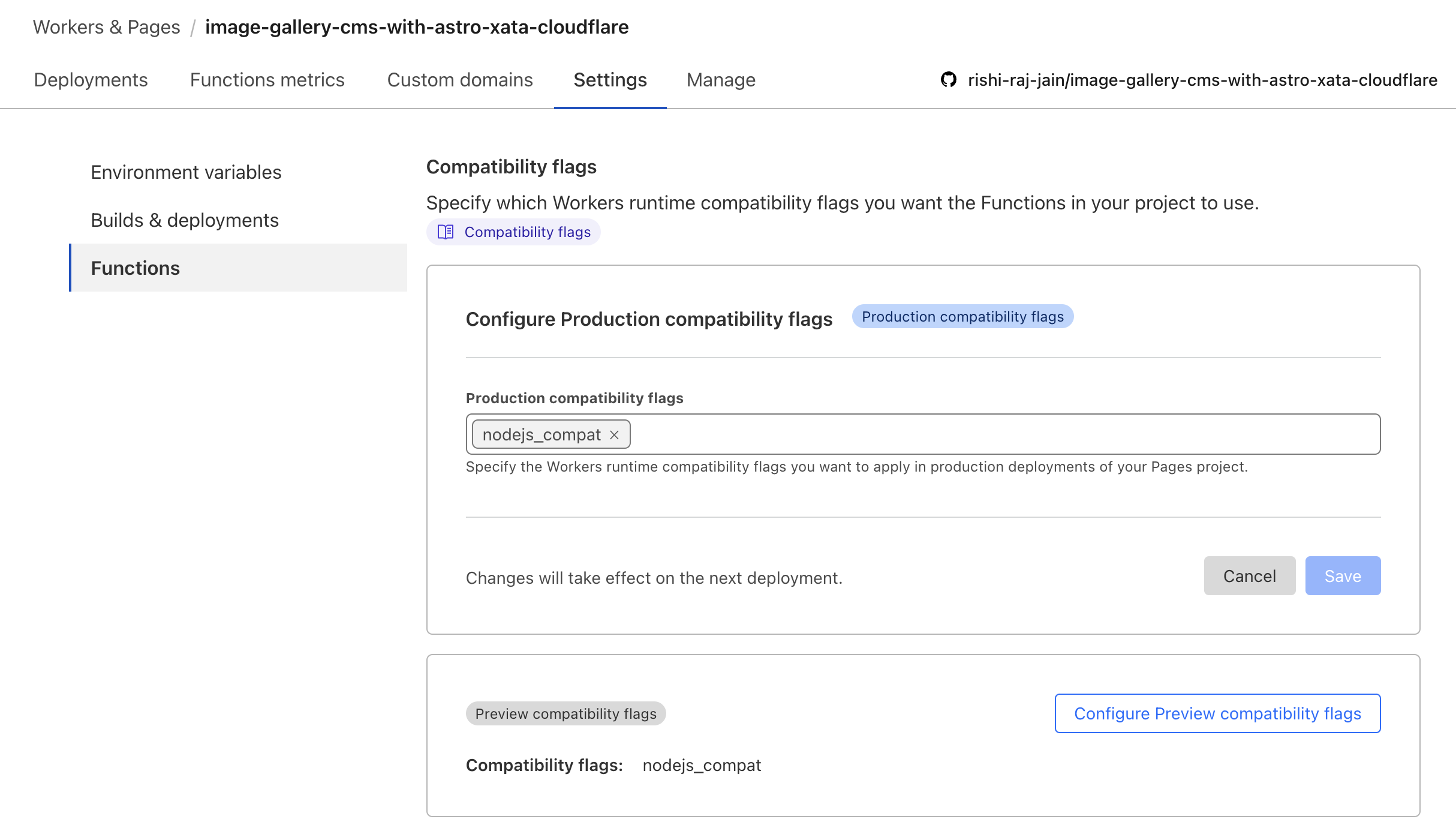
Per Astro + CloudFlare Docs, vous devrez modifier la configuration VITE pour permettre le nœud: * Importer Syntax:
// File: astro.config.mjs

import { defineConfig } from 'astro/config';
import cloudflare from '@astrojs/cloudflare';

// https://astro.build/config
export default defineConfig({
    output: 'server',
    adapter: cloudflare(),
+    vite: {
+        ssr: {
+          external: ["buffer", "path", "fs", "os", "crypto", "async_hooks"].map((i) => `node:${i}`),
+        },
+        // make sure to use node:fs, node:path, or node:os if you are using it in your project instead of fs, path or os
+    },
}); Comme il n'y a pas d'accès aux fichiers dans le répertoire public dans le contexte des pages CloudFlare (rendu côté serveur), vous souhaitez utiliser des polices sur CDN. Pour faire en sorte que le développeur expérimente indolore, utilisez l'extrait de code suivant tout en configurant des polices locales avec CloudFlare dans Astro:
 ---
import { join } from " node:path " ;
import { AstroFont } from " astro-font " ;

const fontPrefix = import . meta . env . PROD
  ? Astro . site . toString ()
  : join ( process . cwd (), " public " );
---

< AstroFont
    config = { [
        {
            name: " Editorial New " ,
            src: [
                {
                    style: " italic " ,
                    weight: " 500 " ,
                    path: join (
                        fontPrefix ,
                        " fonts " ,
                        " PPEditorialNew-MediumItalic.woff2 "
                    ),
                },
            ],
            preload: true ,
            display: " swap " ,
            selector: " body " ,
            fallback: " sans-serif " ,
        }
    ] }
/>Nous aimons nos contributeurs! Voici comment vous pouvez contribuer: