pyggester
v1.0: Optimize Your Python Data Structures - Dynamic & Static Analysis Unleashed


Pyggester-(Python + Suggester)起動態和靜態分析儀的作用。它的主要目的在於提供建議,以通過解決數據結構的次優使用來提高Python代碼的效率。
Pyggester為其功能提供了相當不錯的CLI界面。 CLI建在Typer的頂部
Execution command :
pyggest output :
                                          _____
_____________  ________ _______ ______________  /_____________
___  __ _  / / /_  __ `/_  __ `/  _ _  ___/  __/  _ _  ___/
__  /_/ /  /_/ /_  /_/ /_  /_/ //  __/(__  )/ /_ /  __/  /
_  .___/___, / ___, / ___, / ___//____/ __/ ___//_/
/_/     /____/  /____/  /____/


Usage: pyggest [OPTIONS] COMMAND [ARGS]...

╭─ Options ────────────────────────────────────────────────────────────────────────────────────────────────────────────────────────────────────╮
│ --install-completion          Install completion for the current shell.                                                                      │
│ --show-completion             Show completion for the current shell, to copy it or customize the installation.                               │
│ --help                        Show this message and exit.                                                                                    │
╰──────────────────────────────────────────────────────────────────────────────────────────────────────────────────────────────────────────────╯
╭─ Commands ───────────────────────────────────────────────────────────────────────────────────────────────────────────────────────────────────╮
│ static                 Perform static analysis using PyggestStatic.                                                                          │
│ transform              Perform dynamic transformation using PyggesterDynamic.                                                                │
╰──────────────────────────────────────────────────────────────────────────────────────────────────────────────────────────────────────────────╯
Pyggester CLI提出了兩個不同的特徵:
靜態分析:此功能無需執行代碼,全面檢查您的代碼,提供有關其結構和潛在改進的洞察力。
Execution command
[!注意]存在“靜態”子命令,但沒有實施功能,因為我們已經擁有良好的靜態分析儀(Pylint,Ruff,Flake8)。在將來的迭代中,如果我們確定可以通過靜態分析確定的建議,我們將它們納入此功能。
pyggest static動態/自動轉換:此功能為Python文件添加了額外的代碼,以在運行時分析您的數據結構。您的原始代碼保持不變;它不會改變。創建一個新文件,就像原始文件一樣,但帶有其他代碼。這適用於單個文件和整個目錄(完整的項目結構)。
Execution command
pyggest transform[!信息] Pyggester提供內置文檔,用於詳細使用
pyggest transform --help
pyggest static --help # NOT IMPLEMENTED您可以使用PIP輕鬆安裝Python庫。打開終端並運行以下命令:
pip install pyggester克隆存儲庫:打開您的終端並運行以下命令將GitHub存儲庫克隆到您的本地計算機:
git clone [email protected]:ValdonVitija/pyggester.git導航到存儲庫:將您的工作目錄更改為克隆的存儲庫:
cd pyggester將Pyggester安裝為當地的Pacakge:
[!
pip install .假設您有一個要動態分析的Python文件(運行時分析)
在與Pyggester進行代碼轉換之前:
(venv) root@user: ~ /my_app > ls
app.py
app.py的內容:
 def sum_of_integers ( integer_list ):
    total = sum ( integer_list )
    return total

my_list = [ 1 , 2 , 3 , 4 , 5 ]
print ( sum_of_integers ( my_list ))重要的
在進入下一步之前,請確保您在虛擬環境中安裝了Pyggester。
(venv) root@devs04: ~ /my_app > pyggest transform app.py
╭──────────────────────────────────────────────────────────────────────────────────────────────────────────────────────────────────────────────╮
│ File transformed successfully !                                                                                                               │
╰──────────────────────────────────────────────────────────────────────────────────────────────────────────────────────────────────────────────╯(venv) root@devs04: ~ /my_app > ls
app.py app_transformed.pyapp_transformed.py的內容:
 from pyggester . observable_collector import OBSERVABLE_COLLECTOR
from pyggester . observables import ObservableNumpyArray , ObservableNamedTuple , ObservableSet , ObservablePandasDataFrame , ObservableList , ObservableDict , ObservableTuple


def sum_of_integers ( integer_list ):
    total = sum ( integer_list )
    return total


my_list = ObservableList ([ 1 , 2 , 3 , 4 , 5 ])
OBSERVABLE_COLLECTOR . append ( my_list )
print ( sum_of_integers ( my_list ))

for observable in OBSERVABLE_COLLECTOR :
    observable . run ()
重要的
現在,我們有一個自動創建的新文件,該文件鏡像原始文件。該新文件包括原始文件的所有內容,以及用於在運行時分析代碼的額外代碼。現在,您應該運行“ App_transformed.py”,而不是運行原始的“ app.py”。請放心,“ app.py”中的所有內容都保留在“ app_transformed.py”中。
(venv) root@devs04: ~ /my_app > python3 app_transformed.py
15
╭────────────────────────────────────────────────────────────────────────────╮
│ 10 | Suggestions(/root/my_app/app_transformed.py):                         │
│     [ * ] Consider using an array.array instead of a list, for optimal       │
│ memory consumption                                                         │
│     [ * ] Consider using a set instead of a list, because of unique elements │
╰────────────────────────────────────────────────────────────────────────────╯假設您有一個要動態分析的Python項目(目錄/倉庫)(運行時分析)
在與Pyggester進行代碼轉換之前:
(venv) root@devs04: ~ /python_demo/app_dir > ls
__pycache__  app.py  temperature.py  weather.py
app.py的內容:
 import weather
import temperature


def main ():
    city = input ( 'Enter a city name: ' )
    weather_condition = weather . get_weather ( city )
    avg_temp = temperature . get_average_temperature ()
    print ( f'Weather in { city } : { weather_condition } ' )
    print ( f'Average temperature: { avg_temp } degrees Celsius' )


main ()
溫度含量。
 temperatures = list ([ 20 , 22 , 15 , 18 , 20 , 21 , 22 , 22 , 18 , 17 , 20 ])


def get_average_temperature ():
    return sum ( temperatures ) / len ( temperatures )
天氣的內容:py:
 weather_conditions = [ 'Sunny' , 'Rainy' , 'Cloudy' , 'Windy' , 'Sunny' , 'Cloudy' ]

def get_weather ( city ):
return weather_conditions . pop ()重要的
在進入下一步之前,請確保您在虛擬環境中安裝了Pyggester。
(venv) root@devs04: ~ /python_demo > pyggest transform app_dir/
Enter the name of the main file: app.py
╭──────────────────────────────────────────────────────────────────────────╮
│ Directory transformed successfully !                                      │
╰──────────────────────────────────────────────────────────────────────────╯
重要的
當將目錄或項目指定為參數時,Pyggester會提示我們指定項目的主文件。該文件應為您的項目的輸入點,以其文件名表示。
(venv) root@devs04: ~ /python_demo > ls
app_dir  app_dir_transformed
app_dir_transformed/::
( venv ) root @ devs04 : ~ / python_demo / app_dir_transformed > ls
app . py  temperature . py  weather . py
app.py的內容:
 from pyggester . observable_collector import OBSERVABLE_COLLECTOR
from pyggester . observables import ObservableNumpyArray , ObservableList , ObservablePandasDataFrame , ObservableNamedTuple , ObservableSet , ObservableDict , ObservableTuple
import weather
import temperature


def main ():
    city = input ( 'Enter a city name: ' )
    weather_condition = weather . get_weather ( city )
    avg_temp = temperature . get_average_temperature ()
    print ( f'Weather in { city } : { weather_condition } ' )
    print ( f'Average temperature: { avg_temp } degrees Celsius' )


main ()
for observable in OBSERVABLE_COLLECTOR :
    observable . run ()
溫度含量。
 from pyggester . observable_collector import OBSERVABLE_COLLECTOR
from pyggester . observables import ObservableNumpyArray , ObservableList , ObservablePandasDataFrame , ObservableNamedTuple , ObservableSet , ObservableDict , ObservableTuple
temperatures = ObservableList ( list ([ 20 , 22 , 15 , 18 , 20 , 21 , 22 , 22 , 18 , 17 ,
    20 ]))
OBSERVABLE_COLLECTOR . append ( temperatures )


def get_average_temperature ():
    return sum ( temperatures ) / len ( temperatures )
天氣的內容:py:
 from pyggester . observable_collector import OBSERVABLE_COLLECTOR
from pyggester . observables import ObservableNumpyArray , ObservableList , ObservablePandasDataFrame , ObservableNamedTuple , ObservableSet , ObservableDict , ObservableTuple
weather_conditions = ObservableList ([ 'Sunny' , 'Rainy' , 'Cloudy' , 'Windy' ,
    'Sunny' , 'Cloudy' ])
OBSERVABLE_COLLECTOR . append ( weather_conditions )


def get_weather ( city ):
    return weather_conditions . pop ()
重要的
現在,我們有一個自動創建的新目錄,它反映了原始目錄。該新目錄包括原始目錄的所有內容,以及在運行時分析代碼的額外代碼。現在,您應該運行“ app_dir_transformed/'”中的原始“ app.py”,而是運行“ app.py”。請放心,“ app_dir”中的所有內容都保留在'app_dir_transformed/'中。
(venv) root@devs04: ~ /python_demo/app_dir_transformed > python3 app.py
Enter a city name: Pristina
Weather in Pristina: Cloudy
Average temperature: 19.545454545454547 degrees Celsius
╭─────────────────────────────────────────────────────────────────────────────────────╮
│ 3 | Suggestions(/root/python_demo/app_dir_transformed/temperature.py):              │
│     [ * ] Consider using an array.array instead of a list, for optimal memory         │
│ consumption                                                                         │
╰─────────────────────────────────────────────────────────────────────────────────────╯ .
├── LICENSE
├── README.md # main readme file. The one you are currently reading.
├── VERSION # version of pyggester
├── contributing.md
├── pyggester # directory containing the full source code of pyggester
│ ├── __init__.py
│ ├── cli.py # defines the typer cli structure(command & options)
│ ├── command_handlers.py # Handles subcommands and every option variation per subcommand.
│ ├── data # data/config files related to pyggester.
│ │ └── help_files # build in help files for the pyggester cli
│ │ ├── __init__.py
│ │ ├── transform_helper.md # detailed built-in documentation for the transform subcommand of pyggest
│ │ └── static_helper.md # detailed built-in documentation for the static subcommand of pyggest
│ ├── helpers.py # helper functions to be used by other modules
│ ├── main.py # The entry point of pyggest execution. Initializes the typer cli app and prints the ascii logo of pyggester
│ ├── message_handler.py # Manages how the collected messages will be printed to the user.
│ ├── module_importer.py # Contains the mechanism to automatically import observables
│ ├── observable_collector.py # Contains the list that will be used to collect all observables.
│ ├── observable_transformations.py # Contains the mechanism that will automatically add code that collects observables and glues together all ast modules
│ ├── observables.py # Contains all the defined observables(enhanced version of python collections)
│ ├── pyggester.py # The 'engine' of pyggester. This module glues everything together
│ ├── text_formatters.py # Contains text formatters, to beautify text in stdout.
│ └── wrappers.py # Contains the mechanism that wrap each observable.
├── pyggester_abstract_execution_flow.png
├── pyggester_logo.png
├── pytest.ini # pytest config file
├── requirements.txt # Every pyggester dependecy resides here
├── setup.py # Creates the pyggester pacakge and defines pyggest as the entry point command to execute pyggester
└── tests
├── __init__.py
├── test_cli.py
├── test_command_handlers.py
├── test_file.py
├── test_file_transformed.py
├── test_helpers.py
├── test_main.py
├── test_message_handler.py
├── test_module_importer.py
├── test_observable_transformations.py
├── test_observables.py
├── test_pyggester.py
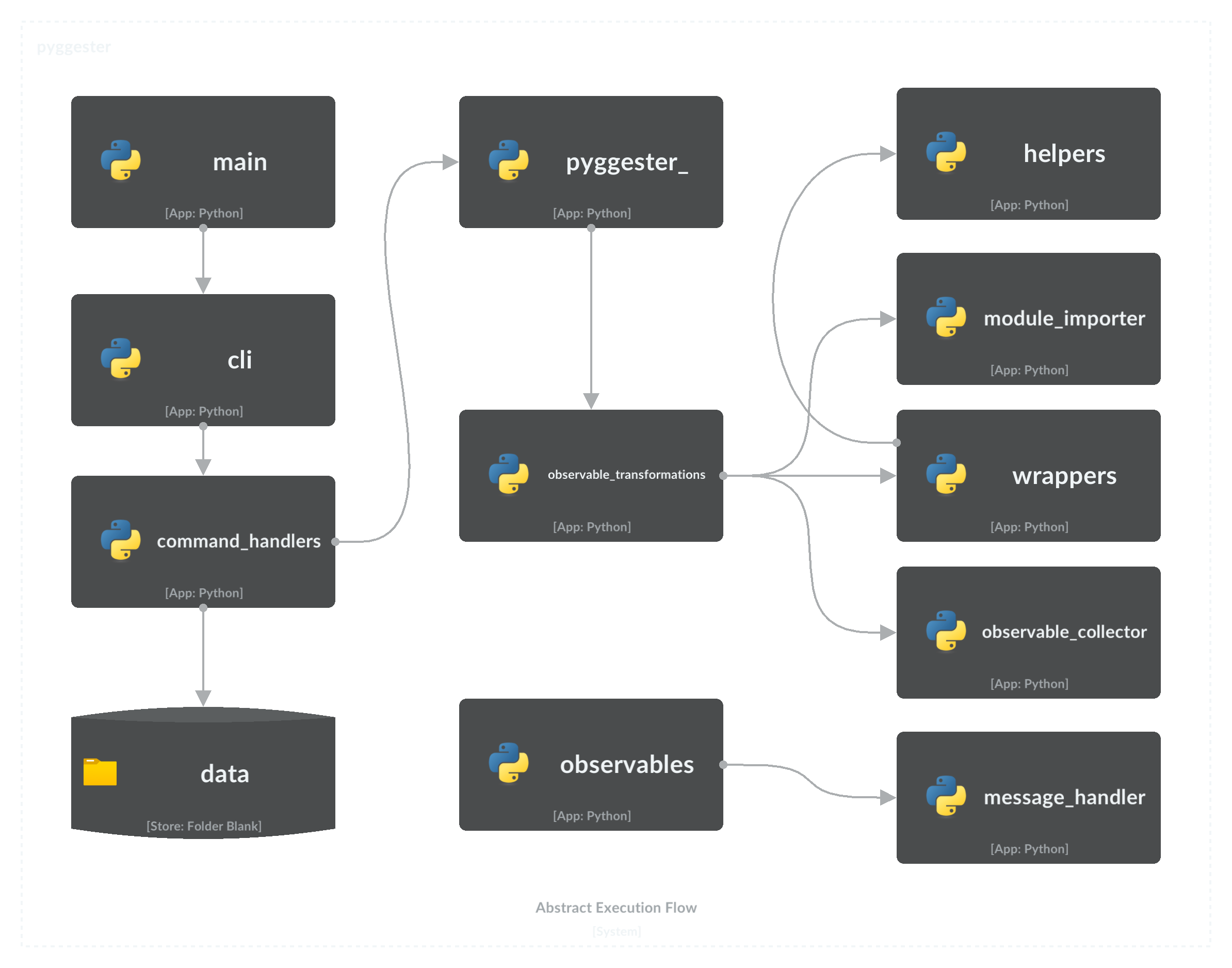
└── test_wrappers.py以下流程圖說明了Pyggester的關鍵組件,並提供了執行順序的全面概述。
為了為該項目做出貢獻,請參閱《詳細說明和最佳實踐》的綜合貢獻指南。
麻省理工學院許可證
版權(C)2023 Valdonvitijaa
特此免費授予獲得此軟件副本和相關文檔文件副本(“軟件”)的任何人,以無限制處理該軟件,包括無限制的使用權,複製,複製,修改,合併,合併,發布,分發,分發,分發,訂婚,和/或允許軟件的副本,並允許對以下條件提供以下條件,以下是以下條件。
上述版權通知和此許可通知應包含在軟件的所有副本或大量部分中。
該軟件是“原樣”提供的,沒有任何形式的明示或暗示保證,包括但不限於適銷性,特定目的的適用性和非侵權的保證。在任何情況下,作者或版權持有人都不應對任何索賠,損害賠償或其他責任責任,無論是在合同,侵權的訴訟中還是其他責任,是由軟件,使用或與軟件中的使用或其他交易有關的。







