pyggester
v1.0: Optimize Your Python Data Structures - Dynamic & Static Analysis Unleashed


Pyggester - (Python + Suggester) funciona como un analizador dinámico y estático. Su propósito principal radica en ofrecer sugerencias para mejorar la eficiencia del código de Python al abordar el uso subóptimo de las estructuras de datos.
Pyggester ofrece una interfaz CLI bastante decente para sus funcionalidades. El CLI está construido sobre Typer
Execution command :
pyggest output :
                                          _____
_____________  ________ _______ ______________  /_____________
___  __ _  / / /_  __ `/_  __ `/  _ _  ___/  __/  _ _  ___/
__  /_/ /  /_/ /_  /_/ /_  /_/ //  __/(__  )/ /_ /  __/  /
_  .___/___, / ___, / ___, / ___//____/ __/ ___//_/
/_/     /____/  /____/  /____/


Usage: pyggest [OPTIONS] COMMAND [ARGS]...

╭─ Options ────────────────────────────────────────────────────────────────────────────────────────────────────────────────────────────────────╮
│ --install-completion          Install completion for the current shell.                                                                      │
│ --show-completion             Show completion for the current shell, to copy it or customize the installation.                               │
│ --help                        Show this message and exit.                                                                                    │
╰──────────────────────────────────────────────────────────────────────────────────────────────────────────────────────────────────────────────╯
╭─ Commands ───────────────────────────────────────────────────────────────────────────────────────────────────────────────────────────────────╮
│ static                 Perform static analysis using PyggestStatic.                                                                          │
│ transform              Perform dynamic transformation using PyggesterDynamic.                                                                │
╰──────────────────────────────────────────────────────────────────────────────────────────────────────────────────────────────────────────────╯
La CLI de Pyggester presenta dos características distintas:
Análisis estático: esta característica examina de manera integral su código sin ejecutarlo, proporcionando ideas perspicaces sobre su estructura y potenciales mejoras.
Execution command
[! Nota] El subcomando 'estático' existe, pero no tiene funcionalidades implementadas, porque ya tenemos buenos analizadores estáticos (Pylint, Ruff, Flake8). En las iteraciones futuras, si identificamos sugerencias que se pueden establecer a través del análisis estático, las incorporaremos a esta característica.
pyggest staticTransformación dinámica/automática: esta característica agrega código adicional a sus archivos de Python para analizar sus estructuras de datos en tiempo de ejecución. Su código original permanece igual; No se cambiará. Se crea un nuevo archivo que es como el original pero con código adicional. Esto funciona tanto para archivos individuales como para directorios completos (estructuras completas del proyecto).
Execution command
pyggest transform[! Info] Pyggester ofrece documentación incorporada para un uso detallado
pyggest transform --help
pyggest static --help # NOT IMPLEMENTEDPuede instalar fácilmente la biblioteca de Python usando PIP. Abra su terminal y ejecute el siguiente comando:
pip install pyggesterClone El repositorio: abra su terminal y ejecute el siguiente comando para clonar el repositorio de GitHub a su máquina local:
git clone [email protected]:ValdonVitija/pyggester.gitNavegue al repositorio: cambie su directorio de trabajo al repositorio clonado:
cd pyggesterInstale Pyggester como Pacakge localmente:
[! IMPORTANTE] Considere hacer esto dentro de un entorno virtual (VENV) si es posible.
pip install .Supongamos que tiene un solo archivo de Python que desea analizar dinámicamente (análisis de tiempo de ejecución)
Antes de la transformación del código con Pyggester:
(venv) root@user: ~ /my_app > ls
app.py
Contenido de App.py:
 def sum_of_integers ( integer_list ):
    total = sum ( integer_list )
    return total

my_list = [ 1 , 2 , 3 , 4 , 5 ]
print ( sum_of_integers ( my_list ))Importante
Asegúrese de estar en un entorno virtual con Pyggester instalado antes de ir al siguiente paso.
(venv) root@devs04: ~ /my_app > pyggest transform app.py
╭──────────────────────────────────────────────────────────────────────────────────────────────────────────────────────────────────────────────╮
│ File transformed successfully !                                                                                                               │
╰──────────────────────────────────────────────────────────────────────────────────────────────────────────────────────────────────────────────╯(venv) root@devs04: ~ /my_app > ls
app.py app_transformed.pyContenido de app_transformed.py:
 from pyggester . observable_collector import OBSERVABLE_COLLECTOR
from pyggester . observables import ObservableNumpyArray , ObservableNamedTuple , ObservableSet , ObservablePandasDataFrame , ObservableList , ObservableDict , ObservableTuple


def sum_of_integers ( integer_list ):
    total = sum ( integer_list )
    return total


my_list = ObservableList ([ 1 , 2 , 3 , 4 , 5 ])
OBSERVABLE_COLLECTOR . append ( my_list )
print ( sum_of_integers ( my_list ))

for observable in OBSERVABLE_COLLECTOR :
    observable . run ()
Importante
Ahora tenemos un nuevo archivo, creado automáticamente, que refleja el archivo original. Este nuevo archivo incluye todo el contenido del original, más el código adicional para analizar su código durante el tiempo de ejecución. En lugar de ejecutar el original 'App.py', ahora debe ejecutar 'app_transformed.py'. Tenga la seguridad de que todo, desde 'App.py' se conserva en 'App_transformed.py'.
(venv) root@devs04: ~ /my_app > python3 app_transformed.py
15
╭────────────────────────────────────────────────────────────────────────────╮
│ 10 | Suggestions(/root/my_app/app_transformed.py):                         │
│     [ * ] Consider using an array.array instead of a list, for optimal       │
│ memory consumption                                                         │
│     [ * ] Consider using a set instead of a list, because of unique elements │
╰────────────────────────────────────────────────────────────────────────────╯Supongamos que tiene un proyecto de Python (directorio/repo) que desea analizar dinámicamente (análisis de tiempo de ejecución)
Antes de la transformación del código con Pyggester:
(venv) root@devs04: ~ /python_demo/app_dir > ls
__pycache__  app.py  temperature.py  weather.py
Contenido de App.py:
 import weather
import temperature


def main ():
    city = input ( 'Enter a city name: ' )
    weather_condition = weather . get_weather ( city )
    avg_temp = temperature . get_average_temperature ()
    print ( f'Weather in { city } : { weather_condition } ' )
    print ( f'Average temperature: { avg_temp } degrees Celsius' )


main ()
Contenido de temperatura.py:
 temperatures = list ([ 20 , 22 , 15 , 18 , 20 , 21 , 22 , 22 , 18 , 17 , 20 ])


def get_average_temperature ():
    return sum ( temperatures ) / len ( temperatures )
Contenido del clima.py:
 weather_conditions = [ 'Sunny' , 'Rainy' , 'Cloudy' , 'Windy' , 'Sunny' , 'Cloudy' ]

def get_weather ( city ):
return weather_conditions . pop ()Importante
Asegúrese de estar en un entorno virtual con Pyggester instalado antes de ir al siguiente paso.
(venv) root@devs04: ~ /python_demo > pyggest transform app_dir/
Enter the name of the main file: app.py
╭──────────────────────────────────────────────────────────────────────────╮
│ Directory transformed successfully !                                      │
╰──────────────────────────────────────────────────────────────────────────╯
Importante
Cuando se especifica un directorio o proyecto como argumento, Pyggester nos solicita que especifique el archivo principal de nuestro proyecto. Este archivo debe ser el punto de entrada de su proyecto, indicado por su nombre de archivo.
(venv) root@devs04: ~ /python_demo > ls
app_dir  app_dir_transformed
Contenido de APP_DIR_TRANSFORMED/:
( venv ) root @ devs04 : ~ / python_demo / app_dir_transformed > ls
app . py  temperature . py  weather . py
Contenido de App.py:
 from pyggester . observable_collector import OBSERVABLE_COLLECTOR
from pyggester . observables import ObservableNumpyArray , ObservableList , ObservablePandasDataFrame , ObservableNamedTuple , ObservableSet , ObservableDict , ObservableTuple
import weather
import temperature


def main ():
    city = input ( 'Enter a city name: ' )
    weather_condition = weather . get_weather ( city )
    avg_temp = temperature . get_average_temperature ()
    print ( f'Weather in { city } : { weather_condition } ' )
    print ( f'Average temperature: { avg_temp } degrees Celsius' )


main ()
for observable in OBSERVABLE_COLLECTOR :
    observable . run ()
Contenido de temperatura.py:
 from pyggester . observable_collector import OBSERVABLE_COLLECTOR
from pyggester . observables import ObservableNumpyArray , ObservableList , ObservablePandasDataFrame , ObservableNamedTuple , ObservableSet , ObservableDict , ObservableTuple
temperatures = ObservableList ( list ([ 20 , 22 , 15 , 18 , 20 , 21 , 22 , 22 , 18 , 17 ,
    20 ]))
OBSERVABLE_COLLECTOR . append ( temperatures )


def get_average_temperature ():
    return sum ( temperatures ) / len ( temperatures )
Contenido del clima.py:
 from pyggester . observable_collector import OBSERVABLE_COLLECTOR
from pyggester . observables import ObservableNumpyArray , ObservableList , ObservablePandasDataFrame , ObservableNamedTuple , ObservableSet , ObservableDict , ObservableTuple
weather_conditions = ObservableList ([ 'Sunny' , 'Rainy' , 'Cloudy' , 'Windy' ,
    'Sunny' , 'Cloudy' ])
OBSERVABLE_COLLECTOR . append ( weather_conditions )


def get_weather ( city ):
    return weather_conditions . pop ()
Importante
Ahora tenemos un nuevo directorio, creado automáticamente, que refleja el directorio original. Este nuevo directorio incluye todo el contenido del original, más el código adicional para analizar su código durante el tiempo de ejecución. En lugar de ejecutar el original 'App.py', ahora debe ejecutar 'App.py' que reside dentro de 'APP_DIR_TRANSFORMED/'. Tenga la seguridad de que todo, desde 'app_dir', se conserva en 'app_dir_transformed/'.
(venv) root@devs04: ~ /python_demo/app_dir_transformed > python3 app.py
Enter a city name: Pristina
Weather in Pristina: Cloudy
Average temperature: 19.545454545454547 degrees Celsius
╭─────────────────────────────────────────────────────────────────────────────────────╮
│ 3 | Suggestions(/root/python_demo/app_dir_transformed/temperature.py):              │
│     [ * ] Consider using an array.array instead of a list, for optimal memory         │
│ consumption                                                                         │
╰─────────────────────────────────────────────────────────────────────────────────────╯ .
├── LICENSE
├── README.md # main readme file. The one you are currently reading.
├── VERSION # version of pyggester
├── contributing.md
├── pyggester # directory containing the full source code of pyggester
│ ├── __init__.py
│ ├── cli.py # defines the typer cli structure(command & options)
│ ├── command_handlers.py # Handles subcommands and every option variation per subcommand.
│ ├── data # data/config files related to pyggester.
│ │ └── help_files # build in help files for the pyggester cli
│ │ ├── __init__.py
│ │ ├── transform_helper.md # detailed built-in documentation for the transform subcommand of pyggest
│ │ └── static_helper.md # detailed built-in documentation for the static subcommand of pyggest
│ ├── helpers.py # helper functions to be used by other modules
│ ├── main.py # The entry point of pyggest execution. Initializes the typer cli app and prints the ascii logo of pyggester
│ ├── message_handler.py # Manages how the collected messages will be printed to the user.
│ ├── module_importer.py # Contains the mechanism to automatically import observables
│ ├── observable_collector.py # Contains the list that will be used to collect all observables.
│ ├── observable_transformations.py # Contains the mechanism that will automatically add code that collects observables and glues together all ast modules
│ ├── observables.py # Contains all the defined observables(enhanced version of python collections)
│ ├── pyggester.py # The 'engine' of pyggester. This module glues everything together
│ ├── text_formatters.py # Contains text formatters, to beautify text in stdout.
│ └── wrappers.py # Contains the mechanism that wrap each observable.
├── pyggester_abstract_execution_flow.png
├── pyggester_logo.png
├── pytest.ini # pytest config file
├── requirements.txt # Every pyggester dependecy resides here
├── setup.py # Creates the pyggester pacakge and defines pyggest as the entry point command to execute pyggester
└── tests
├── __init__.py
├── test_cli.py
├── test_command_handlers.py
├── test_file.py
├── test_file_transformed.py
├── test_helpers.py
├── test_main.py
├── test_message_handler.py
├── test_module_importer.py
├── test_observable_transformations.py
├── test_observables.py
├── test_pyggester.py
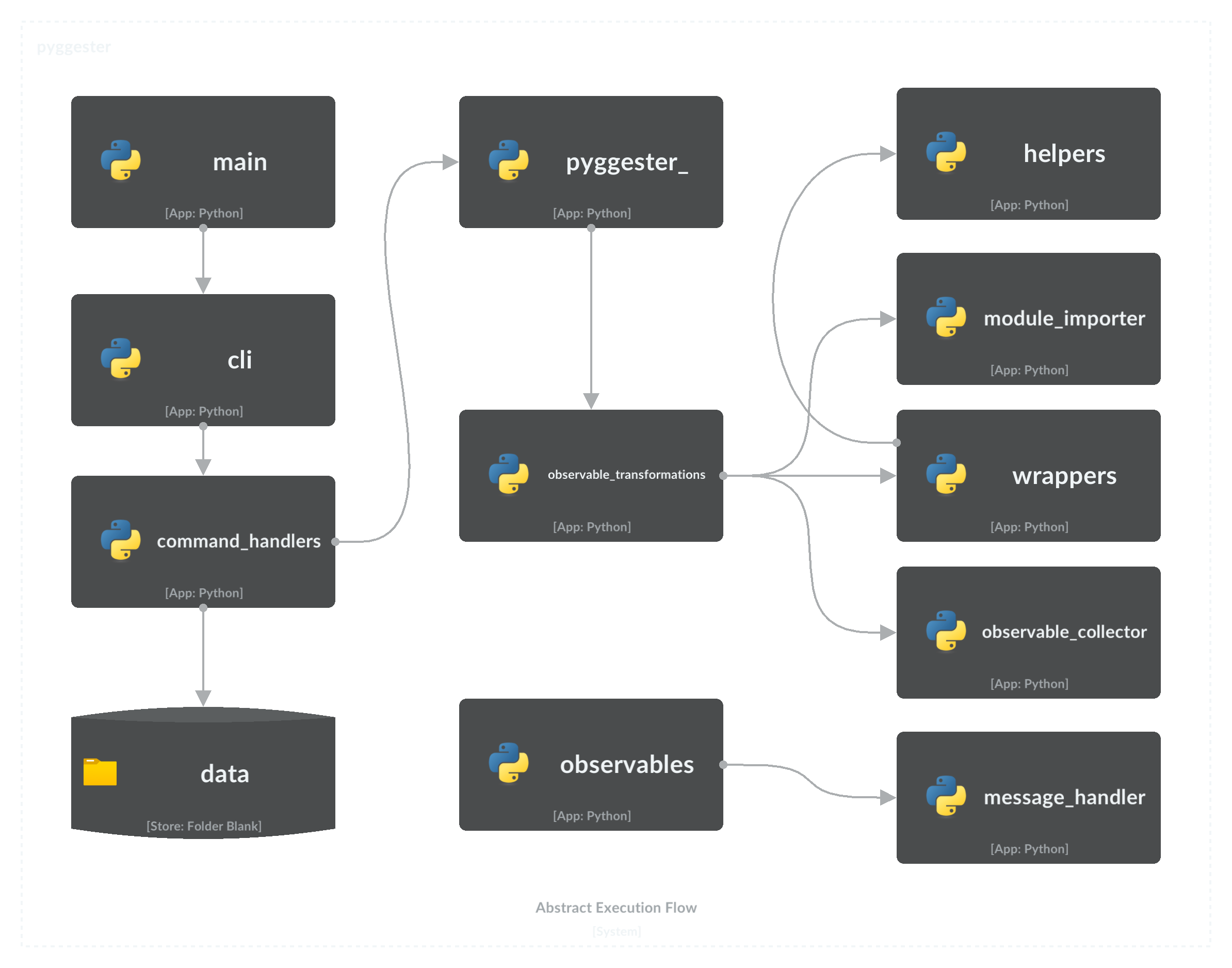
└── test_wrappers.pyEl siguiente diagrama de flujo ilustra los componentes clave de Pyggester y proporciona una descripción completa de la secuencia de ejecución.
Para contribuir a este proyecto, consulte la Guía de contribución integral para obtener instrucciones detalladas y mejores prácticas.
Licencia de MIT
Copyright (c) 2023 Valdonvitijaa
El permiso se otorga, de forma gratuita, a cualquier persona que obtenga una copia de este software y archivos de documentación asociados (el "software"), para tratar en el software sin restricción, incluidos los derechos de los derechos de usar, copiar, modificar, fusionar, publicar, distribuir, sublicense y/o vender copias del software, y para permitir que las personas a quienes se les proporciona el software para hacer, sujeto a las siguientes condiciones: las siguientes condiciones: las siguientes condiciones: las siguientes condiciones:
El aviso de derechos de autor anterior y este aviso de permiso se incluirán en todas las copias o porciones sustanciales del software.
El software se proporciona "tal cual", sin garantía de ningún tipo, expresa o implícita, incluidas, entre otros, las garantías de comerciabilidad, idoneidad para un propósito particular y no infracción. En ningún caso los autores o titulares de derechos de autor serán responsables de cualquier reclamo, daños u otra responsabilidad, ya sea en una acción de contrato, agravio o de otra manera, que surge, de o en relación con el software o el uso u otros tratos en el software.







