pyggester
v1.0: Optimize Your Python Data Structures - Dynamic & Static Analysis Unleashed


Pyggester-(Python + Esbouster)は、動的および静的アナライザーの両方として機能します。その主な目的は、データ構造の準最適な使用に対処することにより、Pythonコードの効率を高めるための提案を提供することにあります。
Pyggesterは、その機能のためにかなりまともなCLIインターフェイスを提供しています。 CLIはタイパーの上に構築されています
Execution command :
pyggest output :
                                          _____
_____________  ________ _______ ______________  /_____________
___  __ _  / / /_  __ `/_  __ `/  _ _  ___/  __/  _ _  ___/
__  /_/ /  /_/ /_  /_/ /_  /_/ //  __/(__  )/ /_ /  __/  /
_  .___/___, / ___, / ___, / ___//____/ __/ ___//_/
/_/     /____/  /____/  /____/


Usage: pyggest [OPTIONS] COMMAND [ARGS]...

╭─ Options ────────────────────────────────────────────────────────────────────────────────────────────────────────────────────────────────────╮
│ --install-completion          Install completion for the current shell.                                                                      │
│ --show-completion             Show completion for the current shell, to copy it or customize the installation.                               │
│ --help                        Show this message and exit.                                                                                    │
╰──────────────────────────────────────────────────────────────────────────────────────────────────────────────────────────────────────────────╯
╭─ Commands ───────────────────────────────────────────────────────────────────────────────────────────────────────────────────────────────────╮
│ static                 Perform static analysis using PyggestStatic.                                                                          │
│ transform              Perform dynamic transformation using PyggesterDynamic.                                                                │
╰──────────────────────────────────────────────────────────────────────────────────────────────────────────────────────────────────────────────╯
PyggesterCLIは、2つの異なる機能を示しています。
静的分析:この機能は、コードを実行せずに包括的に調べ、その構造と潜在的な改善に関する洞察に富んだ洞察を提供します。
Execution command
[!注]「静的」サブコマンドは存在しますが、既に優れた静的アナライザー(Pylint、Ruff、Flake8)があるため、機能は実装されていません。将来の反復では、静的分析を通じて確立できる提案を特定した場合、それらをこの機能に組み込みます。
pyggest static動的/自動変換:この機能は、Pythonファイルに追加のコードを追加して、実行時にデータ構造を分析します。元のコードは同じままです。変更されません。オリジナルと同じですが、追加のコードがある新しいファイルが作成されます。これは、単一ファイルとディレクトリ全体(完全なプロジェクト構造)の両方で機能します。
Execution command
pyggest transform[!info] Pyggesterは、詳細な使用法のための組み込みドキュメントを提供しています
pyggest transform --help
pyggest static --help # NOT IMPLEMENTEDPIPを使用してPythonライブラリを簡単にインストールできます。端末を開き、次のコマンドを実行します。
pip install pyggesterリポジトリのクローン:端末を開き、次のコマンドを実行してGitHubリポジトリをローカルマシンにクローンします。
git clone [email protected]:ValdonVitija/pyggester.gitリポジトリに移動します。作業ディレクトリをクローンリポジトリに変更します。
cd pyggesterPyggesterをPacakgeとしてローカルにインストールします。
[!重要]可能であれば、仮想環境(VENV)内でこれを行うことを検討してください。
pip install .動的に分析する単一のPythonファイルを持っているとしましょう(実行時間分析)
Pyggesterによるコード変換の前:
(venv) root@user: ~ /my_app > ls
app.py
app.pyのコンテンツ:
 def sum_of_integers ( integer_list ):
    total = sum ( integer_list )
    return total

my_list = [ 1 , 2 , 3 , 4 , 5 ]
print ( sum_of_integers ( my_list ))重要
次のステップに進む前に、Pyggesterがインストールされている仮想環境にいることを確認してください。
(venv) root@devs04: ~ /my_app > pyggest transform app.py
╭──────────────────────────────────────────────────────────────────────────────────────────────────────────────────────────────────────────────╮
│ File transformed successfully !                                                                                                               │
╰──────────────────────────────────────────────────────────────────────────────────────────────────────────────────────────────────────────────╯(venv) root@devs04: ~ /my_app > ls
app.py app_transformed.pyapp_transformed.pyのコンテンツ:
 from pyggester . observable_collector import OBSERVABLE_COLLECTOR
from pyggester . observables import ObservableNumpyArray , ObservableNamedTuple , ObservableSet , ObservablePandasDataFrame , ObservableList , ObservableDict , ObservableTuple


def sum_of_integers ( integer_list ):
    total = sum ( integer_list )
    return total


my_list = ObservableList ([ 1 , 2 , 3 , 4 , 5 ])
OBSERVABLE_COLLECTOR . append ( my_list )
print ( sum_of_integers ( my_list ))

for observable in OBSERVABLE_COLLECTOR :
    observable . run ()
重要
これで、元のファイルをミラーリングする新しいファイルが自動的に作成されました。この新しいファイルには、オリジナルのすべての内容に加えて、ランタイム中にコードを分析するための追加コードが含まれています。元の「app.py」を実行する代わりに、「app_transformed.py」を実行する必要があります。 「app.py」のすべてが「app_transformed.py」で保持されていることを安心させてください。
(venv) root@devs04: ~ /my_app > python3 app_transformed.py
15
╭────────────────────────────────────────────────────────────────────────────╮
│ 10 | Suggestions(/root/my_app/app_transformed.py):                         │
│     [ * ] Consider using an array.array instead of a list, for optimal       │
│ memory consumption                                                         │
│     [ * ] Consider using a set instead of a list, because of unique elements │
╰────────────────────────────────────────────────────────────────────────────╯動的に分析する(実行時間分析)を使用するPythonプロジェクト(ディレクトリ/レポ)があるとしましょう
Pyggesterによるコード変換の前:
(venv) root@devs04: ~ /python_demo/app_dir > ls
__pycache__  app.py  temperature.py  weather.py
app.pyのコンテンツ:
 import weather
import temperature


def main ():
    city = input ( 'Enter a city name: ' )
    weather_condition = weather . get_weather ( city )
    avg_temp = temperature . get_average_temperature ()
    print ( f'Weather in { city } : { weather_condition } ' )
    print ( f'Average temperature: { avg_temp } degrees Celsius' )


main ()
温度の内容:
 temperatures = list ([ 20 , 22 , 15 , 18 , 20 , 21 , 22 , 22 , 18 , 17 , 20 ])


def get_average_temperature ():
    return sum ( temperatures ) / len ( temperatures )
天気のコンテンツ:
 weather_conditions = [ 'Sunny' , 'Rainy' , 'Cloudy' , 'Windy' , 'Sunny' , 'Cloudy' ]

def get_weather ( city ):
return weather_conditions . pop ()重要
次のステップに進む前に、Pyggesterがインストールされている仮想環境にいることを確認してください。
(venv) root@devs04: ~ /python_demo > pyggest transform app_dir/
Enter the name of the main file: app.py
╭──────────────────────────────────────────────────────────────────────────╮
│ Directory transformed successfully !                                      │
╰──────────────────────────────────────────────────────────────────────────╯
重要
ディレクトリまたはプロジェクトが引数として指定されている場合、Pyggesterはプロジェクトのメインファイルを指定するように促します。このファイルは、ファイル名で示されるプロジェクトのエントリポイントである必要があります。
(venv) root@devs04: ~ /python_demo > ls
app_dir  app_dir_transformed
app_dir_transformedのコンテンツ/:
( venv ) root @ devs04 : ~ / python_demo / app_dir_transformed > ls
app . py  temperature . py  weather . py
app.pyのコンテンツ:
 from pyggester . observable_collector import OBSERVABLE_COLLECTOR
from pyggester . observables import ObservableNumpyArray , ObservableList , ObservablePandasDataFrame , ObservableNamedTuple , ObservableSet , ObservableDict , ObservableTuple
import weather
import temperature


def main ():
    city = input ( 'Enter a city name: ' )
    weather_condition = weather . get_weather ( city )
    avg_temp = temperature . get_average_temperature ()
    print ( f'Weather in { city } : { weather_condition } ' )
    print ( f'Average temperature: { avg_temp } degrees Celsius' )


main ()
for observable in OBSERVABLE_COLLECTOR :
    observable . run ()
温度の内容:
 from pyggester . observable_collector import OBSERVABLE_COLLECTOR
from pyggester . observables import ObservableNumpyArray , ObservableList , ObservablePandasDataFrame , ObservableNamedTuple , ObservableSet , ObservableDict , ObservableTuple
temperatures = ObservableList ( list ([ 20 , 22 , 15 , 18 , 20 , 21 , 22 , 22 , 18 , 17 ,
    20 ]))
OBSERVABLE_COLLECTOR . append ( temperatures )


def get_average_temperature ():
    return sum ( temperatures ) / len ( temperatures )
天気のコンテンツ:
 from pyggester . observable_collector import OBSERVABLE_COLLECTOR
from pyggester . observables import ObservableNumpyArray , ObservableList , ObservablePandasDataFrame , ObservableNamedTuple , ObservableSet , ObservableDict , ObservableTuple
weather_conditions = ObservableList ([ 'Sunny' , 'Rainy' , 'Cloudy' , 'Windy' ,
    'Sunny' , 'Cloudy' ])
OBSERVABLE_COLLECTOR . append ( weather_conditions )


def get_weather ( city ):
    return weather_conditions . pop ()
重要
これで、元のディレクトリを反映する新しいディレクトリが自動的に作成されました。この新しいディレクトリには、オリジナルのすべてのコンテンツに加えて、ランタイム中にコードを分析するための追加コードが含まれています。元の「app.py」を実行する代わりに、「app_dir_transformed/」内にある「app.py」を実行する必要があります。 「app_dir」のすべてが「app_dir_transformed/」で保持されます。
(venv) root@devs04: ~ /python_demo/app_dir_transformed > python3 app.py
Enter a city name: Pristina
Weather in Pristina: Cloudy
Average temperature: 19.545454545454547 degrees Celsius
╭─────────────────────────────────────────────────────────────────────────────────────╮
│ 3 | Suggestions(/root/python_demo/app_dir_transformed/temperature.py):              │
│     [ * ] Consider using an array.array instead of a list, for optimal memory         │
│ consumption                                                                         │
╰─────────────────────────────────────────────────────────────────────────────────────╯ .
├── LICENSE
├── README.md # main readme file. The one you are currently reading.
├── VERSION # version of pyggester
├── contributing.md
├── pyggester # directory containing the full source code of pyggester
│ ├── __init__.py
│ ├── cli.py # defines the typer cli structure(command & options)
│ ├── command_handlers.py # Handles subcommands and every option variation per subcommand.
│ ├── data # data/config files related to pyggester.
│ │ └── help_files # build in help files for the pyggester cli
│ │ ├── __init__.py
│ │ ├── transform_helper.md # detailed built-in documentation for the transform subcommand of pyggest
│ │ └── static_helper.md # detailed built-in documentation for the static subcommand of pyggest
│ ├── helpers.py # helper functions to be used by other modules
│ ├── main.py # The entry point of pyggest execution. Initializes the typer cli app and prints the ascii logo of pyggester
│ ├── message_handler.py # Manages how the collected messages will be printed to the user.
│ ├── module_importer.py # Contains the mechanism to automatically import observables
│ ├── observable_collector.py # Contains the list that will be used to collect all observables.
│ ├── observable_transformations.py # Contains the mechanism that will automatically add code that collects observables and glues together all ast modules
│ ├── observables.py # Contains all the defined observables(enhanced version of python collections)
│ ├── pyggester.py # The 'engine' of pyggester. This module glues everything together
│ ├── text_formatters.py # Contains text formatters, to beautify text in stdout.
│ └── wrappers.py # Contains the mechanism that wrap each observable.
├── pyggester_abstract_execution_flow.png
├── pyggester_logo.png
├── pytest.ini # pytest config file
├── requirements.txt # Every pyggester dependecy resides here
├── setup.py # Creates the pyggester pacakge and defines pyggest as the entry point command to execute pyggester
└── tests
├── __init__.py
├── test_cli.py
├── test_command_handlers.py
├── test_file.py
├── test_file_transformed.py
├── test_helpers.py
├── test_main.py
├── test_message_handler.py
├── test_module_importer.py
├── test_observable_transformations.py
├── test_observables.py
├── test_pyggester.py
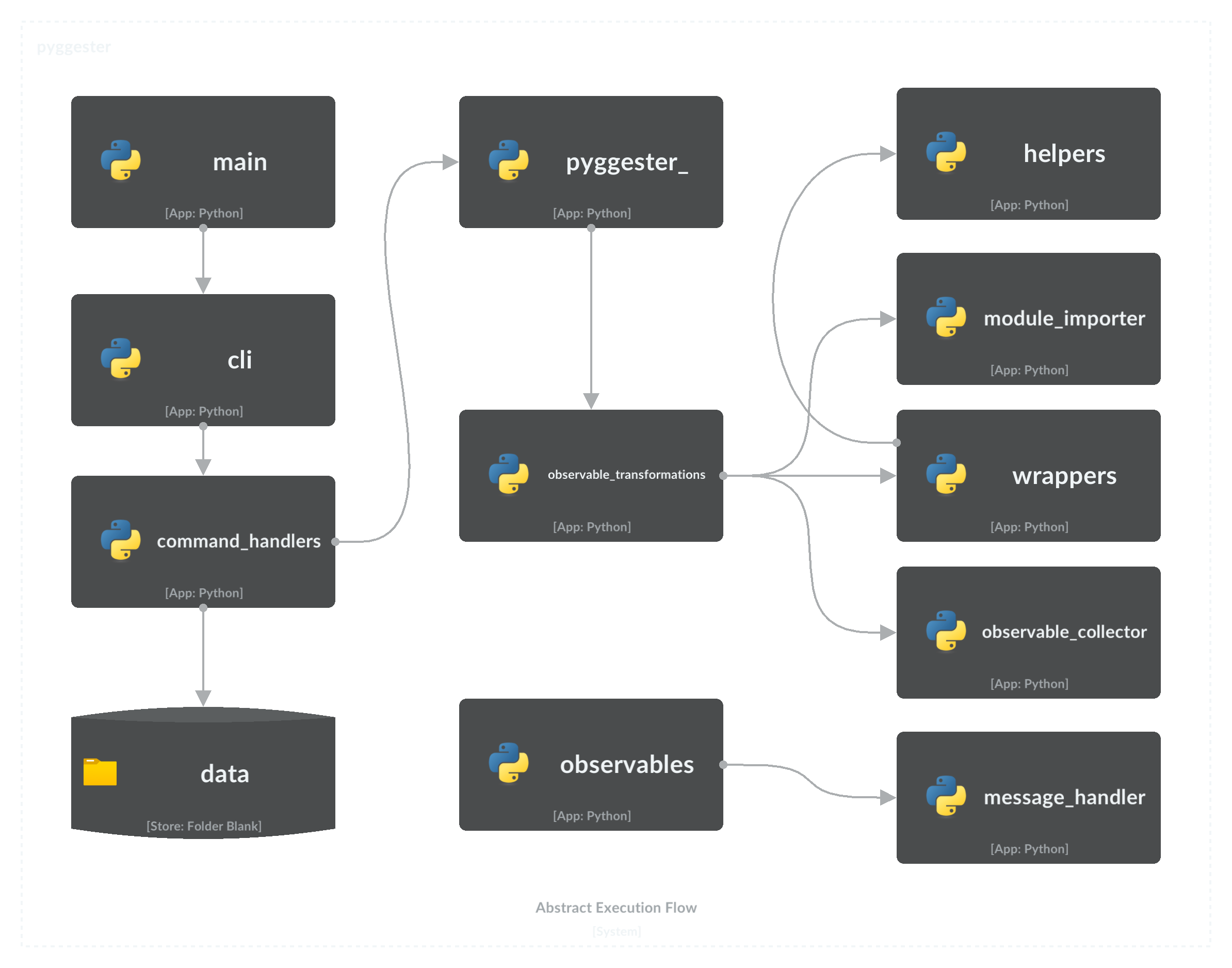
└── test_wrappers.py次のフロー図は、Pyggesterの重要なコンポーネントを示し、実行シーケンスの包括的な概要を示します。
このプロジェクトに貢献するには、詳細な指示とベストプラクティスについては、包括的な貢献ガイドを参照してください。
MITライセンス
著作権(c)2023 valdonvitijaa
このソフトウェアと関連するドキュメントファイル(「ソフトウェア」)のコピーを入手して、制限なしにソフトウェアを扱うために、このソフトウェアを制限する権利を含め、ソフトウェアのコピーをコピー、変更、公開、配布、販売する、ソフトウェアのコピーを許可する人を許可する人を許可することを含めて、許可が無料で許可されます。
上記の著作権通知とこの許可通知は、ソフトウェアのすべてのコピーまたはかなりの部分に含まれるものとします。
このソフトウェアは、商品性、特定の目的への適合性、および非侵害の保証を含むがこれらに限定されない、明示的または黙示的なものを保証することなく、「現状のまま」提供されます。いかなる場合でも、著者または著作権所有者は、契約、不法行為、またはその他の訴訟、ソフトウェアまたはソフトウェアの使用またはその他の取引に関連する、またはその他の契約、またはその他の請求、またはその他の責任について責任を負いません。







