pyggester
v1.0: Optimize Your Python Data Structures - Dynamic & Static Analysis Unleashed


Pyggester - (Python + Suggester) berfungsi sebagai penganalisa dinamis dan statis. Tujuan utamanya terletak pada penawaran saran untuk meningkatkan efisiensi kode Python dengan mengatasi penggunaan suboptimal struktur data.
Pyggester menawarkan antarmuka CLI yang cukup layak untuk fungsinya. CLI dibangun di atas Typer
Execution command :
pyggest output :
                                          _____
_____________  ________ _______ ______________  /_____________
___  __ _  / / /_  __ `/_  __ `/  _ _  ___/  __/  _ _  ___/
__  /_/ /  /_/ /_  /_/ /_  /_/ //  __/(__  )/ /_ /  __/  /
_  .___/___, / ___, / ___, / ___//____/ __/ ___//_/
/_/     /____/  /____/  /____/


Usage: pyggest [OPTIONS] COMMAND [ARGS]...

╭─ Options ────────────────────────────────────────────────────────────────────────────────────────────────────────────────────────────────────╮
│ --install-completion          Install completion for the current shell.                                                                      │
│ --show-completion             Show completion for the current shell, to copy it or customize the installation.                               │
│ --help                        Show this message and exit.                                                                                    │
╰──────────────────────────────────────────────────────────────────────────────────────────────────────────────────────────────────────────────╯
╭─ Commands ───────────────────────────────────────────────────────────────────────────────────────────────────────────────────────────────────╮
│ static                 Perform static analysis using PyggestStatic.                                                                          │
│ transform              Perform dynamic transformation using PyggesterDynamic.                                                                │
╰──────────────────────────────────────────────────────────────────────────────────────────────────────────────────────────────────────────────╯
Pyggester CLI menyajikan dua fitur berbeda:
Analisis Statis: Fitur ini secara komprehensif memeriksa kode Anda tanpa menjalankannya, memberikan wawasan wawasan tentang struktur dan potensi perbaikannya.
Execution command
[! Catatan] Sub -perintah 'statis' ada, tetapi tidak memiliki fungsionalitas yang diterapkan, karena kami sudah memiliki analisis statis yang baik (Pylint, Ruff, Flake8). Dalam iterasi di masa depan, jika kami mengidentifikasi saran yang dapat ditetapkan melalui analisis statis, kami akan memasukkannya ke dalam fitur ini.
pyggest staticTransformasi Dinamis/Otomatis: Fitur ini menambahkan kode tambahan ke file Python Anda untuk menganalisis struktur data Anda saat runtime. Kode asli Anda tetap sama; itu tidak akan diubah. File baru dibuat yang seperti aslinya tetapi dengan kode tambahan. Ini berfungsi untuk file tunggal dan seluruh direktori (struktur proyek lengkap).
Execution command
pyggest transform[! Info] Pyggester menawarkan dokumentasi bawaan untuk penggunaan terperinci
pyggest transform --help
pyggest static --help # NOT IMPLEMENTEDAnda dapat dengan mudah menginstal pustaka Python menggunakan PIP. Buka terminal Anda dan jalankan perintah berikut:
pip install pyggesterKlon The Repository: Buka Terminal Anda dan Jalankan Perintah berikut untuk mengkloning repositori GitHub ke mesin lokal Anda:
git clone [email protected]:ValdonVitija/pyggester.gitArahkan ke repositori: Ubah direktori kerja Anda ke repositori yang dikloning:
cd pyggesterInstal Pyggester sebagai Pacakge secara lokal:
[! Penting] Pertimbangkan untuk melakukan ini dalam lingkungan virtual (VENV) jika memungkinkan.
pip install .Misalkan Anda memiliki file python tunggal yang ingin Anda analisis secara dinamis (analisis run-time)
Sebelum transformasi kode dengan Pyggester:
(venv) root@user: ~ /my_app > ls
app.py
Konten app.py:
 def sum_of_integers ( integer_list ):
    total = sum ( integer_list )
    return total

my_list = [ 1 , 2 , 3 , 4 , 5 ]
print ( sum_of_integers ( my_list ))Penting
Pastikan Anda berada di lingkungan virtual dengan Pyggester diinstal sebelum pergi ke langkah berikutnya.
(venv) root@devs04: ~ /my_app > pyggest transform app.py
╭──────────────────────────────────────────────────────────────────────────────────────────────────────────────────────────────────────────────╮
│ File transformed successfully !                                                                                                               │
╰──────────────────────────────────────────────────────────────────────────────────────────────────────────────────────────────────────────────╯(venv) root@devs04: ~ /my_app > ls
app.py app_transformed.pyKonten app_transformed.py:
 from pyggester . observable_collector import OBSERVABLE_COLLECTOR
from pyggester . observables import ObservableNumpyArray , ObservableNamedTuple , ObservableSet , ObservablePandasDataFrame , ObservableList , ObservableDict , ObservableTuple


def sum_of_integers ( integer_list ):
    total = sum ( integer_list )
    return total


my_list = ObservableList ([ 1 , 2 , 3 , 4 , 5 ])
OBSERVABLE_COLLECTOR . append ( my_list )
print ( sum_of_integers ( my_list ))

for observable in OBSERVABLE_COLLECTOR :
    observable . run ()
Penting
Kami sekarang memiliki file baru, dibuat secara otomatis, yang mencerminkan file asli. File baru ini mencakup semua konten dari yang asli, ditambah kode tambahan untuk menganalisis kode Anda selama runtime. Alih -alih menjalankan 'app.py' asli, Anda sekarang harus menjalankan 'app_transformed.py'. Yakinlah, semuanya dari 'app.py' dipertahankan di 'app_transformed.py'.
(venv) root@devs04: ~ /my_app > python3 app_transformed.py
15
╭────────────────────────────────────────────────────────────────────────────╮
│ 10 | Suggestions(/root/my_app/app_transformed.py):                         │
│     [ * ] Consider using an array.array instead of a list, for optimal       │
│ memory consumption                                                         │
│     [ * ] Consider using a set instead of a list, because of unique elements │
╰────────────────────────────────────────────────────────────────────────────╯Misalkan Anda memiliki proyek Python (direktori/repo) yang ingin Anda analisis secara dinamis (analisis run-time)
Sebelum transformasi kode dengan Pyggester:
(venv) root@devs04: ~ /python_demo/app_dir > ls
__pycache__  app.py  temperature.py  weather.py
Konten app.py:
 import weather
import temperature


def main ():
    city = input ( 'Enter a city name: ' )
    weather_condition = weather . get_weather ( city )
    avg_temp = temperature . get_average_temperature ()
    print ( f'Weather in { city } : { weather_condition } ' )
    print ( f'Average temperature: { avg_temp } degrees Celsius' )


main ()
Kandungan suhu.py:
 temperatures = list ([ 20 , 22 , 15 , 18 , 20 , 21 , 22 , 22 , 18 , 17 , 20 ])


def get_average_temperature ():
    return sum ( temperatures ) / len ( temperatures )
Konten cuaca.py:
 weather_conditions = [ 'Sunny' , 'Rainy' , 'Cloudy' , 'Windy' , 'Sunny' , 'Cloudy' ]

def get_weather ( city ):
return weather_conditions . pop ()Penting
Pastikan Anda berada di lingkungan virtual dengan Pyggester diinstal sebelum pergi ke langkah berikutnya.
(venv) root@devs04: ~ /python_demo > pyggest transform app_dir/
Enter the name of the main file: app.py
╭──────────────────────────────────────────────────────────────────────────╮
│ Directory transformed successfully !                                      │
╰──────────────────────────────────────────────────────────────────────────╯
Penting
Ketika direktori atau proyek ditentukan sebagai argumen, Pyggester meminta kami untuk menentukan file utama proyek kami. File ini harus menjadi titik masuk dari proyek Anda, ditunjukkan oleh nama file -nya.
(venv) root@devs04: ~ /python_demo > ls
app_dir  app_dir_transformed
Konten app_dir_transformed/:
( venv ) root @ devs04 : ~ / python_demo / app_dir_transformed > ls
app . py  temperature . py  weather . py
Konten app.py:
 from pyggester . observable_collector import OBSERVABLE_COLLECTOR
from pyggester . observables import ObservableNumpyArray , ObservableList , ObservablePandasDataFrame , ObservableNamedTuple , ObservableSet , ObservableDict , ObservableTuple
import weather
import temperature


def main ():
    city = input ( 'Enter a city name: ' )
    weather_condition = weather . get_weather ( city )
    avg_temp = temperature . get_average_temperature ()
    print ( f'Weather in { city } : { weather_condition } ' )
    print ( f'Average temperature: { avg_temp } degrees Celsius' )


main ()
for observable in OBSERVABLE_COLLECTOR :
    observable . run ()
Kandungan suhu.py:
 from pyggester . observable_collector import OBSERVABLE_COLLECTOR
from pyggester . observables import ObservableNumpyArray , ObservableList , ObservablePandasDataFrame , ObservableNamedTuple , ObservableSet , ObservableDict , ObservableTuple
temperatures = ObservableList ( list ([ 20 , 22 , 15 , 18 , 20 , 21 , 22 , 22 , 18 , 17 ,
    20 ]))
OBSERVABLE_COLLECTOR . append ( temperatures )


def get_average_temperature ():
    return sum ( temperatures ) / len ( temperatures )
Konten cuaca.py:
 from pyggester . observable_collector import OBSERVABLE_COLLECTOR
from pyggester . observables import ObservableNumpyArray , ObservableList , ObservablePandasDataFrame , ObservableNamedTuple , ObservableSet , ObservableDict , ObservableTuple
weather_conditions = ObservableList ([ 'Sunny' , 'Rainy' , 'Cloudy' , 'Windy' ,
    'Sunny' , 'Cloudy' ])
OBSERVABLE_COLLECTOR . append ( weather_conditions )


def get_weather ( city ):
    return weather_conditions . pop ()
Penting
Kami sekarang memiliki direktori baru, dibuat secara otomatis, yang mencerminkan direktori asli. Direktori baru ini mencakup semua konten dari yang asli, ditambah kode tambahan untuk menganalisis kode Anda selama runtime. Alih -alih menjalankan 'app.py' asli, Anda sekarang harus menjalankan 'app.py' yang berada di dalam 'app_dir_transformed/'. Yakinlah, semuanya dari 'app_dir' dipertahankan di 'app_dir_transformed/'.
(venv) root@devs04: ~ /python_demo/app_dir_transformed > python3 app.py
Enter a city name: Pristina
Weather in Pristina: Cloudy
Average temperature: 19.545454545454547 degrees Celsius
╭─────────────────────────────────────────────────────────────────────────────────────╮
│ 3 | Suggestions(/root/python_demo/app_dir_transformed/temperature.py):              │
│     [ * ] Consider using an array.array instead of a list, for optimal memory         │
│ consumption                                                                         │
╰─────────────────────────────────────────────────────────────────────────────────────╯ .
├── LICENSE
├── README.md # main readme file. The one you are currently reading.
├── VERSION # version of pyggester
├── contributing.md
├── pyggester # directory containing the full source code of pyggester
│ ├── __init__.py
│ ├── cli.py # defines the typer cli structure(command & options)
│ ├── command_handlers.py # Handles subcommands and every option variation per subcommand.
│ ├── data # data/config files related to pyggester.
│ │ └── help_files # build in help files for the pyggester cli
│ │ ├── __init__.py
│ │ ├── transform_helper.md # detailed built-in documentation for the transform subcommand of pyggest
│ │ └── static_helper.md # detailed built-in documentation for the static subcommand of pyggest
│ ├── helpers.py # helper functions to be used by other modules
│ ├── main.py # The entry point of pyggest execution. Initializes the typer cli app and prints the ascii logo of pyggester
│ ├── message_handler.py # Manages how the collected messages will be printed to the user.
│ ├── module_importer.py # Contains the mechanism to automatically import observables
│ ├── observable_collector.py # Contains the list that will be used to collect all observables.
│ ├── observable_transformations.py # Contains the mechanism that will automatically add code that collects observables and glues together all ast modules
│ ├── observables.py # Contains all the defined observables(enhanced version of python collections)
│ ├── pyggester.py # The 'engine' of pyggester. This module glues everything together
│ ├── text_formatters.py # Contains text formatters, to beautify text in stdout.
│ └── wrappers.py # Contains the mechanism that wrap each observable.
├── pyggester_abstract_execution_flow.png
├── pyggester_logo.png
├── pytest.ini # pytest config file
├── requirements.txt # Every pyggester dependecy resides here
├── setup.py # Creates the pyggester pacakge and defines pyggest as the entry point command to execute pyggester
└── tests
├── __init__.py
├── test_cli.py
├── test_command_handlers.py
├── test_file.py
├── test_file_transformed.py
├── test_helpers.py
├── test_main.py
├── test_message_handler.py
├── test_module_importer.py
├── test_observable_transformations.py
├── test_observables.py
├── test_pyggester.py
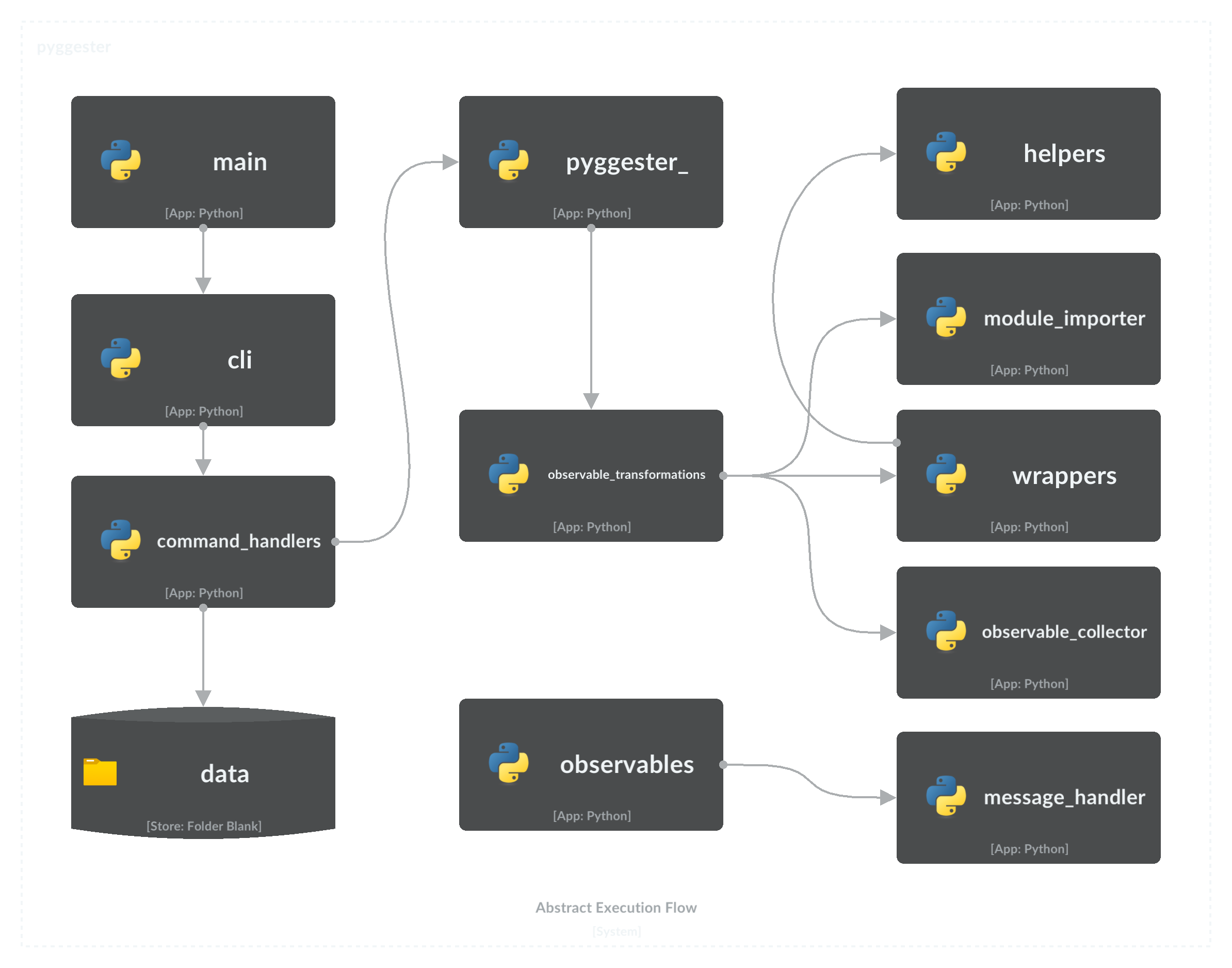
└── test_wrappers.pyDiagram aliran berikut menggambarkan komponen kunci dari Pyggester dan memberikan gambaran komprehensif dari urutan eksekusi.
Untuk berkontribusi pada proyek ini, silakan merujuk ke Panduan Kontribusi Komprehensif untuk instruksi terperinci dan praktik terbaik.
Lisensi MIT
Hak Cipta (C) 2023 Valdonvitijaa
Permission is hereby granted, free of charge, to any person obtaining a copy of this software and associated documentation files (the "Software"), to deal in the Software without restriction, including without limitation the rights to use, copy, modify, merge, publish, distribute, sublicense, and/or sell copies of the Software, and to permit persons to whom the Software is furnished to do so, subject to the following conditions:
Pemberitahuan hak cipta di atas dan pemberitahuan izin ini harus dimasukkan dalam semua salinan atau bagian substansial dari perangkat lunak.
Perangkat lunak ini disediakan "sebagaimana adanya", tanpa jaminan apa pun, tersurat maupun tersirat, termasuk tetapi tidak terbatas pada jaminan dapat diperjualbelikan, kebugaran untuk tujuan tertentu dan nonpringement. Dalam hal apa pun penulis atau pemegang hak cipta tidak akan bertanggung jawab atas klaim, kerusakan atau tanggung jawab lainnya, baik dalam tindakan kontrak, gugatan atau sebaliknya, timbul dari, di luar atau sehubungan dengan perangkat lunak atau penggunaan atau transaksi lain dalam perangkat lunak.







