You Dont Need GUI
1.0.0

中文版請看這裡
圖形用戶界面對計算機用戶非常友好。他們是為了對命令線接口(CLI)的陡峭學習曲線的反應引入。
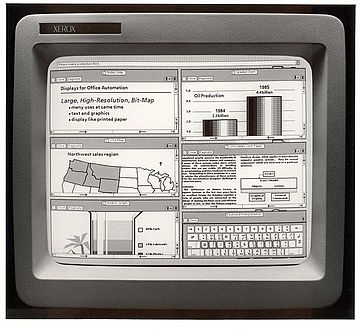
但是,它們通常需要更多的資源,不太強大,難以通過腳本自動化。
作為計算機專家,我們希望提高效率並更好地做好工作。我們知道,命令單詞可能無法輕易發現或助記符,因此我們嘗試列出一些您可能會在GUI中執行的常見任務。
停止拖動文件,或CMD/CTRL + C,CMD/CTRL + VA文件?
複製readme.txt到documents目錄
$ cp readme.txt documents/轉到目錄?
停止右鍵單擊並複製文件?
$ cp readme.txt readme.bak.txt更高級:
$ cp readme{,.bak}.txt
# Note: learn how the {} works with touch foo{1,2,3}.txt and see what happens.
轉到目錄?
停止拖放目錄,或CMD/CTRL + C,CMD/CTRL + VA目錄?
將myMusic目錄複製到myMedia目錄
$ cp -a myMusic myMedia/
# or
$ cp -a myMusic/ myMedia/myMusic/
轉到目錄?
停止右鍵單擊並重複目錄?
$ cp -a myMusic/ myMedia/
# or if `myMedia` folder doesn't exist
$ cp -a myMusic myMedia/
轉到目錄?
停止拖放文件,還是CMD/CTRL + X,CMD/CTRL + VA文件?
$ mv readme.txt documents/出於這個原因,移動文件時始終使用尾隨斜線。
轉到目錄?
停止右鍵單擊並重命名文件?
$ mv readme.txt README.md轉到目錄?
停止拖放目錄,或CMD/CTRL + X,CMD/CTRL + VA目錄?
$ mv myMedia myMusic/
# or
$ mv myMedia/ myMusic/myMedia
轉到目錄?
停止右鍵單擊並重命名目錄?
$ mv myMedia/ myMusic/轉到目錄?
停止拖放到合併目錄?
$ rsync -a /images/ /images2/ # note: may over-write files with the same name, so be careful!轉到目錄?
停止右鍵單擊並創建一個新文件?
$ touch ' new file '    # updates the file's access and modification timestamp if it already exists
# or
$ > ' new file '        # note: erases the content if it already exists
轉到目錄?
停止右鍵單擊並創建一個新目錄?
$ mkdir ' untitled folder '
# or
$ mkdir -p ' path/may/not/exist/untitled folder '
轉到目錄?
停止右鍵單擊並顯示文件/目錄信息?
$ du -sh node_modules/轉到目錄?
停止右鍵單擊並顯示文件/目錄信息?
$ stat -x readme.md   # on macOS
$ stat readme.md      # on Linux
轉到目錄?
停止雙擊文件?
$ xdg-open file   # on Linux
$ open file       # on MacOS
$ start file      # on Windows
轉到目錄?
停止右鍵單擊並打開?
$ open -a appName file轉到目錄?
停止右鍵單擊並壓縮目錄?
$ zip -r archive_name.zip folder_to_compress轉到目錄?
停止右鍵單擊並取消壓縮目錄?
$ unzip archive_name.zip轉到目錄?
停止右鍵單擊並取消壓縮目錄?
$ unar archive_name.zip
$ unar archive_name.7z
$ unar archive_name.rar
$ unar archive_name.ISO
$ unar archive_name.tar.gz
轉到目錄?
停止使用Winrar ?
$ zipinfo archive_name.zip
# or
$ unzip -l archive_name.zip
轉到目錄?
停止使用Winrar ?
$ lsar -l archive_name.zip
$ lsar -l archive_name.7z
$ lsar -l archive_name.ISO
$ lsar -l archive_name.rar
$ lsar -l archive_name.tar.gz
轉到目錄?
停止右鍵單擊並永久刪除文件?
$ rm my_useless_file重要的是: rm命令永久刪除my_useless_file ,這等同於移動my_useless_file以回收垃圾箱並擊中空回收箱。
轉到目錄?
停止右鍵單擊並永久刪除目錄?
$ rm -r my_useless_folder轉到目錄?
$ find . -name " *.bak " -type f -delete重要:運行find . -name "*.bak" -type f首先查看您將刪除哪些文件。
轉到目錄?
停止打開查找器或文件資源管理器?
$ ls my_folder        # Simple
$ ls -la my_folder    # -l: show in list format. -a: show all files, including hidden. -la combines those options.
$ ls -alrth my_folder # -r: reverse output. -t: sort by time (modified). -h: output human-readable sizes.
轉到目錄?
停止打開查找器或文件資源管理器?
$ tree                                                        # on Linux
$ find . -print | sed -e ' s;[^/]*/;|____;g;s;____|; |;g '      # on MacOS
# Note: install homebrew (https://brew.sh) to be able to use (some) Linux utilities such as tree.
# brew install tree
轉到目錄?
停止使用您的文件資源管理器查找文件?
查找5天以上修改的所有修改的文件
$ find my_folder -mtime +5轉到目錄?
停止查找日曆小部件本月的樣子?
顯示文本日曆
$ cal顯示選定的月和年曆
$ cal 11 2018轉到目錄?
停止使用WebApp來計算未來的日期?
今天的約會是什麼?
$ date +%m/%d/%Y從現在起一個星期呢?
$ date -d " +7 days "                                           # on Linux
$ date -j -v+7d                                               # on MacOS
轉到目錄?
停止使用計算器小部件?
$ bc -l轉到目錄?
停止Ctrl + Alt +刪除並選擇要殺死的程序?
$ killall -9 program_name轉到目錄?
停止打開瀏覽器?
$ curl -i umair.surge.sh
# curl's -i (--include) option includes HTTP response headers in its output.
轉到目錄?
停止雙擊文件?
$ cat apps/settings.py
# if the file is too big to fit on one page, you can use a 'pager' (less) which shows you one page at a time.
$ less apps/settings.py
轉到目錄?
在文件中停止CMD/CTRL + F ?
$ grep -i " Query " file.txt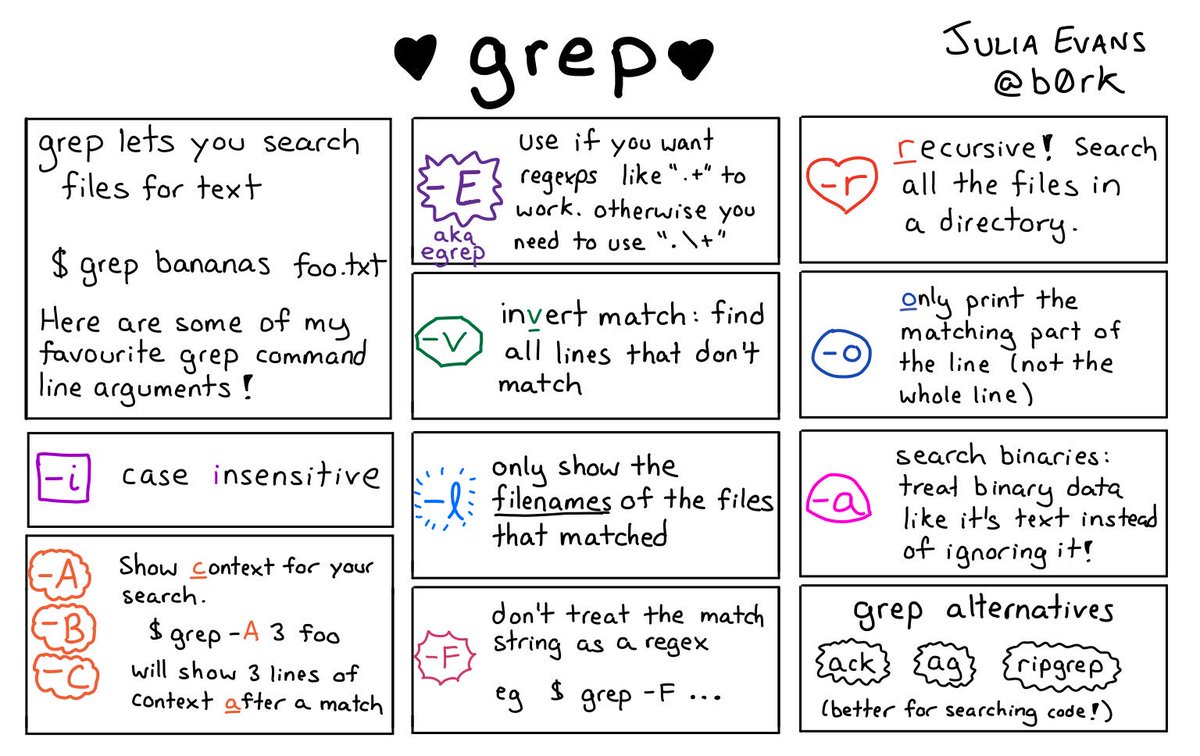
轉到目錄?
在目錄中停止CMD/CTRL + F ?
$ ripgrep -i " Query "
# brew install ripgrep
轉到目錄?
停止使用預覽?
$ imgcat image.png
# Note: requires iTerm2 terminal.
轉到目錄?
停止右鍵單擊磁盤圖標或打開磁盤實用程序?
$ df -h轉到目錄?
停止打開您的活動監視器還是任務管理器?
$ top如果您想要更多細節:
$ htop轉到目錄?
$ glances
# brew install glances
轉到目錄?
當您修補通過SSH訪問並且沒有GUI的服務器時,這可能很有用。
 # poweroff
$ sudo shutdown -h now
# reboot
$ sudo shutdown -r now
轉到目錄?
$ df轉到目錄?
$ sudo umount /dev/sdb1轉到目錄?
 # FAT32
$ sudo mkfs.vfat /dev/sdb1
# NTFS
$ sudo mkfs.ntfs /dev/sdb1
# exFAT
$ sudo mkfs.exfat /dev/sdb1
轉到目錄?
$ sudo fsck /dev/sdb1轉到目錄?
停止一個人單擊文件?
$ for FILE in * ; do echo $FILE ; done轉到目錄?
停止使用網絡實用程序
$ nc -vz www.google.com 443
$ nc -vz 1.1.1.1 53
轉到目錄?
停止使用網絡實用程序
$ dig www.google.com轉到目錄?
停止使用網絡實用程序和域註冊提供商的網站
$ whois www.google.com轉到目錄?
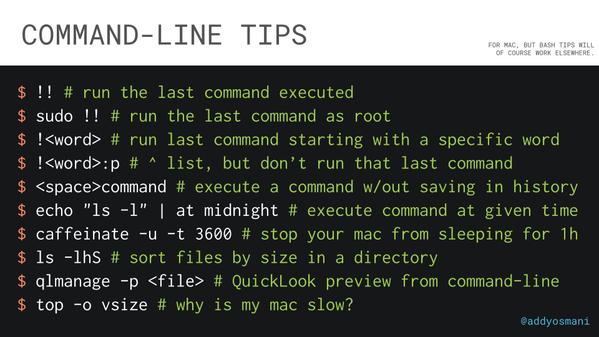
轉到目錄?
| 熱鍵 | 描述 |
|---|---|
| ctrl + a | 轉到您當前正在輸入的行的開頭 |
| ctrl + e | 轉到您當前正在輸入的行末尾 |
| ctrl + l | 清除屏幕,類似於清除命令 |
| Ctrl + U | 在光標位置之前清除線。如果您處於線路的盡頭,請清除整個行。 |
| Ctrl + H | 與backspace相同 |
| ctrl + r | 讓您搜索先前使用的命令 |
| Ctrl + c | 殺死您正在運行的任何事情 |
| Ctrl + D。 | 退出當前外殼 |
| Ctrl + Z | 將您遇到的任何內容都放入懸掛的背景過程中。 FG恢復它。 |
| ctrl + w | 在光標之前刪除單詞 |
| Ctrl + K。 | 光標後清除線路 |
| ctrl + t | 在光標之前交換最後兩個字符 |
| Ctrl + f | 將光標向前移動一個角色 |
| Ctrl + b | 向後移動光標 |
| ESC + t | 在光標之前交換最後兩個單詞 |
| alt + t | 與ESC + T相同 |
| alt + f | 在當前行上移動光標向前一個單詞 |
| alt + b | 將光標向後移動一個單詞 |
| ESC + f | 與alt + f相同 |
| ESC + b | 與alt + b相同 |
| alt + 。 | 粘貼最近命令的最後一句話 |
| 選項卡 | 自動完成文件和目錄名稱 |
| 轉到目錄? |
您可以隨時可以Google或man the您不熟悉的命令。或者,結帳tldr,是簡化和社區驅動的男子頁面的集合。
轉到目錄?





