Stylesheet.NET
v1.2.0

stylesheet.net是一個跨平台.NET庫,為C#,VB.NET和F#開發人員設計。它使開發人員能夠在其代碼中直接編寫CSS樣式,從而消除了對外部樣式表文件的需求。 Stylesheet.net為所有CSS屬性,插曲,關鍵字和其他元素提供了預編寫的實現,從而消除了對其他依賴關係的需求。
它允許您導出縮小和未啟動的CSS。
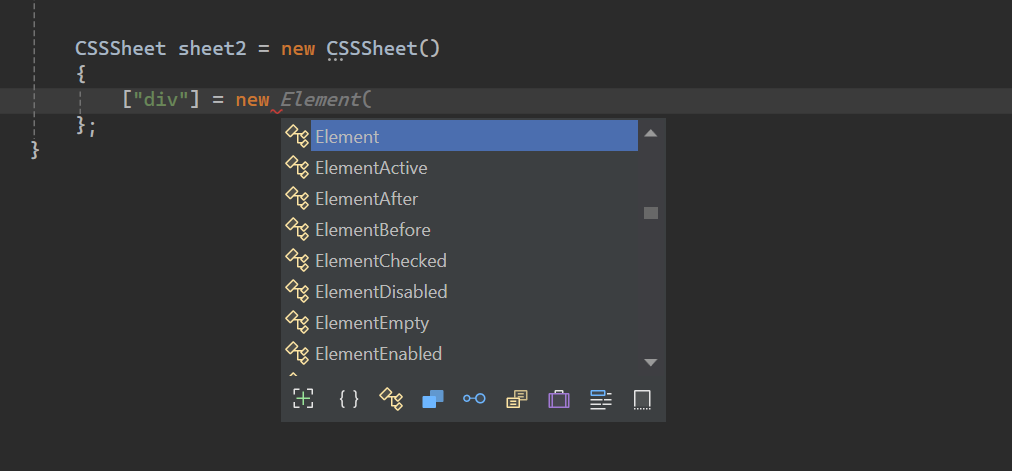
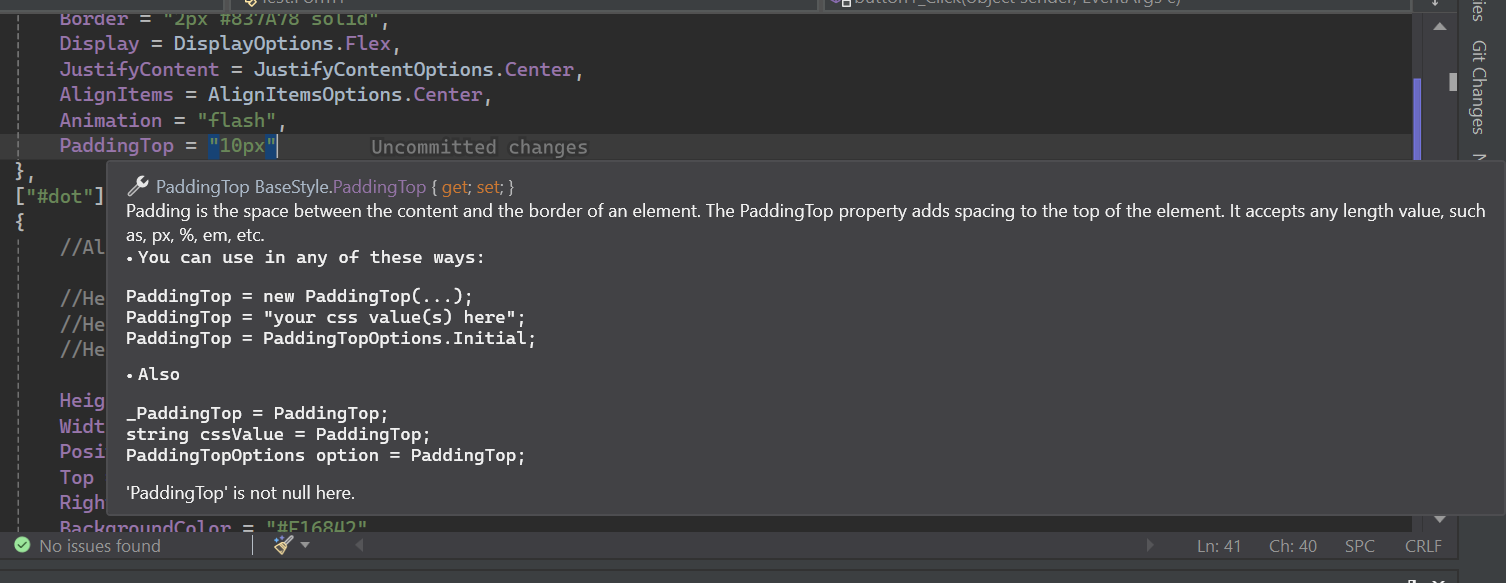
stylesheet.net具有廣泛的IntelliSense文檔。
Install-Package Stylesheet.NET -Version 1.2.0
我們可以使用stylesheet.net在我們的C#代碼中實現以下CSS樣式邏輯。
 @charset "UTF-8" ;
@font-face {
    font-family : 'lilitaone-regular' ;
    src : url ( 'font/lilitaone-regular.ttf' );
}
: root {
        all : unset;
        --color : blue;
}
. head . account {
        height : 40 px !important ;
        width : 40 px !important ;
        position : absolute;
        top : 12 px ;
        left : 15 px ;
        border-radius : 20 px ;
        border : 2 px # 837A78 solid;
        display : flex;
        justify-content : center;
        align-items : center;
        -webkit-animation : flash;
        -moz-animation : flash;
        animation : flash;
}
# dot : hover {
        height : 10 px ;
        width : 10 px ;
        position : absolute;
        top : 16 px ;
        right : 13 px ;
        background-color : # F16842 ;
        border-radius : 5 px ;
        display : block;
}
@Keyframes flash{
0% , 50% , to   {
        opacity : 1 ;

}
55%   {
        opacity : 0.5;

}
25% , 75%   {
        opacity : 0;

}
}
@media ( min-width : 0 px ) and ( max-width : 319 px ){
a [ target = "_blank" ]{
        position : absolute;
        top : 20 px ;
        left : 0 ;
        z-index : 99 ;
}
} using StylesheetNET ;
CSSSheet sheet1 = new CSSSheet ( )
{
Charset = "UTF-8" ,
Root = new Root ( )
{
All = AllOptions . Unset ,
[ "--color" ] = "blue"
} ,
[ ".head .account" ] = new Element ( )
{
//Also u can write them this way too
//Height = new Height("10px"),
//Height = new Height(HeightOptions.Auto)
//Height = HeightOptions.Auto;
Height = "40px !important" ,
Width = "40px !important" ,
Position = PositionOptions . Absolute ,
Top = "12px" ,
Left = "15px" ,
BorderRadius = "20px" ,
Border = "2px #837A78 solid" ,
Display = DisplayOptions . Flex ,
JustifyContent = JustifyContentOptions . Center ,
AlignItems = AlignItemsOptions . Center ,
Animation = "flash"
} ,
[ "#dot" ] = new ElementHover ( )
{
Height = "10px" ,
Width = "10px" ,
Position = PositionOptions . Absolute ,
Top = "16px" ,
Right = "13px" ,
BackgroundColor = "#F16842" ,
BorderRadius = "5px" ,
Display = DisplayOptions . Block
} ,
[ AtRuleType . MediaQuery ] = new MediaQuery ( new AtRule ( ) . MinWidth ( "0px" ) . And . MaxWidth ( "319px" ) )
{
[ "a[target= " _blank " ]" ] = new Element ( )
{
Position = PositionOptions . Absolute ,
Top = "20px" ,
Left = "0" ,
ZIndex = "99"
}
} ,
[ AtRuleType . Keyframes ] = new Keyframes ( "flash" )
{
[ "0%, 50%, to" ] = new Keyframe ( )
{
Opacity = "1"
} ,
[ "55%" ] = new Keyframe ( )
{
Opacity = "0.5"
} ,
[ "25%, 75%" ] = new Keyframe ( )
{
Opacity = "0"
}
}
} ;
sheet . AddFontFace ( "lilitaone-regular" , "font/lilitaone-regular.ttf" ) ; 有幾種方法可以從stylesheet.net導出CSS。
  string unminified_css = sheet1 ;
  //or
  string unminified_css = sheet1 . ToString ( ) ;
  string minified_css = sheet1 . ToString ( true ) ;
  //or
  string unminified_css = sheet1 . GenerateCss ( ) ;
string minified_css = sheet1 . GenerateCss ( true ) ; Stylesheet.net分為幾個核心組件,每個組件都提供了特定的功能,用於您的需求中的樣式元素。
div , span , h1 , id , class , Attribute等。:hover :focus和偽元素,例如::before和::after 。包括所有元素和類偽。@keyframes諸如動畫的@keyframes, @media的響應式佈局以及@import和@layer等指令定義自定義樣式或行為,以包括外部樣式等。代表您要樣式的HTML元素樣式選擇器,例如div , span , h1 , id , class , Attribute等。它包含所有元素選擇器屬性。
 div {
    height : 10 px ;
    width : 10 px ;
    position : absolute;
    top : 16 px ;
    right : 13 px ;
    background-color : # F16842 ;
    border-radius : 5 px ;
    display : block;
} CSSSheet sheet = new CSSSheet ( )
{
[ "div" ] = new Element ( )
{
Height = "10px" ,
Width = "10px" ,
Position = PositionOptions . Absolute ,
Top = "16px" ,
Right = "13px" ,
BackgroundColor = "#F16842" ,
BorderRadius = "5px" ,
Display = DisplayOptions . Block
}
}styleysheet.net還允許您添加自定義屬性。
 CSSSheet sheet = new CSSSheet ( )
  {
   [ "div" ] = new Element ( )
   {
      Height = "10px" ,
      //Width = "10px",

      [ "width" ] = "10px" ,
      [ "my_custom_property" ] = "some css values"
   }
  }
幾乎所有屬性實際上都是類隱式接受字符串和特定枚舉選項的類對象。
每個屬性可以以四種方式寫入。
例子:
 Height = new Height ( "10px" )
 Height = "10px"
 Height = new Height ( HeightOptions . Auto )
 Height = HeightOptions . Auto ;
所有屬性枚舉選項從其屬性的名稱開始,然後按
Options關注。例如Height + Options = HeightOptions。所有屬性都有代表預定義CSS關鍵字的枚舉選項。
stylesheet.net為CSS偽級和偽元素提供了廣泛的支持,使您能夠根據其狀態或交互來定義元素的樣式。
所有偽源以元素的形式開頭,然後由偽類型構成。
示例:
ElementHover,ElementAfter,ElementNthChild等。
例子
 div : hover {
        color : red;
}
p :: after {
        content : "Some contents" ;
        width : 50 px ;
        height : 75 px ;
}
. list : nth-child ( 3 ){
        background-color : blue;
}
. text : not (. sup , p ){
        text-align
: right;
} CSSSheet sheet1 = new CSSSheet ( )
{
[ "div" ] = new ElementHover ( )
{
Color = "red"
} ,
[ "p" ] = new ElementAfter ( )
{
Content = " " Some contents " " ,
Width = "50px" ,
Height = "75px"
} ,
[ ".list" ] = new ElementNthChild ( 3 )
{
BackgroundColor = "blue"
} ,
[ ".text" ] = new ElementNot ( ".sup, p" )
{
TextAlign = TextAlignOptions . Right
}
} ; ATRULES允許使用@keyframes諸如動畫的@KeyFrames, @media的響應式佈局以及@import和@layer等指令定義自定義樣式或行為,以包括外部樣式等。
媒體查詢是響應式Web設計的重要組成部分。它們可以創建適應不同視口尺寸的動態佈局,從而確保各種設備的最佳用戶體驗。
在stylesheet.net中,您可以通過兩種方式定義媒體查詢:
設有製造商
設有製造商可幫助您使用代碼鏈模式定義自定義規則。
設備構建器的含義轉換為字符串,因此您無需施放或轉換為字符串。
 string condition = new AtRule ( ) . Screen . And . MinWidth ( "0px" ) . And . MaxWidth ( "319px" ) ;

//Will give you:
// screen and (min-width: 0px) and (max-width: 319px)讓我們使用Atrule Builder創建媒體查詢:
 @media only screen and ( max-width : 600 px ){
 div {
 width : 100 % ;
 height : 100 % ;
 display : grid;
 }
}
CSSSheet sheet1 = new CSSSheet ( )
{
[ AtRuleType . MediaQuery ] = new MediaQuery ( new AtRule ( ) . Only . Screen . And . MaxWidth ( "600px" ) )
{
[ "div" ] = new Element ( )
{
Width = "100%" ,
Height = "100%" ,
Display = DisplayOptions . Grid
}
}
} ;設有規則構建器已實施所有CSS規則。您可以隨心所欲地鏈接它們。
如果您不想使用Atrule Builder ,則可以將自己的CSS規則/條件作為字符串放置。
 @media only screen and ( max-width : 600 px ){
  div {
        width : 100 % ;
        height : 100 % ;
        display : grid;
    }
} CSSSheet sheet1 = new CSSSheet ( )
{
[ AtRuleType . MediaQuery ] = new MediaQuery ( "only screen and (max-width: 600px)" )
{
[ "div" ] = new Element ( )
{
Width = "100%" ,
Height = "100%" ,
Display = DisplayOptions . Grid
}
}
} ;不要添加
@media,因為庫為您添加了@media。
@keyframes CSS Atrule使開發人員通過在動畫序列中的特定點定義樣式來創建複雜的動畫。
stylesheet.net將其分為兩個Keyframes和Keyframe 。
Keyframes對像是具有路點的class 。路點是單個Keyframe對象。
另一方面, keyframe是單個路點。航點可以具有percent或或from to組合的任何價值。
 @Keyframes flash{
0% , 50% , to   {
        opacity : 1 ;

}
55%   {
        opacity : 0.5;

}
25% , 75%   {
        opacity : 0;

}
} CSSSheet sheet1 = new CSSSheet ( )
{
[ AtRuleType . Keyframes ] = new Keyframes ( "flash" )
{
[ "0%, 50%, to" ] = new Keyframe ( )
{
Opacity = "1"
} ,
[ "55%" ] = new Keyframe ( )
{
Opacity = "0.5"
} ,
[ "25%, 75%" ] = new Keyframe ( )
{
Opacity = "0"
}
}
} ; CSS中的@import AT-LULE可以將樣式從外部樣式表中包含到當前樣式表中。
該樣式可以從本地或URL導入。
 @import 'path/file.css' ;
@import url ( 'someurl/file.css' ) ;

. head {
        height : 40 px !important ;
        width : 40 px !important ;
} CSSSheet sheet1 = new CSSSheet ( ) ;
sheet1 [ ".head" ] = new Element ( )
{
Height = "40px !important" ,
Width = "40px !important" ,
} ;
Import from_Path = new Import ( "path/file.css" ) ;
sheet1 . Import ( from_Path ) ;
Import from_url = new Import ( new Url ( "someurl/file.css" ) ) ;
sheet1 . Import ( from_url ) ;您可以刪除導入或清除所有導入。
 sheet . RemoveImport ( import_to_remove ) ; //remove an import
sheet . ClearImport ( ) ; //remove all imports CSS中的@layer AT-RULE介紹了級聯層的概念,使開發人員可以在多個CSS規則可能適用於同一元素的情況下定義樣式的優先順序。
Stylesheet.net提供了高級功能,例如:
 @layer layer1 {
    @layer layer2 {

        . head {
            display : flex;
        }
    }

    . head {
        height : 100 % ;
        width : 100 % ;
    }
}

@layer layer3 {

    . head {
        display : block;
    }
}

. head {
    height : 40 px !important ;
    width : 40 px !important ;
} CSSSheet sheet1 = new CSSSheet ( ) ;
sheet1 [ ".head" ] = new Element ( )
{
Height = "40px !important" ,
Width = "40px !important" ,
} ;
Layer layer1 = new Layer ( )
{
[ ".head" ] = new Element ( )
{
Height = "100%" ,
Width = "100%" ,
}
} ;
Layer layer2 = new Layer ( )
{
[ ".head" ] = new Element ( )
{
Display = DisplayOptions . Flex
}
} ;
Layer layer3 = new Layer ( )
{
[ ".head" ] = new Element ( )
{
Display = DisplayOptions . Block
}
} ;
layer1 . AddLayer ( "layer2" , layer2 ) ; //nest layer2 in layer1
sheet1 . AddLayer ( "layer1" , layer1 ) ; //add layer1 to sheet1
sheet1 . AddLayer ( "layer3" , layer3 ) ; //add layer3 to sheet1您可以卸下一層或清除紙張或圖層中的所有圖層。您可以通過其下層或其圖層名稱刪除一層。
 layer1 . RemoveLayer ( "layer2" ) ;

sheet . RemoveLayer ( "layer1" ) ;
sheet . RemoveLayer ( "layer3" ) ; @font-face CSS ATRULE允許開發人員將自定義字體添加到其網頁中。這些字體可以從遠程服務器或用戶設備上的本地安裝的字體加載。
stylesheet.net允許您通過兩種方式添加自定義字體。
 @font-face {
    font-family : "lilitaone-regular" ;
    src : url ( 'font/lilitaone-regular.ttf' );
}
@font-face {
    font-family : "NoyhR-Black" ;
    src : url ( "font/Noyh R Bold/NoyhR-Black.ttf" ) format ( "truetype" );
}

. head {
    height : 40 px !important ;
    width : 40 px !important ;
} CSSSheet sheet1 = new CSSSheet ( ) ;
sheet1 [ ".head" ] = new Element ( )
{
Height = "40px !important" ,
Width = "40px !important" ,
} ;
sheet1 . AddFontFace ( "lilitaone-regular" , "font/lilitaone-regular.ttf" ) ;
Dictionary < string , string > _font = new Dictionary < string , string > ( )
{
{ "font-family" , " " NoyhR-Black " " } ,
{ "src" , "url( " font/Noyh R Bold/NoyhR-Black.ttf " ) format( " truetype " )" }
} ;
sheet1 . AddFontFace ( _font ) ;您可以通過fontfamily刪除fontface,也可以清除全部。
 sheet1 . RemoveFontFace ( "lilitaone-regular" ) ;

sheet1 . ClearFontFace ( ) ; 本指南涵蓋了stylesheet.net的基礎知識。要了解更多信息並發現其全部功能,請隨時嘗試並探索其不同的功能。