Stylesheet.NET
v1.2.0

Stylesheet.net es una biblioteca .NET multiplataforma diseñada para desarrolladores C#, VB.NET y F#. Permite a los desarrolladores escribir estilos CSS directamente en su código, eliminando la necesidad de archivos de hoja de estilo externos. Stylesheet.net proporciona implementaciones preescritas para todas las propiedades de CSS, AT-Rules, Palabras clave y otros elementos, eliminando la necesidad de dependencias adicionales.
Le permite exportar CSS minificado y sin minificar.
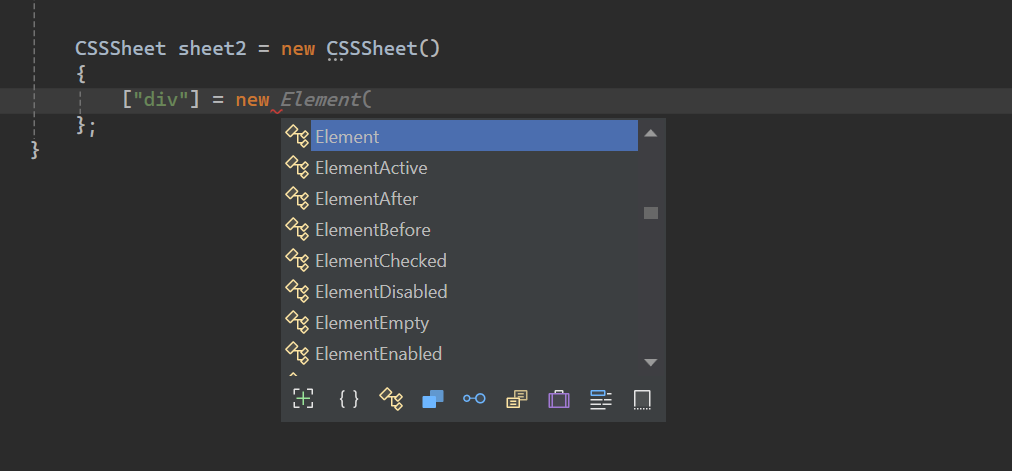
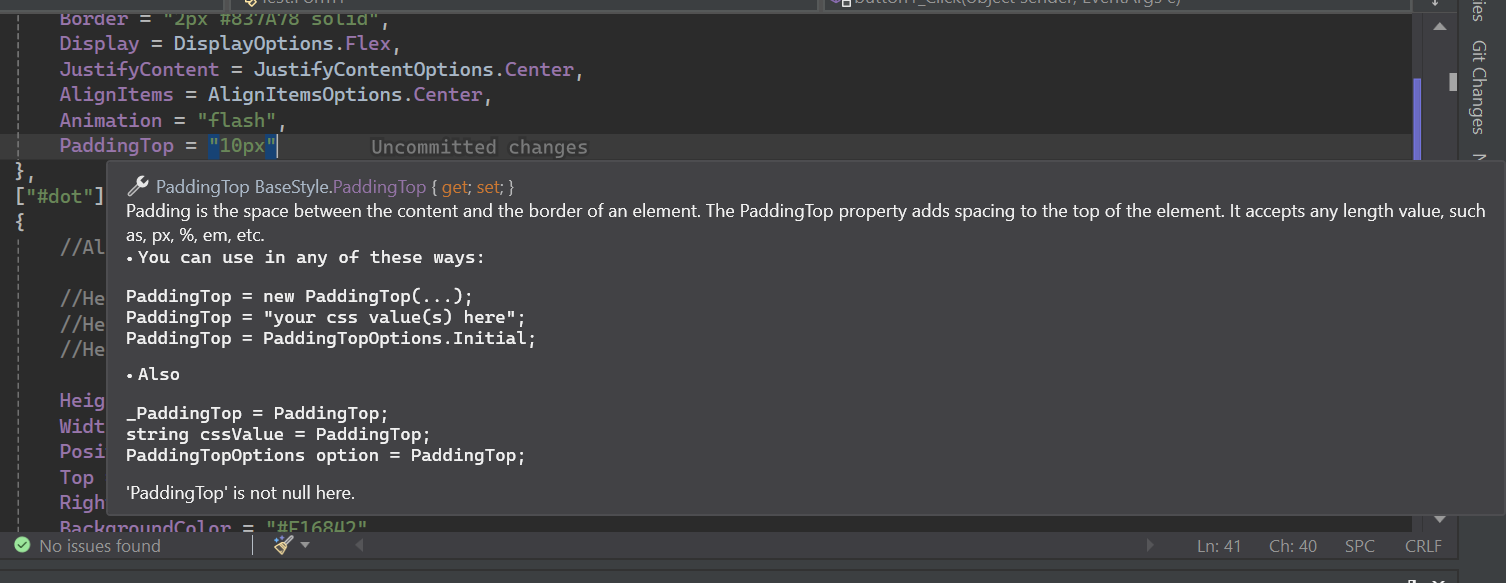
Stylesheet.net tiene extensas documentaciones de IntelliSense.
Install-Package Stylesheet.NET -Version 1.2.0
Podemos implementar la siguiente lógica de estilo CSS dentro de nuestro código C# usando Stylesheet.net .
 @charset "UTF-8" ;
@font-face {
    font-family : 'lilitaone-regular' ;
    src : url ( 'font/lilitaone-regular.ttf' );
}
: root {
        all : unset;
        --color : blue;
}
. head . account {
        height : 40 px !important ;
        width : 40 px !important ;
        position : absolute;
        top : 12 px ;
        left : 15 px ;
        border-radius : 20 px ;
        border : 2 px # 837A78 solid;
        display : flex;
        justify-content : center;
        align-items : center;
        -webkit-animation : flash;
        -moz-animation : flash;
        animation : flash;
}
# dot : hover {
        height : 10 px ;
        width : 10 px ;
        position : absolute;
        top : 16 px ;
        right : 13 px ;
        background-color : # F16842 ;
        border-radius : 5 px ;
        display : block;
}
@Keyframes flash{
0% , 50% , to   {
        opacity : 1 ;

}
55%   {
        opacity : 0.5;

}
25% , 75%   {
        opacity : 0;

}
}
@media ( min-width : 0 px ) and ( max-width : 319 px ){
a [ target = "_blank" ]{
        position : absolute;
        top : 20 px ;
        left : 0 ;
        z-index : 99 ;
}
} using StylesheetNET ;
CSSSheet sheet1 = new CSSSheet ( )
{
Charset = "UTF-8" ,
Root = new Root ( )
{
All = AllOptions . Unset ,
[ "--color" ] = "blue"
} ,
[ ".head .account" ] = new Element ( )
{
//Also u can write them this way too
//Height = new Height("10px"),
//Height = new Height(HeightOptions.Auto)
//Height = HeightOptions.Auto;
Height = "40px !important" ,
Width = "40px !important" ,
Position = PositionOptions . Absolute ,
Top = "12px" ,
Left = "15px" ,
BorderRadius = "20px" ,
Border = "2px #837A78 solid" ,
Display = DisplayOptions . Flex ,
JustifyContent = JustifyContentOptions . Center ,
AlignItems = AlignItemsOptions . Center ,
Animation = "flash"
} ,
[ "#dot" ] = new ElementHover ( )
{
Height = "10px" ,
Width = "10px" ,
Position = PositionOptions . Absolute ,
Top = "16px" ,
Right = "13px" ,
BackgroundColor = "#F16842" ,
BorderRadius = "5px" ,
Display = DisplayOptions . Block
} ,
[ AtRuleType . MediaQuery ] = new MediaQuery ( new AtRule ( ) . MinWidth ( "0px" ) . And . MaxWidth ( "319px" ) )
{
[ "a[target= " _blank " ]" ] = new Element ( )
{
Position = PositionOptions . Absolute ,
Top = "20px" ,
Left = "0" ,
ZIndex = "99"
}
} ,
[ AtRuleType . Keyframes ] = new Keyframes ( "flash" )
{
[ "0%, 50%, to" ] = new Keyframe ( )
{
Opacity = "1"
} ,
[ "55%" ] = new Keyframe ( )
{
Opacity = "0.5"
} ,
[ "25%, 75%" ] = new Keyframe ( )
{
Opacity = "0"
}
}
} ;
sheet . AddFontFace ( "lilitaone-regular" , "font/lilitaone-regular.ttf" ) ; Hay varias formas de exportar su CSS desde Stylesheet.net .
  string unminified_css = sheet1 ;
  //or
  string unminified_css = sheet1 . ToString ( ) ;
  string minified_css = sheet1 . ToString ( true ) ;
  //or
  string unminified_css = sheet1 . GenerateCss ( ) ;
string minified_css = sheet1 . GenerateCss ( true ) ; Stylesheet.net se organiza en varios componentes centrales, cada uno de los cuales proporciona funcionalidades específicas para los elementos de estilo en sus requisitos.
div , span , h1 , id , class , Attribute , etc.:hover , :focus y pseudo-Elements como ::before y ::after . Se incluyen todos los pseudos de elementos y clase .@keyframes para animaciones, @media para diseños receptivos y @import y @layer para incluir estilos externos y otros. Representa el selector de estilo de elemento HTML que desea diseñar, como div , span , h1 , id , class , Attribute , etc. Alojan todas las propiedades del selector de elementos.
 div {
    height : 10 px ;
    width : 10 px ;
    position : absolute;
    top : 16 px ;
    right : 13 px ;
    background-color : # F16842 ;
    border-radius : 5 px ;
    display : block;
} CSSSheet sheet = new CSSSheet ( )
{
[ "div" ] = new Element ( )
{
Height = "10px" ,
Width = "10px" ,
Position = PositionOptions . Absolute ,
Top = "16px" ,
Right = "13px" ,
BackgroundColor = "#F16842" ,
BorderRadius = "5px" ,
Display = DisplayOptions . Block
}
}Styleysheet.net también le permite agregar propiedades personalizadas.
 CSSSheet sheet = new CSSSheet ( )
  {
   [ "div" ] = new Element ( )
   {
      Height = "10px" ,
      //Width = "10px",

      [ "width" ] = "10px" ,
      [ "my_custom_property" ] = "some css values"
   }
  }
Casi todas las propiedades son en realidad objetos de clase que aceptan implícitamente la cadena y sus opciones de enumes específicas.
Cada propiedad se puede escribir de cuatro maneras.
Ejemplo:
 Height = new Height ( "10px" )
 Height = "10px"
 Height = new Height ( HeightOptions . Auto )
 Height = HeightOptions . Auto ;
Todas las opciones de la propiedad de Enum comienzan con el nombre de su propiedad y luego siguen las
Options. Por ejemplo,Height + Options = HeightOptions.Todas las propiedades tienen opciones enum que representan las palabras clave CSS predefinidas.
Stylesheet.net proporciona un amplio soporte para las pseudo-clases de CSS y los pseudo-elementos, lo que le permite definir estilos para elementos basados en su estado o interacción.
Todos los pseudos comienzan con el elemento y luego se transmiten por el tipo de pseudo .
Ejemplo:
ElementHover,ElementAfter,ElementNthChildetc.
Ejemplo
 div : hover {
        color : red;
}
p :: after {
        content : "Some contents" ;
        width : 50 px ;
        height : 75 px ;
}
. list : nth-child ( 3 ){
        background-color : blue;
}
. text : not (. sup , p ){
        text-align
: right;
} CSSSheet sheet1 = new CSSSheet ( )
{
[ "div" ] = new ElementHover ( )
{
Color = "red"
} ,
[ "p" ] = new ElementAfter ( )
{
Content = " " Some contents " " ,
Width = "50px" ,
Height = "75px"
} ,
[ ".list" ] = new ElementNthChild ( 3 )
{
BackgroundColor = "blue"
} ,
[ ".text" ] = new ElementNot ( ".sup, p" )
{
TextAlign = TextAlignOptions . Right
}
} ; AT-Rules permiten definir estilos o comportamientos personalizados utilizando directivas como @keyframes para animaciones, @media para diseños receptivos y @import y @layer para incluir estilos externos y otros.
Las consultas de los medios son un componente esencial del diseño web receptivo. Habilitan la creación de diseños dinámicos que se adaptan a diferentes tamaños de ventanas de ventanas gráficos, asegurando una experiencia de usuario óptima en varios dispositivos.
En stylesheet.net puede definir la consulta de medios de dos maneras:
Constructor de reglas
At-Rule Builder lo ayuda a definir reglas personalizadas utilizando el patrón de cadena de código.
At-Rule Builder La implicidad se convierte en cadena, por lo que no necesita lanzar o convertir a cadena.
 string condition = new AtRule ( ) . Screen . And . MinWidth ( "0px" ) . And . MaxWidth ( "319px" ) ;

//Will give you:
// screen and (min-width: 0px) and (max-width: 319px)
Creemos una consulta de medios con At-Rule Builder :
 @media only screen and ( max-width : 600 px ){
 div {
 width : 100 % ;
 height : 100 % ;
 display : grid;
 }
}
CSSSheet sheet1 = new CSSSheet ( )
{
[ AtRuleType . MediaQuery ] = new MediaQuery ( new AtRule ( ) . Only . Screen . And . MaxWidth ( "600px" ) )
{
[ "div" ] = new Element ( )
{
Width = "100%" ,
Height = "100%" ,
Display = DisplayOptions . Grid
}
}
} ;At-Rule Builder tiene todas las reglas CSS implementadas. Puede encadenarlos como desee sin límite de longitud.
Si no desea utilizar el creador de reglas , simplemente puede poner sus propias reglas/condiciones de CSS como cadena.
 @media only screen and ( max-width : 600 px ){
  div {
        width : 100 % ;
        height : 100 % ;
        display : grid;
    }
} CSSSheet sheet1 = new CSSSheet ( )
{
[ AtRuleType . MediaQuery ] = new MediaQuery ( "only screen and (max-width: 600px)" )
{
[ "div" ] = new Element ( )
{
Width = "100%" ,
Height = "100%" ,
Display = DisplayOptions . Grid
}
}
} ;No agregue
@mediaya que la biblioteca lo agrega para usted.
El @keyframes CSS At Rule permite a los desarrolladores crear animaciones complejas definiendo estilos para puntos específicos dentro de la secuencia de animación.
Stylesheet.net divide esto en dos Keyframes y Keyframe .
Un objeto Keyframes es class que contiene los puntos de referencia. Un punto de referencia es un solo objeto Keyframe .
Un keyframe en otro lado es un solo punto de referencia. Un punto de referencia puede ser de cualquier valor que sea percent o from y to la combinación de estos.
 @Keyframes flash{
0% , 50% , to   {
        opacity : 1 ;

}
55%   {
        opacity : 0.5;

}
25% , 75%   {
        opacity : 0;

}
} CSSSheet sheet1 = new CSSSheet ( )
{
[ AtRuleType . Keyframes ] = new Keyframes ( "flash" )
{
[ "0%, 50%, to" ] = new Keyframe ( )
{
Opacity = "1"
} ,
[ "55%" ] = new Keyframe ( )
{
Opacity = "0.5"
} ,
[ "25%, 75%" ] = new Keyframe ( )
{
Opacity = "0"
}
}
} ; El @import at-regla en CSS permite la inclusión de estilos de hojas de estilo externos en la hoja de estilo actual.
El estilo se puede importar de local o URL.
 @import 'path/file.css' ;
@import url ( 'someurl/file.css' ) ;

. head {
        height : 40 px !important ;
        width : 40 px !important ;
} CSSSheet sheet1 = new CSSSheet ( ) ;
sheet1 [ ".head" ] = new Element ( )
{
Height = "40px !important" ,
Width = "40px !important" ,
} ;
Import from_Path = new Import ( "path/file.css" ) ;
sheet1 . Import ( from_Path ) ;
Import from_url = new Import ( new Url ( "someurl/file.css" ) ) ;
sheet1 . Import ( from_url ) ;Puede eliminar una importación o borrar todas las importaciones.
 sheet . RemoveImport ( import_to_remove ) ; //remove an import
sheet . ClearImport ( ) ; //remove all imports La @layer At-Rule en CSS presenta el concepto de capas en cascada, lo que permite a los desarrolladores definir el orden de precedencia para los estilos en los casos en que múltiples reglas CSS podrían aplicarse al mismo elemento.
Stylesheet.net ofrece características avanzadas como:
 @layer layer1 {
    @layer layer2 {

        . head {
            display : flex;
        }
    }

    . head {
        height : 100 % ;
        width : 100 % ;
    }
}

@layer layer3 {

    . head {
        display : block;
    }
}

. head {
    height : 40 px !important ;
    width : 40 px !important ;
} CSSSheet sheet1 = new CSSSheet ( ) ;
sheet1 [ ".head" ] = new Element ( )
{
Height = "40px !important" ,
Width = "40px !important" ,
} ;
Layer layer1 = new Layer ( )
{
[ ".head" ] = new Element ( )
{
Height = "100%" ,
Width = "100%" ,
}
} ;
Layer layer2 = new Layer ( )
{
[ ".head" ] = new Element ( )
{
Display = DisplayOptions . Flex
}
} ;
Layer layer3 = new Layer ( )
{
[ ".head" ] = new Element ( )
{
Display = DisplayOptions . Block
}
} ;
layer1 . AddLayer ( "layer2" , layer2 ) ; //nest layer2 in layer1
sheet1 . AddLayer ( "layer1" , layer1 ) ; //add layer1 to sheet1
sheet1 . AddLayer ( "layer3" , layer3 ) ; //add layer3 to sheet1Puede eliminar una capa o borrar todas las capas en una hoja o capa. Puede eliminar una capa por su capa subyacente o por el nombre de su capa.
 layer1 . RemoveLayer ( "layer2" ) ;

sheet . RemoveLayer ( "layer1" ) ;
sheet . RemoveLayer ( "layer3" ) ; El @font-face CSS AT-Rule permite a los desarrolladores agregar fuentes personalizadas a sus páginas web. Estas fuentes se pueden cargar desde un servidor remoto o una fuente instalada localmente en el dispositivo del usuario.
Stylesheet.net le permite agregar fuentes personalizadas de dos maneras.
 @font-face {
    font-family : "lilitaone-regular" ;
    src : url ( 'font/lilitaone-regular.ttf' );
}
@font-face {
    font-family : "NoyhR-Black" ;
    src : url ( "font/Noyh R Bold/NoyhR-Black.ttf" ) format ( "truetype" );
}

. head {
    height : 40 px !important ;
    width : 40 px !important ;
} CSSSheet sheet1 = new CSSSheet ( ) ;
sheet1 [ ".head" ] = new Element ( )
{
Height = "40px !important" ,
Width = "40px !important" ,
} ;
sheet1 . AddFontFace ( "lilitaone-regular" , "font/lilitaone-regular.ttf" ) ;
Dictionary < string , string > _font = new Dictionary < string , string > ( )
{
{ "font-family" , " " NoyhR-Black " " } ,
{ "src" , "url( " font/Noyh R Bold/NoyhR-Black.ttf " ) format( " truetype " )" }
} ;
sheet1 . AddFontFace ( _font ) ;Puede eliminar una fuente de Fontfamily o puede borrar todo.
 sheet1 . RemoveFontFace ( "lilitaone-regular" ) ;

sheet1 . ClearFontFace ( ) ; Esta guía cubre los conceptos básicos de Stylesheet.net . Para obtener más información y descubrir sus capacidades completas, siéntase libre de experimentar y explorar sus diferentes características.