Stylesheet.NET
v1.2.0

Stylesheet.Net is a cross-platform .NET library designed for C#, VB.NET, and F# developers. It enables developers to write CSS styles directly in their code, eliminating the need for external stylesheet files. Stylesheet.Net provides pre-written implementations for all CSS properties, at-rules, keywords, and other elements, eliminating the need for additional dependencies.
It allows you to export both minified and unminified css.
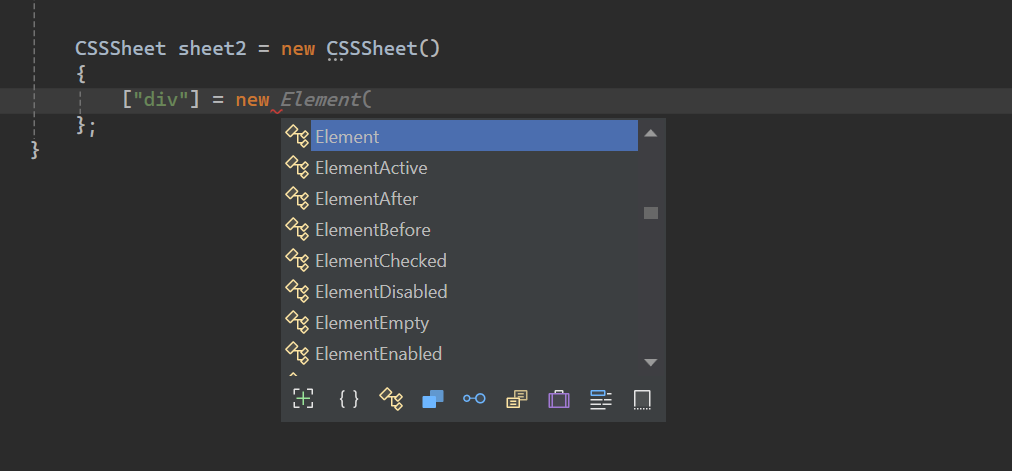
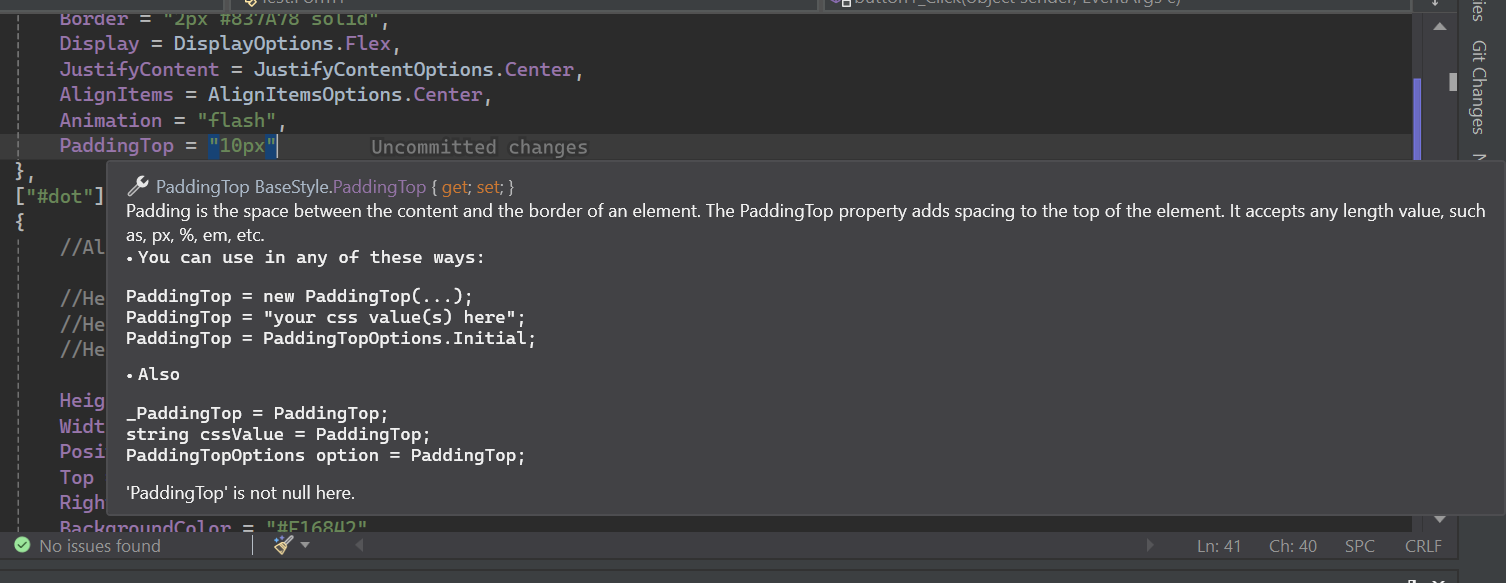
Stylesheet.Net has extensive intellisense documentations.
Install-Package Stylesheet.NET -Version 1.2.0
We can implement the following CSS styling logic within our C# code using Stylesheet.Net.
@charset "UTF-8";
@font-face {
    font-family: 'lilitaone-regular';
    src: url('font/lilitaone-regular.ttf');
}
:root{
        all: unset;
        --color: blue;
}
.head .account{
        height: 40px !important;
        width: 40px !important;
        position: absolute;
        top: 12px;
        left: 15px;
        border-radius: 20px;
        border: 2px #837A78 solid;
        display: flex;
        justify-content: center;
        align-items: center;
        -webkit-animation: flash;
        -moz-animation: flash;
        animation: flash;
}
#dot:hover{
        height: 10px;
        width: 10px;
        position: absolute;
        top: 16px;
        right: 13px;
        background-color: #F16842;
        border-radius: 5px;
        display: block;
}
@Keyframes flash{
0%, 50%, to   {
        opacity: 1;

}
55%   {
        opacity: 0.5;

}
25%, 75%   {
        opacity: 0;

}
}
@media (min-width: 0px) and (max-width: 319px){
a[target="_blank"]{
        position: absolute;
        top: 20px;
        left: 0;
        z-index: 99;
}
} using StylesheetNET;
CSSSheet sheet1 = new CSSSheet()
{
Charset = "UTF-8",
Root = new Root()
{
All = AllOptions.Unset,
["--color"] = "blue"
},
[".head .account"] = new Element()
{
//Also u can write them this way too
//Height = new Height("10px"),
//Height = new Height(HeightOptions.Auto)
//Height = HeightOptions.Auto;
Height = "40px !important",
Width = "40px !important",
Position = PositionOptions.Absolute,
Top = "12px",
Left = "15px",
BorderRadius = "20px",
Border = "2px #837A78 solid",
Display = DisplayOptions.Flex,
JustifyContent = JustifyContentOptions.Center,
AlignItems = AlignItemsOptions.Center,
Animation = "flash"
},
["#dot"] = new ElementHover()
{
Height = "10px",
Width = "10px",
Position = PositionOptions.Absolute,
Top = "16px",
Right = "13px",
BackgroundColor = "#F16842",
BorderRadius = "5px",
Display = DisplayOptions.Block
},
[AtRuleType.MediaQuery] = new MediaQuery(new AtRule().MinWidth("0px").And.MaxWidth("319px"))
{
["a[target="_blank"]"] = new Element()
{
Position = PositionOptions.Absolute,
Top = "20px",
Left = "0",
ZIndex = "99"
}
},
[AtRuleType.Keyframes] = new Keyframes("flash")
{
["0%, 50%, to"] = new Keyframe()
{
Opacity = "1"
},
["55%"] = new Keyframe()
{
Opacity = "0.5"
},
["25%, 75%"] = new Keyframe()
{
Opacity = "0"
}
}
};
sheet.AddFontFace("lilitaone-regular", "font/lilitaone-regular.ttf");There are several ways to export your css from Stylesheet.Net.
  string unminified_css = sheet1;
  //or
  string unminified_css = sheet1.ToString();
  string minified_css = sheet1.ToString(true);
  //or
  string unminified_css = sheet1.GenerateCss();
string minified_css = sheet1.GenerateCss(true);Stylesheet.Net is organized into several core components, each providing specific functionalities for styling elements in your requirements.
div, span, h1 , id, class, Attribute etc.:hover, :focus, and pseudo-elements like ::before and ::after. All element and class pseudos are included.@keyframes for animations, @media for responsive layouts and @import and @layer for including external styles, and others.Represents the HTML element style selector you want to style, such as div, span, h1 , id, class, Attribute etc. It houses all the element selector properties.
div {
    height: 10px;
    width: 10px;
    position: absolute;
    top: 16px;
    right: 13px;
    background-color: #F16842;
    border-radius: 5px;
    display: block;
} CSSSheet sheet = new CSSSheet()
{
["div"] = new Element()
{
Height = "10px",
Width = "10px",
Position = PositionOptions.Absolute,
Top = "16px",
Right = "13px",
BackgroundColor = "#F16842",
BorderRadius = "5px",
Display = DisplayOptions.Block
}
}Styleysheet.NET also allows you to add custom properties.
 CSSSheet sheet = new CSSSheet()
  {
   ["div"] = new Element()
   {
      Height = "10px",
      //Width = "10px",

      ["width"] = "10px",
      ["my_custom_property"] = "some css values"
   }
  }
Almost all properties are actually class objects that implicitly accept string and thier specific Enum options.
Each property can be written in four ways.
Example:
 Height = new Height("10px")
 Height = "10px"
 Height = new Height(HeightOptions.Auto)
 Height = HeightOptions.Auto;
All property enum options start with the name of their property then following by
Options. E.g.Height + Options = HeightOptions.All properties have Enum options that represent the predefined css keywords.
Stylesheet.Net provides extensive support for CSS pseudo-classes and pseudo-elements, enabling you to define styles for elements based on their state or interaction.
All pseudos start with Element then folowed by the pseudo type.
Example:
ElementHover,ElementAfter,ElementNthChildetc.
Example
div:hover{
        color: red;
}
p::after{
        content: "Some contents";
        width: 50px;
        height: 75px;
}
.list:nth-child(3){
        background-color: blue;
}
.text:not(.sup, p){
        text-align
: right;
} CSSSheet sheet1 = new CSSSheet()
{
["div"] = new ElementHover()
{
Color = "red"
},
["p"] = new ElementAfter()
{
Content = ""Some contents"",
Width = "50px",
Height = "75px"
},
[".list"] = new ElementNthChild(3)
{
BackgroundColor = "blue"
},
[".text"] = new ElementNot(".sup, p")
{
TextAlign = TextAlignOptions.Right
}
};At-Rules Allow for defining custom styles or behavior using directives like @keyframes for animations, @media for responsive layouts and @import and @layer for including external styles, and others.
Media queries are an essential component of responsive web design. They enable the creation of dynamic layouts that adapt to different viewport sizes, ensuring an optimal user experience across various devices.
In Stylesheet.NET you can define media query in two ways:
At-Rule builder
At-Rule builder helps you define custom rules using code chain pattern.
At-Rule builder implicity converts to string, so you don't need to cast or convert to string.
string condition = new AtRule().Screen.And.MinWidth("0px").And.MaxWidth("319px");

//Will give you:
// screen and (min-width: 0px) and (max-width: 319px)
Let's create media query with At-Rule builder:
@media only screen and (max-width: 600px){
 div{
 width: 100%;
 height: 100%;
 display: grid;
 }
}
CSSSheet sheet1 = new CSSSheet()
{
[AtRuleType.MediaQuery] = new MediaQuery(new AtRule().Only.Screen.And.MaxWidth("600px"))
{
["div"] = new Element()
{
Width = "100%",
Height = "100%",
Display = DisplayOptions.Grid
}
}
};At-Rule builder has all Css rules implemented. You can chain them as you want with no limit in length.
If you don't want to use the At-Rule builder, you can simply put your own css rules/conditions as string.
@media only screen and (max-width: 600px){
  div{
        width: 100%;
        height: 100%;
        display: grid;
    }
}CSSSheet sheet1 = new CSSSheet()
{
[AtRuleType.MediaQuery] = new MediaQuery("only screen and (max-width: 600px)")
{
["div"] = new Element()
{
Width = "100%",
Height = "100%",
Display = DisplayOptions.Grid
}
}
};Don't add
@mediaas the library adds that for you.
The @keyframes CSS at-rule empowers developers to create complex animations by defining styles for specific points within the animation sequence.
Stylesheet.NET divides this into two, Keyframes and Keyframe.
A Keyframes object is class that holds waypoints. A waypoint is single Keyframe object.
A keyframe in other hand is a single waypoint. A waypoint can be of any value that is percent or from and to or combination of these.
@Keyframes flash{
0%, 50%, to   {
        opacity: 1;

}
55%   {
        opacity: 0.5;

}
25%, 75%   {
        opacity: 0;

}
}CSSSheet sheet1 = new CSSSheet()
{
[AtRuleType.Keyframes] = new Keyframes("flash")
{
["0%, 50%, to"] = new Keyframe()
{
Opacity = "1"
},
["55%"] = new Keyframe()
{
Opacity = "0.5"
},
["25%, 75%"] = new Keyframe()
{
Opacity = "0"
}
}
};The @import at-rule in CSS enables the inclusion of styles from external stylesheets into the current stylesheet.
The style can be imported from local or url.
@import 'path/file.css' ;
@import url('someurl/file.css') ;

.head{
        height: 40px !important;
        width: 40px !important;
}CSSSheet sheet1 = new CSSSheet();
sheet1[".head"] = new Element()
{
Height = "40px !important",
Width = "40px !important",
};
Import from_Path = new Import("path/file.css");
sheet1.Import(from_Path);
Import from_url = new Import(new Url("someurl/file.css"));
sheet1.Import(from_url);You can remove an Import or clear all imports.
sheet.RemoveImport(import_to_remove);//remove an import
sheet.ClearImport();//remove all importsThe @layer at-rule in CSS introduces the concept of cascade layers, allowing developers to define the order of precedence for styles in cases where multiple CSS rules might apply to the same element.
Stylesheet.NET offers advanced features like:
@layer layer1 {
    @layer layer2 {

        .head {
            display: flex;
        }
    }

    .head {
        height: 100%;
        width: 100%;
    }
}

@layer layer3 {

    .head {
        display: block;
    }
}

.head {
    height: 40px !important;
    width: 40px !important;
} CSSSheet sheet1 = new CSSSheet();
sheet1[".head"] = new Element()
{
Height = "40px !important",
Width = "40px !important",
};
Layer layer1 = new Layer()
{
[".head"] = new Element()
{
Height = "100%",
Width = "100%",
}
};
Layer layer2 = new Layer()
{
[".head"] = new Element()
{
Display = DisplayOptions.Flex
}
};
Layer layer3 = new Layer()
{
[".head"] = new Element()
{
Display = DisplayOptions.Block
}
};
layer1.AddLayer("layer2", layer2);//nest layer2 in layer1
sheet1.AddLayer("layer1", layer1);//add layer1 to sheet1
sheet1.AddLayer("layer3", layer3);//add layer3 to sheet1You can remove a layer or clear all layers in a sheet or layer. You can remove a layer by its underlying layer or by its layer name.
layer1.RemoveLayer("layer2");

sheet.RemoveLayer("layer1");
sheet.RemoveLayer("layer3");The @font-face CSS at-rule allows developers to add custom fonts into their web pages. These fonts can be loaded from either a remote server or a locally installed font on the user's device.
Stylesheet.NET allows you to add Custom fonts in two ways.
@font-face {
    font-family: "lilitaone-regular";
    src: url('font/lilitaone-regular.ttf');
}
@font-face {
    font-family: "NoyhR-Black";
    src: url("font/Noyh R Bold/NoyhR-Black.ttf") format("truetype");
}

.head{
    height: 40px !important;
    width: 40px !important;
} CSSSheet sheet1 = new CSSSheet();
sheet1[".head"] = new Element()
{
Height = "40px !important",
Width = "40px !important",
};
sheet1.AddFontFace("lilitaone-regular", "font/lilitaone-regular.ttf");
Dictionary<string, string> _font = new Dictionary<string, string>()
{
{"font-family", ""NoyhR-Black"" },
{"src", "url("font/Noyh R Bold/NoyhR-Black.ttf") format("truetype")" }
};
sheet1.AddFontFace(_font);You can remove a fontface by fontfamily or you can clear all.
 sheet1.RemoveFontFace("lilitaone-regular");

sheet1.ClearFontFace();This guide covers the basics of Stylesheet.NET. To learn more and discover its full capabilities, feel free to experiment and explore its different features.