PETALface
1.0.0

Kartik Narayan 1 Nithin Gopalakrishnan Nair 1 Jennifer Xu 2 Rama Chellappa 1 Vishal M. Patel 1
约翰·霍普金斯大学1系统与技术研究2
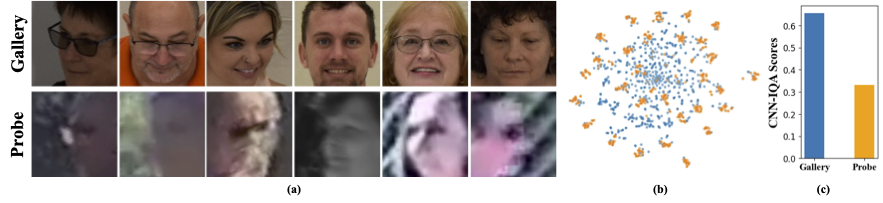
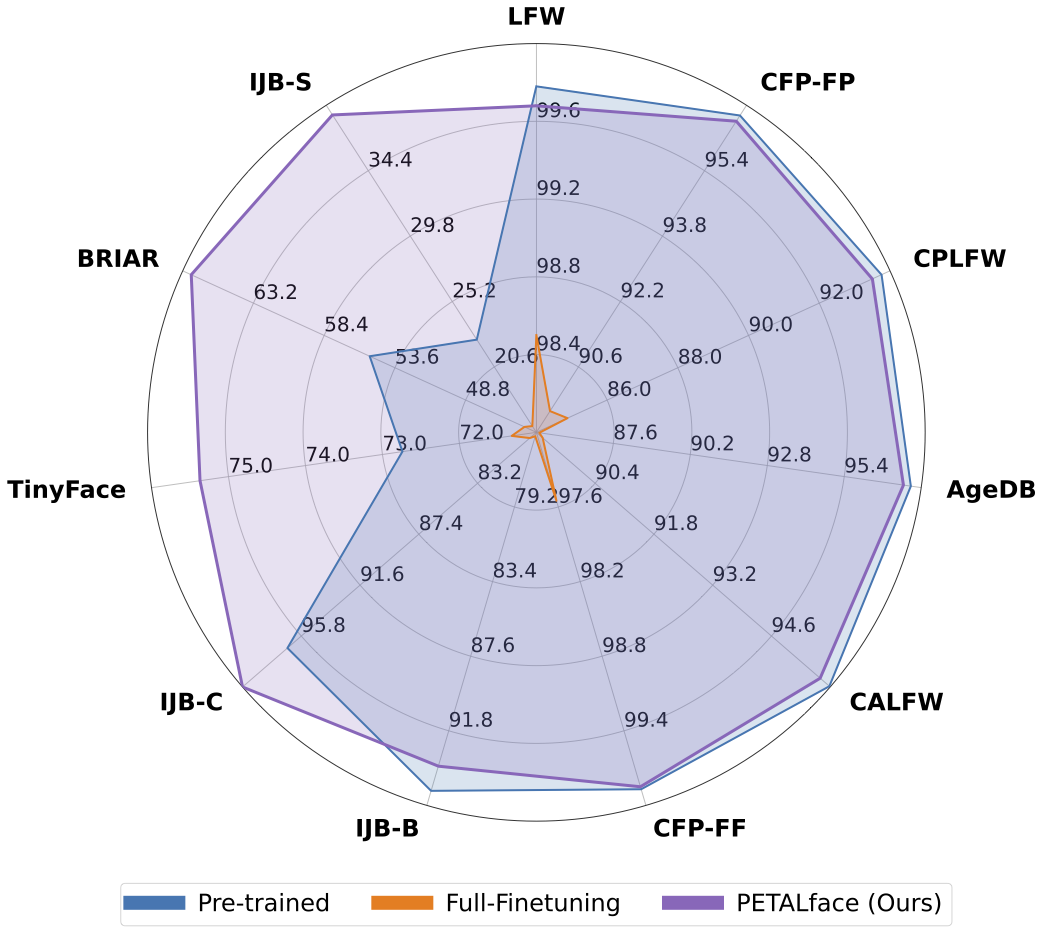
低分辨率数据集包含差清晰度差的图像,这使得提取面部识别和验证必不可少的有意义的判别特征具有挑战性。此外,低分辨率数据集通常很小,受试者数量有限,因为策划它们需要大量的时间,精力和投资。现有方法迫使学习高分辨率和低分辨率面对单个编码器中的图像,但无法解释它们之间的域差异。从图1(a),1(b)和1(c)中,我们观察到高质量的画廊图像和低质量的探针图像属于不同的域,并且需要单独的编码器来提取有意义的特征进行分类。将预训练模型调整为低分辨率数据集的一种天真方法已在这些数据集上进行了全面调查。但是,如前所述,低分辨率数据集的大小很小,并且在小型低分辨率数据集上更新具有大量参数的模型会导致收敛性差。这使该模型容易出现灾难性的遗忘,我们看到高分辨率和混合质量数据集的性能下降,如图2所示。
具有上述动机,
1️⃣我们介绍了基于洛拉的PETL技术的使用,以使大型预训练的面部识别模型适应低分辨率数据集。
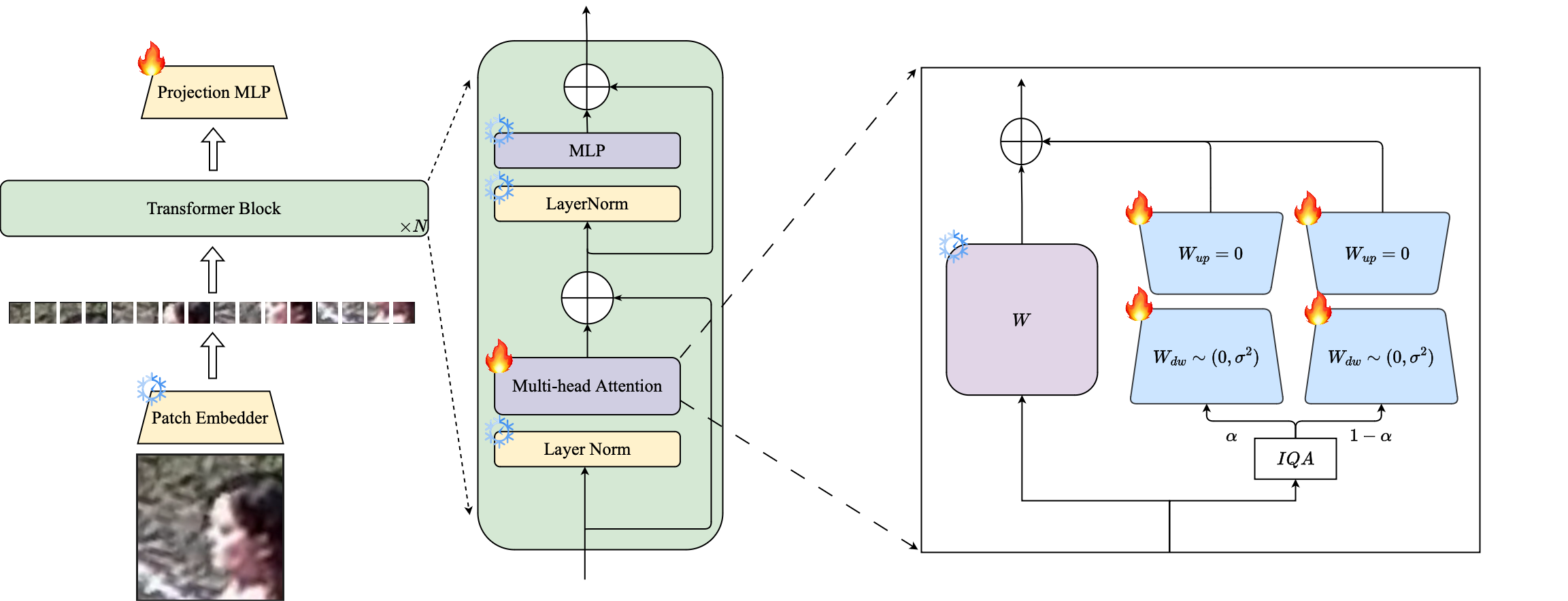
2️⃣我们提出了一个基于图像质量的洛拉模块的加权,以创建用于高分辨率和低分辨率数据的单独的代理编码器,以确保有效提取嵌入式嵌入以识别面部识别。
3️⃣我们在适应低分辨率数据集的情况下演示了花瓣面的优越性,在低分辨率基准上的其他最先进的模型优于其他最先进的模型,同时保持高分辨率和混合质量数据集的性能。
摘要:大规模数据集的预训练和利用基于保证金的损失功能在高分辨率面部识别的训练模型中非常成功。但是,这些模型在低分辨率的面部数据集中遇到了困难,在该数据集中,面部缺乏区分不同面部所需的面部属性。在低分辨率数据集上进行全面微调,这是一种适应模型的天真方法,由于灾难性忘记了预训练的知识而导致的表现较低。此外,低分辨率数据集中的高分辨率(HR)图库图像和低分辨率(LR)探针图像之间的域差异导致单个模型的收敛性不佳,以适应画廊和调查后的探测。为此,我们提出了Petalface,这是一种用于低分辨率面部识别的参数效率转移学习方法。通过Petalface,我们试图解决两个上述问题。 (1)我们通过利用参数有效微调(PEFT)的力量来解决灾难性遗忘。 (2)我们向主链介绍了两个低级适应模块,并根据输入图像质量进行调整,以说明画廊和探测图像的质量差异。据我们所知,Petalface是利用PEFT为低分辨率面部识别的第一份工作。广泛的实验表明,所提出的方法在低分辨率数据集上的表现优于全面调查,同时保留高分辨率和混合质量数据集的性能,同时仅使用0.48%的参数。
conda env create --file environment.yml
conda activate petalface数据集可以从其各自的网页下载或邮寄作者:
以以下方式安排数据集:
 data /
├── BRIAR /
│   ├── train_set_1 /
│   │   ├── train . idx
│   │   ├── train . lst
│   │   └── train . rec
│   └── train_set_2 /
│       ├── train . idx
│       ├── train . lst
│       └── train . rec
├── HQ_val /
│   ├── agedb_30 . bin
│   ├── calfw . bin
│   ├── cfp_ff . bin
│   ├── cfp_fp . bin
│   ├── cplfw . bin
│   └── lfw . bin
├── ijb /
│   ├── IJB_11 . py
│   ├── IJBB /
│   ├── IJBC /
│   ├── recognition /
│   └── run . sh
├── IJBS /
│   ├── ijbs_participant_publication_consent . csv
│   ├── img /
│   ├── img . md5
│   ├── protocols /
│   ├── README . pdf
│   ├── videos /
│   ├── videos . md5
│   ├── videos_ground_truth /
│   └── videos_ground_truth . md5
├── tinyface_aligned_112 /
│   ├── Gallery_Distractor /
│   ├── Gallery_Match /
│   ├── Probe /
│   ├── train . idx
│   ├── train . lst
│   └── train . rec
├── WebFace12M /
│   ├── train . idx
│   ├── train . lst
│   └── train . rec
└── WebFace4M /
    ├── train . idx
    ├── train . lst
└── train . rec可以从HuggingFace或使用Python手动下载培训模型:
 from huggingface_hub import hf_hub_download

# Finetuned Weights

# The filename "swin_arcface_webface4m_tinyface" indicates that the model has a swin bakcbone and pretraind
# on webface4m dataset with arcface loss function and finetuned on tinyface.
hf_hub_download ( repo_id = "kartiknarayan/PETALface" , filename = "swin_arcface_webface4m_tinyface/model.pt" , local_dir = "./weights" )
hf_hub_download ( repo_id = "kartiknarayan/PETALface" , filename = "swin_cosface_webface4m_tinyface/model.pt" , local_dir = "./weights" )
hf_hub_download ( repo_id = "kartiknarayan/PETALface" , filename = "swin_cosface_webface4m_briar/model.pt" , local_dir = "./weights" )
hf_hub_download ( repo_id = "kartiknarayan/PETALface" , filename = "swin_cosface_webface12m_briar/model.pt" , local_dir = "./weights" )

# Pre-trained Weights
hf_hub_download ( repo_id = "kartiknarayan/PETALface" , filename = "swin_arcface_webface4m/model.pt" , local_dir = "./weights" )
hf_hub_download ( repo_id = "kartiknarayan/PETALface" , filename = "swin_cosface_webface4m/model.pt" , local_dir = "./weights" )
hf_hub_download ( repo_id = "kartiknarayan/PETALface" , filename = "swin_arcface_webface12m/model.pt" , local_dir = "./weights" )
hf_hub_download ( repo_id = "kartiknarayan/PETALface" , filename = "swin_cosface_webface12m/model.pt" , local_dir = "./weights" )从HuggingFace下载训练有素的权重,并确保使用适当的目录结构下载数据。
 ### BRISQUE | CosFace | TinyFace ###
NCCL_P2P_DISABLE = 1 CUDA_VISIBLE_DEVICES = 0 , 1 , 2 , 3 , 4 , 5 , 6 , 7 torchrun - - nproc_per_node = 8 - - master_port = 29190 train_iqa . py
    - - network swin_256new_iqa
    - - head partial_fc
    - - output / mnt / store / knaraya4 / PETALface / < model_save_folder >
    - - margin_list 1.0 , 0.0 , 0.4
    - - batch - size 8
    - - optimizer adamw
    - - weight_decay 0.1
    - - rec / data / knaraya4 / data / < folder_to_rec_file >
    - - num_classes 2570
    - - num_image 7804
    - - num_epoch 50
    - - lr 0.0005
    - - fp16
    - - warmup_epoch 2
    - - image_size 120
    - - use_lora
    - - lora_rank 8
    - - iqa brisque
    - - threshold < threshold >
    - - seed 19
    - - load_pretrained / mnt / store / knaraya4 / PETALface / < path_to_pretrained_model >

###
# For CosFace, --margin_list 1.0,0.0,0.4; For ArcFace, --margin_list 1.0,0.5,0.0
# For BRISQUE, --iqa brisque; For CNNIQA, --iqa cnniqa; set the threshold accordingly
# For TinyFace,
#   --num_classes 2570
#   --num_image 7804
#   --num_epoch 40
#   --warmup_epoch 2
# For BRIAR,
#   --num_classes 778
#   --num_image 301000
#   --num_epoch 10
#   --warmup_epoch 1
###
训练有素的模型存储在指定的“ Ouptut”中。
注意:花瓣/脚本提供了用于训练和洛拉填充的培训脚本。
 # Validation HQ dataset
CUDA_VISIBLE_DEVICES = 0 python validation_hq / validate_hq_iqa . py
    - - model_load_path / mnt / store / knaraya4 / PETALface / < folder_name > / model . pt
    - - data_root / data / knaraya4 / data / < hq_dataset_folder >
    - - model_type swin_256new_iqa
    - - image_size 120
    - - lora_rank 8
    - - use_lora
    - - iqa cnniqa
    - - threshold threshold

# Validation Mixed Quality Dataset | IJBC
CUDA_VISIBLE_DEVICES = 0 python validation_ijb / eval_ijb_iqa . py
    - - model_load_path / mnt / store / knaraya4 / PETALface / < folder_name > / model . pt
    - - data_root / data / knaraya4 / data / ijb / < ijbc_dataset_folder >
    - - batch - size 1024
    - - model_type swin_256new_iqa
    - - target IJBC
    - - image_size 120
    - - lora_rank 8
    - - use_lora
    - - iqa cnniqa
    - - threshold < threshold >

# Validation Mixed Quality Dataset | IJBB
CUDA_VISIBLE_DEVICES = 0 python validation_ijb / eval_ijb_iqa . py
    - - model_load_path / mnt / store / knaraya4 / PETALface / < folder_name > / model . pt
    - - data_root / data / knaraya4 / data / < ijbb_dataset_folder >
    - - batch - size 1024
    - - model_type swin_256new_iqa
    - - target IJBB
    - - image_size 120
    - - lora_rank 8
    - - use_lora
    - - iqa cnniqa
    - - threshold < threshold >

# Validation Low-quality Dataset | TinyFace
CUDA_VISIBLE_DEVICES = 0 python validation_lq / validate_tinyface_iqa . py
    - - data_root / data / knaraya4 / data
    - - batch_size 512
    - - model_load_path / mnt / store / knaraya4 / PETALface / < folder_name > / model . pt
    - - model_type swin_256new_iqa
    - - image_size 120
    - - lora_rank 8
    - - use_lora
    - - iqa cnniqa
    - - threshold < threshold >

# Validation Low-quality Dataset | IJBS
CUDA_VISIBLE_DEVICES = 0 python validation_lq / validate_ijbs_iqa . py
    - - data_root / mnt / store / knaraya4 / data / < ijbs_dataset_folder >
    - - batch_size 2048
    - - model_load_path / mnt / store / knaraya4 / PETALface / < folder_name > / model . pt
    - - model_type swin_256new_iqa
    - - image_size 120
    - - lora_rank 8
    - - use_lora
    - - iqa cnniqa
- - threshold < threshold >注意:推理脚本以petalface/脚本提供。
如果您发现花瓣脸对您的研究有用,请考虑引用我们:
 @article { narayan2024petalface ,
  title = { PETALface: Parameter Efficient Transfer Learning for Low-resolution Face Recognition } ,
  author = { Narayan, Kartik and Nair, Nithin Gopalakrishnan and Xu, Jennifer and Chellappa, Rama and Patel, Vishal M } ,
  journal = { arXiv preprint arXiv:2412.07771 } ,
  year = { 2024 }
}如有任何疑问,请在此存储库上创建一个问题,或通过[email protected]进行联系。







