daam
v0.2.0

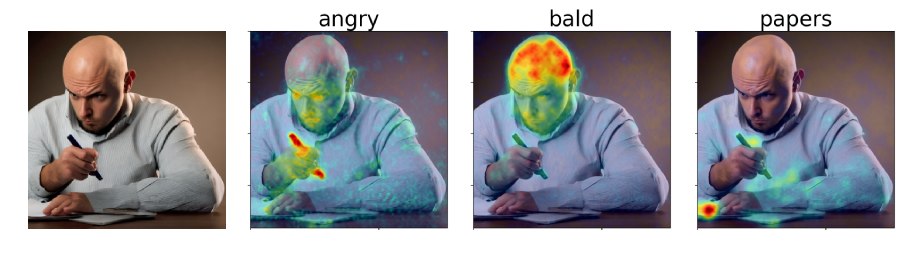
我定期更新此代码库。如果您有任何疑问,请提交问题。
在我们的论文中,我们提出了扩散专注归因图(DAAM),这是一种基于跨注意力的方法来解释稳定扩散。请查看我们的演示:https://huggingface.co/spaces/tetrisd/diffusion-diffusion-antentive-attribution-maps。请参阅我们的文档,该文档由GitHub页面托管,以及我们的COLAB笔记本,该文档已更新为v0.1.0。
首先,为您的平台安装Pytorch。然后,使用pip install daam ,除非您需要库的可编辑版本,否则在这种情况下,请git clone https://github.com/castorini/daam && pip install -e daam 。最后,使用huggingface-cli login登录以获取许多稳定的扩散模型 - 您需要在huggingface.co上获得令牌。
只需在外壳中运行daam-demo ,然后导航到http:// localhost:8080。与拥抱面空间上的演示相同。
DAAM带有一个简单的一代脚本,适合想要快速尝试的人。尝试跑步
$ mkdir -p daam-test && cd daam-test
$ daam " A dog running across the field. "
$ ls
a.heat_map.png    field.heat_map.png    generation.pt   output.png  seed.txt
dog.heat_map.png running.heat_map.png prompt.txt现在,您当前的工作目录将包含每个单词的生成图像作为output.png和DAAM地图以及一些辅助数据。您可以通过运行daam -h查看daam的更多选项。要使用稳定的扩散XL作为后端,请运行daam --model xl-base-1.0 "Dog jumping" 。
导入并使用DAAM如下:
 from daam import trace , set_seed
from diffusers import DiffusionPipeline
from matplotlib import pyplot as plt
import torch


model_id = 'stabilityai/stable-diffusion-xl-base-1.0'
device = 'cuda'

pipe = DiffusionPipeline . from_pretrained ( model_id , use_auth_token = True , torch_dtype = torch . float16 , use_safetensors = True , variant = 'fp16' )
pipe = pipe . to ( device )

prompt = 'A dog runs across the field'
gen = set_seed ( 0 )  # for reproducibility

with torch . no_grad ():
    with trace ( pipe ) as tc :
        out = pipe ( prompt , num_inference_steps = 50 , generator = gen )
        heat_map = tc . compute_global_heat_map ()
        heat_map = heat_map . compute_word_heat_map ( 'dog' )
        heat_map . plot_overlay ( out . images [ 0 ])
        plt . show ()
您也可以轻松地序列化并逐渐阐明DAAM地图:
 from daam import GenerationExperiment , trace

with trace ( pipe ) as tc :
    pipe ( 'A dog and a cat' )
    exp = tc . to_experiment ( 'experiment-dir' )
    exp . save ()  # experiment-dir now contains all the data and heat maps

exp = GenerationExperiment . load ( 'experiment-dir' ) # load the experiment我们将继续添加文档。同时,请查看GenerationExperiment , GlobalHeatMap和DiffusionHeatMapHooker类别”,以及daam/run/*.py示例脚本。您可以通过http://ralphtang.com/coco-gen.tar.gz从纸上下载可可基因数据集。如果单击链接在浏览器上无法使用,请将其复制并粘贴到新的选项卡中,或使用诸如wget之类的CLI实用程序。
DAAM-I2I,DAAM到图像到图像归因的扩展。
Furkan的视频很容易开始使用DAAM。
1 LittleCoder的代码演示的视频和旧版本的DAAM的COLAB笔记本。
 @inproceedings{tang2023daam,
    title = "What the {DAAM}: Interpreting Stable Diffusion Using Cross Attention",
    author = "Tang, Raphael  and
      Liu, Linqing  and
      Pandey, Akshat  and
      Jiang, Zhiying  and
      Yang, Gefei  and
      Kumar, Karun  and
      Stenetorp, Pontus  and
      Lin, Jimmy  and
      Ture, Ferhan",
    booktitle = "Proceedings of the 61st Annual Meeting of the Association for Computational Linguistics (Volume 1: Long Papers)",
    year = "2023",
    url = "https://aclanthology.org/2023.acl-long.310",
}





