daam
v0.2.0

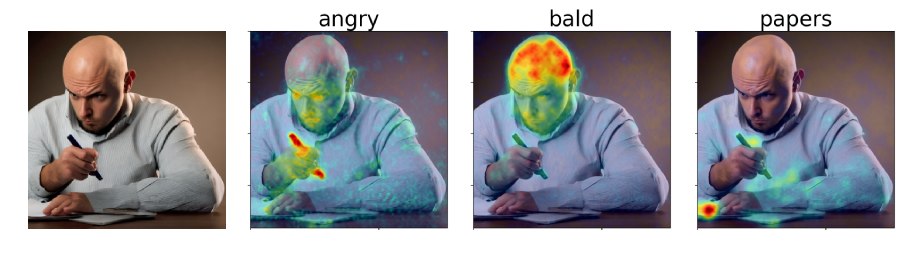
このコードベースを定期的に更新します。ご質問がある場合は、問題を提出してください。
私たちの論文では、安定した拡散を解釈するための交差注意に基づいたアプローチである拡散気配属性マップ(DAAM)を提案します。デモ:https://huggingface.co/spaces/tetrisd/diffusion-attentive-attribution-mapsをご覧ください。 GitHubページがホストするドキュメントと、v0.1.0に更新されたColabノートブックを参照してください。
まず、プラットフォームにPytorchをインストールします。次に、ライブラリの編集可能なバージョンが必要な場合を除き、DAAMをpip install daamにインストールしgit clone https://github.com/castorini/daam && pip install -e daam 。最後に、 huggingface-cli loginを使用してログインして、多くの安定した拡散モデルを取得します。Huggingface.coでトークンを取得する必要があります。
シェルでdaam-demoを実行して、http:// localhost:8080に移動します。 Huggingfaceスペースのデモと同じデモが表示されます。
Daamには、すぐに試してみたい人のためのシンプルな世代スクリプトが付いています。実行してみてください
$ mkdir -p daam-test && cd daam-test
$ daam " A dog running across the field. "
$ ls
a.heat_map.png    field.heat_map.png    generation.pt   output.png  seed.txt
dog.heat_map.png running.heat_map.png prompt.txt現在の作業ディレクトリには、生成された画像がoutput.pngとして、すべての単語のDAAMマップ、およびいくつかの補助データが含まれるようになりました。 daam -h実行することで、 daamのより多くのオプションを見ることができます。安定した拡散XLをバックエンドとして使用するには、 daam --model xl-base-1.0 "Dog jumping"を実行します。
次のようにDAAMをインポートして使用します。
 from daam import trace , set_seed
from diffusers import DiffusionPipeline
from matplotlib import pyplot as plt
import torch


model_id = 'stabilityai/stable-diffusion-xl-base-1.0'
device = 'cuda'

pipe = DiffusionPipeline . from_pretrained ( model_id , use_auth_token = True , torch_dtype = torch . float16 , use_safetensors = True , variant = 'fp16' )
pipe = pipe . to ( device )

prompt = 'A dog runs across the field'
gen = set_seed ( 0 )  # for reproducibility

with torch . no_grad ():
    with trace ( pipe ) as tc :
        out = pipe ( prompt , num_inference_steps = 50 , generator = gen )
        heat_map = tc . compute_global_heat_map ()
        heat_map = heat_map . compute_word_heat_map ( 'dog' )
        heat_map . plot_overlay ( out . images [ 0 ])
        plt . show ()
また、Daamマップを簡単にシリアル化して脱必要にすることもできます。
 from daam import GenerationExperiment , trace

with trace ( pipe ) as tc :
    pipe ( 'A dog and a cat' )
    exp = tc . to_experiment ( 'experiment-dir' )
    exp . save ()  # experiment-dir now contains all the data and heat maps

exp = GenerationExperiment . load ( 'experiment-dir' )  # load the experiment
ドキュメントを追加し続けます。それまでの間、 GenerationExperiment 、 GlobalHeatMap 、およびDiffusionHeatMapHookerクラス、およびdaam/run/*.py http://ralphtang.com/coco-gen.tar.gzのペーパーからCoco-Genデータセットをダウンロードできます。 [リンク]がブラウザで動作しない場合は、新しいタブにコピーして貼り付けたり、 wgetなどのCLIユーティリティを使用したりします。
DAAM-I2I、画像から画像への帰属へのDAAMの拡張。
Daamを簡単に始めることに関するFurkanのビデオ。
1 LittleCoderのコードデモンストレーションとColabノートブックのDAAMのコラブノートブック。
 @inproceedings{tang2023daam,
    title = "What the {DAAM}: Interpreting Stable Diffusion Using Cross Attention",
    author = "Tang, Raphael  and
      Liu, Linqing  and
      Pandey, Akshat  and
      Jiang, Zhiying  and
      Yang, Gefei  and
      Kumar, Karun  and
      Stenetorp, Pontus  and
      Lin, Jimmy  and
      Ture, Ferhan",
    booktitle = "Proceedings of the 61st Annual Meeting of the Association for Computational Linguistics (Volume 1: Long Papers)",
    year = "2023",
    url = "https://aclanthology.org/2023.acl-long.310",
}





