daam
v0.2.0

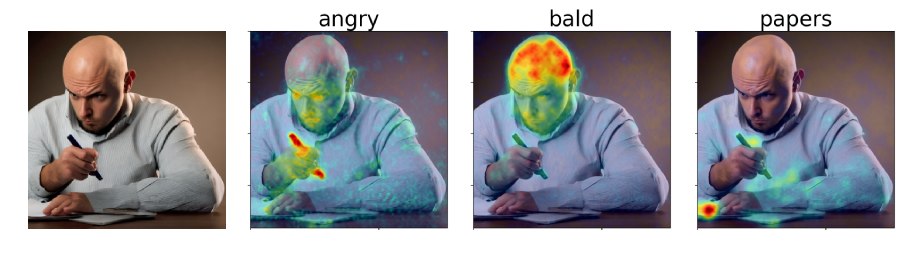
أقوم بتحديث قاعدة الشفرة هذه بانتظام. يرجى تقديم مشكلة إذا كان لديك أي أسئلة.
في ورقتنا ، نقترح خرائط الإسناد اليقظة الانتشار (DAAM) ، وهو نهج متقاطع يعتمد على الاهتمام لتفسير الانتشار المستقر. تحقق من العرض التوضيحي الخاص بنا: https://huggingface.co/spaces/tetrisd/diffusion-ententive-attribution-maps. راجع وثائقنا ، التي تستضيفها GitHub Pages ، و Colab Notebook ، تم تحديثها لـ V0.1.0.
أولاً ، قم بتثبيت Pytorch لمنصتك. بعد ذلك ، قم بتثبيت daam باستخدام pip install daam ، ما لم تكن تريد إصدارًا قابلًا للتحرير من المكتبة ، وفي هذه الحالة ، تقوم git clone https://github.com/castorini/daam && pip install -e daam . أخيرًا ، تسجيل الدخول باستخدام huggingface-cli login للحصول على العديد من نماذج الانتشار المستقرة-ستحتاج إلى الحصول على رمز في Huggingface.co.
ما عليك سوى تشغيل daam-demo في قذيفة وانتقل إلى http: // localhost: 8080. نفس العرض التوضيحي مثل واحد على مساحات Huggingface سوف تظهر.
يأتي دام مع نص جيل بسيط للأشخاص الذين يرغبون في تجربته بسرعة. حاول الجري
$ mkdir -p daam-test && cd daam-test
$ daam " A dog running across the field. "
$ ls
a.heat_map.png    field.heat_map.png    generation.pt   output.png  seed.txt
dog.heat_map.png  running.heat_map.png  prompt.txt
سيحتوي دليل العمل الحالي الخاص بك الآن على الصورة التي تم إنشاؤها output.png png وخريطة daam لكل كلمة ، وكذلك بعض البيانات الإضافية. يمكنك رؤية المزيد من الخيارات لـ daam عن طريق تشغيل daam -h . لاستخدام الانتشار المستقر XL مثل الواجهة الخلفية ، قم بتشغيل daam --model xl-base-1.0 "Dog jumping" .
استيراد واستخدام DAAM على النحو التالي:
 from daam import trace , set_seed
from diffusers import DiffusionPipeline
from matplotlib import pyplot as plt
import torch


model_id = 'stabilityai/stable-diffusion-xl-base-1.0'
device = 'cuda'

pipe = DiffusionPipeline . from_pretrained ( model_id , use_auth_token = True , torch_dtype = torch . float16 , use_safetensors = True , variant = 'fp16' )
pipe = pipe . to ( device )

prompt = 'A dog runs across the field'
gen = set_seed ( 0 )  # for reproducibility

with torch . no_grad ():
    with trace ( pipe ) as tc :
        out = pipe ( prompt , num_inference_steps = 50 , generator = gen )
        heat_map = tc . compute_global_heat_map ()
        heat_map = heat_map . compute_word_heat_map ( 'dog' )
        heat_map . plot_overlay ( out . images [ 0 ])
        plt . show ()
يمكنك أيضًا تخصيص خرائط DAAM وتهربها بسهولة:
 from daam import GenerationExperiment , trace

with trace ( pipe ) as tc :
    pipe ( 'A dog and a cat' )
    exp = tc . to_experiment ( 'experiment-dir' )
    exp . save ()  # experiment-dir now contains all the data and heat maps

exp = GenerationExperiment . load ( 'experiment-dir' )  # load the experiment
سنستمر في إضافة مستندات. في غضون ذلك ، تحقق من فئات GenerationExperiment و GlobalHeatMap و DiffusionHeatMapHooker ، وكذلك البرامج النصية daam/run/*.py يمكنك تنزيل مجموعة بيانات Coco-Gen من الورقة على http://ralphtang.com/coco-gen.tar.gz. إذا لم يعمل النقر فوق الرابط على متصفحك ، فقم بنسخه ولصقه في علامة تبويب جديدة ، أو استخدم أداة CLI مثل wget .
Daam-i2i ، امتداد Daam إلى إسناد صورة إلى صورة.
فيديو Furkan حول البدء بسهولة مع Daam.
1 littlecoder مقطع الفيديو لتوضيح رمز ودفتر كولاب لإصدار أقدم من DAAM.
 @inproceedings{tang2023daam,
    title = "What the {DAAM}: Interpreting Stable Diffusion Using Cross Attention",
    author = "Tang, Raphael  and
      Liu, Linqing  and
      Pandey, Akshat  and
      Jiang, Zhiying  and
      Yang, Gefei  and
      Kumar, Karun  and
      Stenetorp, Pontus  and
      Lin, Jimmy  and
      Ture, Ferhan",
    booktitle = "Proceedings of the 61st Annual Meeting of the Association for Computational Linguistics (Volume 1: Long Papers)",
    year = "2023",
    url = "https://aclanthology.org/2023.acl-long.310",
}





