daam
v0.2.0

이 코드베이스를 정기적으로 업데이트합니다. 궁금한 점이 있으면 문제를 제출하십시오.
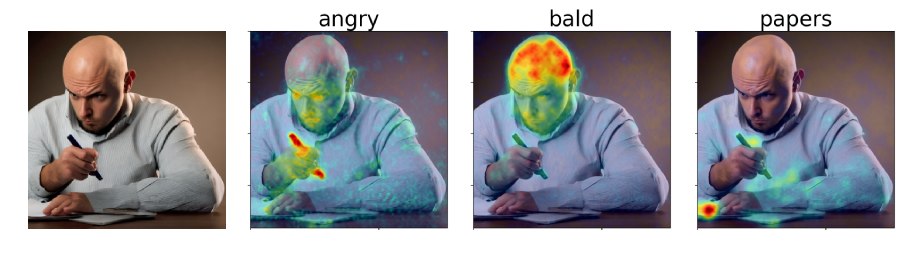
우리 논문에서, 우리는 안정적인 확산을 해석하기위한 교차주의 기반 접근법 인 확산 세심한 속성 맵 (DAAM)을 제안합니다. 데모를 확인하십시오 : https://huggingface.co/spaces/tetrisd/diffusion-attentive-attribution-maps를 확인하십시오. GitHub 페이지에서 주최하는 문서와 V0.1.0으로 업데이트 된 Colab 노트북을 참조하십시오.
먼저 플랫폼에 Pytorch를 설치하십시오. 그런 다음 pip install daam 사용하여 DAAM을 설치하십시오. 라이브러리의 편집 가능한 버전을 원하지 않는 한 git clone https://github.com/castorini/daam && pip install -e daam 사용하십시오. 마지막으로, huggingface-cli login 사용하여 로그인하여 많은 안정적인 확산 모델을 얻으려면 Huggingface.co에서 토큰을 가져와야합니다.
쉘에서 daam-demo 실행하고 http : // localhost : 8080으로 이동하십시오. Huggingface Spaces와 같은 데모가 나타납니다.
DAAM에는 빨리 시험 해보고 싶은 사람들을위한 간단한 세대 스크립트가 제공됩니다. 달리기를 시도하십시오
$ mkdir -p daam-test && cd daam-test
$ daam " A dog running across the field. "
$ ls
a.heat_map.png    field.heat_map.png    generation.pt   output.png  seed.txt
dog.heat_map.png  running.heat_map.png  prompt.txt
현재 작업 디렉토리에는 이제 생성 된 이미지가 output.png as as output.png 및 모든 단어에 대해 DAAM 맵과 일부 보조 데이터를 포함합니다. daam -h 실행하여 daam 에 대한 더 많은 옵션을 볼 수 있습니다. 안정적인 확산 XL을 백엔드로 사용하려면 daam --model xl-base-1.0 "Dog jumping" 실행하십시오.
다음과 같이 DAAM을 가져오고 사용하십시오.
 from daam import trace , set_seed
from diffusers import DiffusionPipeline
from matplotlib import pyplot as plt
import torch


model_id = 'stabilityai/stable-diffusion-xl-base-1.0'
device = 'cuda'

pipe = DiffusionPipeline . from_pretrained ( model_id , use_auth_token = True , torch_dtype = torch . float16 , use_safetensors = True , variant = 'fp16' )
pipe = pipe . to ( device )

prompt = 'A dog runs across the field'
gen = set_seed ( 0 )  # for reproducibility

with torch . no_grad ():
    with trace ( pipe ) as tc :
        out = pipe ( prompt , num_inference_steps = 50 , generator = gen )
        heat_map = tc . compute_global_heat_map ()
        heat_map = heat_map . compute_word_heat_map ( 'dog' )
        heat_map . plot_overlay ( out . images [ 0 ])
        plt . show ()
DAAM 맵을 직렬화하고 조작 할 수 있습니다.
 from daam import GenerationExperiment , trace

with trace ( pipe ) as tc :
    pipe ( 'A dog and a cat' )
    exp = tc . to_experiment ( 'experiment-dir' )
    exp . save ()  # experiment-dir now contains all the data and heat maps

exp = GenerationExperiment . load ( 'experiment-dir' )  # load the experiment
우리는 문서를 계속 추가 할 것입니다. 그 동안 GenerationExperiment , GlobalHeatMap 및 DiffusionHeatMapHooker 클래스와 daam/run/*.py 예제 스크립트를 확인하십시오. 논문에서 http://ralphtang.com/coco-gen.tar.gz에서 Coco-gen 데이터 세트를 다운로드 할 수 있습니다. 링크를 클릭하면 브라우저에서 링크를 클릭하지 않으면 새 탭에 복사하여 붙여 넣거나 wget 과 같은 CLI 유틸리티를 사용하십시오.
DAAM-I2I, DAAM의 이미지-이미지 속성 연장.
Daam과 쉽게 시작하는 Furkan의 비디오.
코드 데모에 대한 1LittleCoder의 비디오 및 이전 버전의 DAAM의 Colab 노트.
 @inproceedings{tang2023daam,
    title = "What the {DAAM}: Interpreting Stable Diffusion Using Cross Attention",
    author = "Tang, Raphael  and
      Liu, Linqing  and
      Pandey, Akshat  and
      Jiang, Zhiying  and
      Yang, Gefei  and
      Kumar, Karun  and
      Stenetorp, Pontus  and
      Lin, Jimmy  and
      Ture, Ferhan",
    booktitle = "Proceedings of the 61st Annual Meeting of the Association for Computational Linguistics (Volume 1: Long Papers)",
    year = "2023",
    url = "https://aclanthology.org/2023.acl-long.310",
}





