ruby_whatsapp_sdk
1.0.0

SDK จัดเตรียมชุดการดำเนินงานและคลาสเพื่อใช้ WhatsApp API ส่งสติกเกอร์ข้อความเสียงวิดีโอสถานที่ตอบสนองและตอบกลับข้อความหรือเพียงแค่ขอหมายเลขโทรศัพท์ผ่านห้องสมุดนี้ในไม่กี่ขั้นตอน!
ตรวจสอบที่เก็บตัวอย่าง Ruby on Rails WhatsApp ที่ใช้ไลบรารีนี้เพื่อส่งข้อความ
เพิ่มบรรทัดนี้ใน Gemfile ของแอปพลิเคชันของคุณ:
gem 'whatsapp_sdk'แล้วดำเนินการ:
$ bundle
หรือติดตั้งด้วยตัวเองเป็น:
$ gem install whatsapp_sdk
มีทรัพยากรหลักสาม Messages Media และ PhoneNumbers Messages อนุญาตให้ผู้ใช้ส่งข้อความใด ๆ (ข้อความเสียงตำแหน่งวิดีโอภาพ ฯลฯ ) Media อนุญาตให้ผู้ใช้จัดการสื่อและ Phone Numbers ช่วยให้ลูกค้าสามารถสอบถามหมายเลขโทรศัพท์ที่เกี่ยวข้องได้
ในการใช้ Messages Media หรือ PhoneNumbers คุณต้องเริ่มต้น Client ที่มีข้อมูลการรับรองความถูกต้อง มีสองวิธีในการทำ
 # config/initializers/whatsapp_sdk.rb
WhatsappSdk . configure do | config |
  config . access_token = ACCESS_TOKEN
  config . api_version = API_VERSION
  config . logger = Logger . new ( STDOUT ) # optional, Faraday logger to attach
  config . logger_options = { bodies : true } # optional, they are all valid logger_options for Faraday
end
หมายเหตุ:
Client ซ์ไคลเอนต์: # without
client = WhatsappSdk :: Api :: Client . new ( "<ACCESS TOKEN>" ) # replace this with a valid access token
# OR optionally use a logger, api_version and
logger = Logger . new ( STDOUT )
logger_options = { bodies : true }
client = WhatsappSdk :: Api :: Client . new ( "<ACCESS TOKEN>" , "<API VERSION>" , logger , logger_options ) 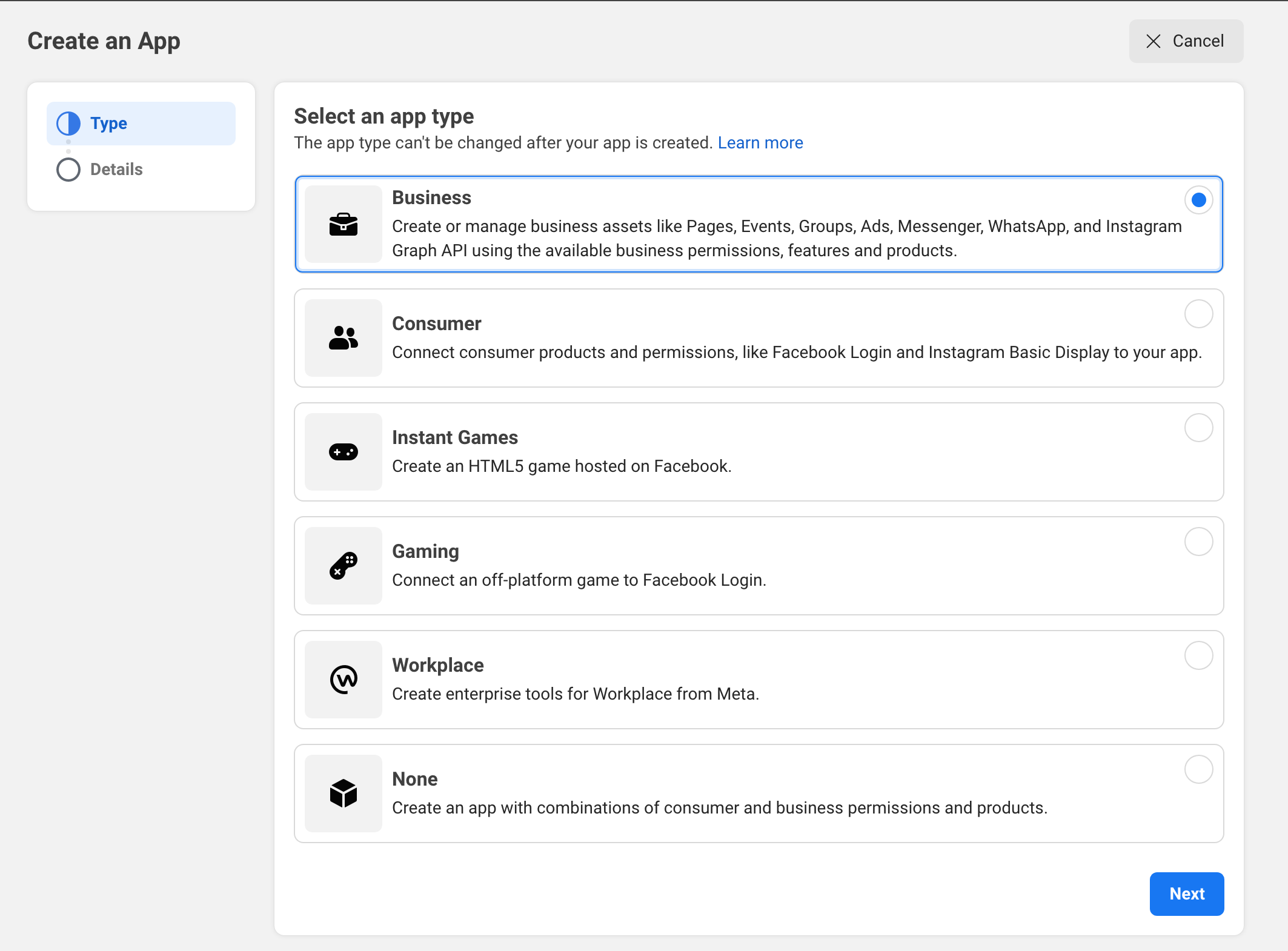
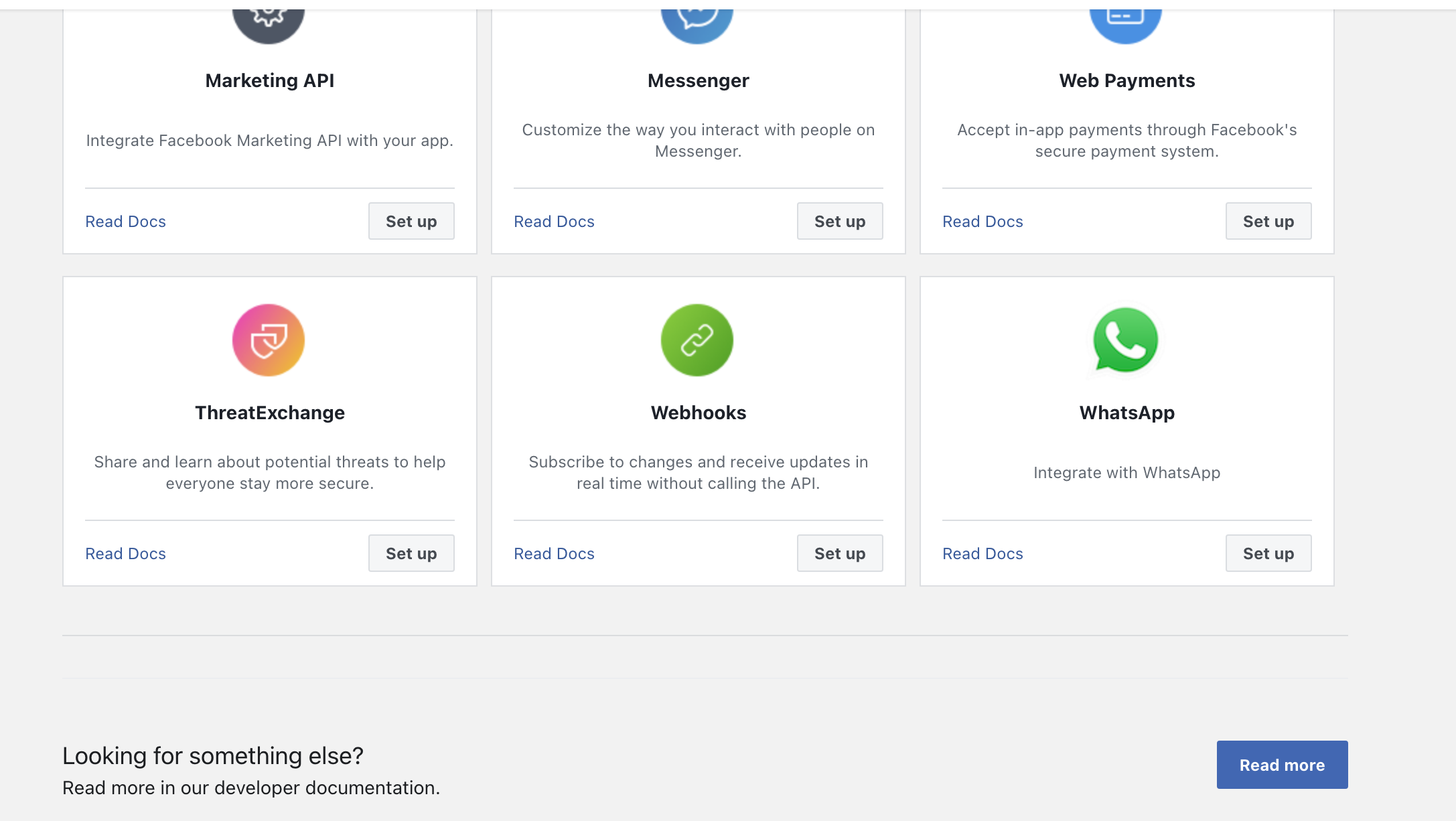
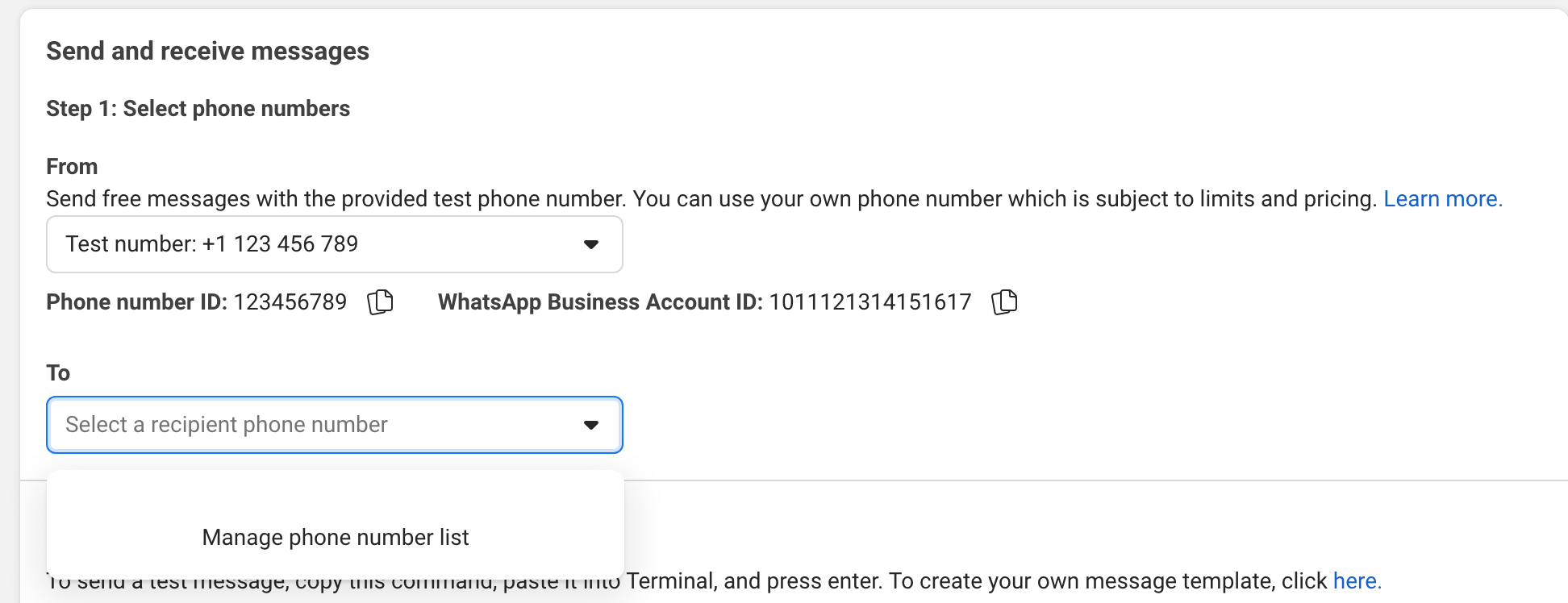
ลองส่งข้อความไปยังโทรศัพท์ของคุณใน UI
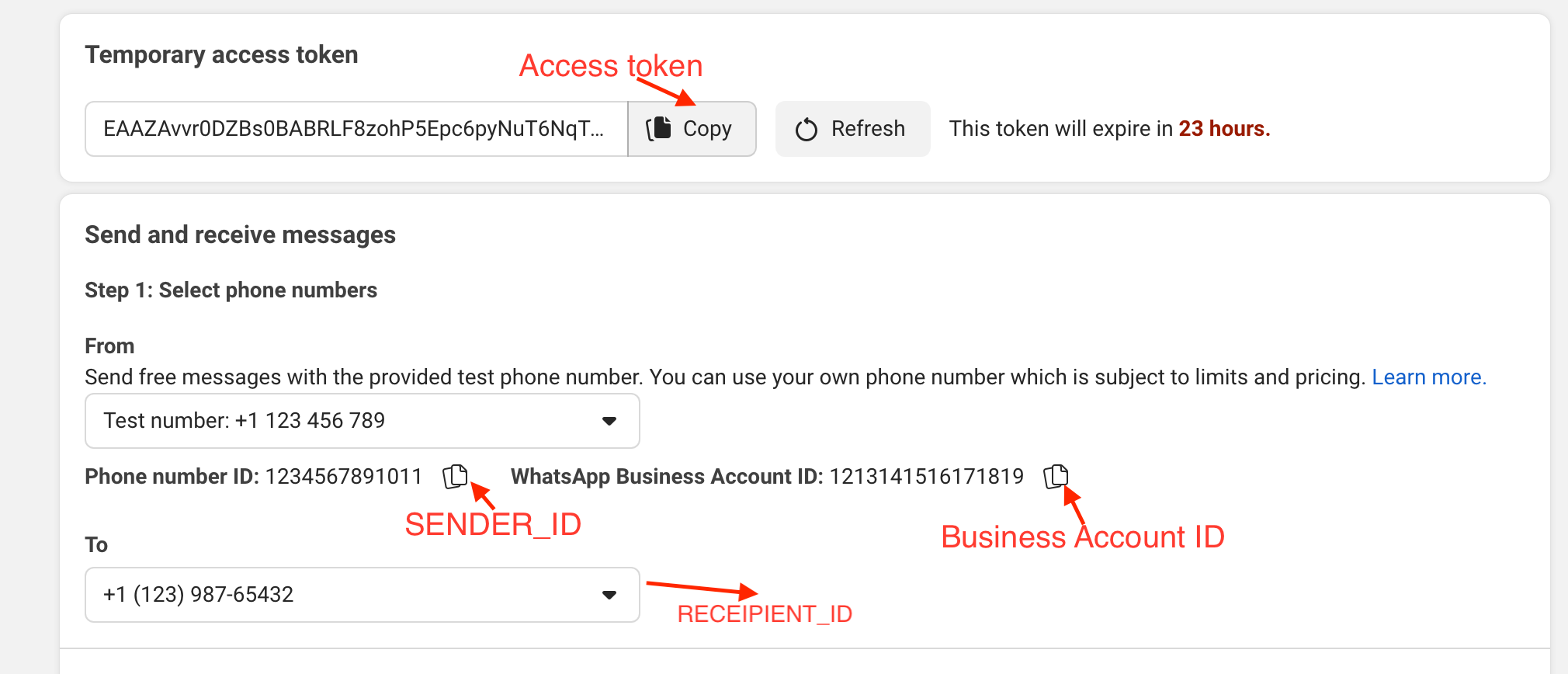
ตัวอย่าง:
gem install whatsapp_sdk ในอัญมณีirbrequire "whatsapp_sdk"ACCESS_TOKEN , SENDER_ID , BUSINESS_ID และ RECIPIENT_NUMBER ในตัวแปร ACCESS_TOKEN = "EAAZAvvr0DZBs0BABRLF8zohP5Epc6pyNu"
BUSINESS_ID = 1213141516171819
SENDER_ID = 1234567891011
RECIPIENT_NUMBER = 12398765432 WhatsappSdk . configure do | config |
config . access_token = ACCESS_TOKEN
endหมายเลขโทรศัพท์ API
registered_number = client . phone_numbers . registered_number ( SENDER_ID )ข้อความ API
 message_sent = client . messages . send_text ( sender_id : SENDER_ID , recipient_number : RECIPIENT_NUMBER ,
                                      message : "Hey there! it's Whatsapp Ruby SDK" )
ตรวจสอบไฟล์ตัวอย่าง RB สำหรับตัวอย่างเพิ่มเติม
 client = WhatsappSdk :: Api :: Client . new ( "<ACCESS TOKEN>" ) # replace this with a valid access token

client . phone_numbers . register_number ( SENDER_ID , 123456 ) # register the phone number to uplaod media and send message from.

# send a text and a location
client . messages . send_text ( sender_id : SENDER_ID , recipient_number : RECIPIENT_NUMBER , message : "Hey there! it's Whatsapp Ruby SDK" )

client . messages . send_location ( sender_id : SENDER_ID , recipient_number : RECIPIENT_NUMBER , longitude : - 75.6898604 , latitude : 45.4192206 , name : "Ignacio" , address : "My house" )

# upload a photo and send it
image = client . media . upload ( sender_id : SENDER_ID , file_path : "test/fixtures/assets/whatsapp.png" , type : "image/png" ) image = client . media . get ( media_id : uploaded_media . id )
client . messages . send_image ( sender_id : SENDER_ID , recipient_number : RECIPIENT_NUMBER , image_id : image . id )

# upload a sticker and send it
sticker = client . media . upload ( sender_id : SENDER_ID , file_path : "test/fixtures/assets/sticker.webp" , type : "image/webp" )
client . messages . send_sticker ( sender_id : SENDER_ID , recipient_number : RECIPIENT_NUMBER , sticker_id : sticker . id ) # Get list of templates
client . templates . list ( business_id : BUSINESS_ID )
# Get Message Template Namespace
# The message template namespace is required to send messages using the message templates.
client . templates . get_message_template_namespace ( business_id : BUSINESS_ID )
# Create a template
client . templates . create (
business_id : BUSINESS_ID , name : "seasonal_promotion" , language : "en_US" , category : "MARKETING" ,
components_json : components_json , allow_category_change : true
)
# Delete a template
client . templates . delete ( business_id : BUSINESS_ID , name : "my_name" ) # delete by name # Get the details of your business
client . business_profiles . get ( phone_number_id )
# Update the details of your business
client . business_profiles . update ( phone_number_id : SENDER_ID , params : { about : "A very cool business" } ) # Get the list of phone numbers registered
client . phone_numbers . list ( business_id )
# Get the a phone number by id
client . phone_numbers . get ( phone_number_id )
# Register a phone number
client . phone_numbers . register_number ( phone_number_id , pin )
# Deregister a phone number
client . phone_numbers . deregister_number ( phone_number_id ) # Upload a media
client . media . upload ( sender_id : SENDER_ID , file_path : "tmp/whatsapp.png" , type : "image/png" )
# Get a media
media = client . media . get ( media_id : MEDIA_ID )
# Download media
client . media . download ( url : MEDIA_URL , file_path : 'tmp/downloaded_whatsapp.png' , media_type : "image/png" )
# Delete a media
client . media . delete ( media_id : MEDIA_ID ) # Send a text message
client . messages . send_text ( sender_id : 1234 , recipient_number : 112345678 , message : "hola" )
# Read a message
client . messages . read_message ( sender_id : 1234 , message_id : "wamid.HBgLMTM0M12345678910=" )
# Note: To get the `message_id` you can set up [Webhooks](https://developers.facebook.com/docs/whatsapp/cloud-api/webhooks/components) that will listen and fire an event when a message is received.
# Send a reaction to message
# To send a reaction to a message, you need to obtain the message id and look for the emoji's unicode you want to use.
client . messages . send_reaction ( sender_id : 123_123 , recipient_number : 56_789 , message_id : "12345" , emoji : " u{1f550} " )
client . messages . send_reaction ( sender_id : 123_123 , recipient_number : 56_789 , message_id : "12345" , emoji : "⛄️" )
# Reply to a message
# To reply to a message, just include the id of the message in the `client.messages` methods. For example, to reply to a text message include the following:
client . messages . send_text ( sender_id : 123_123 , recipient_number : 56_789 , message : "I'm a reply" , message_id : "wamid.1234" )
# Send a location message
client . messages . send_location (
sender_id : 123123 , recipient_number : 56789 ,
longitude : 45.4215 , latitude : 75.6972 , name : "nacho" , address : "141 cooper street"
)
# Send an image message
# It uses a link or an image_id.
# with a link
client . messages . send_image ( sender_id : 123123 , recipient_number : 56789 , link : "image_link" , caption : "Ignacio Chiazzo Profile" )
# with an image id
client . messages . send_image ( sender_id : 123123 , recipient_number : 56789 , image_id : "1234" , caption : "Ignacio Chiazzo Profile" )
# Send an audio message
# It uses a link or an audio_id.
# with a link
client . messages . send_audio ( sender_id : 123123 , recipient_number : 56789 , link : "audio_link" )
# with an audio id
client . messages . send_audio ( sender_id : 123123 , recipient_number : 56789 , audio_id : "1234" )
# Send a document message
# It uses a link or a document_id.
# with a link
client . messages . send_document ( sender_id : 123123 , recipient_number : 56789 , link : "document_link" , caption : "Ignacio Chiazzo" )
# with a document id
client . messages . send_document ( sender_id : 123123 , recipient_number : 56789 , document_id : "1234" , caption : "Ignacio Chiazzo" )
# Note, you can specify the filename via argument [`filename`](https://developers.facebook.com/docs/whatsapp/cloud-api/reference/messages).
# Send a sticker message
# It could use a link or a sticker_id.
# with a link
client . messages . send_sticker ( sender_id : 123123 , recipient_number : 56789 , link : "link" )
# with a sticker_id
client . messages . send_sticker ( sender_id : 123123 , recipient_number : 56789 , sticker_id : "1234" )
# Send contacts message
# To send a contact, you need to create a Contact instance object that contain objects embedded like `addresses`, `birthday`, `emails`, `name`, `org`. See this [guide](/test/contact_helper.rb) to learn how to create contacts objects.
client . messages . send_contacts ( sender_id : 123123 , recipient_number : 56789 , contacts : [ create_contact ( params ) ] )
# Alternatively, you could pass a plain json like this:
client . messages . send_contacts ( sender_id : 123123 , recipient_number : 56789 , contacts_json : { ... } )
# Send a template message
# WhatsApp message templates are specific message formats that businesses use to send out notifications or customer care messages to people that have opted in to notifications. Messages can include appointment reminders, shipping information, issue resolution or payment updates.
# Before sending a message template, you need to create one. visit the [Official API Documentation](https://developers.facebook.com/docs/whatsapp/cloud-api/guides/send-message-templates) currency = WhatsappSdk :: Resource :: Currency . new ( code : "USD" , amount : 1000 , fallback_value : "1000" )
date_time = WhatsappSdk :: Resource :: DateTime . new ( fallback_value : "2020-01-01T00:00:00Z" )
media_component = WhatsappSdk :: Resource :: MediaComponent . new ( type : "image" , link : "http(s)://URL" )
location = WhatsappSdk :: Resource :: Location . new (
latitude : 25.779510 , longitude : - 80.338631 , name : "miami store" , address : "820 nw 87th ave, miami, fl"
)
parameter_image = WhatsappSdk :: Resource :: ParameterObject . new ( type : "image" , image : media_component )
parameter_text = WhatsappSdk :: Resource :: ParameterObject . new ( type : "text" , text : "TEXT_STRING" )
parameter_currency = WhatsappSdk :: Resource :: ParameterObject . new ( type : "currency" , currency : currency )
parameter_date_time = WhatsappSdk :: Resource :: ParameterObject . new ( type : "date_time" , date_time : date_time )
parameter_location = WhatsappSdk :: Resource :: ParameterObject . new ( type : "location" , location : location )
header_component = WhatsappSdk :: Resource :: Component . new ( type : "header" , parameters : [ parameter_image ] )
body_component = WhatsappSdk :: Resource :: Component . new (
type : "body" ,
parameters : [ parameter_text , parameter_currency , parameter_date_time ]
)
button_component1 = WhatsappSdk :: Resource :: Component . new (
type : "button" ,
index : 0 ,
sub_type : "quick_reply" ,
parameters : [
WhatsappSdk :: Resource :: ButtonParameter . new ( type : "payload" , payload : "PAYLOAD" )
]
)
button_component2 = WhatsappSdk :: Resource :: Component . new (
type : "button" ,
index : 1 ,
sub_type : "quick_reply" ,
parameters : [
WhatsappSdk :: Resource :: ButtonParameter . new ( type : "payload" , payload : "PAYLOAD" )
]
)
location_component = WhatsappSdk :: Resource :: Component . new ( type : "header" , parameters : [ parameter_location ] )
client . messages . send_template (
sender_id : 12_345 , recipient_number : 12345678 , name : "hello_world" , language : "en_US" , components : [ ... ]
)หรือคุณสามารถผ่าน JSON ธรรมดาเช่นนี้:
client . messages . send_template ( sender_id : 12_345 , recipient_number : 12345678 , name : "hello_world" , language : "en_US" , components_json : [ { ... } ] )ส่งข้อความโต้ตอบเยี่ยม ชมเอกสาร API อย่างเป็นทางการ
 interactive_header = WhatsappSdk :: Resource :: InteractiveHeader . new ( type : "text" , text : "I am the header!" )
interactive_body = WhatsappSdk :: Resource :: InteractiveBody . new ( text : "I am the body!" )
interactive_footer = WhatsappSdk :: Resource :: InteractiveFooter . new ( text : "I am the footer!" )
interactive_action = WhatsappSdk :: Resource :: InteractiveAction . new ( type : "list_message" )

interactive_action . button = "I am the button CTA"

interactive_section_1 = WhatsappSdk :: Resource :: InteractiveActionSection . new ( title : "I am the section 1" )
interactive_section_1_row_1 = WhatsappSdk :: Resource :: InteractiveActionSectionRow . new (
  title : "I am the row 1 title" ,
  id : "section_1_row_1" ,
  description : "I am the optional section 1 row 1 description"
)
interactive_section_1 . add_row ( interactive_section_1_row_1 )
interactive_action . add_section ( interactive_section_1 )

interactive_list_messages = WhatsappSdk :: Resource :: Interactive . new (
  type : "list" ,
  header : interactive_header ,
  body : interactive_body ,
  footer : interactive_footer ,
  action : interactive_action
)

client . messages . send_interactive_list_messages (
  sender_id : SENDER_ID , recipient_number : RECIPIENT_NUMBER ,
  interactive : interactive_list_messages
)
หรือคุณสามารถผ่าน JSON ธรรมดาเช่นนี้:
 client . messages . send_interactive_list_messages (
  sender_id : 12_345 , recipient_number : 1234567890
  interactive_json : { ... }
) interactive_header = WhatsappSdk :: Resource :: InteractiveHeader . new ( type : "text" , text : "I am the header!" )
interactive_body = WhatsappSdk :: Resource :: InteractiveBody . new ( text : "I am the body!" )
interactive_footer = WhatsappSdk :: Resource :: InteractiveFooter . new ( text : "I am the footer!" )
interactive_action = WhatsappSdk :: Resource :: InteractiveAction . new ( type : "reply_button" )
interactive_reply_button_1 = WhatsappSdk :: Resource :: InteractiveActionReplyButton . new (
title : "I am the reply button 1" ,
id : "button_1"
)
interactive_action . add_reply_button ( interactive_reply_button_1 )
interactive_reply_button_2 = WhatsappSdk :: Resource :: InteractiveActionReplyButton . new (
title : "I am the reply button 2" ,
id : "button_2"
)
interactive_action . add_reply_button ( interactive_reply_button_2 )
interactive_reply_buttons = WhatsappSdk :: Resource :: Interactive . new (
type : "reply_button" ,
header : interactive_header ,
body : interactive_body ,
footer : interactive_footer ,
action : interactive_action
)
client . messages . send_interactive_reply_buttons (
sender_id : 12_345 , recipient_number : 1234567890 ,
interactive : interactive_reply_buttons
)ทางเลือกคุณสามารถผ่าน JSON ธรรมดาเช่นนี้:
 client . messages . send_interactive_reply_buttons (
  sender_id : 12_345 , recipient_number : 1234567890
  interactive_json : { ... }
) หาก API ส่งคืนข้อผิดพลาดข้อยกเว้น WhatsappSdk::Api::Responses::HttpResponseError จะเพิ่มขึ้น วัตถุมีข้อมูลที่ส่งคืนโดยคลาวด์ API สำหรับข้อมูลเพิ่มเติมเกี่ยวกับข้อผิดพลาดที่อาจเกิดขึ้นตรวจสอบเอกสารอย่างเป็นทางการ
เยี่ยมชมไฟล์ตัวอย่างพร้อมตัวอย่างเพื่อเรียก API ในไฟล์เดียว
หากคุณพยายามส่งข้อความโดยตรงโดยไม่มีเทมเพลตข้อความที่สร้างและอนุมัติในแผงควบคุมเมตาของคุณคุณไม่สามารถเริ่มการแชทกับคนอื่นได้ แต่ถ้าคุณได้รับข้อความก่อนหน้านี้เป็นไปได้ที่จะส่งข้อความ
หากการตอบสนองของ API ยังคง success แต่ข้อความไม่ได้ส่ง:
v.14หมายเหตุ: บางครั้งข้อความล่าช้า; ดูเอกสารเมตา
หลังจากตรวจสอบ repo ให้เรียกใช้ bin/setup เพื่อติดตั้งการพึ่งพา จากนั้นเรียกใช้ rake test เพื่อเรียกใช้การทดสอบ
เรียกใช้ 'Bundle Exec Rake Install' เพื่อติดตั้งอัญมณีนี้ลงในเครื่องในพื้นที่ของคุณ หากต้องการเปิดตัวเวอร์ชันใหม่ให้อัปเดตหมายเลขเวอร์ชันใน version.rb จากนั้นเรียกใช้ bundle exec rake release ซึ่งจะสร้างแท็ก GIT สำหรับเวอร์ชันกด GIT และแท็กและกดไฟล์ .gem ไปที่ rubygems.org
rake testsrb tcbundle exec rubocop ในการอัปเดตเวอร์ชันคลาวด์ API อัปเดตเวอร์ชันใน lib/whatsapp_sdk/api/api_configuration.rb ตรวจสอบ Cloud API Changelog สำหรับ API udpates
รายงานข้อผิดพลาดและคำขอดึงยินดีต้อนรับบน GitHub ที่ https://github.com/ignacio-chiazzo/ruby_whatsapp_sdk โครงการนี้มีจุดประสงค์เพื่อเป็นพื้นที่ที่ปลอดภัยและเป็นมิตรสำหรับการทำงานร่วมกัน
หากคุณต้องการให้มีคุณสมบัติที่จะนำไปใช้ในอัญมณีโปรดเปิดปัญหาและเราจะดูโดยเร็วที่สุด
คุณต้องการมีส่วนร่วมและไม่แน่ใจว่าจะเริ่มต้นที่ไหน? ping ฉันบน Twitter และฉันจะช่วยคุณ!
ตรวจสอบไฟล์ที่มีส่วนร่วม
อัญมณีมีให้เป็นโอเพ่นซอร์สภายใต้ข้อกำหนดของใบอนุญาต MIT







