ruby_whatsapp_sdk
1.0.0

Le SDK fournit un ensemble d'opérations et de classes pour utiliser l'API WhatsApp. Envoyez des autocollants, des messages, de l'audio, des vidéos, des emplacements, réagissez et répondez aux messages ou demandez simplement les numéros de téléphone via cette bibliothèque en quelques étapes!
Vérifiez le référentiel Ruby on Rails WhatsApp Exemple qui utilise cette bibliothèque pour envoyer des messages.
Ajoutez cette ligne à Gemfile de votre application:
gem 'whatsapp_sdk'Puis exécuter:
$ bundle
Ou installez-le vous-même comme:
$ gem install whatsapp_sdk
Il existe trois ressources primaires, Messages , Media et PhoneNumbers . Messages permettent aux utilisateurs d'envoyer un message (texte, audio, emplacement, vidéo, image, etc.). Media permettent aux utilisateurs de gérer les médias et Phone Numbers permettent aux clients d'interroger les numéros de téléphone associés.
Pour utiliser Messages , Media ou PhoneNumbers , vous devez initialiser le Client contenant des informations Auth. Il y a deux façons de le faire.
 # config/initializers/whatsapp_sdk.rb
WhatsappSdk . configure do | config |
  config . access_token = ACCESS_TOKEN
  config . api_version = API_VERSION
  config . logger = Logger . new ( STDOUT ) # optional, Faraday logger to attach
  config . logger_options = { bodies : true } # optional, they are all valid logger_options for Faraday
end
Notes:
Client : # without
client = WhatsappSdk :: Api :: Client . new ( "<ACCESS TOKEN>" ) # replace this with a valid access token
# OR optionally use a logger, api_version and
logger = Logger . new ( STDOUT )
logger_options = { bodies : true }
client = WhatsappSdk :: Api :: Client . new ( "<ACCESS TOKEN>" , "<API VERSION>" , logger , logger_options ) 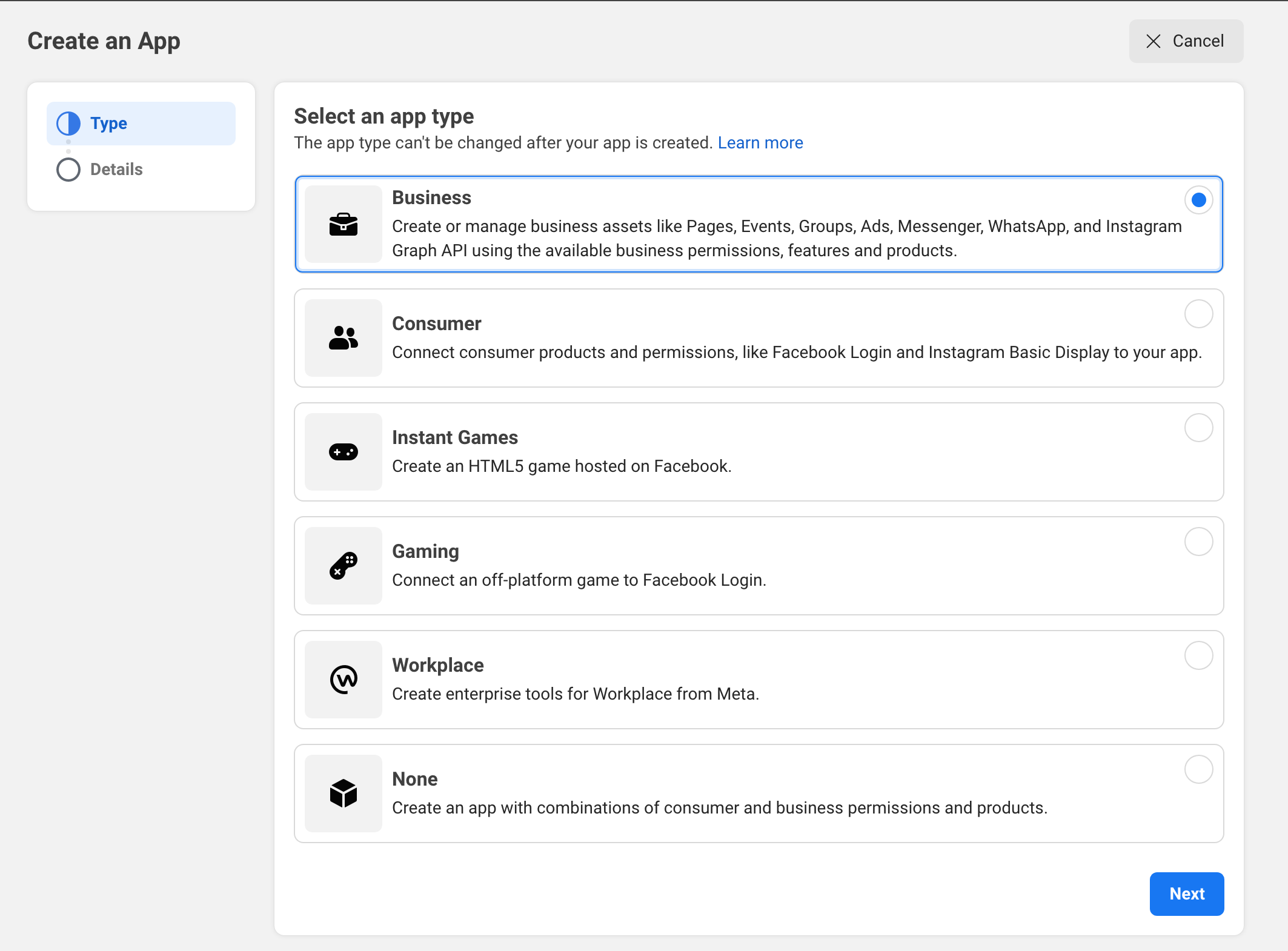
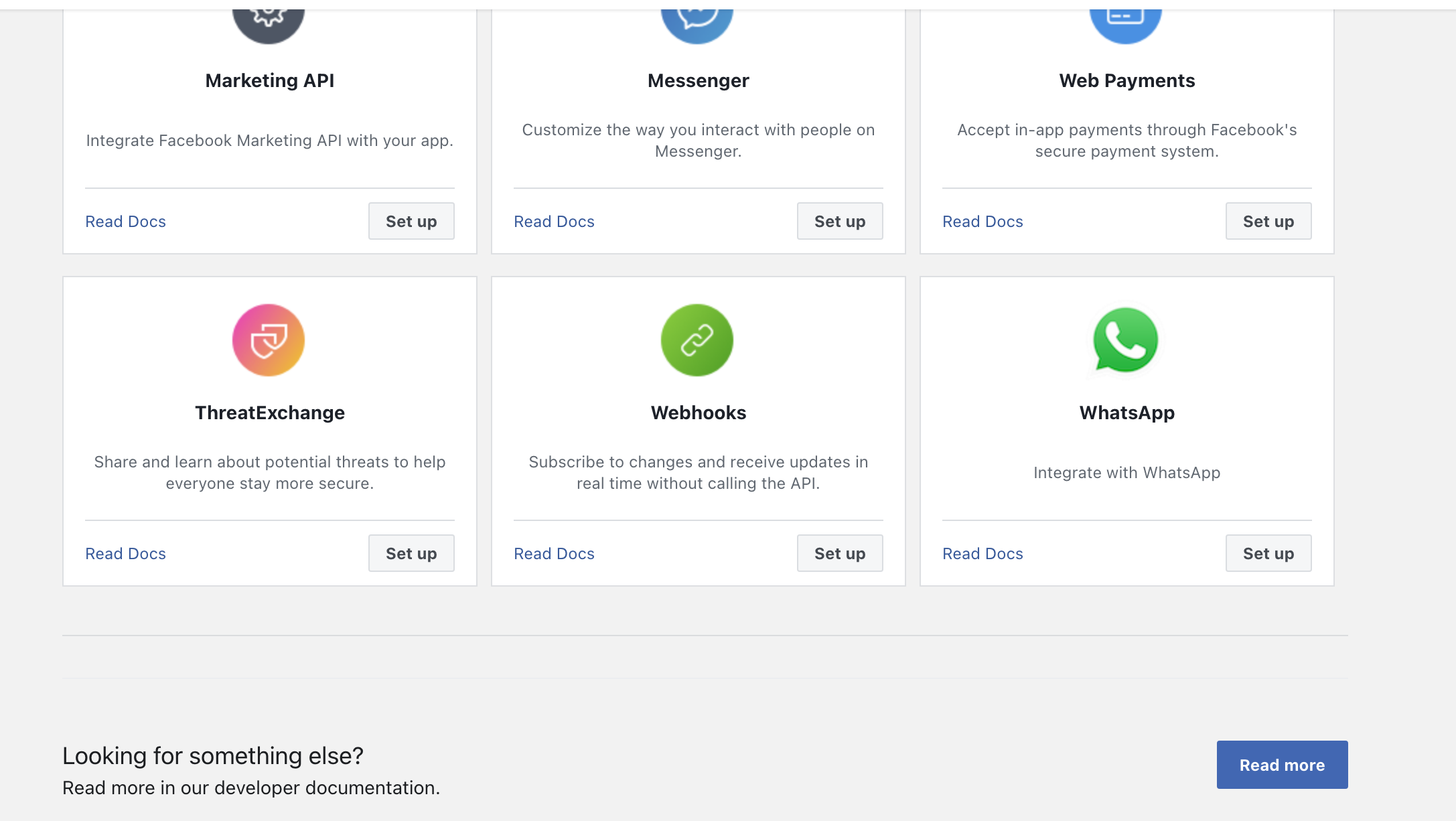
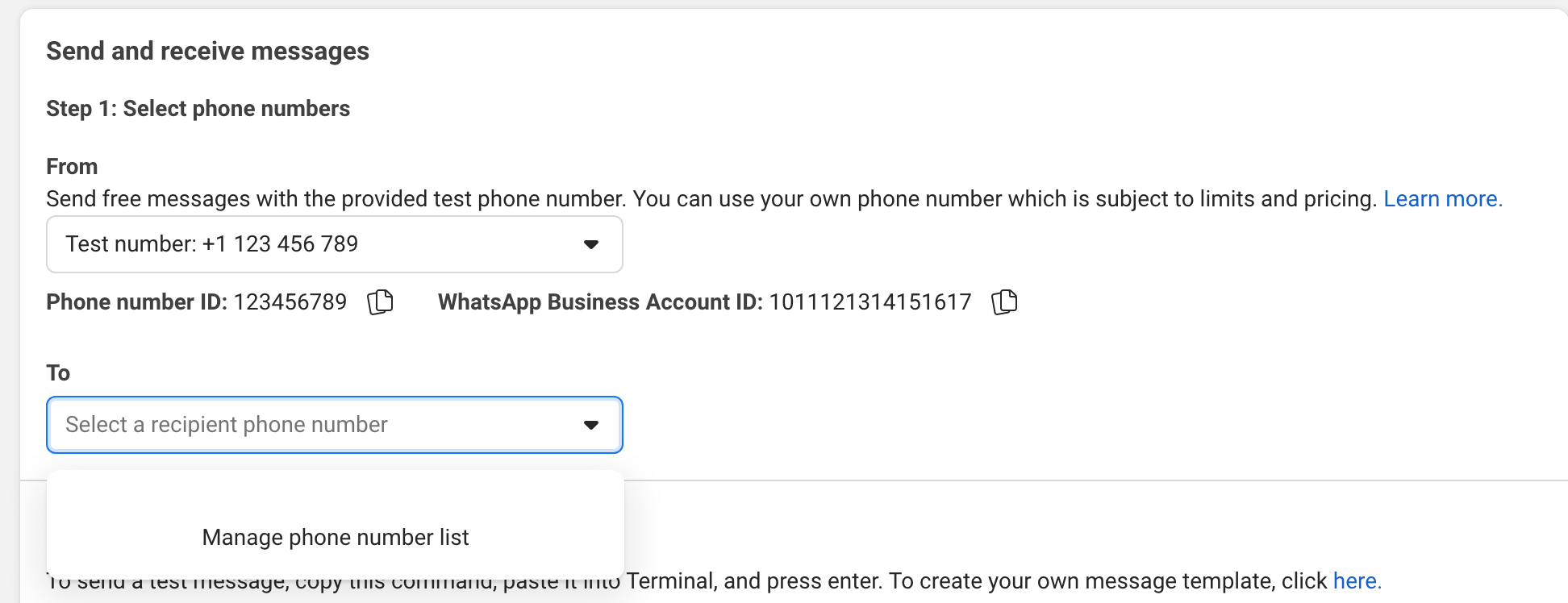
Essayez d'envoyer un message à votre téléphone dans l'interface utilisateur.
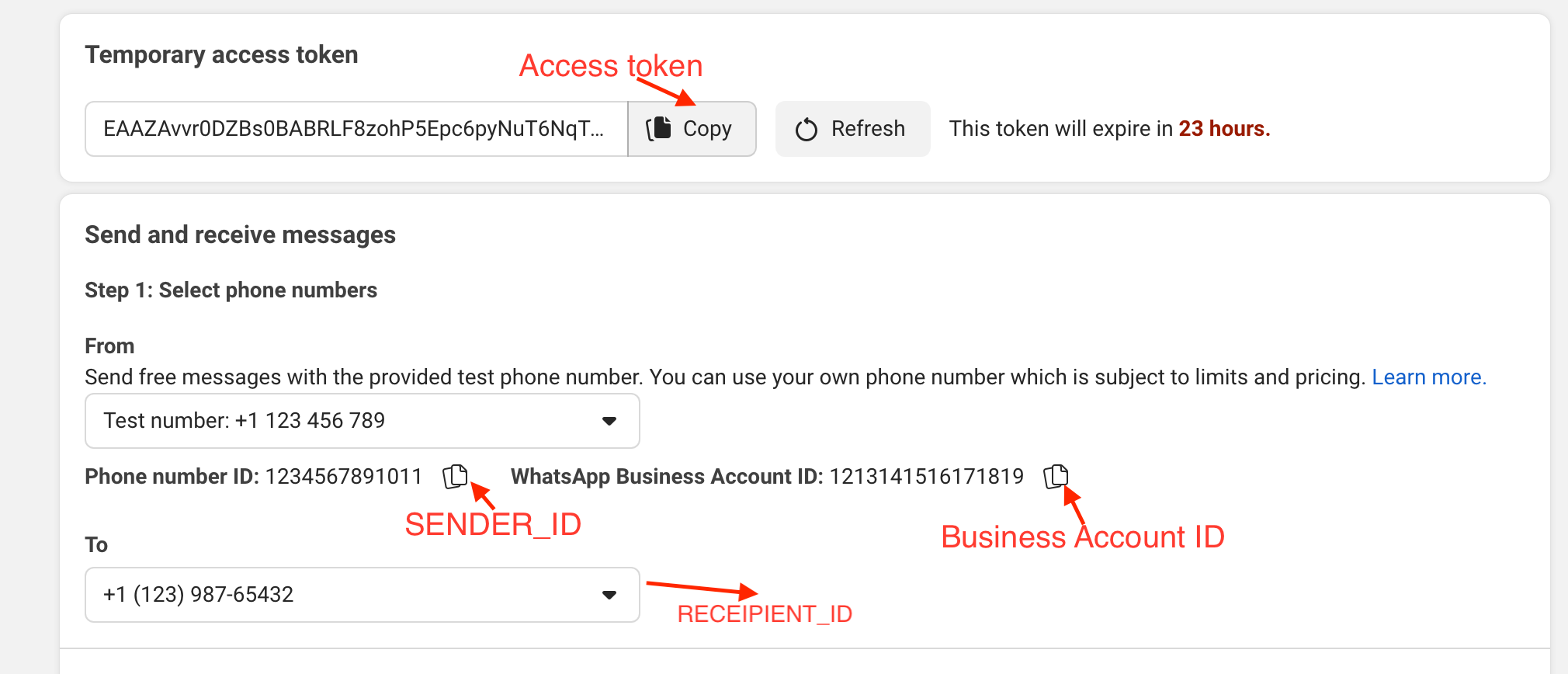
Exemple:
gem install whatsapp_sdk dans le Gem.irbrequire "whatsapp_sdk"ACCESS_TOKEN , le SENDER_ID , le BUSINESS_ID et le RECIPIENT_NUMBER en variables. ACCESS_TOKEN = "EAAZAvvr0DZBs0BABRLF8zohP5Epc6pyNu"
BUSINESS_ID = 1213141516171819
SENDER_ID = 1234567891011
RECIPIENT_NUMBER = 12398765432 WhatsappSdk . configure do | config |
config . access_token = ACCESS_TOKEN
endAPI des numéros de téléphone
registered_number = client . phone_numbers . registered_number ( SENDER_ID )API Messages
 message_sent = client . messages . send_text ( sender_id : SENDER_ID , recipient_number : RECIPIENT_NUMBER ,
                                      message : "Hey there! it's Whatsapp Ruby SDK" )
Vérifiez le fichier Exemple.rb pour plus d'exemples.
 client = WhatsappSdk :: Api :: Client . new ( "<ACCESS TOKEN>" ) # replace this with a valid access token

client . phone_numbers . register_number ( SENDER_ID , 123456 ) # register the phone number to uplaod media and send message from.

# send a text and a location
client . messages . send_text ( sender_id : SENDER_ID , recipient_number : RECIPIENT_NUMBER , message : "Hey there! it's Whatsapp Ruby SDK" )

client . messages . send_location ( sender_id : SENDER_ID , recipient_number : RECIPIENT_NUMBER , longitude : - 75.6898604 , latitude : 45.4192206 , name : "Ignacio" , address : "My house" )

# upload a photo and send it
image = client . media . upload ( sender_id : SENDER_ID , file_path : "test/fixtures/assets/whatsapp.png" , type : "image/png" ) image = client . media . get ( media_id : uploaded_media . id )
client . messages . send_image ( sender_id : SENDER_ID , recipient_number : RECIPIENT_NUMBER , image_id : image . id )

# upload a sticker and send it
sticker = client . media . upload ( sender_id : SENDER_ID , file_path : "test/fixtures/assets/sticker.webp" , type : "image/webp" )
client . messages . send_sticker ( sender_id : SENDER_ID , recipient_number : RECIPIENT_NUMBER , sticker_id : sticker . id ) # Get list of templates
client . templates . list ( business_id : BUSINESS_ID )
# Get Message Template Namespace
# The message template namespace is required to send messages using the message templates.
client . templates . get_message_template_namespace ( business_id : BUSINESS_ID )
# Create a template
client . templates . create (
business_id : BUSINESS_ID , name : "seasonal_promotion" , language : "en_US" , category : "MARKETING" ,
components_json : components_json , allow_category_change : true
)
# Delete a template
client . templates . delete ( business_id : BUSINESS_ID , name : "my_name" ) # delete by name # Get the details of your business
client . business_profiles . get ( phone_number_id )
# Update the details of your business
client . business_profiles . update ( phone_number_id : SENDER_ID , params : { about : "A very cool business" } ) # Get the list of phone numbers registered
client . phone_numbers . list ( business_id )
# Get the a phone number by id
client . phone_numbers . get ( phone_number_id )
# Register a phone number
client . phone_numbers . register_number ( phone_number_id , pin )
# Deregister a phone number
client . phone_numbers . deregister_number ( phone_number_id ) # Upload a media
client . media . upload ( sender_id : SENDER_ID , file_path : "tmp/whatsapp.png" , type : "image/png" )
# Get a media
media = client . media . get ( media_id : MEDIA_ID )
# Download media
client . media . download ( url : MEDIA_URL , file_path : 'tmp/downloaded_whatsapp.png' , media_type : "image/png" )
# Delete a media
client . media . delete ( media_id : MEDIA_ID ) # Send a text message
client . messages . send_text ( sender_id : 1234 , recipient_number : 112345678 , message : "hola" )
# Read a message
client . messages . read_message ( sender_id : 1234 , message_id : "wamid.HBgLMTM0M12345678910=" )
# Note: To get the `message_id` you can set up [Webhooks](https://developers.facebook.com/docs/whatsapp/cloud-api/webhooks/components) that will listen and fire an event when a message is received.
# Send a reaction to message
# To send a reaction to a message, you need to obtain the message id and look for the emoji's unicode you want to use.
client . messages . send_reaction ( sender_id : 123_123 , recipient_number : 56_789 , message_id : "12345" , emoji : " u{1f550} " )
client . messages . send_reaction ( sender_id : 123_123 , recipient_number : 56_789 , message_id : "12345" , emoji : "⛄️" )
# Reply to a message
# To reply to a message, just include the id of the message in the `client.messages` methods. For example, to reply to a text message include the following:
client . messages . send_text ( sender_id : 123_123 , recipient_number : 56_789 , message : "I'm a reply" , message_id : "wamid.1234" )
# Send a location message
client . messages . send_location (
sender_id : 123123 , recipient_number : 56789 ,
longitude : 45.4215 , latitude : 75.6972 , name : "nacho" , address : "141 cooper street"
)
# Send an image message
# It uses a link or an image_id.
# with a link
client . messages . send_image ( sender_id : 123123 , recipient_number : 56789 , link : "image_link" , caption : "Ignacio Chiazzo Profile" )
# with an image id
client . messages . send_image ( sender_id : 123123 , recipient_number : 56789 , image_id : "1234" , caption : "Ignacio Chiazzo Profile" )
# Send an audio message
# It uses a link or an audio_id.
# with a link
client . messages . send_audio ( sender_id : 123123 , recipient_number : 56789 , link : "audio_link" )
# with an audio id
client . messages . send_audio ( sender_id : 123123 , recipient_number : 56789 , audio_id : "1234" )
# Send a document message
# It uses a link or a document_id.
# with a link
client . messages . send_document ( sender_id : 123123 , recipient_number : 56789 , link : "document_link" , caption : "Ignacio Chiazzo" )
# with a document id
client . messages . send_document ( sender_id : 123123 , recipient_number : 56789 , document_id : "1234" , caption : "Ignacio Chiazzo" )
# Note, you can specify the filename via argument [`filename`](https://developers.facebook.com/docs/whatsapp/cloud-api/reference/messages).
# Send a sticker message
# It could use a link or a sticker_id.
# with a link
client . messages . send_sticker ( sender_id : 123123 , recipient_number : 56789 , link : "link" )
# with a sticker_id
client . messages . send_sticker ( sender_id : 123123 , recipient_number : 56789 , sticker_id : "1234" )
# Send contacts message
# To send a contact, you need to create a Contact instance object that contain objects embedded like `addresses`, `birthday`, `emails`, `name`, `org`. See this [guide](/test/contact_helper.rb) to learn how to create contacts objects.
client . messages . send_contacts ( sender_id : 123123 , recipient_number : 56789 , contacts : [ create_contact ( params ) ] )
# Alternatively, you could pass a plain json like this:
client . messages . send_contacts ( sender_id : 123123 , recipient_number : 56789 , contacts_json : { ... } )
# Send a template message
# WhatsApp message templates are specific message formats that businesses use to send out notifications or customer care messages to people that have opted in to notifications. Messages can include appointment reminders, shipping information, issue resolution or payment updates.
# Before sending a message template, you need to create one. visit the [Official API Documentation](https://developers.facebook.com/docs/whatsapp/cloud-api/guides/send-message-templates) currency = WhatsappSdk :: Resource :: Currency . new ( code : "USD" , amount : 1000 , fallback_value : "1000" )
date_time = WhatsappSdk :: Resource :: DateTime . new ( fallback_value : "2020-01-01T00:00:00Z" )
media_component = WhatsappSdk :: Resource :: MediaComponent . new ( type : "image" , link : "http(s)://URL" )
location = WhatsappSdk :: Resource :: Location . new (
latitude : 25.779510 , longitude : - 80.338631 , name : "miami store" , address : "820 nw 87th ave, miami, fl"
)
parameter_image = WhatsappSdk :: Resource :: ParameterObject . new ( type : "image" , image : media_component )
parameter_text = WhatsappSdk :: Resource :: ParameterObject . new ( type : "text" , text : "TEXT_STRING" )
parameter_currency = WhatsappSdk :: Resource :: ParameterObject . new ( type : "currency" , currency : currency )
parameter_date_time = WhatsappSdk :: Resource :: ParameterObject . new ( type : "date_time" , date_time : date_time )
parameter_location = WhatsappSdk :: Resource :: ParameterObject . new ( type : "location" , location : location )
header_component = WhatsappSdk :: Resource :: Component . new ( type : "header" , parameters : [ parameter_image ] )
body_component = WhatsappSdk :: Resource :: Component . new (
type : "body" ,
parameters : [ parameter_text , parameter_currency , parameter_date_time ]
)
button_component1 = WhatsappSdk :: Resource :: Component . new (
type : "button" ,
index : 0 ,
sub_type : "quick_reply" ,
parameters : [
WhatsappSdk :: Resource :: ButtonParameter . new ( type : "payload" , payload : "PAYLOAD" )
]
)
button_component2 = WhatsappSdk :: Resource :: Component . new (
type : "button" ,
index : 1 ,
sub_type : "quick_reply" ,
parameters : [
WhatsappSdk :: Resource :: ButtonParameter . new ( type : "payload" , payload : "PAYLOAD" )
]
)
location_component = WhatsappSdk :: Resource :: Component . new ( type : "header" , parameters : [ parameter_location ] )
client . messages . send_template (
sender_id : 12_345 , recipient_number : 12345678 , name : "hello_world" , language : "en_US" , components : [ ... ]
)Alternativement, vous pouvez passer un JSON ordinaire comme ceci:
client . messages . send_template ( sender_id : 12_345 , recipient_number : 12345678 , name : "hello_world" , language : "en_US" , components_json : [ { ... } ] )Envoyer des messages interactifs visitez la documentation officielle de l'API
 interactive_header = WhatsappSdk :: Resource :: InteractiveHeader . new ( type : "text" , text : "I am the header!" )
interactive_body = WhatsappSdk :: Resource :: InteractiveBody . new ( text : "I am the body!" )
interactive_footer = WhatsappSdk :: Resource :: InteractiveFooter . new ( text : "I am the footer!" )
interactive_action = WhatsappSdk :: Resource :: InteractiveAction . new ( type : "list_message" )

interactive_action . button = "I am the button CTA"

interactive_section_1 = WhatsappSdk :: Resource :: InteractiveActionSection . new ( title : "I am the section 1" )
interactive_section_1_row_1 = WhatsappSdk :: Resource :: InteractiveActionSectionRow . new (
  title : "I am the row 1 title" ,
  id : "section_1_row_1" ,
  description : "I am the optional section 1 row 1 description"
)
interactive_section_1 . add_row ( interactive_section_1_row_1 )
interactive_action . add_section ( interactive_section_1 )

interactive_list_messages = WhatsappSdk :: Resource :: Interactive . new (
  type : "list" ,
  header : interactive_header ,
  body : interactive_body ,
  footer : interactive_footer ,
  action : interactive_action
)

client . messages . send_interactive_list_messages (
  sender_id : SENDER_ID , recipient_number : RECIPIENT_NUMBER ,
  interactive : interactive_list_messages
)
Alternativement, vous pouvez passer un JSON ordinaire comme ceci:
 client . messages . send_interactive_list_messages (
  sender_id : 12_345 , recipient_number : 1234567890
  interactive_json : { ... }
) interactive_header = WhatsappSdk :: Resource :: InteractiveHeader . new ( type : "text" , text : "I am the header!" )
interactive_body = WhatsappSdk :: Resource :: InteractiveBody . new ( text : "I am the body!" )
interactive_footer = WhatsappSdk :: Resource :: InteractiveFooter . new ( text : "I am the footer!" )
interactive_action = WhatsappSdk :: Resource :: InteractiveAction . new ( type : "reply_button" )
interactive_reply_button_1 = WhatsappSdk :: Resource :: InteractiveActionReplyButton . new (
title : "I am the reply button 1" ,
id : "button_1"
)
interactive_action . add_reply_button ( interactive_reply_button_1 )
interactive_reply_button_2 = WhatsappSdk :: Resource :: InteractiveActionReplyButton . new (
title : "I am the reply button 2" ,
id : "button_2"
)
interactive_action . add_reply_button ( interactive_reply_button_2 )
interactive_reply_buttons = WhatsappSdk :: Resource :: Interactive . new (
type : "reply_button" ,
header : interactive_header ,
body : interactive_body ,
footer : interactive_footer ,
action : interactive_action
)
client . messages . send_interactive_reply_buttons (
sender_id : 12_345 , recipient_number : 1234567890 ,
interactive : interactive_reply_buttons
)Alternative, vous pourriez passer un JSON ordinaire comme ceci:
 client . messages . send_interactive_reply_buttons (
  sender_id : 12_345 , recipient_number : 1234567890
  interactive_json : { ... }
) Si l'API renvoie une erreur, une exception WhatsappSdk::Api::Responses::HttpResponseError est augmentée. L'objet contient des informations renvoyées par l'API Cloud. Pour plus d'informations sur l'erreur potentielle, vérifiez la documentation officielle.
Visitez le fichier d'exemple avec des exemples pour appeler l'API dans un seul fichier.
Si vous essayez d'envoyer un SMS directement sans modèle de message créé et approuvé dans votre panneau de méta-configuration, vous ne pouvez pas commencer une conversation avec d'autres personnes. Mais si vous recevez un message auparavant, il est possible d'envoyer un message.
Si la réponse de l'API est toujours success , mais le message n'est pas livré:
v.14 .Remarque: Parfois, les messages sont retardés; Voir Meta Documentation.
Après avoir vérifié le dépôt, exécutez bin/setup pour installer des dépendances. Ensuite, exécutez rake test pour exécuter les tests.
Exécutez «Bundle Exec Rake Install» pour installer ce gemme sur votre machine locale. Pour publier une nouvelle version, mettez à jour le numéro de version dans version.rb , puis exécutez bundle exec rake release , qui créera une balise GIT pour la version, pousse Git Commits and Tags, et poussez le fichier .gem sur RubyGems.org.
rake testsrb tcbundle exec rubocop Pour mettre à jour la version Cloud API à mettre à jour la version dans lib/whatsapp_sdk/api/api_configuration.rb . Vérifiez le Cloud API Changelog pour l'API UDPates.
Les rapports de bogues et les demandes de traction sont les bienvenus sur GitHub à https://github.com/ignacio-chiazzo/ruby_whatsapp_sdk Ce projet est destiné à être un espace sûr et accueillant pour la collaboration, et les contributeurs devraient adhérer au Code de conduite de l'alliance des contributeurs.
Si vous voulez qu'une fonctionnalité soit implémentée dans le gemme, s'il vous plaît, ouvrez un problème et nous allons jeter un œil dès que possible.
Voulez-vous contribuer et vous ne savez pas par où commencer? Ping me sur Twitter, et je vais vous aider!
Vérifiez le fichier contributif.
Le GEM est disponible en open source en vertu des termes de la licence du MIT.







