react native custom fonts
1.0.0

ใช้แบบอักษรแบบไดนามิกที่ระบุผ่านที่ตั้งเครือข่ายแทนที่จะจัดการในการสร้างดั้งเดิมของคุณ!
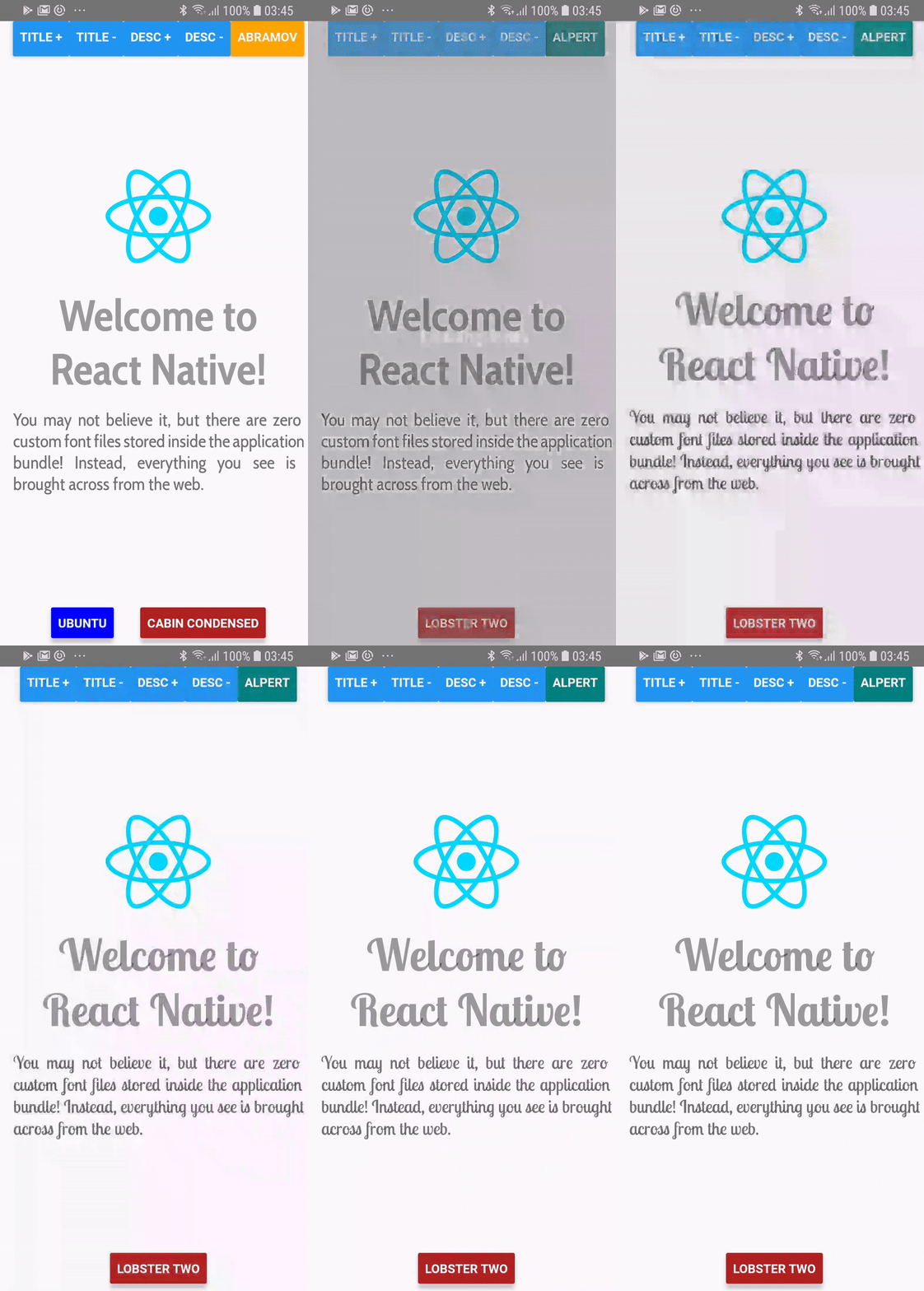
> = 0.60.0
yarn add react-native-custom-fonts # or npm install --save react-native-custom-fonts จากนั้นสร้างแอปของคุณใหม่ บน iOS อย่าลืม pod install cocoapods ของคุณในไดเรกทอรี /ios ของแอพของคุณ
<= 0.59.x
ใช้ yarn :
yarn add react-native-custom-fonts
react-native link react-native-custom-fontsfontFaces ได้กลายเป็นวัตถุ fontFaces ซึ่งมีคีย์คือ ชื่อ ของรูปแบบตัวอักษรที่คุณต้องการอ้างอิงในแอปของคุณfontFace คุณต้องระบุชื่อในการโทรไปยัง useCustomFont(name:String) โปรดตรวจสอบโครงการตัวอย่างสำหรับการสาธิตเต็มรูปแบบ เพียงแค่ cd ลงในไดเรกทอรีให้ใช้ npm หรือ yarn เพื่อติดตั้งการพึ่งพาจากนั้นเรียกใช้งานแอพโดยใช้สิ่งต่อไปนี้:
react-native run-android # run on android
react-native run-ios # run on ios import React from "react" ;
import PropTypes from "prop-types" ;
import { View , Text } from "react-native" ;
import CustomFontsProvider , { useCustomFont } from "react-native-custom-fonts" ;
const fontFaces = {
// XXX: Specify the local name of your font. You'll use this to refer to it via the useCustomFont hook.
'UbuntuBold' : {
uri : 'https://github.com/google/fonts/raw/master/ufl/ubuntu/Ubuntu-Bold.ttf' ,
fontFamily : 'Ubuntu' ,
fontWeight : 'bold' ,
// XXX: You can also specify additional font styling.
color : 'blue' ,
} ,
} ;
const SomeComponent = ( ) => {
// Fetch the desired font by name. When the font has been cached, it will automatically update the View.
const { ... fontProps } = useCustomFont ( 'UbuntuBold' ) ;
return (
< Text
{ ... fontProps }
children = "Hello, world!"
/>
) ;
} ;
export default ( ) => (
< CustomFontsProvider
fontFaces = { fontFaces }
>
< SomeComponent />
</ CustomFontsProvider >
) ; react-native-custom-fonts จับภาพ ref ของส่วนประกอบ Text เพื่อทำการกำหนดคุณสมบัติรันไทม์ คุณยังสามารถเข้าถึงการอ้างอิงได้ในหนึ่งในสองวิธี:
คุณสามารถ จัดหาอ้างอิง :
 const ref = useRef ( ) ;
const { ... fontProps } = useCustomFont ( 'UbuntuBold' , ref ) ;
return (
  < Text
    ref = { ref }
    { ... fontProps }
  />
) ;
หรือคุณสามารถ ใช้ Ref ที่ให้ไว้ :
 const { ref , ... fontProps } = useCustomFont ( 'UbuntuBold' ) ;
return (
  < Text
    ref = { ref }
    { ... fontProps }
  />
) ; เป็นไปได้ที่จะทำเช่นนี้เช่นกัน เพียงแค่ดึงรูป style เสาจากการโทรไปยัง useCustomFont :
 const { style , ... fontProps } = useCustomFont ( 'UbuntuBold' ) ;
return (
  < TextInput
    style = { [ style , { fontColor : 'blue' } ] }
    { ... fontProps }
  />
) ; CustomFontsProvider นี่คือผู้ให้บริการบริบทที่ตอบสนองสำหรับเด็กทุกคนที่ถูกเรียกด้วยการเรียกร้องให้ ReactNativeCustomFonts.withCustomFont จัดการการแคชและการกำหนดแบบอักษรระยะไกลให้กับเด็ก
| ชื่อเสา | ชนิดข้อมูล | ที่จำเป็น | ค่าเริ่มต้น | คำอธิบาย |
|---|---|---|---|---|
fontFaces | Proptypes.shape ({}) | เท็จ | - | กำหนดค่าการกำหนดค่าของแบบอักษรระยะไกล |
fallback | Proptypes.shape ({}) | เท็จ | {color: 'red', fontweight: 'bold'} | สไตล์ที่จะใช้เมื่อการดาวน์โหลดแบบอักษรล้มเหลว |
onDownloadDidStart | Proptypes.func | เท็จ | () => null | โทรกลับเมื่อผู้ให้บริการเริ่มดาวน์โหลด FontFaces |
onDownloadDidEnd | Proptypes.func | เท็จ | () => null | โทรกลับเมื่อผู้ให้บริการเสร็จสิ้นการดาวน์โหลด FontFaces |
onDownloadDidError | Proptypes.func | เท็จ | () => null | เรียกว่าเมื่อเกิดข้อผิดพลาดเมื่อดาวน์โหลด Fontfaces |
โปรดรายงานปัญหาใด ๆ ที่คุณเจอและอย่าลังเลที่จะส่งคำขอดึงหากคุณต้องการเพิ่มการปรับปรุงใด ๆ ในการเปลี่ยนแปลงใด ๆ คุณสามารถสาขาจาก master ได้
มิกซ์








