lovely tensors
1.0.0

JAX น่ารักpip install lovely-tensorsหรือ
mamba install lovely-tensorsหรือ
conda install -c conda-forge lovely-tensorsคุณพบว่าตัวเองดีบั๊กรหัส pytorch บ่อยแค่ไหน? คุณทิ้งเทนเซอร์ไปยังเอาต์พุตเซลล์และดูสิ่งนี้:
numbers tensor([[[-0.3541, -0.3369, -0.4054, ..., -0.5596, -0.4739, 2.2489],
[-0.4054, -0.4226, -0.4911, ..., -0.9192, -0.8507, 2.1633],
[-0.4739, -0.4739, -0.5424, ..., -1.0390, -1.0390, 2.1975],
...,
[-0.9020, -0.8335, -0.9363, ..., -1.4672, -1.2959, 2.2318],
[-0.8507, -0.7822, -0.9363, ..., -1.6042, -1.5014, 2.1804],
[-0.8335, -0.8164, -0.9705, ..., -1.6555, -1.5528, 2.1119]],
[[-0.1975, -0.1975, -0.3025, ..., -0.4776, -0.3725, 2.4111],
[-0.2500, -0.2325, -0.3375, ..., -0.7052, -0.6702, 2.3585],
[-0.3025, -0.2850, -0.3901, ..., -0.7402, -0.8102, 2.3761],
...,
[-0.4251, -0.2325, -0.3725, ..., -1.0903, -1.0203, 2.4286],
[-0.3901, -0.2325, -0.4251, ..., -1.2304, -1.2304, 2.4111],
[-0.4076, -0.2850, -0.4776, ..., -1.2829, -1.2829, 2.3410]],
[[-0.6715, -0.9853, -0.8807, ..., -0.9678, -0.6890, 2.3960],
[-0.7238, -1.0724, -0.9678, ..., -1.2467, -1.0201, 2.3263],
[-0.8284, -1.1247, -1.0201, ..., -1.2641, -1.1596, 2.3786],
...,
[-1.2293, -1.4733, -1.3861, ..., -1.5081, -1.2641, 2.5180],
[-1.1944, -1.4559, -1.4210, ..., -1.6476, -1.4733, 2.4308],
[-1.2293, -1.5256, -1.5081, ..., -1.6824, -1.5256, 2.3611]]])
มันมีประโยชน์จริงๆสำหรับคุณในฐานะมนุษย์เพื่อดูตัวเลขเหล่านี้ทั้งหมดหรือไม่?
รูปร่างคืออะไร? ขนาด?
สถิติคืออะไร?
ค่าใดของ nan หรือ inf ?
มันเป็นภาพของผู้ชายที่ถือ Tench หรือไม่?
import lovely_tensors as lt lt . monkey_patch () numbers # torch.Tensor tensor[3, 196, 196] n=115248 (0.4Mb) x∈[-2.118, 2.640] μ=-0.388 σ=1.073
numbers . rgbดีกว่าเหรอ?
numbers [ 1 ,: 6 , 1 ] # Still shows values if there are not too many. tensor[6] x∈[-0.443, -0.197] μ=-0.311 σ=0.091 [-0.197, -0.232, -0.285, -0.373, -0.443, -0.338]
 spicy = numbers [ 0 ,: 12 , 0 ]. clone ()

spicy [ 0 ] *= 10000
spicy [ 1 ] /= 10000
spicy [ 2 ] = float ( 'inf' )
spicy [ 3 ] = float ( '-inf' )
spicy [ 4 ] = float ( 'nan' )

spicy = spicy . reshape (( 2 , 6 ))
spicy # Spicy stuff
tensor[2, 6] n=12 x∈[-3.541e+03, -4.054e-05] μ=-393.842 σ=1.180e+03 +Inf! -Inf! NaN!
torch . zeros ( 10 , 10 ) # A zero tensor - make it obvious tensor[10, 10] n=100 all_zeros
spicy . v # Verbose tensor[2, 6] n=12 x∈[-3.541e+03, -4.054e-05] μ=-393.842 σ=1.180e+03 +Inf! -Inf! NaN!
 tensor([[-3.5405e+03, -4.0543e-05,         inf,        -inf,         nan, -6.1093e-01],
        [-6.1093e-01, -5.9380e-01, -5.9380e-01, -5.4243e-01, -5.4243e-01, -5.4243e-01]])
spicy . p # The plain old way tensor([[-3.5405e+03, -4.0543e-05, inf, -inf, nan, -6.1093e-01],
[-6.1093e-01, -5.9380e-01, -5.9380e-01, -5.4243e-01, -5.4243e-01, -5.4243e-01]])
 named_numbers = numbers . rename ( "C" , "H" , "W" )
named_numbers
/home/xl0/mambaforge/envs/lovely-py31-torch25/lib/python3.10/site-packages/torch/_tensor.py:1420: UserWarning: Named tensors and all their associated APIs are an experimental feature and subject to change. Please do not use them for anything important until they are released as stable. (Triggered internally at ../c10/core/TensorImpl.h:1925.)
return super().rename(names)
tensor[C=3, H=196, W=196] n=115248 (0.4Mb) x∈[-2.118, 2.640] μ=-0.388 σ=1.073
.deeper numbers . deeper tensor[3, 196, 196] n=115248 (0.4Mb) x∈[-2.118, 2.640] μ=-0.388 σ=1.073
tensor[196, 196] n=38416 x∈[-2.118, 2.249] μ=-0.324 σ=1.036
tensor[196, 196] n=38416 x∈[-1.966, 2.429] μ=-0.274 σ=0.973
tensor[196, 196] n=38416 x∈[-1.804, 2.640] μ=-0.567 σ=1.178
 # You can go deeper if you need to
# And we can use `.deeper` with named dimensions.

named_numbers . deeper ( 2 )
tensor[C=3, H=196, W=196] n=115248 (0.4Mb) x∈[-2.118, 2.640] μ=-0.388 σ=1.073
tensor[H=196, W=196] n=38416 x∈[-2.118, 2.249] μ=-0.324 σ=1.036
tensor[W=196] x∈[-1.912, 2.249] μ=-0.673 σ=0.522
tensor[W=196] x∈[-1.861, 2.163] μ=-0.738 σ=0.418
tensor[W=196] x∈[-1.758, 2.198] μ=-0.806 σ=0.397
tensor[W=196] x∈[-1.656, 2.249] μ=-0.849 σ=0.369
tensor[W=196] x∈[-1.673, 2.198] μ=-0.857 σ=0.357
tensor[W=196] x∈[-1.656, 2.146] μ=-0.848 σ=0.372
tensor[W=196] x∈[-1.433, 2.215] μ=-0.784 σ=0.397
tensor[W=196] x∈[-1.279, 2.249] μ=-0.695 σ=0.486
tensor[W=196] x∈[-1.364, 2.249] μ=-0.637 σ=0.539
...
tensor[H=196, W=196] n=38416 x∈[-1.966, 2.429] μ=-0.274 σ=0.973
tensor[W=196] x∈[-1.861, 2.411] μ=-0.529 σ=0.556
tensor[W=196] x∈[-1.826, 2.359] μ=-0.562 σ=0.473
tensor[W=196] x∈[-1.756, 2.376] μ=-0.622 σ=0.458
tensor[W=196] x∈[-1.633, 2.429] μ=-0.664 σ=0.430
tensor[W=196] x∈[-1.651, 2.376] μ=-0.669 σ=0.399
tensor[W=196] x∈[-1.633, 2.376] μ=-0.701 σ=0.391
tensor[W=196] x∈[-1.563, 2.429] μ=-0.670 σ=0.380
tensor[W=196] x∈[-1.475, 2.429] μ=-0.616 σ=0.386
tensor[W=196] x∈[-1.511, 2.429] μ=-0.593 σ=0.399
...
tensor[H=196, W=196] n=38416 x∈[-1.804, 2.640] μ=-0.567 σ=1.178
tensor[W=196] x∈[-1.717, 2.396] μ=-0.982 σ=0.350
tensor[W=196] x∈[-1.752, 2.326] μ=-1.034 σ=0.314
tensor[W=196] x∈[-1.648, 2.379] μ=-1.086 σ=0.314
tensor[W=196] x∈[-1.630, 2.466] μ=-1.121 σ=0.305
tensor[W=196] x∈[-1.717, 2.448] μ=-1.120 σ=0.302
tensor[W=196] x∈[-1.717, 2.431] μ=-1.166 σ=0.314
tensor[W=196] x∈[-1.560, 2.448] μ=-1.124 σ=0.326
tensor[W=196] x∈[-1.421, 2.431] μ=-1.064 σ=0.383
tensor[W=196] x∈[-1.526, 2.396] μ=-1.047 σ=0.417
...
.rgbภารกิจสำคัญ - เป็นคนของเราหรือไม่?
numbers . rgb ( numbers ). plt ( numbers + 3 ). plt ( center = "range" ).chans # .chans will map values betwen [-1,1] to colors.
# Make our values fit into that range to avoid clipping.
mean = torch . tensor ( in_stats [ 0 ])[:, None , None ]
std = torch . tensor ( in_stats [ 1 ])[:, None , None ]
numbers_01 = ( numbers * std + mean )
numbers_01 tensor[3, 196, 196] n=115248 (0.4Mb) x∈[0., 1.000] μ=0.361 σ=0.248
numbers_01 . chans # Weights of the second conv layer (64ch -> 128ch) of VGG11,
# grouped per output channel.
weights . chans ( frame_px = 1 , gutter_px = 0 ) lt . chans ( numbers_01 )
numbers . rgb ( in_stats ). fig # matplotlib figure 
( numbers * 0.3 + 0.5 ). chans . fig # matplotlib figure 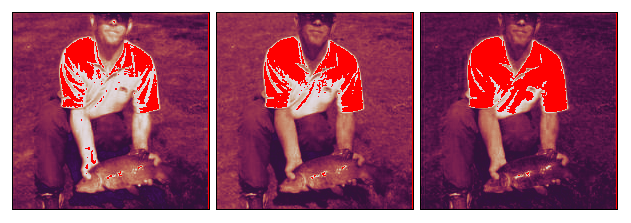
numbers . plt . fig . savefig ( 'pretty.svg' ) # Save it !f ile pretty . svg ; rm pretty . svg pretty.svg: SVG Scalable Vector Graphics image
 fig = plt . figure ( figsize = ( 8 , 3 ))
fig . set_constrained_layout ( True )
gs = fig . add_gridspec ( 2 , 2 )
ax1 = fig . add_subplot ( gs [ 0 , :])
ax2 = fig . add_subplot ( gs [ 1 , 0 ])
ax3 = fig . add_subplot ( gs [ 1 , 1 :])

ax2 . set_axis_off ()
ax3 . set_axis_off ()

numbers_01 . plt ( ax = ax1 )
numbers_01 . rgb ( ax = ax2 )
numbers_01 . chans ( ax = ax3 );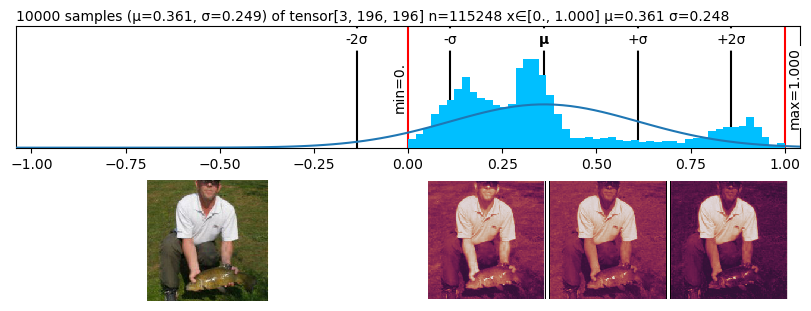
แค่ทำงาน
 def func ( x ):
    return x * 2

if torch . __version__ >= "2.0" :
    func = torch . compile ( func )

func ( torch . tensor ([ 1 , 2 , 3 ]))
tensor[3] i64 x∈[2, 6] μ=4.000 σ=2.000 [2, 4, 6]
เทนเซอร์ที่น่ารักติดตั้งตะขอนำเข้า ตั้งค่า LOVELY_TENSORS=1 และมันจะโหลดโดยอัตโนมัติไม่จำเป็นต้องแก้ไขรหัส:> หมายเหตุ: อย่าตั้งค่าทั่วโลกหรือสคริปต์ Python ทั้งหมดที่คุณเรียกใช้จะนำเข้า LT และ Pytorch ซึ่งจะทำให้สิ่งต่าง ๆ ช้าลง
 import torch

x = torch . randn ( 4 , 16 )
print ( x )
LOVELY_TENSORS=1 python test.py x: tensor[4, 16] n=64 x∈[-1.652, 1.813] μ=-0.069 σ=0.844
สิ่งนี้มีประโยชน์อย่างยิ่งเมื่อรวมกับข้อยกเว้นที่ดีกว่า:
 import torch

x = torch . randn ( 4 , 16 )
print ( f"x: { x } " )

w = torch . randn ( 15 , 8 )
y = torch . matmul ( x , w ) # Dimension mismatch
BETTER_EXCEPTIONS=1 LOVELY_TENSORS=1 python test.py x: tensor[4, 16] n=64 x∈[-1.834, 2.421] μ=0.103 σ=0.896
Traceback (most recent call last):
File "/home/xl0/work/projects/lovely-tensors/test.py", line 7, in <module>
y = torch.matmul(x, w)
│ │ └ tensor[15, 8] n=120 x∈[-2.355, 2.165] μ=0.142 σ=0.989
│ └ tensor[4, 16] n=64 x∈[-1.834, 2.421] μ=0.103 σ=0.896
└ <module 'torch' from '/home/xl0/mambaforge/envs/torch25-py313/lib/python3.12/site-packages/torch/__init__.py'>
RuntimeError: mat1 and mat2 shapes cannot be multiplied (4x16 and 15x8)








