xmake
v2.9.6

ยูทิลิตี้บิลด์ข้ามแพลตฟอร์มตาม LUA
เครื่องมือสร้าง C/C ++ ที่ทันสมัย: การรวมแพ็คเกจการพึ่งพาอาศัยกันอย่างรวดเร็วและทรงพลังที่ทรงพลัง
สนับสนุนโครงการนี้โดยการเป็นสปอนเซอร์ โลโก้ของคุณจะปรากฏขึ้นที่นี่พร้อมลิงค์ไปยังเว็บไซต์ของคุณ
นอกจากนี้คุณยังสามารถพิจารณาให้การสนับสนุนเราเพื่อรับบริการสนับสนุนทางเทคนิคเพิ่มเติมผ่านโปรแกรมสปอนเซอร์ GitHub หากคุณทำเช่นนั้นคุณสามารถเข้าถึงพื้นที่เก็บข้อมูล Xmake-IO/Technical-Support ซึ่งมีประโยชน์ดังต่อไปนี้:
Xmake คืออะไร?
xmake.lua เพื่อดูแลการสร้างโครงการด้วยไวยากรณ์ที่ง่ายและอ่านได้Xmake สามารถใช้ในการสร้างซอร์สโค้ดโดยตรง (เช่น Make หรือ Ninja) หรือสามารถสร้างไฟล์แหล่งที่มาของโครงการเช่น CMake หรือ Meson นอกจากนี้ยังมีระบบการจัดการแพ็คเกจ ในตัว เพื่อช่วยให้ผู้ใช้รวมการพึ่งพา C/C ++
Xmake = Build backend + Project Generator + Package Manager + [Remote|Distributed] Build + Cache
แม้ว่าจะมีความแม่นยำน้อยกว่า แต่ก็ยังสามารถเข้าใจ xmake ในวิธีต่อไปนี้:
Xmake ≈ Make/Ninja + CMake/Meson + Vcpkg/Conan + distcc + ccache/sccache
หากคุณต้องการทราบข้อมูลเพิ่มเติมโปรดดูที่: เอกสาร, GitHub หรือ Gitee นอกจากนี้คุณยังสามารถเข้าร่วมชุมชนของเราได้
ที่เก็บ Xmake อย่างเป็นทางการสามารถดูได้ที่ XMake-IO/XMake-Repo
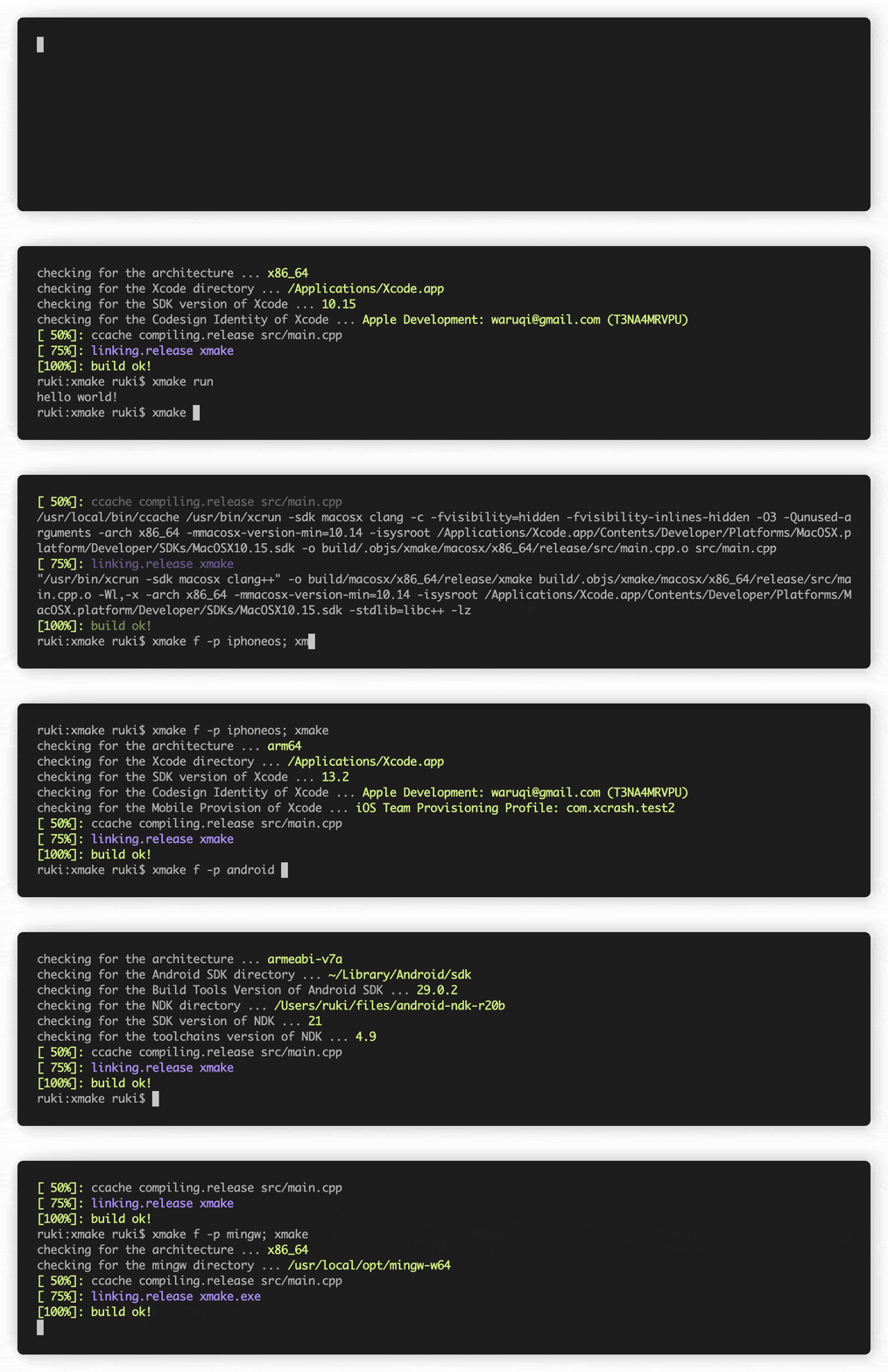
curl -fsSL https://xmake.io/shget.text | bashwget https://xmake.io/shget.text -O - | bashInvoke-Expression (Invoke-Webrequest ' https://xmake.io/psget.text ' -UseBasicParsing).Contentหากคุณไม่ต้องการใช้สคริปต์ด้านบนเพื่อติดตั้ง Xmake ให้ไปที่คู่มือการติดตั้งสำหรับวิธีการติดตั้งอื่น ๆ (อาคารจากแหล่งที่มาผู้จัดการแพ็คเกจ ฯลฯ )
 target ( " console " )
    set_kind ( " binary " )
    add_files ( " src/*.c " )
สร้าง console เป้าหมายใหม่ของชนิด binary ชนิดและเพิ่มไฟล์ทั้งหมดที่ลงท้ายด้วย .c ในไดเรกทอรี src
add_requires ( " tbox 1.6.* " , " zlib " , " libpng ~1.6 " )เพิ่มข้อกำหนดของ Tbox v1.6, zlib (เวอร์ชันใดก็ได้) และ libpng v1.6
ที่เก็บแพ็คเกจ Xmake อย่างเป็นทางการมีอยู่ที่: xmake-repo
ด้านล่างถือว่าคุณอยู่ในไดเรกทอรีรากของโครงการ
$ xmake$ xmake run console$ xmake run -d console$ xmake test$ xmake f -p [windows | linux | macosx | android | iphoneos ..] -a [x86 | arm64 ..] -m [debug | release]
$ xmake$ xmake f --menu$ xmake show -l toolchains
xcode Xcode IDE
msvc Microsoft Visual C/C++ Compiler
clang-cl LLVM Clang C/C++ Compiler compatible with msvc
yasm The Yasm Modular Assembler
clang A C language family frontend for LLVM
go Go Programming Language Compiler
dlang D Programming Language Compiler (Auto)
dmd D Programming Language Compiler
ldc The LLVM-based D Compiler
gdc The GNU D Compiler (GDC)
gfortran GNU Fortran Programming Language Compiler
zig Zig Programming Language Compiler
sdcc Small Device C Compiler
cuda CUDA Toolkit (nvcc, nvc, nvc++, nvfortran)
ndk Android NDK
rust Rust Programming Language Compiler
swift Swift Programming Language Compiler
llvm A collection of modular and reusable compiler and toolchain technologies
cross Common cross compilation toolchain
nasm NASM Assembler
gcc GNU Compiler Collection
mingw Minimalist GNU for Windows
gnu-rm GNU Arm Embedded Toolchain
envs Environment variables toolchain
fasm Flat Assembler
tinycc Tiny C Compiler
emcc A toolchain for compiling to asm.js and WebAssembly
icc Intel C/C++ Compiler
ifort Intel Fortran Compiler
ifx Intel LLVM Fortran Compiler
muslcc The musl-based cross-compilation toolchain
fpc Free Pascal Programming Language Compiler
wasi WASI-enabled WebAssembly C/C++ toolchain
nim Nim Programming Language Compiler
circle A new C++20 compiler
armcc ARM Compiler Version 5 of Keil MDK
armclang ARM Compiler Version 6 of Keil MDK
c51 Keil development tools for the 8051 Microcontroller Architecture
icx Intel LLVM C/C++ Compiler
dpcpp Intel LLVM C++ Compiler for data parallel programming model based on Khronos SYCL
masm32 The MASM32 SDK
iverilog Icarus Verilog
verilator Verilator open-source SystemVerilog simulator and lint system
cosmocc build-once run-anywhere
hdk Harmony SDKนิทรรศการ xmake:
compile_commands.json )Xmake รองรับประเภทด้านล่างของโครงการ:
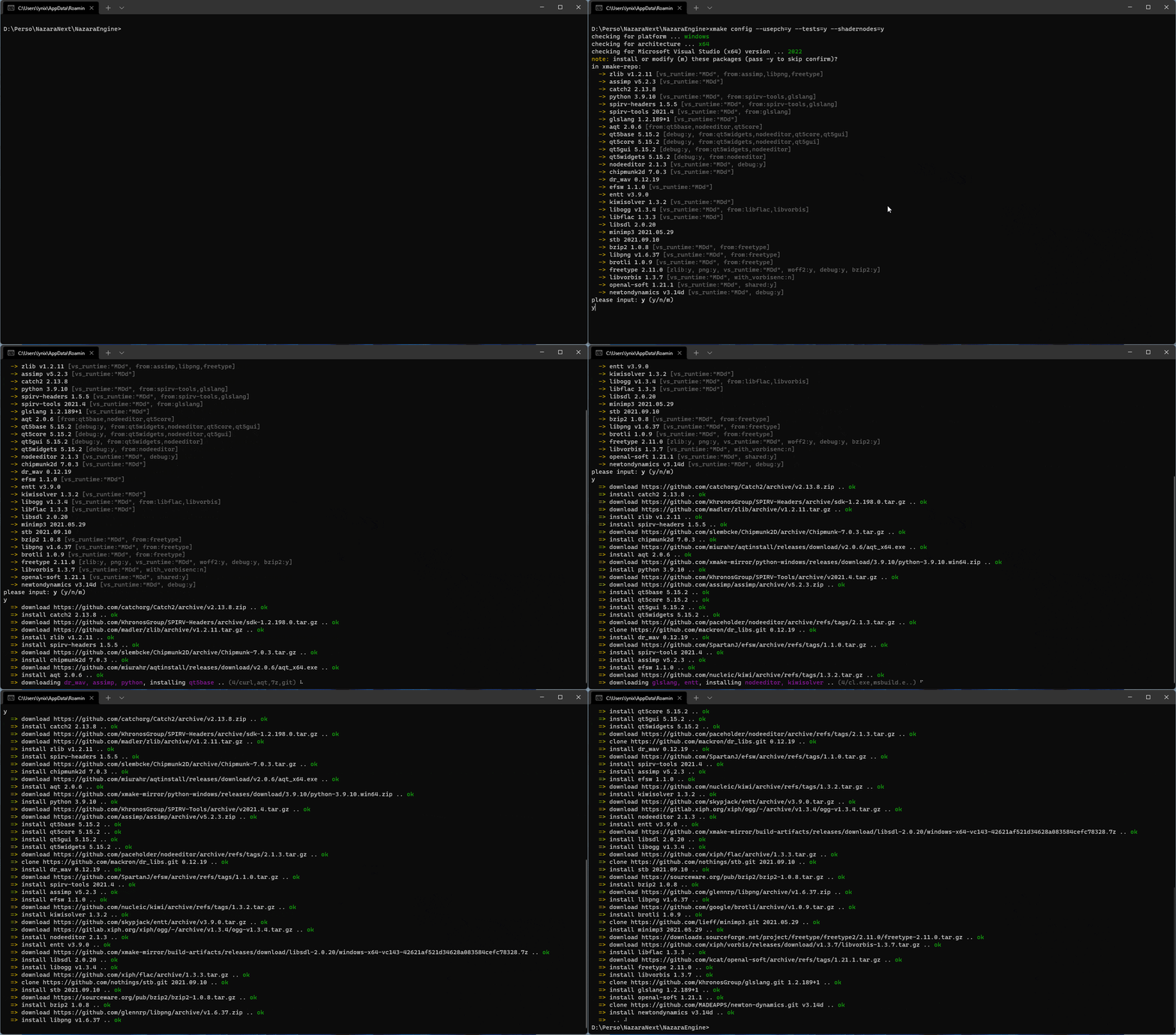
Xmake สามารถดึงและติดตั้งการพึ่งพาได้โดยอัตโนมัติ!
xrepo env shellด้านล่างนี้เป็นแผนภาพที่แสดงสถาปัตยกรรมของ Xmake โดยประมาณและวิธีการทำงาน
สำหรับรายละเอียดเพิ่มเติมดู: #274
สำหรับรายละเอียดเพิ่มเติมโปรดดู: #622
สำหรับรายละเอียดเพิ่มเติมโปรดดู: #622
ความเร็วของ Xmake อยู่ที่ Ninja! โครงการทดสอบ: xmake-core
| ระบบอาคาร | TERMUX (8Core/-J12) | ระบบอาคาร | MacOS (8Core/-J12) |
|---|---|---|---|
| xmake | 24.890s | xmake | 12.264s |
| นินจา | 25.682s | นินจา | 11.327s |
| cmake (gen+make) | 5.416S+28.473S | cmake (gen+make) | 1.203s+14.030s |
| cmake (Gen+Ninja) | 4.458S+24.842S | cmake (Gen+Ninja) | 0.988S+11.644S |
| ระบบอาคาร | termux (-j1) | ระบบอาคาร | macOS (-J1) |
|---|---|---|---|
| xmake | 1M57.707S | xmake | 39.937s |
| นินจา | 1M52.845S | นินจา | 38.995S |
| cmake (gen+make) | 5.416S+2M10.539S | cmake (gen+make) | 1.203S+41.737S |
| cmake (Gen+Ninja) | 4.458S+1M54.868S | cmake (Gen+Ninja) | 0.988S+38.022S |
 add_rules ( " mode.debug " , " mode.release " )

target ( " console " )
    set_kind ( " binary " )
    add_files ( " src/*.c " )
    if is_mode ( " debug " ) then
        add_defines ( " DEBUG " )
end target ( " test " )
set_kind ( " binary " )
add_files ( " src/*.c " )
after_build ( function ( target )
print ( " hello: %s " , target : name ())
os . exec ( " echo %s " , target : targetfile ())
end )ดาวน์โหลดและใช้แพ็คเกจใน Xmake-Repo หรือที่เก็บบุคคลที่สาม:
 add_requires ( " tbox >1.6.1 " , " libuv master " , " vcpkg::ffmpeg " , " brew::pcre2/libpcre2-8 " )
add_requires ( " conan::openssl/1.1.1g " , { alias = " openssl " , optional = true , debug = true })
target ( " test " )
    set_kind ( " binary " )
    add_files ( " src/*.c " )
    add_packages ( " tbox " , " libuv " , " vcpkg::ffmpeg " , " brew::pcre2/libpcre2-8 " , " openssl " )
นอกจากนี้เรายังสามารถใช้คำสั่ง XREPO เพื่อติดตั้งการพึ่งพาได้อย่างรวดเร็ว
 target ( " test " )
    add_rules ( " qt.quickapp " )
    add_files ( " src/*.cpp " )
add_files ( " src/qml.qrc " ) target ( " test " )
set_kind ( " binary " )
add_files ( " src/*.cu " )
add_cugencodes ( " native " )
add_cugencodes ( " compute_35 " ) target ( " echo " )
add_rules ( " wdk.driver " , " wdk.env.umdf " )
add_files ( " driver/*.c " )
add_files ( " driver/*.inx " )
add_includedirs ( " exe " )
target ( " app " )
add_rules ( " wdk.binary " , " wdk.env.umdf " )
add_files ( " exe/*.cpp " )สำหรับตัวอย่างไดรเวอร์ WDK เพิ่มเติม (UMDF/KMDF/WDM) กรุณาเยี่ยมชมตัวอย่างโปรแกรม WDK
 target ( " test " )
    add_rules ( " xcode.application " )
    add_files ( " src/*.m " , " src/**.storyboard " , " src/*.xcassets " )
add_files ( " src/Info.plist " ) target ( " test " )
add_rules ( " xcode.framework " ) -- or xcode.bundle
add_files ( " src/*.m " )
add_files ( " src/Info.plist " ) add_requires ( " libomp " , { optional = true })
target ( " loop " )
set_kind ( " binary " )
add_files ( " src/*.cpp " )
add_rules ( " c++.openmp " )
add_packages ( " libomp " ) target ( " test " )
set_kind ( " binary " )
add_files ( " src/main.zig " )ต้องการเวอร์ชัน Clang ที่บรรจุด้วย LLM-10 เพื่อรวบรวมโครงการ
 add_requires ( " llvm 10.x " , { alias = " llvm-10 " })
target ( " test " )
    set_kind ( " binary " )
    add_files ( " src/*.c " )
set_toolchains ( " llvm@llvm-10 " )นอกจากนี้เรายังสามารถดึงเครื่องมือรวบรวมข้ามที่ระบุไว้ในเพื่อรวบรวมโครงการ
 add_requires ( " muslcc " )
target ( " test " )
    set_kind ( " binary " )
    add_files ( " src/*.c " )
set_toolchains ( " @muslcc " ) นอกจากนี้เรายังสามารถใช้เครื่องมือรวบรวม Cross-Compilation muslcc ที่ระบุเพื่อรวบรวมและรวมแพ็คเกจที่ขึ้นกับทั้งหมด
 add_requires ( " muslcc " )
add_requires ( " zlib " , " libogg " , { system = false })

set_toolchains ( " @muslcc " )

target ( " test " )
    set_kind ( " binary " )
    add_files ( " src/*.c " )
add_packages ( " zlib " , " libogg " )$ xmake project -k vsxmake -m " debug,release " # New vsproj generator (Recommended)
$ xmake project -k vs -m " debug,release "
$ xmake project -k cmake
$ xmake project -k ninja
$ xmake project -k compile_commands$ xmake l ./test.lua
$ xmake l -c " print('hello xmake!') "
$ xmake l lib.detect.find_tool gcc
$ xmake l
> print( " hello xmake! " )
> {1, 2, 3}
< {
1,
2,
3
}หากต้องการดูรายการปลั๊ก Bultin กรุณาเยี่ยมชมปลั๊กอินในตัว
โปรดดาวน์โหลดและติดตั้งปลั๊กอินอื่น ๆ จากที่เก็บปลั๊กอิน XMake-Plugins
เราสามารถใช้ปลั๊กอิน Xmake-Gradle เพื่อรวบรวมไลบรารี JNI ผ่าน Gradle
 plugins {
  id 'org.tboox.gradle-xmake-plugin' version '1.1.5'
}

android {
    externalNativeBuild {
        xmake {
            path "jni/xmake.lua"
        }
    }
}
งาน xmakeBuild จะถูกฉีดเข้าไปในงาน assemble โดยอัตโนมัติหากมีการใช้งาน gradle-xmake-plugin
$ ./gradlew app:assembleDebug
> Task :nativelib:xmakeConfigureForArm64
> Task :nativelib:xmakeBuildForArm64
>> xmake build
[ 50%]: cache compiling.debug nativelib.cc
[ 75%]: linking.debug libnativelib.so
[100%]: build ok!
>> install artifacts to /Users/ruki/projects/personal/xmake-gradle/nativelib/libs/arm64-v8a
> Task :nativelib:xmakeConfigureForArmv7
> Task :nativelib:xmakeBuildForArmv7
>> xmake build
[ 50%]: cache compiling.debug nativelib.cc
[ 75%]: linking.debug libnativelib.so
[100%]: build ok!
>> install artifacts to /Users/ruki/projects/personal/xmake-gradle/nativelib/libs/armeabi-v7a
> Task :nativelib:preBuild
> Task :nativelib:assemble
> Task :app:assembleDebug ปลั๊กอิน GitHub-Action-Setup-Xmake สำหรับการกระทำของ GitHub สามารถช่วยให้คุณใช้ XMake ด้วยความพยายามน้อยที่สุดหากคุณใช้การกระทำของ GitHub สำหรับไปป์ไลน์ CI ของคุณ
 uses : xmake-io/github-action-setup-xmake@v1
with :
xmake-version : latest รายชื่อผู้คนและโครงการที่ใช้ XMake มีอยู่ที่นี่
หากคุณใช้ XMake คุณสามารถส่งข้อมูลของคุณไปยังรายการด้านบนผ่าน PR เพื่อให้ผู้ใช้รายอื่นและนักพัฒนาสามารถวัดความสนใจได้ IHIS ยังให้ผู้ใช้ใช้ XMake อย่างมั่นใจมากขึ้นและให้แรงจูงใจแก่เราในการรักษาต่อไป
สิ่งนี้จะช่วยโครงการ Xmake และชุมชนก็เติบโตขึ้นและขยายตัว!
โครงการนี้มีอยู่ขอบคุณทุกคนที่มีส่วนร่วม:
xrepo env shell และมีส่วนร่วมในแพ็คเกจจำนวนมากในที่เก็บ Xmake-Repoenderger : ช่วยให้ขอบของการแปลภาษาอังกฤษราบรื่นขึ้นของ readme




